Most iPhone problems clear up with a restart, the latest iOS update and a check of the setting behind the failing feature, such as Bluetooth, Focus or Airplane Mode.
Below are quick fixes for calls, messages, battery, charging, Wi-Fi, Find My, CarPlay, Apple Watch, the screen and storage, each linked to a full walkthrough.
How to fix iPhone problems
Test after each step; none of them erases your data.
- Restart the iPhone. If an iPhone 8 or later is frozen, press and release volume up, then volume down, then hold the side button until the Apple logo appears.
- Update iOS in Settings > General > Software Update, on power and Wi-Fi.
- Check the feature's switch: Airplane Mode off, Wi-Fi and Bluetooth on, and Do Not Disturb off under Focus.
- If an Apple service fails on every device, check Apple's System Status page.
- For stubborn connection faults, tap Reset Network Settings in Settings > General > Transfer or Reset iPhone > Reset. It clears saved Wi-Fi passwords.
Beyond that, the iPhone reset and recovery mode options go as far as a full restore.
Quick diagnosis: how to diagnose iPhone problems
Match what you see to a row. On iOS 18 or later, the Apple Support app can run extra diagnostics. Model-specific and platform-specific issues have their own rows further down.
| What you see | First check |
|---|---|
| SOS or No Service | Airplane Mode on for 15 seconds, then off |
| Several apps crash or freeze | Update iOS and the apps, then fix apps that stop working |
| Calls or alerts never arrive | Do Not Disturb in Settings > Focus |
| Screen black or frozen | Force restart, then charge for an hour |
| Apple Watch frozen | Hold the side button and Digital Crown for 10 seconds to hard reset an Apple Watch |
| The same fault on an iPad | The iPad restart, reset and battery fixes |
Get started with a new iPhone: setup and data transfer
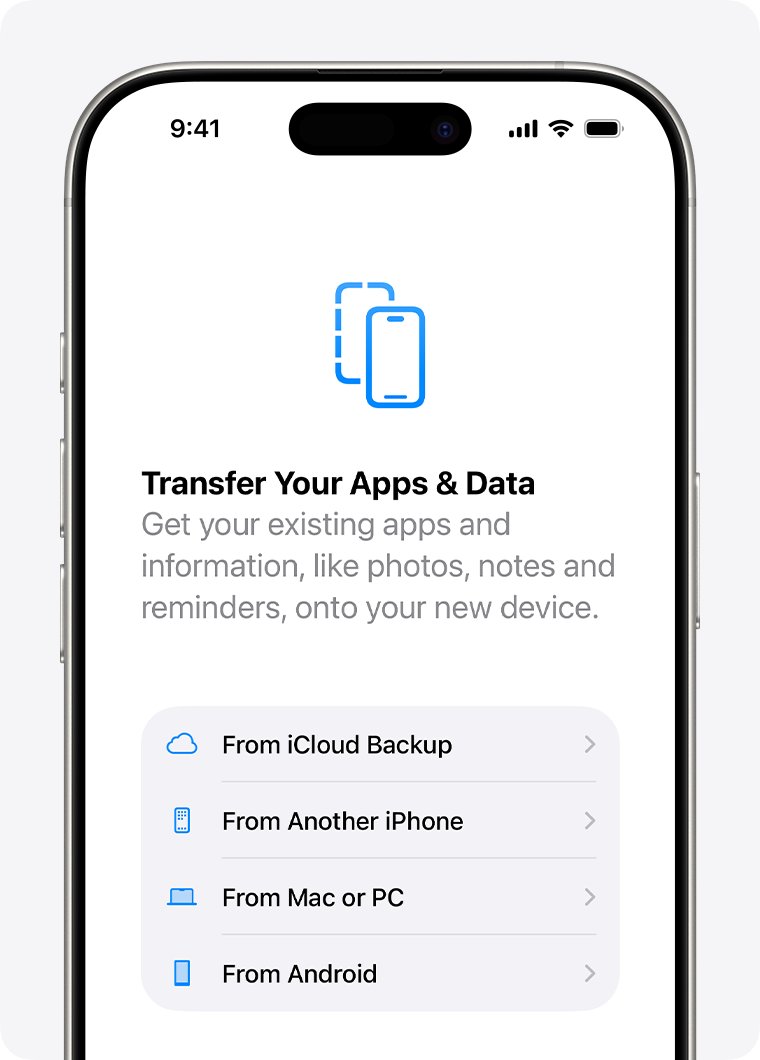
Update the old device, keep both on power and close together, and allow time.
| Moving from | Route | If it stalls |
|---|---|---|
| Another iPhone | Quick Start: unlock the old phone with Wi-Fi and Bluetooth on, then hold the new one next to it | Restart both, or switch method if you can't complete the transfer |
| Android | Set Up Without Another Apple Device > From Android, then the Move to iOS app | Supported Android 17 phones need no app; move from Android to iPhone |
| iCloud backup | Apps and data download in the background | Stay on Wi-Fi and power, then fix photos missing after an iCloud transfer |
| Windows PC backup | The Apple Devices app or iTunes | The Apple apps for Windows handle the PC side |
If Gmail refuses to sign in on the new phone, fix a Gmail login on a new iPhone.
iPhone call problems: blocked callers, caller ID and voicemail
When calls fail, toggle Airplane Mode with a five-second pause, check Do Not Disturb, Blocked Contacts and Call Forwarding, then ask your carrier about outages.
| Problem | Fix |
|---|---|
| Can't find a missed call | Check Calls (unified layout) or Recents (classic) to find recent calls |
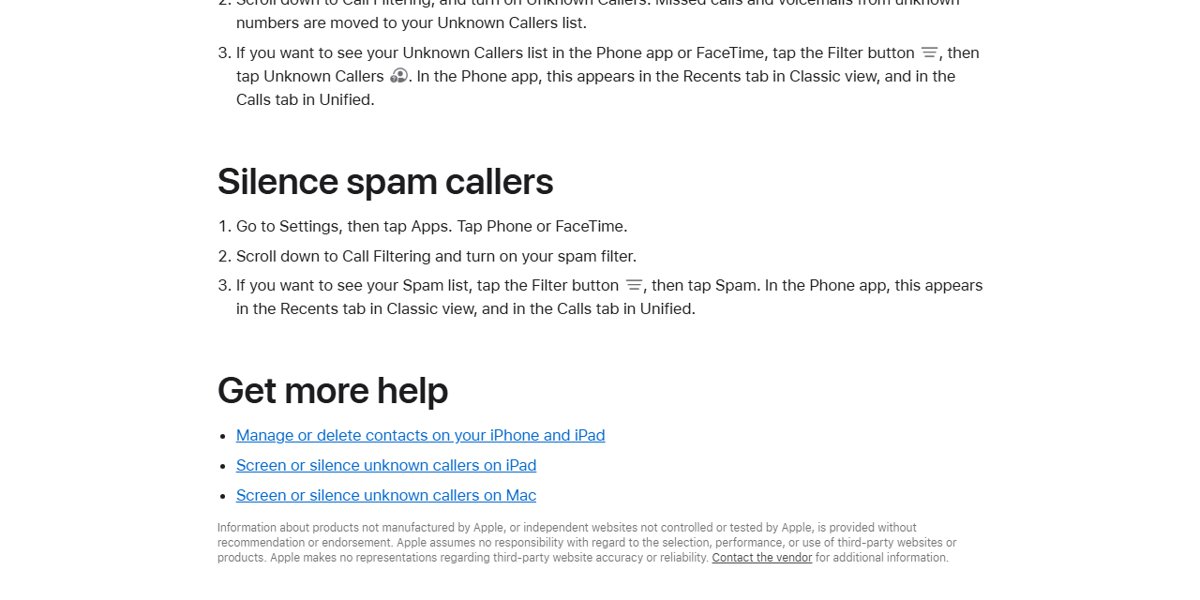
| Unknown numbers keep ringing | Choose Silence or Ask Reason for Calling in Settings > Apps > Phone to block No Caller ID calls |
| Spam calls | Turn on Spam there, and use Block Caller in Recents to stop spam calls |
| A contact's calls never ring | Remove them from Blocked Contacts to unblock a contact |
| Hide your number | Dial the carrier code *67 first, or hide your caller ID on every call |
| Calls jump to another number | Turn off Call Forwarding in Phone settings, and learn what dialing *#21# does |
| Voicemail gone after #004# | Ask your carrier to restore it, then reactivate voicemail after #004# |
| Callers audible only on speaker | Remove cases and films, brush the receiver clean, then fix a caller you can't hear |
| Speaker button missing | Disconnect Bluetooth headsets or cars to get the speaker icon back |
| Emergency contacts missing | Open Health > profile picture > Medical ID > Edit to change your emergency contacts |
| Contacts vanished | Use icloud.com/contacts > Data Recovery > Restore Contacts to recover lost contacts |
iMessage, texts and Mail not working on iPhone
A red exclamation point means Not Delivered: tap it, then Try Again or Send as Text Message.
| Problem | Fix |
|---|---|
| Green bubbles or iMessage off | Turn on iMessage in Settings > Apps > Messages, then check Send & Receive to enable iMessage |
| Texts missing on Mac or iPad | Turn each device on under Text Message Forwarding to forward texts to a Mac |
| Photos won't send | Free storage or turn on Low Quality Image Mode to fix photos that won't send |
| Lost message or draft | Deleted messages stay recoverable for 30 to 40 days on iOS 16 or later; retrieve a lost text draft |
| Scam text | Tap Report Spam > Delete and Report Spam once you spot a scam text |
| Spam calendar invite | Tap the event, then Report Junk to remove spam calendar invites |
| Texting from a computer | Use Text Message Forwarding on a Mac, or MightyText alternatives for iPhone |
| Contacts on Windows | FaceTime links open in Chrome or Edge to use FaceTime on Windows; texts need a way to get iMessage on Windows |
| Mail broken after an update | Check the account under Mail Accounts in Settings > Apps > Mail to fix Mail after iOS 18 |
| Mail slow or bloated | Remove and re-add the account to clear the Mail cache |
| Email arrives late | Set Fetch New Data to choose between push and fetch |
| Gmail won't sign in | Re-add the Google account under Mail Accounts to fix Gmail sign-in |
Messages in iCloud also syncs chats to a Mac, and the Mac and macOS fixes cover that side.
Why is your iPhone battery draining so fast?
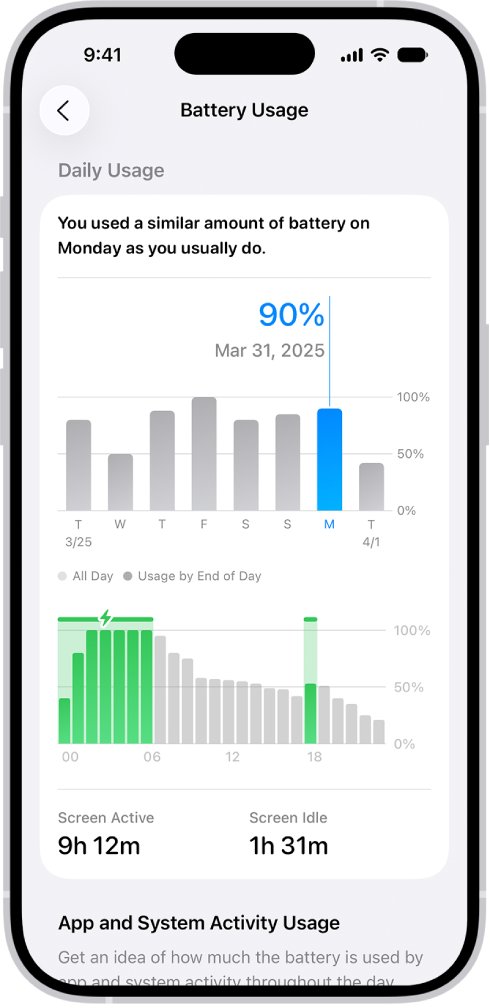
Each app's details under Settings > Battery name the cause.
| Cause | Fix |
|---|---|
| Background activity, such as music or location | Use the app less, or limit background activity |
| Low signal or no coverage | Use Wi-Fi, or Airplane Mode where there's no signal |
| Notifications waking the phone | Cut that app's alerts in Settings > Notifications |
| High brightness | Turn on Auto-Brightness |
| Ongoing iOS Update Insight | Wait a few days |
| Battery aging or heat | Check Battery Health, and avoid charging in direct sun |
How to check what's killing your iPhone battery
- Open Settings > Battery and read any suggestions or Insights.
- Check Daily Usage (iOS 26 or later): orange means heavier use than usual.
- Review App and System Activity for today's top three apps.
- Tap View All Battery Usage to compare the last seven days.
- Tap an app to see its On screen, Background, Cellular coverage or Notifications use.
Then apply the real fix for fast battery drain to that app or setting.
10 ways to stop iPhone battery drain
Prevention beats repair: keep the phone out of heat. Low Power Mode also pauses Mail fetch and Background App Refresh.
| Way | Where |
|---|---|
| Install the latest iOS | Settings > General > Software Update |
| Leave Adaptive Power on | Settings > Battery > Power Mode, iPhone 15 Pro or later |
| Use Low Power Mode | Power Mode or Control Center; it turns off above 80% |
| Turn on Auto-Brightness | Settings > Accessibility > Display & Text Size |
| Lower the brightness | The Control Center slider |
| Turn on Auto-Lock | Battery suggestions flag it when it's off |
| Prefer Wi-Fi | It uses less power than cellular |
| Use 5G Auto | Cellular Data Options > Voice & Data, iPhone 12 or later |
| Use Airplane Mode | Where there's no coverage |
| Cut wake-up notifications | Settings > Notifications, per app |
iPhone battery draining after iOS 26 update: is it normal?
Yes, for a few days. Update tasks keep running in the background, shown as Ongoing iOS Update under Settings > Battery. If the drain continues, look for an app with heavy background use; updates can't be downgraded.
If the new look bothers you more, disable Liquid Glass effects in iOS 26.
When should you replace your iPhone battery?
Open Settings > Battery > Battery Health (Battery Health & Charging on iPhone 14 and earlier).
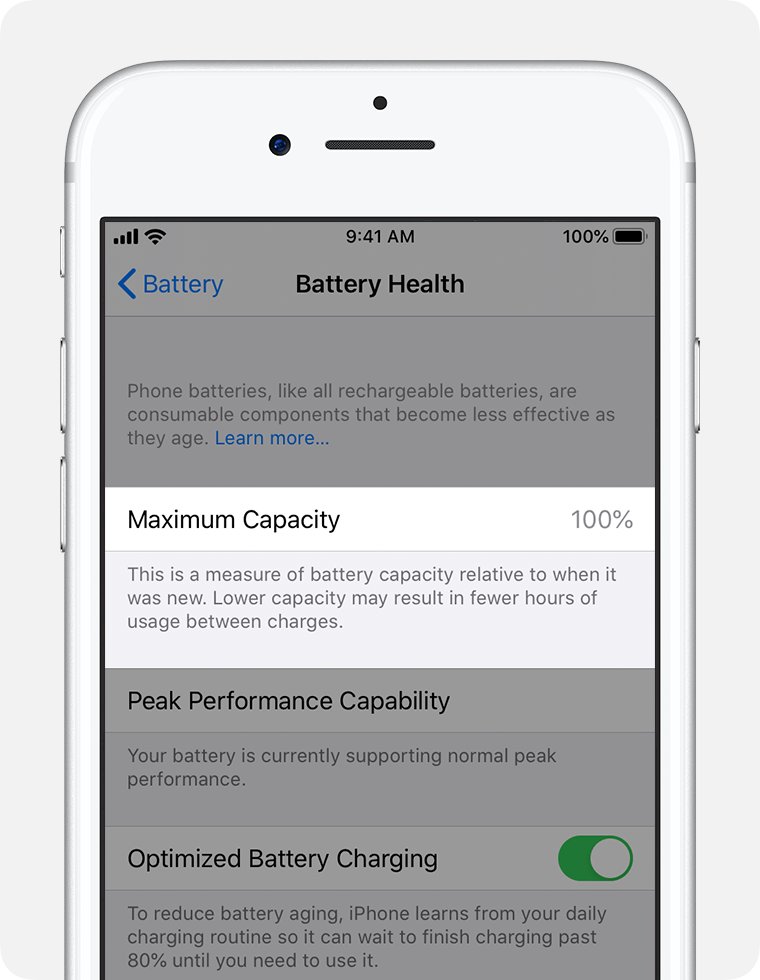
| Battery Health shows | Meaning |
|---|---|
| Service | Replace the battery to restore full performance |
| Significantly degraded | Not a safety issue, but expect shorter battery life |
| Performance management applied | An unexpected shutdown made iOS cap peak performance |
| Unable to verify a genuine battery | The details may be wrong; have it checked |
| Capacity near 80% | Expected at 500 cycles on iPhone 14 and earlier, 1000 on iPhone 15 models |
Capacity can read under 100% from activation, so 99% health after 86 cycles is fine. Whatever you decide about when to charge your iPhone, avoid heat.
Why is my iPhone not charging?
iPhone not charging when plugged in
A damaged cable or adapter, port debris, or a loose connection.
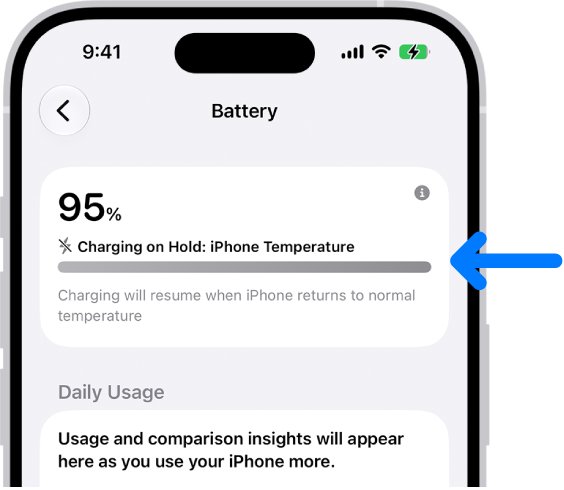
- Try a different power source: another wall outlet, a computer or a power accessory.
- Check the cable and adapter for damage, and try a different charger, such as a charger for iPhone 17 Pro Max.
- Clean debris from the charging port and plug in firmly.
- Restart, update to the latest iOS version, then try Reset All Settings.
- Work through the rest for a plugged-in iPhone that won't charge.
iPhone not charging when dead
A drained battery needs time before the screen responds.
- Charge for half an hour from a wall outlet.
- Force restart (hard reset): volume up, volume down, then a long press of the side button.
- Charge another half hour, then contact Apple Support; an iPhone 11 that won't turn on follows the same order.
iPhone not charging after 80%
Optimized Battery Charging, heat or a Charge Limit.
- Open Settings > Battery > Charging (iPhone 15 or later) or Battery Health & Charging.
- Tap Resume Charging, or Charge to 100% if a limit is set.
- Move somewhere cooler, and learn how charge limits and fast charging work.
iPhone not charging wirelessly
A wet back or a charger that isn't Qi-certified.
- Dry the back and use a Qi-certified or MagSafe charger.
- Stop wireless charging and test a cable to rule out the pad.
- Remove a thick case, or switch to a MagSafe case.
iPhone not charging after getting wet
Liquid detection blocks wired charging until the connector dries.
- Check for moisture: unplug the cable at both ends.
- Tap the phone, connector down, against your hand and leave it in airflow.
- Retry after 30 minutes; drying can take 24 hours.
- Skip rice, heat and compressed air; a Qi pad lets you charge again after a water spill.
iPhone error messages and status explanations
| Message | What to do |
|---|---|
| SOS or SOS only | No carrier connection, but emergency calls work; toggle Airplane Mode and fix SOS on iPhone |
| No Service or Searching | Turn the line on under Settings > Cellular, then call your carrier |
| Accessory not supported | Plug straight into the charger, clean the port and check the USB-C adapter's volts and amps |
| iPhone is findable on a dead phone | Find My can locate a switched-off iPhone for 24 hours; fix a findable iPhone that won't charge |
| Liquid Detected | Unplug and dry the connector, as in the wet-charging fix above |
Stay connected: iPhone Wi-Fi, cellular data, hotspot and Bluetooth fixes
Toggle Airplane Mode and remove VPN apps first. Reset Network Settings clears saved Wi-Fi passwords, so keep it for last.
| Problem | Fix |
|---|---|
| Wi-Fi fails after an update | Turn off Connectivity Assist, rejoin and restart the router to fix Wi-Fi after iOS 26.0.1 |
| Calls work, data doesn't | Remove VPN apps and check Cellular Data to restore data when calls still work |
| Cellular signal drops | Install carrier settings from Settings > General > About to fix an iPhone 17 Pro cellular issue |
| Data use climbing | Tap Show All in Settings > Cellular, then use Low Data Mode to stop unexpected data use |
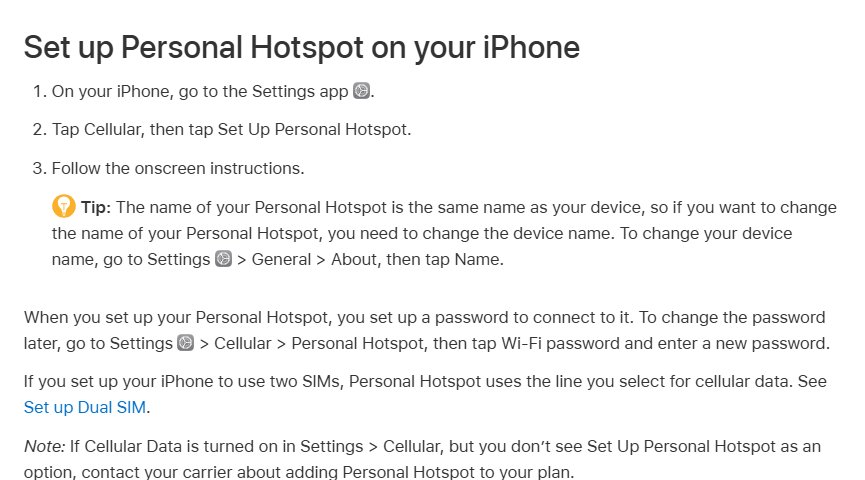
| Hotspot won't share | Turn on Allow Others to Join and Maximize Compatibility to set up a Personal Hotspot |
| Bluetooth speaker won't pair | Unpair it from other devices, then pair again to connect a JBL speaker |
| Wi-Fi password won't share | Keep both phones close, in each other's Contacts, hotspot off, to share your Wi-Fi password |
| Old iPod touch can't join | Try the router's other band and check its configuration to connect an old iPod touch |
Why Apple CarPlay is not working
Make sure CarPlay is set up correctly: a supported car and region, the latest iOS and Siri on. Test after each quick fix.
| Cause | Quick check |
|---|---|
| Unsupported car or region | Ask the vehicle manufacturer |
| Outdated iOS | Update, then fix CarPlay after the iOS 27 update |
| Screen Time restrictions | Make sure restrictions aren't blocking CarPlay under Content & Privacy Restrictions > Allowed Apps |
| Airplane Mode on, or Bluetooth or Wi-Fi off | Fix those for wireless CarPlay |
| CarPlay didn't open | Select the CarPlay logo on the car display |
| Phone or stereo glitch | Restart the iPhone and the car |
How to fix wired Apple CarPlay not working
- Use the car's CarPlay USB port, often marked with a CarPlay or smartphone icon.
- Try a different Apple USB cable, then a different port.
- Skip the USB-C to Lightning Adapter if CarPlay drops, and connect directly.
- Restart the iPhone and car, then select the CarPlay logo.
If an iPhone 17 keeps dropping out, stop iPhone 17 CarPlay disconnects.
How to fix wireless Apple CarPlay not working
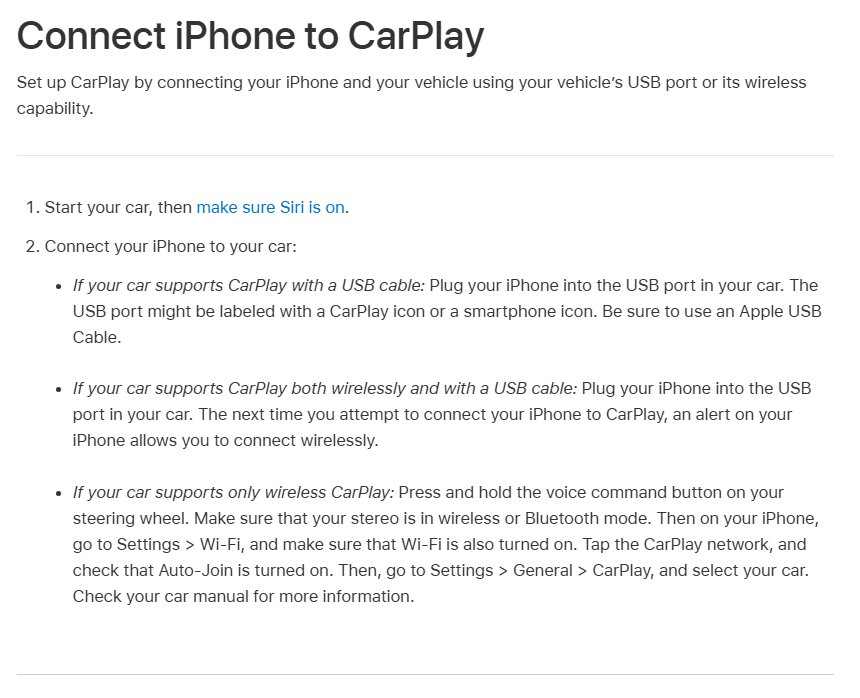
- Check your Bluetooth connection: Settings > Bluetooth on.
- In Settings > Wi-Fi, tap the CarPlay network and turn on Auto-Join.
- Put the stereo in wireless mode and hold the steering wheel voice button.
- Select your car in Settings > General > CarPlay.
If it connects but can't load maps or music, fix wireless CarPlay with no internet.
Advanced Apple CarPlay fixes if it still won't connect
Forgetting the car is how you reset Apple CarPlay.
- Go to Settings > General > CarPlay, tap your car, then Forget This Car.
- Set it up again, by USB first if the car supports both.
- Recheck Allowed Apps in Screen Time.
- Install the car maker's latest stereo firmware.
Ford owners can also sync an iPhone with Ford SYNC over Bluetooth first.
Find My iPhone not working: location and device status
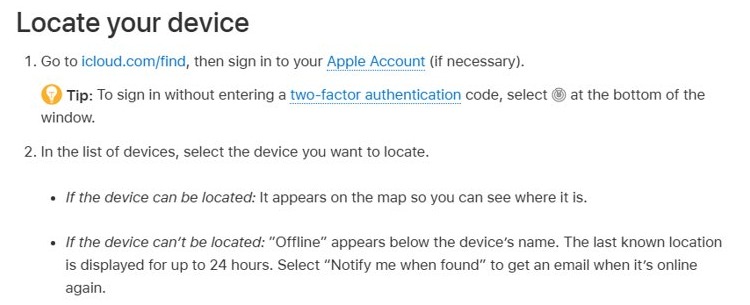
Turn on Find My iPhone, Find My network and Send Last Location in Settings > [your name] > Find My before anything goes missing. With Family Sharing, all family members' devices appear under Devices.
| What you see | Fix |
|---|---|
| No devices listed | Use the same Apple Account everywhere and automatic date and time to fix Find My showing no devices |
| Offline | Sounds and locks run when it reconnects; fix Find My when it stops working |
| No location found | Turn on Notify When Found and fix the no-location message |
| No last known location | Offline for over 7 days, so fix a missing last known location |
| Friends can't see you | Allow Location Services for Find My, then share your location from Me |
| Wrong device as your location | Tap Me > Use This iPhone as My Location to change your Find My location |
| iPhone switched off | The Find My network finds it for 24 hours (5 in power reserve), so it stays findable after power off |
| Find My was off | Report it to police and your carrier to find a stolen iPhone with Find My off |
| Data use on the lost phone | It reports over Wi-Fi or cellular, or the Find My network offline; check Find My's cellular data use |
How to find a lost or stolen iPhone, AirTag or AirPods
Use icloud.com/find, which needs no verification code, or Find My on another device. Lost Mode locks the iPhone and suspends Apple Pay cards.
| Missing | Next step |
|---|---|
| iPhone | Play a sound, turn on Lost Mode, and try other ways to find a lost cell phone |
| Stolen iPhone | Give police the serial number, ask your carrier to disable the account, and keep it in Find My |
| AirTag | Tap Items, then Find, for directions based on how AirTags actually work |
| AirTag missing on iCloud.com | Find Devices lists devices only, so find AirTags missing from iCloud under Items |
| AirPods | Supported models show for 24 hours after they last connected, once you add AirPods to Find My |
| Beats | Located when nearby on Bluetooth; use Find My for Beats |
Then review your account at account.apple.com; the Apple Account and iCloud recovery steps help if you're locked out.
Add a personal touch: iPhone Lock Screen and Liquid Glass
| Change | Where |
|---|---|
| Lock Screen | Touch and hold it, then tap Customize to change your Lock Screen |
| Liquid Glass tint | The slider in Settings > Appearance > Liquid Glass |
| Solid backgrounds | Reduce Transparency in Settings > Accessibility > Display & Text Size to turn off the Liquid Glass look |
| Dark Mode | Settings > Display & Brightness > Dark |
Reduce Transparency and Increase Contrast lock the Liquid Glass slider until you turn them off.
Common iPhone screen issues and solutions
| Problem | Fix |
|---|---|
| Black screen | Force restart, holding the side button past 10 seconds, then charge for an hour to fix a black iPhone screen |
| Touch not responding | Force restart, then fix an unresponsive touch screen |
| Brightness at zero | Use the Control Center slider and check Reduce White Point to turn the brightness back up |
| Zoomed in or inverted | Double-tap with three fingers, then turn off Zoom and Smart Invert to undo the Moo virus prank |
| Speaker and screen both fail | Update and force restart, then book service to fix iPhone 16 Pro Max faults |
| Mirror to a TV | Join the same Wi-Fi, then tap Screen Mirroring in Control Center to mirror your iPhone to a TV |
| One iPhone Duo display black | Restart from the power button in Control Center on the working display |
iPhone storage full and apps not working
| Problem | Fix |
|---|---|
| Storage full | Check Settings > General > iPhone Storage and turn on Offload Unused Apps to clear iPhone storage |
| WhatsApp still huge | Check its size in iPhone Storage to reclaim WhatsApp storage |
| Can't find a file | Tap Browse in Files to find your files |
| WhatsApp freezes | Quit and reopen it, then update it to stop WhatsApp freezing |
| Lost downloads | Open Files > Browse > Downloads to find downloads on iPhone |
| Wrong default browser | Use Settings > Apps > Default Apps > Browser App to make Safari the default |
| Stuck in Private Browsing | Tap the More button, then New Tab, to leave Private Browsing |
| Old searches | Clear each app's history to delete search history |
| Missing notifications | Check Focus and Scheduled Summary to restore missing notifications |
Simplify your day: iPhone alarms, flashlight, Weather and Stocks
| Task | How |
|---|---|
| Stop an alarm | Tap its switch in Clock > Alarms, or edit the Health sleep schedule, to turn off an alarm |
| Alarm volume | Use Alarms and Timers in Settings > Sounds & Haptics to change the alarm volume |
| Flashlight | Use Control Center, the Lock Screen or Siri to turn the flashlight on and off |
| Weather alert stuck | Use Government Alerts in Settings > Notifications to remove a persistent weather alert |
| Old Weather design | iOS can't be downgraded, so the former Weather app won't come back |
| Gold in Stocks | Search for a gold symbol to add the gold price |
Take your best shot: iPhone camera, recording and photo fixes
| Task | How |
|---|---|
| Camera forgets settings | Use Settings > Camera > Preserve Settings, or reset the Camera settings |
| Better photos | Night mode and exposure tips to shoot like a pro on iPhone 12 |
| Front camera tracks your face | In FaceTime, tap Camera Effects > Center Stage; in other apps, turn off Center Stage in WhatsApp |
| Record the screen | Screen Recording in Control Center saves to Photos; you can record audio, video and calls too |
| Deleted a photo | Recently Deleted in Photos keeps it for 30 days, so recover deleted photos quickly |
iPhone models, sizes and model numbers
| Question | Answer |
|---|---|
| iPhone Duo | Meet iPhone Duo: 2026, with 5.4-inch outer and 7.6-inch inner displays, Touch ID and no SIM tray |
| Release dates | The iPhone release timeline lists every model |
| Sizes | For a quick comparison, use the iPhone size chart |
| iPhone 11 water resistance | IP68 to 2 meters for 30 minutes; details on iPhone 11 water resistance and its dimensions |
| Model number | Tap the part number in Settings > General > About; the A-number shows the region your iPhone is from |
| CE0682 on the back | iPhone 7 and earlier print the model number beside marks like CE0682 on an iPhone 6 |
| iPhone XS Max | Tops out at iOS 18.7.11; check the iPhone XS Max specs before buying used |
| Vintage or obsolete | Vintage 5 to 7 years after sales end, obsolete after 7; check iPhone SE 2020 support |
| IMEI | Etched on the SIM tray of iPhone 11 and 13; it matters if you need to track a stolen iPhone by IMEI |
When to contact Apple Support about iPhone speaker and hardware problems
Get service if the Ringtone and Alerts slider is dimmed, liquid alerts persist with dry Apple cables, Bluetooth won't turn on, or Battery Health shows Service.
| Problem | Try first |
|---|---|
| Weak speaker | Turn off Silent mode, remove films and test the ringtone slider to fix a weak iPhone 17 Pro Max speaker |
| Clogged speaker holes | A clean, dry, soft-bristled brush can clear out speaker holes |
| EarPods button ignored | Update iOS and clean the port to fix the EarPods play/pause button |
| AirPods Max noise cancellation | Press the listening mode button to turn on AirPods Max noise cancellation |
Apple Watch problems with iPhone: pairing, charging, black screen and reset
You can't restart Apple Watch while it's charging, and a Focus set on one device applies to both.
| Problem | Fix |
|---|---|
| Pairing a new iPhone | Update both, then open the Apple Watch app with the watch on your wrist to pair Apple Watch |
| Won't charge | Use the Apple cable, clean the back and charger, and wait 30 minutes to fix a watch that won't charge |
| Black screen | Charge for 30 minutes, then hold the side button and Digital Crown for 10 seconds to fix a black Apple Watch screen |
| Stuck in Sleep | Tap the Focus control in Control Center to get the watch out of sleep mode |
| Apps missing | watchOS 27 hides apps without 64-bit support; update them to show missing Watch apps |
| Selling it | In the Watch app, tap All Watches > info > Unpair Apple Watch to factory reset Apple Watch |
| Cellular cost | Carriers price watch plans; compare Apple Watch cellular costs |
| Which model | Compare every Apple Watch generation |
iPhone problems FAQ
How do you diagnose iPhone problems?
Start with the Insights in Settings > Battery and the status bar for SOS or No Service. On iOS 18 or later, the Apple Support app runs extra diagnostics. Restart and update iOS before trying deeper fixes.
Is there a problem with iPhone today?
Check Apple's System Status page at apple.com/support/systemstatus for Find My, the App Store and Apple Account. If those show as available but calls or data still fail, ask your carrier about local outages.
Why is my iPhone having connection problems?
Toggle Airplane Mode for 15 seconds and restart. Install any carrier settings update from Settings > General > About, remove VPN apps and check Cellular Data. Reset Network Settings last, because it erases saved Wi-Fi passwords.
Is the new iPhone update causing problems?
For a few days it can, while update tasks run in the background, shown as Ongoing iOS Update under Settings > Battery. Updates can't be downgraded, and you can tint or tone down Liquid Glass if the new look is the problem.
Does the iPhone 17e have battery problems?
Check Settings > Battery > Battery Health. Like other iPhone 15 and later models, the 17e shows maximum capacity, cycle count and first use date there, and Daily Usage names the apps behind any fast drain.
How do you fix an iPhone 11 or iPhone 13 that is not charging?
Clean the charging port, then try another cable, adapter and outlet. Charge for half an hour, force restart with volume up, volume down and the side button, then charge another half hour before booking service.
Why is my iPhone 17 not charging?
Look for a Charge Limit in Settings > Battery > Charging, which stops charging at a set percentage on iPhone 15 and later. Then rule out heat, a Liquid Detected alert and a damaged cable or adapter.