To add the gold price to the Stocks app, tap the search button, enter a gold symbol such as GC=F (the COMEX gold futures symbol on Yahoo Finance) or the word gold, and add the result to your watchlist.
This guide covers adding gold on iPhone, reading its chart, moving it to the top of your watchlist, and what to do when the symbol does not come up.
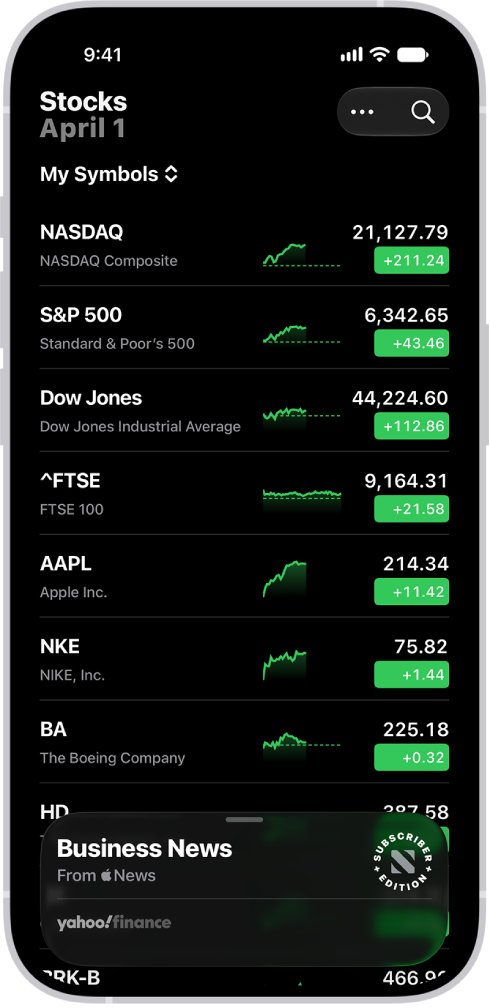
Add gold to the Stocks app watchlist
- Open the Stocks app on your iPhone.
- Tap the search button.
- Type
GC=Fin the search field, or typegoldto see matching funds and indexes. - In the search results, tap the add button next to the gold entry you want.
- Tap Done to return to the My Symbols watchlist, where gold now appears with its price and daily change.
The search field accepts a ticker symbol, a company name, a fund name or an index, so a gold fund name also works.
Gold symbols to search in the Stocks app
Gold has no single ticker. Pick the kind of price you want to follow, then search for it.
| What you want to track | What to search | What it shows |
|---|---|---|
| The gold futures price per ounce in US dollars | GC=F |
COMEX gold futures for the nearest contract month |
| A gold fund you hold or plan to buy | The fund's name or ticker | The fund's share price, not the metal price itself |
| Gold-related companies | gold, then a company name |
A mining or gold company's share price |
A futures contract has an expiry month, so its name in the watchlist changes as one contract ends and the next becomes current.
View the gold price chart in the Stocks app
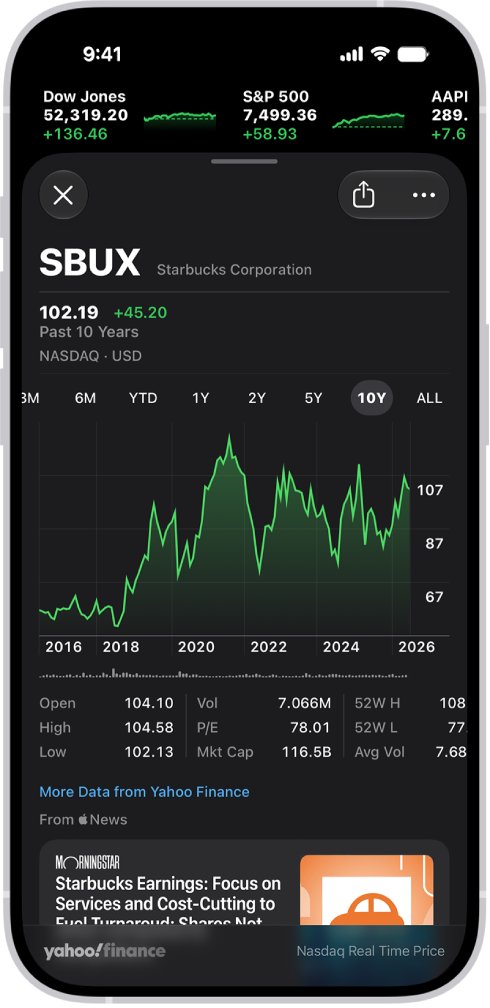
- Tap the gold symbol in your watchlist.
- Tap a time range at the top of the chart to see performance over that period.
- Touch and hold the chart with one finger to read the price on a specific date or time.
- Touch and hold the chart with two fingers to see the difference in value between two points.
- Swipe the data below the chart for details such as the 52-week high and low.
- Swipe up to read related news stories.
To glance at gold without opening it, touch and hold the symbol in your watchlist for a quick view of its performance.
Move gold to the top of the Stocks watchlist
- Open the Stocks app and tap the more button at the top of the watchlist.
- Tap Edit Watchlist.
- Touch and hold the reorder handle next to the gold symbol.
- Drag it to the top of the list and tap Done.
Remove gold from the Stocks app
- Open the Stocks app.
- Swipe left on the gold symbol in the My Symbols watchlist.
- Tap Remove.
Removing a symbol from My Symbols also removes it from every other watchlist you created.
Check the gold price shows in your watchlist
- Close the search screen and look at the My Symbols watchlist.
- Confirm the gold entry shows a price and a daily percentage change.
- Tap it and confirm the chart, exchange name and news load for gold, not for an unrelated company.
Gold price not showing in the Stocks app
Searching GC=F returns no result
The Stocks app's search does not list every symbol that finance websites use.
- Search
goldinstead and scroll through the funds and indexes in the results. - Add a gold fund by name if you want a price that tracks the metal.
- Check the gold spot or futures price on a finance website when you need the exact contract quote.
The gold symbol shows a company instead of the metal
Many company names contain the word gold, and they rank in the same search.
- Tap the result before adding it and read the name and exchange under the price.
- Remove the wrong entry by swiping left and tapping Remove, then search again.
Gold vanished from a custom watchlist
Deleting a symbol from My Symbols deletes it from all watchlists.
- Search for the gold symbol again and add it.
- Add it to your custom watchlist as well.
Gold price in the Stocks app FAQ
How do I see the gold price on my iPhone?
Open the Stocks app, tap the search button and search GC=F or gold. Add the result to your watchlist, and the price and daily change appear every time you open the app.
What is the symbol for gold in the Stocks app?
Gold has no single ticker. GC=F is the symbol Yahoo Finance uses for COMEX gold futures in US dollars. Gold funds and mining companies each have their own tickers.
Is a gold fund the same as the gold price?
No. A gold fund's share price follows the metal but is not the price per ounce. Use a futures symbol such as GC=F if you want the metal price itself.
How do I see the gold price history in the Stocks app?
Tap the gold symbol in your watchlist and choose a time range above the chart. Touch and hold the chart with one finger to read the price on a specific date.
Can I put gold at the top of my Stocks list?
Yes. Tap the more button, tap Edit Watchlist, then touch and hold the reorder handle next to gold and drag it to the top of the list.
How do I remove gold from the Stocks app?
Swipe left on the gold symbol in the My Symbols watchlist and tap Remove. This also removes it from any other watchlist you created in the app.