Dialing *#21# on an iPhone asks your carrier whether unconditional call forwarding is on for your line, and the reply shows on screen within a few seconds.
This guide explains how to run the code, how to read the answer, the related *21 and ##21# codes, and how to switch forwarding off from Settings when it is on.
How to dial *#21# on iPhone to check call forwarding
The code is a status query, not a setting change. Running it does not turn anything on or off.
- Open the Phone app.
- Tap Keypad at the bottom of the screen.
- Type
*#21#exactly, including both symbols. - Tap the green Call button.
- Read the message your carrier returns, then close it.
The wording of the reply comes from the carrier, not from Apple, so it differs between networks. It usually lists voice, data, fax and SMS services with a status for each.
What is *#21# on your phone?
*#21# belongs to the GSM supplementary service codes. Service code 21 is unconditional forwarding, which sends every incoming call to another number without ringing your phone.
The *# prefix means "check status". The same prefix works with the other forwarding service codes.
| Part of the code | Meaning |
|---|---|
*# |
Interrogate: ask the network for the current status |
21 |
Service code for unconditional (all calls) forwarding |
# |
Ends the request and sends it to the network |
How to read the *#21# result on iPhone
Match the reply on your screen to a row below. A phone number in the reply is where your calls go.
- Find the line for voice calls in the reply. Other lines cover data, fax and SMS services.
- If the voice line says the service is not active or not forwarded, all-call forwarding is off.
- If the voice line shows a phone number, every call is going to that number.
- Compare that number with one you set up yourself. An unknown number means someone or something changed your forwarding.
- Check the status bar for the call forwarding icon, which iPhone shows whenever forwarding is on in Settings.
*#21#, *21* and ##21# call forwarding codes compared
These codes differ by one or two symbols, and each one does something different. Dial the wrong one and you change the setting instead of checking it.
| Code | What it does | When to use it |
|---|---|---|
*#21# |
Shows whether all-call forwarding is on | You want to check without changing anything |
*21*number# |
Turns on forwarding of all calls to that number | You want every call to ring elsewhere |
**21*number# |
Registers the number and turns on all-call forwarding | Same as above, with the number stored on the network |
#21# |
Turns off all-call forwarding but keeps the stored number | You plan to switch it back on later |
##21# |
Turns off all-call forwarding and erases the number | You want forwarding gone completely |
*21# |
Turns all-call forwarding back on to the stored number | You switched it off with #21# earlier |
Other call forwarding status codes for iPhone
Unconditional forwarding is only one type. Conditional forwarding sends a call elsewhere only when you are busy, do not answer or have no signal, and *#21# does not report it.
| Forwarding type | Check status | Turn off and erase |
|---|---|---|
| All calls (unconditional) | *#21# |
##21# |
| When busy | *#67# |
##67# |
| When unanswered | *#61# |
##61# |
| When unreachable or switched off | *#62# |
##62# |
| Every conditional type at once | *#004# |
##004# |
| Every forwarding type at once | *#002# |
##002# |
##002# is the quickest reset: it clears every kind of forwarding on a GSM line in one request.
How to turn off call forwarding on iPhone
Settings controls the same unconditional forwarding that *#21# reports. This route works on GSM carriers such as AT&T and T-Mobile.
- Open the Settings app.
- Tap Apps, then tap Phone.
- Tap Call Forwarding.
- If your iPhone has Dual SIM, choose the line under SIMs.
- Turn off Call Forwarding.
- Dial
*#21#again and confirm the reply says forwarding is not active.
To clear conditional forwarding as well, dial ##002# and tap Call. Settings only manages the all-calls type.
How to set up call forwarding on iPhone
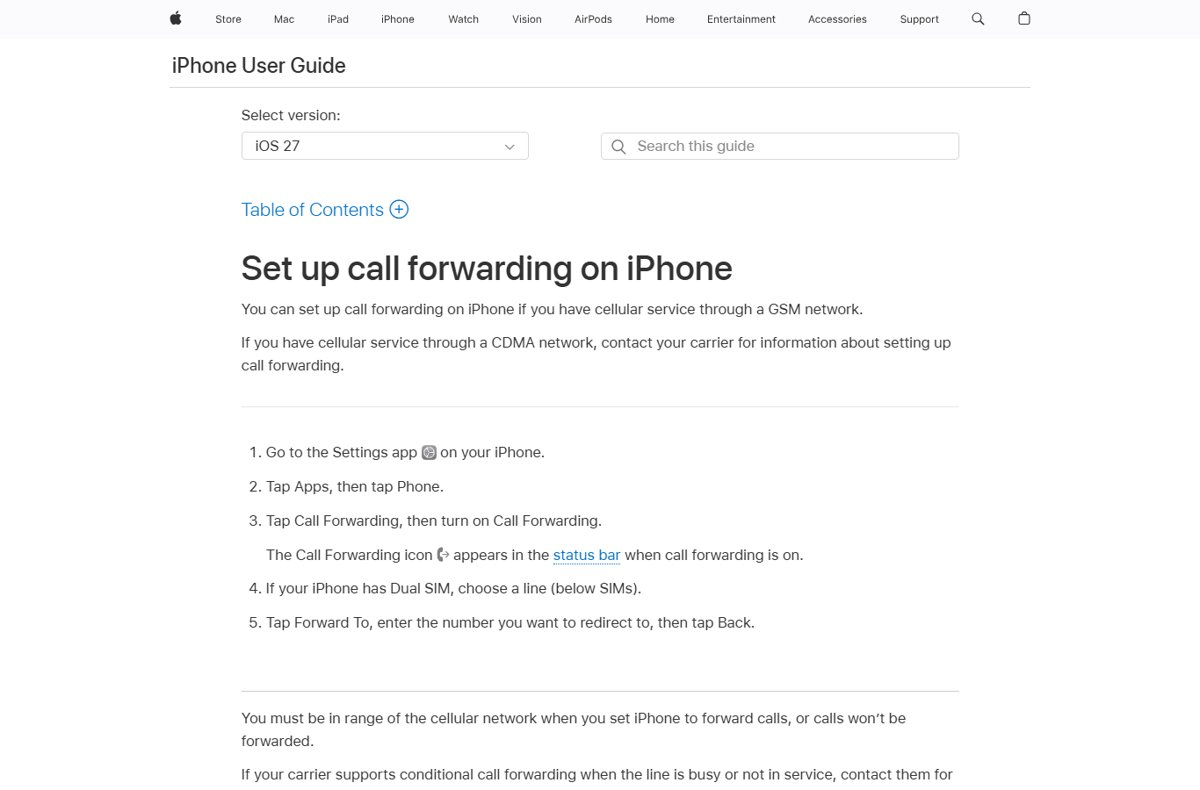
You must be in range of the cellular network when you set this, or calls will not be forwarded.
- Go to Settings > Apps > Phone.
- Tap Call Forwarding, then turn on Call Forwarding.
- On a Dual SIM iPhone, choose the line under SIMs.
- Tap Forward To, enter the number, then tap Back.
- Check that the call forwarding icon appears in the status bar.
Busy or not-in-service forwarding is set up through the carrier. On AT&T, *61*number#, *62*number# and *67*number# cover unanswered, unreachable and busy calls.
Is *#21# used to check if your iPhone is hacked?
*#21# cannot detect malware, spyware or a hacked iPhone. It only reports one network setting held by your carrier.
It is still a useful check for one scam. Fraudsters send links or ask you to dial a code that forwards your calls, so they can receive your bank or account verification calls.
Dial *#21# if you suspect your calls are being redirected, and never dial a *21* code someone else sends you. iPhone alerts you and blocks links in messages, email, webpages or apps that ask you to turn on call forwarding, because scammers use them. A forwarding number you do not recognise should be removed with ##21# or ##002# straight away.
*#21# not working on iPhone: fixes
Nothing happens or the call fails right away
The request needs a live cellular connection, which an iPhone showing SOS in the status bar does not have, and some carriers do not use GSM codes.
- Check that the status bar shows cellular bars, not No Service or SOS.
- Turn off Airplane Mode in Control Center.
- Retype the code with no spaces and dial it from Keypad, not from Contacts.
- If it still fails, soft reset the iPhone and dial again.
You are on Verizon and the code returns an error
Verizon documents its own call forwarding codes rather than the GSM *21 set.
- Dial
*73to turn off call forwarding on Verizon. - Listen for the confirmation tone, which can sound like a busy signal.
- To forward all calls instead, dial
*72followed by the 10-digit number.
Calls still go elsewhere after the reply says not forwarded
Conditional forwarding or voicemail diversion is active, which *#21# does not report.
- Dial
*#61#,*#62#and*#67#one at a time and read each reply. - Dial
##002#to clear every forwarding type at once. - Ask your carrier to check the line if calls still divert.
*#21# iPhone code FAQ
What does *#21# do?
It checks whether unconditional call forwarding is active on your line. The carrier replies with a status for each service, such as voice or data, and a destination number if forwarding is on. Dialing it changes nothing.
What is *#21# on your phone?
It is a GSM status code. The star-hash prefix asks the network for a status, and service code 21 means forwarding of all calls. It works on iPhone and Android phones on GSM carriers.
What does *21*number# do?
It turns on unconditional call forwarding to the number you enter. Every incoming call then goes straight to that number and your iPhone does not ring. Dial ##21# to undo it.
What does #21# do?
It switches off unconditional call forwarding but keeps the forwarding number stored on the network. Dial *21# later to turn forwarding back on to that same number. Use ##21# to erase the number as well.
What does ##21# do on iPhone?
It turns off unconditional call forwarding and deletes the stored forwarding number. After dialing it, *#21# should report that forwarding is not active. ##002# goes further and clears conditional forwarding too.
Can *#21# tell if my iPhone is tapped or hacked?
No. It reports only whether your carrier forwards all your calls. It cannot see apps, malware or account access. An unfamiliar forwarding number is still worth removing, because call forwarding is a known scam tactic.
Is 21 an international dialing code?
No country uses +21 on its own. Codes in that range have three digits, such as +212 for Morocco, +213 for Algeria and +216 for Tunisia. The star and hash in *#21# make it a network command, not a phone number.
What happens when dialing 211 on a phone?
In the US and Canada, 211 connects you to local information and referral services for health, human and social service organisations. It is unrelated to the *#21# forwarding code.
Bottom line: should you dial *#21# on iPhone?
Yes. Dial *#21# whenever calls stop ringing on your iPhone or you suspect a forwarding scam, because it is a read-only check. It shows in seconds whether every call is going to another number. If it is, turn off Call Forwarding in Settings or dial ##002#, then run *#21# again to confirm.

![How to install or update a printer driver in Windows 11? [Full guide]](https://techdows.com/wp-content/uploads/2026/10/How-to-Install-or-Update-a-Printer-Driver-in-Windows-11-600x338.jpg)