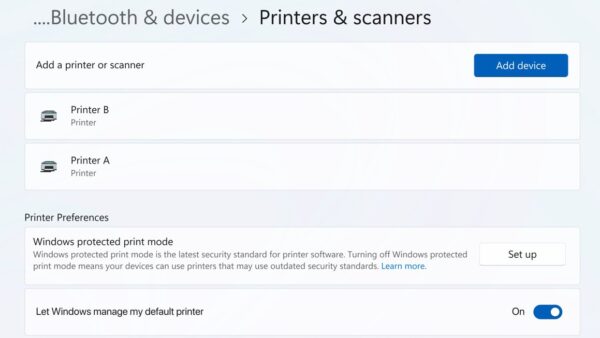
The best browser for Windows 11 is Microsoft Edge if you want the built-in, Windows-integrated choice, and Google Chrome if you want the widest extension and Google account support; Firefox, Brave, Opera and Vivaldi win on privacy, built-in blockers or customisation.
This guide compares all six on engine, ad blocking, VPN, sidebar and platforms, lists each vendor's offline installer, and shows how to set, update and fix your browser on Windows 11 and 10.
What is the best browser for Windows 11?
Best Windows 11 browser: a quick overview. Every browser here is free, runs on Windows 11 and Windows 10, and syncs with phones.
Keep Microsoft Edge if you use Windows features like Copilot and SmartScreen, install Google Chrome if you live in Google services, and pick Brave or Firefox if blocking ads and trackers matters most. Edge ships with Windows and is built on Chromium, so most Chrome extensions and sites behave the same. Brave blocks third-party ads out of the box, and Firefox blocks trackers by default.
Quick picker: choose the best browser by what you need
Quick picks for the best Windows 11 browser by need. Match your main priority to a row; this is also how to choose the best browser for Windows 11 when you care about what matters most to you.
| What you need | Browser | Why |
|---|---|---|
| Built into Windows, Copilot, PDF tools | Microsoft Edge | Preinstalled; get the Microsoft Edge installer only to reinstall it |
| Google account sync, Gemini, widest extension store | Google Chrome | Chrome Web Store, Gemini in Chrome; download Google Chrome for PC |
| Non-Chromium engine, trackers blocked by default | Mozilla Firefox | Gecko engine; get Firefox for Windows |
| Ads blocked with no add-on | Brave | Shields blocks third-party ads; download the Brave browser |
| Free built-in VPN and messengers in a sidebar | Opera | Free VPN with unlimited data; download the Opera browser |
| Tab stacks, mail and calendar in one window | Vivaldi | Everything configurable; Vivaldi for Windows |
Best browsers for Windows 11
This table lists the best browsers for Windows 11 in 2026 by engine and what each has built in. It replaces a ranked top-10 list, because which one is best depends on these columns.
| Browser | Engine | Ad blocking | VPN | Sidebar / panels | Built-in AI |
|---|---|---|---|---|---|
| Microsoft Edge | Chromium | Tracking prevention; no ad blocker | Edge Secure Network | Yes, sidebar | Copilot |
| Google Chrome | Chromium | Not built in (extensions) | Not listed | Vertical tabs, split view | Gemini in Chrome |
| Mozilla Firefox | Gecko | Trackers blocked by default; ads via add-ons | Not listed | Not listed | Not listed |
| Brave | Chromium | Yes, Shields | Yes, built-in VPN | Yes, sidebar | AI assistant |
| Opera | Chromium | Yes (turn it on first) | Yes, free, unlimited data | Yes, messengers sidebar | Browser AI |
| Vivaldi | Chromium source | Yes, plus tracker blocker | Proton VPN for Vivaldi | Yes, web panels | Not listed |
Five of the six share Chromium, so they render pages the same way and can run Chrome Web Store extensions. Firefox is the only major Windows browser on its own engine, Gecko.
Best browser for Windows: Microsoft Edge
Edge is preinstalled on Windows 11 and 10, so there is nothing to download. Its current Stable release is version 156, out October 22, 2026.
| Feature | What it does |
|---|---|
| Microsoft Defender SmartScreen | Blocks known phishing sites and malicious downloads |
| Scareware blocker | Stops fake warnings and tech-support scam pop-ups |
| Edge Secure Network | Protects your connection on public Wi-Fi |
| Copilot | Summarizes pages and compares details across tabs |
| PDF reader | Reads, annotates and summarizes PDFs |
Shared PCs benefit most from separate Edge profiles for each family member. Testers can run Edge Canary beside Stable to try features early, and the Edge program folder on Windows is where its files and profile data live.
Most functional browser: Google Chrome
Chrome's download page offers it for Windows 11/10 64-bit, and a new version ships every four weeks.
| Feature | What it does |
|---|---|
| Gemini in Chrome | Meet Gemini in Chrome: an AI assistant that uses your open tabs; auto browse is limited to Google AI Pro and Ultra subscribers in the U.S. |
| Vertical tabs | Right-click a Chrome window and select Show Tabs Vertically |
| Split view | Shows two tabs in one window |
| Energy Saver and Memory Saver | Cut battery and RAM use by background tabs |
| Enhanced Safe Browsing and Safety Check | Warn about malware, phishing and leaked passwords |
| Chrome Web Store | The largest extension catalogue for Chromium browsers |
Adding features is mostly a matter of installing Chrome extensions from the Web Store. Developers who want Chrome's open-source base without Google services can get Chromium builds instead.
Best all-around web browser: Firefox
Firefox is the best open-source, private option for readers who want a browser outside the Chromium family. Mozilla offers it in more than 90 languages.
| Feature | Detail |
|---|---|
| Engine | Gecko, Mozilla's own rendering engine |
| Tracker blocking | On by default, plus fingerprint blocking |
| Ad blocking | Through add-ons |
| Editions | Firefox, Beta, Developer Edition, Nightly, Extended Support Release |
| Platforms | Windows, macOS, Linux, Android, iOS |
Most secure web browser: Brave
Brave is the pick for ad blocking and privacy without add-ons. It is built on Chromium, so Chrome extensions install normally.
| Feature | Detail |
|---|---|
| Shields | Blocks third-party ads, including video, search and social ads, and cookie pop-ups |
| Brave Search | Brave's own search engine |
| VPN | Built-in VPN listed as a Brave feature |
| AI assistant | Built into the browser |
| Channels | Release, Beta and Nightly; also in the Microsoft Store |
Most diverse web browser: Opera
Opera packs the most add-on style features into the stock browser, and it is based on Chromium.
| Opera browser | Built for | Platforms |
|---|---|---|
| Opera One | Free VPN, ad blocker, Tab Islands, messengers in the sidebar | Windows, Mac, Linux, Android, iOS |
| Opera GX | Gamers: CPU, RAM and network limiters | Windows, macOS, Linux, Android, iOS |
| Opera Air | Breathing exercises and break reminders | Windows, macOS |
| Opera Neon | Experimental agentic AI browser | Windows, macOS |
| Opera Mini | Data saving on phones | Android |
Gamers can get Opera GX for Windows, while Opera Mini for Android has no Windows version.
Best internet browser for multitasking: Vivaldi
Vivaldi contains the Chromium source code, needs Windows 10 or later on 64-bit Intel or AMD, and runs Chrome extensions.
| Tool | What it does |
|---|---|
| Tab Stacks, Tiling, Hibernation | Group tabs, view them side by side, and put idle tabs to sleep |
| Web Panels | Pin any site to the side bar |
| Workspaces and sessions | Switch between saved sets of tabs |
| Mail, Calendar, Feed Reader | Built-in clients, no extra app |
| Ad Blocker and Tracker Blocker | Built in |
| Proton VPN for Vivaldi | One-click VPN |
Is Chrome or Edge better for Windows 11?
Both use Chromium, so page compatibility and speed differences are small. The choice comes down to account and extras.
| Microsoft Edge | Google Chrome | |
|---|---|---|
| Preinstalled on Windows 11 | Yes | No |
| Account sync | Microsoft account | Google Account |
| AI assistant | Copilot | Gemini in Chrome |
| Extra protection | SmartScreen, Scareware blocker | Enhanced Safe Browsing |
| Tab tools | Tab search, sidebar | Tab groups, vertical tabs, split view |
A longer Edge vs Chrome comparison covers memory tools, privacy and sync side by side.
Do you have to use Microsoft Edge with Windows 11?
No. Install any browser and make it the default; Edge stays on the PC but no longer opens your links. Edge is part of Windows. Changing the default browser is the supported way to stop using it.
Where Windows allows it, you can remove Microsoft Edge completely.
What should you use instead of Internet Explorer?
Microsoft ended support for Internet Explorer on June 15, 2022. Use Edge, and turn on IE mode for old intranet sites that still need it.
- Open Edge, type
edge://settings/defaultBrowserin the address bar and press Enter. - Under Internet Explorer compatibility, set Allow sites to be reloaded in Internet Explorer mode (IE mode) to Allow.
- Select Restart to restart Edge.
- On a work PC where the setting is greyed out, ask your administrator.
Adding pages to the list is part of turning on Internet Explorer mode in Edge.
Privacy and security: the safest Windows browser depends on the threat
These are the best browsers for privacy and security, matched to the threat. Which web browser is best for privacy depends on whether you fear scams, ads or tracking.
| Threat | Browser feature that helps |
|---|---|
| Phishing and malicious downloads | Edge SmartScreen; Chrome Enhanced Safe Browsing |
| Fake support pop-ups | Edge Scareware blocker |
| Cross-site tracking | Firefox (default), Brave Shields, Vivaldi Tracker Blocker, Edge tracking prevention |
| Ads and malvertising | Brave, Opera, Vivaldi built-in blockers; an extension in Chrome, Edge or Firefox |
| Untrusted Wi-Fi | Opera free VPN, Edge Secure Network, Brave VPN, Proton VPN for Vivaldi |
| Weak passwords | Edge Password health, Chrome Google Password Manager and Safety Check |
Edge users can tighten Edge privacy and security settings such as tracking prevention and SmartScreen. Chrome and Edge users who want blocking can add the Adblock Plus extension, and the best private browser alternative many readers try is the DuckDuckGo browser for Windows.
Fastest browsers: what speed actually means
What is the fastest browser for Windows 11? Five of the six share Chromium, so raw page speed is close; performance on Windows 11 differs most in speed with many tabs, RAM and battery life.
| Browser | Built-in performance tool |
|---|---|
| Chrome | Memory Saver and Energy Saver |
| Vivaldi | Tab Hibernation puts idle tabs to sleep |
| Opera | Battery Saver for laptops |
| Opera GX | CPU, RAM and network limiters |
| Brave | Blocking ads cuts data and page weight |
High memory in Task Manager is not always the browser: if msedgewebview2.exe uses too much memory, another app is using the WebView2 Runtime.
AI browsers on Windows 11: useful feature or hype?
The best AI browsers in 2026 build an assistant into the window. Each one works on the page you have open.
| Browser | AI feature | Limits |
|---|---|---|
| Edge | Copilot: summaries, compare across tabs, Copilot new tab page | Availability varies by market |
| Chrome | Gemini in Chrome, AI Mode search | Auto browse only for Google AI Pro/Ultra in the U.S. |
| Opera | Browser AI with Opera AI, ChatGPT and Gemini | Opera Neon is experimental |
| Brave | Built-in AI assistant | Not listed |
Best browsers for productivity and work
Which web browser has the best tools depends on how many tabs you juggle.
| Need | Edge | Chrome | Opera | Vivaldi |
|---|---|---|---|---|
| Two pages side by side | Split screen | Split view | Split Screen | Tab Tiling |
| Vertical tabs | Yes | Yes | Yes | Not listed |
| Separate work and home tabs | Profiles | Profiles | Workspaces | Workspaces |
| Apps in a side pane | Sidebar | No | Messengers sidebar | Web Panels |
| Built-in email | No | No | No | Vivaldi Mail |
Best browser for PC, Mac, iPhone, and Android
Which web browser has the best compatibility across devices? All six sync between desktop and phone.
| Browser | Windows | macOS | Linux | Android | iPhone |
|---|---|---|---|---|---|
| Edge | Yes | Yes | Yes | Yes | Yes |
| Chrome | Yes | Yes | Yes | Yes | Yes |
| Firefox | Yes | Yes | Yes | Yes | Yes |
| Brave | Yes | Yes | Yes | Yes | Yes |
| Opera | Yes | Yes | Yes | Yes | Yes |
| Vivaldi | Yes | Yes | Yes | Yes | Yes |
Apple's browser is the one missing from this list, because Safari for Mac and iPhone is not offered on the six vendors' Windows pages.
Offline installers for Chrome, Edge, Firefox, Brave, Opera and Vivaldi
An offline or standalone installer carries the whole browser, so you can install it on a PC with no internet or on several PCs.
| Browser | Offline / standalone option | Where the vendor offers it |
|---|---|---|
| Chrome | Alternate installer for another computer | Chrome download page > Other Platforms |
| Edge | Standalone Windows 64-bit, 32-bit and ARM64 builds | Edge for Business download page |
| Firefox | Full installers by edition, platform and language | Firefox download page > Custom Download Options |
| Opera | USB (portable) version for Windows 64-bit | opera.com/download > Looking for another version? |
| Brave | Not listed; Microsoft Store copy available | brave.com/download |
| Vivaldi | Not listed; one 64-bit installer and alternative stores | vivaldi.com/download |
Mozilla's page also lists language packs, and the Firefox full installer links cover each edition.
How to set your default browser in Windows 11 and 10
Installing a browser does not make it the default. Set it once in Settings.
- Open Settings and go to Apps > Default apps.
- Under Set defaults for applications, select your browser.
- Select Set default next to the make-default prompt.
Windows 10 and per-file-type options are covered when you change the default web browser. Chrome can also make itself the default browser from its own settings, and the same page path works to set or remove Edge as default.
How to update Chrome and Edge to the latest version
Both update in the background, but a pending update only applies after a restart.
- In Chrome, select More > Help > About Google Chrome.
- Select Relaunch if it appears.
- In Edge, select Settings and more > Help and feedback > About Microsoft Edge.
- Select Download and install or Restart if Edge shows either button.
Problem cases are covered when you update Google Chrome manually or update Edge with winget.
How to check which browser version you have
- Open About Google Chrome in Chrome, or
edge://settings/helpin Edge. - Read the version number at the top of the page.
- Confirm Chrome shows no Relaunch button, or Edge shows Microsoft Edge is up to date.
How to reset Chrome to default settings
A reset clears changes made by unwanted extensions without deleting bookmarks or passwords.
- Select More > Settings in Chrome.
- Select Reset settings.
- Select Restore settings to their original defaults.
- Select Reset settings to confirm.
The reset turns off extensions and clears cookies, and the details of resetting Chrome settings list everything it changes.
Fix browser problems on Windows 11 and 10
Microsoft Edge not working, freezing or not opening
A bad extension, corrupt browsing data or an outdated build.
- Close Edge completely and open it again.
- Open
edge://settings/helpand install any pending update. - Turn off extensions one at a time.
- If it still fails, work through the Edge not working fixes, ending with repair.
Chrome search engine or homepage changed by itself
An extension or program changed Chrome settings.
- Remove extensions you do not recognise from the extensions page.
- Run the Chrome reset above.
Links still open in the old browser
The default browser was not changed in Windows Settings.
- Open Settings > Apps > Default apps.
- Select your browser and select Set default.
Best browser for Windows 11 FAQ
What's a good browser for Windows 11?
Edge, Chrome, Firefox, Brave, Opera and Vivaldi all support Windows 11. Edge is preinstalled, Chrome has the largest extension store, Firefox uses its own Gecko engine, and Brave, Opera and Vivaldi include ad blockers.
Is Edge the best browser for Windows 11?
Edge is the best fit if you want a browser that ships with Windows, adds SmartScreen and Copilot, and needs no download. Chrome or Firefox suit readers tied to Google services or wanting a non-Chromium engine.
Which is the fastest web browser for PC?
No vendor publishes a neutral ranking, and five of the six share Chromium. Memory Saver in Chrome, Tab Hibernation in Vivaldi and the limiters in Opera GX make the biggest difference on a PC with many tabs.
What is the best web browser for PC?
For most Windows PCs the choice is Edge or Chrome. Pick Firefox for a different engine and default tracker blocking, or Brave for built-in ad blocking.
What does a web browser do?
A web browser fetches web pages from servers and renders their HTML, CSS and JavaScript into the page you see. Its engine, such as Chromium's or Firefox's Gecko, handles the rendering, network requests and scripts.
What is my computer browser?
Your browser is the app you open to visit websites. On Windows 11 the default one is listed under Settings > Apps > Default apps; Microsoft Edge is the default until you change it.
Why is a browser software?
A browser is an application installed on your PC like any other program. It runs on Windows, updates itself and can be uninstalled.
Are these browsers free?
Yes. Chrome, Edge, Firefox, Brave, Opera and Vivaldi are free to download and use on Windows 11 and Windows 10. Some extras, such as Chrome's auto browse, need a paid subscription.
Final verdict: which Windows 11 browser should you install?
Final verdict: the best browser depends on the job. Stay with Edge for Windows integration, install Chrome for Google services, and choose Brave, Firefox, Opera or Vivaldi for built-in blocking, a separate engine, a free VPN or deep customisation. All six are free and run on the same Windows 11 and 10 PCs, so you can install two and switch the default in Settings at any time.