When contacts suddenly disappear on iPhone, they are usually still in iCloud or another account and only hidden by a sync toggle, a Lists filter or a sign-in change.
This guide shows how to bring them back on screen, how to restore an older contacts archive from iCloud.com, and how to stop it happening again.
Turn on iCloud Contacts to get missing iPhone contacts back
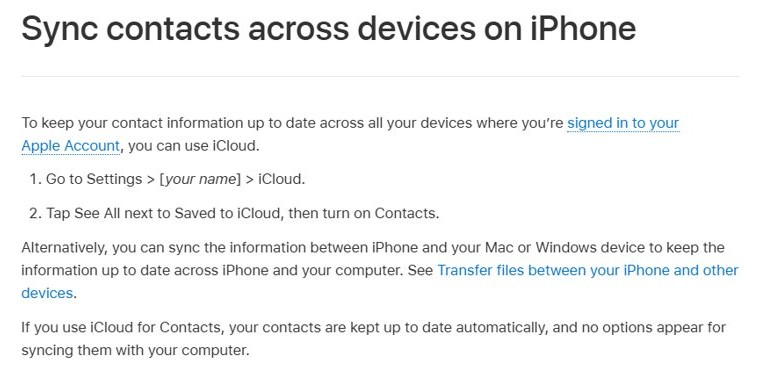
Most missing contacts live in iCloud. If the Contacts switch for iCloud was turned off, the iPhone stops showing them even though they still exist online.
- Open the Settings app on your iPhone.
- Tap [your name], then tap iCloud.
- Tap See All next to Saved to iCloud.
- Turn on Contacts.
- Open the Contacts app and swipe down on the list to refresh it.
Contacts that were saved to iCloud download back to the phone once the switch is on and the iPhone is online.
Why did my iPhone contacts disappear?
Each cause below hides contacts in a different way, so match what you see to the row.
| What changed | What you see | Where to fix it |
|---|---|---|
| iCloud Contacts switched off | All or most contacts gone | Settings > [your name] > iCloud > See All > Contacts |
| Another account switched off or removed (Google, Exchange, Yahoo) | Only some contacts gone | Settings > Apps > Contacts > Contacts Accounts |
| A single list selected in Contacts | Contacts app shows a short list | Contacts > Lists > All iCloud or All Contacts |
| Signed in with a different Apple Account | A different or empty contact list | Settings > [your name] |
| Contacts deleted on another synced device | Specific names gone everywhere | iCloud.com Data Recovery > Restore Contacts |
| Sync stalled after an update or wrong date and time | Recent edits missing | Restart, update iOS, check date and time |
Show all iCloud contacts in the Contacts app lists
The Contacts app can show a single list instead of everything. Apple recommends making sure All iCloud is selected.
- Open the Contacts app.
- Tap Lists in the top-left corner.
- Tap All iCloud, or All Contacts to include every account.
- Swipe down on the list to refresh it.
Turn Google or Exchange contacts back on in iPhone settings
Contacts from Gmail, Outlook or a work account vanish when that account's Contacts switch is off. Turning it off only hides them; the contacts stay in the online account.
- Open the Settings app.
- Tap Apps, then tap Contacts.
- Tap Contacts Accounts.
- Tap the account whose contacts are missing.
- Turn on Contacts.
- If the account is not listed, go back, tap Add Account, sign in, then turn on Contacts.
If an account does not push changes, tap Fetch New Data in Contacts Accounts and choose a schedule so new contacts arrive without a manual refresh.
Restore deleted iPhone contacts from iCloud.com
iCloud keeps archived versions of your contacts. Restoring one replaces the contacts on every device that syncs iCloud Contacts, and iCloud archives your current contacts first so you can switch back. For a copy you control, you can also export your iCloud contacts to a vCard file.
- On a computer or tablet, go to icloud.com/contacts and sign in with your Apple Account.
- Click the App Launcher button in the toolbar, then choose Data Recovery.
- Choose Restore Contacts.
- Find a version dated before the contacts disappeared and click Restore.
- Wait for the restore to finish before you edit any contact, because changes made during the restore are not saved.
A contact deleted very recently can take up to 24 hours to appear as an archive.
Default account for new contacts on iPhone
New contacts saved to an account you later remove disappear with it. Set iCloud, or the account you trust, as the default.
- Open the Settings app.
- Tap Apps, then tap Contacts.
- Tap Default Account.
- Tap iCloud or the account you want new contacts saved to.
Confirm iPhone contacts are back and syncing
- Open Contacts and search for a name that was missing.
- Sign in at icloud.com/contacts on a computer and check the same name is listed there.
- Edit a test contact on the iPhone and confirm the change shows on iCloud.com after a refresh.
iPhone contacts still disappearing: fixes
Contacts are disappearing on my iPhone again after they come back
Sync is not completing between the iPhone and iCloud.
- Check Apple's System Status page for an iCloud Contacts outage.
- Update the iPhone to the latest iOS in Settings > General > Software Update.
- Make sure the date and time on the iPhone are correct.
- Close the Contacts app, wait about a minute, and reopen it.
- Restart the iPhone.
Some of my iPhone contacts disappeared, not all
The missing names belong to one account that is hidden or removed.
- Tap Lists in Contacts and select All Contacts.
- Check each entry in Settings > Apps > Contacts > Contacts Accounts has Contacts turned on.
iPhone phone contacts disappeared after changing Apple Account
Each Apple Account has its own iCloud contacts.
- Tap [your name] in Settings and confirm the email shown is the account that holds your contacts.
- Sign in with that Apple Account on every device that should share contacts.
Contacts disappeared on iPhone FAQ
Why did contacts disappear on iPhone?
Usually because iCloud Contacts or another account's Contacts switch was turned off, the Contacts app is showing a single list, or the iPhone is signed in to a different Apple Account. The contacts normally still exist online.
Why did my iPhone contacts disappear after an update?
Sync can pause or a setting can change during an update. Check that Contacts is on under Settings > [your name] > iCloud > See All, then refresh the Contacts list by swiping down.
Why are my iPhone contacts disappearing randomly?
Contacts that vanish and return point to a sync problem or an account set to fetch data on a schedule. Update iOS, check the date and time, and restart the iPhone.
Can I recover contacts deleted from my iPhone?
Yes, if they were in iCloud. Sign in at icloud.com/contacts, open Data Recovery from the App Launcher, choose Restore Contacts and restore a version from before the deletion.
Does restoring contacts on iCloud.com delete my current contacts?
It replaces them on every synced device, but iCloud archives your current contacts first, so you can restore that newer version again if you need to.
Does turning off iCloud Contacts delete them?
No. When you turn it off, the iPhone asks whether to keep or delete the synced copies on the phone. The contacts stay in iCloud either way.
Why did my Gmail contacts disappear from my iPhone?
The Google account's Contacts switch is likely off. Go to Settings > Apps > Contacts > Contacts Accounts, tap the Google account and turn on Contacts.