The Cisco Packet Tracer download is free from Cisco Networking Academy (NetAcad), with 64-bit installers for Windows 11, macOS and Ubuntu Linux. Sign in to a free NetAcad account, open the Resource Hub at netacad.com and click the Packet Tracer 9.0.1 build for your computer.
Packet Tracer is Cisco’s network simulator. You build networks from virtual routers, switches, PCs and cables, add IoT devices, and watch packets move hop by hop in Simulation Mode, all without buying any hardware.
Below you will find which build fits your machine, the exact sign-in route to the download, the install steps for each system, Cisco’s system requirements, how Packet Tracer compares with GNS3 and EVE-NG, and fixes for the problems that stop most downloads.
What is Cisco Packet Tracer?
Cisco Packet Tracer is a network configuration simulation tool made by Cisco for its Networking Academy courses. Cisco describes it as a virtual lab for practising networking, IoT and cybersecurity skills with no hardware needed.
Students use it to work through CCNA-style labs, teachers use it to build activities and assessments, and self-learners use it to try router and switch commands they would otherwise need a rack of equipment for. Cisco says Packet Tracer has over a million users worldwide who share network designs and ideas.
On its own Packet Tracer page, Cisco lists what the tool helps you do:
- Practise building simple and complex networks.
- Visualise how a network works, then build and secure your own.
- Hone rack, stack and cabling skills in the virtual lab.
- Integrate IoT devices, Python code and network automation.
- Study for a Cisco certification exam such as CCST Networking, CCST Cybersecurity or CCNA.

Cisco Packet Tracer download for Windows, Mac and Linux
Cisco publishes one build per operating system, and all three are 64-bit. Match your computer to a row, then download that file from the Resource Hub.
| Your computer | Download | What Cisco requires |
|---|---|---|
| Windows 11 PC with an Intel or AMD processor | Packet Tracer 9.0.1 Windows 64bit | Windows 11, amd64 (x86-64) CPU |
| Mac running macOS 12 or newer | Packet Tracer 9.0.1 MacOS 64bit | macOS 12 or newer, amd64 (x86-64) CPU |
| PC running Ubuntu 22.04 or 24.04 LTS | Packet Tracer 9.0.1 Ubuntu 64bit | Ubuntu 22.04 or 24.04 LTS, amd64 (x86-64) CPU |
| Windows 10 PC | No build listed for Windows 10 | Cisco’s 9.0.1 requirements name Windows 11 only |
Not sure what you have? On Windows 11, open Settings > System > About and read System type; this Windows version check walks through every method. On a Mac, open the Apple menu and choose About This Mac.
Cisco’s requirements name an amd64 (x86-64) processor for every build and list no ARM build. That matters on a Mac with Apple silicon and on Windows 11 laptops with Snapdragon chips, which are covered in the troubleshooting section below.
Download Cisco Packet Tracer from the official NetAcad Resource Hub
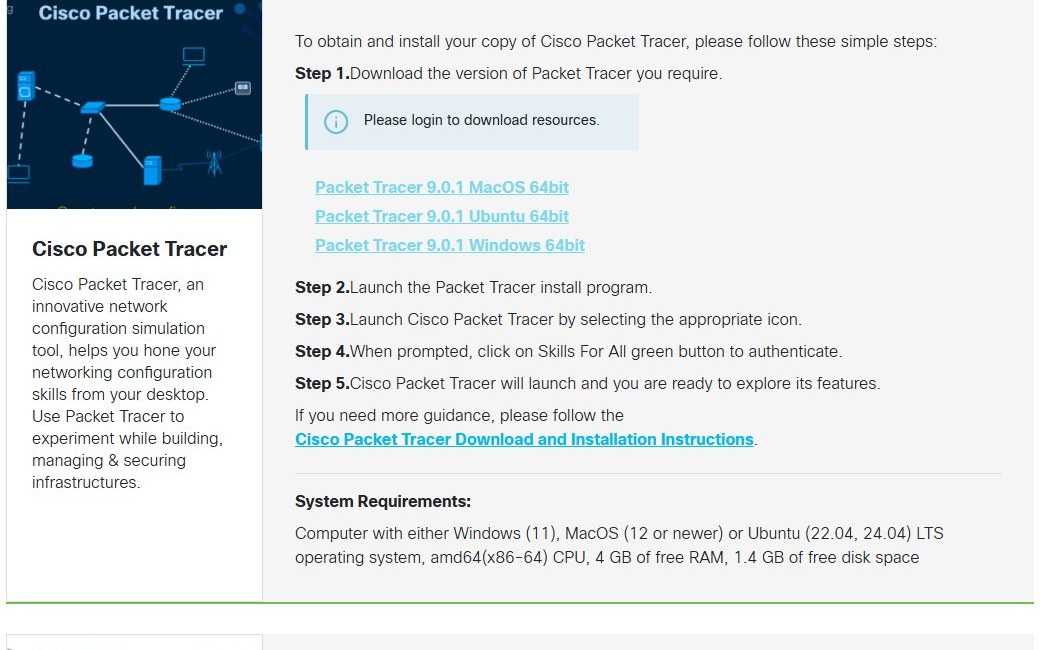
Cisco hosts the Packet Tracer installers on the Networking Academy Resource Hub at netacad.com. The download links stay locked until you sign in, and the page shows Please login to download resources. above them instead.
The Resource Hub lays the process out as five steps: download the version you need, launch the install program, launch Packet Tracer from its icon, click the green Skills For All button to authenticate, and start exploring.
Creating the account costs nothing. Cisco also points new users to its short Getting Started with Cisco Packet Tracer course, which is free and is where Cisco says to enroll to download the latest version.
| Official Cisco page | What you get there |
|---|---|
| Cisco Networking Academy Resource Hub | Windows, macOS and Ubuntu installers; sign-in required |
| Getting Started with Cisco Packet Tracer | Free, self-paced, 2-hour course; Module 1 covers downloading and using the app |
| Cisco Packet Tracer learning collection | Two free 3-hour follow-up courses and a 15-question introductory exam |
| Time to Download Cisco Packet Tracer 9.0.1 | NetAcad’s release announcement, dated 25 July 2026 |
Skip any site that offers a Packet Tracer direct download without a NetAcad sign-in. That file does not come from the Resource Hub, and you cannot tell what was changed inside it.
Step-by-step guide to download and install Cisco Packet Tracer on Windows
These steps add the sign-in that unlocks the download to Cisco’s own five-step flow.
- Open the Resource Hub on netacad.com.
- Click Login and sign in, or click Sign up to create a free NetAcad account first.
- Return to the Resource Hub and scroll to the Cisco Packet Tracer section.
- Click Packet Tracer 9.0.1 Windows 64bit to download the installer.
- Open your Downloads folder and double-click the Packet Tracer install program.
- Click Yes if User Account Control asks for permission, then follow the setup prompts.
- Launch Cisco Packet Tracer from its desktop or Start menu icon.
- When prompted, click the green Skills For All button to authenticate.
- Sign in with your NetAcad details, and Packet Tracer opens, ready for your first network.
Install Cisco Packet Tracer on a Mac
- Sign in on the Resource Hub and click Packet Tracer 9.0.1 MacOS 64bit.
- Open the downloaded file from your Downloads folder and follow the installer.
- Open Cisco Packet Tracer from Applications.
- Click Skills For All when prompted and sign in.
Install Cisco Packet Tracer on Ubuntu
- Sign in on the Resource Hub and click Packet Tracer 9.0.1 Ubuntu 64bit.
- Open the downloaded package from your Downloads folder and install it with your software installer.
- Start Packet Tracer from the app grid.
- Authenticate with Skills For All at first launch.
If you also run Linux as a separate system for labs, our Ubuntu download guide covers getting 24.04 LTS from Canonical.
Cisco Packet Tracer latest version through the Getting Started course
Cisco’s learning collection page says to enroll in Getting Started with Cisco Packet Tracer to download the latest version. The course is self-paced, takes about two hours, is marked Free and Beginner, and is offered in several languages.
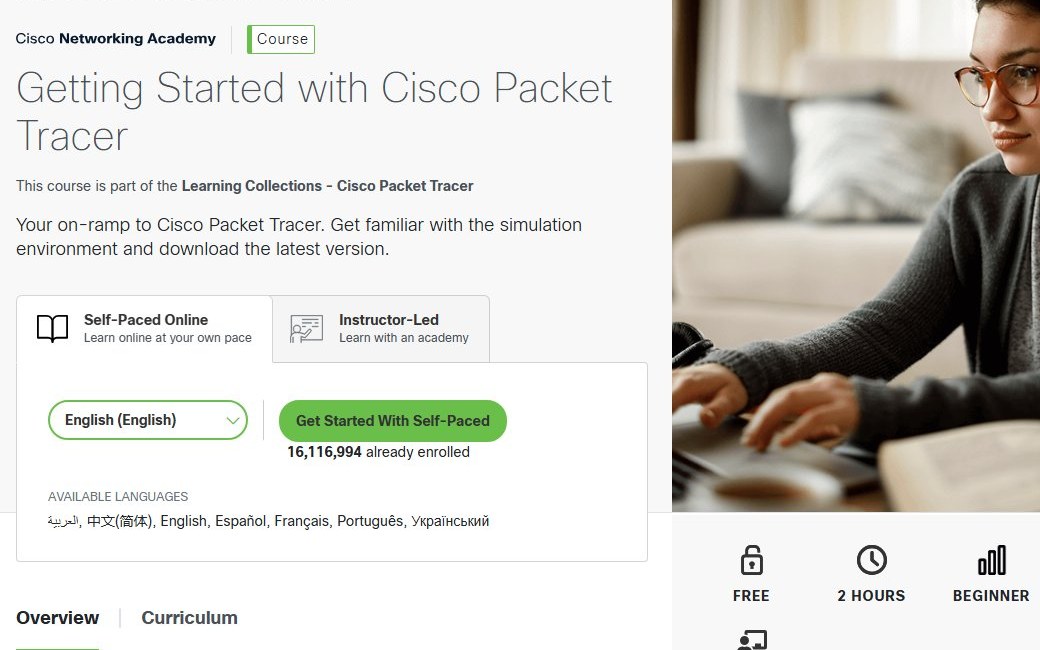
- Open the Getting Started with Cisco Packet Tracer page.
- Click Get Started With Self-Paced and sign in or create your NetAcad account.
- Open Module 1: Download and Use Cisco Packet Tracer.
- Follow the module’s download step, or go back to the Resource Hub, which now shows the download links.
The curriculum has two modules, Download and Use Cisco Packet Tracer and Create a Cisco Packet Tracer Network, followed by an end-of-course survey and a final exam.

Cisco Packet Tracer free download and NetAcad account
Yes. Cisco charges nothing for Packet Tracer. Its learning collection page says “Best of all, it’s free!”, and every course in the collection is listed at Price: Free.
The only requirement is a NetAcad account. After Getting Started, the collection continues with Exploring Networking with Cisco Packet Tracer (3 hours, a branch office network) and Exploring Internet of Things with Cisco Packet Tracer (3 hours, a smart home network), then the Introduction to Packet Tracer Exam for a digital badge.

A site asking for payment, or offering the installer without a Cisco sign-in, is not Cisco’s distribution channel.
Key features of Cisco Packet Tracer 9.0
Cisco’s descriptions of the current release highlight these capabilities:
- Simulation Mode: step through traffic and watch how data travels across your network.
- Physical Mode: practise setting up a device rack and cabling it, not just a logical diagram.
- IoT devices: add smart home and industrial things to a network and control them.
- Python and network automation: integrate code into simulations once you are past the basics.
- Tutored activities: hints along the way in select courses, if you want them.
- Assessments and authoring: teachers can build activities, and the app supports multi-user collaboration and competition.
Top use cases for Packet Tracer on Windows
Typical uses line up with Cisco’s own course list and certification links:
- Certification prep: CCNA, CCST Networking and CCST Cybersecurity labs such as VLANs, routing and access lists.
- Classroom labs: NetAcad instructors hand out .pkt activity files that you open and complete in the app.
- Home network planning: sketch a small office or smart home before you buy equipment.
- Troubleshooting practice: break a working topology on purpose and find the fault in Simulation Mode.
When you want to see real traffic rather than simulated packets, a capture tool such as Wireshark is the next step.
Packet Tracer 9.0.1 vs older versions
The Resource Hub lists this one version for all three operating systems and no earlier build. NetAcad announced it on 25 July 2026.
Install Packet Tracer 9.0.1. It is the build Cisco currently offers for Windows, macOS and Ubuntu, and the Getting Started course is built around downloading the latest version. Older installers passed around outside NetAcad come with no way to confirm they are untouched,.
Windows system requirements for Packet Tracer 9.0
Check the operating system version and processor type first, because each build targets specific releases and an x86-64 CPU. This is how the Resource Hub states the requirements for 9.0.1:
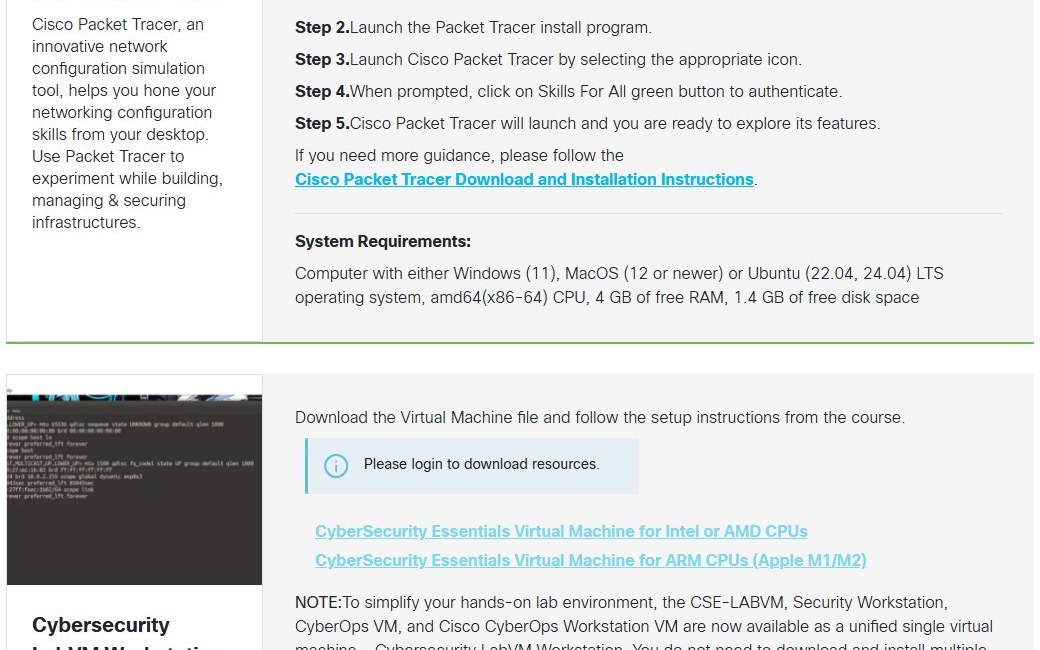
| Field | Value |
|---|---|
| Software | Cisco Packet Tracer |
| Developer | Cisco Systems, Inc. (Cisco Networking Academy) |
| Latest version | 9.0.1, announced 25 July 2026 |
| Licence | Free with a NetAcad account |
| Windows | Windows 11 |
| macOS | macOS 12 or newer |
| Linux | Ubuntu 22.04 or 24.04 LTS |
| Processor | amd64 (x86-64) CPU; all builds are 64-bit |
| Memory | 4 GB of free RAM |
| Disk space | 1.4 GB of free disk space |
| Download size | Not published by Cisco |
| Account | NetAcad sign-in to download and Skills For All authentication at first launch |
| Official source | netacad.com Resource Hub |
| Last verified | 2026-10-25 |
Note the wording: 4 GB of free RAM, not 4 GB installed. On an 8 GB laptop with a browser full of tabs, close a few before a large lab. To see how much space your drive has left, use the storage view in Windows 11 Settings. On Ubuntu, run lsb_release -a in a terminal to confirm the release number.
Cisco Packet Tracer vs. alternatives (GNS3, EVE-NG)
Packet Tracer is a simulator: Cisco models how its devices behave, so it is light, quick to install and built around NetAcad courses. GNS3 and EVE-NG are emulators: they run real network operating system images, which you have to supply and license yourself, and they need far more memory.
| Question | Packet Tracer | GNS3 or EVE-NG |
|---|---|---|
| Cost | Free with a NetAcad account | Community editions are free; device images are separate |
| Hardware | 4 GB free RAM, 1.4 GB disk | Much more RAM, often a dedicated VM or server |
| Devices | Cisco-modelled devices plus IoT | Whatever images you load, from several vendors |
| Best for | CCNA, CCST and classroom labs | Advanced or multi-vendor labs |
Start with Packet Tracer if you are studying for CCNA or CCST. Move to an emulator when a lab needs features a simulator does not model.
Cisco itself offers two paid step-ups, listed on its Packet Tracer and alternative lab solutions page. Cisco Learning Labs gives you three months of access to a Cisco-hosted lab pod running real IOS on routers and switches, grouped by certification exam. Cisco Modeling Labs is an on-premise tool for workstations and servers that simulates Cisco and non-Cisco networks with real Cisco images. If you go the emulator route, you will usually run it inside VirtualBox or a similar hypervisor.
Cisco Packet Tracer not downloading or installing: fixes
Most Packet Tracer problems happen before the installer ever runs. Find the symptom that matches yours and work through its fix.
The Resource Hub says Please login to download resources
You are not signed in, so the download links are locked.
- Click Login at the top of the Resource Hub.
- Sign in with your NetAcad account, or click Sign up to create one.
- Reload the Resource Hub after sign-in completes.
- Click the Packet Tracer build for your operating system.
No Packet Tracer download link appears after you sign in
Cisco ties the latest download to its free Getting Started course.
- Open the Getting Started with Cisco Packet Tracer course.
- Click Get Started With Self-Paced to enroll.
- Open Module 1: Download and Use Cisco Packet Tracer.
- Return to the Resource Hub and click the build for your system.
Packet Tracer asks you to log in when it starts
The app authenticates through Skills For All before it opens.
- Click the green Skills For All button on the prompt.
- Sign in with your NetAcad account details.
- Keep an internet connection available while you authenticate.
- Restart Packet Tracer if it does not open after sign-in.
Setup fails on Windows 10 or an older macOS
The current release lists Windows 11, macOS 12 or newer, and Ubuntu 22.04 or 24.04 LTS.
- Open Settings > System > About on Windows, or About This Mac on a Mac, and read the version.
- Upgrade to Windows 11 or macOS 12 or newer if your hardware supports it.
- Download the installer again from the Resource Hub and rerun it.
The installer will not run on an ARM-based computer
Cisco’s requirements name an amd64 (x86-64) processor and list no ARM build.
- On a Mac, open About This Mac and read the Chip or Processor line.
- On Windows 11, check System type under Settings > System > About.
- If it shows an ARM processor, install Packet Tracer on a computer with an Intel or AMD processor instead.
Packet Tracer runs slowly or setup stops for lack of space
Cisco asks for 4 GB of free RAM and 1.4 GB of free disk space.
- Close browsers and other large apps before you launch Packet Tracer.
- Free at least 1.4 GB on the drive you install to.
- Run the installer again.
Common pitfalls and pro tips for Windows users
- Sign in to NetAcad before you download, so the Resource Hub links and the Skills For All prompt use the same account.
- Save labs as .pkt files in a synced folder such as OneDrive so a reinstall never costs you work.
- Download a fresh installer for each new release instead of keeping old ones around.
How to uninstall Cisco Packet Tracer
Remove Packet Tracer the same way as any other desktop app. Save any .pkt network files you want to keep before you start.
- On Windows 11, click Start and open Settings.
- Go to Apps > Installed apps.
- Find Cisco Packet Tracer in the list and click the … menu beside it.
- Click Uninstall, then click Uninstall again to confirm.
- Follow the uninstaller prompts until it finishes.
On a Mac, open Finder > Applications, drag Cisco Packet Tracer to the Trash and empty it; the full macOS app removal steps also clear leftover support files. To reinstall later, download a fresh copy from the Resource Hub rather than reusing an old installer.
Cisco Packet Tracer download FAQ
Cisco keeps its own answers to common questions on the Packet Tracer page, including what the tool is for, who uses it and how to obtain it.
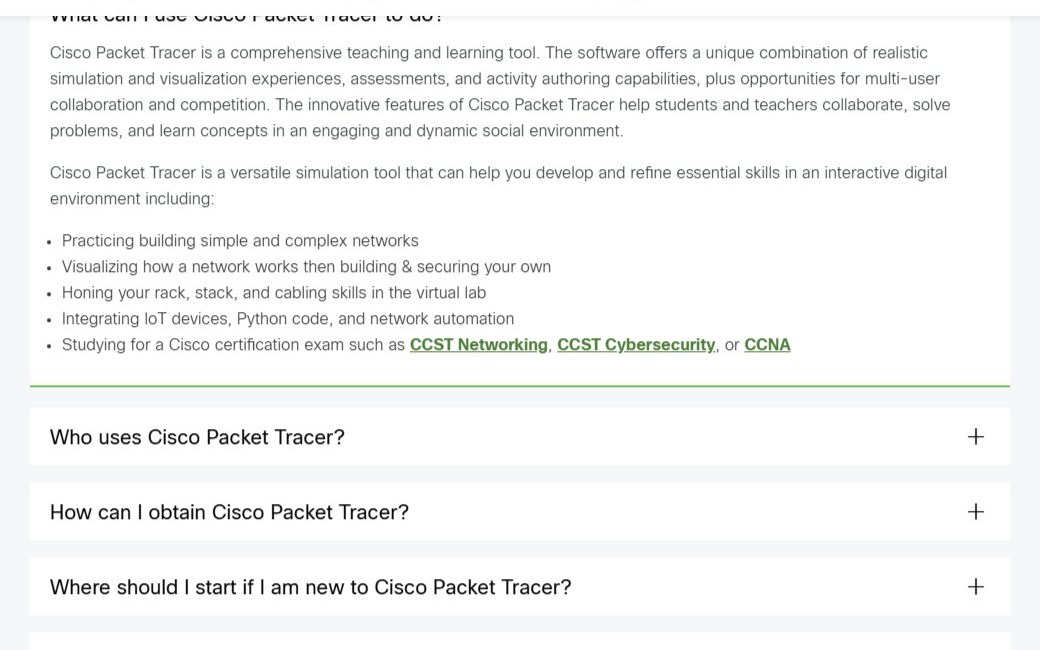
Cisco Packet Tracer free download and NetAcad account
Yes. Cisco Packet Tracer is free from Cisco Networking Academy. You need a free NetAcad account to download it, and the Getting Started with Cisco Packet Tracer course that leads to the latest version is free too.
What is the official Cisco Packet Tracer download page?
The official download page is the Cisco Networking Academy Resource Hub at netacad.com/resources/lab-downloads. Sign in to a NetAcad account and the Windows, macOS and Ubuntu builds of Packet Tracer become available.
Does Cisco Packet Tracer work on Windows 11?
Yes. The current Packet Tracer release lists Windows 11 as a supported system, along with an amd64 (x86-64) processor, 4 GB of free RAM and 1.4 GB of free disk space. Download the Windows 64bit build from the Resource Hub.
Can I install Cisco Packet Tracer on Windows 10?
Cisco’s system requirements for the current Packet Tracer release name Windows 11, not Windows 10. The Resource Hub offers no separate Windows 10 build, so upgrade to Windows 11 for a supported setup.
How big is the Cisco Packet Tracer download?
Cisco does not publish a download size for Packet Tracer, and the installer is only available after you sign in. The app needs 1.4 GB of free disk space and 4 GB of free RAM.
Is there a Cisco Packet Tracer offline installer?
The Resource Hub provides a separate installer file for Windows, macOS and Ubuntu. Packet Tracer asks you to authenticate with Skills For All when you launch it, so keep an internet connection for sign-in.
Is Cisco Packet Tracer available for Mac?
Yes. Cisco offers a MacOS 64bit Packet Tracer build on the Resource Hub for macOS 12 or newer. The requirements name an amd64 (x86-64) processor, and Cisco lists no separate build for Apple silicon.
Is Cisco Packet Tracer 64-bit, and is there an ARM version?
Current Packet Tracer builds are 64-bit only. Cisco labels the Windows, macOS and Ubuntu builds 64bit, requires an amd64 (x86-64) CPU, and lists no 32-bit or ARM build on the Resource Hub.
What is the latest version of Cisco Packet Tracer?
The latest version is Cisco Packet Tracer 9.0.1, announced by Cisco Networking Academy on 25 July 2026. It is available for Windows 11, macOS 12 or newer, and Ubuntu 22.04 or 24.04 LTS.
Is Cisco Packet Tracer safe to download?
Yes, when you download it from the Resource Hub on netacad.com after signing in. Avoid sites that offer a Packet Tracer direct download without a Cisco account, because those files do not come from Cisco.
Why can’t I download Cisco Packet Tracer?
The download links only appear after you log in to NetAcad. Sign in on the Resource Hub, and if the links still do not show, enroll in the free Getting Started with Cisco Packet Tracer course.
Why won’t Cisco Packet Tracer install?
Check your system first. Packet Tracer needs Windows 11, macOS 12 or newer, or Ubuntu 22.04 or 24.04 LTS, plus an amd64 processor, 4 GB of free RAM and 1.4 GB of free disk space.
Do I need a Cisco account to use Packet Tracer?
Yes. You need a free NetAcad account to download it, and Packet Tracer asks you to authenticate with Skills For All the first time you launch it.
Other developer tools for Windows include Terraform and Eclipse IDE.
>