The best charger for iPhone 17 Pro Max is a 40W or higher USB-C power adapter that supports USB Power Delivery (USB-PD), used with the USB-C cable from the box, which charges a drained phone to 50% in about 20 minutes.
This guide covers the wall, MagSafe, Qi2 and portable options, the exact wattage each one needs, and how to confirm your iPhone is actually fast charging.
Best charger for iPhone 17 Pro Max: the quick answer
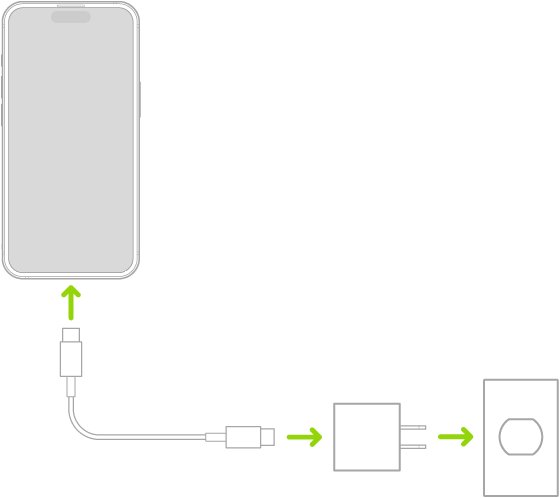
iPhone 17 Pro Max ships with a 1 m USB-C Charge Cable but no power adapter. Apple encourages any compatible USB-C adapter, so a charger you already own may be enough.
- Check the output printed on your USB-C adapter; you need 40W or higher and USB-PD support for top wired speed.
- If you do not own one, buy the Apple 40W Dynamic Power Adapter with 60W Max or a comparable third-party USB-C PD adapter rated 40W or more.
- Plug the USB-C Charge Cable from the box into the adapter and into the iPhone.
- Connect the adapter to a wall outlet and confirm the charging icon appears on the battery indicator.
- Leave it connected for about 20 minutes from empty to reach roughly 50%.
A higher-watt USB-C PD adapter, such as a 60W laptop charger, also qualifies, because Apple rates fast charging with a 40W adapter or higher.
iPhone 17 Pro Max charger comparison: wired, MagSafe, Qi2 and portable
| Charger type | What you need | Charging speed | Best for |
|---|---|---|---|
| Wired fast charger | USB-C PD adapter rated 40W or higher plus the included USB-C cable | Up to 50% in about 20 minutes | Fastest top-ups before you leave the house |
| Apple MagSafe Charger | MagSafe Charger (1 m or 2 m) plus a USB-C adapter rated 30W or higher | Up to 25W; up to 50% in about 30 minutes | Bedside and desk charging without plugging in a cable |
| Qi2 magnetic charger | A Qi2-certified pad or stand with its recommended adapter | Up to 25W | Stands, multi-device docks and travel pads |
| Standard Qi charger | Any Qi-certified pad | Slow; Apple flags wireless chargers under 10W | Occasional charging where speed does not matter |
| Older 5W or 7.5W USB adapter | A USB adapter and a matching cable | Slow; Apple flags wired chargers of 7.5W or less | Overnight only |
| Computer USB-C port | The included cable and a computer that is switched on | Depends on the port's power output | Charging while you sync or back up |
| Portable power bank | A USB-C PD pack with a cable, or a Qi2 magnetic pack | Depends on the pack's output | Travel and long days away from an outlet |
iPhone 17 Pro Max charger type and charging specs
| Spec | iPhone 17 Pro Max |
|---|---|
| Charging port | USB-C connector (no Lightning) |
| Wired fast charging | Up to 50% in 20 minutes with a 40W adapter or higher and a USB-C charging cable |
| MagSafe wireless charging | Up to 25W with a 30W power adapter or higher |
| Qi2 wireless charging | Up to 25W |
| Standard Qi wireless charging | Supported, at slower speeds |
| In the box | USB-C Charge Cable (1 m) that supports fast charging; no power adapter |
| Adapters Apple used in its own tests | 40W Dynamic Power Adapter with 60W Max (Model A3351) and 30W USB-C Power Adapter (Model A2164) |
| MagSafe Chargers Apple used in its tests | 1-meter Model A3502 and 2-meter Model A3503 |
| Video playback battery life | Up to 39 hours |
The USB-C port also supports USB 3 data transfer up to 10Gb/s, but that needs a USB 3 cable. The included cable is for charging and works with USB-C adapters and computer ports.
Best wall charger for iPhone 17 Pro Max
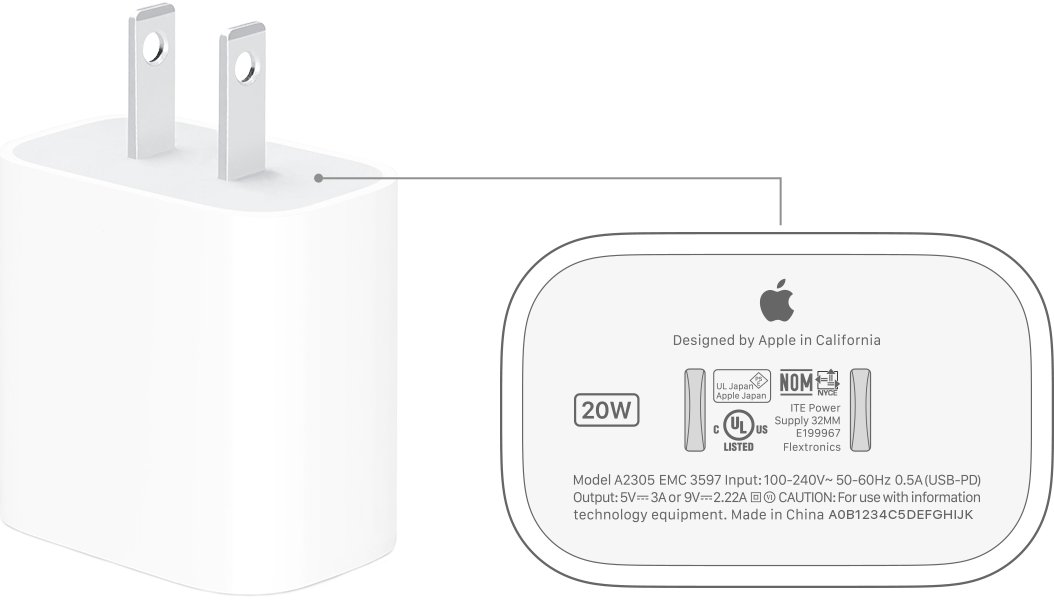
A USB-C wall adapter gives the fastest charge. Apple accepts a comparable third-party adapter as long as it supports USB-PD and meets the wattage.
- Pick an adapter with a USB-C output port, not the older rectangular USB-A port.
- Confirm the label or listing says USB Power Delivery or USB-PD.
- Choose 40W or more on the USB-C port; on multi-port chargers, check the wattage a single port delivers when other devices are plugged in.
- Buy from Apple or a brand that states compliance with your country's safety standards.
- Use the USB-C to USB-C cable from the box, or another USB-C charge cable in good condition.
- Plug in and wait for the charging icon on the battery indicator.
A 20W or 30W adapter still charges iPhone 17 Pro Max, just more slowly than the 40W rating Apple uses for its 20-minute figure.
Best MagSafe charger for iPhone 17 Pro Max
Apple's current MagSafe Charger sells in a 1 m version for $39 and a 2 m version for $49 in the US. It reaches 25W on iPhone 17 Pro Max only when the adapter behind it is 30W or higher.
- Buy the Apple MagSafe Charger in the length that suits your desk or nightstand.
- Plug its USB-C end into a USB-C power adapter rated 30W or higher, such as the Apple 30W USB-C Power Adapter or the 40W Dynamic Power Adapter.
- Connect the adapter to a wall outlet.
- Place the iPhone face up on the charger so the magnets align it.
- Confirm the charging icon appears; with a MagSafe case, keep the case on and charge through it.
A 20W adapter behind a MagSafe Charger still works, but it cannot supply the 25W the phone accepts.
Best wireless charger for iPhone 17 Pro Max: Qi2 vs Qi
iPhone 17 Pro Max supports Qi2 wireless charging up to 25W. Older plain Qi pads also work, but Apple notes that a wireless charger delivering less than 10W makes charging take longer.
- Look for Qi2 certification on the box or product page; that is the magnetic standard that matches MagSafe alignment.
- Check that the listed iPhone output reaches 25W if you want the fastest wireless speed.
- Use the power adapter the charger maker specifies; an underpowered adapter lowers the speed.
- For a 2-in-1 or 3-in-1 stand, check the iPhone wattage when all devices charge together.
- Place the iPhone on the stand and confirm the charging icon appears.
Best portable charger for iPhone 17 Pro Max
A power bank can charge iPhone 17 Pro Max by cable or wirelessly. The same rules apply as at home: USB-PD for wired speed and Qi2 for magnetic wireless packs.
- Choose a pack with a USB-C output that supports USB-PD if you plan to charge with the cable.
- Check the USB-C output wattage; anything under 40W charges more slowly than Apple's fast-charge rating.
- For a cable-free pack, choose one certified for Qi2 so it snaps on magnetically.
- Check that the pack states compliance with your country's safety standards.
- Charge the iPhone with the included USB-C cable or by attaching the magnetic pack to the back.
If the phone warms up while a magnetic pack is attached, Apple's temperature protection can slow or pause charging.
How to check iPhone 17 Pro Max is fast charging
- Plug the iPhone in and confirm the charging icon appears on the battery indicator.
- Open Settings and tap Battery.
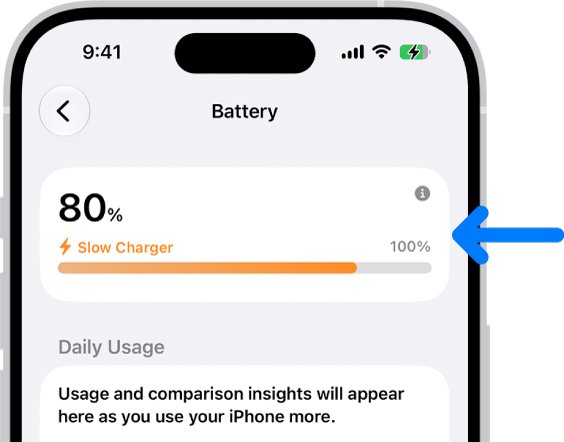
- Look for a Slow Charger message; if it appears, the connected charger cannot deliver the power the iPhone supports.
- Note the battery percentage, wait 20 minutes on a 40W wired charger, and check how much it rose from a low starting level.
- Expect the rate to slow after about 80%; iPhone switches to trickle charging there to protect the battery.
Set a charge limit on iPhone 17 Pro Max
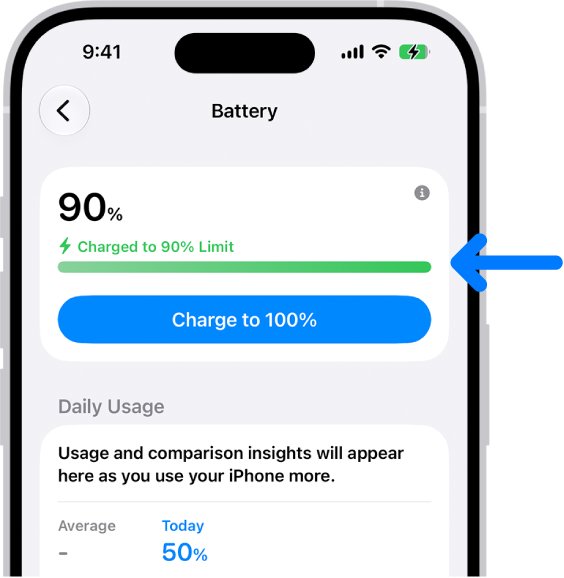
A fast charger does not harm the battery, but long periods at 100% add wear. iPhone 15 and later models, including iPhone 17 Pro Max, can stop charging at a level you choose.
- Open Settings on the iPhone.
- Tap Battery, then tap Charging.
- Choose a limit, such as 80%.
- Turn Optimized Battery Charging on if you charge overnight on a regular schedule.
- To fill up before a trip, go to Settings > Battery and tap Charge to 100%.
With a limit set, iPhone still charges to 100% occasionally to keep the battery percentage accurate.
iPhone 17 Pro Max charging slowly or not charging: fixes
"Slow Charger" appears in Settings > Battery
The adapter, cable or wireless pad cannot deliver the power iPhone 17 Pro Max supports.
- Check the adapter wattage; replace any 5W, 7.5W or USB-A adapter with a USB-C PD adapter of 40W or more.
- For MagSafe, move the charger to a USB-C adapter of 30W or more.
- Swap the cable for the original USB-C Charge Cable to rule out a damaged one.
- On a multi-port charger, unplug other devices so the iPhone port gets full power.
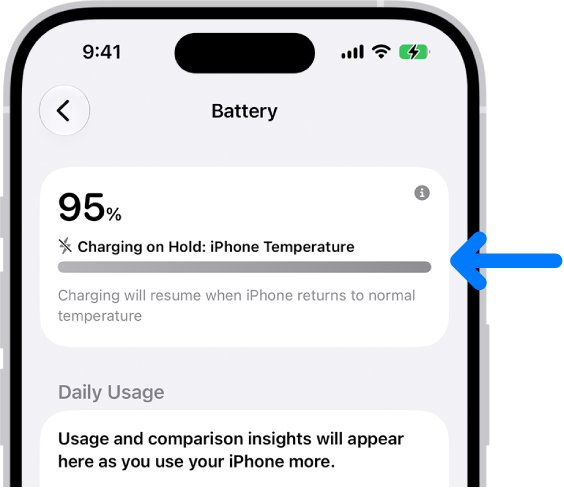
"Charging On Hold" on the Lock Screen
The iPhone is too hot or too cold, so iOS pauses charging to protect the battery.
- Move the iPhone out of direct sunlight or a hot car.
- Remove the case if the phone heats up while charging.
- Charge in a room between 32° and 95° F (0° and 35° C).
- Wait; charging resumes automatically when the battery returns to a normal temperature.
Charging stops at 80%
A charge limit or Optimized Battery Charging is holding the battery at 80%.
- Open Settings > Battery and tap Resume Charging or Charge to 100%.
- To change the limit permanently, tap Charging and pick a new percentage.
- Choose Set Limit to 100% if you want no limit.
Charging from a computer drains the battery instead
The computer is off or asleep, or the port supplies too little power.
- Turn the computer on and keep it awake while charging.
- Use a USB-C port on the computer itself, not a keyboard or unpowered hub.
- Switch to a wall adapter for faster charging.
iPhone does not charge at all
A very drained battery, liquid in the port or a faulty accessory.
- Leave the iPhone on the charger; the screen can stay blank for up to 2 minutes, and it may need up to 10 minutes before it is usable.
- If you suspect liquid in the USB-C port, unplug the cable and let the phone dry before charging.
- Try a different outlet, adapter and cable.
- Work through the full checklist to fix an iPhone that will not charge if the problem continues.
iPhone 17 Pro Max charger FAQ
What charger type does iPhone 17 Pro Max use?
iPhone 17 Pro Max uses a USB-C connector. Any USB-C power adapter works with the included USB-C Charge Cable, and the phone also charges wirelessly on MagSafe, Qi2 and Qi chargers. Lightning cables do not fit.
Does iPhone 17 Pro Max come with a charger?
No. The box includes a 1 m USB-C Charge Cable that supports fast charging, but no power adapter. Apple encourages using any compatible USB-C adapter you already own, or buying one separately.
What is the recommended charger for iPhone 17 Pro Max?
Apple recommends a 40W or higher USB-C adapter for wired fast charging, such as its 40W Dynamic Power Adapter with 60W Max. A comparable third-party adapter that supports USB-PD at the same wattage is acceptable.
What is the best fast charger for iPhone 17 Pro Max?
Any USB-C PD adapter rated 40W or higher, used with a USB-C cable, gives the fastest speed. Apple rates it at up to 50% in about 20 minutes from a drained battery.
What is the best MagSafe charger for iPhone 17 Pro Max?
Apple's current MagSafe Charger, in the 1 m ($39) or 2 m ($49) length, paired with a 30W or higher USB-C adapter. That combination reaches 25W and up to 50% in about 30 minutes.
What is the best wireless charger for iPhone 17 Pro Max?
Choose a MagSafe or Qi2-certified charger that lists 25W iPhone output, with the adapter its maker specifies. Plain Qi pads also work, but chargers under 10W charge noticeably slower.
Can I use a 60W or 100W charger on iPhone 17 Pro Max?
Yes, if it is a USB-C PD adapter. Apple rates fast charging with a 40W adapter or higher, and its own tests used the 40W Dynamic Power Adapter with 60W Max.
Can I use my old 20W iPhone charger with iPhone 17 Pro Max?
Yes. A 20W USB-C adapter charges the phone safely, but more slowly than a 40W adapter, and it cannot drive a MagSafe Charger at the full 25W.
Does an original Apple charger matter for iPhone 17 Pro Max?
No. Apple says third-party adapters and Qi-certified chargers are fine when they meet applicable safety standards. For wired fast charging, a third-party adapter must support USB-PD at 40W or more.
How much is an iPhone 17 Pro Max charger?
Apple's MagSafe Charger costs $39 for the 1 m version and $49 for the 2 m version in the US. Wall adapter prices vary by wattage and brand, so compare listings for 40W USB-PD models.
Bottom line: which iPhone 17 Pro Max charger to buy
Buy a 40W or higher USB-C PD wall adapter for the included cable, and add a MagSafe Charger on a 30W adapter only if you want cable-free charging at a desk or bedside. The 40W wired setup is the fastest route Apple rates for iPhone 17 Pro Max, and a 40W adapter can also power a MagSafe Charger at its full 25W, so one adapter covers both.


![Troubleshooting headphone detection on Windows 11, 10 [Step-by-step]](https://techdows.com/wp-content/uploads/2026/10/Troubleshooting-Headphone-Detection-on-Windows-11-10-Step-By-Step-500x338.jpg)