Download PHP 8.4.27 for Windows from the official php.net downloads page, where the Windows tab now lists four 8.4.27 zip builds published on 21 October 2026.
PHP 8.4.27 is a security release that fixes two critical remote code execution flaws, CVE-2026-109618 and CVE-2026-109619, so every PHP 8.4 install serving web requests should move to it now. This guide covers which build to pick, how to check the file, how to upgrade, and every change in the release. Other branches are in our PHP update guide.
PHP 8.4.27 download for Windows
The PHP project publishes Windows binaries on its own downloads page. Use only that page, not a mirror or a download portal.
- Open the official page at https://www.php.net/downloads.php?os=windows&version=8.4.
- Confirm the heading reads PHP 8.4 (8.4.27).
- Find the build that matches your setup, for example VS17 x64 Non Thread Safe or VS17 x64 Thread Safe.
- Click Zip under that build to download the PHP 8.4.27 archive.
- Copy the SHA256 value shown under the Zip link so you can check the file after it downloads.
All four Windows builds on the page carry the build stamp 2026-Oct-21 13:48:34 UTC. The older PHP 8.4.26 builds are no longer the ones listed for 8.4. If you are new to PHP on Windows, the general PHP download for Windows 11 and 10 post explains the basics.
Which PHP 8.4.27 build: x64, x86, TS or NTS
php.net recommends x64 builds, because almost all current Windows installations support x64. The thread-safety choice depends on how your web server loads PHP.
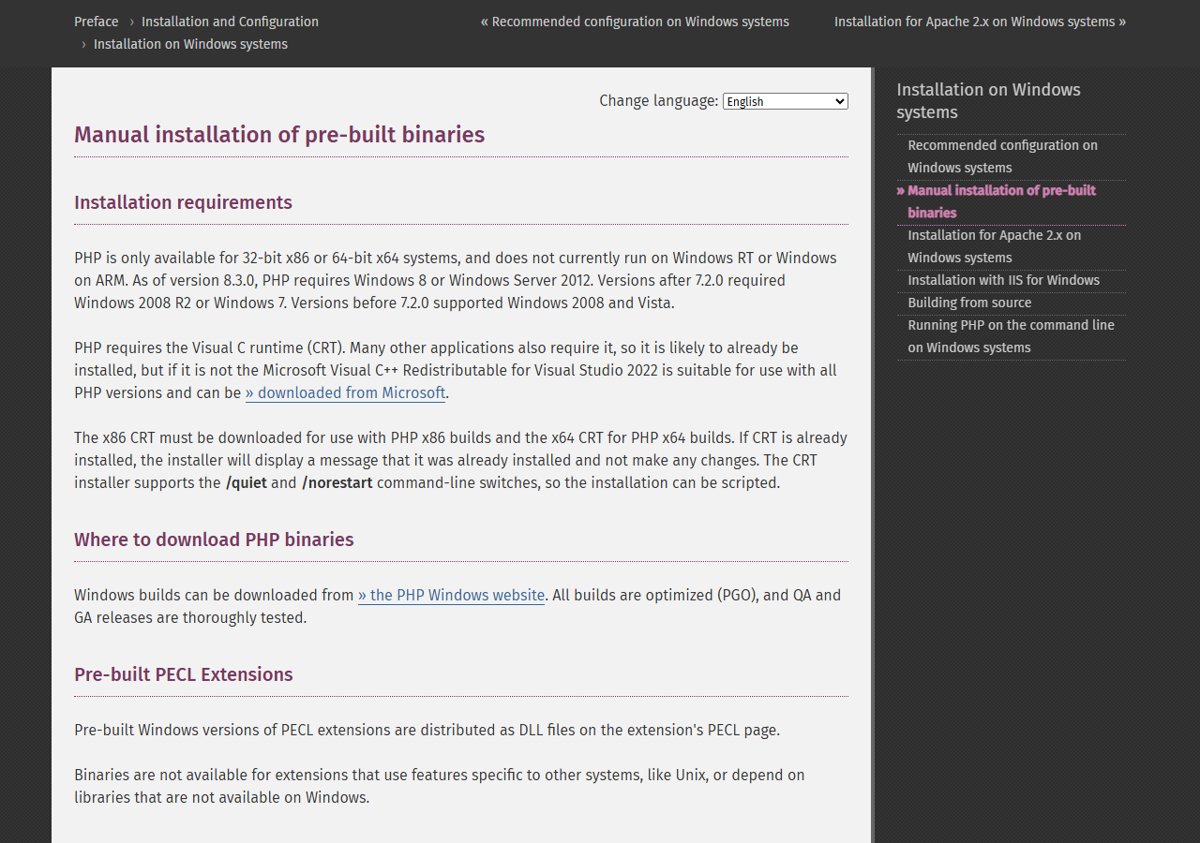
All four builds are compiled with Visual Studio 2022 (VS17) and need the Visual C++ Redistributable for Visual Studio 2015-2022 in the matching x64 or x86 flavour.
| Your setup | Download this build | Zip size | Why |
|---|---|---|---|
| IIS with FastCGI, PHP-FPM style FastCGI servers, or the command line on 64-bit Windows | VS17 x64 Non Thread Safe | 33.66 MB | NTS builds are for single-threaded use such as FastCGI and the CLI |
| Apache HTTP Server loading PHP as a module (mod_php) on 64-bit Windows | VS17 x64 Thread Safe | 33.82 MB | TS builds support multithreaded SAPIs and are meant for PHP loaded as a web server module |
| FastCGI or CLI on a 32-bit Windows system | VS17 x86 Non Thread Safe | 30.31 MB | x86 builds are for 32-bit systems |
| Apache module on a 32-bit Windows system | VS17 x86 Thread Safe | 30.39 MB | Thread-safe build for 32-bit Apache |
Each build also offers a Debug Pack (about 40.7 to 41.4 MB) and a Development package (SDK to develop PHP extensions) of 1.36 MB. Most people need only the zip.
PHP for Windows runs on 32-bit x86 or 64-bit x64 systems only. It does not run on Windows RT or Windows on ARM, and PHP 8.3 and later require Windows 8 or Windows Server 2012 or newer.
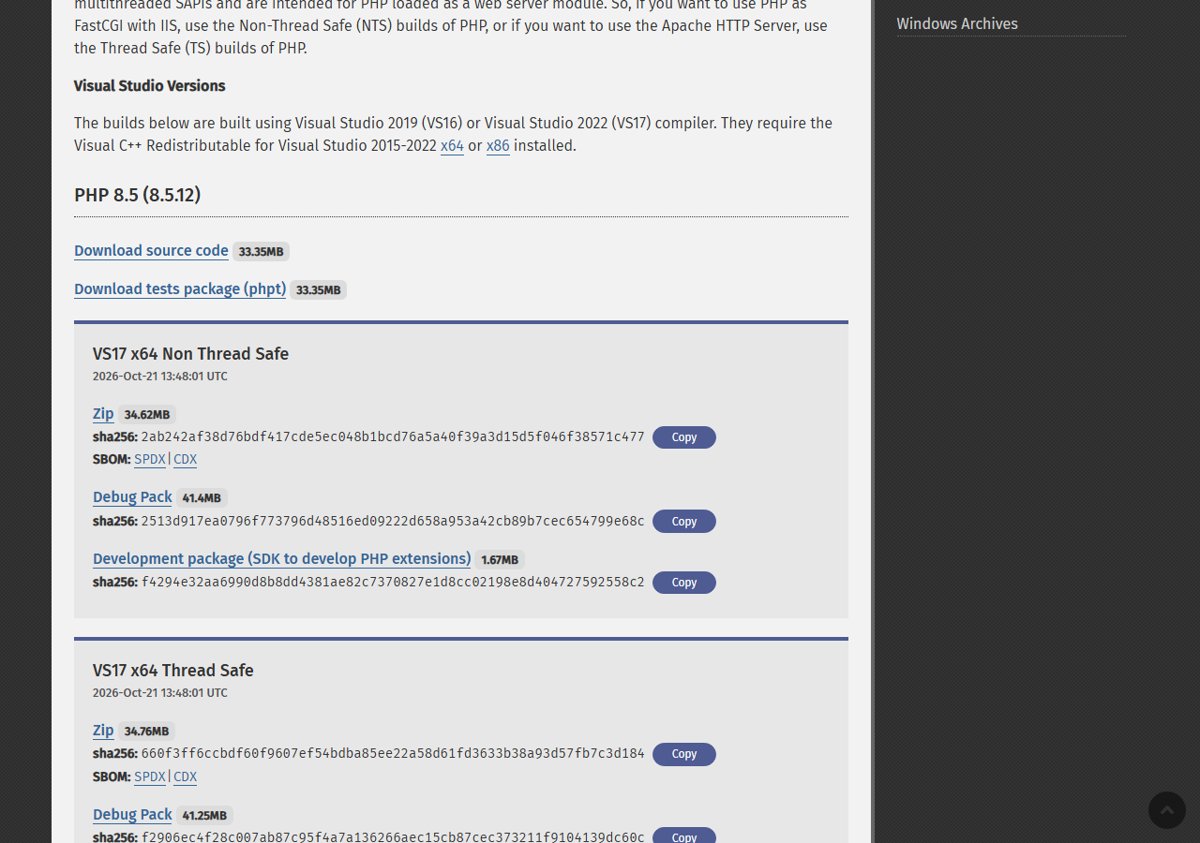
PHP 8.4.27 Windows zip SHA256 checksums
These are the SHA256 values php.net lists for the 8.4.27 Windows zips. A match proves the file you downloaded is the one the PHP project published.
| PHP 8.4.27 build | Zip SHA256 |
|---|---|
| VS17 x64 Non Thread Safe | 93bd8a815a52156606fb906d0573437908c61f96e2cc52c03a51e36a41bf5236 |
| VS17 x64 Thread Safe | 7902fe891ff4b035d431fd429a2ec1df193ba1f6fedba425d861790465c64e6b |
| VS17 x86 Non Thread Safe | c9f9b497458540622f443751dc553fbbd6e2974a005bb17a08ccfdcca2994d0d |
| VS17 x86 Thread Safe | b1f02421a1f92e65930cdf6d5819138cd4ceb120740ef05968387fe72a3c6bda |
Check the PHP 8.4.27 zip hash in PowerShell
Run this in PowerShell from the folder that holds the downloaded zip. Replace the file name with the exact name of your download.
Get-FileHash .\<your-php-8.4.27-zip-file>.zip -Algorithm SHA256Get-FileHash computes the file's hash, and -Algorithm SHA256 selects the same algorithm php.net uses for its published values.
You should see: The Hash column matches the value listed under your build's Zip link on php.net, ignoring letter case.
PHP 8.4.27 source code download
Linux, macOS and Windows users who compile PHP themselves take the source archive from the same page. The PHP 8.4 section lists Download source code at 31.18 MB, plus a tests package (phpt).
- Open https://www.php.net/downloads.php and choose your operating system.
- Select version 8.4 and confirm the heading shows PHP 8.4 (8.4.27).
- Click Download source code for the 8.4.27 tarball.
- Use Source Tarballs at the bottom of the page if you need a specific archive format or signature files.
- Build and install as you normally do, then restart every PHP worker.
If you run PHP 8.1 or older, the PHP project no longer ships updates for it. For 7.4, 8.0 and 8.1 the security team provided minimal source backports of these two fixes for people who build from source.
Install or upgrade to PHP 8.4.27
PHP for Windows ships as a zip with no installer, so an upgrade means swapping the PHP folder and restarting whatever runs it. Keep your old folder until 8.4.27 is confirmed working.
- Install or confirm the Microsoft Visual C++ Redistributable for Visual Studio 2015-2022 that matches your build (x64 or x86).
- Stop the service that runs PHP: Apache, IIS, or your FastCGI process.
- Rename your current PHP folder, for example to
php-8.4.26-old, as a rollback copy. - Extract the PHP 8.4.27 zip into a folder with the original name, so paths in your server configuration still point at it.
- Copy your
php.inifrom the old folder into the new one. - Copy any extra extension DLLs you added yourself into the new
extfolder, using builds made for PHP 8.4 and the same TS or NTS type. - Start the web server or FastCGI service again so every worker loads 8.4.27.
On Linux, take the update from your distribution: run your package manager's normal update (for example sudo apt update then sudo apt upgrade, or sudo dnf upgrade). Distributions and LTS vendors received the patches in advance, so check your vendor's security notice for the fixed package version. The step-by-step PHP update guide for Windows, Linux and XAMPP covers every platform.
php.net warns users of the volunteer-run rpms.remirepo.net repository that it will not have updates on release day, and advises switching to distribution packages or building from source.
How to check PHP 8.4.27 is installed
- Open Command Prompt or PowerShell.
- Run
php -vusing the full path to the new folder if PHP is not on your PATH. - Confirm the first line starts with PHP 8.4.27.
- For the web server, open a page that calls
phpinfo()and confirm the version at the top reads 8.4.27. - Delete that
phpinfo()page afterwards, because it exposes your configuration to anyone who loads it.
If the command line shows 8.4.27 but the web page still shows 8.4.26, the server is still running old workers. Restart the service, not just the site.
PHP 8.4.27 security fixes
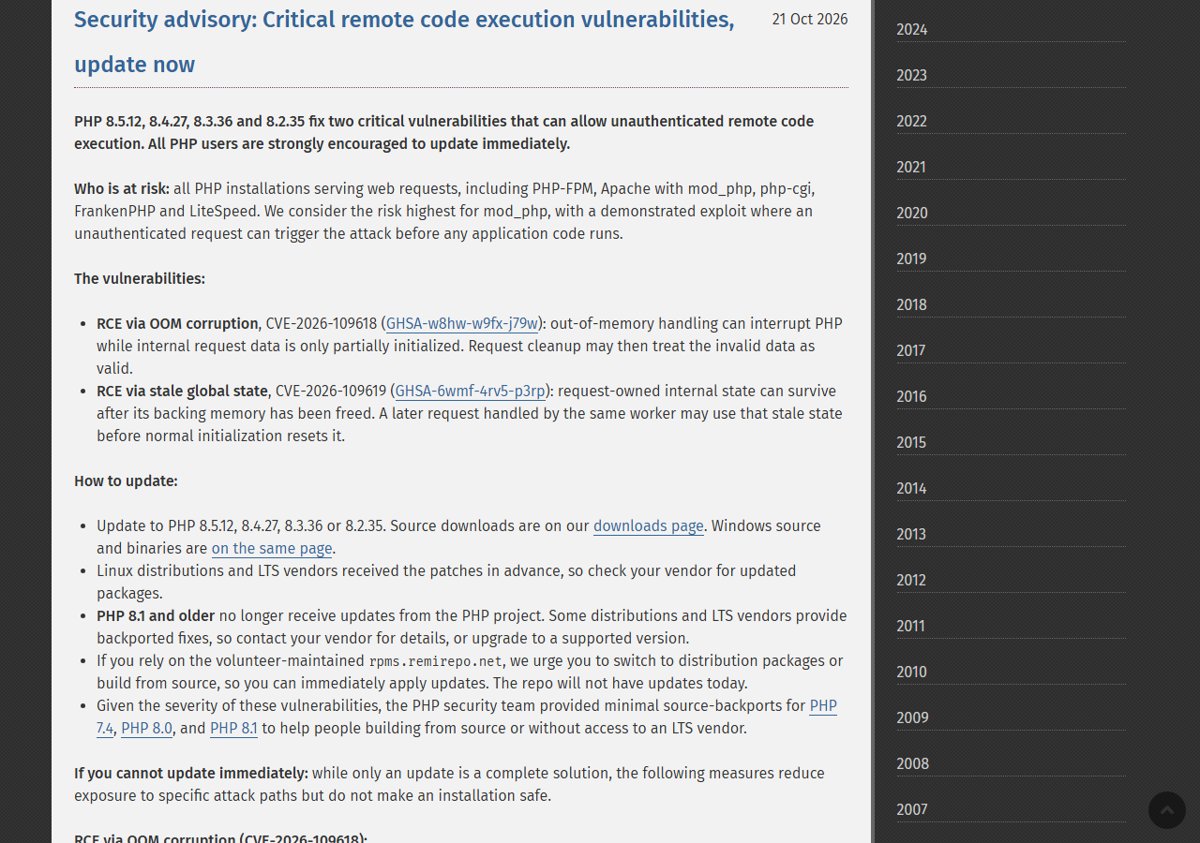
php.net rates both flaws critical and states they can allow unauthenticated remote code execution. The PHP 8.4.27 changelog lists them under Core as "Avoid state corruption via bailout".
| CVE | Advisory ID | Type | What goes wrong |
|---|---|---|---|
| CVE-2026-109618 | GHSA-w8hw-w9fx-j79w | RCE via OOM corruption | Out-of-memory handling can interrupt PHP while internal request data is only partially initialized, and request cleanup may then treat the invalid data as valid. |
| CVE-2026-109619 | GHSA-6wmf-4rv5-p3rp | RCE via stale global state | Request-owned internal state can survive after its memory is freed, and a later request on the same worker may use that stale state before normal initialization resets it. |
Every PHP installation that serves web requests is at risk, including PHP-FPM, Apache with mod_php, php-cgi, FrankenPHP and LiteSpeed. php.net considers mod_php the highest risk, with a demonstrated exploit that runs before any application code. The advance notice published on 20 October rated both flaws CVSS v4.0 9.2.
The same fixes ship in PHP 8.5.12, 8.3.36 and 8.2.35. The PHP critical RCE security update report covers the advisory in full, and there are partial mitigations if you cannot update yet. php.net is clear that only updating is a complete fix.
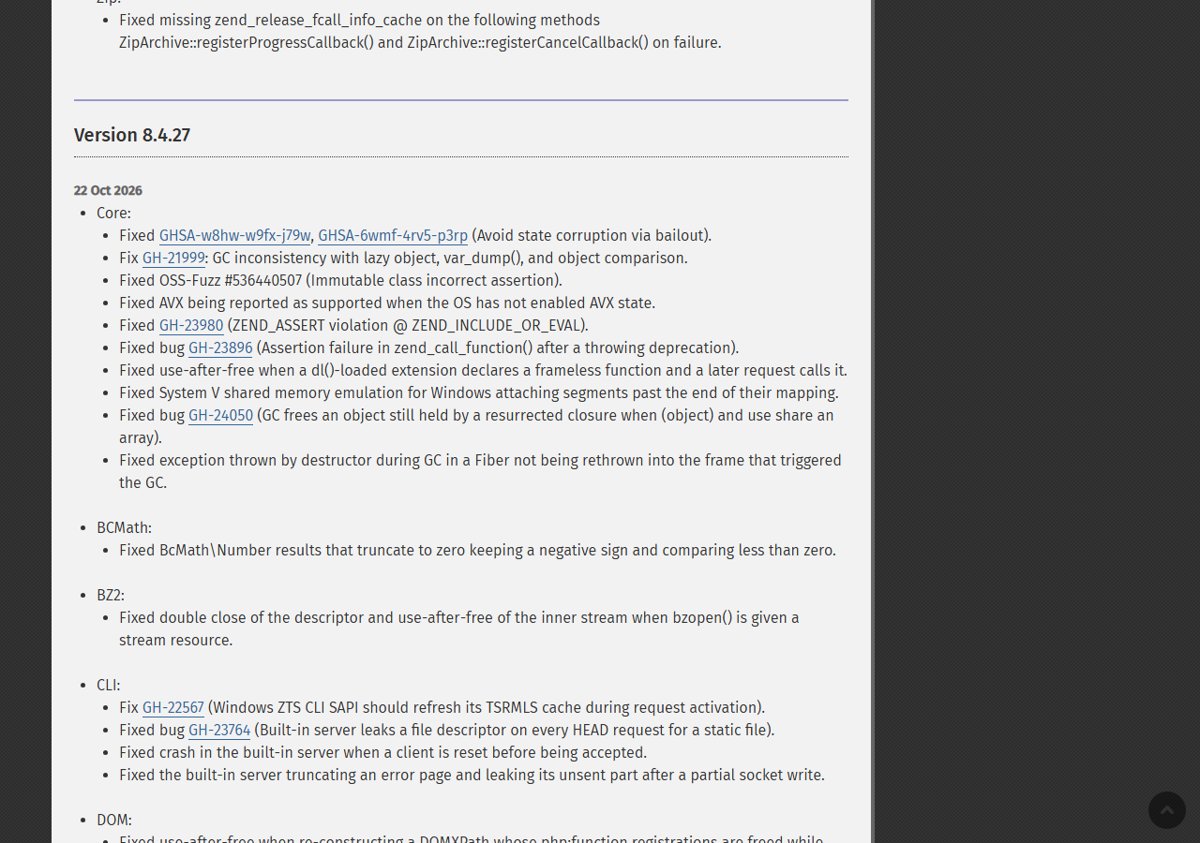
Full PHP 8.4.27 changelog
Beyond the two CVEs, PHP 8.4.27 carries a long list of bug fixes. This table groups every ChangeLog entry by extension.
| Area | Fixes in PHP 8.4.27 |
|---|---|
| Core | GHSA-w8hw-w9fx-j79w and GHSA-6wmf-4rv5-p3rp (state corruption via bailout); GH-21999 GC inconsistency with lazy objects, var_dump() and comparison; OSS-Fuzz #536440507 immutable class assertion; AVX reported as supported when the OS has not enabled AVX state; GH-23980 ZEND_ASSERT in ZEND_INCLUDE_OR_EVAL; GH-23896 assertion in zend_call_function() after a throwing deprecation; use-after-free with dl()-loaded frameless functions; Windows System V shared memory emulation attaching segments past their mapping; GH-24050 GC freeing an object held by a resurrected closure; destructor exceptions during GC in a Fiber not rethrown |
| BCMath | BcMath\Number results that truncate to zero keeping a negative sign |
| BZ2 | Double close and use-after-free when bzopen() gets a stream resource |
| CLI | GH-22567 Windows ZTS CLI TSRMLS cache refresh; GH-23764 built-in server leaking a descriptor on HEAD requests; built-in server crash on client reset; truncated error pages after partial writes |
| DOM | DOMXPath use-after-free fixes (including GH-23729); GH-23365 insertBefore($n, $n) dropping the node; Dom\HTMLDocument::getElementById() missing SVG and MathML ids; attribute namespace bug with xlink, xml or xmlns fragments; GH-23897 php:function() assertion; XPath losing context node after nested evaluation |
| FFI | Crashes with callbacks built from __call() trampolines and released array callables |
| FTP | GH-23619 cryptic error on servers without TLS session resumption on the data connection |
| GD | Undefined behaviour with GD2 images using INT_MAX-sized chunks and with bad GIF LZW data |
| Intl | IntlDateFormatter offset handling; cloning IntlDateFormatter and MessageFormatter losing state; unconstructed Collator checks; several grapheme_strstr(), grapheme_strpos() and grapheme_strrpos() result fixes |
| Lexbor | Upstream patches for a heap buffer overflow in :lexbor-contains() parsing and buffer overflows in malformed decode replay |
| MBString | GH-23106 mb_strpos() over-read on truncated UTF-8; surrogates emitted in UTF-8 output |
| MySQLi and MySQLnd | GH-22854 assertion after failed reconnection; field_count not reset on OK packet; leak when closing a statement after its connection was killed |
| Opcache | OSS-Fuzz heap overflow in the optimizer; GH-23693 tracing JIT wrong results; uninitialized read in is_cacheable_stream_path(); call_stack overrun; GH-23637 PHP-FPM worker SIGSEGV; unsound escape analysis DCE; GH-24063 -0.0 folding; file cache crash with frameless functions; GH-23991 invalid JIT IR; SCCP isset()/empty() fix |
| OpenSSL | Socket left non-blocking after a handshake timeout; feof() staying false after close_notify on Windows |
| PCNTL | Dropped signals in pcntl_signal_dispatch(); pcntl_setcpuaffinity() message; optional pcntl_setqos_class() argument; GH-23986 /proc/self after pcntl_fork() |
| PDO and drivers | getColumnMeta() out-of-bounds read; bindColumn(), execute(), setAttribute() and setFetchMode() fixes; use-after-free from __toString() during execute(); GH-23962 persistent PDO rollback; leak fixes; GH-23741 PDO_DBLIB segfault; GH-23758 PDO_Firebird empty BLOBs returning null |
| Readline | Heap over-read when cli.prompt is an empty string |
| Session | session_start() continuing after a failed create_sid() under session.use_strict_mode; create_sid() exceptions being replaced |
| SimpleXML, SOAP, Sockets | SimpleXMLElement child freed while referenced; GH-22895 SOAP use-after-free and load_wsdl_ex() leak; socket_select() truncating large sets on Windows |
| SPL and SQLite | SplFixedArray::setSize() on subclasses and a destructor leak; crash when SQLite3::close() runs from a callback |
| Standard | sha1_file() after read failure; iptcembed() JPEG corruption; proc_open() descriptor leak and three Windows-only proc_open() defects; persistent stream context lifetime; wordwrap() trailing break; quoted-printable lowercase hex decoding |
| Tidy, XSL, Zip | tidyNode use-after-free after reparse; GH-23730 XSLTProcessor use-after-free; ZipArchive::extractTo() ignoring non-list arrays; GH-23747 ZipArchive::close() use-after-free |
The complete wording of each entry is in the official PHP 8 ChangeLog at php.net/ChangeLog-8.php under Version 8.4.27.
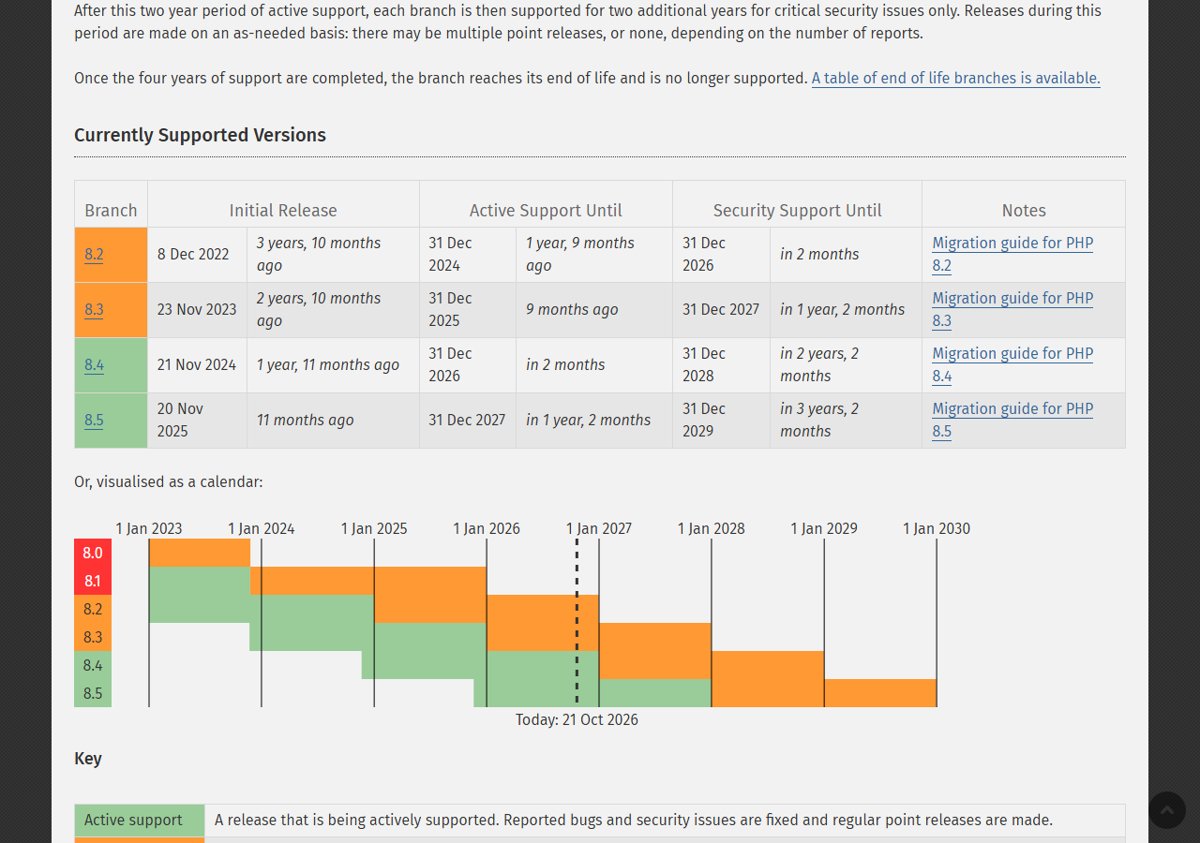
PHP 8.4 support dates
PHP 8.4 was released on 21 November 2024. Its active support ends on 31 December 2026, after which it receives security fixes only until 31 December 2028.
| Branch | Fixed release | Active support until | Security support until |
|---|---|---|---|
| PHP 8.5 | 8.5.12 | 31 Dec 2027 | 31 Dec 2029 |
| PHP 8.4 | 8.4.27 | 31 Dec 2026 | 31 Dec 2028 |
| PHP 8.3 | 8.3.36 | 31 Dec 2025 (ended) | 31 Dec 2027 |
| PHP 8.2 | 8.2.35 | 31 Dec 2024 (ended) | 31 Dec 2026 |
Staying on PHP 8.4 is safe for now, since it gets security releases for two more years. If you are still on 8.2, the PHP 8.3.36 and 8.2.35 downloads close this hole, but 8.2 reaches end of life on 31 December 2026.
PHP 8.4.27 upgrade problems on Windows
The web server still reports PHP 8.4.26 after the upgrade
Running workers keep the old binaries loaded until the service restarts.
- Stop Apache, IIS or the FastCGI service completely.
- Confirm the server configuration points at the folder that holds 8.4.27.
- Start the service and reload your
phpinfo()check page.
PHP 8.4.27 will not start and complains about a missing runtime DLL
The Visual C++ runtime for your build's architecture is missing.
- Check whether you downloaded the x64 or x86 build.
- Install the Microsoft Visual C++ Redistributable for Visual Studio 2015-2022 with the same architecture.
- Start PHP again.
Apache fails to load the PHP 8.4.27 module
An NTS build was installed where Apache's mod_php needs the Thread Safe build.
- Download the VS17 x64 Thread Safe zip instead.
- Replace the PHP folder contents with it.
- Restart Apache.
An extension fails to load after moving to PHP 8.4.27
A third-party DLL was built for a different PHP branch or thread-safety type.
- Find the extension's PHP 8.4 build with the same TS or NTS type on its official PECL page.
- Replace the DLL in the
extfolder. - Restart the web server.
PHP 8.4.27 download FAQ
Where can I download PHP 8.4.27 for Windows?
Download it from https://www.php.net/downloads.php with the Windows tab and version 8.4 selected. The page lists four PHP 8.4.27 zips: x64 and x86, each in Thread Safe and Non Thread Safe builds, all compiled with Visual Studio 2022 (VS17).
Is PHP 8.4.27 a security release?
Yes. PHP 8.4.27 fixes two critical vulnerabilities, CVE-2026-109618 and CVE-2026-109619, which can allow unauthenticated remote code execution. php.net strongly encourages every PHP 8.4 user to update immediately and says there are no complete mitigations.
When was PHP 8.4.27 released?
php.net announced PHP 8.4.27 on 21 October 2026, alongside PHP 8.5.12, 8.3.36 and 8.2.35. The Windows builds on the downloads page carry a build stamp of 2026-Oct-21 13:48:34 UTC.
Should I download the Thread Safe or Non Thread Safe PHP 8.4.27 build?
Choose Thread Safe if Apache loads PHP as a module. Choose Non Thread Safe for IIS with FastCGI, other FastCGI servers and command-line use. php.net also recommends the x64 build for almost every current Windows PC.
Do I need Visual C++ for PHP 8.4.27 on Windows?
Yes. The PHP 8.4.27 Windows builds need the Visual C++ Redistributable for Visual Studio 2015-2022. Install the x64 version for x64 PHP builds and the x86 version for x86 builds.
Does PHP 8.4.27 run on Windows on ARM?
No. The PHP manual states PHP for Windows runs only on 32-bit x86 or 64-bit x64 systems and does not currently run on Windows RT or Windows on ARM.
How long is PHP 8.4 supported?
PHP 8.4 gets active support until 31 December 2026 and security fixes until 31 December 2028, according to php.net's supported versions page.
Can I upgrade from PHP 8.4.26 to 8.4.27 without changing my code?
PHP 8.4.27 is a patch release in the same 8.4 branch, made of security and bug fixes rather than new features. Keep your php.ini and PHP 8.4 extension DLLs, swap the PHP folder, and restart the web server.
Bottom line: should you install PHP 8.4.27 now?
Yes. Install PHP 8.4.27 today on every PHP 8.4 system that serves web requests, starting with Apache mod_php servers. It closes two critical unauthenticated remote code execution flaws that php.net says no configuration change fully mitigates, and as a patch release in the 8.4 branch it is a drop-in folder swap on Windows.