To find a lost cell phone, sign in at google.com/android/find for an Android phone or icloud.com/find for an iPhone, and the map shows where it is. Both services are free, and both can ring, lock or erase the phone from any browser.
The 5 ways below cover Android and iPhone tracking, ringing a phone that is nearby, searching from a friend's device, and what to do with the IMEI when the phone is gone for good.
Way 1: Track a lost Android phone with Google Find Hub
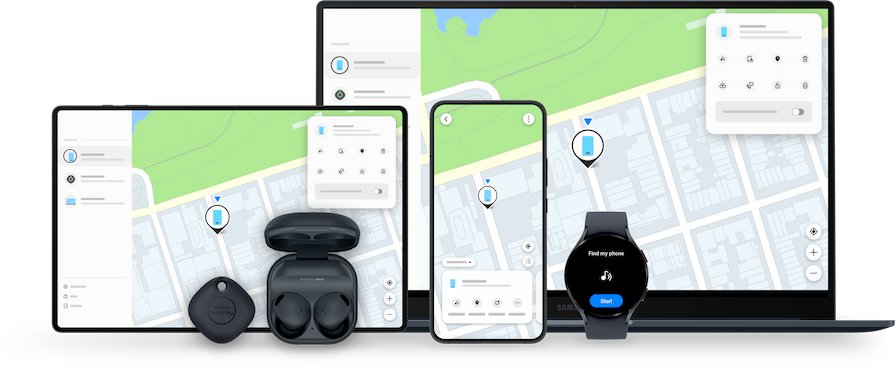
Find Hub, previously called Find My Device, locates any Android phone signed in to a Google Account, including Samsung Galaxy phones. Use the Find Hub app on another Android device or the website on any computer.
- Go to google.com/android/find in a browser, or open the Find Hub app on another Android phone or tablet.
- Sign in with the Google Account on the lost phone. In the app, tap Continue as [your name].
- Select the lost phone from the list. The phone gets a notification.
- Enter the phone's lock screen PIN if Find Hub asks for it.
- Check the map for the phone's estimated location, then select Get directions to go there.
- Within about 10 meters, use Find nearby to close in on it.
If the phone's current location cannot be found, Find Hub may still show its last known location. A phone with a PIN, pattern or password set can also be found through the Find Hub network, a crowdsourced network of Android devices.
Samsung Galaxy owners also have a manufacturer-specific tool, Samsung's SmartThings Find site at smartthingsfind.samsung.com, which needs a Samsung account. Find Hub works on Galaxy phones either way.
Things you should know before tracking a lost phone
Tracking only works if the phone was set up for it before it went missing. Check which of these applies to your phone.
| Question | Android (Find Hub) | iPhone (Find My) |
|---|---|---|
| What you sign in with | The Google Account email and password used on the phone | The Apple Account email and password used on the phone |
| Must be on beforehand | Find Hub and Location | Find My iPhone |
| To lock or erase, the phone needs | Power, mobile data or Wi-Fi, and Find Hub turned on | Find My turned on; an erase waits until the phone next connects |
| If the phone is off or offline | Last known location, if available, plus the Find Hub network | Last known location for up to 24 hours on iCloud.com, or up to 7 days with the Find My network |
| Cost | Free | Free |
| Tracks by phone number or IMEI | No; it locates by Google Account | No; it locates by Apple Account |
Apple warns that it never contacts you to say your device has been found. Never share your passcode, password or verification codes with anyone who asks.
Way 2: Find a lost iPhone with Find My
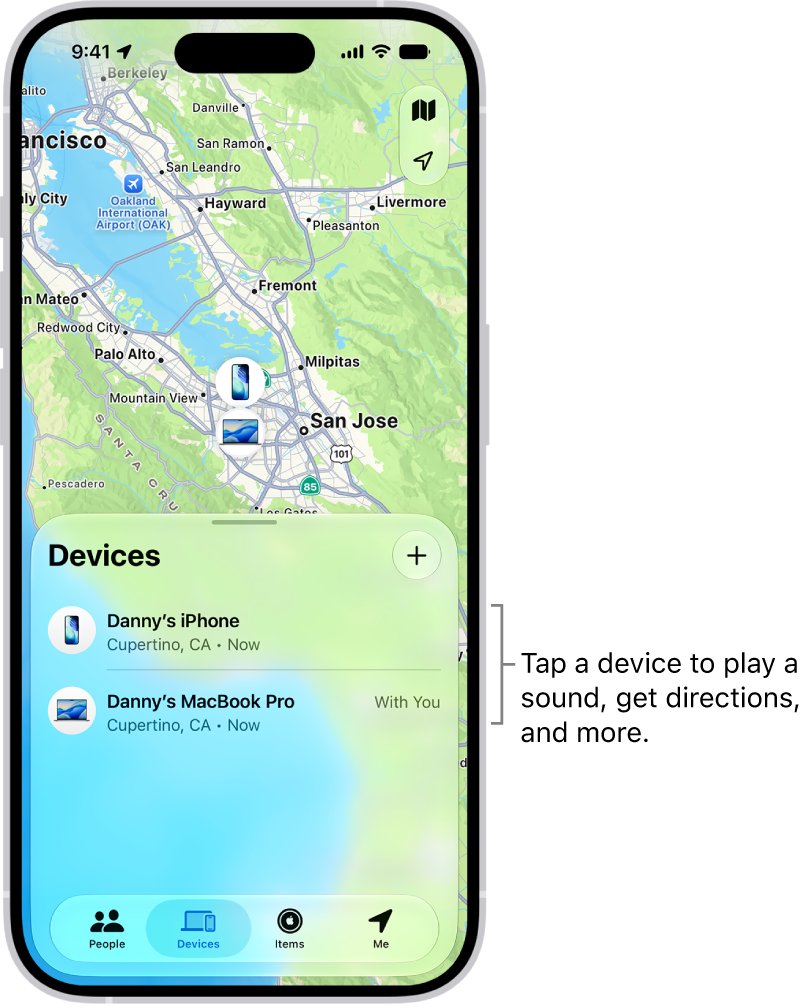
Use the Find My app on another Apple device signed in to your Apple Account, or Find Devices on iCloud.com from any computer or phone. The same steps track a lost iPad, which appears in the same device list.
- Go to icloud.com/find and sign in to your Apple Account. If you are asked for a verification code you cannot receive, select the Find Devices button instead.
- Select your iPhone in the All Devices list.
- Check the map. If it shows Offline, select Notify me when found to get an email when it reconnects.
- On another Apple device, open Find My, tap Devices, tap your iPhone, then tap Directions to open Maps.
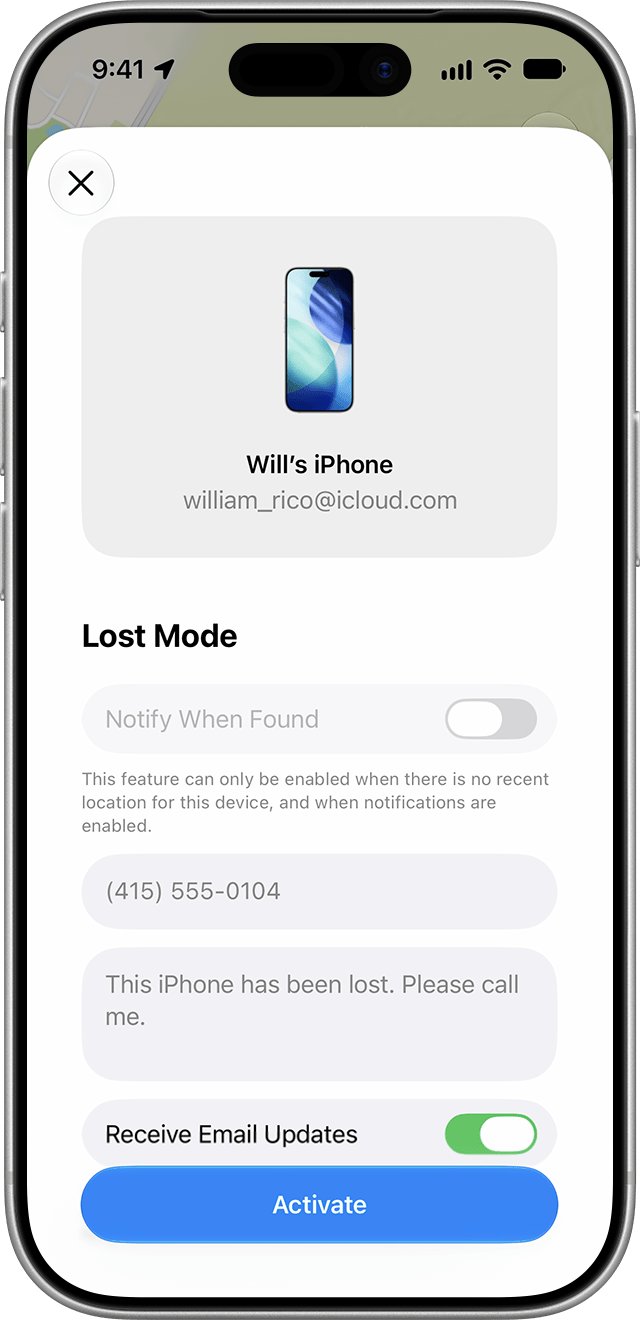
- If you think it is lost rather than nearby, tap Activate under Mark As Lost to lock it with your passcode and show a contact message.
Lost Mode also suspends Apple Pay cards and passes on the phone. With Stolen Device Protection on, Face ID or Touch ID is needed to turn Lost Mode off, even if someone knows your passcode.
Way 3: Ring a lost phone to find it nearby
When the map shows the phone at home, in the car or at work, make it ring. Both services ring the phone even when it is set to silent.
| Phone | How to ring it | What happens |
|---|---|---|
| Android | In Find Hub, select the phone, then Play sound | Rings at full volume for 5 minutes, even on silent or vibrate |
| iPhone | In Find My, tap Devices, tap the iPhone, then tap Play | Sound builds in volume and plays for about two minutes; a confirmation email is sent |
| iPhone that is offline | Tap Play anyway | Shows Sound Pending and plays the next time the iPhone connects to Wi-Fi or cellular |
| Any cell phone that is on | Call your number from another phone | Works with no app, but not if the phone is muted |
On Android, wireless headphones still connected to the phone must be on, and earbuds out of their case, for the Find Hub sound to be heard. On an iPhone, press a side button or the Ring/Silent switch to stop the sound.
Way 4: Find a lost phone using a friend's phone or computer
You do not need a second device of your own. Both services let you sign in on someone else's phone or any computer.
- For an Android phone, open the Find Hub app on a friend's Android phone and tap Sign in as guest, then sign in with your Google Account.
- For an iPhone, open icloud.com/find in any browser and sign in with your Apple Account. Friends' devices cannot be added to your list, so sign in yourself.
- If you are in a Family Sharing group, ask a family member to open Find My; your devices appear in their list if you share your location with the family.
- Ring or locate the phone as in Way 1, Way 2 or Way 3.
- Sign out of your account on the borrowed device when you finish.
Way 5: Lock it and report it with the IMEI number
If the phone looks stolen or cannot be reached, protect your data and accounts. Your carrier can use the phone's IMEI to disable it, and the police may ask for the serial number. On an iPhone, you cannot track a stolen iPhone with the IMEI yourself, so start with Find My.
- Lock the phone: in Find Hub, select Mark as lost, then Next, add a contact message and select Mark as lost again. On an iPhone, use Mark As Lost in Find My.
- Find the IMEI without the phone: for Android, look in Find Hub; for an iPhone, sign in at account.apple.com, open Devices and select the phone. The original box also lists it.
- Report the loss to the police and give them the serial number or IMEI.
- Contact your wireless carrier to suspend service, block the phone, and file a claim if your plan covers it.
- If you have AppleCare+ with Theft and Loss, file a claim and keep the iPhone in Find My until it is approved.
- Change your Google Account or Apple Account password, and review the account for changes you did not make.
Do not remove the phone from Find Hub or Find My while a claim is open. You can also sign out of Gmail on other devices from a computer to cut off access to your mail.
What to do if your Android phone is stolen: Remote Lock and Theft Protection
When a phone is stolen rather than misplaced, lock it first and protect your accounts. Android's theft protection features below must be turned on before the theft, except Find Hub's lock, which works whenever Find Hub was on.
| Feature | What it does | How to use it |
|---|---|---|
| Remote Lock | Locks the phone's screen right away using only your phone number | Go to android.com/lock in any browser, enter your phone number and complete the security check |
| Theft Detection Lock | Locks the screen automatically when the phone's sensors detect a common theft motion | Turn it on ahead of time in Theft Protection settings |
| Offline Device Lock | Locks the screen if the phone stays disconnected from the Find Hub network for an extended period | Turn it on ahead of time in Theft Protection settings |
| Secure device / Mark as lost in Find Hub | Locks the phone with your PIN, pattern or password, signs it out of your Google Account and can remove cards from Google Wallet | Select the phone in Find Hub, choose the option and add a contact message for the lock screen |
| Your bank or card company | Freezes or cancels cards linked to Google Wallet | Call them and report the cards on the stolen phone |
After locking it, open your Google Account security settings from another device and review recent activity for sign-ins you do not recognize.
Which way to find a lost phone fits your situation
| Your situation | Use | Why |
|---|---|---|
| Lost Android phone, location unknown | Way 1: Google Find Hub | Shows the map location and last known location |
| Lost iPhone, location unknown | Way 2: Find My or icloud.com/find | Shows the map location, with offline location from the Find My network |
| Phone is somewhere in the house or car | Way 3: Ring it | Plays a sound even on silent |
| You have no other device of your own | Way 4: A friend's phone or computer | Guest sign-in and iCloud.com work on any device |
| Phone is stolen or unreachable | Way 5: Lock, report, block by IMEI | Protects your data and stops the phone being used on the network |
Should you erase a lost phone remotely?
Erase only when you are sure the phone will not come back, after you have tried locating, ringing and Lost Mode. On Android, select the phone in Find Hub, then Settings > Factory reset; on an iPhone, select the phone in Find My or on icloud.com/find and choose the erase option. Erasing cannot be undone. An erased Android phone disappears from Find Hub, so you can no longer track it, though it still needs your Google Account password to be used again. On an iPhone, keep the erased phone in Find My, because removing it turns off Activation Lock and makes it easier to resell.
How to prevent future phone loss: turn on tracking now
To be prepared, turn these settings on before you lose your phone; none of them can be switched on remotely afterwards. Set them on every phone in the household.
| Phone | Setting | Where to find it |
|---|---|---|
| Android | Allow device to be located | Settings > Security > Find Hub |
| Android | Use location | Settings > Location |
| Android | Offline finding: With network in busy places only or With network everywhere | Settings > Google > All Services > Find Hub > Find your offline devices |
| Android | A PIN, pattern or password | Required for help from the Find Hub network |
| iPhone | Find My iPhone | Settings > [your name] > Find My > Find My iPhone |
| iPhone | Find My network | Same screen; finds the iPhone while it is offline |
| iPhone | Send Last Location | Same screen; sends the location to Apple when the battery is low |
To take control of your phone's security beyond tracking, set a strong screen lock with your fingerprint, face or a complex PIN, back up your photos, contacts and data regularly, and on Android move sensitive apps into Private Space, a separate password-protected space on the phone.
Write down your phone's IMEI and serial number now and keep the box. On Android 12 and up, you can also show the IMEI on the lock screen from Security & Privacy > Lost Device Protection > Theft Protection. These numbers help your carrier and the police, but you cannot track a phone by its serial number yourself.
Lost phone location not showing: fixes
Match what the map shows, then follow the steps under it.
Find My shows "No location found" or "Offline"
The iPhone is off, out of battery, or has no connection, and no Find My network location is available.
- Turn on Notify When Found in the Find My app, or Notify me when found on iCloud.com.
- Check the last known location, which iCloud.com shows for up to 24 hours.
- Tap Activate under Mark As Lost so the phone locks as soon as it reconnects.
Find Hub cannot locate the Android phone
The phone has no power or connection, or Find Hub or Location was turned off.
- Check the last known location in Find Hub, if one is shown.
- Try again later; lock and erase need the phone to have power and a connection.
- If the phone never shows up, move to Way 5 and report it with the IMEI.
The phone does not appear in the device list at all
Find Hub or Find My was never turned on, or you signed in with a different account.
- Sign out and sign in with the account that was on the phone.
- If it still is not listed, it cannot be tracked or erased remotely.
- Report it to the police and your carrier, and change your account password.
iCloud.com asks for a verification code sent to the lost iPhone
Two-factor authentication sends codes to your trusted devices, including the missing one.
- Select the Find Devices button on the sign-in screen instead of entering a code.
- Sign in with your Apple Account password to reach the device list.
Track a lost phone FAQ
Can a lost cell phone be tracked?
Yes, if tracking was on before it was lost. Android phones with Find Hub and iPhones with Find My show their location on a map at google.com/android/find or icloud.com/find. If neither was on, the phone cannot be tracked, and reporting it is the remaining option.
How do I track a lost phone for free?
Use Google Find Hub for Android or Apple's Find My for iPhone. Both are free and built into the phone. Sign in to the website with the same account that was on the phone to see its location, ring it, lock it or erase it.
How do I track a lost phone using the IMEI number?
You cannot track a phone's location yourself with the IMEI. Find Hub and Find My locate phones through your account. Give the IMEI to your carrier, which can use it to disable the phone, and to the police with your report.
How do I track a lost phone using the phone number?
Neither Google nor Apple locates a phone by its number. Sign in with the Google Account or Apple Account used on the phone instead. Calling the number only helps when the phone is nearby and not muted.
How do I track a lost phone using email?
Sign in with the phone's account email. For Android, use your Google Account email at google.com/android/find. For an iPhone, use your Apple Account email at icloud.com/find. The map then shows the phone's location.
How do I track a lost Samsung phone?
Use Google Find Hub at google.com/android/find, which works on Samsung Galaxy phones signed in to a Google Account. Samsung also runs its own SmartThings Find site for Galaxy devices signed in to a Samsung account.
How do I track a lost phone using Google?
Go to google.com/android/find and sign in with the Google Account on the lost Android phone. Select the phone to see it on a map, play a sound for 5 minutes, mark it as lost, or factory reset it.
How do I track a lost iPhone?
Sign in at icloud.com/find, or open the Find My app on another Apple device, and select the iPhone. The map shows its location. If it is offline, Find My can show its last location for up to 7 days when the Find My network was on.
Can I track a lost phone using the serial number?
No. A serial number does not locate a phone. Police may ask for it when you report a loss. Find an iPhone's serial number at account.apple.com under Devices, or on the original box.
Can I track a lost phone if it is turned off?
Sometimes. Find My shows an iPhone's location through the Find My network while it is offline, if that setting was on. Find Hub can show an Android phone's last known location and use the Find Hub network for phones with a screen lock.
Best first step when your phone is lost
Open google.com/android/find or icloud.com/find on any device right away, ring the phone if it is close, and mark it as lost if it is not. The sooner you look, the more likely the phone still has battery and a connection, which locking and ringing need. If it never appears, switch to reporting it with the IMEI and changing your account password.