The Apple iPhone XS Max is the 6.5-inch iPhone Apple introduced in 2018, with an A12 Bionic chip, dual 12MP rear cameras, Face ID and IP68 water resistance.
This page lists its official specs, the software it still gets, what it lacks against newer iPhones and how to check a used one before you pay.
iPhone XS Max at a glance
Every figure below comes from Apple's own tech specs and model identification pages. Use the right-hand column to decide whether a spec matters for how you plan to use the phone.
| Spec | iPhone XS Max | What it means for you |
|---|---|---|
| Year introduced | 2018 | The phone is about eight years old in 2026 |
| Display | 6.5-inch Super Retina HD OLED, 2688 x 1242 at 458 ppi | Same 6.46-inch measured size as the iPhone 11 Pro Max |
| Chip | A12 Bionic with next-generation Neural Engine | Runs iOS 18, but not iOS 26 or iOS 27 |
| Storage | 64GB, 256GB or 512GB | About 10GB to 12GB is taken by iOS and preinstalled apps |
| Rear cameras | Dual 12MP wide (f/1.8) and telephoto (f/2.4) | 2x optical zoom, no Ultra Wide lens |
| Front camera | 7MP TrueDepth, f/2.2 | Face ID, Portrait mode selfies and Memoji |
| Water and dust | IP68, up to 2 meters for up to 30 minutes | Survives splashes and accidental drops in water, not swimming |
| Cellular | Gigabit-class LTE with 4×4 MIMO | No 5G |
| SIM | nano-SIM plus eSIM (two nano-SIMs in China mainland, Hong Kong and Macao) | Can run two numbers |
| Connector and charging | Lightning, 18W fast charging, Qi wireless charging | Uses Lightning cables, not USB-C |
| Latest software | iOS 18.7.10 (released August 17, 2026) | Still receives iOS 18 security updates |
| Apple service status | Vintage worldwide | Repairs depend on parts availability |
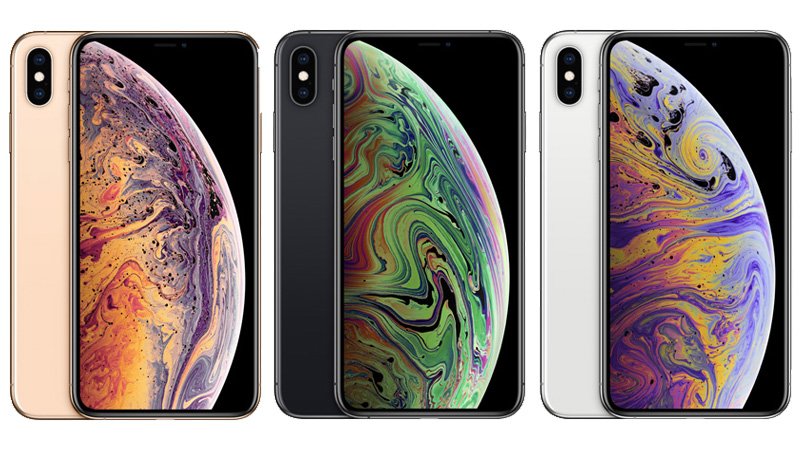
Apple sold it in silver, space gray and gold. The model numbers are A1921, A2101, A2102 (Japan), A2103 and A2104 (China mainland).
Design and display
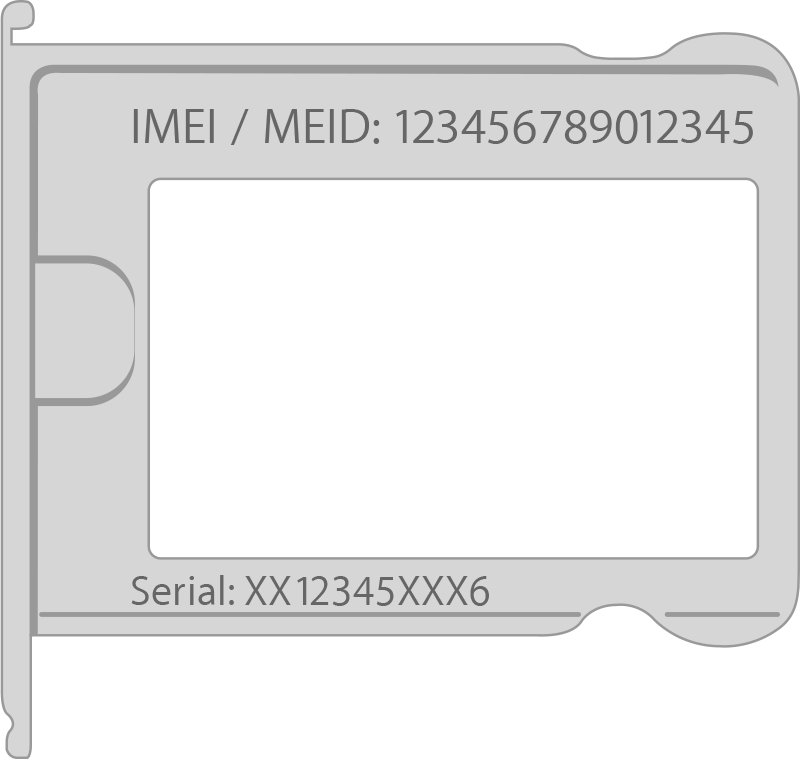
The iPhone XS Max has a glass back with a stainless steel band around the frame. The side button sits on the right side, next to the SIM tray, and the IMEI is etched on that tray.
| Item | Official figure |
|---|---|
| Height | 6.20 inches (157.5 mm) |
| Width | 3.05 inches (77.4 mm) |
| Depth | 0.30 inch (7.7 mm) |
| Weight | 7.34 ounces (208 grams) |
| Screen size | 6.5 inches diagonal with rounded corners; 6.46 inches when measured as a standard rectangle |
| Panel type | All-screen OLED Multi-Touch, HDR, True Tone, wide color (P3) |
| Resolution | 2688 by 1242 pixels at 458 ppi |
| Contrast ratio | 1,000,000:1 (typical) |
| Peak brightness | 625 nits max (typical) |
| Touch extras | 3D Touch, fingerprint-resistant oleophobic coating |
| Biometrics | Face ID through the TrueDepth camera; no Touch ID |
| Buttons | Volume up/down, Ring/Silent switch, side button |
The screen is the biggest difference from the iPhone XS, which has a 5.8-inch display. Both share the same chip, cameras, storage options and colors.
Performance and software
The A12 Bionic chip and its Neural Engine power Face ID, Smart HDR and Portrait Lighting. The phone shipped with iOS 12 and has since moved through every iOS release up to iOS 18.
| Software question | Answer from Apple |
|---|---|
| Version it shipped with | iOS 12 |
| Latest version it can run | iOS 18 (iOS 18.7.10 on August 17, 2026) |
| iOS 26 and iOS 27 | Not supported; both list iPhone 11 and later |
| Security updates | Apple still lists the iPhone XS Max on iOS 18.x security releases |
| Battery performance management | Added for iPhone XS Max starting with iOS 13.1 |
| Preinstalled Apple apps at launch | Pages, Numbers, Keynote, iMovie, GarageBand, Clips, Apple Store app |
Apple's free productivity apps still install on iOS 18, so you can get Apple Pages and Apple Numbers on the phone if they were deleted.
Cameras
The rear has two 12MP cameras: a wide-angle lens and a telephoto lens. Both have optical image stabilization, which Apple calls dual OIS.
| Camera feature | Rear dual camera | TrueDepth front camera |
|---|---|---|
| Resolution | 12MP wide and 12MP telephoto | 7MP |
| Aperture | Wide f/1.8, telephoto f/2.4 | f/2.2 |
| Zoom | 2x optical, up to 10x digital for photos | None |
| Portrait mode | Advanced bokeh and Depth Control | Advanced bokeh and Depth Control |
| Portrait Lighting | Five effects: Natural, Studio, Contour, Stage, Stage Mono | Same five effects |
| Flash | Quad-LED True Tone flash with Slow Sync | Retina Flash |
| Photo processing | Smart HDR, HEIF and JPEG capture, panorama up to 63MP | Smart HDR |
| Video | 4K at 24, 30 or 60 fps; 1080p slo-mo at 120 or 240 fps | 1080p at 30 or 60 fps |
| Video zoom | 2x optical, up to 6x digital | None |
| Video formats | HEVC and H.264, stereo recording | HEVC and H.264 |
You can take 8MP still photos while recording 4K video. There is no Ultra Wide camera, which arrived with later models.
Battery life and charging
Apple rates the iPhone XS Max at up to 1.5 hours longer than the iPhone X. Apple's figures came from preproduction units in 2018, so an aged battery today will fall short of them.
| Battery or charging item | Apple's rating |
|---|---|
| Talk time (wireless) | Up to 25 hours |
| Internet use | Up to 13 hours |
| Video playback (wireless) | Up to 15 hours |
| Audio playback (wireless) | Up to 65 hours |
| Fast charging | Up to 50% in 30 minutes with an 18W or higher adapter, sold separately |
| Wireless charging | Works with Qi chargers |
| Wired charging | Lightning, via USB to a computer or power adapter |
| Designed capacity retention | 80% of original capacity at 500 complete charge cycles under ideal conditions |
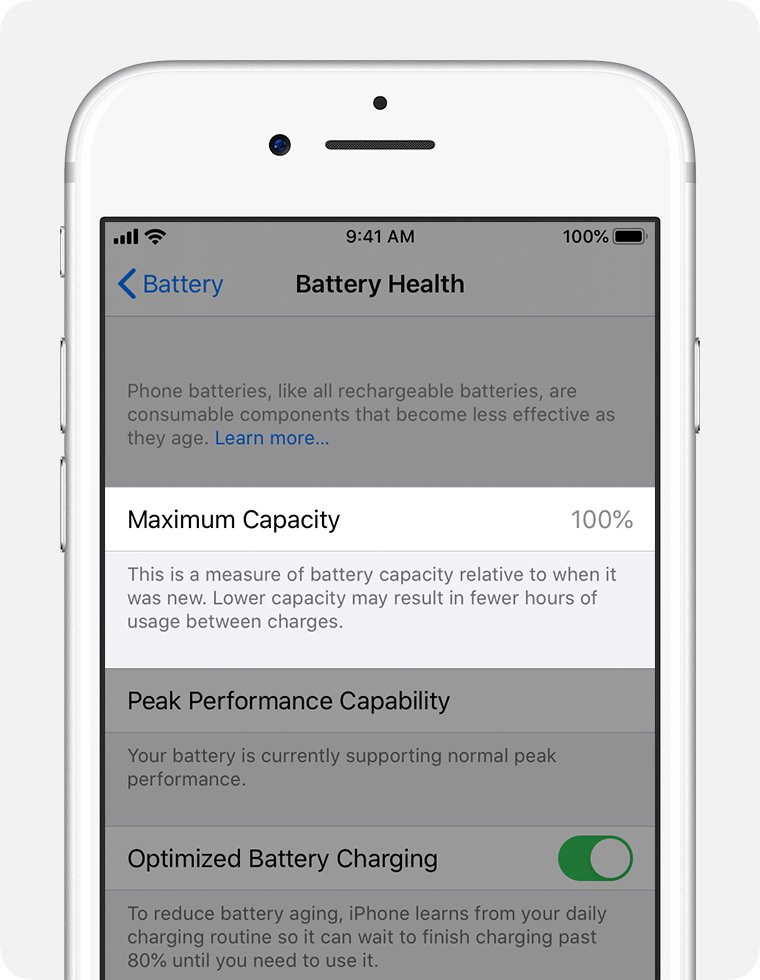
Apple does not publish a battery capacity in mAh on the spec page. Check Settings > Battery > Battery Health to see how much of the original capacity is left.
Connectivity and SIM support
Every iPhone XS Max has gigabit-class LTE, 802.11ac Wi-Fi with 2×2 MIMO, Bluetooth 5.0 and NFC with reader mode. The SIM setup depends on where the phone was sold.
| Feature | iPhone XS Max support |
|---|---|
| Cellular | Gigabit-class LTE with 4×4 MIMO and LAA; VoLTE and Wi-Fi calling where carriers offer them |
| LTE bands on A1921 | FDD-LTE bands 1, 2, 3, 4, 5, 7, 8, 12, 13, 14, 17, 18, 19, 20, 25, 26, 29, 30, 32, 66, 71; TD-LTE 34, 38, 39, 40, 41, 46 |
| Older networks | CDMA EV-DO Rev. A, UMTS/HSPA+/DC-HSDPA, GSM/EDGE |
| 5G | Not supported |
| SIM (most regions) | Dual SIM: one nano-SIM plus one eSIM |
| SIM (China mainland, Hong Kong, Macao) | Two nano-SIM cards in the tray |
| eSIM requirement | A carrier that supports eSIM; not available in every region |
| Location | Assisted GPS, GLONASS, Galileo, QZSS, digital compass, iBeacon |
| Video out | AirPlay, or up to 1080p through Lightning Digital AV or Lightning to VGA adapters |
The tray does not accept micro-SIM cards. To add an eSIM, open Settings > Cellular and tap Add eSIM or Set Up Cellular, then follow your carrier's prompts.
Water resistance: what IP68 does and does not mean
The iPhone XS Max is rated IP68 under IEC standard 60529, tested to a maximum depth of 2 meters for up to 30 minutes in lab conditions. Apple states that this resistance is not permanent and can decrease with normal wear.
| IP68 on this phone does mean | IP68 on this phone does not mean |
|---|---|
| It resists splashes, rain and accidental short drops into water | You can swim, bathe or shower with it |
| It resists spills of soda, beer, coffee, tea and juice | It tolerates pressurized water, saunas or steam rooms |
| It warns you when it detects liquid in the Lightning port | It is safe to charge by cable while wet; wait at least 5 hours |
| It matches the iPhone XS and iPhone 11 rating | It matches newer iPhones rated to 4 or 6 meters |
| An eight-year-old seal may still hold | Liquid damage is covered by the warranty |
If the phone gets wet, wipe it with a lint-free cloth and tap it gently with the Lightning port facing down. Do not use a heat source or push a cotton swab into the port.
What the iPhone XS Max is missing
Several features that buyers now take for granted arrived after 2018. The table compares what the iPhone XS Max has with what it lacks.
| Feature | iPhone XS Max | Impact |
|---|---|---|
| 5G | LTE only | No access to 5G networks |
| Current iOS | Stops at iOS 18 | No iOS 26 or iOS 27 features |
| Ultra Wide camera | Wide and telephoto only | No 0.5x shots |
| USB-C | Lightning connector | Needs Lightning cables and accessories |
| Charger in the box (used units) | Original box had a USB Power Adapter and EarPods | 18W fast charging needs a separate adapter |
| Apple hardware service | Vintage status | Repairs only while parts last; obsolete products get no hardware service |
How to check a used iPhone XS Max before buying
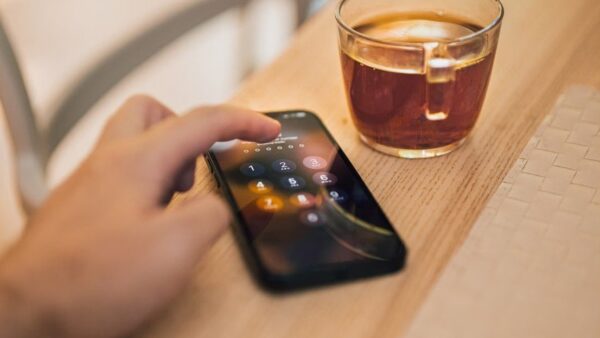
Run these checks in person, with the seller present. Activation Lock is the most important one, because a locked phone cannot be set up without the previous owner's Apple Account password.
- Turn on the phone. If you see an iPhone Locked to Owner screen, do not buy it.
- If the passcode Lock Screen or Home Screen appears, ask the seller to erase the phone before you take it.
- Start setup. If it asks for the previous owner's Apple Account, hand it back and ask the seller to enter the password or remove the device from their account.
- Continue only when the Hello screen appears; that means the phone is ready for a new owner.
- Open Settings > General > About and compare the IMEI with the number etched on the SIM tray.
- Open Settings > Battery > Battery Health and note the Maximum Capacity and any service message.
- Open Settings > General > Software Update and confirm the phone shows iOS 18.
- Test Face ID, both rear cameras, the front camera, the speakers and a call with your own SIM.
If Battery Health says it is unable to verify a genuine Apple battery, the health figures on that screen may not be accurate.
Update an iPhone XS Max to the latest iOS 18 version
iOS 18 is the last major version for this phone, so updating keeps it on the newest security fixes it can receive.
- Back up the phone to iCloud or a computer.
- Plug the phone into power and connect to Wi-Fi.
- Open Settings and tap General.
- Tap Software Update to see the installed version.
- Tap Download and Install if an iOS 18 update appears, then follow the onscreen instructions.
- Tap Automatic Updates and turn on Automatically Install to get future iOS 18 fixes overnight.
If no update appears, a VPN or proxy can block the update servers; turn it off and check again.
How to check which iOS version your iPhone XS Max runs
- Open Settings > General > Software Update.
- Read the installed version at the top; an up-to-date phone shows iOS 18.7.10 or a later iOS 18 release.
- Confirm the screen does not offer iOS 26; that version is not available for the iPhone XS Max.
Is the iPhone XS Max still worth buying?
The answer depends on the price and what you need the phone to do for the next few years.
| Your situation | Verdict | Why |
|---|---|---|
| You need a cheap large-screen backup phone | Reasonable buy | 6.5-inch OLED, Face ID and iOS 18 security updates still arrive |
| You want a main phone for three or more years | Skip it | It stopped at iOS 18 and is already vintage for Apple service |
| You need 5G or USB-C | Skip it | It has LTE and a Lightning port |
| You want Ultra Wide photos or newer camera features | Skip it | Only wide and telephoto lenses |
| You found one with a healthy battery and no Activation Lock | Buy only at a low price | A worn battery or a locked phone turns a cheap buy into a costly one |
iPhone XS Max stuck on Apple logo and other common problems
iPhone XS Max stuck on the Apple logo
A failed update or corrupted software leaves the Apple logo on screen for several minutes with no progress bar.
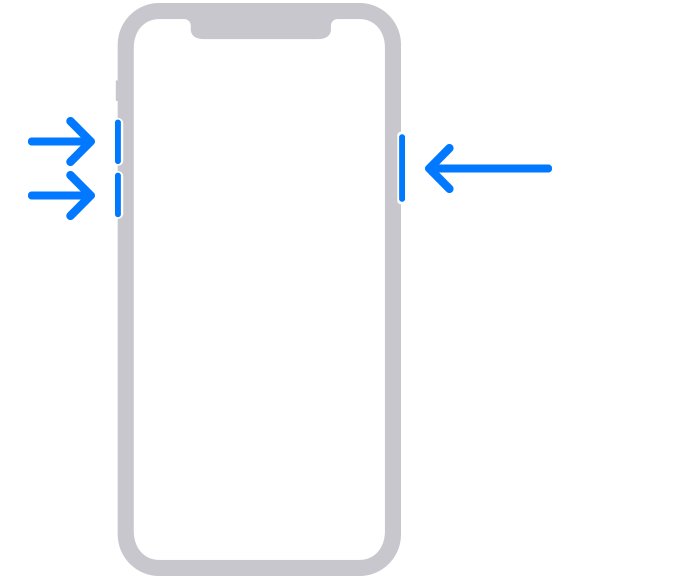
- Connect the phone to a Mac with Finder or a PC with the Apple Devices app.
- Press and quickly release Volume Up, then press and quickly release Volume Down.
- Press and hold the side button until the Connect to computer screen appears.
- Choose Update first on the computer.
- If Update fails, repeat the steps and choose Restore, which reinstalls iOS and erases all data.
iPhone XS Max keeps flashing the Apple logo on and off
The phone cannot finish starting up, which is a case for recovery mode.
- Put the phone into recovery mode with the same button sequence as above.
- Choose Update on the computer and let the download finish.
- If the download takes over 15 minutes and the phone leaves recovery mode, let it finish, then enter recovery mode again.
- If Update and Restore both fail, or a button does not work, book Apple service.
iPhone XS Max does not show iOS 26
iOS 26 and iOS 27 require iPhone 11 or later. An iPhone 11 Pro runs both, yet you can keep an iPhone 11 Pro on iOS 18 by installing only the iOS 18 builds offered.
- Open Settings > General > Software Update.
- Install the newest iOS 18 update offered; that is the latest version for this model.
Battery Health says the battery cannot be verified
iOS cannot confirm the battery is a genuine Apple battery.
- Treat the Maximum Capacity figure as unreliable.
- Have the battery checked by Apple or an Apple Authorized Service Provider.
Apple iPhone XS Max FAQ
What is an iPhone XS Max?
The iPhone XS Max is Apple's 2018 large-screen iPhone with a 6.5-inch OLED display, A12 Bionic chip, Face ID, dual 12MP rear cameras and IP68 water resistance. It was the bigger sibling of the 5.8-inch iPhone XS.
How old is the Apple iPhone XS Max?
Apple introduced the iPhone XS Max in 2018, so it is about eight years old in 2026. Apple now lists it as a vintage product, which means hardware service depends on parts availability.
Is the iPhone XS Max still supported?
Yes, for security updates. Apple released iOS 18.7.10 for the iPhone XS Max on August 17, 2026. It cannot run iOS 26 or iOS 27, and its hardware service status is vintage.
What is the latest iOS version for the iPhone XS Max?
iOS 18 is the last major version for the iPhone XS Max. The newest release listed by Apple is iOS 18.7.10, published on August 17, 2026. Install it from Settings > General > Software Update.
Does the Apple iPhone XS Max support eSIM?
Yes. The iPhone XS Max supports Dual SIM with one nano-SIM and one eSIM in most regions. Your carrier must support eSIM, and models sold in China mainland, Hong Kong and Macao use two nano-SIM cards instead.
Does the iPhone XS Max have a physical SIM card slot?
Yes. A SIM tray on the right side holds one nano-SIM card, and the IMEI is etched on that tray. In China mainland, Hong Kong and Macao, the tray holds two nano-SIM cards. Micro-SIM cards do not fit.
Does the iPhone XS Max support 5G?
No. The iPhone XS Max supports gigabit-class LTE with 4×4 MIMO, plus older 3G and 2G networks, but it has no 5G modem.
Does the iPhone XS Max support iOS 18?
Yes. The iPhone XS Max runs iOS 18 and still receives iOS 18 security releases. iOS 18 is also its final major version, because iOS 26 and iOS 27 require iPhone 11 or later.
What is the difference between the iPhone XS and XS Max?
The main difference is screen size: the iPhone XS has a 5.8-inch display and the iPhone XS Max has a 6.5-inch display. Both use the A12 Bionic chip, the same dual 12MP cameras, the same storage options and the same colors.
What is the Apple iPhone XS Max screen size and resolution?
The iPhone XS Max has a 6.5-inch Super Retina HD OLED display at 2688 by 1242 pixels and 458 ppi. Measured as a standard rectangle without the rounded corners, the screen is 6.46 inches diagonally.
What are the iPhone XS Max dimensions?
The iPhone XS Max measures 6.20 inches (157.5 mm) tall, 3.05 inches (77.4 mm) wide and 0.30 inch (7.7 mm) deep, and weighs 7.34 ounces (208 grams). Size and weight vary slightly by configuration.
What is model A1921 or A2101?
Both are iPhone XS Max model numbers. Apple lists A1921, A2101, A2102 (Japan), A2103 and A2104 (China mainland) as the iPhone XS Max models. Apple's spec page lists the full LTE band set for A1921.
The bottom line on the iPhone XS Max
Buy an iPhone XS Max only as a low-cost large-screen spare, and only after confirming there is no Activation Lock and the battery health is acceptable. It still gets iOS 18 security updates and has a sharp 6.5-inch OLED screen, but it cannot run iOS 26, has no 5G or USB-C, and is already vintage for Apple repairs.