Your Apple Account, the new name for Apple ID, is the one sign-in for iCloud, the App Store, Messages, FaceTime and Apple Pay, and you manage it in Settings > [your name] or at account.apple.com.
This page covers signing in, password resets, recovery and locked accounts, iCloud Mail, Photos and Drive, Apple Pay and Apple Cash, billing, and Apple Support.
Forgot your Apple Account password?
Use a trusted device: an iPhone, iPad, Apple Watch, Apple Vision Pro or Mac already signed in with two-factor authentication. Changing the password there usually avoids account recovery.
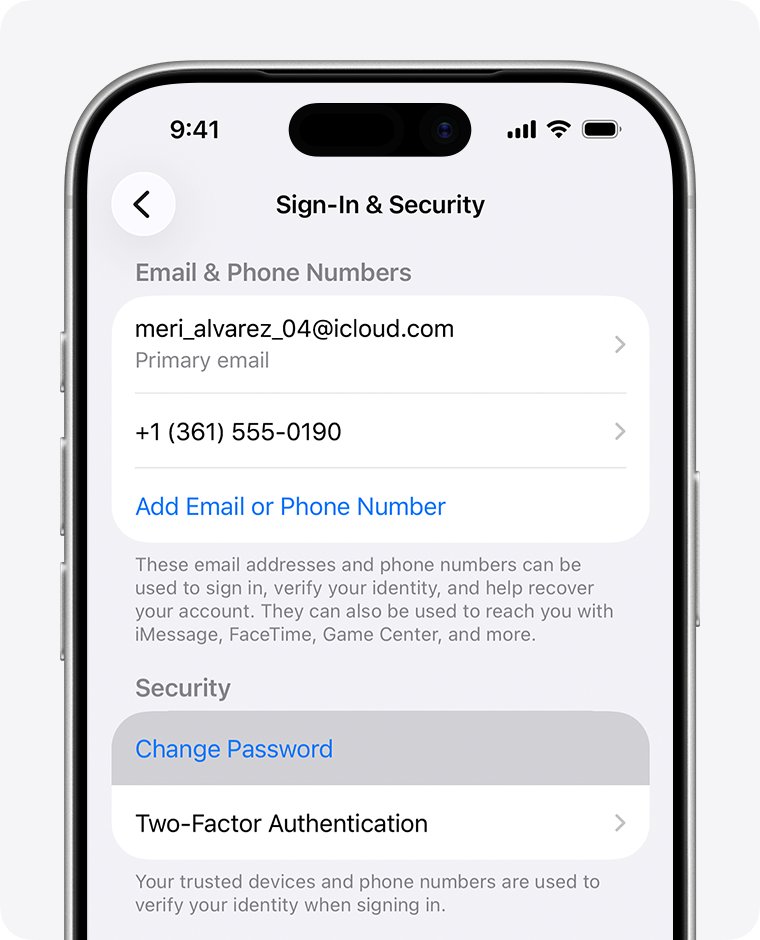
- On your iPhone, open Settings and tap [your name].
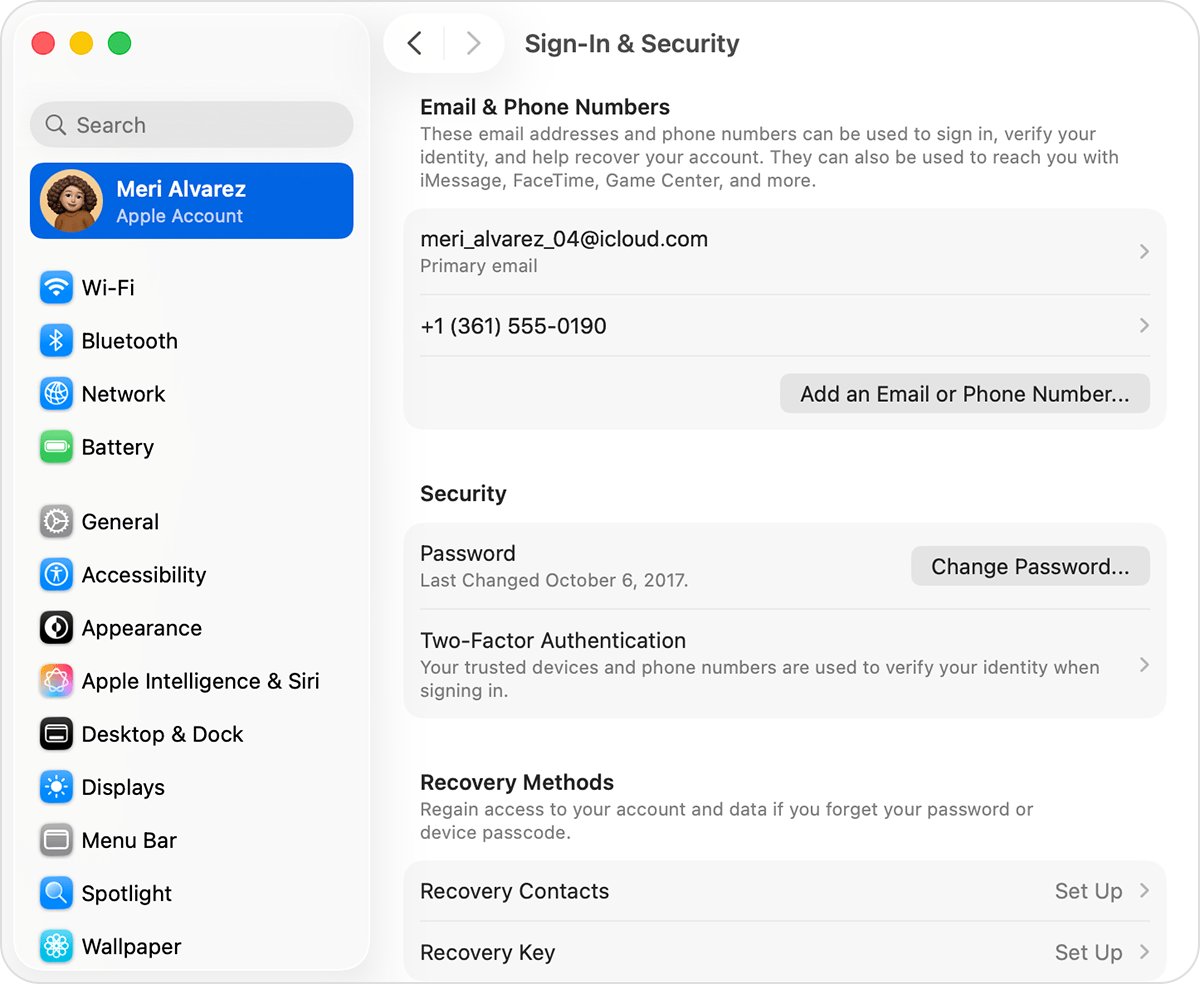
- Tap Sign-In & Security, then Change Password.
- Follow the onscreen instructions to set the new password.
- Tap Remove Other Devices or Keep All Devices Signed In.
- On a Mac, choose Apple menu > System Settings > [your name] > Sign-In & Security > Change Password, then enter your Mac login password.
No trusted device? Choose Forgot password? on any sign-in screen or go to iforgot.apple.com, with a recovery factor ready: your trusted phone number, a recovery contact's code, your account email or the card's CVV. Stolen Device Protection can add a one-hour wait. Then reset your Apple Account password with the route that fits.
Apple Account vs iCloud and Apple ID
Apple ID is now Apple Account, with the same email address or phone number and password. iCloud is one service the account unlocks, not a separate login.
| Name | What it is |
|---|---|
| Apple Account | Your sign-in for every Apple service; you can create, unlock or delete an Apple Account from Settings or the web |
| Apple ID | The old name for the same login |
| iCloud | The storage and sync service the account unlocks, so iCloud versus Apple ID is a service versus a login; 5 GB free |
| @icloud.com address | Optional; setup offers one if you tap Don't have an email address?, so decide whether you need an iCloud email address |
| Another email as username | Any address you control works, including an Apple Account with a Gmail address |
| Second Apple Account | One account in iCloud and another under Media & Purchases is supported when you use two Apple Accounts |
Apple Account website and login pages
Type these addresses yourself instead of tapping links in emails or texts.
| You want to | Go to | What happens there |
|---|---|---|
| Change password, email, phone numbers or devices | account.apple.com | Sign-In and Security and Devices; redirects to a trusted device when it can |
| Reset a forgotten password or start recovery | iforgot.apple.com | Trusted device or recovery factors, plus recovery status |
| Finish recovery after the wait | apple.com/recover | If the text or call never arrives |
| Use Mail, Photos, Drive and Notes in a browser | iCloud.com | Your iCloud data and iCloud+ features |
| Find a charge or request a refund | reportaproblem.apple.com | Purchases, family purchases and refund claims |
| Download your data or delete your Apple Account | privacy.apple.com | Request to delete your account gives an access code to cancel with |
| Check for an outage | Apple System Status | Apple Account, iCloud Mail, Apple Pay, Apple Cash and more |
Apple Account sign in not working on iPhone, Mac or the App Store
To sign in on iPhone, open Settings, tap Apple Account, choose Use Another Apple Device or Sign in Manually, and enter the six-digit code.
| Symptom | Cause | Fix |
|---|---|---|
| App Store wants another account | A different account under Media & Purchases | Tap Media & Purchases > Sign Out, then sign in on the App Store with the right one |
| iPhone keeps asking for the password | Unfinished restore, changed password, Automatic Downloads or a family purchase request | Stay on Wi-Fi and power, then stop repeated password prompts |
| iCloud asks for an old email | An older account may still be signed in for purchases | Sign it out and remove the old email iCloud asks for |
| Terms screen loops on every device | Unclear; Apple's first checks are outages and old software | Check System Status, update, then break the iCloud terms of service loop |
| Apple Account greyed out | Screen Time restrictions or passcode | Screen Time > Content & Privacy Restrictions > Allow Changes to Settings |
| Fails away from Wi-Fi | Cellular data is off | Turn it on in Settings > Cellular |
| Third-party mail app rejects the password | It needs an app-specific password | Create one and use it there |
| Signing in to other apps with Apple | Sign in with Apple can hide your email | Choose the Apple option and use Sign in with Apple on Spotify or similar apps |
Sign in to iCloud.com
- Go to iCloud.com in a browser on Apple's supported list.
- Enter your email or phone number and password, or use Face ID or Touch ID.
- For a passkey, select Sign in with Passkey and scan the QR code with your iPhone or iPad.
- Enter the code sent to your trusted device or phone number, or use a security key.
- Lost the trusted device? Select Find Devices to locate it without the code.
If a Mac asks for its login password, you can still use your Apple Account password on iCloud.com. If the code goes to a phone you no longer have, get into iCloud without your phone, and if sign-in stalls on Linux, fix iCloud.com on Firefox for Linux.
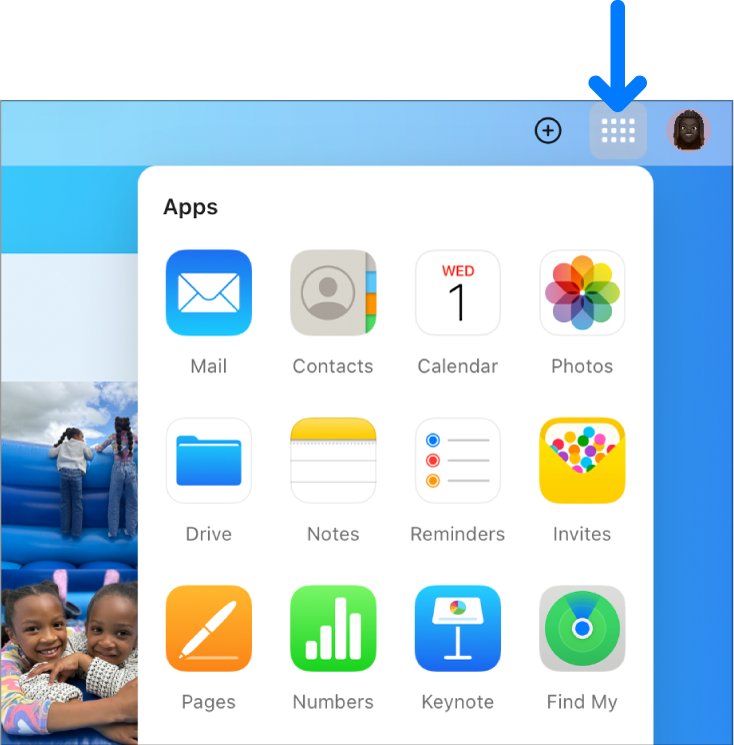
Apps and features on iCloud.com
Computers get the full set; phones and tablets see fewer apps.
| App or feature | Use |
|---|---|
| iCloud Mail | Mail, plus up to nine @icloud.com aliases |
| Photos and iCloud Drive | Your synced library and files |
| Contacts | Edit contacts or export your iCloud contacts |
| Calendar, Reminders, Notes, Apple Invites | The same data as your devices |
| Pages, Numbers, Keynote | Edit documents in the browser |
| Find Devices | Locate a device, even without your trusted device |
| Hide My Email, Custom Email Domain | iCloud+ address features |
| iCloud Settings | Sign Out Of All Browsers |
To switch to a different app or feature on iCloud.com, select its tile on the homepage, or select an item inside a tile, such as a note, to open it directly.
If you don’t see the apps or data you’re looking for
Only Find My iPhone and iCloud Settings appear
Advanced Data Protection turns off web access to your data.
- On your iPhone, open Settings > [your name] > iCloud and turn on Access iCloud Data on the Web.
- Reload iCloud.com, and if a tile is still gone, restore the Photos option on iCloud.com.
Apps missing on a phone or tablet
Mobile browsers get a different set of apps.
- Sign in on a computer instead.
- Use the device's own Photos, Mail and Files apps meanwhile.
Photos or files you know exist are missing
You used a different Apple Account than your iPhone.
- Check the account under your name in iPhone Settings.
- Sign out of iCloud.com and sign in with that account.
Most apps missing on a new account
A web-only account has never signed in on an Apple device.
- Sign in with it on an iPhone, iPad or Mac.
- Sign in to iCloud.com again.
Sign out of iCloud.com
- Select your Apple Account photo or the account button in the top-right corner.
- Choose Sign Out for this browser only.
- To sign out everywhere, select iCloud Settings > Sign Out Of All Browsers > Sign Out.
Use the all-browsers option after signing in on a shared computer.
Apple Account locked, disabled or not active
"This Apple Account has been disabled for security reasons"
Account details were entered wrong too many times.
- Reset the password on a trusted device or at iforgot.apple.com.
- Sign in again on each device.
Apple Account locked or not active
Apple restricted the account.
- Tap Request Access in the alert if it appears.
- Otherwise, request access from Apple's locked-account support page.
"This Apple Account is locked and can't be used"
Apple denied the unlock request, which is what the locked and can't be used message signals.
- Create a new Apple Account for iCloud and purchases.
- For a device stuck on Activation Lock, start an Activation Lock support request with proof of purchase.
"Your Media & Purchases account has been disabled"
Only purchasing is disabled.
- Tap Continue in the alert.
- Or choose Request reactivation on Apple's Contact Apple Support page.
Apple Account recovery waiting period and status
Recovery is the last resort when no trusted device or recovery factor works. It can take several days or longer, and Apple Support can't shorten it.
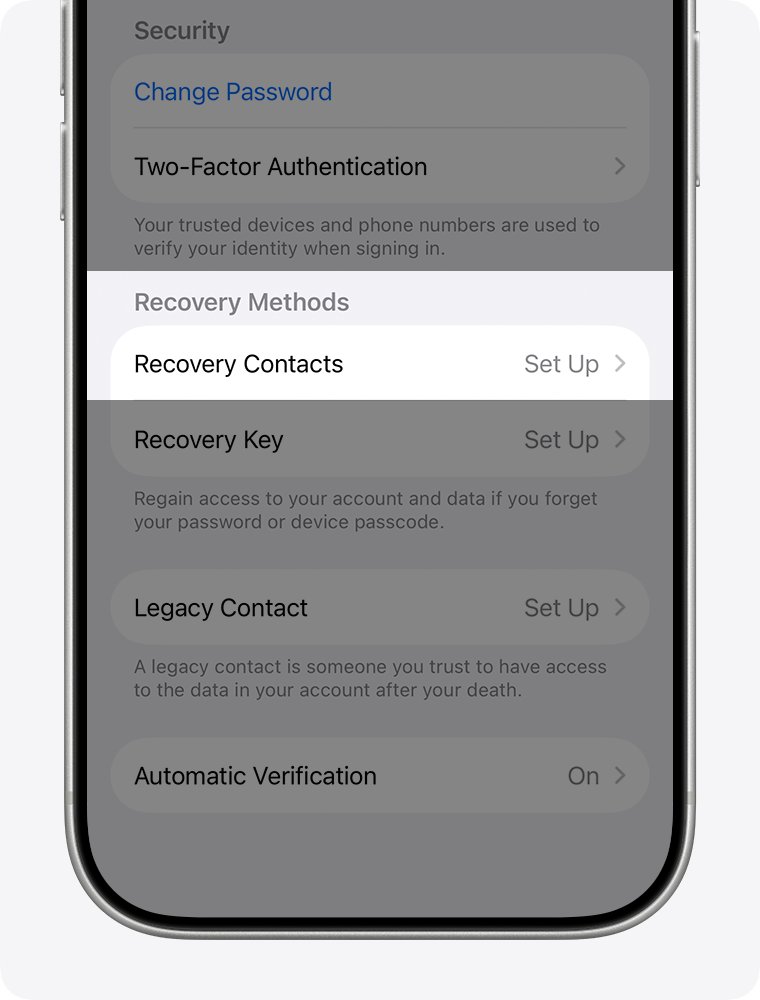
- Start the Apple Account recovery process at iforgot.apple.com in Safari on iOS 17 or macOS 27 or later, or on a borrowed device in the Apple Support app under Support Tools > Reset Password > Help Someone Else.
- Expect a confirmation email, or iMessage for phone-only accounts, within 72 hours.
- If you started on the web, turn off your other Apple devices; using one cancels the request.
- Check status at iforgot.apple.com with the same email and phone number.
- When Apple texts or calls, follow its instructions, or go to apple.com/recover after the time in your email.
A second request won't speed things up and can extend the wait. Without the old number and email, recover iCloud without your old number using a phone you can answer now.
Protect your Apple Account
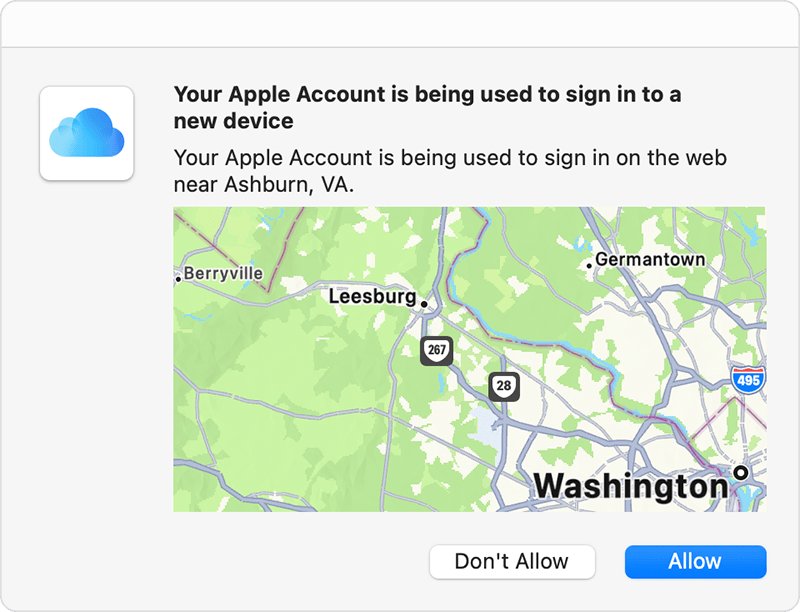
Warning signs are sign-in alerts you didn't trigger, codes you didn't request and unknown devices. Never approve an unexpected iCloud login alert; change your password from a trusted device instead.
| Protection | Where | Why |
|---|---|---|
| Two-factor authentication | Settings > [your name] > Sign-In & Security | Required for Apple Pay and Sign in with Apple |
| Trusted phone numbers | Sign-In & Security | Codes and password resets without a trusted device |
| Recovery contact | Account security settings | A six-digit code that helps you back in |
| Recovery key or security keys | Optional account security settings | Change how recovery works; store them safely |
| Stolen Device Protection | iPhone settings | Can add a one-hour delay before a password change |
| Device list | account.apple.com > Devices | Remove devices you don't recognize |
Apple Account security alert scam: real vs fake signs
Apple never asks you, by call or message, to log in to a website, tap Accept on a two-factor prompt, share a password, passcode or code, or turn off a security feature.
| Warning sign | What to do |
|---|---|
| Sender or link URL doesn't match Apple | Touch and hold the link (hover on Mac) to see it, then verify a security alert email in your account settings |
| Caller says your iCloud was hacked and pushes you to act now | Hang up and dial 1-800-275-2273 yourself; a scam Apple Support number can look real on caller ID |
| Request for Apple Gift Cards, codes, or to turn off two-factor authentication | Refuse; Apple never asks for these |
| Text about an Apple Store bill you don't recognize | Email a screenshot to [email protected], as with the Apple Store billing text scam |
| Text or call about Apple Pay charges | Share nothing and spot fake Apple Pay texts and calls |
| Suspicious email or FaceTime call | Forward email to [email protected]; send FaceTime call screenshots to [email protected] |
Genuine messages match what you see in Settings or at account.apple.com, the simplest test for real Apple emails and texts. US readers can report scam calls at reportfraud.ftc.gov.
iCloud Mail aliases, Mail Drop and blocked senders
iCloud Mail allows 1,000 messages and 1,000 recipients a day, 500 recipients per message and 20 MB per message. Full iCloud storage stops sending and receiving.
| Task | What to know |
|---|---|
| Add a second address | iCloud.com Mail settings > Add Alias; up to nine, 3 to 20 characters, so make an iCloud email alias before a new account |
| Separate inbox on iPhone | An alias can't become its own Apple Account, so add a second iCloud email account on iPhone |
| Remove an address | Deleted aliases bounce mail and are permanent; delete an iCloud email address only if you're sure |
| Clear old mail | Command-click or Control-click to mass delete iCloud emails; Trash keeps them 30 days |
| Mail from a sender stopped | A filter rule keeps acting until you edit or delete it under Rules, one way to unblock a sender in iCloud Mail |
| Layout problems | Organize iCloud email by thread, or recover a Send button missing on iCloud Mail |
| Files over 20 MB | Mail Drop for large attachments sends up to 5 GB as a 30-day link, outside your storage |
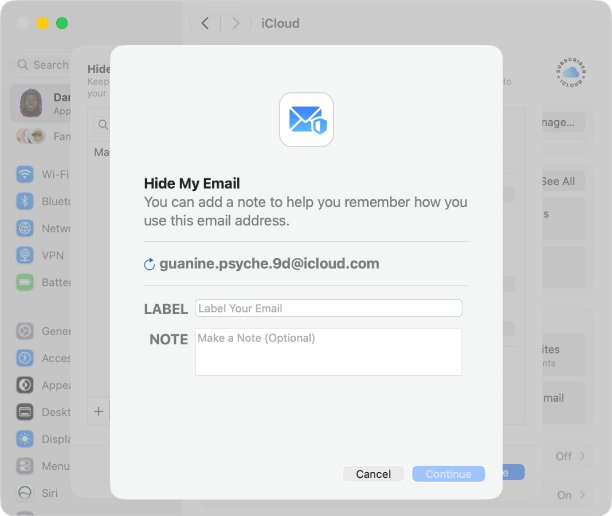
| @privaterelay.appleid.com address | A Hide My Email address from Sign in with Apple; a privaterelay.appleid.com email address forwards to your Apple Account email |
| Private Relay prompts | An iCloud+ feature under iCloud > Private Relay; stop Private Relay notifications there |
| Texts show your @icloud.com address | Pick your number in Messages > Send & Receive to stop texts coming from @icloud.com |
How to turn on iCloud Photos on iPhone, iPad and Mac
- On iPhone or iPad, open Settings > [your name] > iCloud.
- Tap Photos and turn on Sync this device.
- On a Mac, open System Settings > [your name] > iCloud.
- Under Saved to iCloud, click Photos and turn on Sync this Mac.
Deletions sync everywhere, and Recently Deleted keeps items 30 days, so back up photos to iCloud and to a drive too. Optimize Storage keeps smaller copies on the device; weigh the Optimize Storage trade-offs first.
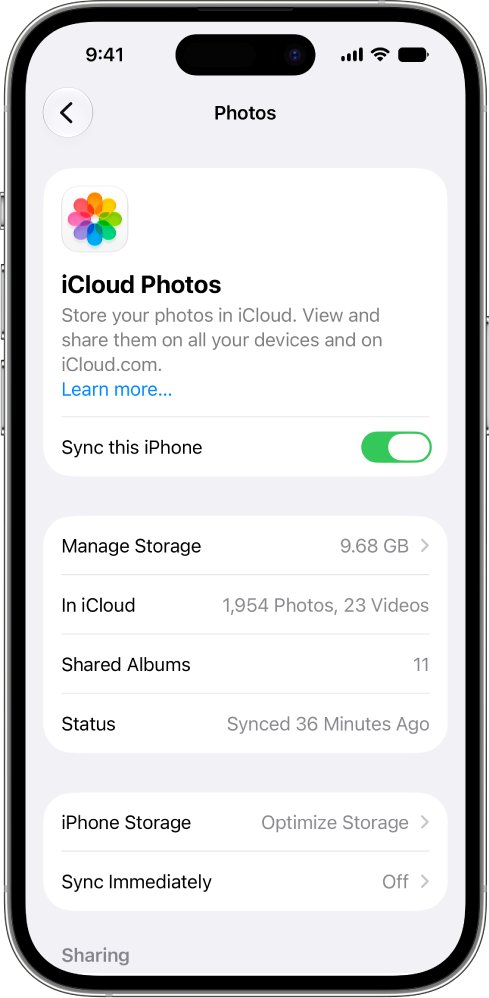
When uploads stall, fix iCloud Photos sync problems, and use a link to share photos with non-Apple users.
iCloud storage and iCloud Drive on iPhone, Mac and Windows
| Question | Answer |
|---|---|
| Free storage | 5 GB, shared by backups, Mail, Photos and Drive |
| iCloud+ in the US | Monthly: 50 GB $0.99, 200 GB $2.99, 2 TB $9.99, 6 TB $29.99, 12 TB $59.99 |
| Settings on iPhone | [your name] > iCloud, where you set up iCloud on iPhone and iPad |
| Files out of date | Use one Apple Account everywhere, then refresh iCloud Drive |
| Mac disk filling up | Check what iCloud Drive keeps locally and free MacBook space used by iCloud Drive |
| "Couldn't connect to the server" | Check System Status, then the couldn't connect to the server error |
| Windows PC | iCloud for Windows and other Apple apps on a Windows PC |
| Still stuck | Apple's own iCloud support options |
Understanding Apple Pay and its requirements
Apple does not approve or decline cards; the card issuer makes each decision.
| Requirement | Detail |
|---|---|
| Device | A compatible device on the latest software |
| Card | A supported card from a participating issuer |
| Account and lock | Apple Account signed in with two-factor authentication, plus Face ID, Touch ID, Optic ID or a passcode |
| Availability | A supported country or region, such as the United States |
| Security | A Device Account Number replaces your card number, which merchants never see; Lost Mode suspends Apple Pay on a missing phone, the other half of Apple Pay security |
Why Apple Pay is not working on your iPhone
Why isn't my Apple Pay working? The common issues and solutions come down to a few causes.
| Symptom | Cause | Fix |
|---|---|---|
| "Could Not Add Card", "Invalid Card", "Card Device Limit" | Card-related issuer decision | Contact the issuer |
| Cards missing on double-click | Another default contactless app | Open Wallet, pick the card, double-click |
| PIN request or large payment refused | Issuer or merchant limits | Enter the PIN or ask the issuer |
| No card can be added | Account locked or two-factor authentication off | Fix the account first |
| Fails for everyone | Outage | Check Apple System Status |
How to fix Apple Pay not working on iPhone
Try these first, in order, and test a payment after each.
- Check Apple Pay availability for your region and on Apple System Status.
- Check your internet connection; outages and connection issues stop cards being added.
- Verify your cards in Wallet and ask the issuer about any error.
- Restart your iPhone and Apple Watch.
- Update software to the latest iOS or watchOS to clear system bugs.
- Check Apple ID and region settings: same account, two-factor on, supported region.
- Check security settings: Face ID, Touch ID or a passcode must be set.
- In stores, double-click the side button, authenticate, and hold the top near the reader until Done appears.
- Contact support: the issuer for declines, Apple at 1-800-275-2273 for Wallet faults.
The 10 Apple Pay fixes add default card and Wallet checks.
Apple Pay settings you should check on iPhone
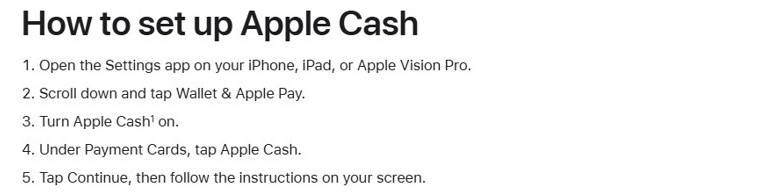
| Setting | Where | Effect |
|---|---|---|
| Default contactless app | Settings | Another app hides Wallet cards on double-click |
| Express Transit | Wallet & Apple Pay | Transit cards work without Face ID |
| Apple Watch cards | Apple Watch app > Wallet & Apple Pay > Add Card | Added separately from iPhone |
| Time Sensitive Notifications | Notifications > the app | How urgent alerts appear |
| Cards you want gone | Wallet > the card | Remove each card per device to disable Apple Pay |
| Lost or sold iPhone | Find My | Lost Mode suspends cards and erasing removes them, so you can remove Apple Pay from another phone |
Apple Pay not working in stores vs online payments
| Check | In stores | Online and in apps |
|---|---|---|
| Pay | Double-click, authenticate, hold near the reader | Tap the Apple Pay button and review |
| Acceptance | Merchant takes your card and network | Site or app shows Apple Pay |
| Browser | Not needed | Safari, or a third-party browser on iOS 18 or later |
| In-store payment tips | Wallet as default contactless app; PIN if asked | Review the payment details first |
On a phone with no cellular plan, check Apple Pay without a data plan before relying on it at a till.
How to fix Apple Pay account that keeps getting declined
Apple Pay declined, but card works
Apple Pay uses a separate Device Account Number, and only the issuer can say why it declined.
- Call the number on the card and ask why the Apple Pay payment failed.
- Remove the card and add it again with Add Card if the issuer asks.
Apple Pay declined, but money in account
Issuer or merchant limits and PIN rules apply whatever your balance.
- Ask the issuer about limits and holds.
- Try a smaller amount, or enter the PIN.
What is Apple Pay decline time sensitive
Time Sensitive is an iPhone notification level for urgent alerts, not a decline reason.
- Note the merchant, amount and time.
- Ask the issuer why it declined.
Every card keeps getting declined
A locked, inactive or disabled Apple Account can stop cards being added.
- Sign in at account.apple.com to confirm the account works.
- Contact Apple Support if it does and cards still fail.
Advanced Apple Pay troubleshooting (last resort)
These advanced solutions to fix Apple Pay are the final steps if it is still not working.
- Remove the card, restart, and add it again with Add Card > Debit or Credit Card.
- Make sure no other app is your default contactless app.
- Ask the issuer to check the card's Apple Pay status.
- Call 1-800-275-2273 to contact Apple about Apple Pay, with your model, iOS version and exact error ready.
Apple Cash transfer to bank, Instant Transfer and limits
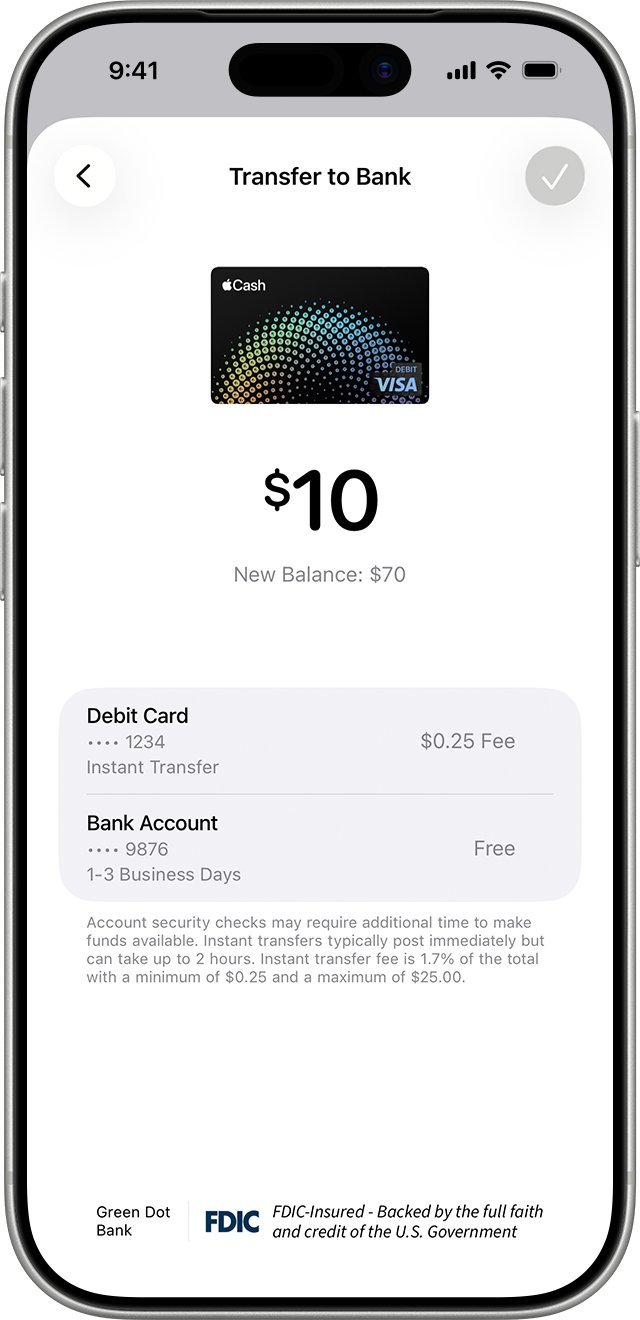
Apple Cash is US-only, from Green Dot Bank (1-877-233-8552). You must be 18, and iCloud and iMessage must use the same Apple Account.
| Task or problem | What to know |
|---|---|
| Transfer to bank | Wallet > Apple Cash > More > Transfer to Bank; free in 1-3 business days, $10,000 per transfer, $20,000 per 7 days |
| Instant Transfer | 1.7% fee ($0.25 to $25), up to 30 minutes; switch the Instant Transfer debit card in Wallet |
| New bank account | Card Details > Bank Account, where you change the transfer bank account |
| Transfer missing | Call Green Dot after 2 hours (Instant) or 3 business days, and track an Apple Cash transfer that never arrived |
| Bank rejected it | Wrong details may be unrecoverable; ask Green Dot to recover a transfer rejected by your bank |
| Payment Pending | Not accepted yet; cancel it, or it returns after 7 days |
| Top up | Add Money takes $10 to $10,000 from a US debit card, so add money from your bank through its card |
| Savings | Add Money > Transfer From > Apple Cash, usually instant, to move Apple Cash to Savings |
| Apple Card | Check approval with no credit score impact when you apply for Apple Card |
| Android recipient | Recipients need an eligible Apple device, so send Apple Cash to an Android user via your bank |
| Blue replies after paying from iPad | Without your number in Messages, an iPad sends from your Apple Account email, causing blue texts after sending money |
apple.com/bill charge: find the purchase and request a refund
An apple.com/bill charge covers apps, media, subscription renewals and family purchases, sometimes grouped into one line.
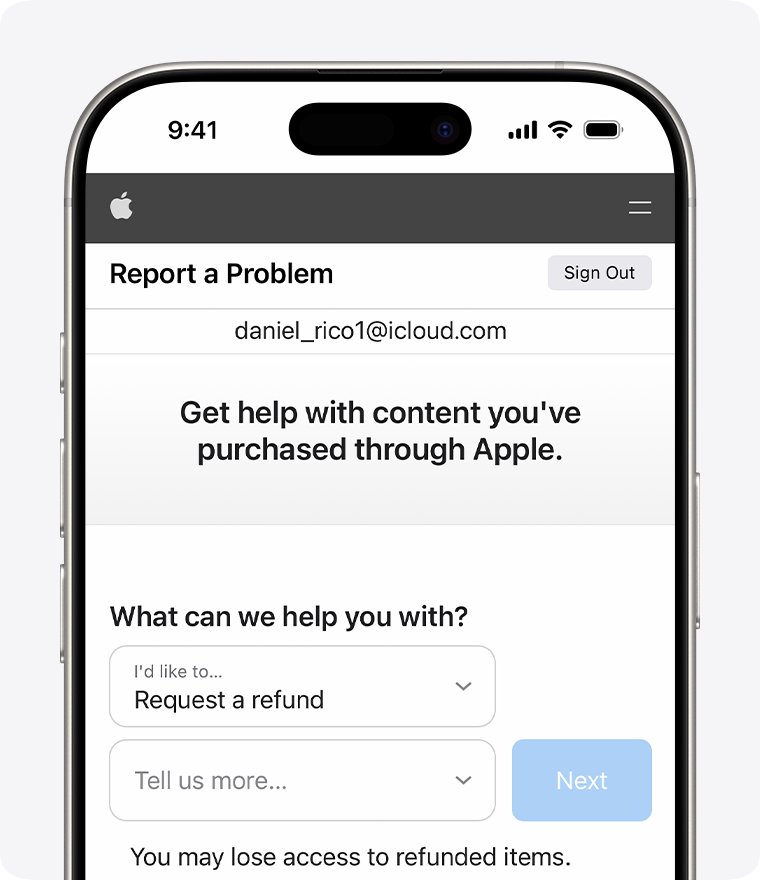
- Sign in at reportaproblem.apple.com.
- For family purchases, pick a member, or All, from the Apple Account menu.
- Search for the amount and tap the purchase date for the receipt.
- Choose I'd like to > Request a refund, a reason, Next, the item, then Submit.
- After 24 to 48 hours, open Check Status of Claims > Pending.
Refunds take up to 30 days on cards, Apple Pay and Apple Cash. No matching receipt? Search email for "receipt from Apple" and try your other accounts, which can explain an unknown $159.99 Apple charge. Store orders and media purchases use different routes when you request an Apple refund.
On iPhone, view purchased items under Apps & Purchase History and cancel plans in [your name] > Subscriptions. With Purchase Sharing, the organizer pays and can check family members' purchases; an adult reverses a Family Sharing payment method takeover by adding their own card.
Apple Music, iTunes and Apple TV with your Apple Account
Media apps sign in with the Apple Account that holds your purchases, so rule out a wrong account first.
| Task or problem | Device | Walkthrough |
|---|---|---|
| Bought songs gone after Apple Music | iPhone, Mac, PC | purchased music missing |
| Next song plays automatically | iPhone, Mac | stop Apple Music autoplay |
| Sign in to iTunes | Windows PC | iTunes login on a PC |
| Update iTunes | Windows PC | update iTunes on Windows |
| Music won't play, error -45061 | Windows PC | iTunes error -45061 |
| iTunes or Apple Devices | Windows PC | iTunes vs the Apple Devices app |
| Crash while syncing music | Windows 10 | Apple Devices crashes while syncing |
| Rebuild a lost library | iPod, iPhone, iPad | recover an iTunes library from an iPod |
| Read Apple Books purchases | Windows PC | Apple Books on Windows |
| Remote won't respond | Apple TV | pair or reset an Apple TV remote |
| One profile per person | Apple TV | Apple TV profiles |
| Forecasts and alerts | iPhone, Mac, Apple Watch | Apple Weather app |
| Save a place by coordinates | iPhone, Mac | coordinates in Apple Maps |
| Calls, battery, Wi-Fi, CarPlay | iPhone | iPhone calls, battery and Wi-Fi fixes |
| Shortcuts, storage, updates | Mac | Mac shortcuts, storage and updates |
Contact Apple Support by phone, chat or Genius Bar
| Route | Use it for |
|---|---|
| Phone, US: 1-800-275-2273 | Account and Wallet help; hang up on a spoofed Apple Support phone number and dial this yourself |
| Apple Support app | Recovery on a borrowed device, and a way to start a live chat with Apple Support |
| reportaproblem.apple.com | Refunds and the way to report a problem to Apple with a purchase |
| Apple Store | Repairs when you book a Genius Bar appointment |
| Buying from Apple | Compare buying online or in store and refurbished availability in India |
| Student pricing | Fix a UNiDAYS verification loop and know the UNiDAYS purchase limits |
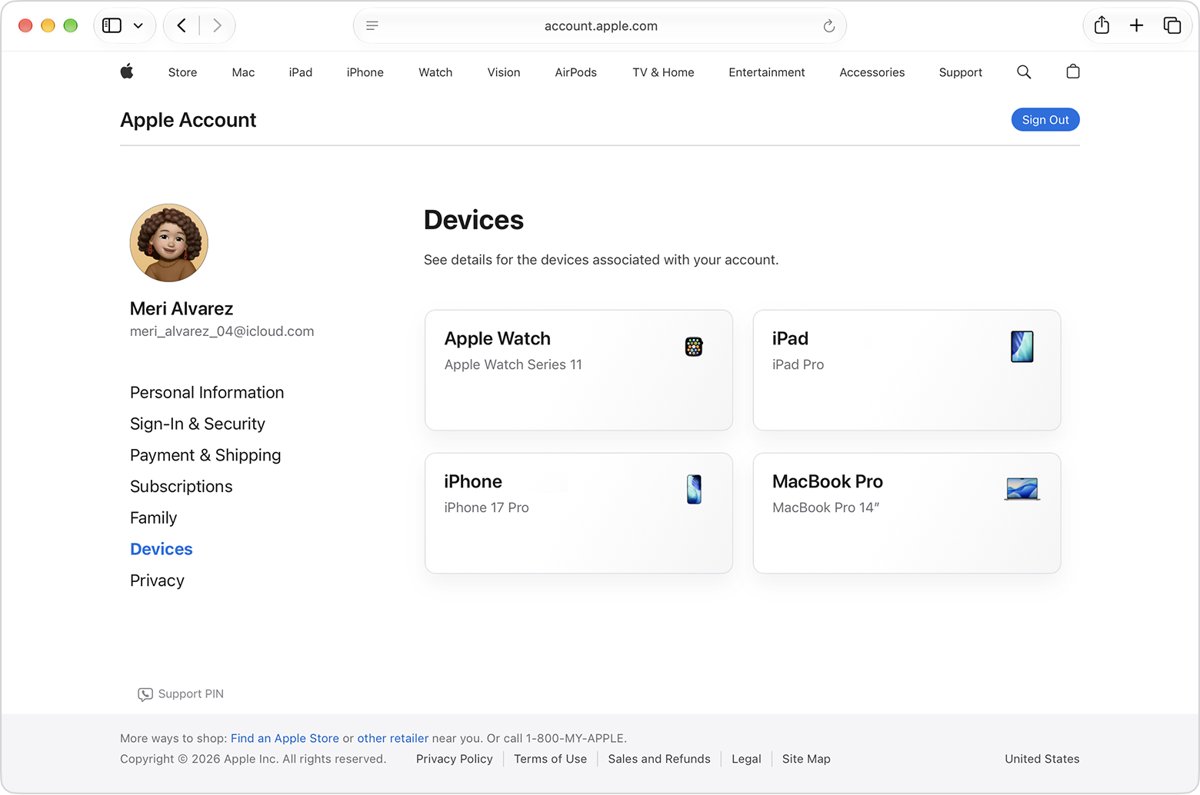
How to see devices signed in to your Apple Account
- Sign in at account.apple.com.
- Select Devices and review every device listed.
- Remove any device you don't recognize, then change your password.
- On iPhone, confirm two-factor authentication is on in Sign-In & Security.
For sign-ins older than the device list, request your iCloud login history from Apple.
Apple Account FAQ
What is an Apple Account?
It is the single sign-in for iCloud, the App Store, Messages, FaceTime and Sign in with Apple. It replaced the Apple ID name and keeps the same email or phone number and password.
Is Apple Account and Apple ID the same?
Yes. Apple renamed Apple ID to Apple Account, so your existing email address or phone number and password still work as before.
Is Apple Account free?
Yes. Creating one is free, and you aren't charged until you buy something. iCloud includes 5 GB of free storage, with paid iCloud+ plans for more.
How do I create an Apple Account?
In the App Store, tap My Account and choose Create New Apple Account, or tap "Forgot password or don't have an account?" during iPhone setup. Then verify your email.
Why can't I create an Apple Account?
Apple limits how many new Apple Accounts one device can set up with iCloud in a year. For "your account cannot be created at this time", try another device or the web.
Where is Apple Account settings on iPhone?
Open Settings and tap your name at the top. Sign-In & Security, Media & Purchases, Subscriptions and iCloud all sit on that screen.
Why does Apple Account recovery take so long?
The wait is a security delay that can last several days or longer. Apple Support can't shorten it, and a second request can extend it.
Can I have 2 Apple Accounts?
Yes. One iPhone can use one account for iCloud and another for Media & Purchases, and Apple can migrate purchases from a secondary account to your primary one.
Is an Apple Account security alert a scam?
It can be. Real alerts never ask for your password, code or passcode. Check account.apple.com yourself and forward fake emails to [email protected].