Apple Pay itself is very hard to hack, because your real card number is never stored on your iPhone or Apple's servers and every payment needs your Face ID, Touch ID or passcode.
The realistic risks are a thief who knows your passcode and scammers who trick you into handing over codes. This guide explains how Apple Pay protects a payment, the settings that close those gaps, and what to do if a charge looks wrong.
How to secure Apple Pay on iPhone in five steps
These settings cover the ways an Apple Pay account is actually misused: a stolen unlocked phone, a guessed passcode and a hijacked Apple Account.
- Set a passcode that is not your birthday or a simple pattern in Settings > Face ID & Passcode; Apple Pay will not work without one.
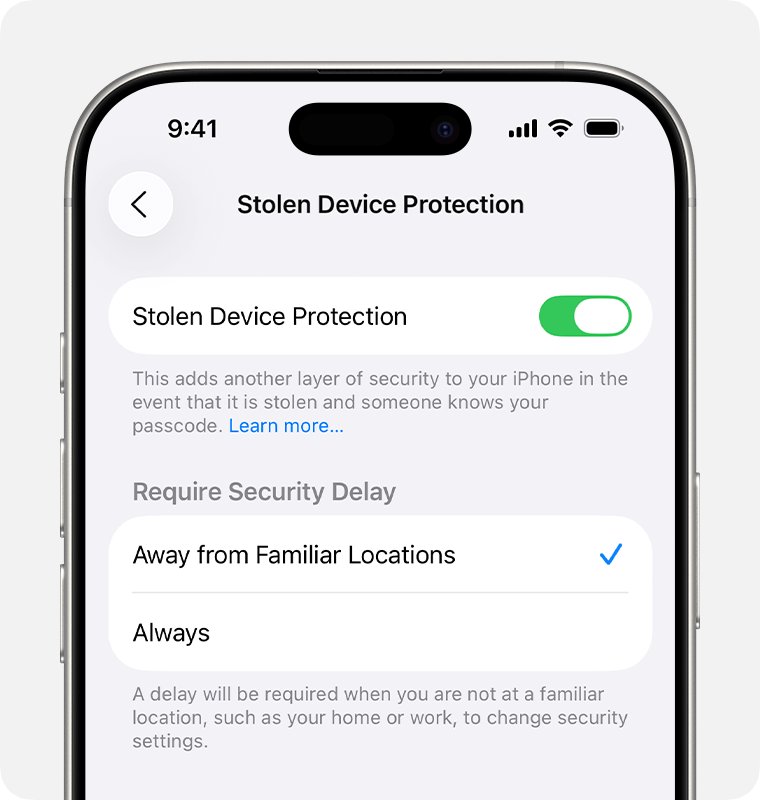
- In the same menu, tap Stolen Device Protection and turn it on (iOS 17.3 or later).
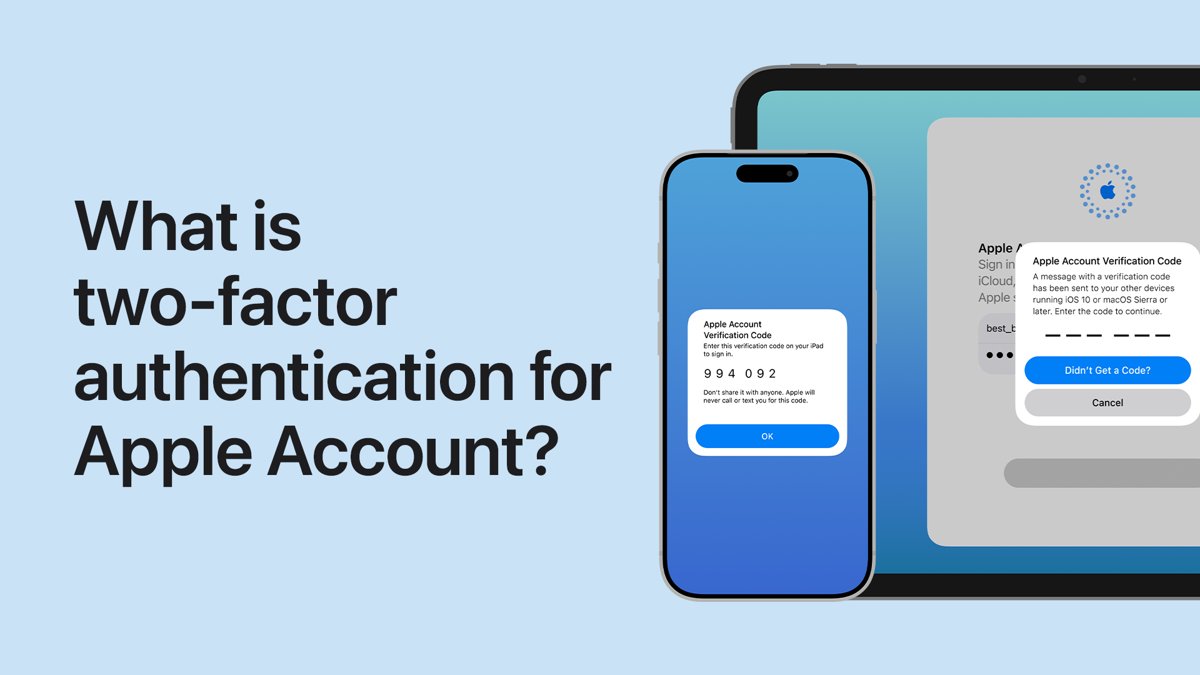
- Open Settings, tap your name, tap Sign-In & Security and make sure two-factor authentication is on.
- Make sure Find My is on for the iPhone so you can suspend Apple Pay with Lost Mode later.
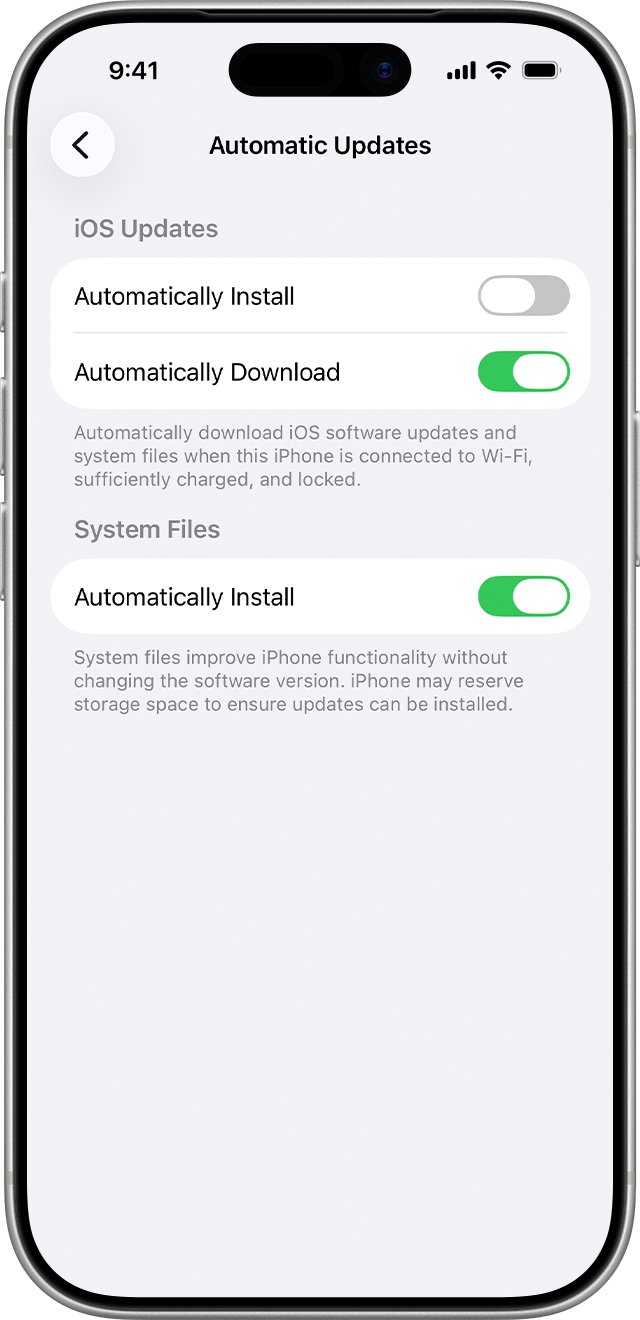
- Go to Settings > General > Software Update > Automatic Updates and turn on Automatically Install.
With these on, someone who steals the phone cannot pay without your face, fingerprint or passcode, and you can switch Apple Pay off remotely in minutes.
How Apple Pay security works: device account number and tokenization
When you add a card, your bank creates a Device Account Number for that one device and sends it to Apple encrypted. Apple cannot decrypt it, and it lives in the Secure Element chip, isolated from iOS.
| Protection | What it does | What an attacker would need |
|---|---|---|
| Device Account Number | Replaces your card number at the till; never stored on Apple servers or backed up to iCloud | Your physical, unlocked device; a stolen number alone does not work elsewhere |
| Secure Element | Stores the Device Account Number apart from the operating system | Hardware-level access to the chip |
| Dynamic security code | A one-time code is generated for each transaction and checked by your bank | A fresh code for every purchase, which only your device produces |
| Face ID, Touch ID or passcode | Required for each in-store payment, except Express Mode transit cards | Your face, fingerprint or passcode |
| No card number to merchants | Shops, apps and websites receive the device number and code, not your card number | Nothing useful to steal from a merchant breach |
| No tied transaction history | Apple keeps no card transaction data that can be linked to you | Nothing to steal from Apple about your purchases |
This is why a hacked shop or a skimmer on a card terminal does not expose your Apple Pay card. A physical card swiped at the same terminal hands over far more.
Apple Pay hacking risks and how likely each one is
| Risk | How it happens | What stops it |
|---|---|---|
| Stolen iPhone plus known passcode | A thief watches you type your passcode, then steals the phone | A strong passcode, Stolen Device Protection, Lost Mode right away |
| Phishing and fake support calls | A message claims there are unauthorized Apple Pay charges and asks for a code or sign-in | Never share verification codes; Apple does not ask for them |
| Apple Account takeover | Someone signs in to your Apple Account with a reused password | Two-factor authentication and a unique password |
| Merchant or terminal breach | A shop's systems or a card reader are compromised | Tokenization: the shop never had your card number |
| Unpatched iOS flaw | Malware exploits a bug fixed in a later update | Automatic iOS updates |
Apple Pay purchases still accept your passcode even with Stolen Device Protection on, so keeping that passcode private matters most.
How to turn on Stolen Device Protection for Apple Pay and Wallet
Stolen Device Protection asks for Face ID or Touch ID, with no passcode fallback, for sensitive actions when the iPhone is away from familiar places such as home or work. That covers saved cards in Safari, viewing your Apple Card virtual number and turning off Lost Mode.
- Update the iPhone to iOS 17.3 or later in Settings > General > Software Update.
- Make sure two-factor authentication, Face ID or Touch ID, Find My and Significant Locations in Location Services are on.
- Open Settings and tap Face ID & Passcode.
- Enter your device passcode.
- Tap Stolen Device Protection and turn it on.
It must be on before the phone goes missing. On many iPhones it is already turned on by default.
How to suspend Apple Pay on a lost or stolen iPhone
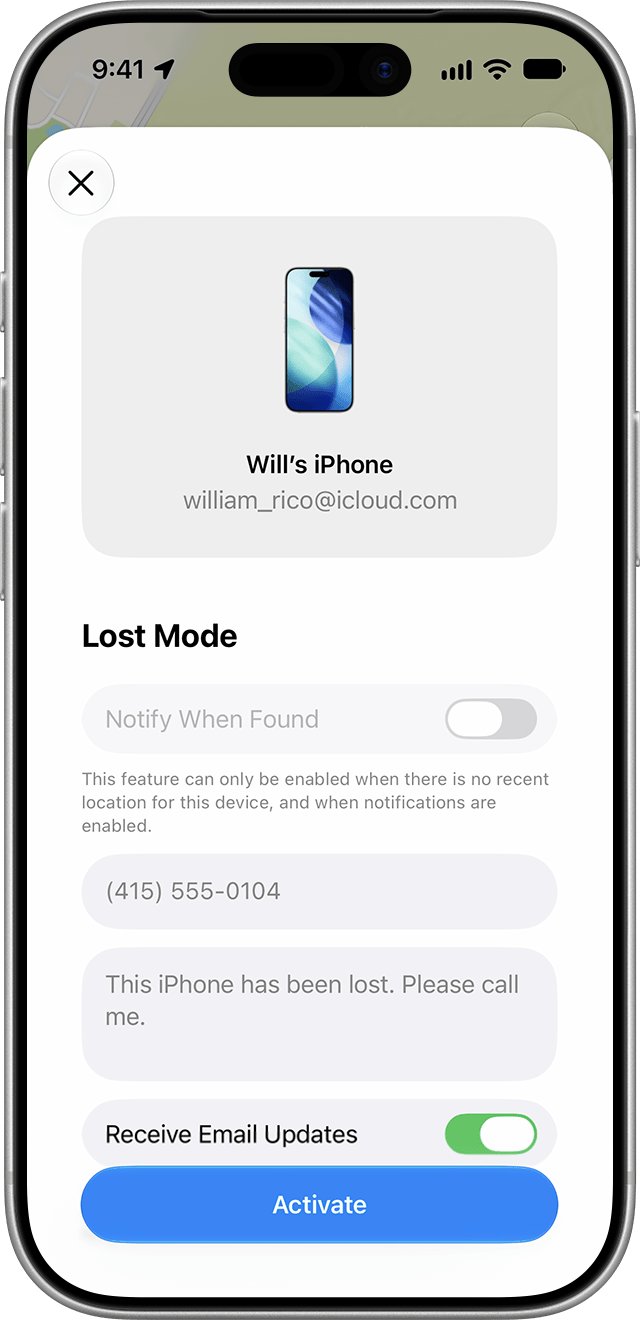
Lost Mode suspends every payment card and pass in Apple Pay without cancelling the cards, so you can resume them if the phone turns up.
- Open the Find My app on another Apple device, or one owned by a Family Sharing member.
- Go to the Devices tab and select the missing iPhone.
- Tap the More button.
- Scroll to Lost iPhone and turn on Lost Mode.
- Add contact details if you want them shown on the screen, then tap Activate.
- Call your bank or card issuer to report the device and ask them to suspend its Apple Pay cards.
Erasing the device remotely also removes the ability to pay, and card issuers suspend the cards even if the phone is offline. If Find My was off, you cannot mark the phone as lost, so contact your bank and wireless carrier straight away.
How to check your Apple Pay transactions for fraud
- Open the Wallet app.
- Tap the card you want to check to see its latest transactions.
- Tap any transaction you do not recognise to see its details.
- Use the option to report an issue on that transaction.
- Compare the list with your bank's own statement, which holds the most accurate record.
A Wallet entry can show a different amount from the final charge, for example a pre-authorization at a fuel pump. Check the bank statement before you report it; a line that reads apple.com/bill on your bank statement is an Apple subscription or App Store charge, not an Apple Pay payment.
Apple Pay hacked? What to do about fraud, theft and scam messages
A charge you did not make appears in Wallet
Usually a merchant error or a pending amount, sometimes someone with access to your unlocked phone.
- Tap the transaction in Wallet and report the issue.
- Call your card issuer and dispute the charge.
- Remove the card in Wallet: tap the card, tap More, tap Card Details, then Remove Card.
- Change your device passcode in Settings > Face ID & Passcode.
Your iPhone is lost or stolen
Anyone who knows your passcode can pay with the phone until Apple Pay is suspended.
- Turn on Lost Mode in Find My.
- Call your bank to suspend the device's cards.
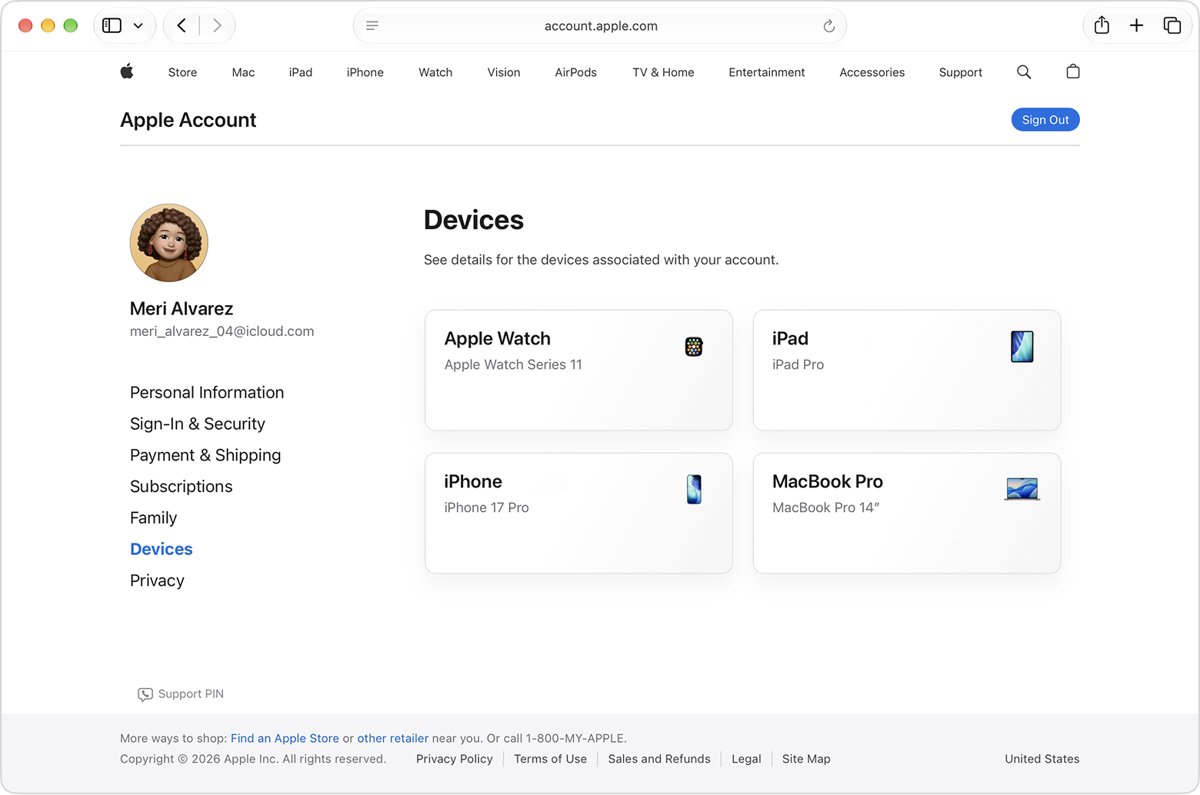
- Sign in at account.apple.com and review Devices for anything you do not recognise.
- Change your Apple Account password if you see changes you did not make.
A text or call says your Apple Pay was used without permission
Scammers use fake Apple Pay alerts to create urgency and steal passwords or codes.
- Do not tap links, call numbers in the message or share any verification code.
- Check the card in Wallet yourself for real transactions.
- Forward suspicious email, or a screenshot of a suspicious text, to [email protected].
- Tap Report Junk under the message in Messages.
You signed in on a fake Apple page
Your Apple Account password is now known to the scammer.
- Change your Apple Account password immediately.
- Open Settings, tap your name, and check the device list at the bottom.
- Tap any device you do not own and select Remove from Account.
- Confirm two-factor authentication is on in Sign-In & Security.
If Apple Pay itself stops working after these changes, the same card checks apply as when Apple Pay is not working for any other reason.
Apple Pay security FAQ
Can your Apple Pay get hacked?
It is very unlikely. Apple Pay never stores or shares your real card number, uses a one-time security code per payment and needs Face ID, Touch ID or your passcode. Most Apple Pay fraud comes from stolen phones with known passcodes or from phishing scams.
Can someone use my Apple Pay if they steal my iPhone?
Only if they can unlock it with your face, fingerprint or passcode. Apple Pay accepts the passcode, so a thief who has seen you type it can pay. Turn on Lost Mode in Find My at once to suspend every card in Apple Pay.
Do merchants get my card number with Apple Pay?
No. Shops, apps and websites receive a Device Account Number and a one-time security code, never your actual card number. A data breach at a merchant therefore does not expose the card you added to Apple Pay.
Can Apple phones get hacked?
Yes, no phone is immune, but iPhones that run the latest iOS are hard targets. Apple calls keeping software up to date one of the most important things you can do for security, so turn on automatic updates in Settings > General > Software Update.
Can my Apple ID get hacked?
Yes, usually through a reused password or a phishing page. Two-factor authentication blocks most takeovers because a password alone is not enough to sign in on a new device. Apple never asks you for your password or verification codes.
Can Apple devices be hacked through Apple Pay?
There is no known route where paying with Apple Pay gives an attacker access to your device. The Device Account Number sits in the Secure Element, isolated from iOS, and payment data is encrypted for the specific app or site you buy from.
Can Apple computers be hacked?
Yes, Macs can be hacked like any computer, mainly through unpatched software and malicious downloads. Keep macOS updated, install apps from trusted sources and use two-factor authentication on your Apple Account. Apple Pay on a Mac uses the same tokenized card numbers.
Does Apple keep my Apple Pay purchase history?
Apple says it keeps no credit, debit or prepaid card transaction information that can be tied back to you. For app and web purchases it keeps anonymous data such as an approximate amount, the app name and the approximate date.
Bottom line: is Apple Pay safer than a physical card?
Yes. Keep using Apple Pay, but protect the two things it relies on: a private, strong passcode and an Apple Account with two-factor authentication. Tokenization means a hacked shop or card reader never sees your card number, so the remaining risks are people, not the payment system: a thief with your passcode or a scammer with your codes.
For questions about a specific charge, your card issuer is the first call; for account problems, contact Apple Pay support directly.