A text, email or call that says someone made unauthorized charges with your Apple Pay and asks you to tap a link, call a number or share a code is almost certainly a scam.
This guide covers the warning signs Apple lists, what Apple never asks for, how to report the message, and what to do if you already replied.
Is this Apple Pay alert a scam? Check it in five steps
Do not tap anything in the message while you check it.
- Look at the sender. A random phone number or an email address that does not match Apple is a red flag.
- On iPhone, touch and hold any link to preview the real address without opening it. On a Mac, hover over it.
- Ask whether the message pushes you to act right now. Manufactured urgency is a classic scam tactic.
- Check whether it asks for a password, passcode, verification code or card number. Apple never asks for these to provide support.
- Ignore the contact details in the message. Open the Wallet app or your bank's own app yourself to look for the charge.
If the charge is not in Wallet or your bank app, the alert was fake.
Apple Pay scam text and alert warning signs
| Warning sign | What it looks like | Why it matters |
|---|---|---|
| Mismatched sender | A text from an unknown number or an email from an odd domain | Real company messages come from contact details that match the company |
| Suspicious link | A link to a site that is not apple.com | Fake sign-in pages steal your Apple Account password |
| Spoofed caller ID | A call that shows Apple's name or number | Scammers fake caller ID to look like Apple |
| Urgent deadline | "Your account will be locked in 24 hours" | Pressure stops you from checking with Apple yourself |
| Fake charge claim | "Unauthorized charges were made using Apple Pay" | The scare sets up an offer to "help" you |
| Request to lower security | Asks you to turn off two-factor authentication or Stolen Device Protection | Apple never asks you to disable a security feature |
| Gift card payment | Asks you to pay or "verify" with Apple Gift Cards | Apple Gift Cards are never a way to pay other people |
What Apple never asks for in an Apple Pay message or call
Any request on this list means the contact is not Apple.
| Apple never asks you to | What to do instead |
|---|---|
| Sign in to a website from a link it sent | Type apple.com yourself or use Settings on your device |
| Tap Accept on a two-factor authentication prompt for someone else | Tap Don't Allow if you did not start the sign-in |
| Share your Apple Account password | Keep it to yourself, even with someone claiming to be Apple Support |
| Share your device passcode or a verification code | End the call or delete the message |
| Disable two-factor authentication or Stolen Device Protection | Leave both turned on |
| Pay with Apple Gift Cards | Refuse and report the request |
How to report an Apple Pay scam text or email
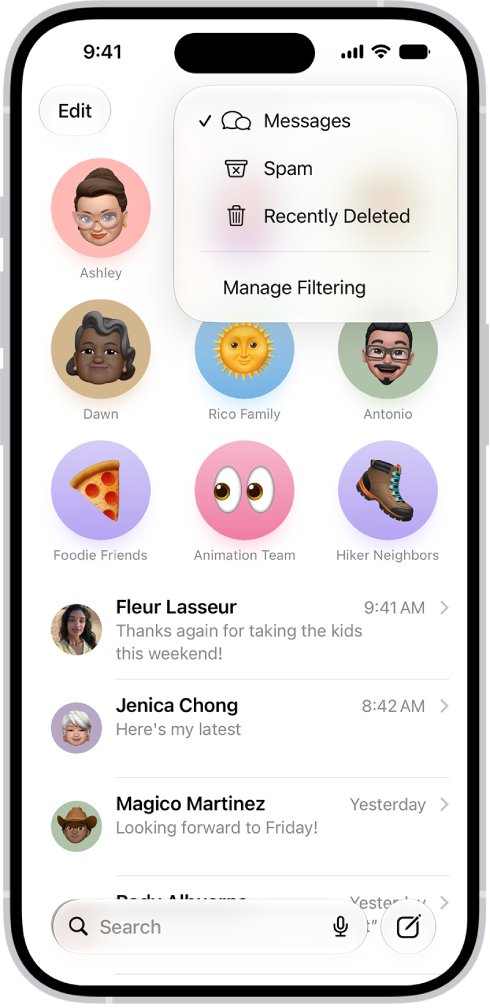
- For a scam text in Messages, tap Report Junk under the message.
- Take a screenshot of the text and email it to [email protected].
- For a scam email that looks like it came from Apple, forward it to [email protected].
- For junk in an iCloud.com, me.com or mac.com inbox, mark it as Junk.
- Delete the message once you have reported it.
How to report an Apple Pay phone scam or FaceTime call
- Hang up on any unsolicited call that claims to be from Apple.
- For a FaceTime call, open FaceTime and tap the More Info button next to the call.
- Take a screenshot of the call information and email it to [email protected].
- For a suspicious FaceTime link in Messages or Mail, email a screenshot that includes the sender's number or address to the same address.
- In the U.S., report the scam call at reportfraud.ftc.gov. Elsewhere, contact local law enforcement.
What to do if you replied to an Apple Pay scam
You entered your Apple Account password on a fake site
The scammer can now try to sign in as you.
- Change your Apple Account password immediately from Settings on your iPhone.
- Make sure two-factor authentication is turned on.
- Decline any sign-in prompt you did not start.
You shared a card number or saw a charge you do not recognize
Card details are handled by the bank that issued the card.
- Call your bank using the number on the back of your card, not a number from the message.
- Tell the bank which charges you did not make and ask it to block the card.
- If the card is in Wallet, follow your bank's instructions to add the replacement card.
You sent money with Apple Cash or bought gift cards
Apple Cash payments work like any other private transaction, and gift card codes are spent quickly.
- Contact Apple through official support channels at support.apple.com.
- Keep the messages, receipts and gift card codes as evidence.
- In the U.S., file a report at reportfraud.ftc.gov.
A pop-up says your iPhone is hacked or you won a prize
Browser pop-ups that show warnings or prizes are bait.
- Do not call the number or tap the links in the pop-up.
- Close the tab or window.
- Install apps only from the App Store, and never install an unknown configuration profile.
For help with a real problem, you can contact Apple Pay support through Apple's own channels.
Apple Pay scam FAQ
Is there a scam involving Apple Pay?
Yes. Common versions are texts, emails and calls claiming someone made unauthorized charges with your Apple Pay. They push you to tap a link, call a number or share a code so the scammer can take over your account or card.
Why do scammers use Apple Pay in their messages?
Apple Pay is linked to real bank cards, so a warning about charges makes people panic. That fear makes victims skip checking the sender and hand over passwords, verification codes or card details without contacting Apple or their bank directly.
Is an Apple Pay alert text real?
Treat any unexpected Apple Pay alert text as suspicious. Open the Wallet app or your bank's app yourself to check for the charge. If the charge is not there, the text is fake, so report it as junk and delete it.
Does Apple Support call you about Apple Pay?
Do not trust an unsolicited call claiming to be Apple, even if caller ID shows Apple. Scammers spoof Apple's number. Hang up and contact Apple yourself through official support channels at support.apple.com.
Where do I report an Apple Pay scam message?
Forward scam emails to [email protected]. For a text, tap Report Junk in Messages and email a screenshot to [email protected]. In the U.S., you can also report scam calls at reportfraud.ftc.gov.
What should I do if I tapped a link in an Apple Pay scam text?
If you entered your Apple Account password, change it immediately and make sure two-factor authentication is on. If you entered card details, call your bank using the number on the back of the card and ask it to block the card.