iCloud on iOS is in the Settings app: tap your name, tap iCloud, then turn on the apps and features you want to keep in sync.
This guide covers where iCloud lives on iPhone and iPad, what it stores, how to set up backup, Photos and iCloud Drive, how to check storage, and how to reach iCloud from a computer or another phone.
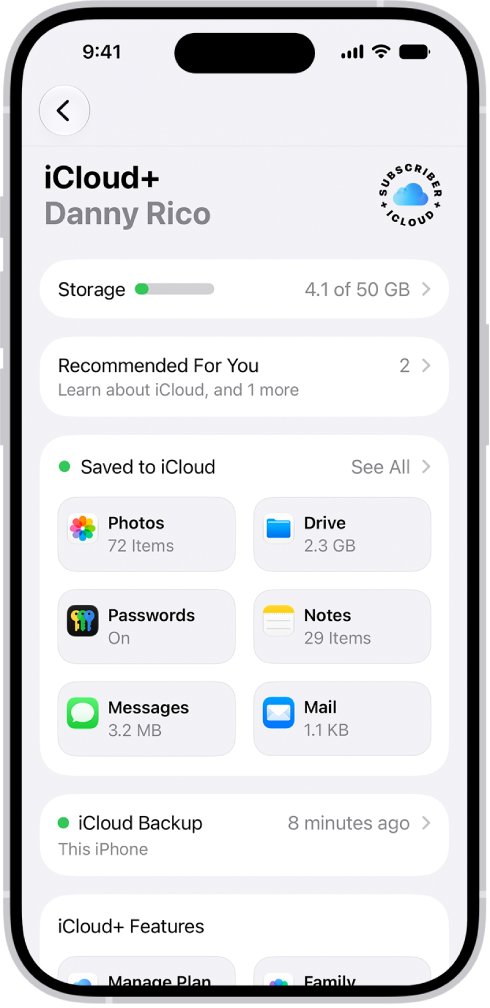
How to set up iCloud on iPhone
iCloud is built into every iPhone and iPad, so there is no separate app to install. Signing in to your Apple Account turns it on.
- Open the Settings app on your iPhone.
- Tap your name at the top. If you do not see your name, tap Apple Account and sign in with Use Another Apple Device or Sign in Manually.
- Enter the six-digit verification code if two-factor authentication asks for one.
- Tap iCloud.
- Tap See All (or Show All) to list every app and feature that can use iCloud.
- Turn on the apps you want to sync, such as Photos, iCloud Drive, Messages and Contacts.
What does iCloud do on iPhone?
iCloud stores your photos, files, notes, passwords and other data in the cloud and keeps it up to date on every device signed in to the same Apple Account. Every account includes an email address and 5 GB of free storage.
| iCloud feature | What it does on iPhone | Where to turn it on |
|---|---|---|
| iCloud Backup | Copies the data on your iPhone that is not already synced, including settings, Home Screen layout and app data | Settings > [your name] > iCloud > iCloud Backup |
| iCloud Photos | Keeps your full-resolution photo and video library in sync across devices | Settings > [your name] > iCloud > Photos |
| iCloud Drive | Stores files you can open in the Files app and on other devices | Settings > [your name] > iCloud > Drive |
| Messages in iCloud | Keeps conversations up to date on every device | Settings > [your name] > iCloud > See All |
| iCloud Mail | Gives you an @icloud.com email address | Settings > [your name] > iCloud > See All |
| Passwords (iCloud Keychain) | Syncs passwords and passkeys across your devices | Settings > [your name] > iCloud > See All |
| Find My | Locates a missing device and shares locations with friends and family | Settings > [your name] > Find My |
| Contacts, Calendars, Notes, Reminders | Keeps these apps identical on every device | Settings > [your name] > iCloud > See All |
Turning off an app on one device removes its iCloud data from that device only. The data stays on your other devices where that app is still turned on.
Where to find iCloud on iPhone and iPad
| What you want | Where it is |
|---|---|
| iCloud settings on iPhone or iPad | Settings > [your name] > iCloud |
| iCloud storage details | Settings > [your name] > iCloud > Storage (or Manage Account Storage) |
| iCloud Drive files | The Files app, under iCloud Drive |
| iCloud Photos | The Photos app, once Photos sync is on |
| iCloud on a Mac | Apple menu > System Settings > [your name] > iCloud |
| iCloud on a Windows PC | The iCloud for Windows app from the Microsoft Store |
| iCloud in any web browser | iCloud.com |
There is no separate iCloud app icon on the iPhone Home Screen. Each Apple app, such as Photos, Notes or Files, reads its own data from iCloud.
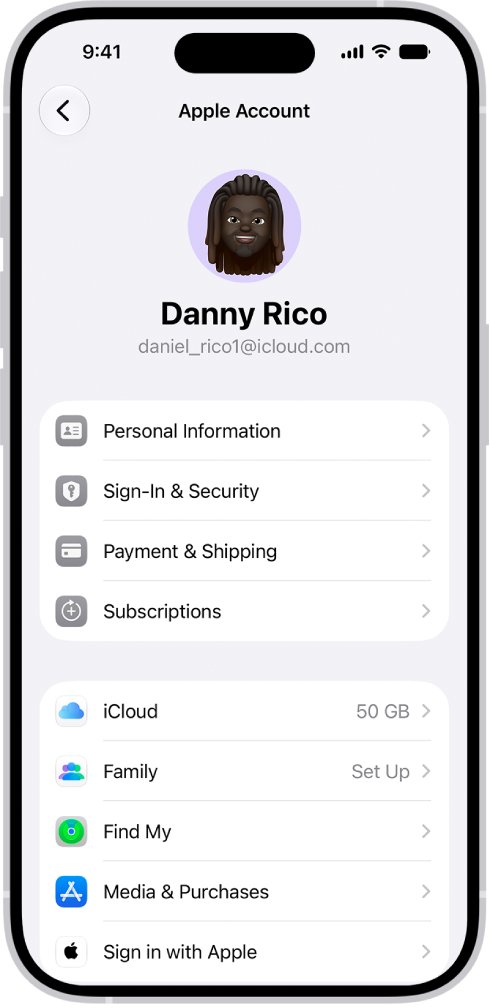
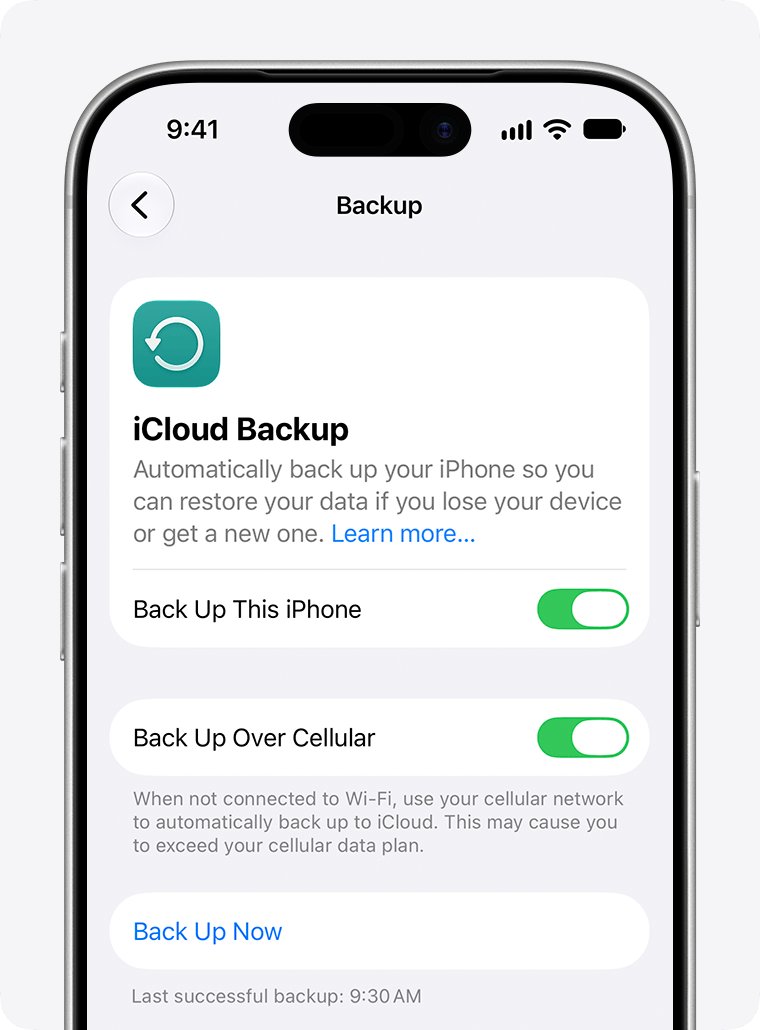
Back up iPhone to iCloud
iCloud Backup holds the data on your iPhone that does not already sync, so you can restore it on a new device. It runs automatically once a day under the right conditions.
- Open Settings, tap your name, then tap iCloud.
- Tap iCloud Backup.
- Turn on Back Up This iPhone for automatic backups.
- Leave the iPhone connected to power and Wi-Fi with the screen locked so the automatic backup can run.
- To back up right away, connect to Wi-Fi and tap Back Up Now.
- Stay on Wi-Fi until it finishes. The date and time of the last backup appear under Back Up Now.
If you use iCloud Photos or Messages in iCloud, those items sync instead and are not duplicated in the daily backup.
Turn on iCloud Photos on iPhone
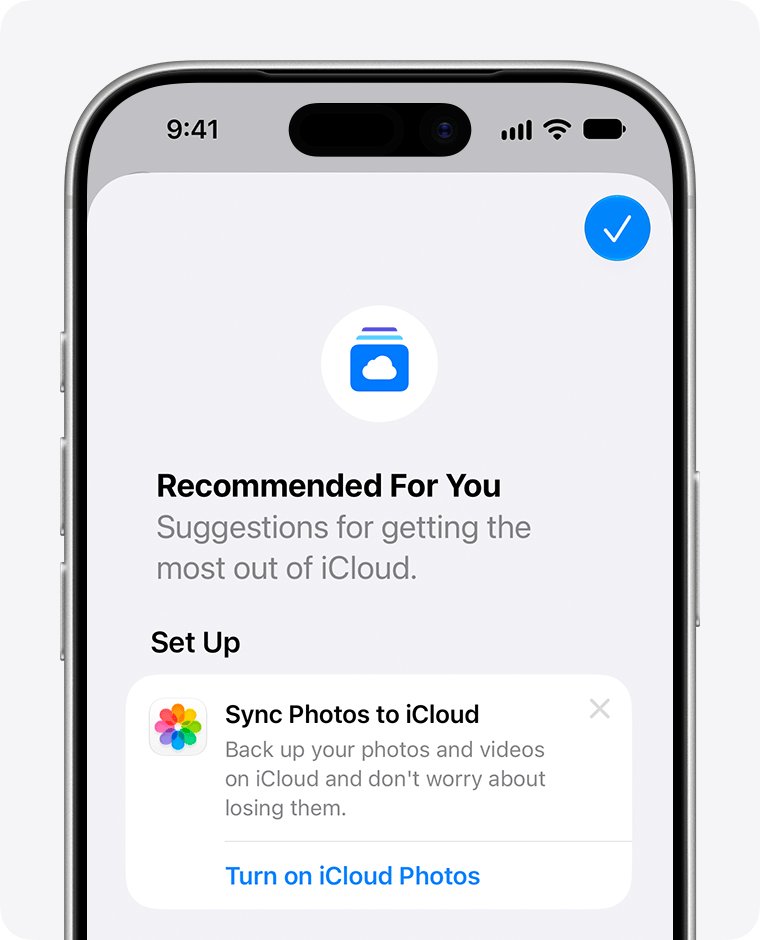
iCloud Photos stores originals at full resolution and shows the same library on every device. Deleting a photo on one device deletes it everywhere.
- Open Settings, tap your name, then tap iCloud.
- Tap Photos under Saved to iCloud.
- Turn on Sync this iPhone.
- To save space on the iPhone, tap iPhone Storage and choose Optimize Storage. On iOS 26 or earlier, choose Optimize Storage directly.
- Keep the iPhone on Wi-Fi while the library uploads. Large libraries take longer.
Before you pick it, weigh the trade-offs of Optimize Storage, because the originals then live only in iCloud.
Set up iCloud Drive and the Files app on iPhone
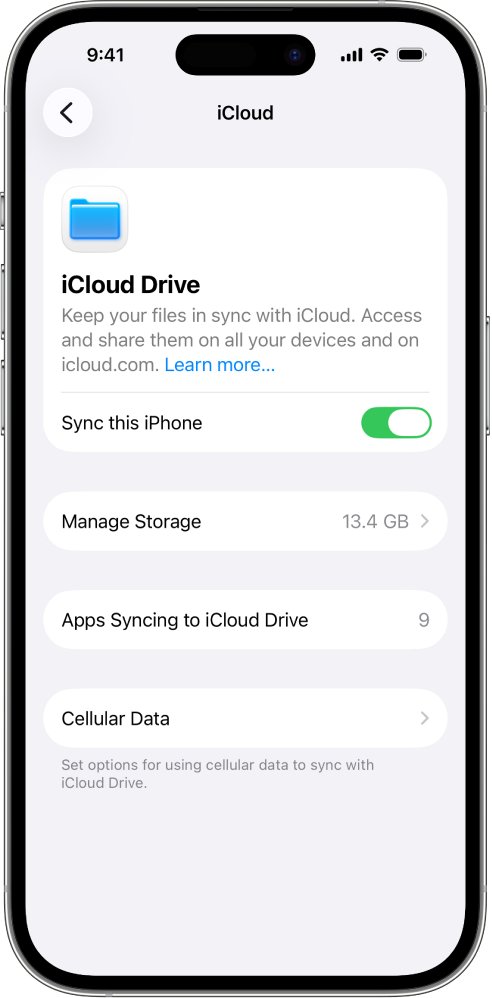
- Open Settings, tap your name, then tap iCloud.
- Tap Drive (or iCloud Drive).
- Turn on Sync this iPhone.
- Turn on any app in the list below it that should store its data in iCloud Drive.
- Open the Files app and tap iCloud Drive to see your files and folders.
Contacts sync separately from iCloud Drive. If you want a copy outside Apple's apps, you can export your iCloud contacts from iCloud.com.
Check iCloud storage on iPhone
Every Apple Account gets 5 GB of free iCloud storage. This is separate from the storage built into your iPhone.
- Open Settings, tap your name, then tap iCloud.
- Read the bar graph at the top for your overall usage.
- Tap Storage or Manage Account Storage to see which apps use the most space.
- Tap Recommended for You (iOS 17 or later) to delete large files, photos or old backups you no longer need.
- Tap Backups, then a device name, to see how big each backup is and which apps it includes.
Upgrade to iCloud+ on iPhone
iCloud+ adds storage plus Private Relay, Hide My Email, a custom email domain, Apple Invites and HomeKit Secure Video support. You can share a plan with up to five family members.
| iCloud plan | Storage | US monthly price |
|---|---|---|
| iCloud (free) | 5 GB | Free |
| iCloud+ 50 GB | 50 GB | $0.99 |
| iCloud+ 200 GB | 200 GB | $2.99 |
| iCloud+ 2 TB | 2 TB | $9.99 |
| iCloud+ 6 TB | 6 TB | $29.99 |
| iCloud+ 12 TB | 12 TB | $59.99 |
To upgrade, change or cancel, go to Settings > [your name] > iCloud > Storage > Manage Plan and follow the onscreen steps. Cancelling removes the extra storage and the iCloud+ features.
How to get into iCloud from a computer or Android phone
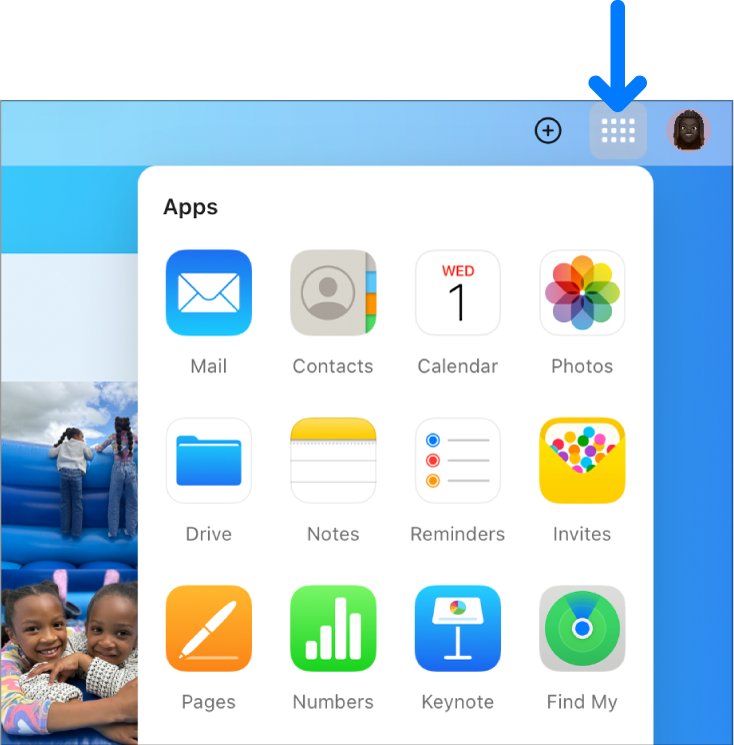
Apple builds iCloud into its own devices and offers iCloud for Windows on PCs. On any other device, including an Android phone, use iCloud.com in a web browser.
| Your device | How to reach iCloud | What you get |
|---|---|---|
| Mac | Apple menu > System Settings > [your name] > iCloud | The same apps and settings as on iPhone |
| Windows PC | Install iCloud for Windows from the Microsoft Store and sign in | Photos, iCloud Drive in File Explorer, Calendar and Contacts in Outlook, Passwords, Bookmarks |
| Android phone or any browser | Go to iCloud.com and sign in with your Apple Account | Mail, Photos, iCloud Drive, Notes, Contacts, Calendar, Find Devices and more; a phone shows a smaller set than a computer |
| iPad | Settings > [your name] > iCloud | The same steps as iPhone |
Sign in with the same Apple Account everywhere. A different account shows a different library.
iCloud not working on iPhone: fixes
You can't sign in to iCloud on iPhone
An outage, an out-of-date iOS version or a different Apple Account on each device.
- Check the Apple System Status page for iCloud outages.
- Confirm you are signed in with the same Apple Account on all devices.
- Go to Settings > General > Software Update and install the latest iOS.
- If the account says it is locked or disabled, follow Apple's steps to unlock your Apple Account.
iCloud won't sign in on mobile data
Cellular data is turned off, so the iPhone cannot reach iCloud away from Wi-Fi.
- Open Settings and tap Cellular (or Mobile Data).
- Turn on cellular data.
- Try signing in again with a strong signal.
iPhone keeps asking for the Apple Account password
An unfinished restore, a recently changed password or pending automatic downloads.
- Keep the iPhone on Wi-Fi and power until an iCloud restore finishes.
- Re-enter your new password in every iCloud service that asks for it.
- Let pending downloads finish, or approve a child's purchase request if you run Family Sharing.
iPhone won't back up or photos won't upload to iCloud
iCloud storage is full, which stops backups, Photos uploads, iCloud Drive syncing and iCloud Mail.
- Go to Settings > [your name] > iCloud and check the storage bar.
- Delete old backups or files you no longer need, or turn off backup for unused apps.
- Upgrade to iCloud+ if you still need more space.
Do I need iCloud on my iPhone?
An iPhone works without iCloud, but without it nothing is backed up off the device and nothing syncs to your other Apple devices.
Turn on at least iCloud Backup, even on the free 5 GB plan. A backup restores your settings, Home Screen layout, messages and app data to a new or replacement iPhone. Without one, a lost or broken iPhone takes that data with it.
iCloud on iOS FAQ
What is iCloud on iPhone?
iCloud is Apple's service that stores your photos, files, notes, passwords and backups in the cloud and keeps them up to date on every device signed in to your Apple Account. It includes an iCloud email address and 5 GB of free storage.
Where do I find iCloud on my iPhone?
Open the Settings app, tap your name at the top, then tap iCloud. That screen shows your storage, iCloud Backup and every app that syncs with iCloud. There is no separate iCloud app on the Home Screen.
Where is iCloud on iPad?
It is in the same place as on iPhone: Settings, then your name, then iCloud. Sign in with the same Apple Account as your iPhone to see the same photos, files and messages.
How does iCloud work on iPhone?
Apps you turn on in iCloud settings save their data to Apple's servers. When you change something on one device, the change appears on your other devices. Data that does not sync is copied into a daily iCloud Backup instead.
Is there an iCloud app for iPhone?
No. iCloud is built into iOS, so each app such as Photos, Files, Notes and Mail uses it directly. You manage it in Settings, and you can also use iCloud.com in Safari.
Can I get iCloud on Android?
There is no iCloud app for Android. Open iCloud.com in a web browser on the Android phone and sign in with your Apple Account to reach Mail, Photos, iCloud Drive, Notes and other apps.
Where is the iCloud app on a computer?
On a Mac, iCloud is in System Settings under your name. On a Windows PC, install iCloud for Windows from the Microsoft Store. Any computer can also use iCloud.com in a supported browser.
How much iCloud storage is free?
Every Apple Account gets 5 GB of iCloud storage for free. iCloud+ plans add 50 GB, 200 GB, 2 TB, 6 TB or 12 TB; in the United States they cost $0.99 to $59.99 a month.
Does every iPhone have iCloud?
Yes. iCloud is part of iOS on every supported iPhone. You only need to sign in to an Apple Account in Settings to start using it.
What happens if my iCloud storage is full?
Your iPhone stops backing up to iCloud, new photos stop uploading to iCloud Photos, iCloud Drive stops syncing, and you cannot send or receive iCloud email until you free space or upgrade.