Family Sharing takes over an iPhone's payment method when the organizer turns on Purchase Sharing, because the organizer then pays for every member's purchases unless that member adds their own payment method.
This guide shows how a family member can pay with their own card, how the organizer can stop Purchase Sharing, how to leave the group, and how to check which card is now being charged.
Use your own payment method with Apple Family Sharing
Apple bills the family organizer unless an adult family member adds a payment method of their own. Do this on the family member's iPhone, signed in to their own Apple Account.
- Open the Settings app and tap your name at the top.
- Tap Payment & Shipping. Sign in to your Apple Account if asked.
- Tap Add Payment Method.
- Enter the card details, and make sure the name and billing address match what your bank has on file.
- Tap Done.
- Tap Edit and drag your own card to the top of the list if you have more than one payment method.
Purchases are charged to your Apple Account balance first. Only when the balance is not enough does the remainder go to your own payment method, or to the organizer if you have not added one.
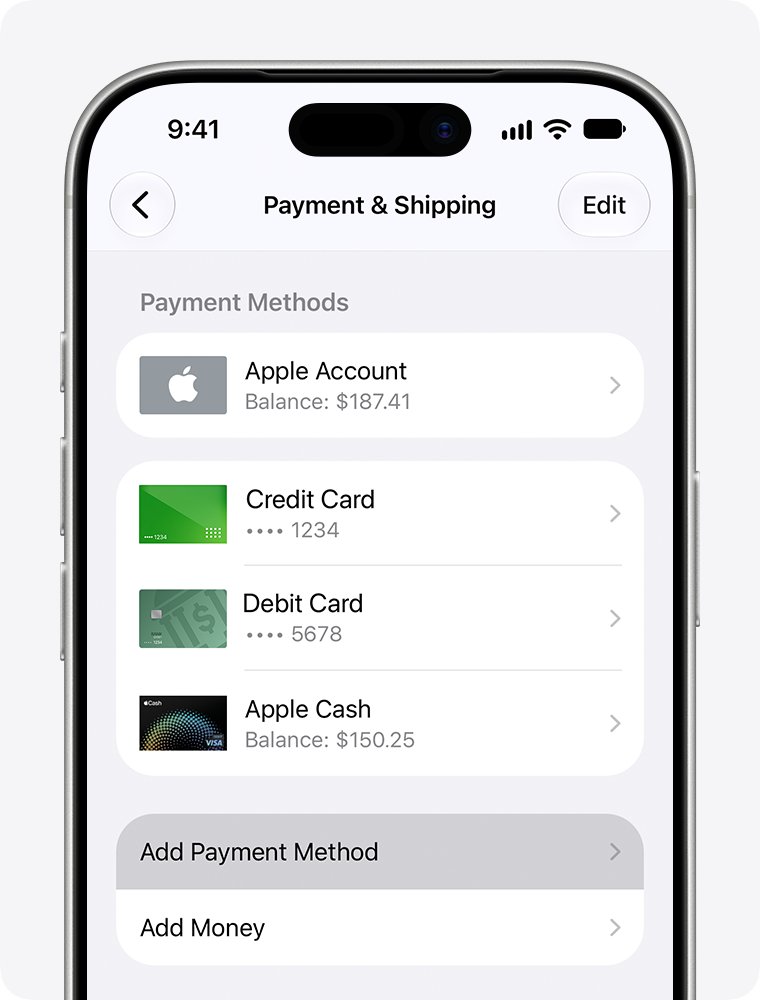
Apple Family Sharing separate payment options
Each fix changes something different. Pick the one that matches what the family actually wants to keep.
| What you want | Do this | What happens |
|---|---|---|
| Keep sharing apps and books, but pay for your own purchases | Add your own payment method | The organizer stops being billed for your purchases |
| Nobody in the family should use the organizer's card | Organizer taps Stop Purchase Sharing | Everyone loses access to shared App Store, Apple TV and Books purchases |
| Hide your purchases from the family | Turn off Share Purchases for your name | Purchases are hidden, but they still use the shared family payment method |
| Leave the family group completely | Stop Using Family Sharing | You lose shared purchases and services such as a shared iCloud+ plan |
| Keep shared subscriptions but stop shared purchases | Organizer stops Purchase Sharing | iCloud+, Apple TV and other subscriptions can still be shared |
How does Family Sharing work with payment methods?
Family Sharing lets you and up to five family members share Apple services without sharing one Apple Account. Purchase Sharing is the part that controls who pays.
| Situation | Who pays |
|---|---|
| Purchase Sharing on, member has no payment method | The family organizer |
| Purchase Sharing on, member added their own payment method | The member |
| Member has Apple Account balance | The balance first, then the organizer or the member's own card |
| Purchase Sharing off | Each person pays with their own payment method |
| Child with Ask to Buy on | The organizer or a parent/guardian approves each request |
When a family member buys something with Purchase Sharing on, the organizer might need to confirm the card by entering its CVV. The item is added to the buyer's own account and is shared with the family.
How to stop Purchase Sharing as the family organizer
Only the organizer can turn Purchase Sharing off for the whole group. This is the quickest way to stop the organizer's card being used by anyone else.
- On the organizer's iPhone, open the Settings app.
- Tap Family, then tap Purchase Sharing.
- Tap Stop Purchase Sharing.
- Tap Stop Sharing to confirm.
- On a Mac, open System Settings > Family > Purchase Sharing and click Stop Purchase Sharing twice.
Each person keeps the items they chose to buy, even ones the organizer paid for. Family members simply lose access to each other's shared purchases.
Turn off Share Purchases on iPhone in Family Sharing
This switch hides your purchases from the family. It does not change who pays: purchases you make still use the shared family payment method.
- Open the Settings app.
- Tap Family, then tap Purchase Sharing.
- Tap your name.
- Turn off Share Purchases.
- Add your own payment method as well if the aim is to stop the organizer paying.
How to leave Family Sharing on iPhone
Any adult can remove themselves from a Family Sharing group. Leaving also ends shared services, location sharing and shared albums with that family.
- Open the Settings app, then tap Family. If you do not see Family, tap your name, then tap Family.
- Tap your name.
- Tap Stop Using Family Sharing and confirm.
- Open Settings > your name > Payment & Shipping and add your own payment method for future purchases.
- Without the iPhone, sign in at account.apple.com, open Family Sharing, then select Disconnect Account and Disconnect.
You keep the purchases you made while in the group. Apps you downloaded from a family member's purchase history need to be bought again to keep their in-app purchases.
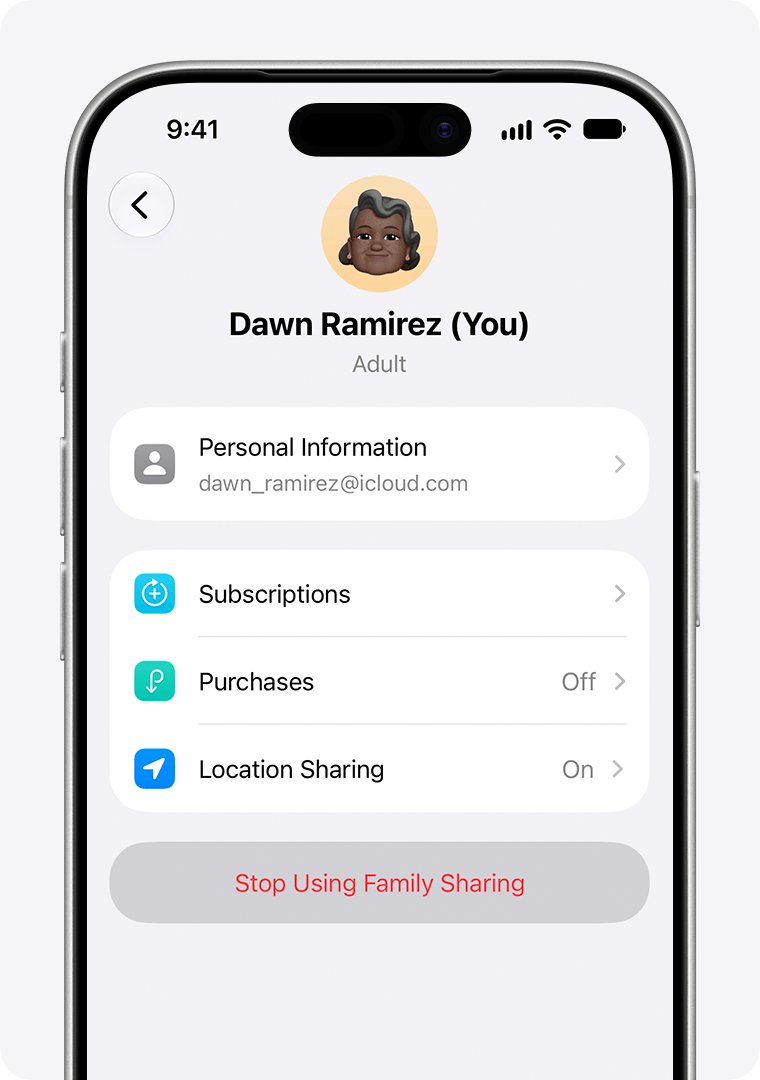
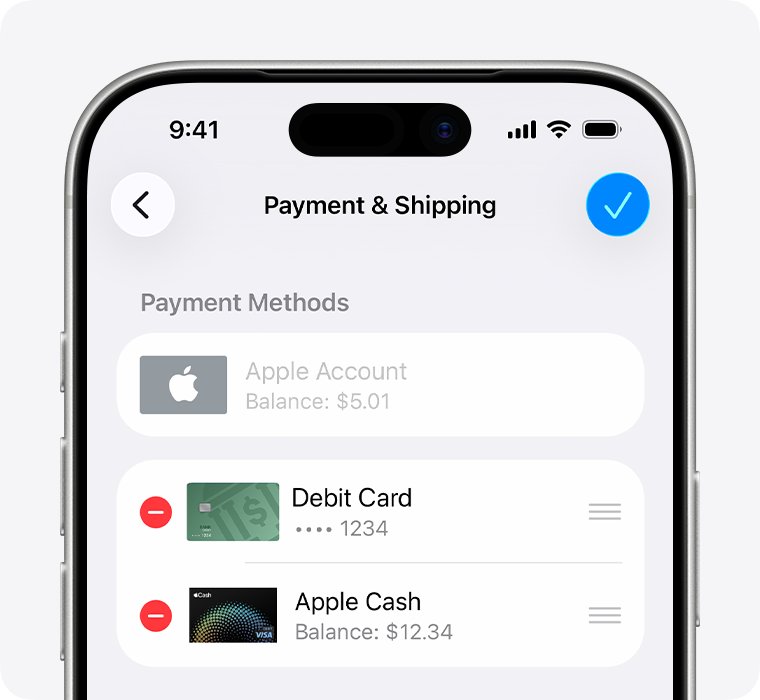
Remove the organizer's card from Family Sharing
The organizer must keep at least one payment method on file while Purchase Sharing is on. To remove that card, Purchase Sharing has to go first.
- On the organizer's iPhone, turn off Purchase Sharing in Settings > Family > Purchase Sharing > Stop Purchase Sharing.
- Open Settings and tap the organizer's name.
- Tap Payment & Shipping, then tap Edit.
- Tap the Delete button next to the card.
- Tap Remove to confirm.
- If removal is still blocked, cancel active subscriptions such as iCloud+ or pay any unpaid balance, then try again.
Check which payment method Family Sharing is using
Look at both lists: the shared payment methods in Family and the personal ones in Payment & Shipping.
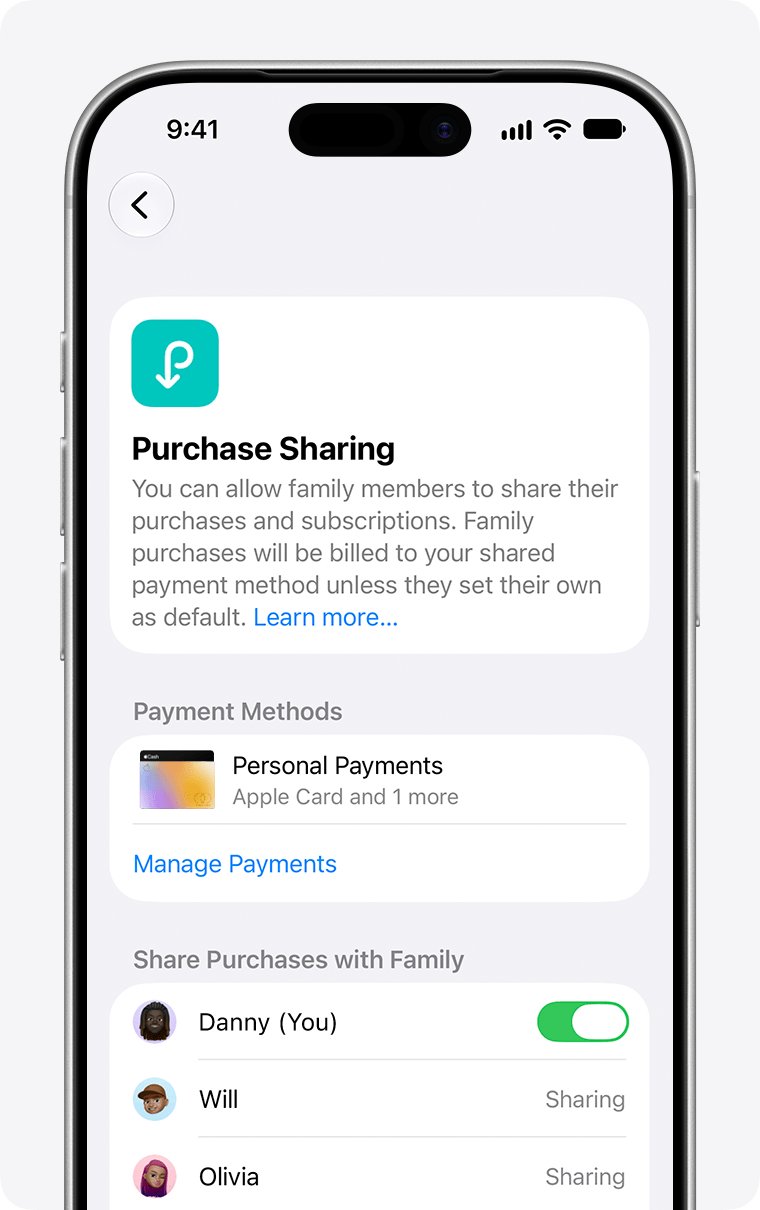
- Open Settings > Family > Purchase Sharing.
- Read the card listed under Payment Methods. That is the organizer's default shared payment method.
- Go back, tap your name, then tap Payment & Shipping.
- Confirm your own card appears there and sits at the top of the list.
- Make a small or free purchase, then check your purchase history to see which account was billed.
The organizer can review what each member bought, and you can find purchases made by other family members from the App Store and Music apps.
How to turn on Family Sharing on iPhone
The organizer, who must be an adult, sets up the group and decides whether Purchase Sharing is on. You can belong to only one Family Sharing group at a time.
- Open the Settings app, then tap your name.
- Tap Family, then tap Continue.
- Follow the onscreen instructions to create the group and invite family members by Messages or email.
- To turn on Purchase Sharing, tap Family > Purchase Sharing > Turn On.
- Check the card under Payment Methods, because it becomes the default for everyone's purchases.
- Ask adult members to add their own payment methods if they should pay for themselves.
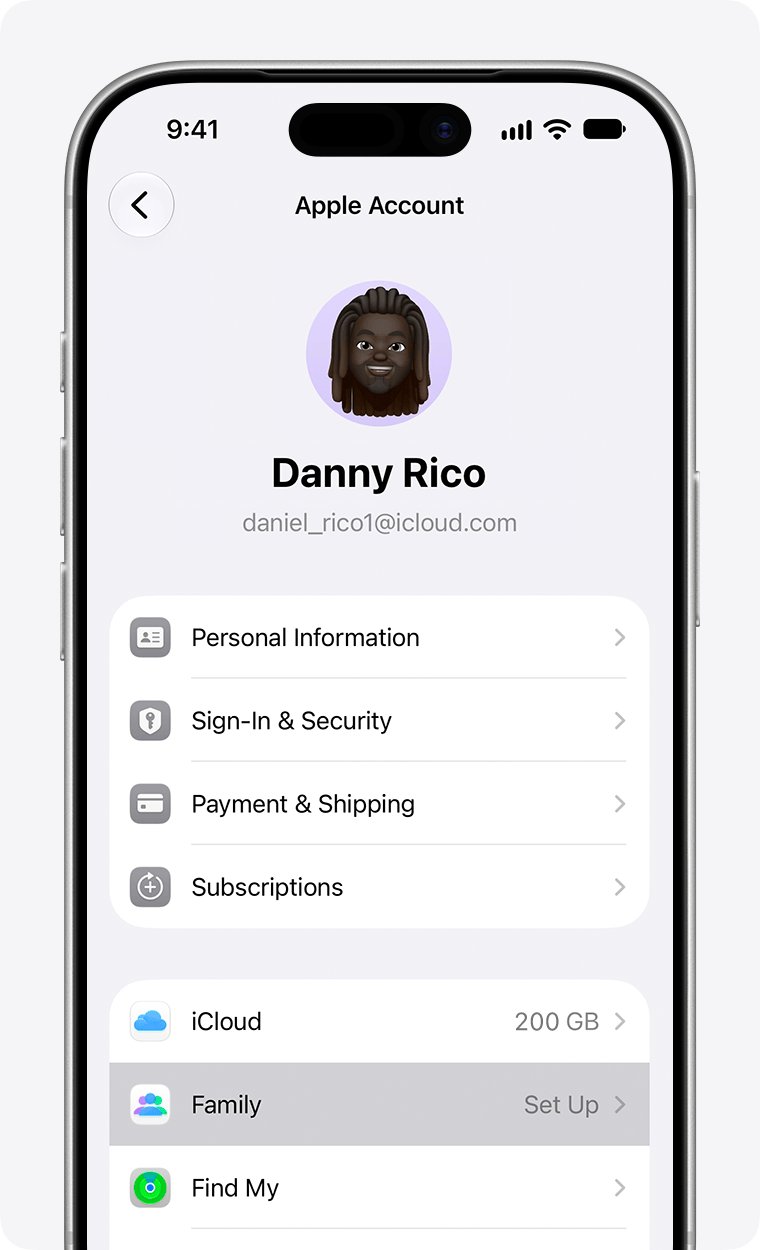
Family Sharing not working or payment declined
Why is Family Sharing not working for shared purchases?
Family members must be in the same Apple Account country or region to share purchases.
- Compare the Apple Account country or region on each family member's account.
- Change the country or region on the account that does not match, if that member really lives there.
- Reopen the App Store and check Purchased for family purchases again.
Family Sharing purchase request not going through
The organizer's card was declined or needs verification.
- Ask the organizer to check that their name and billing address match their bank's records.
- In Settings > their name > Payment & Shipping, add a new card, then remove the old one.
- Ask the bank to allow the charge, or complete any verification it sends by text or app.
- Try the purchase again.
You can't remove a payment method from your Apple Account
Organizers with Purchase Sharing, active subscriptions or an unpaid balance must keep one payment method.
- If you are the organizer, stop Purchase Sharing first.
- Cancel subscriptions such as iCloud+ and wait for the period to end.
- Pay any unpaid balance, then remove the card from Payment & Shipping.
Family Sharing payment methods FAQ
What is Family Sharing?
Family Sharing is Apple's feature that lets you and up to five family members share Apple services such as iCloud+, Apple Music and Apple TV without sharing one Apple Account. With Purchase Sharing on, members can also share App Store, Apple TV and Apple Books purchases.
How does Family Sharing work with payments?
When Purchase Sharing is on, the family organizer pays for everyone's purchases with a shared payment method. An adult member who adds their own payment method pays for their own purchases instead. Apple Account balance is always used first.
Can Apple Family Sharing members use their own payment method?
Yes. An adult family member can add a card in Settings > their name > Payment & Shipping > Add Payment Method. After that, the organizer is no longer billed for that member's purchases, while shared apps and books stay available.
How do I get off of Family Sharing?
Open Settings, tap Family, tap your name, then tap Stop Using Family Sharing. Any adult can do this. You lose access to shared purchases and services, but you keep anything you bought yourself while in the group.
How do I stop using Family Sharing for purchases only?
The organizer can open Settings > Family > Purchase Sharing and tap Stop Purchase Sharing. Members stay in the family group and can still share subscriptions such as iCloud+, but they stop sharing purchases and stop using the organizer's card.
Why is Family Sharing not working?
The most common reason purchases do not share is that members' Apple Accounts are set to different countries or regions. Family members must be in the same country or region. A declined organizer card also blocks shared purchases until it is updated.
Where is Family Sharing on iPhone?
Family Sharing is in the Settings app under Family, just below your name. If you do not see Family there, tap your name, then tap Family. Purchase Sharing, members and shared payment methods are all managed from that screen.
Can you change Family Sharing payment method?
Yes. The organizer changes the shared card in Settings > their name > Payment & Shipping by adding a new card and removing the old one. A member can stop using the shared card by adding their own payment method.
Does turning off Share Purchases stop the organizer paying?
No. Turning off Share Purchases only hides your purchases from the family. Apple notes that purchases you make still use the shared family payment method, so add your own payment method if you want to pay yourself.