Apple's real US support number is 1-800-275-2273, and Apple says to hang up on any unsolicited call claiming to be Apple Support, even when caller ID shows an Apple number.
This guide shows how to check a number, what scam callers ask for, how to report the call, text or email, and what to do if you already shared a code or password.
What to do after a call from an Apple Support scam number
Scammers spoof caller ID, so a call that shows Apple's name or number can still be fake. Treat every unexpected call as suspicious and reach Apple Support yourself.
- Hang up without giving any code, password, card number or gift card.
- Do not open any link the caller sent you by text or email.
- Call Apple yourself on 1-800-275-2273 (US), or open the Apple Support app or getsupport.apple.com.
- Ask Apple to confirm whether there is any real problem with your Apple Account.
- Block the scam number in the Phone app: tap Recents, tap the number, scroll down and tap Block Caller.
- Report the call to the FTC at reportfraud.ftc.gov.
Official Apple Support phone numbers in the US
These are the only US numbers Apple lists on its contact page. Any other number from a text, pop-up or search ad should be treated as a scam number until proven otherwise.
| Apple service | Official US number |
|---|---|
| Apple Support (general) | 1-800-275-2273 |
| Education customers | 1-800-800-2775 |
| Apple Business and Apple School Manager | 1-866-902-7144 |
| Apple Cash and person-to-person payments | 1-877-233-8552 |
Outside the US, pick your country on Apple's Contact Apple Support page at support.apple.com/en-us/106932 to get the local number.
Apple support phone number scam: warning signs
Apple describes these calls as social engineering: the caller builds trust, invents an emergency, then asks for access.
| What the caller does | Why it gives the scam away |
|---|---|
| Shows Apple's name or number on caller ID | Caller ID is easy to spoof, so it proves nothing |
| Quotes your address, employer or Social Security number | Leaked personal data is used to seem legitimate |
| Says your iPhone or iCloud was hacked, or Apple Pay was charged | An invented emergency pushes you to act fast |
| Warns you will be liable if you hang up and call back | Apple says this is false and meant to keep you on the line |
| Sends you to a sign-in page to verify your identity | Apple never asks you to log in to a website during a call |
| Asks for your password, passcode or two-factor code | Apple never asks for these to provide support |
| Asks you to tap Accept on a two-factor prompt | That approves the scammer's own sign-in |
| Asks you to turn off two-factor authentication or Stolen Device Protection | Apple never asks you to disable a security feature |
| Asks for payment in Apple Gift Cards | Apple says never to pay other people with gift cards |
Apple support phone number scam text: how to spot and report it
Fake texts usually claim a locked account, a suspicious purchase or a refund, then give a number to call or a link to tap.
- Check the sender: a number or address that does not match Apple is a red flag.
- On iPhone, touch and hold any link to preview the real address without opening it.
- Take a screenshot of the message.
- Email the screenshot to [email protected].
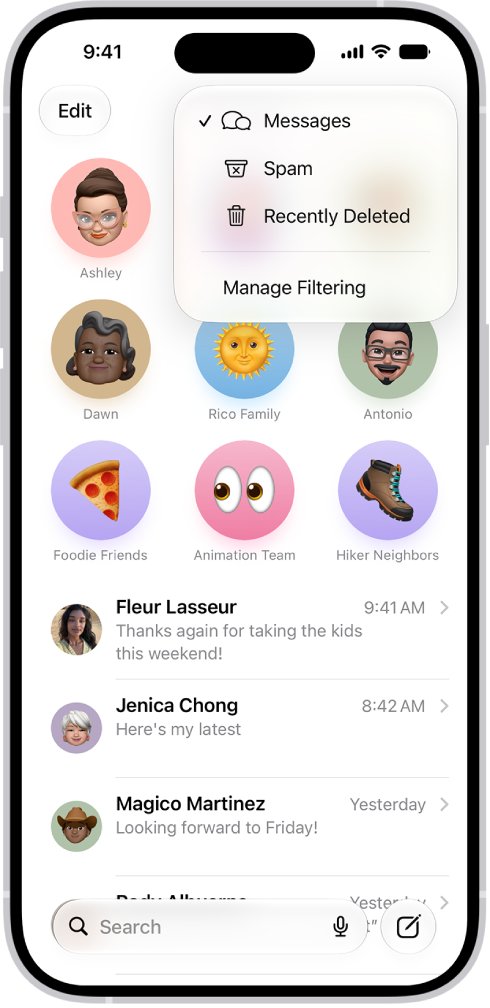
- Tap Report Junk under the message in Messages.
- Delete the message without replying or calling the number in it.
Apple support email scam: how to check and report it
- Compare the sender address with the email address Apple has on file for you.
- Hover over a link on a Mac to see its real URL; if Safari hides it, choose View > Show Status Bar.
- Do not open attachments in an unexpected message.
- Forward the email to [email protected]; in Mail on a Mac, select it and choose Message > Forward As Attachment to include the headers.
- If it arrived in an iCloud.com, me.com or mac.com inbox, mark it as Junk afterwards.
A message that looks very different from earlier Apple emails, or asks for a card number or password, should be treated as phishing.
Fake Apple support pop-up with a phone number
A browser alert that says your iPhone or Mac has a virus and lists a support number is a fraudulent ad, not Apple.
- Do not call the number or tap any button inside the pop-up.
- Close the tab, or close the whole browser window.
- Do not install any app or configuration profile the page offers.
- Get software only from the App Store or the developer's own website.
Apple FaceTime scam call: how to report it
- Open FaceTime and tap the More Info button next to the suspicious call.
- Take a screenshot of the call information.
- Email the screenshot to [email protected].
- For a FaceTime link sent in Messages or Mail, screenshot the link with the sender's number or address and send it to the same address.
- Tap the caller, scroll down and tap Block Caller.
Block an Apple support scam number on iPhone
- Open the Settings app.
- Tap Privacy & Security.
- Tap Blocked Contacts.
- Tap Add Blocked Contact, then enter the scam number.
- Tap Block Contact.
A blocked number can still leave a voicemail, but you get no notification and its messages are not delivered.
Gave information to an Apple support scammer? Fix it
You shared your Apple Account password or a verification code
The scammer can sign in to your account with those details.
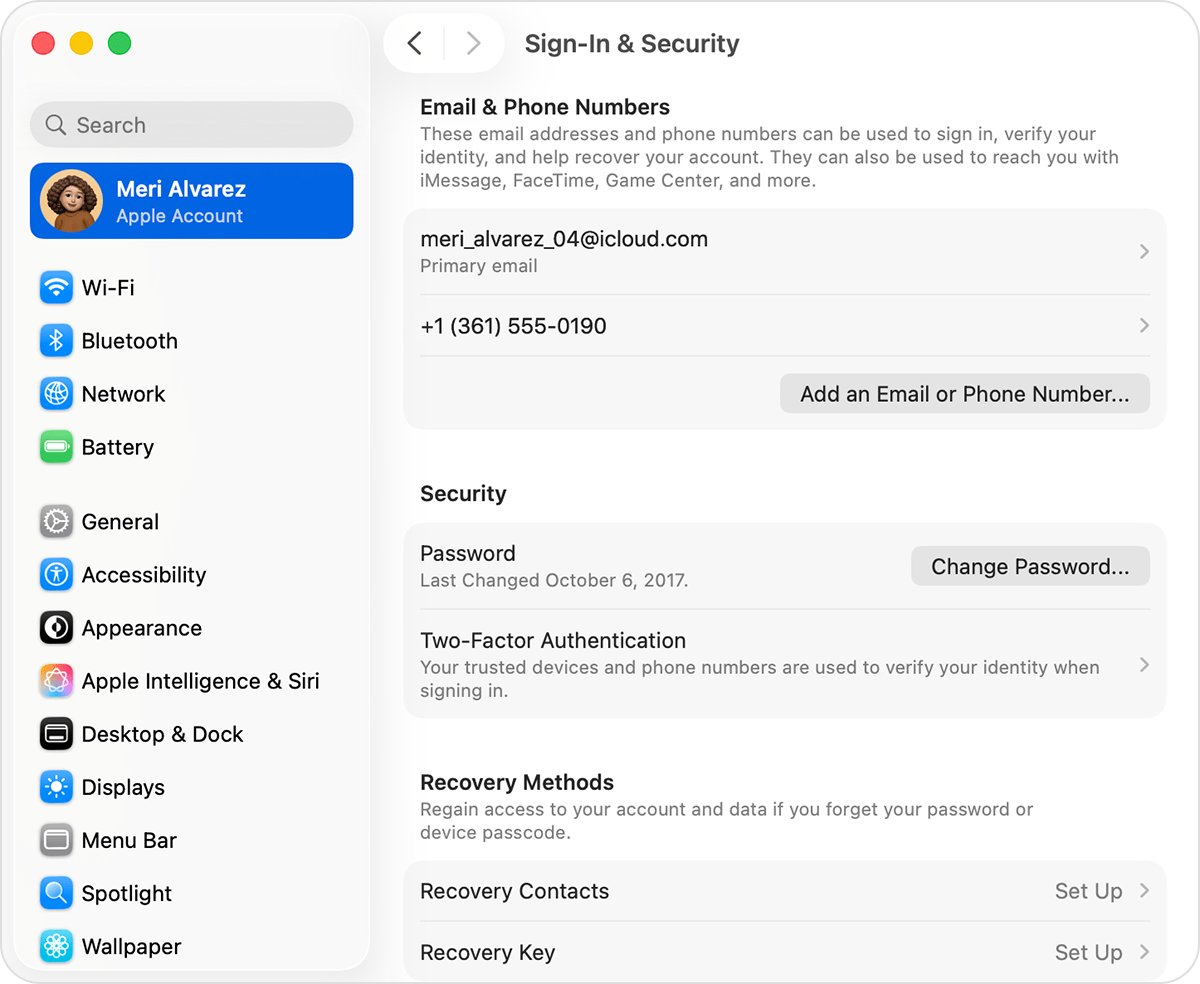
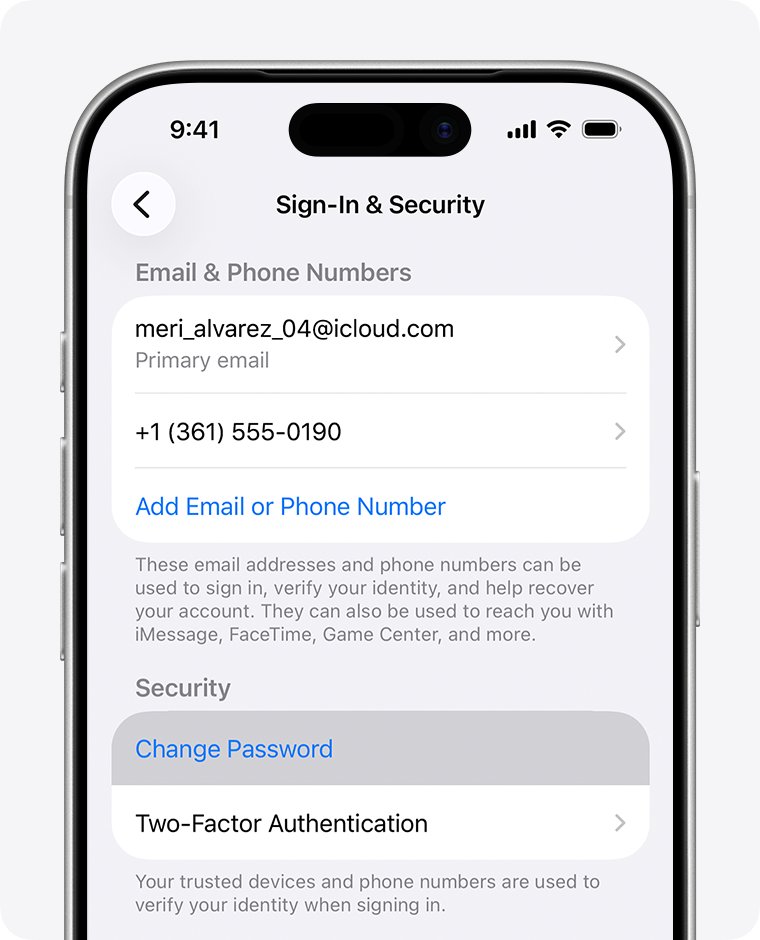
- On iPhone, open Settings, tap your name, then tap Sign-In & Security.
- Tap Change Password and follow the prompts.
- Tap Remove Other Devices when asked, so unknown sessions are signed out.
- Confirm two-factor authentication is turned on in the same Sign-In & Security screen.
You entered details on a fake Apple sign-in page
The page captured your password and possibly card details.
- Change your Apple Account password straight away from a trusted device.
- Call your bank or card issuer if you typed any card number.
- Call Apple on 1-800-275-2273 to check the account for changes.
You paid with Apple Gift Cards
Gift cards are a common scam payment because they are hard to trace.
- Keep the cards and receipts.
- Call Apple on 1-800-275-2273 and explain that the cards were used in a scam.
- Report the payment to the FTC at reportfraud.ftc.gov or to local police.
Apple support scam number FAQ
What is the real Apple Support phone number?
In the United States the official Apple Support number is 1-800-275-2273. Apple lists other countries' numbers on its Contact Apple Support page, where you choose your country or region to see the local line.
Does Apple call you about a hacked account?
Apple advises hanging up on any unsolicited call claiming to be Apple or Apple Support. If you are worried about a charge, review purchases on your Apple ID, then contact Apple yourself through the Apple Support app, getsupport.apple.com or the official number.
Can a scam call show Apple's real number?
Yes. Scammers spoof caller ID so a call appears to come from Apple's legitimate number. A familiar number on screen is not proof, so hang up and dial Apple's number yourself.
Is an Apple Pay support number in a text a scam?
Treat it as one. A text warning of an Apple Pay charge with a number to call is a common tactic. Do not call it; check your Wallet activity and contact Apple Pay support or your card issuer directly.
How do I report an Apple support scam text?
Take a screenshot of the text and email it to [email protected]. Then tap Report Junk under the message in Messages and delete it without replying.
Where do I forward an Apple support scam email?
Forward it to [email protected]. On a Mac, select the message in Mail and choose Message > Forward As Attachment so the header information goes with it.
Will Apple support ask for my verification code?
No. Apple never asks for your password, device passcode or two-factor authentication code, and never asks you to tap Accept on a sign-in prompt or enter a code into a website.
Where do I report Apple scam phone numbers?
In the United States, report scam phone calls to the Federal Trade Commission at reportfraud.ftc.gov or to your local law enforcement agency. Block the number on your iPhone afterwards.
Are Apple support scams on iPhone pop-ups real warnings?
No. Pop-ups saying your iPhone has a virus or offering a prize are fraudulent ads. Do not call the number shown; close the tab or browser window instead.