To switch the debit card that receives an Apple Cash Instant Transfer, add the new eligible debit card to Wallet and remove the old one, because Apple documents no separate card picker for Instant Transfer.
This guide covers the switch on iPhone and iPad, the fee and limits, how to change the bank account for free transfers, and what to do when a transfer fails.
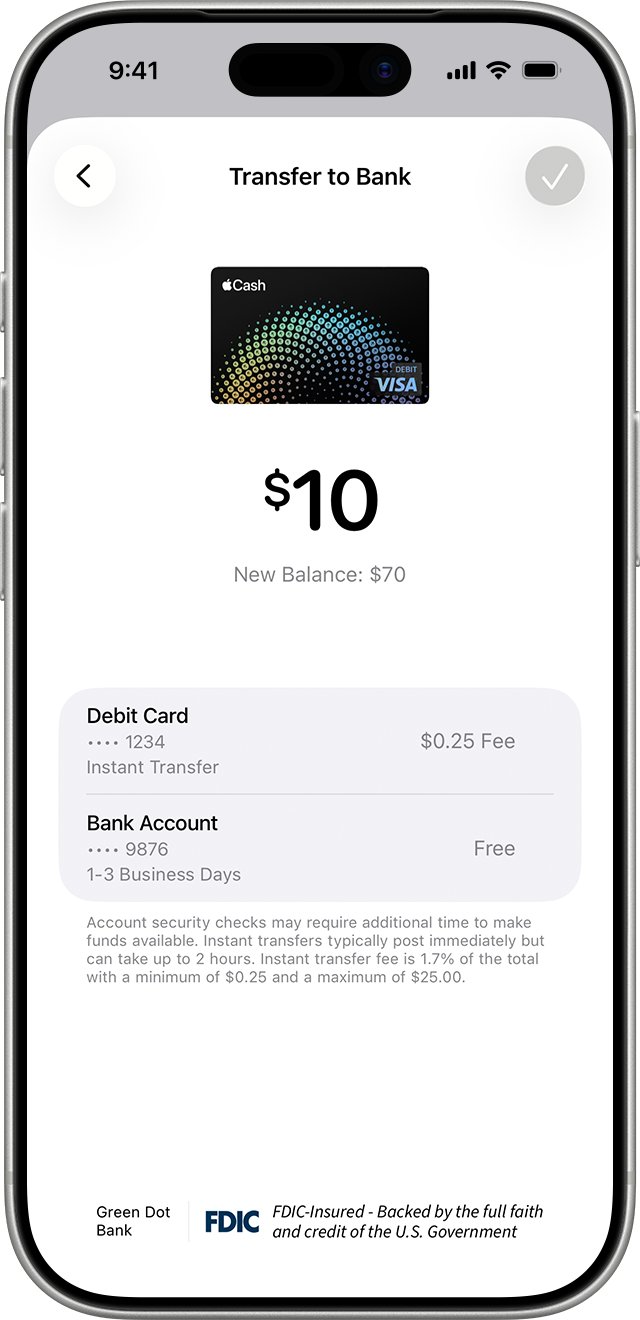
Switch debit cards for Apple Cash Instant Transfer on iPhone
The default card setting controls Apple Pay purchases, not Instant Transfer. Apple's own help page for Instant Transfer describes no option to choose between several debit cards, so the reliable way to change the destination is to leave only the card you want in Wallet.
- Open the Wallet app and tap the Add Card button.
- Tap Debit or Credit Card, then tap Continue.
- Hold the new debit card near your iPhone, or tap Enter Card Details Manually and follow the prompts.
- Back in Wallet, tap the old debit card you no longer want to receive transfers.
- Tap the More button, tap Card Details, scroll down and tap Remove Card.
- Start the Instant Transfer from your Apple Cash card as usual, so it goes to the remaining debit card.
Removing a card from Wallet does not close the card account. You can add it back later with Cards Found For You in the Add Card screen.
Apple Cash Instant Transfer vs bank transfer
| Your situation | Use this | Why |
|---|---|---|
| You need the money now | Instant Transfer to a debit card | Usually arrives at once, up to 30 minutes |
| You want to avoid fees | 1-3 Business Days to a bank account | Bank transfers carry no fee |
| Your card is not U.S.-issued | Bank transfer to a U.S. account | Only U.S.-issued debit cards are eligible |
| You are under 13 in Apple Cash Family | Bank transfer | Instant Transfer is for teens 13 and older |
Eligible debit card for Apple Cash Instant Transfer
| Requirement | Detail |
|---|---|
| Card type | A debit card issued in the United States; credit cards do not qualify |
| Software | The latest version of iOS or iPadOS |
| Card location | The debit card must be in the Wallet app on the same device |
| Not sure your card qualifies | Ask the card issuer; Apple directs eligibility questions to them |
Send an Apple Cash Instant Transfer to a debit card
- Open Wallet, tap your Apple Cash card, tap the More button, then tap Transfer to Bank.
- Enter an amount, tap the Close button, then tap Continue.
- Tap the Instant Transfer option, then tap Done.
- If no eligible debit card is listed, tap Add Card and follow the prompts.
- Double-click the side button, then confirm with Face ID, Touch ID or your passcode.
On iPad, start from Settings > Wallet & Apple Pay > your Apple Cash card > Transfer to Bank, then follow the same steps.
Change the debit card on iPad for Instant Transfer
- Open Settings and tap Wallet & Apple Pay.
- Tap Add Card and follow the steps to add the new debit card.
- Open the Wallet & Apple Pay list again and tap the old debit card.
- Tap Remove Card and confirm.
- Start a new Instant Transfer from your Apple Cash card.
Change bank account for Apple Cash transfers
Free 1-3 day transfers go to a bank account, not a card. Change that account here.
- Open Wallet, tap your Apple Cash card, tap the More button, then tap Card Details.
- Scroll down, tap Bank Account, then tap the account you want to change.
- Tap the routing or account number, enter the new details, confirm them and tap Next.
- To remove the account instead, tap Delete Bank Account Information, then tap Delete.
The change syncs to every device signed in to the same Apple Account. Wrong bank details can send money to an account it cannot be recovered from, so check both numbers.
Apple Cash Instant Transfer fee and limits
| Item | Standard account | Apple Cash Family |
|---|---|---|
| Instant Transfer fee | 1.7% (minimum $0.25, maximum $25) | 1.7% (minimum $0.25, maximum $25) |
| Bank transfer fee | None | None |
| Minimum transfer | $1, or the full balance if under $1 | $1, or the full balance if under $1 |
| Maximum per transfer | $10,000 | $2,000 |
| Maximum per 7 days | $20,000 | $4,000 |
| Arrival time | Instant, up to 30 minutes | Instant, up to 30 minutes |
The fee comes out of the amount you transfer, and Wallet shows the exact fee before you confirm.
Check which debit card got the Apple Cash transfer
- Open Wallet and tap your Apple Cash card.
- Tap the transfer in the transaction list to open its details.
- Check the card's own banking app for the matching deposit within 30 minutes.
Apple Cash Instant Transfer not working
The transfer went to the old debit card
The old card was still in Wallet when the transfer started.
- Remove the old card with More > Card Details > Remove Card.
- Contact the old card's issuer to find the deposit, since the money is in that account.
Instant Transfer is not offered or shows an error
The card is not an eligible U.S. debit card, or the software is out of date.
- Update the iPhone or iPad to the latest iOS or iPadOS.
- Confirm with the issuer that the card is a U.S.-issued debit card.
- Check the amount is at least $1 and under the $10,000 per-transfer limit.
- Verify your identity if Wallet asks for it.
Instant Transfer money has not arrived
Security checks can hold the funds longer than 30 minutes.
- Wait two hours from the time you sent it.
- After two hours, contact an Apple Cash Specialist at Green Dot Bank.
Apple Cash Instant Transfer debit card FAQ
How do I change the debit card for Apple Cash Instant Transfer?
Add the new debit card to Wallet, then remove the old one through More > Card Details > Remove Card. Apple documents no separate setting to pick a transfer card, so keeping one eligible debit card in Wallet decides where the money goes.
Does the Apple Pay default card control Instant Transfer?
Apple describes the default card as the card used for Apple Pay purchases in apps and online. It does not link that setting to Instant Transfer, so changing the default card is not a dependable way to change the transfer destination.
Can I split an Instant Transfer between two debit cards?
A single Instant Transfer goes to one debit card. To send money to two cards, make two transfers and change which card is in Wallet between them. Each transfer pays its own 1.7% fee.
How much does Apple Cash Instant Transfer cost?
Instant Transfer costs 1.7% of the amount, with a minimum fee of $0.25 and a maximum of $25. Transfers to a bank account in 1-3 business days are free.
How do I get a new debit card into Apple Wallet?
Open Wallet, tap the Add Card button, tap Debit or Credit Card, then Continue. Hold the card near the iPhone or enter the details manually. Some issuers ask for extra verification before the card works.
Can I use a credit card for Apple Cash Instant Transfer?
No. Instant Transfer only sends money to an eligible debit card issued in the United States. Use a bank transfer if you do not have one.
How long does Apple Cash Instant Transfer take?
Funds usually arrive immediately and can take up to 30 minutes. Security checks can add time. Contact Green Dot Bank if the money has not arrived after two hours.