You can delete an iCloud email alias, a Hide My Email address or a custom domain address at any time, but your primary @icloud.com address only goes away if you change it or delete your whole Apple Account.
This guide shows each route on iCloud.com, iPhone and Mac, plus how to simply remove iCloud Mail from a device without closing anything.
Can you delete an iCloud email address? Answer by address type
Find the kind of address you want gone in the first column. The right-hand column is the fix.
| Address you want to remove | Can it be deleted? | What to do |
|---|---|---|
| An @icloud.com alias you created | Yes, permanently | Delete it in iCloud Mail settings on iCloud.com |
| A Hide My Email address | Yes, after you deactivate it | Deactivate, then delete it in Hide My Email on iCloud.com |
| An address on your own custom domain | Yes | Remove it under Custom Email Domain on iCloud.com |
| Your primary @icloud.com address | No, not on its own | Change it to a new @icloud.com address, or delete the Apple Account |
| The iCloud address shown in the Mail app | Removing it from the device does not delete it | Turn off Use on this iPhone, or remove the account in Mail on Mac |
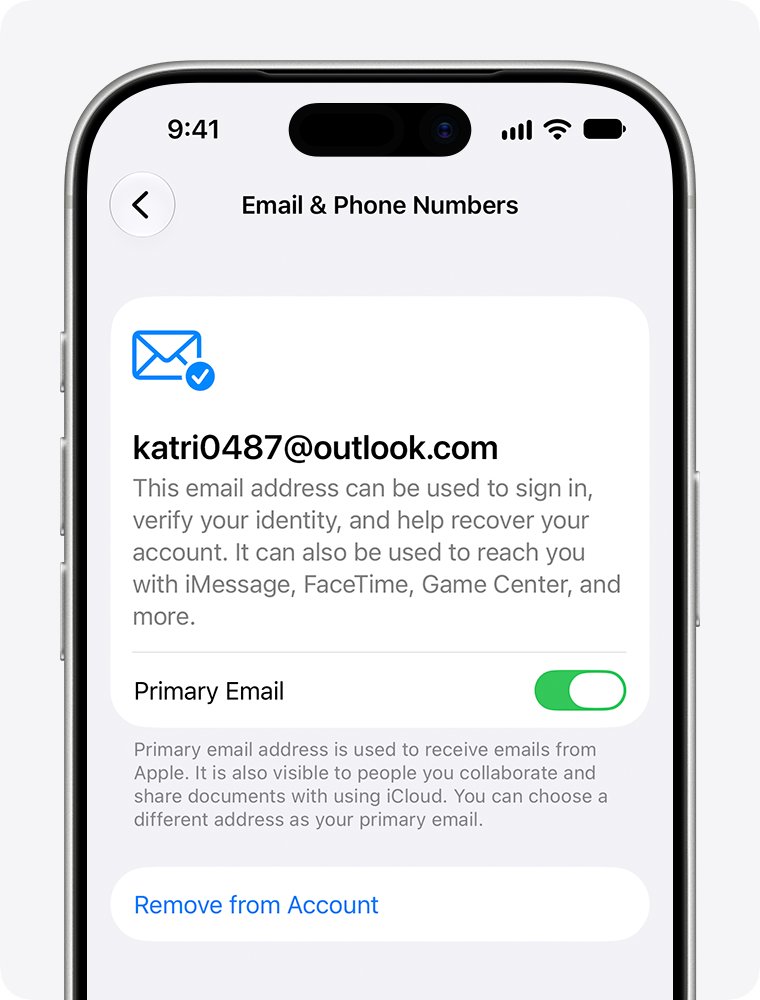
| An extra email address on your Apple Account | Yes, if another address remains | Select Remove from Account in Sign-In & Security |
Delete an iCloud Mail alias on iCloud.com
Deleting an alias is permanent, and mail sent to it is returned to the sender. Aliases cannot be renamed or turned into a primary address.
- Go to icloud.com/mail in a browser and sign in to your Apple Account.
- Select the settings button above the Mailboxes list, then select Settings.
- Select the alias you want to remove in the list.
- Select Delete alias.
- Select Delete to confirm.
To pause an alias instead, select the Disable alias checkbox and select Save Changes. Turning an alias off is temporary, so you can clear the checkbox later.
If you are at the alias limit and delete one, Apple makes you wait 7 days before you can create a replacement.
Delete a random iCloud+ email address on iCloud.com
Random addresses come from the iCloud+ Hide My Email feature. You can delete only inactive addresses, so deactivate the address first. Deletion is permanent and removes it from every device set up for Hide My Email.
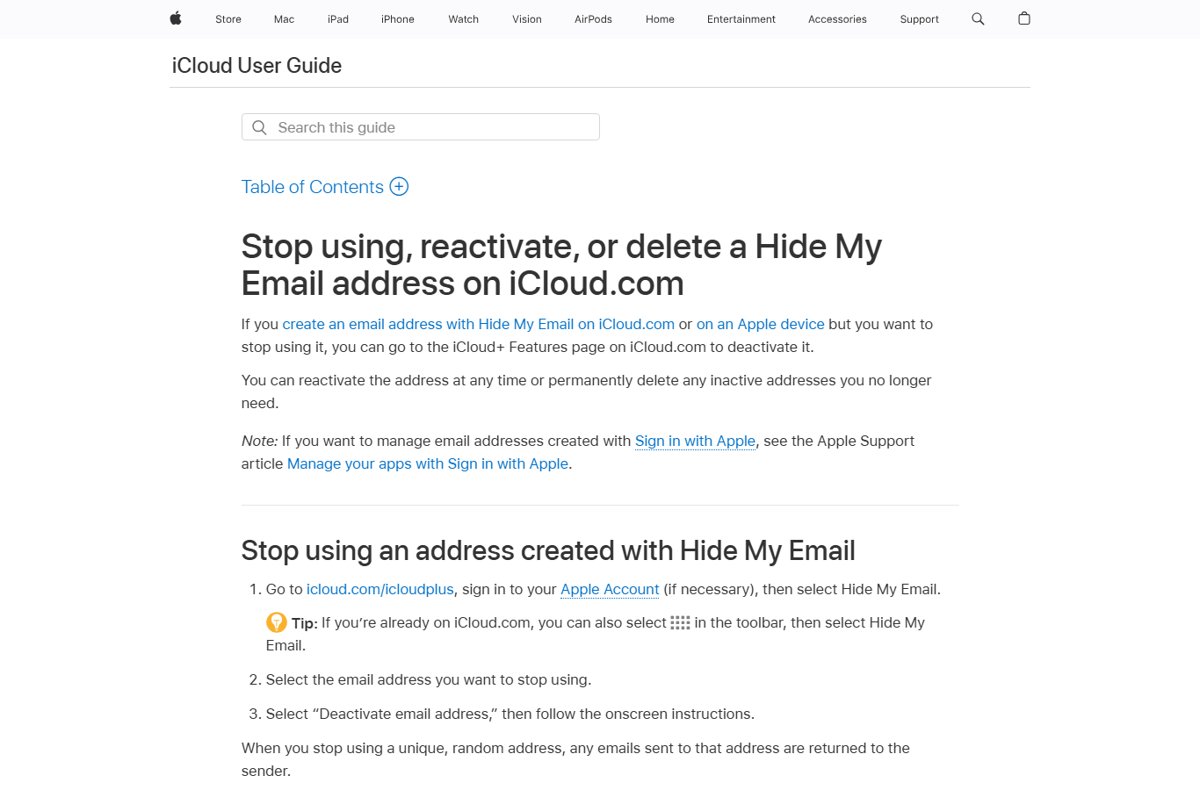
- Go to icloud.com/icloudplus, sign in, then select Hide My Email.
- Select the address you want to stop using.
- Select Deactivate email address and follow the onscreen instructions.
- Scroll to the bottom of the list and select the address under inactive email addresses.
- Select Delete address and follow the onscreen instructions.
Mail sent to a deactivated address is returned to the sender, and a deleted address cannot be reactivated.
Delete a custom domain email address in iCloud+
- Go to icloud.com/icloudplus and sign in to your Apple Account.
- Select Custom Email Domain.
- Select the domain that holds the address.
- Select the Remove button next to the address you want to delete.
- Follow the onscreen instructions to confirm.
Email sent to a deleted custom domain address is returned to the sender. When a person leaves a shared domain, all of their addresses on it are deleted.
Change your primary iCloud email address on iPhone
Apple does not let you rename a primary iCloud address in place, but devices running iOS 18.1, iPadOS 18.1 or macOS 26.4 or later can replace it with a new @icloud.com address. The new address replaces the old one, and you keep using iCloud Mail.
- Open the Settings app and tap your name.
- Tap Sign-In & Security.
- Tap your iCloud email address.
- Tap Change Email Address. This option appears when the iCloud address is the only email on the account.
- Enter the new @icloud.com address you want and follow the onscreen steps to confirm.
The new address must be available and cannot already belong to another Apple Account. If contacts still see the old address on your texts, switch iMessage to your phone number in Messages settings.
Remove an iCloud email address from your Apple Account sign-in
When your Apple Account has more than one email address, you can remove one or move the primary role to another address.
- Open Settings, tap your name, then tap Sign-In & Security.
- Tap the email address you want to change.
- Tap Remove from Account to drop it, or turn off Primary Email to keep it as a secondary address.
- Choose another address on the account as the new primary, or add a new one.
- Verify the new primary address when Apple asks.
Without a trusted device, go to account.apple.com, sign in, open Sign-In and Security and choose Email & Phone Numbers. Select Remove next to an additional address to delete it.
A removed address that is not an iCloud address cannot be linked to another Apple Account for 30 days.
Remove iCloud Mail from the iPhone Mail app
This stops the iCloud address on your iPhone only. The address and its mail stay intact on iCloud.com and other devices.
- Open the Settings app.
- Tap Apps, then tap Mail.
- Tap Mail Accounts, then tap your iCloud account.
- Turn off Use on this iPhone.
Turn the switch back on at any time to restore iCloud Mail on the iPhone.
Remove an iCloud email account from Mail on Mac
Removing the account deletes its messages from the Mac, but copies stay on the iCloud mail server. Move anything stored only locally to an On My Mac mailbox first.
- Open the Mail app on your Mac.
- Choose Mail > Settings, then click Accounts.
- Select the iCloud account and click the remove button below the list.
- If Mail sends you to Internet Accounts, choose Apple menu > System Settings, click Internet Accounts, select the account and turn Mail off.
To pause the account instead, deselect Enable this account in the same Accounts pane.
Delete your Apple Account to delete the primary iCloud email address
Deleting the Apple Account is the only way to make the primary @icloud.com address stop existing. It is permanent, and Apple cannot reopen the account or restore its data, so export your iCloud contacts and other files first.
- Cancel any AppleCare+ plan that is not paid in full, spend or transfer any Apple Cash balance, and download anything you want to keep.
- Sign out of your Apple Account on every device, because Activation Lock cannot be turned off after deletion.
- Go to privacy.apple.com and sign in to your Apple Account.
- Select Request to delete your account and follow the prompts.
- Save the access code Apple gives you. It is the only way to cancel the request with Apple Support during the short processing window.
What deleting an Apple Account removes along with the iCloud email
| Item | What happens after deletion |
|---|---|
| iCloud Mail and iMessage | Deleted; messages sent to the account are not delivered |
| iCloud photos, videos and documents | Permanently deleted |
| App Store, Apple Books and iTunes Store purchases | Access ends; DRM-protected content stops working |
| Subscriptions | Cancelled at the end of each billing cycle |
| Family Sharing | The group is disbanded and child accounts in it are deleted |
| The email address itself | Cannot be used for a new Apple Account while Apple keeps a hash of it; a custom domain address can never be reused |
If you only want to stop seeing the iCloud address, removing it from your devices is the safer choice.
Check that the iCloud email address is gone
- For an alias, open icloud.com/mail settings and confirm the alias no longer appears in the list.
- For Hide My Email, confirm the address is missing from both the active and inactive lists in Hide My Email.
- For a change of primary address, open Settings > your name > Sign-In & Security and confirm the new address is listed.
- Send a test message to the deleted address from another account and confirm it bounces back.
- For an account deletion, keep the confirmation email from Apple and the access code until the request completes.
Delete iCloud email address FAQ
How do I delete my iCloud account?
Sign in at privacy.apple.com and select Request to delete your account. Apple verifies that you own the account, then permanently deletes it, including iCloud Mail, photos and documents. Save the access code, because it is the only way to cancel during the processing window.
How do I remove iCloud from my iPhone?
Open Settings, tap your name, scroll down and tap Sign Out, then choose to erase the iPhone or sign out without erasing. To remove only iCloud Mail, go to Settings > Apps > Mail > Mail Accounts, tap iCloud and turn off Use on this iPhone.
How do I delete iCloud on Windows?
Open iCloud for Windows and click Sign out. Signing out stops iCloud syncing on that PC, but your iCloud email address and data stay in your Apple Account and remain available on iCloud.com and your other devices.
How do I remove iCloud from my Mac?
Choose Apple menu > System Settings, click your name, then click Sign Out. Select the checkboxes for any iCloud data you want to keep on the Mac and click Keep a Copy before you finish signing out.
Does removing iCloud Mail from my iPhone delete my emails?
No. Turning off Use on this iPhone or removing the account only takes the mail off that device. The iCloud address keeps working, and your messages stay on the iCloud server and on iCloud.com.
What happens to emails sent to a deleted iCloud address?
They are returned to the sender. That applies to deleted or disabled aliases, deactivated Hide My Email addresses and removed custom domain addresses. After an Apple Account deletion, messages sent to its iCloud address are not delivered.
Can I rename my iCloud email address?
No. Apple does not let you rename a primary iCloud address. On iOS 18.1, iPadOS 18.1 or macOS 26.4 and later you can replace it with a new @icloud.com address, or you can add an alias and use that instead.
Can I reuse an iCloud email address after deleting it?
An address tied to a deleted Apple Account cannot be used for a new Apple Account while Apple keeps a hash of it, and a custom domain address can never be reused. A deleted Hide My Email address cannot be reactivated.