"This Apple Account is locked and can't be used" means Apple refused a request to unlock the account, so your options are account recovery with new recovery factors, a new Apple Account, or an Activation Lock support request for your device.
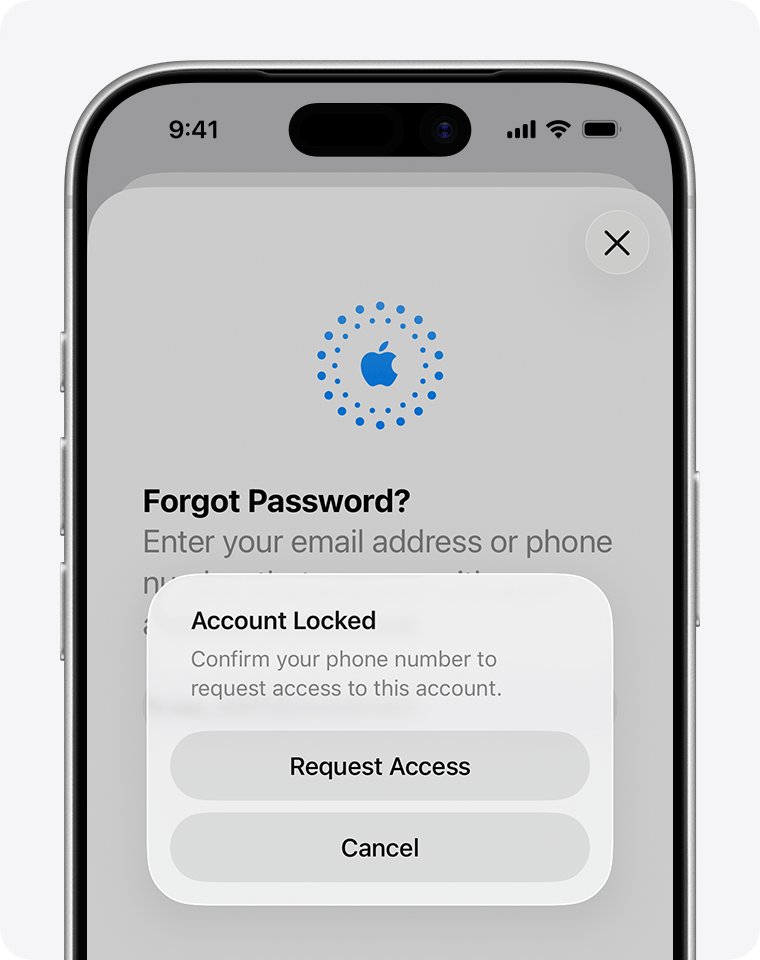
If you see the earlier "locked" or "not active" alert, reset the password or tap Request Access first; this guide covers each message and what to do next.
How to unlock an Apple Account that is locked or not active
- Tap Request Access in the alert that says your Apple Account is locked or not active.
- If the alert says the account was disabled or locked for security reasons, select Forgot password? on the sign-in screen instead.
- Follow the onscreen instructions; Apple sends you to a trusted device or asks for a code sent to your trusted phone number.
- Set a new password you have not used before.
- Sign in again on each of your Apple devices with the new password.
Apple Account locked message meanings and fixes
| Message you see | What happened | What to do |
|---|---|---|
| "This Apple Account has been disabled for security reasons" | Too many wrong password or account details | Reset the password |
| "This Apple Account has been locked for security reasons" | Apple locked the account to protect it | Reset the password |
| Apple Account is locked or not active | Access needs to be requested | Tap Request Access |
| "This Apple Account is locked and can't be used" | The access request was denied | Account recovery, a new Apple Account or an Activation Lock request |
| "Your Media & Purchases account has been disabled" | Store purchases are blocked, not the whole account | Tap Continue to request reactivation |
Reset Apple Account password on a trusted iPhone or Mac
A trusted device is an iPhone, iPad, Apple Watch, Apple Vision Pro or Mac that is already signed in to your Apple Account with two-factor authentication. Changing the password there avoids account recovery entirely.
- On the trusted iPhone, open Settings and tap your name.
- Tap Sign-In & Security, then Change Password.
- Enter the device passcode when asked.
- Type and confirm a new password, then tap Change.
- Sign in on the locked device with the new password.
Start Apple Account recovery at iforgot.apple.com
Use account recovery when you have no trusted device and cannot provide recovery factors. Have your trusted phone number, recovery contact, account email address and the card on file ready.
- Open Safari on a device with iOS 17 or later, or use the Apple Support app on a borrowed device.
- Go to
iforgot.apple.com, or in the Support app open Support Tools > Reset Password > Help Someone Else. - Enter your Apple Account email address or phone number and follow the instructions.
- Wait up to 72 hours for the confirmation email with the date and time you can expect access.
- If you started on the web, turn off all your Apple devices during the wait.
- When Apple texts, calls or emails, follow the link, or go to
apple.com/recoverafter the time in the email.
Apple Support cannot shorten the wait. Submitting a second request without new recovery factors can make it longer.
Check Apple Account recovery status
- Open the confirmation email and note the expected completion time.
- Go to
iforgot.apple.comand enter exactly the same email address and phone number you used to start recovery. - Confirm the request shows as active with an expected time.
- After the wait, sign in to
appleid.apple.comwith the new password to confirm the account works.
Why is my Apple Account locked?
| Cause | Result |
|---|---|
| You or someone else entered the password incorrectly too many times | Disabled or locked for security reasons |
| Other account information was entered incorrectly too many times | Locked automatically to protect the account |
| An access request could not be verified | "This Apple Account is locked and can't be used" |
| A problem with purchases or payment | Media & Purchases account disabled |
If you did not request account recovery, someone may be trying to get into your account. Use the cancellation link in the confirmation email and change your password.
Apple Account locked and can't be used: fixes when access is denied
Request Access was denied
Apple could not confirm you own the account from the details given.
- Find any device still signed in to the account and change the password there.
- Gather recovery factors you did not use before, such as a recovery contact or the card on file.
- Start account recovery at
iforgot.apple.comwith those factors.
Account recovery confirmation email never arrived
The email can take up to 72 hours, or the request was cancelled.
- Wait the full 72 hours.
- Check your spam or junk folder.
- Look up the request on
iforgot.apple.com; submit a new one only if it is not active.
iPhone stuck on Activation Lock after the account was locked
The device is still tied to the locked Apple Account.
- Find the original receipt or proof of purchase.
- Start an Activation Lock support request from Apple Support.
- Create a new Apple Account if Apple cannot restore the old one.
Credit card CVV check says the information is incorrect
The card issuer declined the verification.
- Select Don't have access to this card.
- Continue with the other recovery factors offered.
Apple Account locked FAQ
What is a locked account?
A locked Apple Account cannot sign in to any Apple service, including iCloud, the App Store and FaceTime. Apple locks it automatically to protect it, usually after too many wrong password or account detail attempts.
Why is my Apple account locked?
Apple locks an account when you or someone else enters the password or other account information incorrectly too many times. Resetting the password or requesting access usually restores it.
Why is my account temporarily locked?
A temporary lock follows repeated failed sign-ins. Apple asks you to reset the password through Forgot password? before you can sign in again.
How long does Apple account recovery take?
Account recovery can take several days or longer. A confirmation email within 72 hours gives the exact date and time you can expect access.
Can Apple Support unlock my account faster?
No. Apple says the waiting period is fixed and contacting Apple Support cannot shorten it. Sending repeat requests can extend it.
What can I do if I can't regain access to my Apple Account?
Create a new Apple Account. If a device is stuck on Activation Lock and you have proof of purchase, start an Activation Lock support request with Apple.
Is Apple ID the same as Apple Account?
Yes. Apple renamed Apple ID to Apple Account, and you still sign in with the same email address or phone number and password.
Best fix for an Apple Account that is not active
Change the password on a trusted device if you have one; otherwise tap Request Access, then use account recovery only if that fails. A trusted device restores access at once, while account recovery takes days and is cancelled by any activity on a signed-in device.