Microsoft lists three open known issues for Windows 11 26H2: some USB Audio Class 1.0 devices stop working with Code 10, some Credential Guard machines lose their domain trust, and some virtual desktops show a black screen after sign-in.
All three were marked Mitigated on 29 September 2026, the day 26H2 reached general availability, and none has a final fix yet. This guide gives the official workaround for each one, then the steps that stop the upgrade itself from failing.
The three known issues in Windows 11 26H2 right now
Find your symptom in the left column. Every row comes from the Windows 11, version 26H2 known issues page on Windows release health, last updated 29 September 2026.
| What you see | Who is affected | Status | What to do now |
|---|---|---|---|
| USB speaker, headset or DAC shows This device cannot start (Code 10), no sound, or volume stuck at zero | USB Audio Class 1.0 devices only | Mitigated (opened 11 Sep 2026) | No home-user workaround is published yet; IT admins can contact Microsoft Support for Business. Details below. |
| Domain sign-in fails with a message that the trust relationship between the device and the domain failed | Domain-joined PCs with Credential Guard where Machine Identity Isolation was previously enabled, and no Windows Server 2025 domain controllers | Mitigated (opened 16 Sep 2026) | Turn Machine Identity Isolation off the same way it was turned on, restart, then repair the secure channel. |
| Black screen after sign-in, desktop never loads, Explorer crashes in the event log | Mostly Azure Virtual Desktop hosts using FSLogix profiles | Mitigated (opened 24 Sep 2026) | Start explorer.exe from Task Manager, or have IT deploy the Known Issue Rollback policy. |
Home PCs with no USB Audio Class 1.0 device, no domain and no virtual desktop are not in any of these groups. Microsoft's resolved-issues page for 26H2 lists no resolved issues yet.
What are the known issues on Windows 11 25H2
Versions 24H2, 25H2 and 26H2 share one servicing branch, so the same bugs usually appear on all three. The 25H2 known-issues page lists the same three open problems, plus several that monthly updates already fixed.
If you are still on 25H2 and waiting for the offer, this table shows what you would or would not escape by moving up.
| Issue on 25H2 | Started with | Status on 25H2 | Also listed for 26H2? |
|---|---|---|---|
| Black screen or desktop loading issues after sign-in | KB5120998 (OS Build 26200.9278, 27 Aug 2026) | Mitigated | Yes |
| Domain-joined devices lose the secure trust relationship | KB5124008 (OS Build 26200.9445, 8 Sep 2026) | Mitigated | Yes |
| USB audio devices fail to start or produce no sound | KB5124008 (8 Sep 2026) | Mitigated; the 8-channel and 3D audio symptom was fixed by KB5129195 (14 Sep 2026) | Yes |
| Remote Desktop Services might stop responding | KB5124008 | Resolved by KB5129195 | No |
| Incorrect "Microsoft Defender Antivirus is turned off" notifications | Not tied to one update | Resolved (17 Sep 2026) | No |
| Host folder shares missing in Hyper-V Linux VMs | KB5124008 | Resolved by KB5129195 | No |
| Teams and Outlook fail to launch on Arm-based PCs | KB5121003 (11 Aug 2026) | Resolved by KB5124008 | No |
| Mouse cursor customization resets on non-English Windows | KB5120998 | Resolved by KB5124008 | No |
| Desktop background resets to a black solid color | KB5120998 | Resolved by KB5124008 | No |
How to fix the known Windows 11 26H2 bugs
These are Microsoft's published workarounds. Back up the registry before touching it, as Microsoft's own notice warns.
USB audio device shows Code 10 or produces no sound
A regression that affects USB Audio Class 1.0 devices only. It also hits 25H2, 24H2, Windows 10 and Windows Server.
- Open Device Manager and confirm the USB audio device shows This device cannot start (Code 10).
- Install every pending update from Settings > Windows Update > Check for updates; on 25H2, KB5129195 already fixed the multichannel part of this bug.
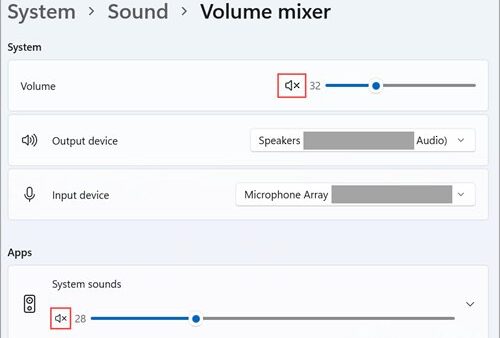
- If the device works in stereo but fails in 8-channel or 3D audio mode, switch it to a 2-channel configuration until a fix ships.
- Use a different audio output (built-in speakers, Bluetooth or HDMI audio) in the meantime.
- On a managed PC, ask IT to contact Microsoft Support for Business, which Microsoft names as the route for an immediate workaround.
Domain sign-in fails: the trust relationship with the domain failed
26H2 starts honoring existing Machine Identity Isolation enforcement settings, which work only with domain controllers at the Windows Server 2025 domain functional level.
- Find out how Machine Identity Isolation was enabled: Intune policy, Group Policy or a direct registry edit.
- If Intune or Group Policy turned it on, turn it off with that same policy.
- If it was set in the registry, open Registry Editor and check
HKLM\SYSTEM\CurrentControlSet\Control\Lsa\MachineIdentityIsolationandHKLM\SOFTWARE\Policies\Microsoft\Windows\DeviceGuard\MachineIdentityIsolation. - Where either key has MachineIdentityIsolation set to 2, change it to 0.
- Restart the PC. Cached credentials usually still let you sign in offline.
- Open PowerShell as administrator and run
Test-ComputerSecureChannel -Repair -Credential (Get-Credential), and enter domain credentials when prompted.
Black screen after sign-in and the desktop does not load
A change in recent updates that mostly hits Azure Virtual Desktop hosts using FSLogix, more often with some existing user profiles.
- Press Ctrl + Shift + Esc to open Task Manager.
- Select Run new task.
- Type
explorer.exeand select OK. The desktop and taskbar load for this session. - For a permanent mitigation, have IT install the KB5124010 260924_20021 Known Issue Rollback Group Policy for 26H2, 25H2 and 24H2.
- Configure it under Computer Configuration > Administrative Templates > KB5124010 260924_20021 Known Issue Rollback, then restart the affected machines.
1. Install Windows 11 26H2 through Windows Update
Windows Update is the lowest-risk route because it respects safeguard holds. On 25H2 and 24H2, 26H2 arrives as a small enablement package that installs like a monthly update and needs a single restart.
- Select Start > Settings > Windows Update.
- Turn on Get the latest updates as soon as they're available.
- Select Check for updates.
- When Windows 11, version 26H2 is offered, select Download & install.
- Save your work and restart when prompted.
The rollout is phased and will expand over the next few months, so most PCs will not see the offer on day one. That is normal, not an error.
2. Create full backup of your computer
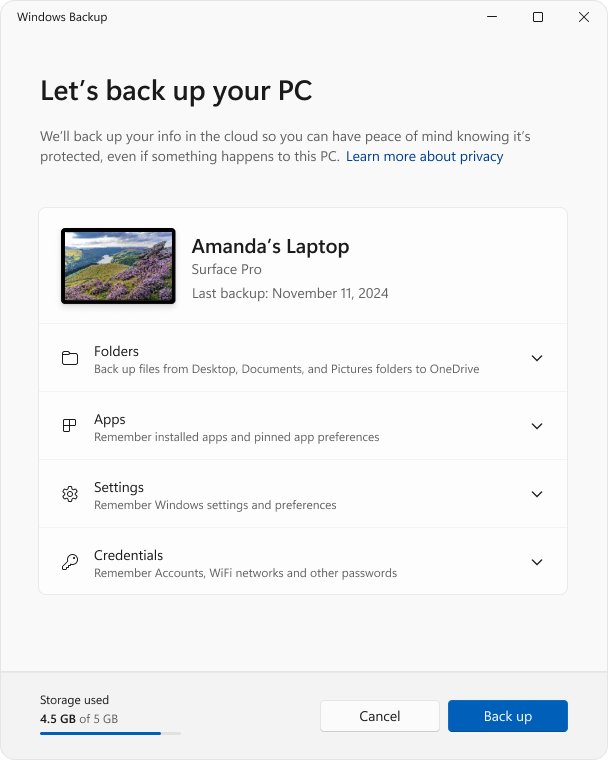
Microsoft tells you to back up personal files before any update troubleshooting. Windows Backup saves folders to OneDrive plus apps, settings and Wi-Fi details to your Microsoft account.
- Select Start, type backup and open Windows Backup.
- Expand Folders and turn on Desktop, Documents, Pictures, Videos and Music as needed.
- Expand the remaining items (Installed apps, Accounts, Wi-Fi network and passwords, Personalization and others) and turn on the ones you want.
- Select Back up.
- For files larger than your OneDrive space, also copy them to a USB drive in File Explorer.
Windows Backup needs a personal Microsoft account; work or school accounts do not work with it. A free account includes 5 GB of OneDrive storage.
3. Prevent storage problems during Windows 11 26H2 upgrade
Microsoft says feature updates typically need 6 GB to 11 GB or more of free space. Its troubleshooting page asks for at least 20 GB free on a 64-bit system when you upgrade with full media.
- Select Start > Settings > System > Storage.
- Turn on Storage Sense.
- Select Cleanup recommendations, review the listed files, and select Clean up.
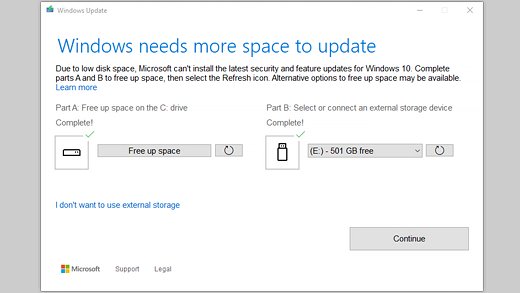
- If Windows Update still reports low space, go to Settings > Windows Update and select Fix issues.
- Connect a USB drive with at least 10 GB free, pick it from the drop-down, select Next and follow the prompts.
Windows also keeps extra space for about 10 days after an update so it can be removed. Reclaim it later from Cleanup recommendations.
4. Fix Windows Update to download Windows 11 26H2
Run these in order and check for updates after each one.
- Select Start > Settings > System > Troubleshoot > Other troubleshooters, then select Run next to Windows Update.
- Under Settings > Time & language > Date & time, turn on Set time automatically and Set time zone automatically.
- Press Win + R, type
services.mscand press Enter; right-click Windows Update and select Stop. - Delete everything inside
C:\Windows\SoftwareDistribution. - Back in Services, right-click Windows Update and select Start.
- Return to Settings > Windows Update and select Check for updates.
5. Remove blocks to download Windows 11 26H2
Some blocks are yours to remove and some are deliberate. A safeguard hold is Microsoft stopping the offer on hardware with a known compatibility problem, and Microsoft advises against updating manually until it lifts.
| What is blocking the offer | What to do | Why |
|---|---|---|
| Get the latest updates as soon as they're available is off | Turn it on in Settings > Windows Update | Day-one availability goes to PCs with this setting on |
| Windows Update says an update is on its way but not ready for your device | Wait, and check the 26H2 known-issues page for your hardware | This is a safeguard hold; it lifts automatically once a fix is verified |
| PC runs 23H2 or older | Install 24H2 or 25H2 first, or use the Installation Assistant | The enablement package only applies to 25H2 and 24H2 |
| Work or school PC | Ask your IT department | Update rings, WSUS or Autopatch policies decide when 26H2 arrives |
| Arm-based PC wanting the Installation Assistant | Stay on Windows Update | The Installation Assistant and Media Creation Tool run on x64 only |
IT admins can confirm a hold in the registry: GStatus under HKLM\SOFTWARE\Microsoft\Windows NT\CurrentVersion\AppCompatFlags\Appraiser\GWX reads 0 when a hold is in effect and 2 when none is.
6. Uninstall non-essential apps to prevent problems
Outdated software and non-Microsoft antivirus can make an upgrade fail. Error 0xC1900208 - 0x4000C specifically means an incompatible app blocked setup.
- Make sure you have the installer and product key for anything you remove.
- Open Control Panel > Programs > Programs and Features.
- Select an old or unneeded program and select Uninstall.
- Select Yes to confirm, and repeat for other non-essential apps.
- Restart, run the update, then reinstall the apps you need.
Microsoft Defender keeps protecting the PC while third-party security software is uninstalled. Reinstall a version that its vendor lists as compatible with Windows 11.
7. Disconnect non-essential peripherals to avoid problems
Extra hardware brings extra drivers, and driver conflicts cause the 0xC1900101 family of upgrade errors.
- Unplug USB flash drives, external hard drives, printers, scanners, speakers and headphones.
- Undock a laptop from its docking station.
- Leave only the keyboard, mouse, display and network connection attached.
- Keep a laptop plugged into power for the whole update.
- Reconnect the devices one at a time after 26H2 finishes installing.
8. Fix Windows 11 26H2 upgrade errors
Find the code in Settings > Windows Update > Update history under the failed entry, then match it below.
0xC1900101 (any suffix such as 0x20017 or 0x30018)
Usually an incompatible driver.
- Open Device Manager and look for any device with a yellow exclamation mark.
- Expand Display adapters and Network adapters, right-click the adapter and select Update driver > Search automatically for drivers.
- If that fails, select Uninstall device instead and restart.
- Check the hardware maker's website for newer drivers and unplug extra hardware.
- Run the update again.
0x80073712: a file Windows Update needs is missing
Damaged system files or component store.
- Type command prompt in the taskbar search box and select Run as administrator.
- Run
DISM.exe /Online /Cleanup-image /Restorehealthand wait for The restore operation completed successfully. - Run
sfc /scannowand wait for 100%. - Restart and select Check for updates again.
0x800f0922: update cannot install
No connection to the Windows Update servers, often through a VPN, or too little free space.
- Disconnect from any VPN.
- Free space with Storage Sense and Cleanup recommendations.
- Retry the update.
0x80070002 or 0x8007000d: update failed to install
Corrupt files in the update cache or an interrupted download.
- Restart the PC.
- Run the Windows Update troubleshooter from Settings > System > Troubleshoot > Other troubleshooters.
- Clear the
SoftwareDistributionfolder as shown in step 4. - Check for updates again.
Stuck at 0%, 100% or between 51% and 99%
Slow connection, low space, or a blocked install.
- Give it time; large updates can sit at one percentage for a while.
- Check your connection under Settings > Network & Internet.
- Restart the PC and select Check for updates again.
- Run the Windows Update troubleshooter if the percentage does not move.
"We couldn't complete the updates. Undoing changes"
A generic message that hides the real error code.
- Let Windows finish undoing the changes and sign in.
- Open Settings > Windows Update > Update history and note the error code.
- Match the code against the groups above.
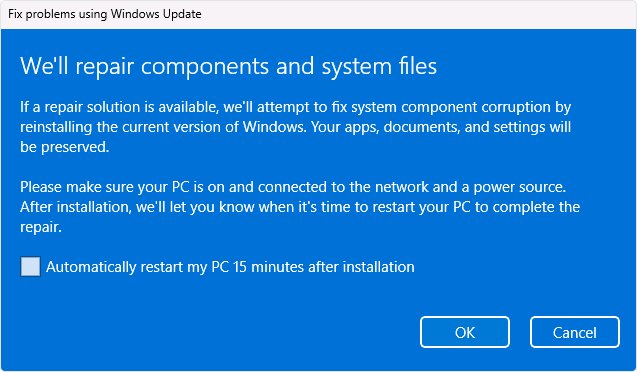
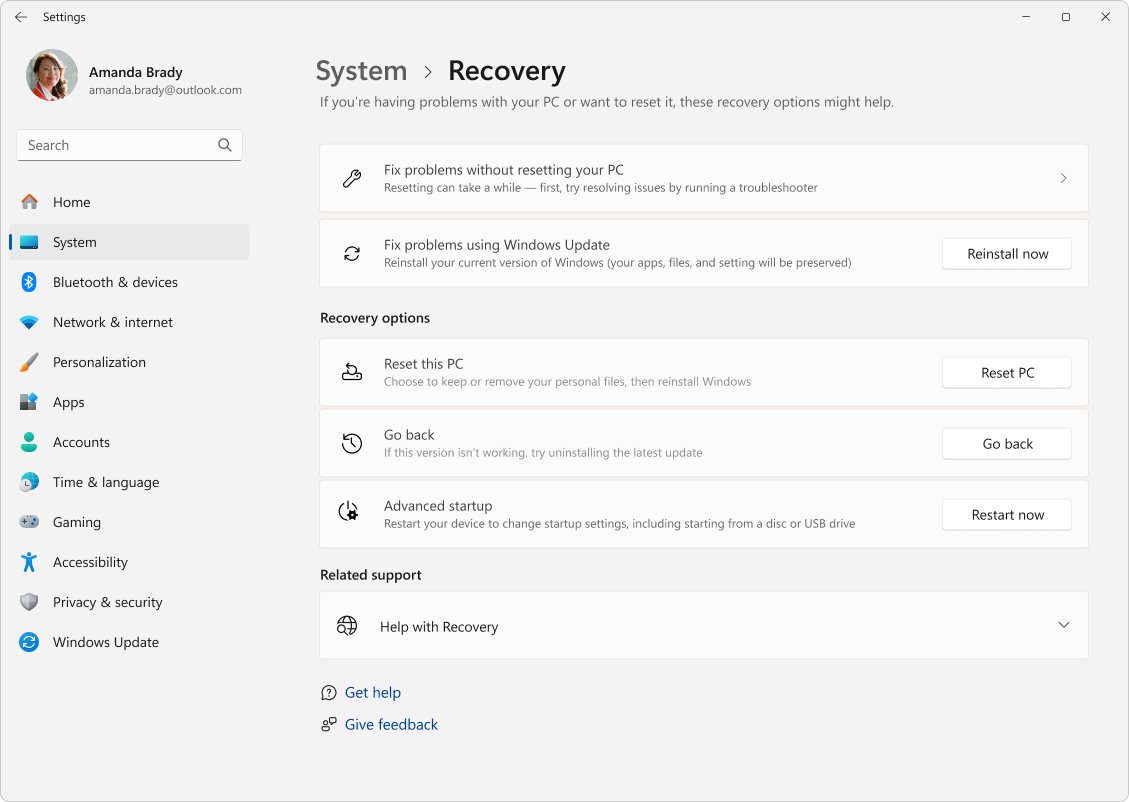
- If nothing works, open Settings > System > Recovery and select Reinstall now under Fix problems using Windows Update. Apps, files and settings are kept.
9. Upgrade to Windows 11 26H2 manually
Microsoft's Windows 11 download page now names the Windows 11 2026 Update, version 26H2, as the current release. Use it only when Windows Update shows no safeguard hold message; the full list of official install methods compares every route.
- Back up your files first (step 2).
- Open
https://www.microsoft.com/software-download/windows11in your browser. - Under Windows 11 Installation Assistant, select Download Now.
- Run the downloaded file and follow the on-screen prompts.
- Keep the PC on power and connected to the internet until it restarts into 26H2.
The Installation Assistant works on x64 PCs only; Arm-based PCs should wait for Windows Update.
How to check 26H2 installed correctly
- Right-click Start and select Settings.
- Select System > About.
- Under Windows specifications, confirm Version reads 26H2.
- Check that OS build starts with 26300; the 29 September 2026 update brings it to 26300.9550 (KB5124010).
- Test your USB audio device, domain sign-in or virtual desktop if you fall into one of the three affected groups.
Later builds are tracked in the 26H2 update history.
How to roll back if 26H2 causes problems
Microsoft has not published rollback steps specific to 26H2. These are its general Windows 11 routes; some updates cannot be uninstalled, and Microsoft suggests trying a reinstall of the current version first.
- Select Start > Settings > Windows Update.
- Under More options, select Update history.
- Under Related settings, select Uninstall updates.
- Select the update to remove and select Uninstall.
- If you upgraded with full setup media, go to Settings > System > Recovery and select Go back instead; this option usually lasts 10 days.
Go back keeps personal files but removes apps and drivers installed after the upgrade. It needs the windows.old and $windows.~bt folders left in place.
The Techdows take: should you install 26H2 now?
Install 26H2 when Windows Update offers it, unless you rely on a USB Audio Class 1.0 device, a Credential Guard domain setup, or FSLogix virtual desktops. The enablement package is small and all three open issues also affect 25H2 and 24H2, so staying behind does not avoid them. Home and Pro users also get a fresh 24 months of support, to 10 October 2028. The honest upgrade verdict weighs the rest.
Frequently Asked Questions
Does Windows 11 26H2 have bugs?
Yes. Microsoft lists three open known issues: USB Audio Class 1.0 devices failing with Code 10, Credential Guard machines losing domain trust, and a black screen after sign-in on some virtual desktops. All three were mitigated, not resolved, on 29 September 2026.
What are the Windows 11 2026 Update problems?
The Windows 11 2026 Update is version 26H2, so its problems are the same three known issues: USB audio Code 10, domain trust failures with Machine Identity Isolation, and black screens on Azure Virtual Desktop hosts using FSLogix. Upgrade errors such as 0xC1900101 are separate and usually driver related.
Where does Microsoft list Windows 11 26H2 issues?
Microsoft lists them on the Windows release health site at learn.microsoft.com, on the page titled Windows 11, version 26H2 known issues and notifications. A separate resolved-issues page tracks fixes; on 30 September 2026 it listed no resolved issues yet.
Why is Windows 11 26H2 not offered on my PC?
The rollout is phased over several months, and day-one availability goes to PCs with Get the latest updates as soon as they're available turned on. A safeguard hold can also block the offer when Microsoft detects a known compatibility problem on your hardware.
Will 26H2 fix bugs from the monthly 2026 updates?
Not by itself. 26H2 shares a servicing branch with 25H2 and 24H2, so fixes arrive in monthly updates for all three. The USB audio, domain trust and black screen issues all began in 25H2 monthly updates in August and September 2026.
Can I uninstall Windows 11 26H2?
Microsoft has not published a 26H2-specific rollback procedure. You can try Settings > Windows Update > Update history > Uninstall updates, although some updates cannot be removed. After a full media upgrade, Settings > System > Recovery > Go back usually works for 10 days.
How do I fix the USB audio Code 10 error after 26H2?
Microsoft has not released a full fix yet. Install all pending updates, switch multichannel devices to 2-channel mode if they work in stereo, and use another audio output meanwhile. Managed PCs can get an immediate workaround through Microsoft Support for Business.
How much free space does the 26H2 update need?
Microsoft says feature updates typically need 6 GB to 11 GB or more of free space, and asks for at least 20 GB on a 64-bit system for a full upgrade. If space runs short, Windows Update offers Fix issues so you can use a USB drive with 10 GB free.

Windows 11 version 26H2: what you need to know about Microsoft's feature update for your PC - Techdows
[…] Fix steps for each issue are in the 26H2 known issues guide. […]
Windows 11 26H2 release date and when your PC gets it - Techdows
[…] the known issues and fixes before installing if you use a USB audio interface or a domain-joined […]
Should I install Windows 11 26H2 on my PC? Yes, but proceed with caution - Techdows
[…] only if your PC matches one of the issues Microsoft documented at launch. If it does, check the 26H2 known issues before […]
How to download and install Windows 11 26H2 - Techdows
[…] status on the 26H2 known issues […]
How to download Windows 11 26H2 ISO file - Techdows
[…] Windows 11 26H2 known issues list tracks each problem with its current […]
Fix Windows 11 26H2 not showing in Windows Update - Techdows
[…] caused by third-party software or drivers, so a PC can be held back without a named reason. The known 26H2 issues and their fixes are tracked separately as Microsoft adds […]
Windows 11 26H2 for enterprise: WSUS, Intune and deployment - Techdows
[…] issues are added to the 26H2 known issues list as Microsoft confirms […]
Windows 11 September 2026 update: KB, build and fixes - Techdows
[…] symptoms are listed on Microsoft's release health pages for the September 2026 updates. The 26H2 known issues tracker follows the ones that also affect the new […]
Windows 11 26H2 Home vs Pro: what is different - Techdows
[…] known issues were listed as mitigated on 29 September 2026. The 26H2 known issues tracker has the […]
Windows 11 26H2 registry tweaks worth knowing - Techdows
[…] plans to temporarily block Machine Identity Isolation enforcement in a future update. The 26H2 known issues list tracks the […]
Windows 11 26H2 Ethernet driver problems: how to fix - Techdows
[…] open problems are among the 26H2 known issues, and the KB5121794 enablement package itself changes little on […]
How to repair Windows 11 26H2 without losing files - Techdows
[…] that started right after the upgrade can be 26H2 known issues rather than damaged files; check the 26H2 known issues list before […]
How to upgrade to Windows 11 26H2 with the Installation Assistant - Techdows
[…] 26H2 known issues list tracks each problem and its […]
Does Windows 11 26H2 corrupt SSD drives? - Techdows
[…] are confirmed, so check it again before you upgrade. The same list, with fixes, is kept on the 26H2 known issues […]
Why does Windows 11 26H2 keep failing to install? - Techdows
[…] comes back, look it up in the error code table below, or jump to the section for your symptom. The 26H2 known issues list shows whether Microsoft has flagged a bug that matches your […]
Windows 11 26H2 new features, changes and details - Techdows
[…] lists three open issues for 26H2, all marked mitigated as of 29 September […]
Windows 11 26H2 network problems: how to fix no internet - Techdows
[…] PC still shows No Internet, match your symptom in the table below. On a PC that just upgraded, the 26H2 known issues list shows whether Microsoft has since confirmed a network […]
Windows 11 KB5126653 issues: Should you install the update? - Techdows
[…] If you also manage newer PCs, Microsoft's workarounds for those three appear alongside the other Windows 11 26H2 known issues. […]