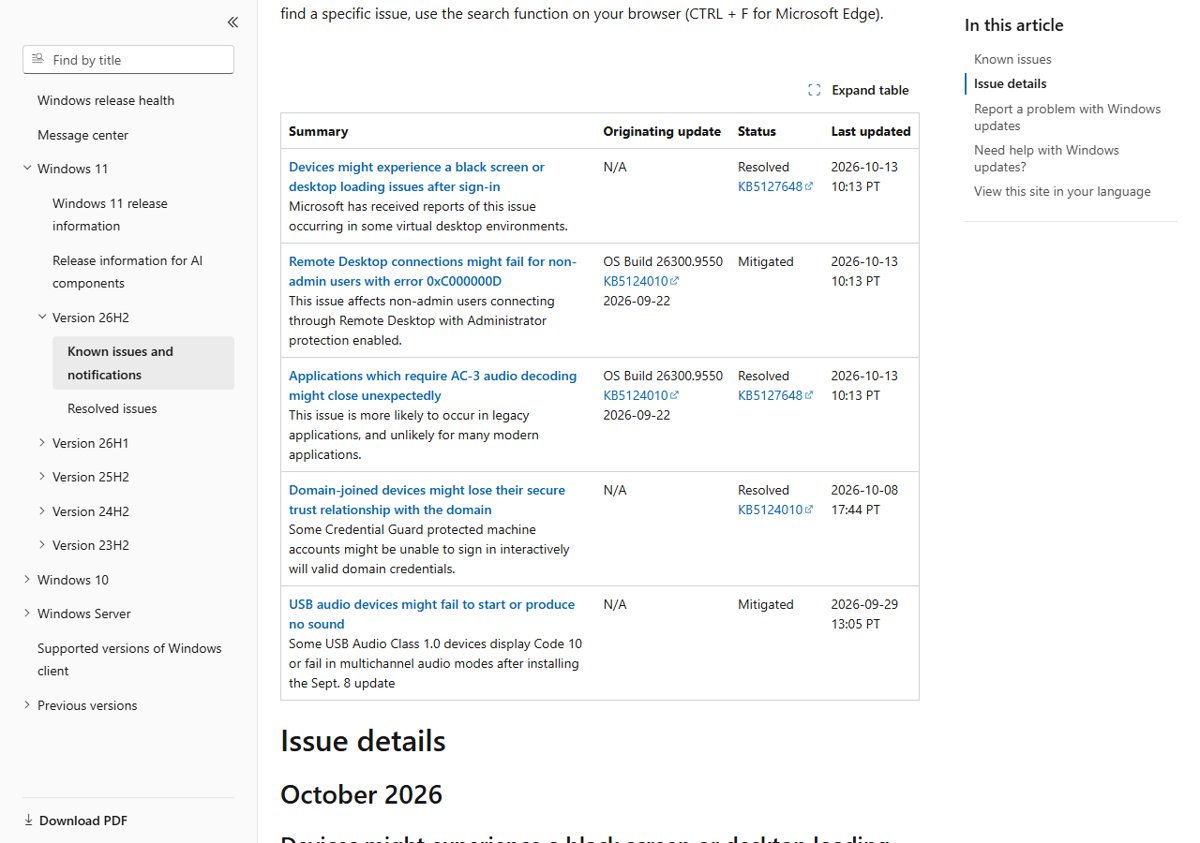
The Windows 11 October 2026 updates leave two known issues open: some USB Audio Class 1.0 devices fail with Code 10 or play no sound, and non-admin Remote Desktop connections to hosts with Administrator protection fail with error 0xC000000D.
The same updates fix the September black screen after sign-in and the AC-3 audio crashes. Below is every issue Microsoft lists for 23H2, 24H2, 25H2, 26H2 and 26H1, with status, workaround and the way back; the October 2026 update review covers the new features.
Quick answer: Windows 11 October 2026 update issues at a glance
Find your symptom in the first column. Status comes from Microsoft's Windows release health pages, last updated October 13, 2026.
| What you see | Versions affected | Status | What to do |
|---|---|---|---|
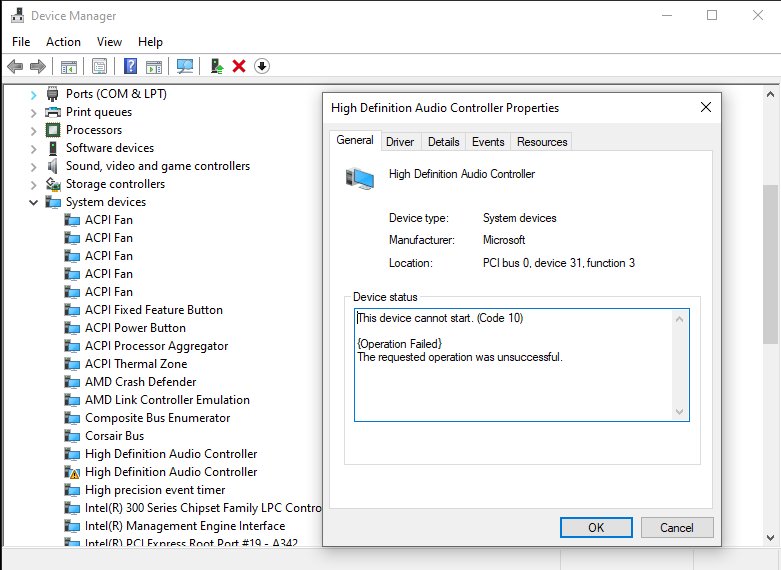
| USB speaker, headset or DAC shows This device cannot start (Code 10), no sound, or volume stuck at zero | All Windows 11 versions, Windows 10 and Windows Server | Mitigated, still open | Use another audio output for now; businesses can get a workaround from Microsoft Support for Business |
| Remote Desktop fails with 0xC000000D and "The token that was passed to the function is invalid" | 24H2, 25H2, 26H2 and 26H1 | Mitigated, still open | IT can temporarily turn off Administrator protection on the Remote Desktop host |
| Black screen after sign-in, desktop does not load | 24H2, 25H2, 26H2 and 26H1 (mostly Azure Virtual Desktop with FSLogix) | Resolved by the October update | Install KB5127648 or KB5127646 |
| Games, media players or older apps close when playing AC-3 (Dolby Digital) audio | 24H2, 25H2 and 26H2 | Resolved by KB5127648 | Install KB5127648 |
| Domain sign-in fails because the trust relationship with the domain failed | 24H2, 25H2, 26H2 and 26H1 | Resolved in September | Any update from September 22, 2026 onward, including October's, fixes it |
A home PC with no USB Audio Class 1.0 device and no Remote Desktop host role is outside both open issues.
Which October 2026 update does your Windows 11 version get?
Microsoft released three cumulative updates on Tuesday, October 13, 2026. Each version has its own issue list, so match your build first.
| Windows 11 version | October 2026 update | OS build after install | Open known issues listed by Microsoft |
|---|---|---|---|
| 24H2 | KB5127648 | 26100.9711 | USB audio Code 10, Remote Desktop 0xC000000D |
| 25H2 | KB5127648 | 26200.9711 | USB audio Code 10, Remote Desktop 0xC000000D |
| 26H2 | KB5127648 | 26300.9711 | USB audio Code 10, Remote Desktop 0xC000000D |
| 23H2 | KB5126653 | 22621.7652 | USB audio Code 10 (release health page); the KB page lists none |
| 26H1 | KB5127646 | 28000.3231 | USB audio Code 10, Remote Desktop 0xC000000D |
Per-update detail lives in the KB5127648 issues breakdown, the KB5126653 issues for 23H2 and the KB5127646 issues for 26H1.
KB5127648 is the last update for 24H2 Home and Pro. Those PCs need to move off 24H2 Home and Pro to keep getting security fixes.
Currently open issues in the October 2026 updates
Two issues stay open after October 13. Both are marked Mitigated, which means Microsoft has a workaround but no final fix yet.
| Issue | Started with | Who is affected | Microsoft's workaround | Next step from Microsoft |
|---|---|---|---|---|
| USB audio devices fail to start or produce no sound | September 8, 2026 security update (KB5124008 on 24H2/25H2, KB5122880 on 23H2, KB5124012 on 26H1) and 26H2 | USB Audio Class 1.0 devices only | IT administrators can contact Microsoft Support for Business | A fix in a future Windows update |
| Remote Desktop connections fail for non-admin users with error 0xC000000D | September 22, 2026 preview (KB5124010, or KB5124006 on 26H1) and later updates | Mainly enterprise-managed Remote Desktop hosts with Administrator protection on | Temporarily turn off Administrator protection by policy | A fix in a future Windows update |
Because the October security update contains the September preview changes, a PC that skipped the preview still gets the Remote Desktop issue with KB5127648 or KB5127646.
USB audio Code 10 after the Windows 11 October 2026 update
This is the issue most home users hit. The steps below are the short version; driver rollback and the Sound troubleshooter are part of the USB audio Code 10 fixes.
USB headset or speaker shows Code 10, plays no sound, or volume stays at zero
A regression in USB Audio Class 1.0 support that began with the September 8, 2026 security update and carries into the October updates.
- Open Device Manager and find the USB audio device.
- Open the device and check whether it reports This device cannot start (Code 10).
- Install every pending update from Settings > Windows Update > Check for updates; the September 14 out-of-band update already fixed the 8-channel and 3D audio failures.
- If the device works in stereo but fails in a multichannel mode, set it to 2-channel output.
- Switch to built-in speakers, Bluetooth or HDMI audio until Microsoft ships a fix.
- On a managed PC, ask IT to contact Microsoft Support for Business for the immediate workaround Microsoft offers.
Remote Desktop error 0xC000000D after the October 2026 update
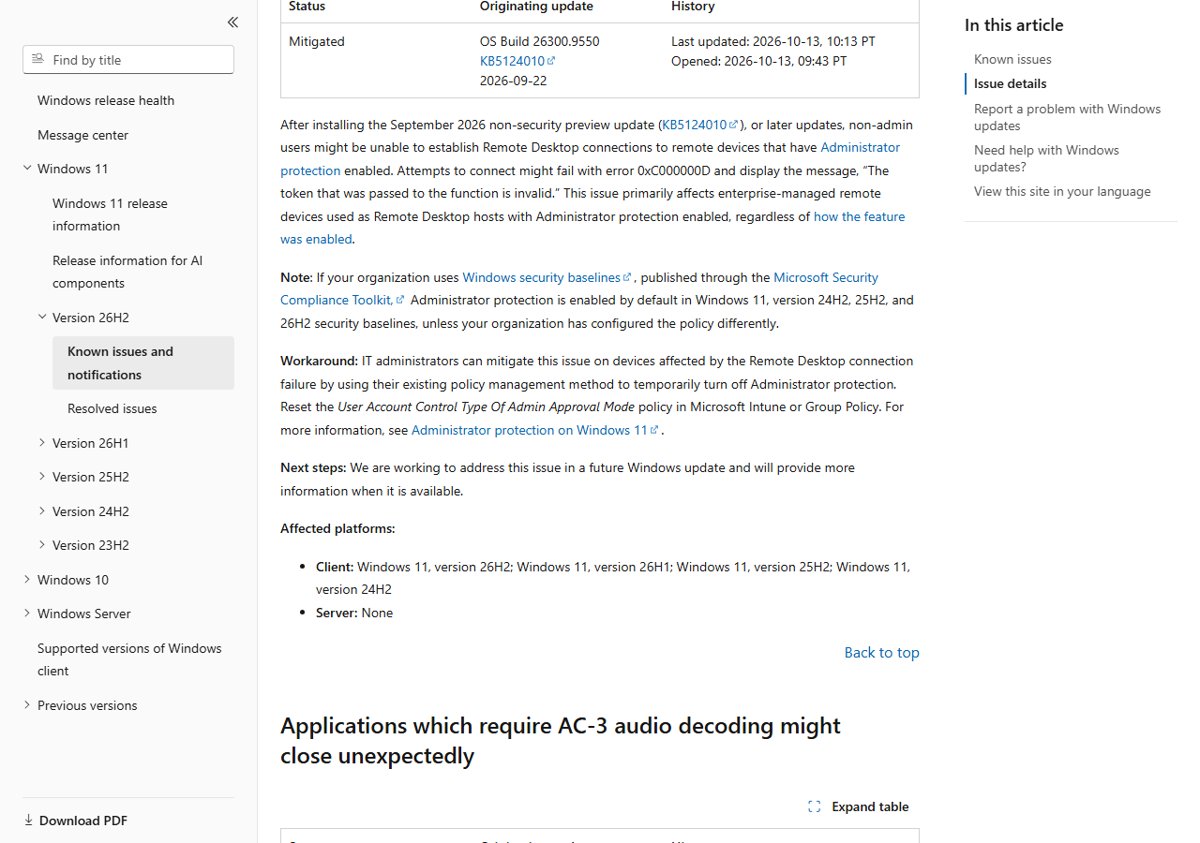
This one hits organizations, not home PCs. Microsoft notes that its Windows 11 24H2, 25H2 and 26H2 security baselines turn on Administrator protection by default.
Non-admin users cannot connect by Remote Desktop and see error 0xC000000D
A change in the September 22 preview breaks non-admin Remote Desktop sign-in to hosts that have Administrator protection turned on.
- Confirm the error text reads The token that was passed to the function is invalid.
- Check whether the Remote Desktop host has Administrator protection enabled, by baseline, Intune or Group Policy.
- In Intune or Group Policy, reset the User Account Control Type Of Admin Approval Mode policy on the affected hosts.
- Apply the policy and retry the connection with the non-admin account.
- Turn Administrator protection back on once Microsoft releases the fix.
Issue: devices might experience a black screen or desktop loading issues after sign-in
Microsoft marked this issue Resolved on October 13. KB5127648 and KB5127646 fix it, so the steps below only matter on a PC that cannot install them yet.
Black screen after sign-in, the desktop session does not load, Explorer crashes in the event log
Explorer.exe fails to start or crashes in multi-user setups, mainly Azure Virtual Desktop hosts using FSLogix profiles.
- Press Ctrl + Shift + Esc to open Task Manager.
- Select Run new task.
- Type
explorer.exeand select OK; the desktop and taskbar load for this session. - Install the October 2026 update for your version to make the fix permanent.
- On managed PCs still waiting for the update, IT can deploy the KB5124010 260924_20021 Known Issue Rollback policy (24H2, 25H2, 26H2) or KB5124006 260924_20071 Known Issue Rollback (26H1), then restart.
Issue: applications which require AC-3 audio decoding might close unexpectedly
This bug came with the September 22 preview on 24H2, 25H2 and 26H2. Modern apps that ship their own decoder were never affected.
A game, media player or older app crashes on launch or when it starts playing Dolby Digital audio
The Windows built-in AC-3 decoder that legacy apps call broke after KB5124010.
- Select Start > Settings > Windows Update > Check for updates.
- Install KB5127648 and restart.
- Open the app again and play the same audio.
- If it still crashes, check the app maker's site for an update, since Microsoft lists this issue as resolved.
Issue: domain-joined devices might lose their secure trust relationship with the domain
This was a September problem, resolved by the September 22, 2026 updates (KB5124010, or KB5124006 on 26H1). Installing the October update keeps it fixed.
Users see that the trust relationship between the device and the domain failed
Credential Guard machines started honoring Machine Identity Isolation enforcement, which only works with domain controllers at the Windows Server 2025 domain functional level.
- Install the October 2026 update; it includes the September 22 change that disables Machine Identity Isolation enforcement.
- Restart the PC and sign in with domain credentials.
- If sign-in still fails, open PowerShell as administrator.
- Run
Test-ComputerSecureChannel -Repair -Credential (Get-Credential)and enter domain credentials when prompted.
Fixed issues in the Windows 11 October 2026 updates
Besides the two known issues above, the October updates fix several problems from August and September. The September 2026 update introduced some of them.
| Problem fixed | Updates that fix it | Versions |
|---|---|---|
| Black screen or Explorer crashes after sign-in on Azure Virtual Desktop and FSLogix | KB5127648, KB5127646 | 24H2, 25H2, 26H2, 26H1 |
| AC-3 audio playback crashes in some apps | KB5127648 | 24H2, 25H2, 26H2 |
| Always On VPN stuck on Connecting or "The specified port is already in use" | KB5127648, KB5127646 | 24H2, 25H2, 26H2, 26H1 |
| Tiered Storage Spaces Direct virtual disks fail to come online | KB5127648, KB5126653, KB5127646 | All five versions |
| Printing fails with RAW or Generic Text Only printer drivers after the August update | KB5127648 | 24H2, 25H2, 26H2 |
| Mouse input stutters in some games | KB5127648, KB5127646 | 24H2, 25H2, 26H2, 26H1 |
| Windows Hello fingerprint sign-in fails after a cold boot | KB5127648 | 24H2, 25H2, 26H2 |
| File History shows "Reconnect your drive" and fails to back up | KB5126653 | 23H2 |
Earlier issues such as Remote Desktop Services hangs, missing Plan9 folder shares in Linux VMs and false "Microsoft Defender Antivirus is turned off" alerts were already resolved in September.
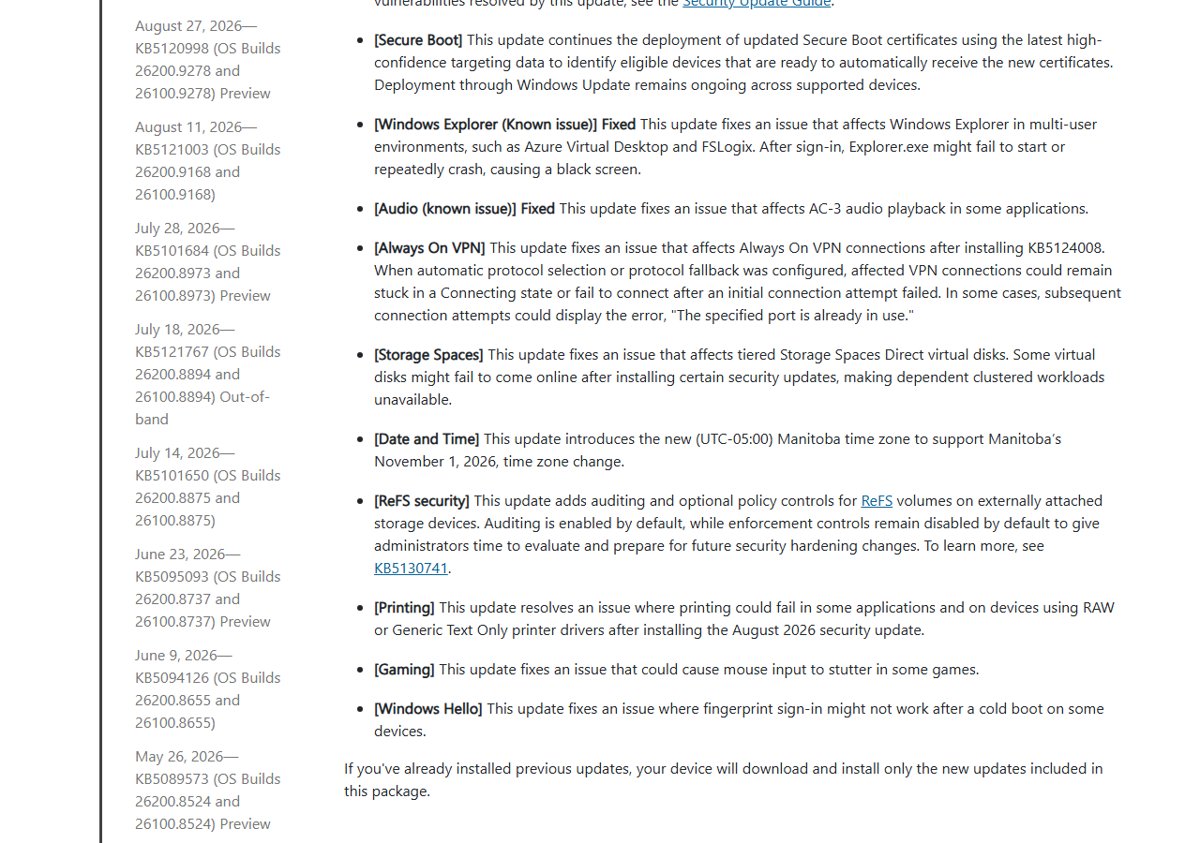
What are the known issues on Windows 11 26H2
On 26H2, the October update KB5127648 leaves the same two open issues as on 24H2 and 25H2. The 26H2 known issues and fixes cover the feature update itself and its upgrade errors.
| 26H2 issue | Status on October 13, 2026 | Fixed by |
|---|---|---|
| USB audio devices fail to start or produce no sound | Mitigated | Not yet fixed |
| Remote Desktop fails for non-admin users with 0xC000000D | Mitigated | Not yet fixed |
| Black screen or desktop loading issues after sign-in | Resolved | KB5127648 |
| AC-3 audio decoding apps close unexpectedly | Resolved | KB5127648 |
| Domain-joined devices lose the secure trust relationship | Resolved | KB5124010 |
Bugs not officially listed by Microsoft in the October 2026 update
Microsoft's release health pages list only confirmed issues. A problem you see that is not in the tables above is not yet confirmed, and it may come from a driver or an app rather than the update.
| What you notice | Where to check | What to do |
|---|---|---|
| A device or driver stopped working | Device Manager for a yellow warning icon | Check the hardware maker's site for a newer driver |
| An app crashes after the update | The app's own support page | Update the app, then test again |
| A problem that matches nothing here | Windows release health page for your version | Report it in the Feedback Hub app so Microsoft can track it |
| Problem on a home PC with no clear cause | The Get Help app | Run its Windows Update troubleshooter or contact Microsoft Support |
How to check what's currently installed on your PC
Two Settings pages tell you whether the October update is on your PC. The first one also lets you check your Windows version and build in one place.
- Select Start > Settings > System > About.
- Under Windows specifications, note the Version (23H2, 24H2, 25H2, 26H2 or 26H1) and the OS build.
- Compare the build with the version table above: 26100.9711, 26200.9711, 26300.9711, 22621.7652 or 28000.3231 means the October update is installed.
- Go to Settings > Windows Update and, under More options, select Update history.
- Look for KB5127648, KB5126653 or KB5127646 in the list of quality updates.
How to roll back the Windows 11 October 2026 update
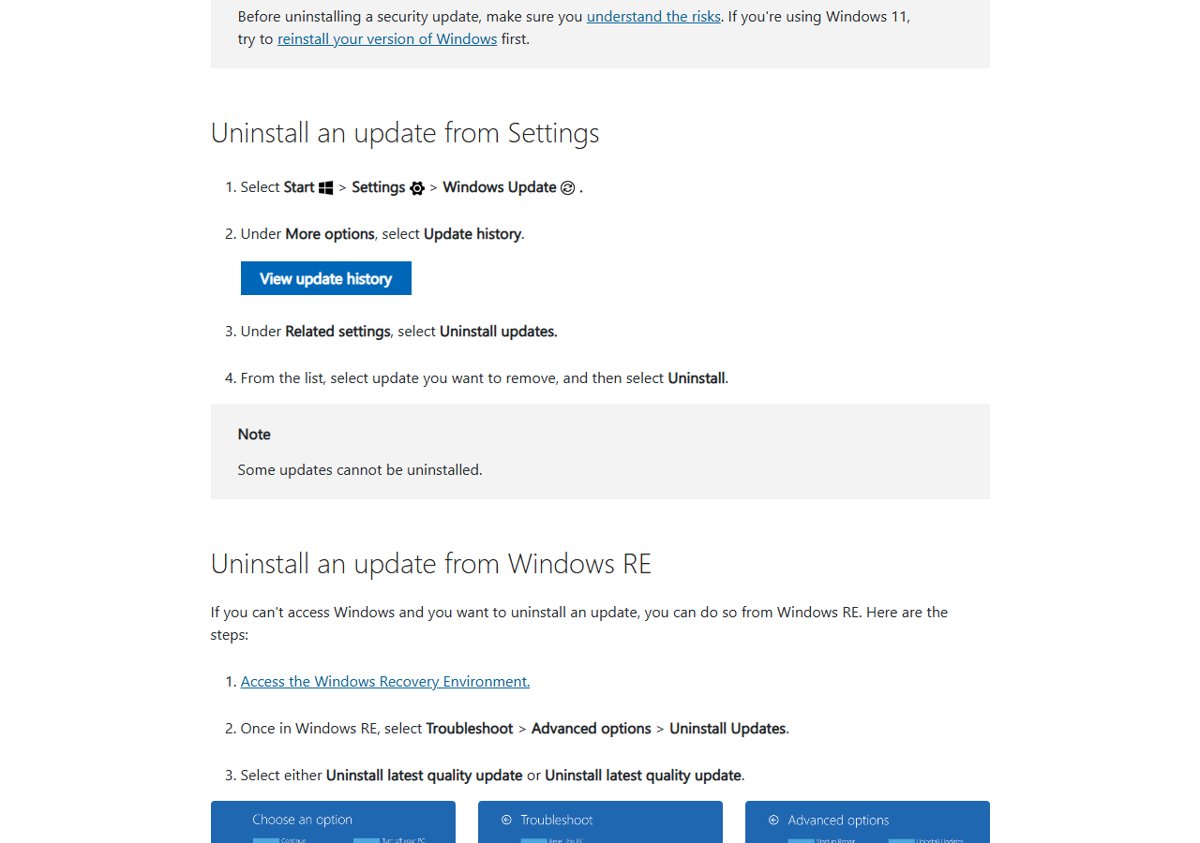
Removing a security update leaves the PC exposed to the flaws it patched, so Microsoft advises trying a reinstall of your Windows version first. Uninstall only when the update causes a problem you cannot work around.
- Select Start > Settings > Windows Update.
- Under More options, select Update history.
- Under Related settings, select Uninstall updates.
- Find KB5127648, KB5126653 or KB5127646 and select Uninstall.
- If Windows does not start, open the Windows Recovery Environment and select Troubleshoot > Advanced options > Uninstall Updates, then Uninstall latest quality update.
Some updates cannot be uninstalled. On 26H2, you can pause or stop updates after removing it so it does not return before a fix ships. The same Settings route lets you roll back a Windows 11 update on 23H2, 24H2 and 25H2 too.
General advice if you're having October 2026 update problems
These fixes cover the October update failing to install, not the known issues above. Run the Windows Update troubleshooter first, then match your error code below.
Update fails with 0x8007000d or 0x80070002
Corrupt files in the update cache or an interrupted install.
- Select Start > Settings > System > Troubleshoot > Other troubleshooters, then select Run next to Windows Update.
- Press Win + R, type
services.mscand press Enter; right-click Windows Update and select Stop. - Delete everything inside
C:\Windows\SoftwareDistribution. - Right-click Windows Update in Services and select Start, then check for updates again.
Update fails with 0x800f0922
Not enough free space, or a VPN blocking the connection to Windows Update.
- Disconnect from any VPN.
- Free up space; Microsoft asks for at least 20 GB free on a 64-bit PC.
- Select Check for updates again.
Update fails with 0xC1900101
An incompatible driver.
- Open Device Manager and expand Display adapters or Network adapters.
- Right-click the adapter and select Update driver > Search automatically for drivers.
- Unplug external drives, docks and other hardware you do not need.
- Restart and run the update again.
Errors such as 0x80070057 point to damaged system files
A corrupted Windows image or system files, which a DISM RestoreHealth repair followed by SFC can fix.
- Type command prompt in the taskbar search box and select Run as administrator.
- Run
DISM.exe /Online /Cleanup-image /Restorehealthand wait for The restore operation completed successfully. - Run
sfc /scannowand wait for 100%. - Restart and check for updates again.
Update stuck at 0% or 100%
Slow connection, low disk space or another app blocking the install.
- Restart the PC.
- Check your connection under Settings > Network & Internet.
- Confirm free space, then select Check for updates again.
Windows 11 October 2026 update issues: frequently asked questions
Why is my Windows 11 PC acting strange after a recent update?
Check Microsoft's list first. After the October 2026 update, the confirmed problems are USB Audio Class 1.0 devices failing with Code 10 and Remote Desktop error 0xC000000D on hosts with Administrator protection. Anything else is more often a driver or app problem; update drivers and apps, then report it in Feedback Hub.
How do I fix a black screen after signing into Windows 11?
Press Ctrl + Shift + Esc, select Run new task, type explorer.exe and select OK to load the desktop. Then install the October 2026 update, KB5127648 or KB5127646, which Microsoft says resolves the black screen seen mainly on Azure Virtual Desktop hosts using FSLogix.
Is the Remote Desktop issue still a problem?
Yes. The 0xC000000D failure for non-admin users connecting to hosts with Administrator protection is still marked Mitigated after the October 13 update. The workaround is to temporarily turn off Administrator protection by policy. The older Remote Desktop Services hang from September was resolved by the September 14 out-of-band update.
My USB headset or speaker stopped working after the update. Is there a fix?
Not a full one yet. Microsoft lists the USB Audio Class 1.0 Code 10 issue as Mitigated. Install all pending updates, switch multichannel devices to 2-channel output if they work in stereo, and use another audio output meanwhile. Businesses can get a workaround from Microsoft Support for Business.
What are the Windows 11 October update problems?
Two known issues remain open after the October 13, 2026 updates: USB audio devices failing with Code 10 or no sound, and Remote Desktop error 0xC000000D for non-admin users. The black screen after sign-in and AC-3 audio crashes from September are fixed by these updates.
Does the October 2026 update have bugs on Windows 11 23H2?
The KB5126653 page says Microsoft is not aware of any issues with the update. The 23H2 release health page still lists the USB audio Code 10 issue as Mitigated, because it started with the September 8 update. The Remote Desktop 0xC000000D issue does not list 23H2.
Should I uninstall the October 2026 update?
Only if it causes a problem you cannot work around. The update carries security fixes, and Microsoft advises trying a reinstall of your Windows version first. Uninstalling also brings back the black screen and AC-3 bugs it fixes, and the USB audio issue began in September, so removing October alone does not cure it.
Where does Microsoft list Windows 11 update issues?
On the Windows release health site at learn.microsoft.com, which has a known issues and notifications page for each Windows 11 version. Each KB article on support.microsoft.com also has a Known issues in this update section.
What should you do about the October 2026 update issues?
Install the October 2026 update for your version now, unless you depend on a USB Audio Class 1.0 device or manage Remote Desktop hosts with Administrator protection turned on. The update closes the security flaws listed in the Security Update Guide and fixes the black screen and AC-3 crashes. The USB audio issue began in September, so skipping October does not avoid it; removing older updates would mean giving up two months of security fixes. Download links and the full change list are on the KB5127648 download page.