Windows 11 26H2, the Windows 11 2026 Update, was released on September 29, 2026, but most PCs will not be offered it on day one because Microsoft is rolling it out in phases over the next few months.
This guide gives the exact dates, shows how to get it today on a PC running version 24H2 or 25H2, and explains why your PC may still be waiting.
Release date: how to get Windows 11 26H2 today
Microsoft made version 26H2 generally available on September 29, 2026. The first wave goes to eligible PCs on version 25H2 or 24H2 that have one Windows Update setting turned on.
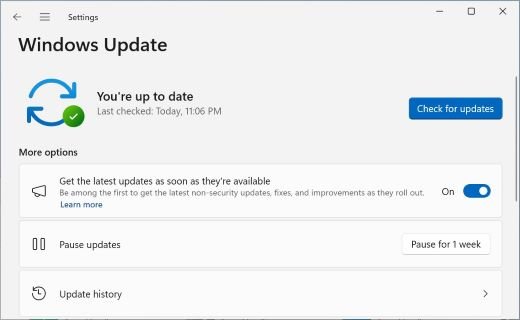
- Select Start > Settings > Windows Update.
- Turn on Get the latest updates as soon as they're available.
- Select Check for updates.
- If Windows 11, version 26H2 is available appears, select Download & install.
- Restart when prompted. One restart finishes the update on a 24H2 or 25H2 PC.
If the 26H2 banner does not appear, your PC is not in the current rollout wave yet. Windows Update is only one of the official ways to install 26H2.
When your PC gets the 2026 Update
The release date is one day, but the day your PC sees the update depends on its current version, its settings and who manages it. Find your row.
| Your PC | When you get 26H2 | What to do |
|---|---|---|
| Windows 11 24H2 or 25H2, latest-updates toggle on | From September 29, 2026, once Microsoft marks the device eligible | Check Windows Update; install when the banner appears |
| Windows 11 24H2 or 25H2, toggle off | Later in the phased rollout, which Microsoft says expands over the next few months | Wait, or turn the toggle on to move up the queue |
| PC under a safeguard hold | Not until Microsoft resolves the compatibility issue and lifts the hold | Leave it; forcing the update onto a held PC risks the issue the hold exists to avoid |
| Windows 11 23H2 or Windows 10 on Windows 11-capable hardware | Now, as a full upgrade rather than the small enablement package | Use Windows 11 Installation Assistant or the ISO from Microsoft's download page |
| New PC that shipped with Windows 11 26H1 | Not offered; 26H1 runs on a different Windows core | Stay on 26H1; Microsoft says these devices get an update path in a future release |
| Work or school PC | When your IT team approves it; available now through Windows Autopatch and the Microsoft 365 admin center | Ask IT; downloads in the admin center may lag the Windows Update release |
| Arm-based PC on 24H2 or 25H2 | Through Windows Update, on the same phased schedule | Do not use Installation Assistant; it only runs on x64 processors |
Windows 11 26H2 arrived in the fall of 2026
Microsoft previewed 26H2 through the summer and shipped it on the last Tuesday of September. These are the dates Microsoft has published so far.
| Date | Milestone |
|---|---|
| June 19, 2026 | Microsoft announces 26H2 as the next Windows 11 feature update; previews start in the Insider Experimental channel |
| August 27, 2026 | Build 26300.9278 reaches the Release Preview Channel |
| August 31, 2026 | Insider ISOs for 26H2 become available |
| September 22, 2026 | KB5124010 preview update, the required base for the enablement package, ships |
| September 29, 2026 | General availability; phased rollout begins through Windows Update |
| October 2026 | First 26H2 hotpatch baseline update (Enterprise hotpatch calendar) |
| October 13, 2026 | Windows 11 24H2 Home and Pro stop receiving updates |
| October 10, 2028 | End of updates for 26H2 Home, Pro, Pro Education and Pro for Workstations |
| October 9, 2029 | End of updates for 26H2 Enterprise, Education and IoT Enterprise |
The 24H2 cutoff matters: a Home or Pro PC still on 24H2 after October 13, 2026 stops getting security updates. Moving to 25H2 or 26H2 keeps it protected, and 26H2 follows its own support timeline.
Windows 11 26H2 is a quick update for existing PCs
Versions 24H2, 25H2 and 26H2 share one core operating system with an identical set of system files. The 26H2 features already sit on your PC in a dormant state, delivered by recent monthly updates.
| Detail | What Microsoft publishes |
|---|---|
| Update package | KB5121794, a feature update delivered as an enablement package |
| Who can install it | PCs running Windows 11, version 24H2 or 25H2 |
| Required base | The September 22, 2026 update KB5124010, or a later cumulative update |
| Restarts | One restart |
| Build after the update | 26300 (25H2 is 26200, 24H2 is 26100) |
| Channels | Windows Update, Microsoft Update Catalog and WSUS |
The enablement package works like a master switch that turns the dormant features on. The KB5121794 enablement package article explains what it changes on disk.
Windows 11 26H2’s download is small
Microsoft describes the enablement package as a small download that installs much like a monthly update. It has not published a size in megabytes, so any exact figure you see elsewhere is not an official number.
| How you install 26H2 | What you download | Restart and time |
|---|---|---|
| Windows Update on 24H2 or 25H2 | Only the enablement package, once the latest cumulative update is installed | One restart, similar to a monthly update |
| Installation Assistant on 23H2 or Windows 10 | A full Windows 11 image | A full upgrade with several restarts |
| ISO or Media Creation Tool | A full multi-edition image for x64 PCs | Full install or in-place upgrade |
Why Microsoft is releasing another annual version
Windows 11 follows an annual feature update cadence, with one release in the second half of each calendar year. 26H2 is that release for 2026, even though most of its features arrived earlier through monthly updates.
| Reason | What it means for you |
|---|---|
| It resets the support clock | Home and Pro get 24 months of updates; Enterprise and Education get 36 months |
| 24H2 is reaching end of updates | 24H2 Home and Pro updates stop on October 13, 2026 |
| It switches on features held back on business PCs | Windows settings backup, app actions from the taskbar and File Explorer improvements become default on commercial devices |
| It gives IT a fixed version to validate | Update rings and policies target 26H2 as a named release |
What users should expect from Windows 11 26H2
Because 26H2 activates features that shipped to 25H2 during the year, a PC that installs every monthly update will look much the same after the upgrade.
| Area | What to expect |
|---|---|
| New features | Taskbar at the top, left or right, a smaller taskbar, a redesigned Start menu, Windows Search that labels where each result comes from, and point-in-time restore |
| Security | Administrator protection (off by default), built-in Sysmon (off by default), and Smart App Control that can be turned on without a clean install |
| Platform changes | No new core: 26H2 stays on the 24H2/25H2 platform with build 26300; 26H1 uses a different core with build 28000 |
| Removed | WMIC command-line tool; WMI itself still works |
| Known issues at launch | USB Audio Class 1.0 devices, Credential Guard domain trust, and black screens on some virtual desktops, all marked mitigated |
Check the known issues and fixes before installing if you use a USB audio interface or a domain-joined PC.
How to check whether your PC is on 26H2
- Right-click Start and select Settings.
- Select System, then About.
- Under Windows specifications, read Version. It shows 26H2 once the update is installed.
- Check OS build. A 26H2 PC shows a build that starts with 26300.
Fix Windows 11 26H2 when it is not available on your PC
Windows Update does not offer 26H2 yet
The phased rollout has not reached your PC, or the latest cumulative update is missing.
- Open Settings > Windows Update.
- Turn on Get the latest updates as soon as they're available.
- Select Check for updates and install every listed update, including the September 2026 cumulative update.
- Restart, then check for updates again.
26H2 is still not offered after every update is installed
Microsoft may have placed a safeguard hold on your PC because of a known compatibility issue.
- Open the Windows 11, version 26H2 known issues page on Windows release health.
- Match your hardware against the listed issues, such as USB audio devices.
- Wait for the hold to lift; Windows Update offers 26H2 automatically when it does.
The PC runs Windows 11 26H1 and never sees 26H2
26H1 is built on a different Windows core and is not upgradeable to 26H2.
- Open Settings > System > About and confirm Version reads 26H1.
- Keep installing monthly updates; 26H1 still receives security and feature updates.
- Wait for the future release Microsoft says will give 26H1 devices an update path.
More causes and fixes are in the guide to 26H2 not showing in Windows Update.
Frequently asked questions
Is 26H2 out yet?
Yes. Microsoft released Windows 11, version 26H2 on September 29, 2026. It is rolling out in phases, so many PCs will not see it in Windows Update for weeks or months after that date.
Is Windows 11 26H2 available for my PC?
It is available now for eligible PCs running Windows 11 24H2 or 25H2 that have Get the latest updates as soon as they're available turned on. Other eligible PCs get it as the rollout expands, unless a safeguard hold blocks them.
What is the Windows 11 26H2 ISO release date?
Insider ISOs appeared on August 31, 2026. Since general availability on September 29, 2026, Microsoft's Windows 11 download page lists the 2026 Update, version 26H2, as the current release for the x64 ISO, Media Creation Tool and Installation Assistant.
When is the Windows 11 Enterprise 26H2 release date?
Enterprise and Education got 26H2 on the same day, September 29, 2026, through Windows Autopatch, the Microsoft 365 admin center and existing update tools. Those editions receive 36 months of updates, until October 9, 2029.
Is there a Windows 10 26H2 release date?
No. Version 26H2 is a Windows 11 release only. A Windows 10 PC gets it only by upgrading to Windows 11, which requires hardware that meets the Windows 11 requirements.
Is 26H2 the Windows 12 release?
No. Microsoft calls 26H2 the Windows 11 2026 Update. It is a Windows 11 feature update built on the same core as 24H2 and 25H2, and Microsoft has not announced a Windows 12.
Is the Windows 11 26H2 release date different in India?
Microsoft publishes one availability date, September 29, 2026, and has not published a separate date for India. When a given PC receives it depends on the phased rollout and the device's eligibility.
How long will Windows 11 26H2 be supported?
Home and Pro editions get updates until October 10, 2028. Enterprise, Education and IoT Enterprise editions get updates until October 9, 2029.
Bottom line
If your PC runs 24H2 or 25H2, turn on the latest-updates toggle and install 26H2 when Windows Update offers it; do not force it past a safeguard hold. The update is a small enablement package with one restart, it resets support to October 2028 for Home and Pro, and 24H2 Home and Pro updates end on October 13, 2026.
For everything else about the release, start with the Windows 11 26H2 overview.

Windows 11 26H1 vs 26H2: the real differences and who gets each update - Techdows
[…] 26H2 followed on the usual second-half schedule for annual Windows 11 feature updates, and its release date and rollout are covered […]
Get ready for Windows 11, version 26H2: what this message means - Techdows
[…] The full timeline, including how the staged rollout reaches PCs, is in the 26H2 release date article. […]
Windows 11 26H2 new features, changes and details - Techdows
[…] phased and will expand over the next few months, so most PCs are not offered 26H2 on day one. The 26H2 release date guide tracks when each group gets […]
How long does Windows 11 26H2 take to install? - Techdows
[…] "similar to a monthly update, requiring only a small download and a quick restart." The rollout is phased, so many PCs will not see the offer on day […]
How to show battery percentage in Windows 11 26H2 - Techdows
[…] releases 26H2 as a controlled rollout in phases, so many PCs are not offered it on day one. If the offer never shows, safeguard holds and paused […]