KB5127648 is the October 13, 2026 security update for Windows 11 versions 24H2, 25H2 and 26H2, and you can download it from Windows Update or as a 4.45 GB (x64) or 4.22 GB (ARM64) .msu file from Microsoft's catalog server.
This guide gives the direct links, the checkpoint file Microsoft pairs with it, three ways to install it, how to confirm the new build, and the complete list of changes in this part of the Windows 11 October 2026 Update.
How to get KB5127648 through Windows Update
KB5127648 downloads and installs automatically on most PCs. Use these steps to fetch it now instead of waiting, from the same Windows Update settings page that controls automatic updates.
- Select Start > Settings > Windows Update.
- Select Check for updates.
- When 2026-10 Cumulative Update for Windows 11 with KB5127648 appears, select Download & install if it has not started on its own.
- Save your work and restart the PC when Windows asks.
- Run
winverafterwards and confirm the build ends in .9711.

KB5127648 update summary: build numbers and servicing status
One package serves three Windows 11 versions, because 24H2, 25H2 and 26H2 share the same core files. Each version moves to its own build number ending in .9711.
| Windows 11 version | OS build after KB5127648 | Servicing status |
|---|---|---|
| Version 26H2 | 26300.9711 | Supported, newest version |
| Version 25H2 | 26200.9711 | Supported |
| Version 24H2 Home and Pro | 26100.9711 | End of updates: October 2026 is the last update for these editions |
| Version 24H2 Enterprise and Education | 26100.9711 | Still receives monthly updates |
| Version 23H2 | Not this update | Gets KB5126653 (OS Build 22621.7652) instead |
| Version 26H1 | Not this update | Gets KB5127646 (OS Build 28000.3231) instead |
Release date: Tuesday, October 13, 2026. Classification: Security Updates. The package also carries servicing stack update KB5127647 (Build 26100.9703). If you have installed earlier updates, the PC downloads only the new parts of the package. The 26H1 package has its own page with the KB5127646 download links.
Windows 11 KB5127648 direct download
These links come from the Microsoft Update Catalog download dialog and point at catalog.sf.dl.delivery.mp.microsoft.com, Microsoft's own file server. The same files serve 24H2, 25H2 and 26H2, so pick by processor type only.
The catalog dialog returns two files for every KB5127648 entry: the October update itself and KB5043080, a September 2024 checkpoint cumulative update. Microsoft says to install the checkpoint first, then KB5127648.
- Step 1 – KB5043080 checkpoint for x64 (Intel and AMD) – 509 MB —
windows11.0-kb5043080-x64_953449672073f8fb99badb4cc6d5d7849b9c83e8.msu, 533,761,740 bytes - Step 2 – KB5127648 for x64 (Intel and AMD) – 4.45 GB —
windows11.0-kb5127648-x64_2b88d2d308adc938fcd4d2876a68ee0b2a3c4c09.msu, 4,775,050,195 bytes - Step 1 – KB5043080 checkpoint for ARM64 – 582 MB —
windows11.0-kb5043080-arm64_df540a05f9b118e339c5520f4090bb5d450f090b.msu, 610,638,429 bytes - Step 2 – KB5127648 for ARM64 – 4.22 GB —
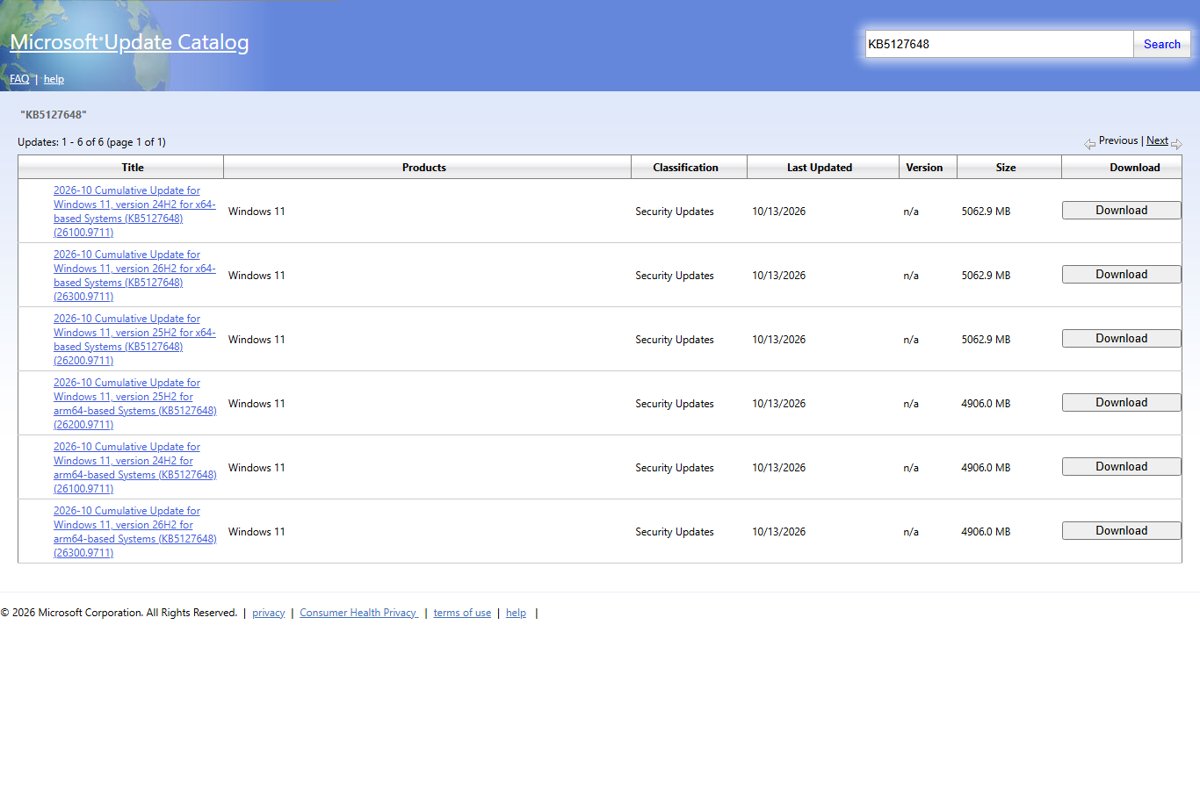
windows11.0-kb5127648-arm64_630ff4173d7728e4123461cba51b63a6ec53df40.msu, 4,533,656,052 bytes - KB5127648 in the Microsoft Update Catalog — Six entries, x64 and arm64 for each version; the catalog lists 5062.9 MB (x64) and 4906.0 MB (arm64) because it counts both files
If the PC already has KB5043080, the installer reports it as already installed, and you move straight to the KB5127648 file. To check whether the PC is x64 or ARM64, open Settings > System > About and read System type under Device specifications.
KB5127648 offline installer or Windows Update: which to use
| Your situation | Use this | Why |
|---|---|---|
| One home PC with a working internet connection | Settings > Windows Update | Downloads only the parts the PC lacks, so it is far smaller than the .msu files |
| Windows Update fails or stalls on KB5127648 | Both .msu files, installed in order | Bypasses the Windows Update client entirely |
| Several PCs on a slow or metered link | Download the .msu files once and copy them | One 5 GB download instead of one per PC |
| You want a single command for both files | DISM /Online /Add-Package on a folder |
DISM finds and installs the checkpoint for you |
| A Windows image you deploy to new PCs | DISM /Image: against the mounted image |
New PCs start on build .9711 |
| PCs managed by WSUS | Sync product Windows 11, classification Security Updates | WSUS picks up KB5127648 automatically with those settings |
The .msu route uses the same Windows Update Standalone Installer as other offline packages, for example the KB5121794 offline installer that moves 24H2 and 25H2 PCs to 26H2.
Install the October 2026 security update KB5127648 from the .msu files
Some coverage calls this a non-security update, but Microsoft classifies KB5127648 as a security update. The September 22 non-security preview, KB5124010, is the release that introduced most of the new features listed further down.
- Download both files for your processor type: the KB5043080 checkpoint and KB5127648.
- Open File Explorer and go to the folder that holds them.
- Close open apps and save your work, because the update ends with a restart.
- Double-click the
windows11.0-kb5043080file first and confirm the Windows Update Standalone Installer prompt. - When it finishes, double-click the
windows11.0-kb5127648file and confirm the prompt. - Restart the PC when the installer asks.
For a silent install from an elevated Command Prompt, run wusa.exe <file name>.msu /quiet /norestart for each file in the same order, then restart.
Windows 11 October 2026 Patch Tuesday: manual installation process with DISM
DISM installs both files in one pass. Put the two .msu files for your architecture in one folder, such as C:\Packages, with no other files in it. DISM scans the folder and installs the required checkpoint before KB5127648.
DISM /Online /Add-Package /PackagePath:c:\packages\windows11.0-kb5127648-x64.msu/Online targets the running copy of Windows. /PackagePath points at the KB5127648 file in the folder; use its full downloaded name, or the arm64 file on an ARM PC. Run it from Command Prompt opened with Run as administrator. The PowerShell equivalent is Add-WindowsPackage -Online -PackagePath "c:\packages\windows11.0-kb5127648-x64.msu".
You should see: DISM finishes without an error and asks for a restart. After the restart, winver shows a build ending in .9711.
To add the update to a mounted Windows image instead, Microsoft gives DISM /Image:mountdir /Add-Package /PackagePath:windows11.0-kb5127648-x64.msu, or Add-WindowsPackage -Path "c:\offline" -PackagePath "windows11.0-kb5127648-x64.msu" -PreventPending in PowerShell.
Check if KB5127648 is installed
- Restart the PC if you postponed the restart or used
/norestart. - Type
winverin the taskbar search box and press Enter. - Confirm the OS build reads 26300.9711 on 26H2, 26200.9711 on 25H2 or 26100.9711 on 24H2.
- For more detail, open Settings > System > About and read Version and OS Build under Windows specifications.
Any build lower than .9711 means the update has not finished. A build of .9550 means the PC still runs the September 22 preview. The About page is also the quickest way to check what version of Windows you have before you pick a download.
What's new on Windows 11 26H2, 25H2 and 24H2 update KB5127648
These are all the improvements Microsoft lists for KB5127648, in the order of its release notes. Each bracketed area on the official page has a row.
| Area | Change in KB5127648 |
|---|---|
| Security updates | Security fixes for this month's vulnerabilities, listed in Microsoft's Security Update Guide |
| Secure Boot | Continues rolling out updated Secure Boot certificates to eligible devices through Windows Update |
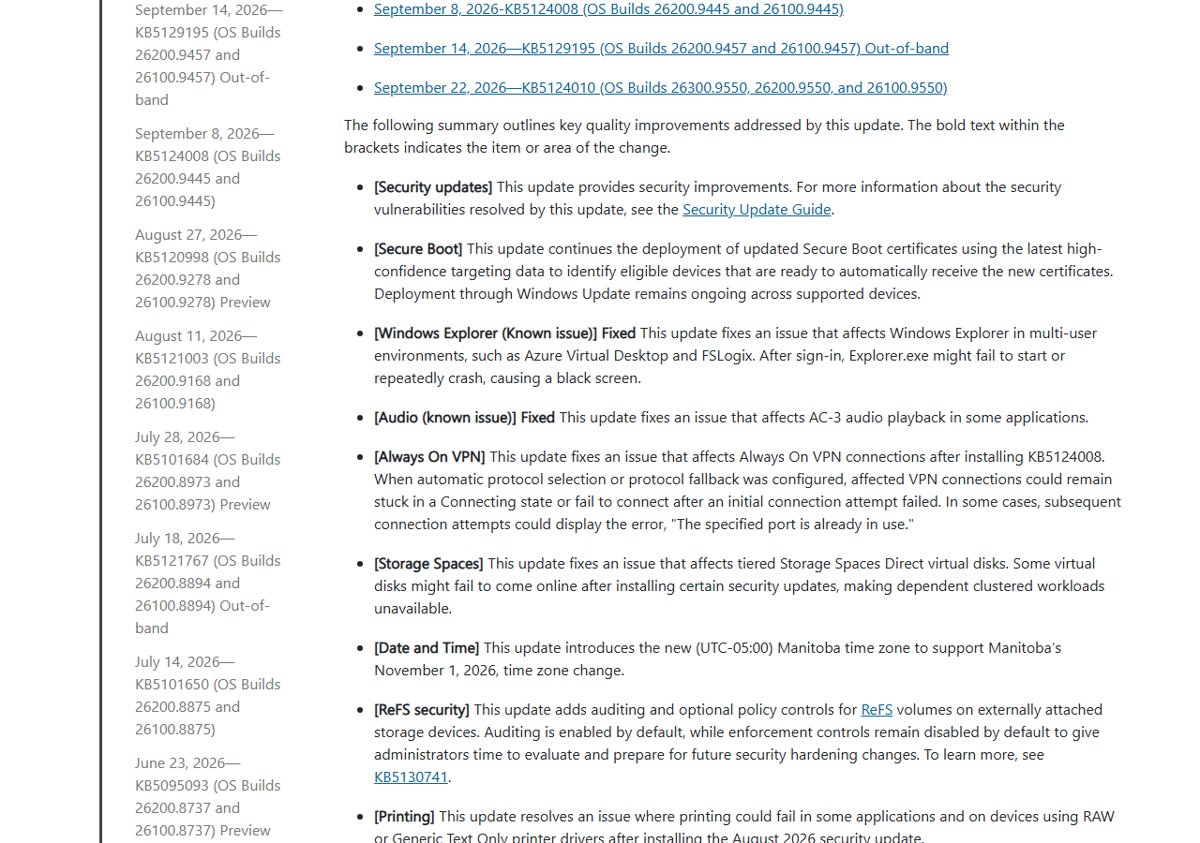
| Windows Explorer (known issue) | Fixes Explorer.exe failing to start or crashing after sign-in on multi-user setups such as Azure Virtual Desktop and FSLogix, which left a black screen |
| Audio (known issue) | Fixes AC-3 audio playback in some apps |
| Always On VPN | Fixes connections stuck on Connecting, or failing with "The specified port is already in use", after KB5124008 when protocol fallback was configured |
| Storage Spaces | Fixes tiered Storage Spaces Direct virtual disks failing to come online after some security updates |
| Date and Time | Adds the (UTC-05:00) Manitoba time zone for Manitoba's November 1, 2026 change |
| ReFS security | Adds auditing (on by default) and optional enforcement controls (off by default) for ReFS volumes on external storage, described in KB5130741 |
| Printing | Fixes printing failures with RAW or Generic Text Only drivers after the August 2026 security update |
| Gaming | Fixes mouse input stutter in some games |
| Windows Hello | Fixes fingerprint sign-in failing after a cold boot on some devices |
KB5127648 also rolls in everything from the September 2026 updates: KB5124008 (September 8), the out-of-band KB5129195 (September 14) and the KB5124010 preview (September 22).
What's new in the October 2026 Update from the September preview
These features first shipped in the optional KB5124010 preview and now reach every PC through the KB5127648 security update. Microsoft marks most of them as a gradual rollout, so they switch on over time and may not appear on your PC straight after the install.
| Feature | What changes | Rollout |
|---|---|---|
| File Explorer changes | The preview pane warns before previewing downloaded HTML files and previews other downloaded files, such as PDFs, automatically. Home remembers expanded or collapsed sections, the Details pane shows cloud thumbnails more reliably, and an address bar bug that cleared its contents is fixed | Gradual |
| Copilot key remapping | A new setting remaps the Copilot key to Right Ctrl or the Context Menu key | Gradual |
| Open apps maximized | A new accessibility setting opens app windows maximized | Gradual |
| Bluetooth fixes | Volume flyout during calls, more accurate disconnected states, better Classic microphone compatibility, a fix for streaming crash 0x139, and more reliable LE Audio and shared audio | Gradual |
| Emoji 17.0 | Support for the Emoji 17.0 set, plus redesigned versions of several existing emoji | Gradual |
| Widgets | A Tips widget with short guidance on Windows features, for the Widgets board or lock screen | Gradual |
| Touchpad | Single-finger scrolling and automatic edge scrolling on precision touchpads | Gradual |
| Camera roll | Camera roll backup to OneDrive in Settings, set up on the phone with a QR code (varies by device and market) | Gradual |
| Personalization and Settings | Background page and slideshow fixes, app versions in Installed apps, and a time picker that follows your 12/24-hour setting | Gradual |
| Windows Backup | PC-to-PC Migration is removed; Windows Backup replaces it | Gradual |
| Camera, File History, Sysmon | Fixes for the built-in camera stopping, File History backup failures with false "Reconnect your drive" messages, and Sysmon errors | Normal |
| Windows Recovery (WinRE) | WinRE can reuse saved Wi-Fi profiles to get online during recovery, on by default | Normal |
Remapping the key is covered step by step in the Copilot key remapping guide.
KB5127648 announcements and messages
| Notice | What Microsoft says | What to do |
|---|---|---|
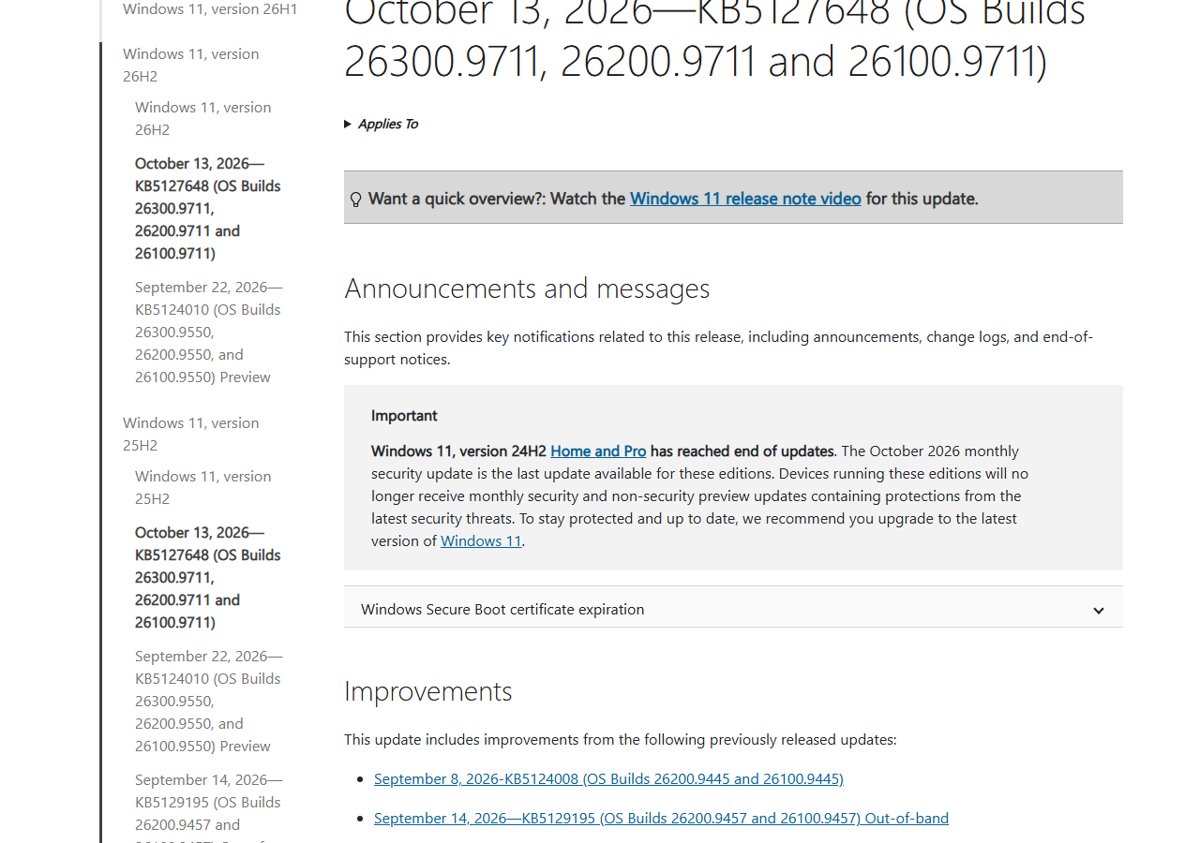
| 24H2 Home and Pro end of updates | October 2026 is the last monthly security update for Windows 11 24H2 Home and Pro. No more security or preview updates follow | Move to 25H2 or 26H2; the 24H2 Home and Pro end-of-updates guide covers your options |
| Secure Boot certificate expiration | New Secure Boot certificates are still rolling out through Windows Update. Devices without them keep starting and receiving standard updates | Keep Windows Update on; no manual step is listed for home PCs |
| Dynamic Update and boot.stl | Media updated with this month's Dynamic Update needs the boot.stl file, or devices can fail to start from it with error 0xc0430001 | Use Microsoft's Update WinPE script, or copy boot.stl from Windows\Boot\EFI |
KB5127648 components updates: AI components and servicing stack
| Component | Version in this update | Applies to |
|---|---|---|
| Image Search | 1.2608.951.0 | Copilot+ PCs only |
| Content Extraction | 1.2608.951.0 | Copilot+ PCs only |
| Semantic Analysis | 1.2608.951.0 | Copilot+ PCs only |
| Settings Model | 1.2608.951.0 | Copilot+ PCs only |
| Servicing stack update KB5127647 | Build 26100.9703 | All 24H2, 25H2 and 26H2 PCs; improves the reliability of update installs |
The four AI components update only on Copilot+ PCs, so other PCs skip that part of the package.
What's new on Windows 11 23H2 update (KB5126653)
Windows 11 23H2 does not get KB5127648. Its October 13 release is KB5126653, OS Build 22621.7652, a 1.14 GB (x64) or 1.29 GB (ARM64) .msu in the catalog.
| KB5126653 change | Shared with KB5127648? |
|---|---|
| Security updates | Yes |
| Secure Boot certificate rollout | Yes |
| ReFS auditing and policy controls (KB5130741) | Yes |
| Storage Spaces Direct virtual disk fix | Yes |
| File History backup and "Reconnect your drive" fix | Already in KB5127648 via the September preview |
| End of updates for 23H2 Enterprise and Education on November 10, 2026 | No, 23H2 only |
On a 23H2 PC, download KB5126653 instead, which comes as its own .msu files.
Known issues in this update and Windows release health for KB5127648
Microsoft lists one open known issue on the KB5127648 page, and the 26H2 release health dashboard tracks a second one. Status, workarounds and who should wait are broken down in KB5127648 issues and fixes.
| Issue | Status | Who is affected |
|---|---|---|
| USB audio devices fail to start (Code 10) or produce no sound | Mitigated; partly fixed by the September 14 out-of-band update, rest still open | USB Audio Class 1.0 devices |
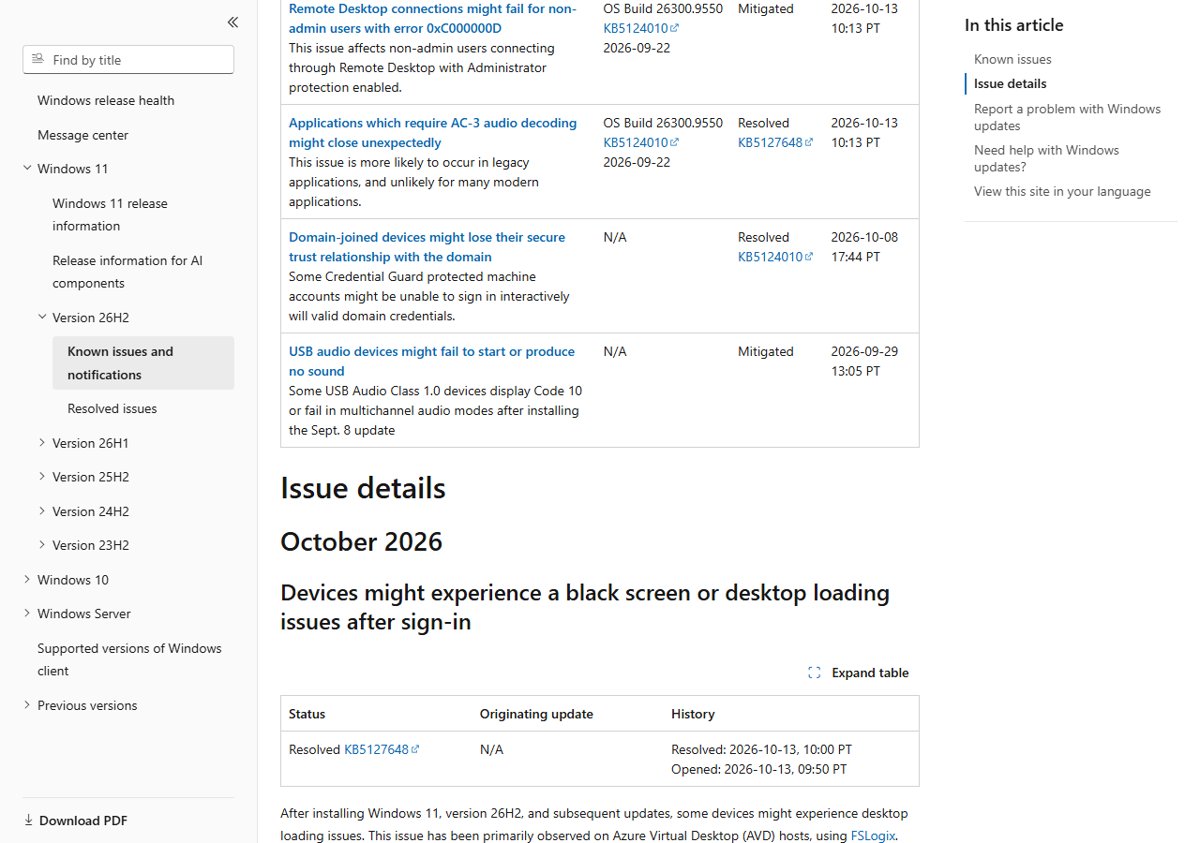
| Remote Desktop fails for non-admin users with error 0xC000000D | Mitigated; admins can turn off Administrator protection as a workaround | Enterprise remote hosts with Administrator protection on |
| Black screen or desktop loading problems after sign-in | Resolved by KB5127648 | Mainly Azure Virtual Desktop hosts using FSLogix |
| Apps that use AC-3 (Dolby Digital) decoding close unexpectedly | Resolved by KB5127648 | Mostly legacy apps, games and media players |
Other versions have their own lists, and the October 2026 update issues across 23H2, 24H2, 25H2, 26H2 and 26H1 share one page.
Full tracking and change history for KB5127648
These official pages hold the file information, the CVEs fixed by this update and the release health status. Microsoft's Security Update Guide is the only official list of the CVEs; the KB page itself names none.
- KB5127648 release notes — Improvements, components, known issues, install channels and file information downloads
- Security Update Guide, October 2026 — Every CVE fixed by this month's updates, with severity
- Windows 11 26H2 release health — Open and resolved issues with status and history
- KB5124010 September preview notes — Full detail on the features KB5127648 now delivers
- KB5130741 ReFS security changes — The ReFS auditing and enforcement controls
The file information for KB5127648 and for servicing stack KB5127647 is a downloadable list linked at the bottom of the release notes. Earlier builds for each version are listed in the 26H2 update history.
KB5127648 admin checklist
| Check | Why it matters |
|---|---|
| WSUS syncs product Windows 11 with classification Security Updates | KB5127648 syncs automatically only with those settings |
| Plan upgrades for 24H2 Home and Pro devices | They receive no updates after October 2026 |
| Include boot.stl when you apply this month's Dynamic Update to media | Media without it can fail to boot with error 0xc0430001 |
| Use Dynamic Update packages from the same month | Microsoft asks for versions from the October 2026 release |
| Review ReFS audit events before enforcement arrives | Auditing is on by default; enforcement stays off for now (KB5130741) |
| Test Remote Desktop to hosts with Administrator protection | Non-admin connections can fail with 0xC000000D since KB5124010 |
| Inventory USB Audio Class 1.0 devices | Code 10 failures remain partly unresolved |
Fix KB5127648 download and install problems
KB5127648 fails to install through Windows Update
Low disk space, a pending restart or a stuck update component.
- Free space if needed: Microsoft asks for at least 20 GB free on 64-bit Windows.
- Select Start > Power > Update and restart to finish any pending update.
- Run the Windows Update troubleshooter from Settings > System > Troubleshoot > Other troubleshooters.
- Select Check for updates again, or install the two .msu files manually.
The checkpoint file says the update is already installed
KB5043080 is already on the PC, which is normal on most up-to-date systems.
- Close the message.
- Double-click the KB5127648 file and finish the install.
USB headset or DAC shows Code 10 or no sound after the update
A known issue with USB Audio Class 1.0 devices that started with the September 8 security update.
- Switch the device to 2-channel (stereo) mode, which restored audio for some users with multichannel failures.
- Reinstall or roll back the device driver with the USB audio Code 10 fixes if stereo mode does not help.
Installation media updated with this month's packages will not boot (0xc0430001)
The boot.stl file used for Secure Boot validation is missing from the media.
- Run Microsoft's Update WinPE script against the image, or copy boot.stl from the device's
Windows\Boot\EFIfolder to the same folder on the media. - Make sure boot.stl matches the Windows version and architecture of the image.
KB5127648 download FAQ
Where can I download KB5127648?
Get KB5127648 from Settings > Windows Update, or download the .msu files from the Microsoft Update Catalog. The direct x64 and ARM64 links in this guide point at Microsoft's catalog server, together with the KB5043080 checkpoint file that installs first.
Is there a KB5127648 offline installer?
Yes. The offline installer is an .msu file: 4.45 GB for x64 and 4.22 GB for ARM64. Install the KB5043080 checkpoint .msu first, then the KB5127648 .msu, by double-clicking, with wusa.exe, or both at once with DISM.
How do I install the KB5127648 .msu file?
Double-click the checkpoint file, then the KB5127648 file, and restart. Or put both in one empty folder and run DISM /Online /Add-Package /PackagePath: with the KB5127648 file from an elevated Command Prompt; DISM installs the checkpoint for you.
What's new in KB5127648?
KB5127648 brings this month's security fixes, Secure Boot certificate updates, the Manitoba time zone, ReFS auditing, and fixes for Always On VPN, printing, mouse stutter in games and Windows Hello. It also delivers the September preview features, such as Copilot key remapping and Emoji 17.0.
Where is the KB5127648 changelog?
Microsoft's changelog is the KB5127648 release notes page on support.microsoft.com, which lists every improvement by area. Security fixes are in the October 2026 Security Update Guide, and open problems are on the Windows release health pages.
What build is KB5127648 on Windows 11 26H2?
On Windows 11 26H2, KB5127648 raises the OS build to 26300.9711. The same package gives build 26200.9711 on 25H2 and 26100.9711 on 24H2, so the download is identical across all three versions.
Is KB5127648 the last update for Windows 11 24H2?
It is the last update for Windows 11 24H2 Home and Pro, which reached end of updates in October 2026. Enterprise and Education editions of 24H2 keep receiving monthly updates.
Does KB5127648 install on Windows 11 25H2?
Yes. KB5127648 installs on 25H2 and moves it to build 26200.9711. It does not apply to 23H2, which gets KB5126653, or to 26H1, which gets KB5127646.
Can I uninstall KB5127648?
Yes, the cumulative update can be removed if it causes problems. You can remove a problematic Windows update from Settings, then pause updates so it does not return straight away.
Bottom line: should you install the KB5127648 update now?
Yes, install KB5127648 on 24H2, 25H2 and 26H2 PCs, through Windows Update if it works and from the two .msu files if it does not. It carries October's security fixes and resolves the black-screen and AC-3 audio problems from September. The open USB audio and Remote Desktop issues affect specific setups, so test those first if you rely on a USB Audio Class 1.0 device or Administrator protection.







Windows 11 KB5127648 issues: Should you install the update? - Techdows
[…] and how to uninstall or pause it. For the download links and the full change list, use the KB5127648 download and changelog […]