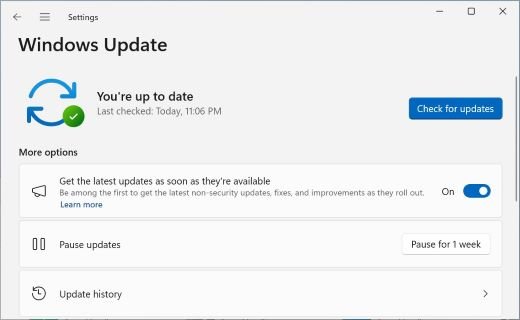
To upgrade to Windows 11 26H2 from 25H2 or 24H2, open Settings > Windows Update, turn on Get the latest updates as soon as they're available, and select Download & install when Windows 11, version 26H2 appears.
This guide covers that one-restart route, the full-upgrade options for Windows 11 23H2 and Windows 10 PCs, the Insider path, managed PCs, and what to check once the upgrade finishes.
Method 1 – Install Windows 11 26H2 using Windows Update
Microsoft released Windows 11, version 26H2, also called the Windows 11 2026 Update, on September 29, 2026. On a PC running 25H2 or 24H2 it arrives as a small enablement package and needs a single restart.
How to get it is the same on Home and Pro: Microsoft's instructions do not change by edition, so a Windows 11 Pro PC on 25H2 follows exactly these steps.
- Select Start > Settings > Windows Update.
- Turn on the toggle Get the latest updates as soon as they're available.
- Select Check for updates, install any pending cumulative update, and restart if asked.
- When Windows 11, version 26H2 is available appears on the Windows Update page, select Download & install.
- Optionally select See what's in this update first to read the release notes.
- Select Restart now when the download finishes. One restart completes the upgrade.
The rollout is phased and expands over the next few months, so most PCs are not offered 26H2 on day one. If the banner is missing, 26H2 not showing in Windows Update has several possible causes.
Microsoft also links a short video guide, How to get the Windows 11 2026 Update, from its Windows release health page for 26H2.
Windows 11 26H2 upgrade paths
Your current version decides the route. Find your row, then use the method it names.
| Your situation | Use this | Why |
|---|---|---|
| Windows 11 25H2, Home or Pro | Method 1: Windows Update | Enablement package, small download, one restart |
| Windows 11 24H2 (upgrade from 24H2) | Method 1: Windows Update | Same enablement package; 24H2 Home and Pro reach end of updates on October 13, 2026 |
| Upgrading from Windows 11 23H2 or earlier | Method 2 (Installation Assistant) or Method 3 (ISO) | The enablement package only installs on 24H2 or 25H2; 23H2 Home and Pro already reached end of updates |
| Windows 10 on hardware that meets Windows 11 requirements | Method 2 or Method 3 | Full upgrade; Windows 10 support ended on October 14, 2025 |
| Windows 11 26H1 (new devices sold from early 2026) | Stay on 26H1 | Microsoft does not offer 26H1 devices an in-place path to 26H2 |
| Windows Insider in the Release Preview Channel | Windows Update seeker experience | 26H2 reached Release Preview on August 27, 2026 |
| Clean install, new drive or reinstall | Method 4: Media Creation Tool USB | Boots from media and installs a fresh copy |
| You planned to use Rufus | Method 4 instead | Rufus is third-party; Microsoft's tool writes official media |
| Work or school PC | Your IT department's update rings | Autopatch, WSUS and the Microsoft 365 admin center control timing |
Each branch is broken down further in the 26H2 upgrade paths explainer.
Before installing Windows 11 26H2, check these things
| Check | What you need |
|---|---|
| Current version | Windows 11, version 24H2 or 25H2 for the enablement package; see Settings > System > About |
| Prerequisite update | The September 22, 2026 update KB5124010 or a later cumulative update |
| Hardware | A PC that meets the Windows 11 minimum requirements: 1 GHz dual-core 64-bit CPU, 4 GB RAM, 64 GB storage, UEFI with Secure Boot, TPM 2.0 |
| Processor type for Methods 2 and 4 | x64 only; the Installation Assistant and Media Creation Tool do not support Arm-based PCs |
| USB flash drive (Method 4) | Blank, at least 8 GB; everything on it is erased |
| Known issues | Check the Windows release health page for 26H2 for safeguard holds and open issues |
| Backup | Back up personal files before any reinstall or clean install |
Upgrade to Windows 11 26H2 from Insider Program
Microsoft released 26H2 (Build 26300.9278) to the Release Preview Channel on August 27, 2026. Insiders in that channel on hardware that meets the Windows 11 requirements can pick it up through Windows Update.
- Confirm your PC is enrolled in the Release Preview Channel of the Windows Insider Program.
- Select Start > Settings > Windows Update.
- Select Check for updates.
- Choose to download and install Windows 11, version 26H2 when it is listed.
- Restart when asked. Monthly servicing updates then arrive through Windows Update as usual.
Now that 26H2 is generally available, PCs outside the Insider Program get the same version through Method 1.
Method 2 – Install Windows 11 26H2 using Installation Assistant
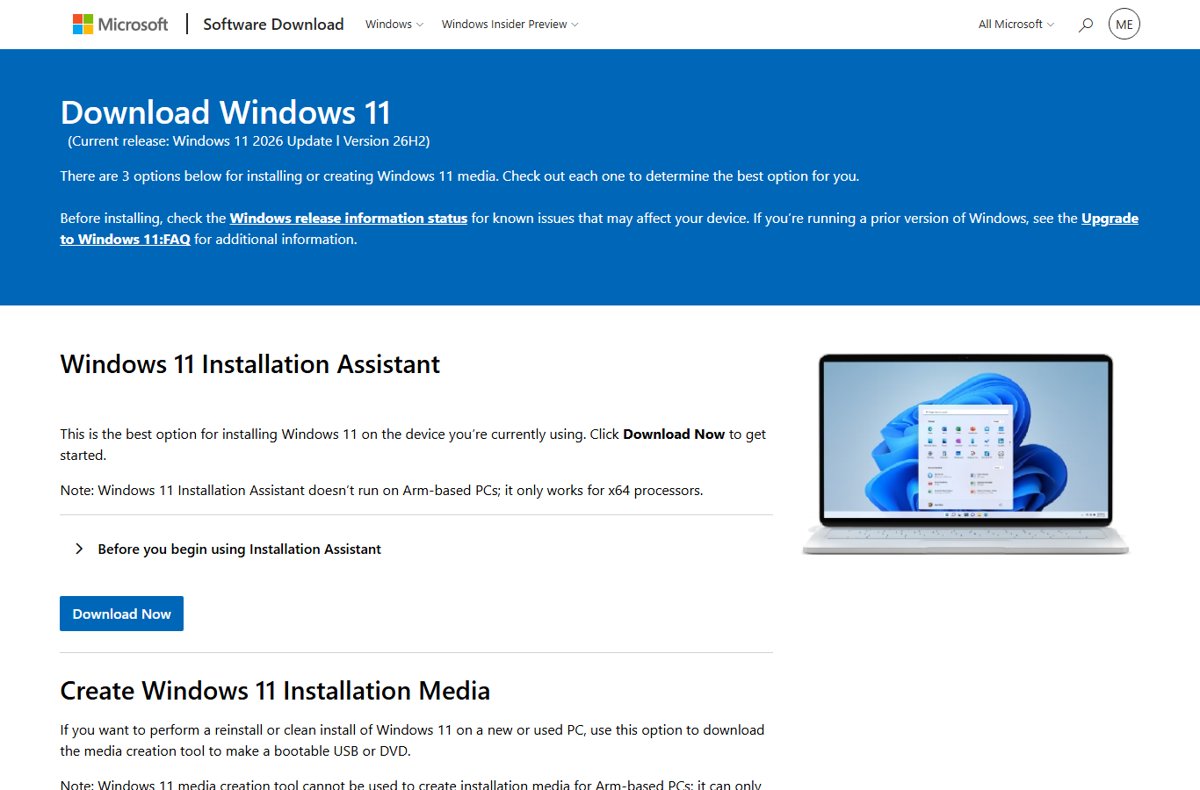
The Download Windows 11 page lists Version 26H2 as the current release, and its Installation Assistant is the tool for PCs on 23H2 or Windows 10. It works only on x64 processors.
- Open the Download Windows 11 page on microsoft.com.
- Under Windows 11 Installation Assistant, select Download Now and run the app.
- If the app asks for more information, run the PC Health Check app, then select Refresh.
- Select Accept and install to start the upgrade.
- Select Restart now when prompted. The PC restarts a few more times on its own.
- Sign in at the Windows sign-in screen to finish.
Method 3 – Install Windows 11 26H2 using the ISO
The x64 ISO on the Download Windows 11 page is multi-edition and uses your product key or digital license to unlock the right edition. Running setup from inside Windows keeps your files and apps by default.
- On the Download Windows 11 page, under Download Windows 11 Disk Image (ISO) for x64 devices, choose Windows 11 (multi-edition ISO for x64 devices).
- Select Confirm, choose your product language and download the file.
- Open File Explorer, right-click the ISO and mount it so it gets a drive letter.
- Open that drive and run setup.exe; select Yes if User Account Control appears.
- On Ready to install, keep Keep personal files and apps, or select Change what to keep.
- Finish the setup pages to start the upgrade.
Mounting the 26H2 ISO this way needs no flash drive at all.
Method 4 – Install Windows 11 26H2 using Media Creation Tool
The Media Creation Tool builds a bootable USB for a clean install or reinstall on a new or used x64 PC. Booting from it wipes the drive, so back up first.
- Connect a blank USB flash drive with at least 8 GB of space.
- On the Download Windows 11 page, under Create Windows 11 Installation Media, select Download Now.
- Run the tool and follow its screens to write the USB drive.
- Run PC Health Check on the target PC, then shut it down.
- Insert the USB drive, turn the PC on and open its boot menu with the key your PC maker specifies (usually a function key or Del).
- Select the USB drive and follow Windows 11 Setup.
Screen-by-screen help is in the guide to create bootable 26H2 USB media.
Method 5 – Install Windows 11 26H2 using Rufus
Rufus is a third-party USB writer, not a Microsoft tool. It writes the same official ISO to a flash drive, so it only makes sense when the Media Creation Tool cannot do the job you need.
| Question | Media Creation Tool | Rufus |
|---|---|---|
| Who makes it | Microsoft | A third-party developer |
| Source of Windows files | Downloads 26H2 from Microsoft | Uses an ISO you supply; download it from Microsoft (Method 3) |
| Supported by Microsoft for 26H2 media | Yes, for x64 PCs | No |
| Result | Bootable USB for a clean install | Bootable USB for a clean install |
If you still want it, the step-by-step for Rufus with 26H2 uses Microsoft's own ISO.
Why Microsoft uses different upgrade methods
Windows 11, versions 24H2, 25H2 and 26H2 share a common core with an identical set of system files. The 26H2 features already sit dormant on 24H2 and 25H2 PCs, and the enablement package is the switch that turns them on.
That is why Microsoft calls this a predictable and low-disruption update: installation feels like a monthly update. Older versions do not share that core, so they need a full operating system upgrade.
| Enablement package | Full upgrade | |
|---|---|---|
| Starts from | Windows 11 24H2 or 25H2 | Windows 11 23H2 or earlier, Windows 10 |
| Delivered by | Windows Update or WSUS | Installation Assistant, ISO or installation media |
| Download | Small | A full copy of Windows |
| Restarts | One | Several |
| Apps and files | Kept | Kept by default when run from inside Windows |
The switch itself is unpacked in the KB5121794 enablement package explainer.
Why some PCs upgrade faster than others
| Factor | Effect on your upgrade |
|---|---|
| Toggle Get the latest updates as soon as they're available is on | The PC is prioritized in the controlled feature rollout |
| Safeguard hold | Microsoft holds the offer on devices with a known compatibility issue until it is fixed |
| Prerequisite missing | The offer waits until KB5124010 or a later cumulative update is installed |
| Current version 23H2 or Windows 10 | Full upgrade with several restarts instead of one |
| PC managed by IT | Update rings and policies decide the date; Microsoft 365 admin center downloads may be delayed |
Can you install Windows 11 26H2 on unsupported hardware?
No. Microsoft does not recommend installing Windows 11 on a PC that fails the minimum requirements, and says anyone who did should roll back to Windows 10. Microsoft states the Windows 11 minimum system requirements remain unchanged, and a boot-media install on an unchecked PC can leave it in an unsupported state. Run PC Health Check to see which requirement fails before deciding.
What an older machine can and cannot do is covered in installing 26H2 on an older PC.
Can you install Windows 11 26H2 without a Microsoft account?
| Scenario | Microsoft account needed? |
|---|---|
| Upgrade through Windows Update, Installation Assistant or setup.exe | No new sign-in; your existing account stays in place |
| Clean install of Windows 11 Home | Yes: Home requires an internet connection and a Microsoft account to finish device setup |
| Clean install of Pro, Enterprise or Education | Microsoft's requirement applies to Home; work or school PCs follow their organization's setup |
Options for a new install are covered in installing 26H2 with a local account.
Windows 11 26H2 clean install versus upgrade, what’s the difference
| In-place upgrade | Clean install | |
|---|---|---|
| How you start it | Windows Update, Installation Assistant, or setup.exe inside Windows | Boot the PC from USB installation media |
| Personal files | Kept by default | Deleted with the drive contents |
| Apps and settings | Kept by default; Change what to keep offers Keep personal files only or Nothing | Removed |
| Requirement check | Windows Update and the Installation Assistant check eligibility | Setup checks only some requirements; run PC Health Check first |
| Best for | Almost everyone | A new drive, a used PC, or a system you want to start fresh |
Information for commercial and education customers
Windows 11, version 26H2 is available through Windows Autopatch, the Microsoft 365 admin center, Windows Update client policies and WSUS. Existing update rings and policies keep working, and Microsoft recommends targeted deployments first.
| Channel | What to know |
|---|---|
| WSUS | Sync Product Windows 11 with Classification Upgrades and the update syncs automatically |
| Windows Autopatch and Microsoft 365 admin center | Available now; admin center downloads may be delayed |
| Microsoft Update Catalog | The enablement package KB5121794 is not offered there |
| Support lifecycle | 36 months for Enterprise and Education, to October 9, 2029 |
| Features turned on | Windows settings backup, app-specific taskbar actions and File Explorer enhancements become enabled by default on commercial devices |
After installing Windows 11 26H2, here’s what to expect
The PC restarts to the same desktop, apps and files. Confirm the version, then expect monthly updates to continue as before.
- Select Start > Settings > System > About.
- Under Windows specifications, confirm Version reads 26H2.
- Confirm OS build begins with 26300; the latest build on September 29, 2026 was 26300.9550.
- Press Win + R, type
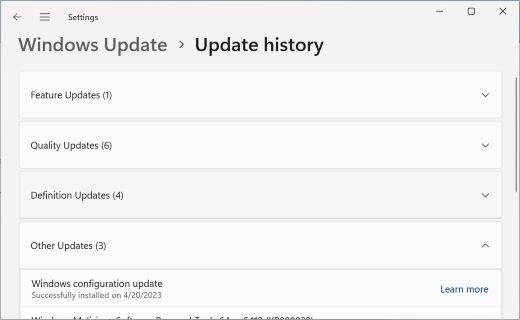
winverand press Enter for the same check in one window. - Open Settings > Windows Update > Update history to see the feature update listed.
Home and Pro now receive updates until October 10, 2028.
Windows 11 26H2 is mostly features you already have
Because the three versions share a servicing branch, many 26H2 features reached 24H2 and 25H2 PCs through monthly updates before the upgrade.
| Area | Examples listed by Microsoft for 26H2 |
|---|---|
| Start and taskbar | Redesigned Start menu with category and grid views; taskbar at the bottom, top, left or right; smaller taskbar option |
| Security | Administrator protection (off by default), built-in Sysmon (off by default), Smart App Control toggle without a clean install |
| Recovery | Point-in-time restore and quick machine recovery |
| Camera and devices | Multi-App Camera, Bluetooth LE Audio and USB4 dock reliability improvements |
| Removed | WMIC is gone and no longer available as a Feature on Demand |
This is not the complete list of 26H2 new features.
Fix Windows 11 26H2 upgrade problems
26H2 is not offered in Windows Update
The phased rollout has not reached the PC, a safeguard hold applies, or the prerequisite update is missing.
- Install every pending update in Settings > Windows Update, then restart.
- Turn on Get the latest updates as soon as they're available and select Check for updates.
- Check the Windows release health page for 26H2 for holds matching your hardware.
- If you must upgrade now and no hold applies, use Method 2 or Method 3.
The USB drive doesn't work when you boot or run setup
The drive was not written as bootable media, the boot menu skipped it, or the PC is Arm-based.
- Recreate the drive with the Media Creation Tool on a blank flash drive of at least 8 GB.
- Open the PC's boot menu with the maker's key and select the USB drive by name.
- To upgrade without booting, insert the drive inside Windows and select Run setup.exe.
- Skip the flash drive entirely: mount the ISO and run setup.exe (Method 3).
"This PC doesn't meet the minimum system requirements to install Windows 11"
The hardware fails at least one Windows 11 requirement.
- Run the PC Health Check app to see which requirement failed.
- Fix the setting it names if the hardware supports it, then select Refresh in the Installation Assistant.
- If the hardware itself is unsupported, stay on your current version.
No sound from a USB headset or a black screen after the upgrade
Both are listed 26H2 known issues; some USB Audio Class 1.0 devices show Code 10.
- For a black screen, press Ctrl + Shift + Esc, select Run new task, type
explorer.exeand select OK. - For USB audio, install new updates as they arrive; Microsoft says a fix is coming in a future update.
- Track both on the 26H2 known issues page.
Windows 11 26H2 installation FAQ
How do I upgrade Windows 11 25H2 to 26H2?
Open Settings > Windows Update, turn on Get the latest updates as soon as they're available and select Check for updates. When Windows 11, version 26H2 is available appears, select Download & install and restart once.
How do I update Windows 11 Pro to 26H2?
Windows 11 Pro uses the same route as Home. On 25H2 or 24H2, install the offered 26H2 enablement package from Settings > Windows Update. On 23H2, run the Installation Assistant or setup.exe from the 26H2 ISO.
Can I upgrade from 24H2 to Windows 11 26H2?
Yes. Microsoft offers 26H2 to 24H2 PCs as the same enablement package it offers 25H2 PCs, with one restart. Install KB5124010 or a later cumulative update first, because the package requires it.
Will upgrading to 26H2 delete my files?
No. The enablement package, the Installation Assistant and setup.exe all keep personal files and apps by default. Only booting from installation media for a clean install, or choosing Nothing on the Change what to keep page, removes them.
Why is my PC not getting 26H2 yet?
Microsoft is rolling 26H2 out in phases over several months and holds it back from devices with known compatibility issues. Turning on the Get the latest updates toggle puts your PC earlier in the queue.
Can a Windows 11 26H1 PC upgrade to 26H2?
No. Windows 11, version 26H1 was built for new devices that launched in early 2026 and uses a different core. Microsoft does not offer those devices an in-place update to 26H2.
How long will Windows 11 26H2 be supported?
Home and Pro editions receive updates until October 10, 2028, and Enterprise and Education until October 9, 2029. Installing 26H2 resets the support clock to 24 or 36 months.
What this means for you
On 25H2 or 24H2, turn on the Get the latest updates toggle and install 26H2 from Windows Update when it is offered; use the Installation Assistant or ISO only on 23H2 or Windows 10. The enablement package is the smallest, fastest route, and staying protected and productive depends on a supported version: 24H2 Home and Pro stop getting updates on October 13, 2026, while 26H2 runs to October 2028.

Should I install Windows 11 26H2 on my PC? Yes, but proceed with caution - Techdows
[…] most people on Windows 11 24H2 or 25H2 should update to 26H2 when Windows Update offers it, because it is a small enablement package that installs with one […]
How to enable Hyper-V in Windows 11 26H2 - Techdows
[…] list includes no Hyper-V change, so these steps match 24H2 and 25H2, and a PC still waiting to upgrade to 26H2 can enable Hyper-V […]
Windows 11 26H2 release date and when your PC gets it - Techdows
[…] is available now for eligible PCs running Windows 11 24H2 or 25H2 that have Get the latest updates as soon as they're available turned on. Other eligible PCs […]
Windows 11 24H2 Home and Pro end of updates: What to do now - Techdows
[…] place a safeguard hold on a PC with a known compatibility problem, so the offer can take weeks. The 26H2 upgrade walkthrough shows every screen along the […]
Windows 11 October 2026 Update review: Everything you need to know - Techdows
[…] on 24H2 Home and Pro are in what to do now that 24H2 updates have ended. When you are ready, upgrade to Windows 11 26H2 from Windows […]