You can install Windows 11 26H2 on an older PC if it meets the Windows 11 minimum requirements: a supported 64-bit CPU, 4 GB of RAM, 64 GB of storage, UEFI with Secure Boot and TPM 2.0.
This guide shows how to check an older desktop or laptop, which install route fits its current version, and what Microsoft says happens if you put 26H2 on hardware that does not qualify.
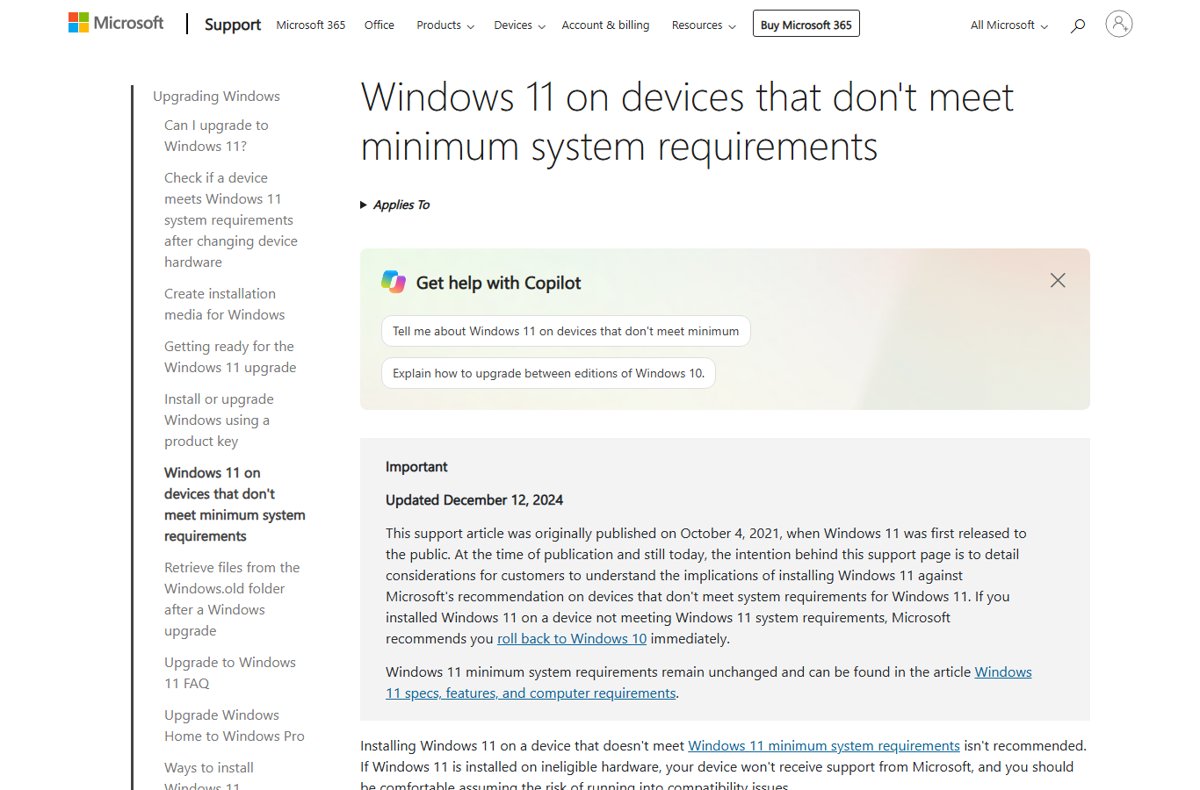
Can your older PC run Windows 11 26H2?
Age alone does not decide it. The requirements are the same Windows 11 minimums Microsoft has published since launch, and 26H2 shares its core system files with 24H2 and 25H2, so a PC that runs those versions properly is in the running for 26H2.
| Your older PC | Can it get 26H2? | What to do |
|---|---|---|
| Runs Windows 11 24H2 or 25H2 and meets the requirements | Yes, as a small enablement package with one restart | Wait for the offer in Windows Update |
| Runs Windows 11 23H2 and meets the requirements | Yes, but not through the enablement package, which needs 24H2 or 25H2 | Use the Installation Assistant or install media |
| Runs Windows 10 and PC Health Check says it is eligible | Yes | Upgrade with the Installation Assistant, or clean install from USB |
| Runs Windows 10 and PC Health Check says it is not eligible | Not as a supported install | Check whether TPM 2.0 is only switched off, then plan a hardware upgrade |
| Runs Windows 11 on hardware that never met the requirements | Microsoft does not guarantee any updates to it | Read the unsupported-hardware section below before trying |
| Arm laptop with a Snapdragon 850 | Yes, but 26H2 is the last version that supports it | Install 26H2, then plan a replacement before its support ends |
The requirements an older PC has to meet
These are Microsoft's minimum hardware requirements to install or upgrade to Windows 11. Microsoft has not published a separate set for 26H2.
| Component | Minimum |
|---|---|
| Processor | 1 GHz or faster, two or more cores, on a compatible 64-bit processor or SoC |
| Memory | 4 GB or more |
| Storage | 64 GB or more of available space |
| System firmware | UEFI, Secure Boot capable |
| TPM | Trusted Platform Module version 2.0 |
| Graphics | DirectX 12 or later with a WDDM 2.0 driver |
| Display | 720p, 9 inches or larger, 8 bits per color channel |
| Internet and account | Needed for updates; Windows 11 Home needs internet and a Microsoft account at first setup |
On top of the other 26H2 system requirements, a Windows 10 PC needs version 2004 or later and the September 14, 2021 security update or later to upgrade directly.
Which older processors are supported
The CPU is the requirement older PCs fail most often, because it cannot be fixed in firmware. Microsoft's newest client processor lists are the 25H2 lists; no 26H2 list existed on 30 September 2026.
| Maker | Oldest families on Microsoft's current list | Not on the list |
|---|---|---|
| Intel | 8th Generation Core i3, i5, i7, i9 and Core m | 7th Generation Core and earlier |
| AMD | Ryzen 3000 Series and Ryzen PRO 3000 Series (listed with a G & GE exception), Threadripper 3000 | Ryzen 1000 and 2000 desktop series |
| Qualcomm | Snapdragon X series on the current list; Snapdragon 850 still supported through 26H2 | Snapdragon 850 after 26H2 |
Microsoft says later processor generations that meet the same principles count as supported even before they are listed. Match your exact chip against the 26H2 supported CPU list.
How to check if this laptop can be updated to Windows 11 26H2
Use PC Health Check on Windows 10 and the About page on Windows 11. Both work the same on a laptop or a desktop.
- On Windows 10, use Search on the taskbar to find PC Health Check and open it.
- If it is missing, install it from
https://aka.ms/GetPCHealthCheckApp. - Select Check now and read why the PC is or is not eligible.
- On Windows 11, open Settings > System > About.
- Read the Processor line and match it to Microsoft's list.
- Check Version under Windows specifications: 24H2 or 25H2 can take the 26H2 enablement package.
- Press Win + R, type
tpm.mscand select OK to confirm Specification Version reads 2.0.
If a known compatibility issue affects your device, Microsoft delays the upgrade with a safeguard hold until it is resolved. Once 26H2 is on the PC, you can confirm 26H2 is installed from the same About page.
Fix a TPM 2.0 failure on an older PC
Many older desktops fail only because TPM is switched off. Most retail motherboards used in self-built PCs ship with TPM turned off by default, even though it is almost always available.
- Press Win + R, type
tpm.mscand select OK. - If you see Compatible TPM cannot be found, the TPM is missing or disabled in firmware.
- On Windows 10, open Settings > Update & Security > Recovery and select Restart now under advanced startup.
- Choose Troubleshoot > Advanced options > UEFI Firmware Settings > Restart.
- Look in the Advanced, Security or Trusted Computing menu.
- Turn on the option labelled Security Device, TPM State, AMD fTPM switch, AMD PSP fTPM, Intel PTT or Intel Platform Trust Technology.
- Save, restart Windows and run
tpm.mscagain to confirm version 2.0.
If the specification version is below 2.0, the PC does not meet the requirement. Option names differ by board, so check the PC maker's support pages when yours do not match.
Which install route fits your older PC
| Starting point | Best route | What it needs |
|---|---|---|
| Windows 11 24H2 or 25H2 | Windows Update enablement package (KB5121794) | The September 22, 2026 update (KB5124010) or later installed |
| Windows 11 23H2 or Windows 10 on the same PC | Windows 11 Installation Assistant | Windows 10 version 2004 or later, 9 GB free, an x64 processor and a license |
| Fresh start, new drive or second-hand PC | Media Creation Tool or ISO on a USB drive | A 64-bit CPU and a USB drive or DVD of at least 8 GB |
| Arm PC | Windows Update, or the Arm64 ISO | The Installation Assistant and Media Creation Tool only support x64 |
Every route is covered step by step in the guide to download and install 26H2. For a Windows 10 or 23H2 machine, the Installation Assistant upgrade keeps your files and apps.
Get 26H2 through Windows Update on a supported older PC
The rollout is phased and expands over the next few months, so most eligible PCs are not offered 26H2 on day one.
- Open Settings > Windows Update.
- Turn on Get the latest updates as soon as they're available.
- Select Check for updates and install the September 22, 2026 update or later if it is offered.
- When Windows 11, version 26H2 is available appears, select Download & install.
- Restart once when prompted.
If the offer never appears on a PC that qualifies, work through the fixes for 26H2 not showing in Windows Update.
2. Create Windows 11 26H2 bootable media
Microsoft's download page now lists the Windows 11 2026 Update, version 26H2, as the current release, so the Media Creation Tool and ISO both carry 26H2.
- On a working PC, open the Windows 11 download page at
https://www.microsoft.com/en-us/software-download/windows11. - Under Create Windows 11 Installation Media, select Download Now to get the Media Creation Tool.
- Plug in a USB drive of at least 8 GB; everything on it is deleted.
- Run the tool and follow its prompts to write the installation files to the USB drive.
- Or choose Download Windows 11 Disk Image (ISO) for x64 devices to keep an ISO file.
- Boot the older PC from the USB drive and follow Windows Setup.
The Media Creation Tool only builds x64 media for a bootable 26H2 USB drive, while the 26H2 ISO download includes x64 and Arm64 images.
Clean install Windows 11 26H2 on unsupported hardware
Microsoft does not recommend installing Windows 11 on a PC that fails the minimum requirements, and its install media carries the same warning. Setup shows a disclaimer that you must accept before it continues on such a PC.
| What you give up | What Microsoft says |
|---|---|
| Support | The device won't receive support from Microsoft |
| Updates | The PC won't be entitled to receive updates, and security updates are not guaranteed |
| Reliability | The device may malfunction due to compatibility issues |
| Warranty | Damage caused by lack of compatibility isn't covered by the manufacturer warranty |
| Desktop | A watermark appears on the desktop and Settings may show that requirements aren't met |
This guide does not cover ways around the requirements. For an older PC that fails them, the supported choices are fixing a switched-off TPM, upgrading the hardware, or replacing the PC.
Windows 11 26H2 unsupported hardware upgrade process
An unsupported PC already running Windows 11 25H2 is in a different position from a supported one. The 26H2 enablement package is aimed at eligible 24H2 and 25H2 devices, and Microsoft makes no promise of updates to ineligible hardware.
| Situation | What to expect | Supported option |
|---|---|---|
| Unsupported PC on Windows 11 25H2 or 24H2 | No guarantee that Windows Update offers 26H2 or later security fixes | Upgrade the hardware or move to a supported PC |
| Unsupported PC has problems after upgrading from Windows 10 | Microsoft recommends going back to Windows 10 | Settings > System > Recovery > Go back |
| More than 10 days since the upgrade | The Go back files are removed | Reinstall the previous version from media |
Staying on a supported version has limits too: Windows 11 24H2 Home and Pro stop getting updates on 13 October 2026. The consequences of skipping are laid out in what happens if you don't install 26H2.
Fix common problems on older PCs
PC Health Check says the processor is not supported
The CPU generation is older than Microsoft's supported list.
- Open Settings > System > About and note the Processor model.
- Compare it with Microsoft's Intel, AMD or Qualcomm list.
- If it is not listed, plan a CPU, board or PC replacement; firmware changes cannot fix this.
PC Health Check says TPM 2.0 is missing
The TPM is switched off in UEFI, or the PC only has TPM 1.2.
- Run
tpm.mscand read the message or Specification Version. - Turn on the TPM in UEFI as shown in the TPM section above.
- Run Check now in PC Health Check again.
A supported older PC does not see 26H2 in Windows Update
The phased rollout has not reached it, a safeguard hold applies, or the prerequisite update is missing.
- Confirm the PC runs 24H2 or 25H2 under Settings > System > About.
- Install the latest cumulative update from Settings > Windows Update.
- Check Microsoft's 26H2 known issues for a safeguard hold, or use the Installation Assistant.
The Installation Assistant will not run
It needs Windows 10 version 2004 or later, 9 GB of free space and an x64 processor.
- Free up at least 9 GB on the system drive.
- Update Windows 10 to version 2004 or later first.
- On an Arm PC, use Windows Update or the Arm64 ISO instead.
Frequently Asked Questions
Can I install Windows 11 26H2 on an older PC?
Yes, if the PC meets the Windows 11 minimum requirements: a supported 64-bit CPU, 4 GB of RAM, 64 GB of storage, UEFI with Secure Boot, TPM 2.0 and a DirectX 12 GPU. An older PC that already runs 24H2 or 25H2 gets 26H2 as a small enablement package.
Can this laptop be updated to Windows 11 26H2?
Check it the same way as a desktop. On Windows 10, run PC Health Check and select Check now. On Windows 11, open Settings > System > About, confirm the processor is on Microsoft's list and the version is 24H2 or 25H2.
Does Windows 11 26H2 have higher requirements than 25H2?
Microsoft has not published different requirements for 26H2. It shares a common core and identical system files with 24H2 and 25H2, and the Windows 11 requirements page lists the same minimums as before.
Can a PC with an Intel 7th Generation CPU get 26H2?
Not as a supported install. Microsoft's current Intel list starts at 8th Generation Core, so a 7th Generation PC does not meet the Windows 11 minimum requirements and is not guaranteed updates.
Can I upgrade a Windows 10 PC straight to Windows 11 26H2?
Yes, if it is eligible. The Installation Assistant needs Windows 10 version 2004 or later, 9 GB of free space and an x64 processor. Microsoft's download page now installs version 26H2, and Windows 10 support ended on October 14, 2025.
Can I clean install Windows 11 26H2 on unsupported hardware?
Microsoft does not recommend it. Setup shows a disclaimer, and an unsupported PC is not entitled to updates, gets no Microsoft support, shows a desktop watermark, and loses warranty cover for damage caused by incompatibility.
Will an unsupported PC on 25H2 get the 26H2 update?
Microsoft does not guarantee it. The enablement package targets eligible 24H2 and 25H2 devices, and Microsoft states that PCs below the minimum requirements are not guaranteed to receive any updates, including security updates.
How long will Windows 11 26H2 be supported on my PC?
Home and Pro editions get updates until 10 October 2028, and Enterprise and Education until 9 October 2029. Snapdragon 850 PCs can run 26H2, but it is the last version that supports them.
Bottom line
Install 26H2 on an older PC only if it passes the Windows 11 requirements; if it fails on TPM alone, switch the TPM on, and if it fails on the CPU, plan new hardware. 26H2 uses the same requirements as earlier Windows 11 versions, and Microsoft does not guarantee updates, support or warranty cover on a PC that falls below them.

Windows 11 26H2 upgrade paths explained - Techdows
[…] Files move to Windows 11 by default, but Microsoft still recommends a backup first. If the PC fails the check, the options are covered in running 26H2 on an older PC. […]
How to upgrade to Windows 11 26H2 - Techdows
[…] What an older machine can and cannot do is covered in installing 26H2 on an older PC. […]
How to repair Windows 11 26H2 without losing files - Techdows
[…] PC does not meet Windows 11 minimum requirements, most often because TPM is […]