KB5126653 is the October 13, 2026 cumulative security update for Windows 11 version 23H2, and you can get it from Windows Update or download the .msu file directly: 1.14 GB for x64 PCs and 1.29 GB for ARM64 PCs.
This guide gives the direct Microsoft download links, three ways to install the file, how to confirm build 22631.7652, and every change Microsoft lists for this release. It is one part of the Windows 11 October 2026 Update, which also shipped KB5127648 and KB5127646 for newer versions.
The fastest way to get KB5126653 on Windows 11 23H2
Microsoft says KB5126653 downloads and installs automatically from Windows Update and Microsoft Update. To install it now instead of waiting, use the Settings app.
- Save your work and close open apps, because the update ends in a restart.
- Open Start > Settings > Windows Update.
- Select Check for updates.
- Wait for 2026-10 Cumulative Update for Windows 11, version 23H2 (KB5126653) to download and install.
- Select Restart now, or choose Update and restart from Start > Power later.
The same page lets you pause updates or schedule restarts if the timing is wrong.

Download Windows 11 KB5126653 offline installer (.msu)
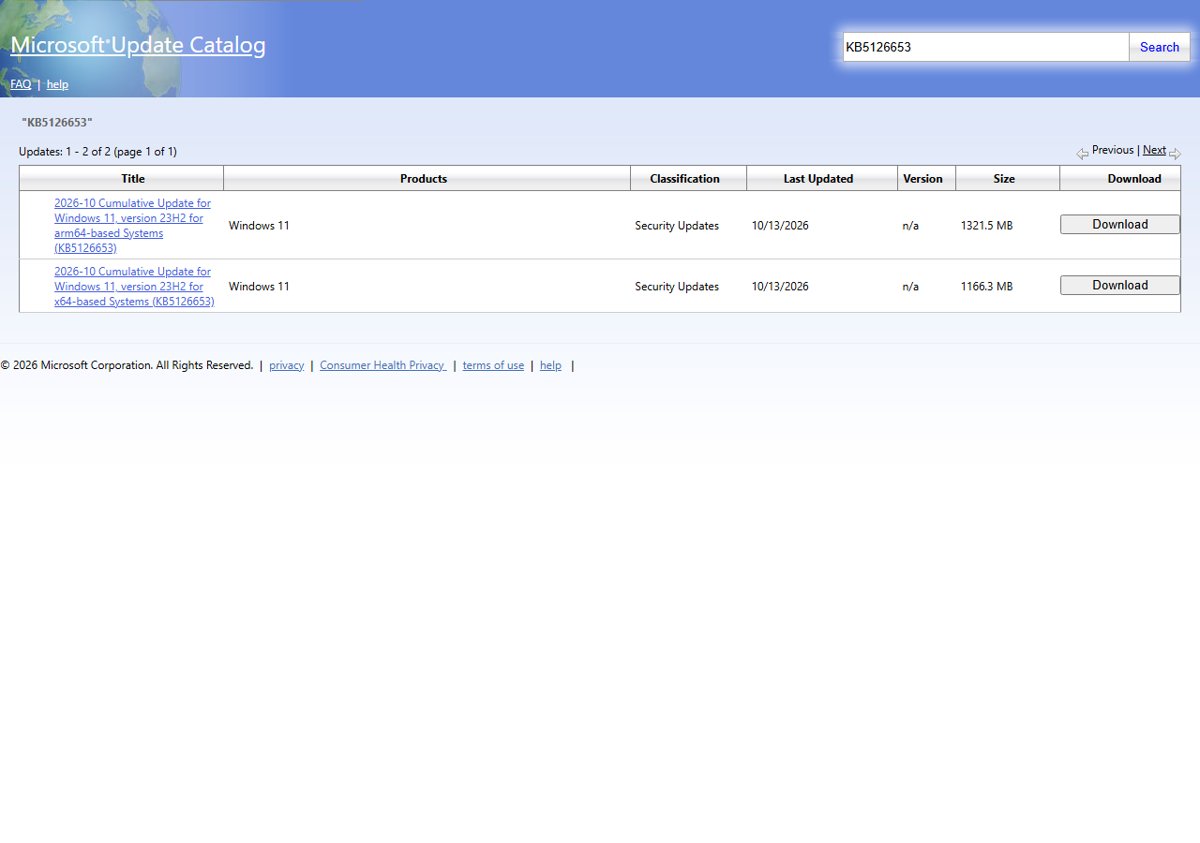
Both files come from catalog.sf.dl.delivery.mp.microsoft.com, the server behind Microsoft Update Catalog downloads. The catalog lists them as 2026-10 Cumulative Update for Windows 11, version 23H2 with the classification Security Updates, last updated 10/13/2026.
Each download is a single .msu file. Unlike the KB5127648 package for 24H2 and later, the 23H2 catalog entry has no second checkpoint file to install first.
- KB5126653 for x64 (Intel and AMD) – 1.14 GB —
windows11.0-kb5126653-x64_5935370fc4ae7f1477ab76bc8e364f7a325c1013.msu, 1,222,962,623 bytes (catalog shows 1166.3 MB) - KB5126653 for ARM64 – 1.29 GB —
windows11.0-kb5126653-arm64_16fbdc47b71eebb5320afced12553bc1fb20bf62.msu, 1,385,744,403 bytes (catalog shows 1321.5 MB) - KB5126653 in the Microsoft Update Catalog — The official search page with both entries, if you prefer to start the download from the catalog itself
KB5126653 release date, OS build and servicing stack
| Detail | KB5126653 |
|---|---|
| Release date | Tuesday, October 13, 2026 (the 2026-10 B security release) |
| Applies to | Windows 11, version 23H2 |
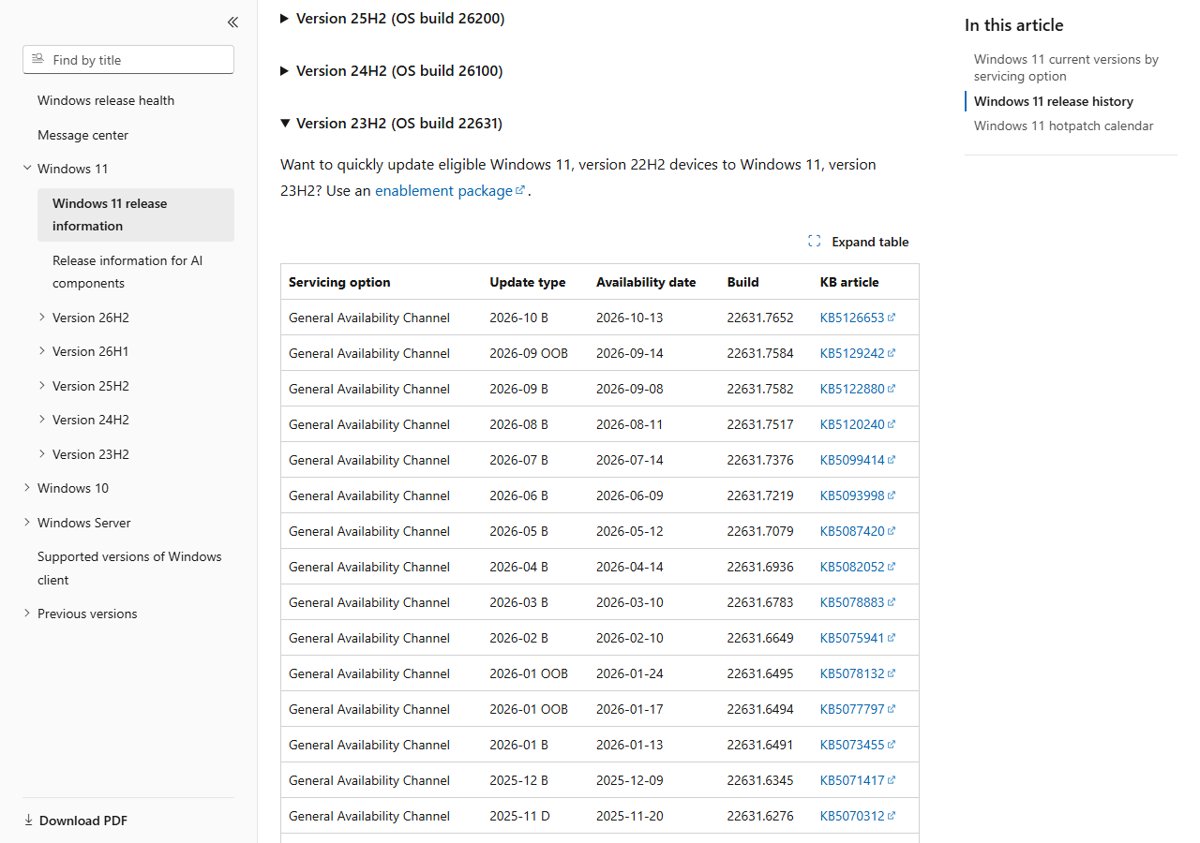
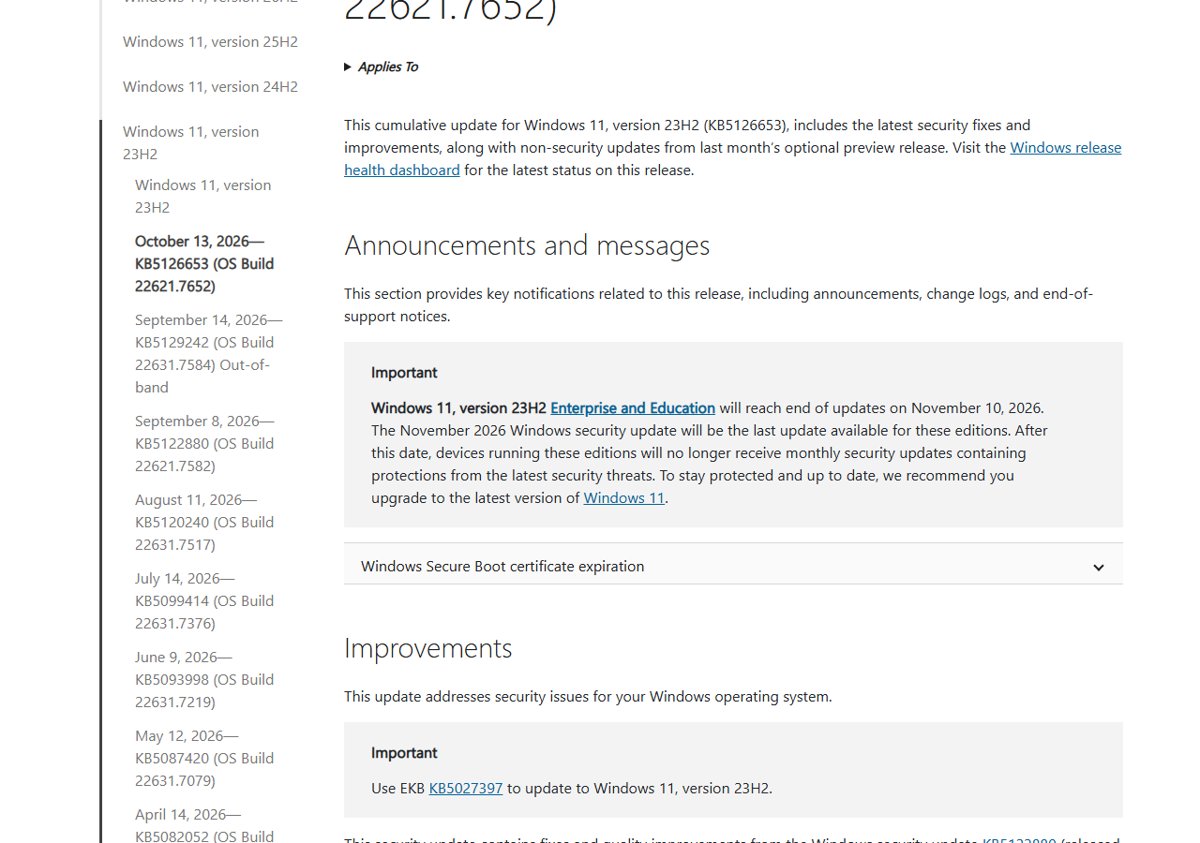
| OS build | 22631.7652 in Microsoft's release information table; the KB article header lists OS Build 22621.7652 |
| Update type | Cumulative security update with last month's non-security fixes |
| Includes fixes from | KB5122880 (September 8, 2026) and the out-of-band KB5129242 (September 14, 2026) |
| Servicing stack update | KB5126652, version 22621.7641 |
| Download size | 1.14 GB (x64) and 1.29 GB (ARM64) |
| Channels | Windows Update, Windows Update for Business, Microsoft Update Catalog, WSUS |
| Known issues listed on the KB page | None |
If you have already installed earlier updates, Windows downloads only the new parts of the package. A PC still on version 22H2 moves to 23H2 with the enablement package KB5027397, which Microsoft names on the KB5126653 page.
Which KB5126653 download option should you use?
| Your situation | Use this | Why |
|---|---|---|
| One home or office PC with internet access | Settings > Windows Update | Downloads only what the PC is missing and installs it for you |
| A PC with no or slow internet, or a failed Windows Update install | The direct .msu link above | Copy the file over USB and install it offline |
| You want to confirm you have Microsoft's file | The Microsoft Update Catalog search | Shows the official title, size and classification before you download |
| Managed PCs under Windows Update for Business | Your existing update policies | Microsoft says it installs automatically according to configured policies |
| PCs that sync with WSUS | Approve it in WSUS | It syncs when Products and Classifications include Windows 11 and Security Updates |
Windows 11 October 2026 Patch Tuesday: manual installation process for KB5126653
Check the PC first: open Settings > System > About and read Version under Windows specifications and System type under Device specifications. A Windows version check takes a few seconds and stops you downloading the wrong file.
- Confirm the PC runs Windows 11, version 23H2 and note whether it is x64 or ARM-based.
- Open the Microsoft Update Catalog search for KB5126653.
- Select Download next to the entry for your architecture: for x64-based Systems or for arm64-based Systems.
- Select the .msu link in the window that opens and save the file to a folder such as
C:\Packages. - Double-click the .msu file and confirm the Windows Update Standalone Installer prompt.
- Restart the PC when the installer finishes.
An .msu file is opened by wusa.exe in %windir%\System32. It holds the update metadata, one or more .cab files and an .xml file describing the package.
Install the KB5126653 .msu with wusa.exe or DISM
Search the Start menu for Command Prompt, right-click it and select Run as administrator. Change to the folder that holds the download, then run the command below.
wusa.exe windows11.0-kb5126653-x64_5935370fc4ae7f1477ab76bc8e364f7a325c1013.msu /quiet /norestart/quiet installs without prompts and /norestart lets you choose when to restart. On an ARM PC, use the arm64 file name. To get an applicability check and a clear error in the console, use DISM instead: DISM /Online /Add-Package /PackagePath:C:\Packages\windows11.0-kb5126653-x64_5935370fc4ae7f1477ab76bc8e364f7a325c1013.msu. The PowerShell equivalent is Add-WindowsPackage -Online -PackagePath "C:\Packages\<file name>.msu".
You should see: The command returns without an error. After a restart, the OS build ends in .7652.
How to check KB5126653 is installed (build 22631.7652)
- Restart the PC if you used
/norestartor postponed the restart. - Type
winverin the taskbar search box and press Enter. - Confirm the About Windows box shows Version 23H2 and an OS build ending in .7652.
- For a second check, open Settings > Windows Update > Update history and look for KB5126653 under Quality Updates.
The previous Patch Tuesday update, KB5122880, ended in .7582 and the September 14 out-of-band fix KB5129242 in .7584, so a lower number means October's update is not installed yet.
What’s new on Windows 11 23H2 update (KB5126653)
This is every item Microsoft lists in the KB5126653 release notes, grouped by the area named in brackets. The update is security-focused and adds no new Windows features.
| Area | Change in KB5126653 |
|---|---|
| Security updates | Security fixes for Windows; the vulnerabilities are listed in Microsoft's Security Update Guide |
| Secure Boot | Continues rolling out the updated Secure Boot certificates to eligible devices, using high-confidence targeting data; deployment through Windows Update is ongoing |
| Date and time | Permanent Daylight Saving Time support for British Columbia and Alberta from November 2026 |
| Date and time | New time zone Manitoba Standard Time, shown as "(UTC-5:00) Manitoba" |
| File History (known issue) | Fixes File History failing to back up or restore files to an external drive or network location, and a false "Reconnect your drive" message |
| ReFS security | Adds auditing and optional policy controls for ReFS volumes on externally attached storage; auditing is on by default, enforcement is off by default (details in KB5130741) |
| Storage Spaces | Fixes tiered Storage Spaces Direct virtual disks that failed to come online after some security updates, taking clustered workloads offline |
| Servicing stack | KB5126652 (22621.7641) improves the component that installs Windows updates |
Microsoft also notes that devices without the new Secure Boot certificates still start and still receive standard updates while the rollout continues.
What's new in the October 2026 Patch Tuesday update for other Windows 11 versions
KB5126653 is the 23H2 package only. Newer versions received their own cumulative updates on the same day.
| Windows 11 version | October 2026 update | OS build(s) | Where to read the changes |
|---|---|---|---|
| 23H2 | KB5126653 | 22631.7652 | This page |
| 24H2, 25H2 and 26H2 | KB5127648 | 26100.9711, 26200.9711, 26300.9711 | KB5127648 download and changes |
| 26H1 | KB5127646 security update | 28000.3231 | KB5127646 download and changes |
The 24H2, 25H2 and 26H2 update also carries the features from the September preview, so its change list is much longer than the one for 23H2.
Windows 11 23H2 end of updates after KB5126653
Windows 11 23H2 Home and Pro reached end of updates on November 11, 2025. Enterprise and Education editions reach end of updates on November 10, 2026, and Microsoft says the November 2026 security update will be the last one for them.
Install KB5126653 now, then plan the move to a supported version of Windows 11 before November 10, 2026. After that date 23H2 devices stop getting monthly security fixes. Microsoft recommends upgrading eligible devices; check Settings > Windows Update > Check for updates for a Download and install offer, or upgrade to Windows 11 26H2 directly. The Windows 11 end of support dates list every version and edition.
KB5126653 known issues and install problems
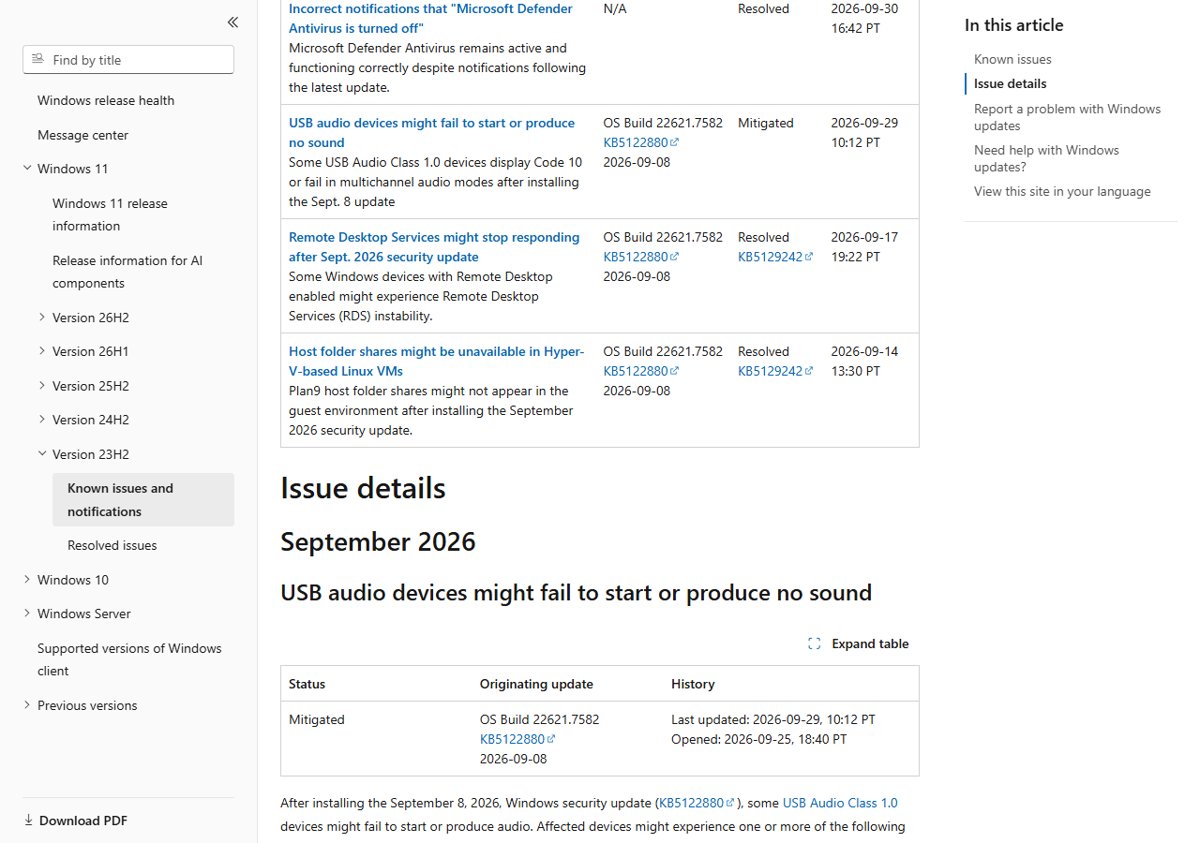
Microsoft's KB article states that it is not aware of any issues with this update. The 23H2 release health page still lists one older open issue, so weigh the KB5126653 issues and install advice before you roll it out widely.
USB audio device shows Code 10 or produces no sound
A known issue that started with the September 8 update KB5122880 on USB Audio Class 1.0 devices; Microsoft lists it as Mitigated, with the multichannel part fixed in KB5129242 and the other symptoms still being worked on.
- Install KB5126653, which includes the KB5129242 fix for 8-channel and 3D audio modes.
- If audio still fails, switch the device to a 2-channel configuration in sound settings.
- Work through the USB audio Code 10 fix for Device Manager steps.
- Business customers can contact Microsoft Support for Business for an interim workaround.
KB5126653 fails to download or install from Windows Update
Low disk space, a broken update cache or damaged system files usually stop cumulative updates.
- Free up space: Microsoft asks for at least 20 GB on a 64-bit system.
- Open Settings > System > Troubleshoot > Other troubleshooters and select Run next to Windows Update.
- Open Command Prompt as administrator and run
DISM.exe /Online /Cleanup-image /Restorehealth, thensfc /scannow. - Restart and select Check for updates again, or install the .msu file from the links above.
Updated installation media fails to start with error 0xc0430001
The boot.stl file used for Secure Boot validation is missing from media built with this dynamic update.
- Update the image with Microsoft's Update WinPE script, which Microsoft recommends.
- Or copy boot.stl from the device's
Windows\Boot\EFIfolder to the matching folder on the installation media. - Make sure the boot.stl file matches the Windows version and architecture of the image.
Something broke after KB5126653 and you want it removed
A newly installed update conflicts with a driver or app on the PC.
- Open Settings > Windows Update > Update history > Uninstall updates.
- Select Uninstall next to the KB5126653 entry and restart.
- Report the problem in the Feedback Hub app, and uninstall problematic Windows updates the same way if a later one causes trouble.
Issues on newer versions, including the 24H2 and 25H2 packages, are tracked in the Windows 11 October 2026 Update issues roundup.
KB5126653 download FAQ
What is KB5126653?
KB5126653 is the October 13, 2026 cumulative security update for Windows 11 version 23H2. It carries security fixes, Secure Boot certificate rollout work, time zone changes and fixes for File History and Storage Spaces Direct, plus the fixes from September's updates.
Where can I download the KB5126653 offline installer?
The KB5126653 offline installer is in the Microsoft Update Catalog under "2026-10 Cumulative Update for Windows 11, version 23H2". This page links the x64 and ARM64 .msu files directly on Microsoft's catalog download server.
How big is the KB5126653 .msu file?
The x64 .msu file is 1,222,962,623 bytes, about 1.14 GB, and the ARM64 file is 1,385,744,403 bytes, about 1.29 GB. Windows Update usually downloads less, because it fetches only the parts a PC is missing.
Is KB5126653 only for Windows 11 23H2?
Yes. KB5126653 applies to Windows 11 version 23H2. Versions 24H2, 25H2 and 26H2 get KB5127648, and version 26H1 gets KB5127646, both released the same day.
What build number does KB5126653 install?
Microsoft's release information lists build 22631.7652 for Windows 11 23H2 after KB5126653. The KB article header shows OS Build 22621.7652, so check that the number after the dot reads 7652.
What's new in KB5126653?
KB5126653 adds no new features. Its changelog covers security fixes, the Secure Boot certificate rollout, permanent Daylight Saving Time for British Columbia and Alberta, a new Manitoba time zone, a File History fix, ReFS auditing controls and a Storage Spaces Direct fix.
Does KB5126653 have known issues?
Microsoft says it is not currently aware of any issues with KB5126653. The 23H2 release health page still lists a mitigated USB Audio Class 1.0 issue that began with the September 8, 2026 update.
Will Windows 11 23H2 keep getting updates after KB5126653?
Only Enterprise and Education editions, and only once more. Microsoft says the November 10, 2026 security update is their last; Home and Pro editions stopped getting updates on November 11, 2025.







Windows 11 26H2 upgrade paths explained - Techdows
[…] Home and Pro editions of 23H2 stopped receiving updates in November 2025, and 22H2 in October 2024. Enterprise and Education editions of 23H2 get updates until November 10, 2026. […]