Firefox offline standalone installers are on Mozilla's Custom Download Options page at firefox.com/download/all, where you pick the edition, platform and language and get the full installer instead of the small stub.
This guide lists the official page for every Firefox edition and platform, explains which file to pick, and shows how to install, verify and deploy it, including older versions from Mozilla's archive.
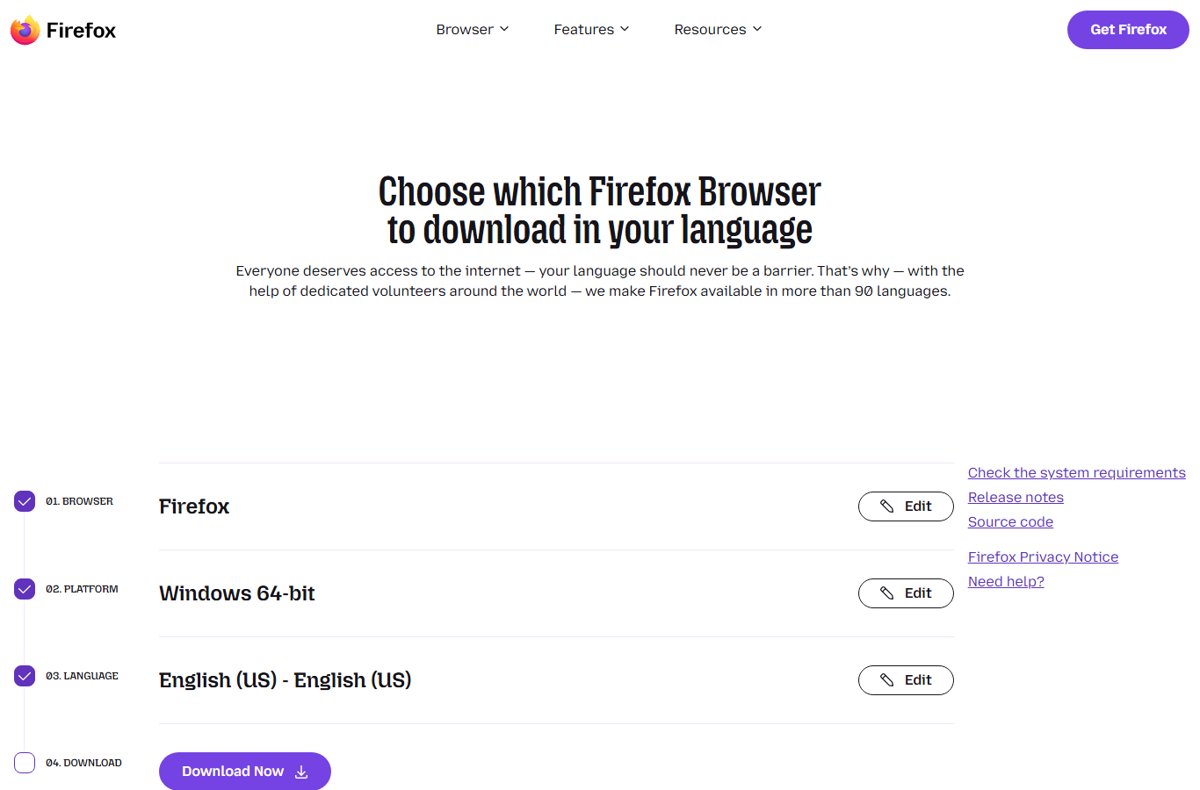
How to download the Firefox offline installer
The normal Download Firefox button gives Windows users the stub installer, which fetches Firefox during setup. The Custom Download Options page gives you the complete package instead, ready to copy to a PC with no internet connection.
- Open Firefox Custom Download Options on any computer with internet access.
- Under Browser, select Firefox (Recommended), or another edition such as Firefox Extended Support Release.
- Under Platform, select your system, for example Windows 64-bit.
- Under Language, select the language you want Firefox to use.
- Select Download Now and save the file.
- Copy the file to the offline PC with a USB drive or network share and run it there.
For the current release on Windows 64-bit in US English, the file is named like Firefox Setup 157.0.1.exe and is about 89 MB, which is how you can tell it is the full installer and not the stub.
What is a Firefox offline standalone installer?
An offline standalone installer contains the whole browser, so setup does not need to download anything. Mozilla's own installer documentation names four Windows installer types; macOS and Linux get a package instead of an installer program.
Mozilla describes the stub as the default for most individual users, while the full installer and MSI are aimed at power users and administrators who need more control.
| Installer type | Works offline? | Who it is for | What it does |
|---|---|---|---|
| Stub installer (Windows) | No | Most home users | A small program that downloads Firefox during setup and picks 32-bit or 64-bit automatically |
Full installer .exe (Windows) |
Yes | Offline PCs, slow connections, power users | Contains the whole browser and accepts command-line options such as silent install |
| MSI package (Windows) | Yes | IT administrators | Wraps the full installer so deployment tools that expect an MSI can push Firefox |
| MSIX package (Windows) | Yes | Enterprise deployment | Mozilla lists it for enterprise users who need to control deployment |
Disk image .dmg or .pkg (macOS) |
Yes | Mac users | The complete app; the .pkg version runs the macOS package installer |
Archive .tar.xz or .deb (Linux) |
Yes | Linux users | The complete browser for extracting or installing with your package manager |
Official Firefox offline installer download page
Mozilla moved its download pages from mozilla.org to firefox.com; old links such as mozilla.org/firefox/all now redirect there. Use only these Mozilla pages, never a download portal that repackages Firefox.
The page works as a three-step picker: Browser, then Platform, then Language, then the download button. Each choice changes the page address, so you can bookmark a finished selection.
- Firefox Custom Download Options — Every desktop edition, platform and language in one picker, including the full installers
- Firefox for Enterprise — Enterprise downloads for Windows, macOS and Linux, policy templates and enterprise release notes
- Firefox release channels (Beta, Developer Edition, Nightly) — Pre-release editions, each with an All Languages and Platforms link
- Mozilla release archive — Every past Firefox and Firefox ESR version, with checksum files for each release
- Firefox system requirements — Supported Windows, macOS and Linux versions for the current release
Direct Firefox offline installer links for the latest stable version
Each link below opens Mozilla's language picker for that platform, preset to the current Firefox release. Choose your language there and select Download Now; the download always serves the newest version.
| Platform | Official Mozilla page | File you get |
|---|---|---|
| Windows 64-bit | Firefox for Windows 64-bit | Full installer .exe |
| Windows 32-bit | Firefox for Windows 32-bit | Full installer .exe |
| Windows ARM64 | Firefox for Windows ARM64/AArch64 | Full installer .exe built for Arm PCs |
| macOS (Intel and Apple silicon) | Firefox for macOS | Disk image .dmg |
| Linux 64-bit | Firefox for Linux 64-bit | Compressed archive .tar.xz |
| Linux ARM64 | Firefox for Linux ARM64/AArch64 | Compressed archive .tar.xz |
| Linux 32-bit | Not offered for the current release; use the ESR row in the next section | – |
The current release (157.0.1 in early October 2026) supports Windows 10 or later and macOS 10.15 or later. In Mozilla's archive the same release folder also holds a macOS .pkg and a Linux .deb package next to the .dmg and .tar.xz.
Firefox ESR offline installer links
Firefox Extended Support Release gets security updates but new features only once a year, which suits schools, businesses and anyone who wants fewer changes. Its picker still offers a Linux 32-bit build.
| Platform | Official Mozilla page | File you get |
|---|---|---|
| Windows 64-bit ESR | Firefox ESR for Windows 64-bit | Full installer .exe |
| Windows 32-bit ESR | Firefox ESR for Windows 32-bit | Full installer .exe |
| Windows ARM64 ESR | Firefox ESR for Windows ARM64/AArch64 | Full installer .exe |
| macOS ESR | Firefox ESR for macOS | Disk image .dmg |
| Linux 64-bit ESR | Firefox ESR for Linux 64-bit | Compressed archive .tar.xz |
| Linux ARM64 ESR | Firefox ESR for Linux ARM64/AArch64 | Compressed archive .tar.xz |
| Linux 32-bit ESR | Firefox ESR for Linux 32-bit | Compressed archive .tar.xz |
Mozilla's product data for early October 2026 lists three maintained ESR lines: 153.4.0esr, 140.17.0esr and 115.42.0esr. ESR 115 is the line whose system requirements still list Windows 7, Windows 8 and 8.1, and macOS 10.12 to 10.14; its installers are in the archive folder named for that version.
Firefox MSI installers for Windows deployment
The MSI is not a true Windows Installer package. Mozilla's documentation says it simply wraps the full installer, which then installs Firefox as if it had been run normally.
| Edition and platform | Official Mozilla page |
|---|---|
| Firefox, Windows 64-bit MSI | Firefox Windows 64-bit MSI |
| Firefox, Windows 32-bit MSI | Firefox Windows 32-bit MSI |
| Firefox ESR, Windows 64-bit MSI | Firefox ESR Windows 64-bit MSI |
| Firefox ESR, Windows 32-bit MSI | Firefox ESR Windows 32-bit MSI |
| Developer Edition, Windows 64-bit MSI | Developer Edition Windows 64-bit MSI |
The picker has no ARM64 MSI entry; Arm PCs use the ARM64 .exe. The .exe command-line options shown further down do not apply to the MSI, and Mozilla's installer documentation sends MSI users to its support article on MSI deployment instead. Pair the MSI with the policy templates on the Firefox for Enterprise page to lock settings across a fleet.
Firefox Beta, Developer Edition, and Nightly offline installers
Mozilla calls all three pre-release editions unstable testing and development platforms, and by default they send data to Mozilla. Install them next to your normal Firefox, not instead of it.
| Edition | What it is for | Where to get the full installer |
|---|---|---|
| Firefox Beta | Testing features that ship in the next release | On Firefox release channels, select All Languages and Platforms under Beta |
| Firefox Developer Edition | Web development, built on the Beta code | Select Firefox Developer Edition on Custom Download Options; MSI builds are offered too |
| Firefox Nightly | Daily builds of code still in development | On the release channels page, select All Languages and Platforms under Nightly; Nightly updates about once or twice a day |
In early October 2026 the current builds were 158.0b5 for Beta and Developer Edition and 159.0a1 for Nightly. Keep a Developer Edition offline installer next to the release installer if you test sites in both.
How to choose the right Firefox installer
Pick the edition first, then the platform. On Windows 11 or 10, open Settings > System > About and read System type under Device specifications to see whether you need 64-bit, 32-bit or ARM64.
| Your situation | Download this | Why |
|---|---|---|
| Home PC on Windows 11 | Firefox, Windows 64-bit (ARM64 on an Arm-based PC) | Windows 11 is 64-bit only |
| Windows 10, 32-bit edition | Firefox, Windows 32-bit | A 64-bit build will not run on a 32-bit operating system |
| PC with 2 GB of RAM or less | Windows 32-bit | The stub only picks 64-bit when there is more than 2 GB of RAM, and Mozilla recommends 32-bit for less powerful machines |
| Windows 7, 8 or 8.1 | Firefox ESR 115 from the archive | Current Firefox and ESR 140 require Windows 10 or later |
| Company or school deployment | Firefox ESR MSI, or Firefox MSI | Annual feature changes and MSI-based tools |
| Mac, Intel or Apple silicon | Firefox for macOS | One .dmg covers both processor types |
| 32-bit Linux | Firefox ESR, Linux 32-bit | The current release no longer lists a Linux 32-bit build |
| Web developer | Firefox Developer Edition | Separate edition aimed at building and testing websites |
How to install Firefox from an offline installer on Windows
The full installer chooses the install scope from the Windows UAC prompt: approve it for an all-users install, or decline it to install for your account only.
- Copy the
Firefox Setup.exefile to the PC and double-click it. - Select Yes in the User Account Control prompt to install for every user, or No for a per-user install.
- Follow the setup wizard; no internet connection is needed during installation.
- Connect to the internet later so Firefox can install security updates.
If the PC already has Firefox from the same channel, the installer installs over it, which also repairs a damaged installation without touching your profile.
How to install Firefox offline on macOS and Linux
| System | File | Steps |
|---|---|---|
| macOS | .dmg |
Double-click the disk image in Downloads, follow the onscreen instructions to copy Firefox into Applications, then eject the disk image |
| macOS (managed Macs) | .pkg from the archive |
Double-click the package and follow the onscreen installer |
| Linux | .tar.xz |
Extract the archive to a folder you own, then run the firefox program inside the extracted firefox folder |
| Debian or Ubuntu | .deb from the archive |
Install it with your distribution's package manager |
If macOS warns about an app downloaded from the internet, confirm only when the file came from a Mozilla domain.
Firefox full installer silent install command line
The Windows .exe full installer accepts command-line options, and any option switches it to silent mode. Options must start with /, and names are spelled out in full.
"Firefox Setup 157.0.1.exe" /S /DesktopShortcut=false /InstallDirectoryName="Firefox Release"/S installs silently with default settings. /DesktopShortcut=false skips the desktop shortcut. /InstallDirectoryName sets the folder created inside Program Files. Other documented options include /TaskbarShortcut, /StartMenuShortcut, /MaintenanceService, /INI= for an .ini file of settings, and /ExtractDir= to unpack the files without installing.
You should see: No window opens. When the command finishes, Firefox appears in the Start menu and in the chosen Program Files folder.
Leave /MaintenanceService at its default. Setting it to false stops users without write access to the install folder from installing Firefox updates.
Where to download older Firefox versions
Every Firefox and Firefox ESR release since the early versions sits on Mozilla's archive server. Old versions miss security fixes, so use one only for testing or for a system the current release no longer supports.
- Open the Mozilla Firefox releases archive.
- Select the version folder, for example a number ending in
esrfor an ESR build orbfor a Beta build. - Select the platform folder:
win64,win32,win64-aarch64,mac,linux-x86_64,linux-i686orlinux-aarch64. - Select your language folder, such as
en-US. - Select the
.exeor.msi(Windows),.dmgor.pkg(macOS), or.tar.xzor.deb(Linux) file. - Check the file against that folder's
SHA256SUMSbefore you install it.
Developer Edition releases have their own folder at archive.mozilla.org/pub/devedition/releases/, and dated Nightly builds sit under archive.mozilla.org/pub/firefox/nightly/.
How to verify a Firefox offline installer
Each release folder on the archive has SHA256SUMS and SHA512SUMS files listing the hash of every package, plus .asc signatures and a KEY file for checking those lists with GnuPG.
- Open the release folder for your exact version on archive.mozilla.org and open
SHA256SUMS. - Find the line for your file path, for example
win64/en-US/Firefox Setup 157.0.1.exe, and note the hash. - On Windows, open PowerShell and run
Get-FileHash "$HOME\Downloads\Firefox Setup 157.0.1.exe"; it uses SHA256 by default. - Compare the Hash value with the line in
SHA256SUMS; letter case does not matter. - For stronger proof, import
KEYinto GnuPG and verifySHA256SUMS.ascagainstSHA256SUMS. - Delete the file and download it again from Mozilla if the hashes differ.
A matching hash proves the file is byte-for-byte what Mozilla published. The file name also tells you the version, so check it against the version you meant to download.
Troubleshooting Firefox offline installer problems
The downloaded file is tiny and setup needs the internet
The file is the stub installer from the main Download Firefox button.
- Delete the small file.
- Open Custom Download Options instead.
- Select the edition, platform and language, then Download Now.
- Check that the new file is tens of megabytes, not a few hundred kilobytes.
Firefox will not install or run on Windows 7, 8 or 8.1
Current Firefox and ESR 140 require Windows 10 or later.
- Open the archive folder for the newest
115.x esrrelease. - Download the
win64orwin32installer in your language. - Install it and leave updates on so ESR 115 security fixes still arrive.
- Plan a move to a supported system, such as a clean Windows 11 install on hardware that meets its requirements.
The 64-bit installer refuses to run
The PC runs a 32-bit edition of Windows.
- Open Settings > System > About.
- Read System type under Device specifications.
- Download the Windows 32-bit installer if it says 32-bit operating system.
Command-line options are ignored by the MSI
The .exe options such as /S and /INI= apply only to the full installer, not the MSI.
- Use the
.exefull installer when you need those options. - Use your deployment tool's normal MSI install settings for the
.msi. - Apply browser settings through enterprise policies rather than installer options.
Firefox installed offline never updates
The Mozilla Maintenance Service was turned off with /MaintenanceService=false, and the user cannot write to the install folder.
- Run the same full installer again without
/MaintenanceService=false. - Let it install over the existing copy.
- Open Help > About Firefox to check for updates once online.
The hash does not match SHA256SUMS
The download was corrupted, the wrong version folder was used, or the file did not come from Mozilla.
- Confirm you opened
SHA256SUMSfrom the same version folder as your file. - Delete the file.
- Download it again from firefox.com or archive.mozilla.org and recheck the hash.
Common Firefox offline installer questions
Is there an official Firefox offline installer?
Yes. Mozilla offers full installers for every edition on the Custom Download Options page at firefox.com/download/all. Pick the browser, platform and language, then select Download Now. On Windows this gives the full .exe instead of the small stub installer.
What is the difference between the Firefox stub and full installer?
The stub is a small program that downloads Firefox during setup and picks 32-bit or 64-bit for you. The full installer already contains the browser, installs without internet access, and accepts command-line options such as /S for a silent install.
Does the Firefox offline installer always give the latest version?
The download links on firefox.com always serve the newest release of the edition you choose. A file you saved earlier stays at its version, so Firefox updates itself after installation once the PC goes online.
Can I install Firefox on a computer without internet?
Yes. Download the full installer on another computer, copy it to the offline PC with a USB drive, and run it there. Installation needs no connection, but Firefox needs internet access later to receive security updates.
Which Firefox offline installer works on Windows 7?
Firefox ESR 115 is the line whose system requirements still list Windows 7, 8 and 8.1. Current Firefox and ESR 140 need Windows 10 or later. Get the newest 115.x esr build from Mozilla's release archive.
Is the Firefox MSI installer free?
Yes. The MSI installers for Firefox and Firefox ESR are free downloads from the same Custom Download Options page, under Windows 64-bit MSI and Windows 32-bit MSI. The MSI wraps the full installer for deployment tools.
Are Firefox installers from other download sites safe?
Use only firefox.com and archive.mozilla.org. Third-party portals can bundle extra software or serve outdated builds. If you already have a file, compare its SHA-256 hash with Mozilla's SHA256SUMS file for that release before running it.
How big is the Firefox offline installer?
The Windows 64-bit full installer for Firefox 157.0.1 is about 89 MB, the macOS disk image about 154 MB, and the Linux 64-bit tar.xz archive about 84 MB. Sizes change slightly from release to release.
Which Firefox offline installer should you download?
Download the Windows 64-bit full installer of Firefox from firefox.com/download/all for a single PC, and the Firefox ESR MSI for managed fleets. Both come straight from Mozilla, install without internet access and keep updating afterwards, while the archive should be kept for old systems and testing because older builds lack security fixes.






