No, you cannot install an unsigned IPSW on an iPhone or iPad, because Apple's installation authorization server approves only iOS and iPadOS versions Apple is still signing.
This guide explains what an unsigned IPSW is, why a restore to one fails, which errors you will see, and the signed routes that get a device working or off a beta.
Can I install an unsigned IPSW on iPhone or iPad?
No. Finder, the Apple Devices app and Apple Configurator all need Apple to sign each install, and Apple refuses to sign versions it has stopped signing. Apple stops signing older versions with known vulnerabilities to prevent downgrade attacks, so the only versions you can restore are the ones Apple currently signs, normally the latest release.
The practical options are restoring the newest signed version in recovery mode, or erasing a beta device back to the current public release.
What is an unsigned IPSW?
An IPSW is the full iOS or iPadOS firmware package a Mac or PC uses to restore a device. Signed or unsigned describes Apple's server, not the file itself.
| Term | Meaning |
|---|---|
| IPSW | The complete iOS or iPadOS package used for a restore from a computer |
| Signed IPSW | A version Apple's installation authorization server still approves; it installs normally |
| Unsigned IPSW | A version Apple no longer approves; the file still exists but the server refuses to authorize it |
| ECID | The Exclusive Chip Identification, a unique ID Apple adds to each approval |
| Anti-replay value | A random value in each request, so a saved approval cannot be reused later |
Why can't you install an unsigned IPSW?
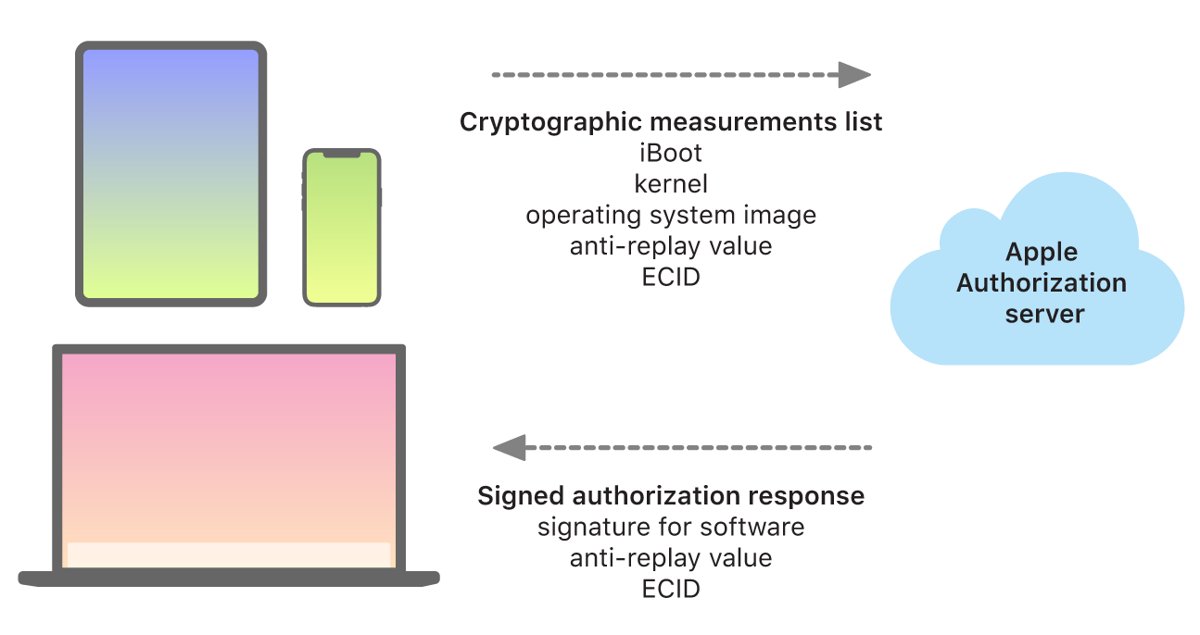
Every restore and update goes through a personalized check with Apple, and the device itself verifies the result at boot.
| Stage | What happens |
|---|---|
| Request | The device sends Apple cryptographic measurements of iBoot, the kernel and the OS image, plus a random anti-replay value and its ECID |
| Check | Apple's server compares the measurements against versions whose installation is still permitted |
| Signed version | The server adds the ECID, signs the result and returns it, so the install continues |
| Unsigned version | No match is found, no signature is returned, and the restore stops with an error |
| Boot check | The chain of trust confirms the signature is Apple's and matches this device's ECID |
| Copying another device's approval | Blocked, because each approval is tied to one ECID |
| Offline restore | Not possible; a network connection to Apple is always required |
The Secure Enclave uses the same system software authorization and is designed to prevent downgrade installs as well.
How to sign an unsigned IPSW or make a custom IPSW
You cannot sign an IPSW yourself or build a custom one that an iPhone or iPad will accept. Only Apple's installation authorization server can produce the signature, and the device's boot chain checks that the signature is Apple's and covers the exact measurements of each component. A modified file changes those measurements, so it fails the check.
Treat any website or app that promises to sign, flash or restore an unsigned IPSW with suspicion. Apple's process has no step that accepts outside signatures, and a failed restore leaves you erasing the device anyway.
Unsigned IPSW downgrade alternatives that work
| Your situation | What works | What to expect |
|---|---|---|
| Want an older iOS version that Apple no longer signs | Nothing supported | Stay on the current version; Apple will not authorize the old one |
| On an iOS or iPadOS beta and want the public release | Erase and restore in recovery mode | The current non-beta version installs |
| Device stuck on the Apple logo or Connect to computer screen | Recovery mode, then Update or Restore | Restore erases all data, so try Update first |
| Restore fails with error 3194 on a signed version | Fix the connection to Apple's update servers | Same restore succeeds once the server is reachable |
| Want your data back after restoring | Restore a backup made on the same or an earlier version | Backups made on beta software might not restore to earlier versions |
Restore the latest signed iOS version in recovery mode
Recovery mode installs the version Apple currently authorizes for your device. Choosing Restore reinstalls iOS and erases all data, so try Update first if you have not already.
- Update your Mac, or install the latest Apple Devices app on your Windows PC.
- Connect the iPhone with a USB cable, then open Finder on the Mac or the Apple Devices app on the PC.
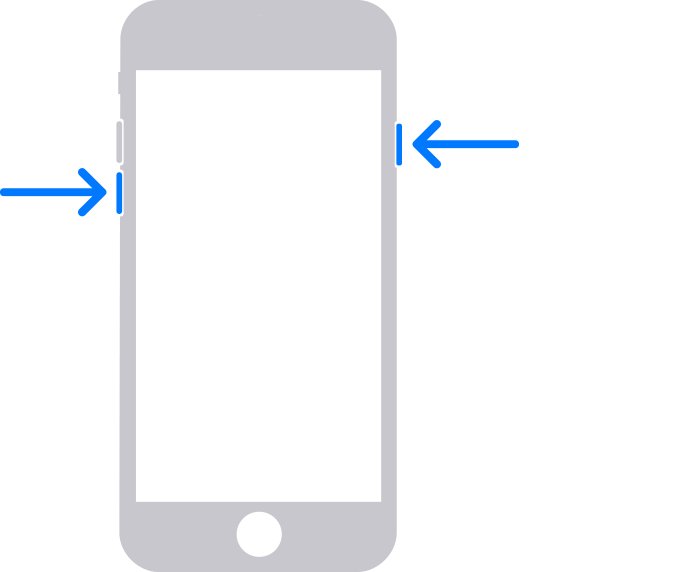
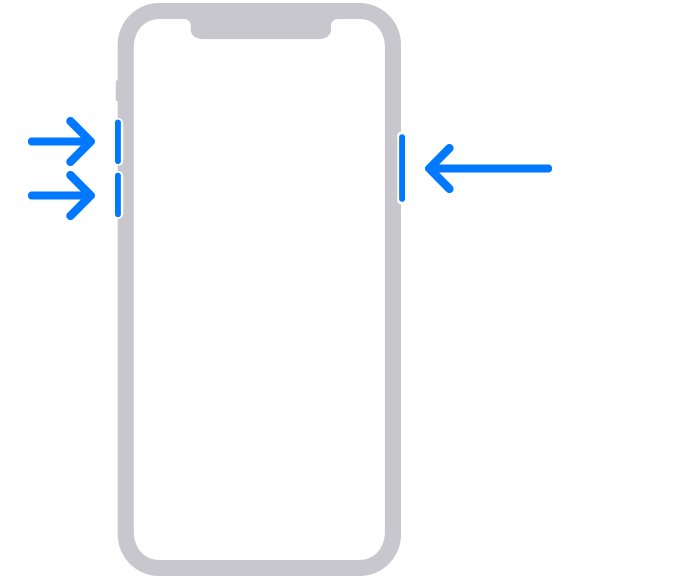
- On iPhone 8 or later, press and quickly release Volume Up, press and quickly release Volume Down, then hold the side button until the Connect to computer screen appears.
- On iPhone 7 or 7 Plus, hold the side and Volume Down buttons together until that screen appears; on iPhone 6s or earlier, hold the Home and side buttons.
- Find the device on the computer and choose Update or Restore when the options appear.
- Wait for the download. If it takes over 15 minutes and the phone leaves recovery mode, let the download finish and enter recovery mode again.
- Set up the device when the restore completes.
Downgrade from iOS beta to the signed public release
Leaving a beta is the one downgrade Apple supports, because the public release you return to is still signed.
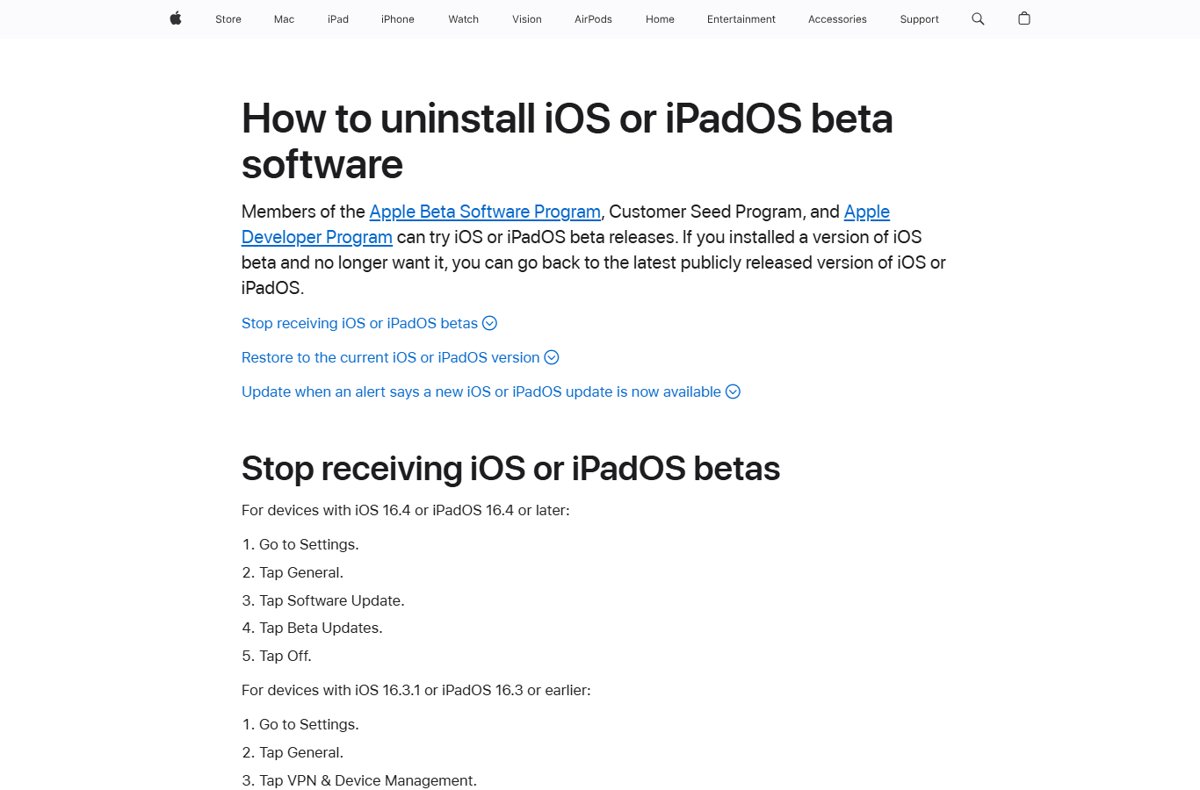
- On iOS 16.4 or later, open Settings > General > Software Update > Beta Updates and choose Off to stop further betas.
- Back up anything you need, knowing a backup made on the beta might not restore to the earlier version.
- Connect the device to your Mac or PC and put it into recovery mode.
- Choose Restore. The computer installs the current non-beta version and erases the device.
- During setup, restore a backup made before you installed the beta.
If you can wait, turning off Beta Updates and installing the next public release when it arrives avoids erasing the device.
Check which iOS version installed after a restore
- Finish setup until you reach the Home Screen.
- Open Settings > General > Software Update and read the version shown.
- After leaving a beta, confirm Beta Updates shows Off on the same screen.
- If the restore stopped part way with an error code, note the number and use the fixes below.
Unsigned IPSW restore errors: 3194 and not eligible for the requested build
"This device isn't eligible for the requested build" or error 3194 when restoring an old IPSW
The version is unsigned, or the computer cannot reach Apple's update servers to get a signature.
- Stop trying the old IPSW; Apple will not authorize an unsigned version.
- Restore through recovery mode and let the computer download the current signed version.
- If the same error appears on the current version, update macOS, iTunes or the Apple Devices app and try again.
Error 3194 keeps appearing even on the latest signed version
A hosts file entry, firewall or network is blocking Apple's update servers.
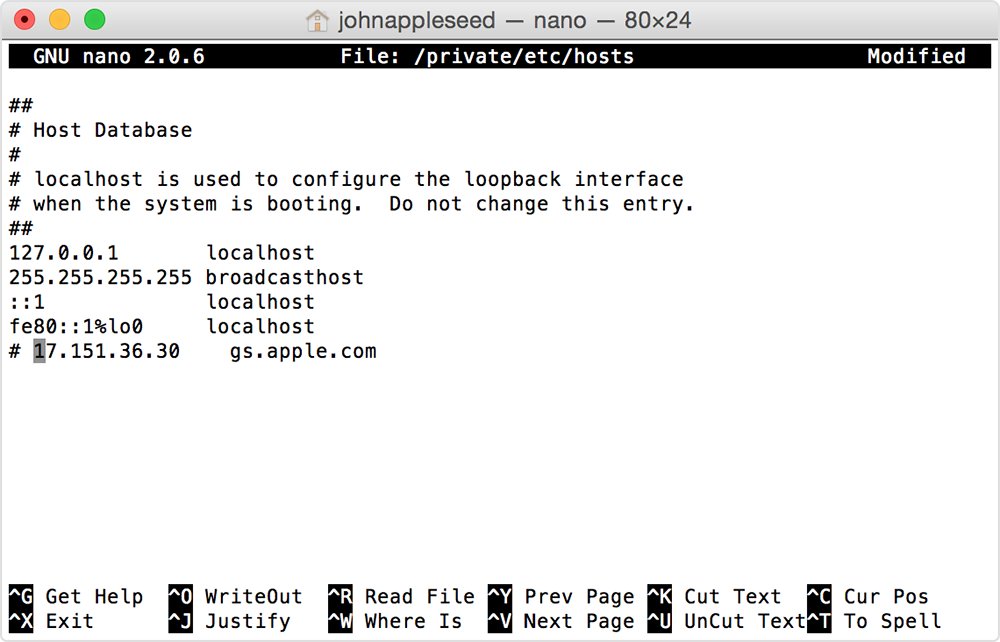
- On a Mac, open Terminal, run
sudo nano /private/etc/hostsand look for an entry containinggs.apple.com. - If one exists, add
#before it, press Control-O, press Return, then press Control-X and restart the Mac. - On Windows, reset the hosts file to its default using Microsoft's instructions.
- Make sure your firewall allows access to Apple's update servers.
- Try a different computer or network, such as home instead of a managed work network.
Errors 17, 1109, 1639, 3000-3020 or 3100-3999 during a restore
The computer cannot communicate with Apple's software update servers.
- Check the internet connection on the computer.
- Connect the computer straight to the modem with an Ethernet cable, then restart the computer and modem.
- Restore again, or move to another computer with a different internet connection.
Unsigned IPSW FAQ
What is an unsigned IPSW?
It is an iOS or iPadOS firmware file for a version Apple no longer authorizes. The file still downloads and opens, but Apple's installation server refuses to sign it, so a restore to it fails.
Can I install an unsigned IPSW?
No. Every install needs a personalized signature from Apple tied to your device's ECID, and Apple signs only versions it still permits. Restores to unsigned versions stop with an error.
Why can't you install an unsigned IPSW?
Apple stops signing older versions with known vulnerabilities to prevent downgrade attacks. Without that signature, the device's boot chain of trust rejects the software, and a network connection to Apple is always required.
How do I restore an unsigned IPSW to an iPhone?
You cannot. Put the iPhone in recovery mode, connect it to Finder or the Apple Devices app, and choose Restore; the computer installs the version Apple currently signs.
How do I downgrade iOS to an unsigned IPSW?
Downgrading to an unsigned version is not possible through Apple's tools. The only supported downgrade is leaving a beta, where an erase and restore installs the current public release.
How do I sign an unsigned IPSW or an IPSW file?
Only Apple's installation authorization server can sign an install, and it signs per device and per request. There is no way for a user to add that signature to a file.
How do I flash an unsigned IPSW?
Flashing an unsigned IPSW fails the same signature check as a normal restore. The device needs Apple's signature for the exact components being installed, so the flash stops before it completes.
How do I make a custom IPSW?
A custom IPSW will not install on an iPhone or iPad. Changing any component changes its cryptographic measurement, and Apple signs only the measurements of the software it released.
Which iOS 26 IPSW versions are signed?
Apple's server decides which versions are signed, and the restore process downloads the version it currently authorizes for your device. Restoring in recovery mode through Finder or the Apple Devices app always installs a signed version.
Will restoring erase my iPhone?
Yes. Choosing Restore reinstalls iOS and erases all your data. Apple suggests trying Update first if you have not done so, and restoring a backup during setup afterwards.
Bottom line on unsigned IPSW restores
Skip unsigned IPSW files and restore the version Apple currently signs, through recovery mode in Finder or the Apple Devices app. Apple's signing check runs on every install and is tied to your device, so an unsigned version cannot pass it, while the signed restore fixes stuck devices and returns betas to the public release.