Skip buttons that jump 30 seconds ahead and 15 seconds back are the Podcasts controls, so the fix is to start a song in Music, or change a track whose Media Kind says Audiobook back to Music.
This guide covers the normal next and previous song controls on iPhone, AirPods and computers, the Media Kind setting, Podcasts headphone controls, and songs that Apple Music skips on its own.
How to make Apple Music skip songs instead of 30 seconds
The Lock Screen, Control Center, headphones and car controls act on whatever is playing. When they jump by seconds, they are usually driving a podcast episode or a spoken-word item, not a song.
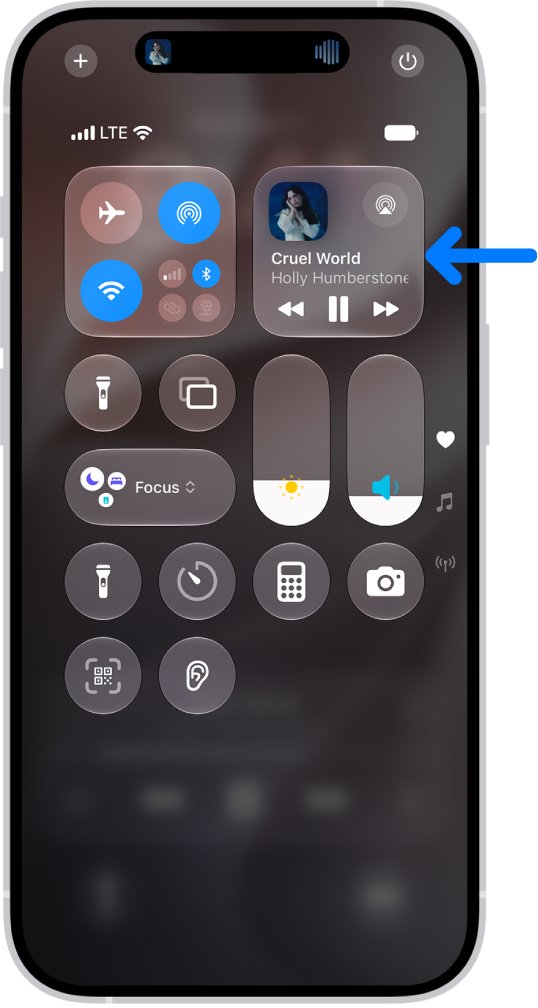
- Open Control Center on your iPhone and look at the audio card to see what is actually playing.
- If it shows a podcast episode, pause it, open the Music app and play a song from your Library or Home tab.
- Tap the MiniPlayer to open the Now Playing screen and check that the controls are the song buttons, not seconds.
- Tap the Next button once to move to the next song.
- Tap the Previous button once to return to the start of the song, and tap it again to play the previous song.
- If one particular track still behaves like an audiobook, change its Media Kind to Music on your computer, as shown below, and sync it again.
Why does Apple Music skip 30 seconds?
Match what your controls do to a row. Most cases are another app holding the controls, or the way the Previous button is designed to work.
| What happens | Cause | Fix |
|---|---|---|
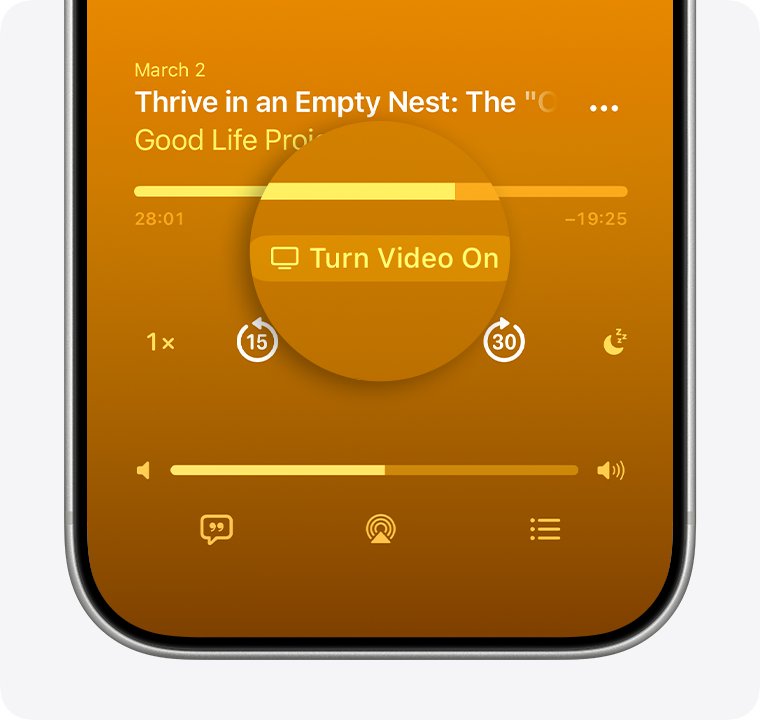
| Buttons jump 30 seconds ahead and 15 seconds back | The controls belong to Podcasts, whose default skips are 30 and 15 seconds | Pause the episode and start a song in Music |
| Headphone presses move through the same episode | Podcasts Headphone Controls is set to Forward/Back | Set Headphone Controls to Next/Previous |
| One imported track remembers its place and sits under Audiobooks | Its Media Kind is set to Audiobook | Change Media Kind back to Music in the Info window |
| Previous restarts the song instead of going back | First tap returns to the beginning of the song by design | Tap Previous twice in quick succession |
| The song scrubs forward or backward | Touching and holding Next or Previous fast-forwards or rewinds | Tap the button briefly instead of holding it |
Apple Music skip song and previous song buttons on iPhone
These are the controls Apple Music uses for songs on the Now Playing screen. Knowing them tells you at once whether Music or another app is in charge.
- Open the Music app and start any song.
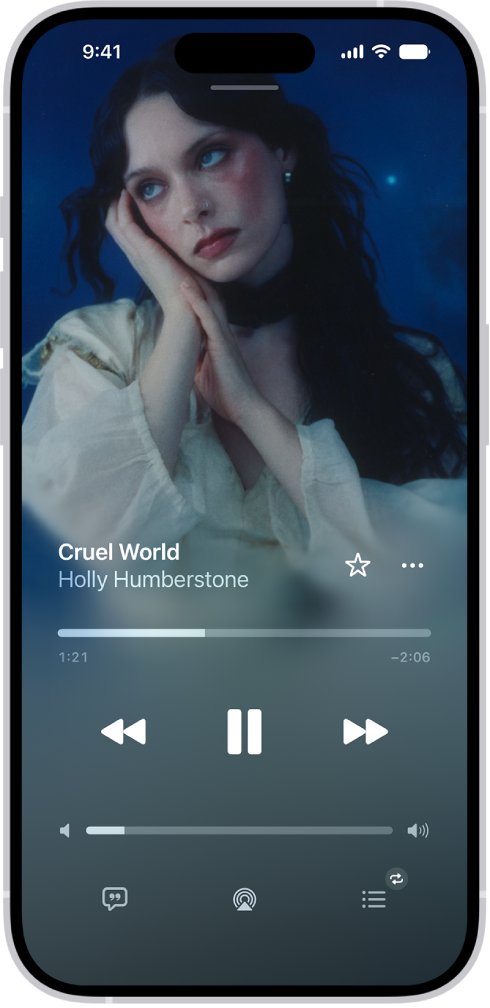
- Tap the MiniPlayer at the bottom of the screen to open the Now Playing screen.
- Tap Next to skip to the next song, or touch and hold it to fast-forward through the current song.
- Tap Previous once to go back to the beginning of the song, then tap it again to play the previous song in the album or playlist.
- Touch and hold Previous to rewind through the current song.
- Swipe left or right across the song title in the MiniPlayer or on the Now Playing screen to move between tracks without the buttons.
If Next lands on a song you did not expect, the Apple Music queue order is usually the reason rather than the buttons.
How to change Media Kind from Audiobook to Music
Music files imported from a CD or another source can be marked as an audiobook. Apple says an item marked that way moves below Audiobooks and the app remembers your place in it, which is how spoken-word items behave.
- On a Mac, open the Music app, click Songs in the sidebar and select the track.
- Choose Song > Get Info, then click Options.
- On a Windows PC with iTunes, select the track and choose Edit > Song Info, then click Options.
- Open the Media Kind pop-up menu and choose Music.
- Click OK to save the change.
- Connect your iPhone and sync, or wait for your library to update on the iPhone, then play the track from Music again.
To fix several tracks at once, select them all before you open the Info window; Apple notes that changes made with several items selected apply to all of them.
Podcasts skip 30 seconds instead of next episode
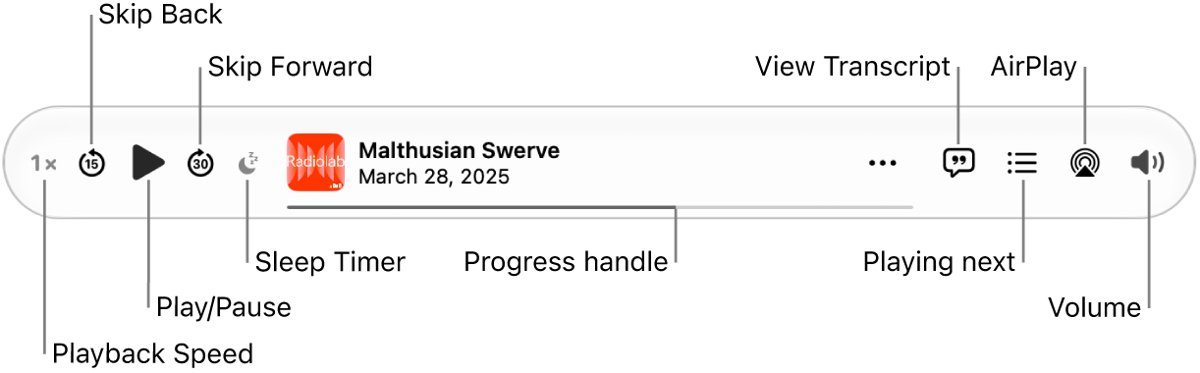
Podcasts lets you choose what headphone controls do. On a Mac, Forward/Back skips ahead 30 seconds and back 15 seconds within an episode, while Next/Previous changes episodes.
- Open the Podcasts app on your Mac.
- Choose Podcasts > Settings, then click Playback.
- Under Headphone Controls, choose Next/Previous to make headphone presses change episodes.
- Choose Forward/Back instead if you want presses to jump within the same episode.
- Under Skip Buttons, set how far Skip Forward and Skip Back jump, anywhere from 10 seconds to 60 seconds.
On iPhone and iPad, Podcasts preferences are in the Settings app under Apps > Podcasts.
How to skip songs on AirPods
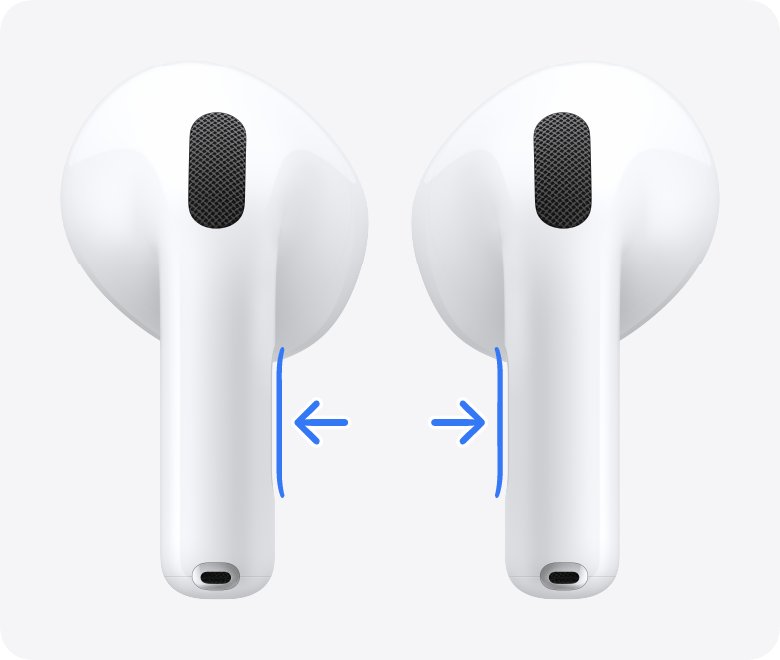
AirPods send next and previous track commands to whatever app is playing. If Podcasts holds the controls, the same presses can move inside an episode instead.
| AirPods model | Next song | Previous song | Play or pause |
|---|---|---|---|
| AirPods 3, AirPods 4, AirPods 5 and AirPods Pro (stem force sensor) | Double-press the stem | Triple-press the stem | Press the stem once |
| AirPods 1 and 2 (double tap) | Double tap the top of the stem, if that AirPod is set to play the next track | Double tap the stem, if that AirPod is set to go back to the previous track | Double tap, if that AirPod is set to play and pause |
| AirPods Max | Double-click the Digital Crown | Triple-click the Digital Crown | Press the Digital Crown once |
To change what a double tap does on AirPods 1 and 2, open Settings, tap the name of your AirPods near the top, and adjust the controls (tap Controls & Gestures first if you do not see them).
If double or triple presses register as single presses, go to Settings > Accessibility > AirPods and adjust Press Speed.
Skip song keyboard shortcut in Apple Music
On a computer, the arrow keys change songs and a modifier turns them into a scrub within the song. Pressing the wrong combination looks like skipping seconds.
| Action | Music on Mac | Apple Music on Windows |
|---|---|---|
| Play the next song | Right Arrow | Control-Right Arrow |
| Play the previous song | Left Arrow | Control-Left Arrow |
| Move forward or backward within a song | Option-Command-Right Arrow or Left Arrow | Alt-Control-Right Arrow or Left Arrow |
| Play or pause the selected song | Space bar | Control-Space bar |
| Go to the next or last chapter | Shift-Command-Right Arrow or Left Arrow | Not listed |
Apple notes that shortcuts can vary with keyboard language and layout, so check the app's menus if a combination does nothing.
Apple Music keeps skipping songs
These problems look similar to the 30-second skip but have different causes.
Apple Music skipping songs on PC
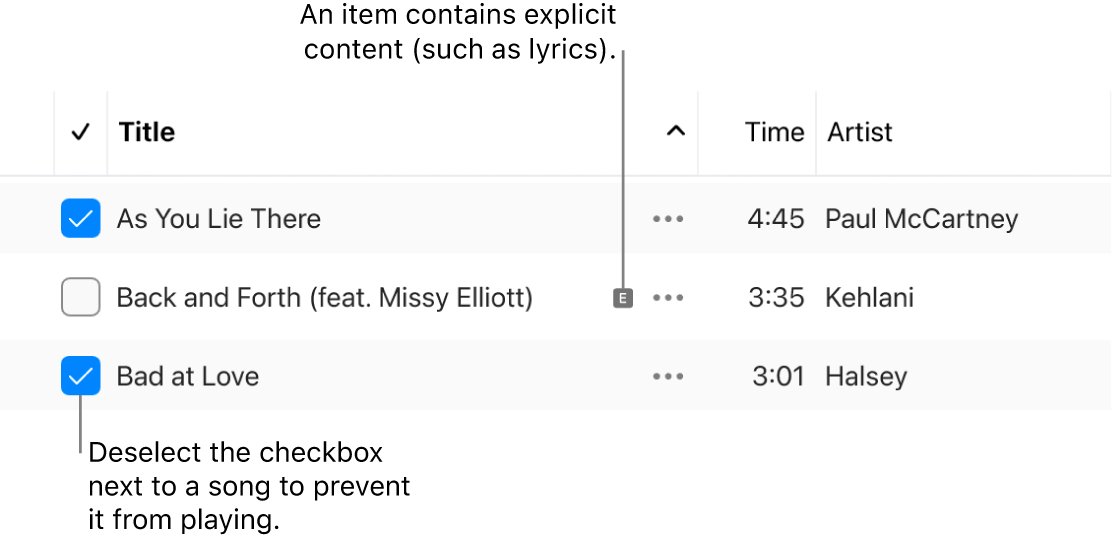
Songs whose checkbox is cleared in the library are set never to play, so Apple Music jumps over them.
- Open the Apple Music app on Windows and select Songs below Library.
- Select the checkbox next to any song that is cleared.
- If you do not see checkboxes, open the menu at the top of the sidebar, choose Settings, select General and turn on Songs list checkboxes.
Apple Music skips songs on Mac
The same cleared checkbox stops a song from playing in every playlist on the Mac.
- Open Music and click Songs below Library.
- Select the checkbox next to the skipped song.
- If checkboxes are hidden, choose Music > Settings, click General and select Songs list checkboxes.
Apple Music stops playing after one song
The queue ends after the song you picked, or a single song is set to repeat.
- Open the Now Playing screen and tap the AutoPlay button so similar songs are added to the end of the queue.
- Check the Repeat button; double-tapping it repeats a single song, so tap it until repeat is off or set to the whole queue.
- Play an album or playlist instead of a single track so the queue has more songs.
Apple Music keeps skipping through songs with AirPods
Presses are being read as double or triple presses, which skip forward or back a track.
- Go to Settings > Accessibility > AirPods on your iPhone.
- Adjust Press Speed so multiple presses need to be quicker before they count.
- Adjust Press and Hold Duration if long presses trigger actions you did not intend.
If you want the opposite and need Music to stop at the end of each track, you can stop Apple Music auto-playing the next song from the Now Playing screen.
Apple Music skip button FAQ
Why does Apple Music skip 30 seconds instead of going to the next song?
Controls that jump 30 seconds ahead and 15 seconds back are the Podcasts skip controls. They appear when a podcast episode holds the Lock Screen or headphone controls, or when a track is marked as an audiobook. Start a song in Music or change the track's Media Kind to Music.
Why does Apple Music skip songs?
Apple Music skips songs whose checkbox is cleared in your library, because a cleared checkbox tells the app never to play them. Turn on Songs list checkboxes in General settings, then select the checkbox next to each skipped song on your Mac or Windows PC.
What is the keyboard shortcut to skip a song in Apple Music?
In Music on a Mac, press Right Arrow to play the next song and Left Arrow to play the previous one while a song is playing. Option-Command with the arrow keys moves forward or backward within the song instead of changing tracks.
What is the keybind to skip a song in Apple Music on PC?
In the Apple Music app for Windows, press Control-Right Arrow for the next song and Control-Left Arrow for the previous song. Alt-Control with the arrow keys moves forward or backward within the current song, and Control-Space bar plays or pauses.
How do I go back to the previous song in Apple Music?
Tap the Previous button twice on the Now Playing screen. The first tap returns to the beginning of the current song and the second tap plays the previous song in the album or playlist. Touching and holding the button rewinds instead.
Why does Apple Music stop playing after one song?
Apple Music stops when nothing else is in the queue. Turn on AutoPlay on the Now Playing screen to add similar songs at the end of the queue, or play a whole album or playlist. Check that Repeat is not set to a single song.
How do I minimize Apple Music on Windows?
Press Shift-Control-M in the Apple Music app on Windows to open the MiniPlayer, a small window with playback controls. Shift-Control-F opens the Full Screen Player instead.
Can I change how far the skip buttons jump?
Yes, in Podcasts. On a Mac, choose Podcasts > Settings, click Playback and set Skip Buttons anywhere from 10 seconds to 60 seconds. Apple Music songs use Next and Previous rather than a time skip.