An Apple Podcasts Connect login loop usually ends once your Apple Account is fully activated with a payment method and the Apple Media Services terms, and once stale apple.com cookies are cleared from your browser.
This guide covers the account requirements Apple sets for Podcasts Connect, how to clear cookies in Safari and Chrome, private-window sign-in, two-factor authentication, and how to send Apple a HAR file when the loop will not stop.
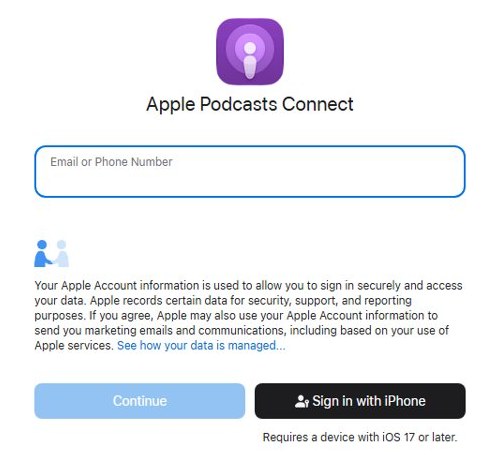
How to fix the Apple Podcasts Connect login loop
Work through these in order and try to sign in again after each one. Most loops stop at step 2 or step 4.
- Confirm you are signing in with a personal or company Apple Account, not a Managed Apple Account from a school or business; Apple does not allow Managed Apple Accounts in Podcasts Connect.
- Add a valid payment method to that Apple Account and agree to the Apple Media Services Terms and Conditions by signing in at podcasts.apple.com and following the prompts.
- Make sure two-factor authentication is turned on for the Apple Account.
- Delete the cookies and site data for apple.com in your browser, then close and reopen the browser.
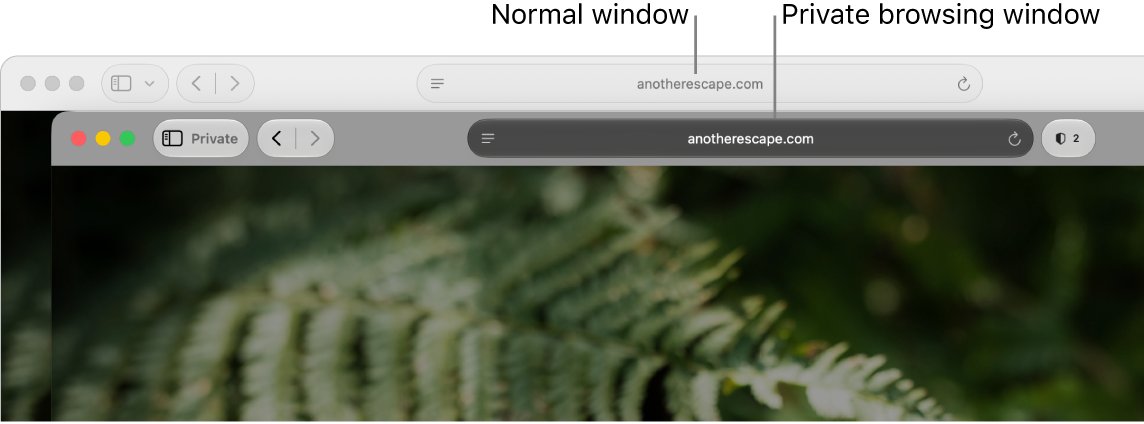
- Open a private window (File > New Private Window in Safari, or Ctrl + Shift + N in Chrome on Windows) and sign in to Apple Podcasts Connect there.
- If the loop continues, record a HAR file while it happens and send it to Apple's Partner Support team.
Why does Apple Podcasts Connect keep asking me to sign in?
Match what you see after entering your password to a row. The cause decides whether the fix is on your Apple Account or in your browser.
| What you see | Likely cause | What to do |
|---|---|---|
| A message asking you to complete your account activation | The Apple Account has no payment method or has not accepted the Media Services terms | Add a payment method and accept the terms at podcasts.apple.com or in Media & Purchases |
| The password and code are accepted, then the sign-in page returns | Old or blocked apple.com cookies stop the session from being saved | Delete apple.com site data, allow cookies, then sign in again |
| The loop happens in one browser but not in a private window | Stored site data or an extension in the normal profile | Clear that browser's apple.com cookies and site data |
| Sign-in fails with a school or work Apple Account | Managed Apple Accounts cannot use Podcasts Connect | Sign in with a personal or company Apple Account instead |
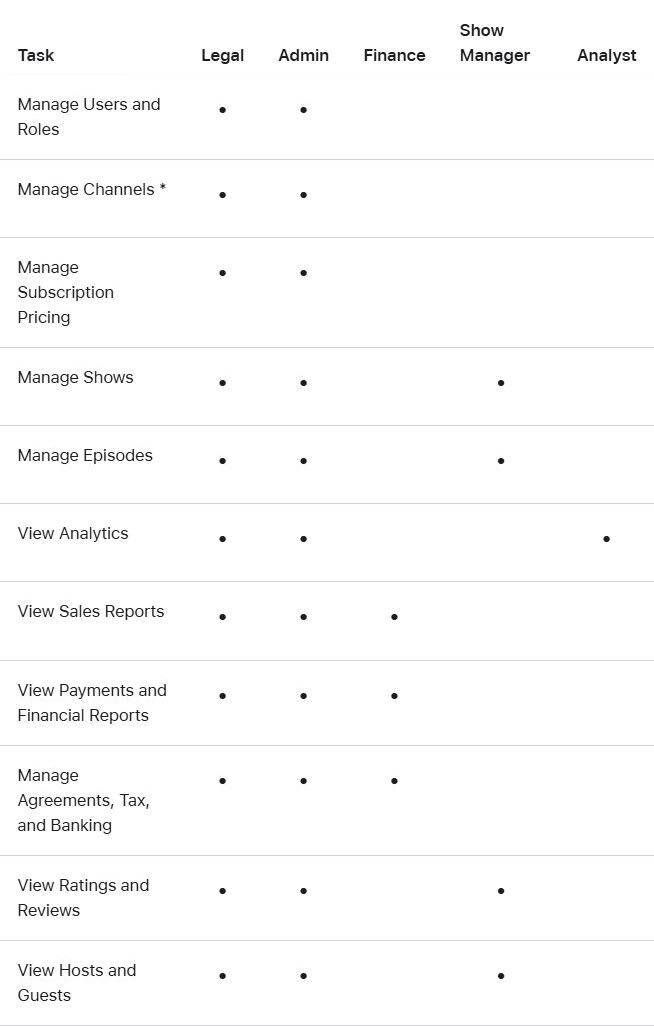
| You are signed in but sections or shows are missing | Your user role limits what you can see | Ask an Admin on the account to change your role or show access |
| Nothing above helps | A fault Apple needs to diagnose | Capture a HAR file and contact Partner Support |
Apple Podcasts Connect account requirements
Apple ties every Podcasts Connect account to the email address of an active Apple Account. A sign-in that loops is often an account that misses one of these.
| Requirement | What Apple asks for |
|---|---|
| Apple Account | A new or existing Apple Account; the Podcasts Connect account is linked to the email address you sign in with |
| Two-factor authentication | The Apple Account must have two-factor authentication turned on |
| Payment method | A valid payment method on the Apple Account; you are not charged until you make a purchase |
| Media Services terms | Agreement to the Apple Media Services Terms and Conditions |
| Account type | Managed Apple Accounts cannot be used for Apple Podcasts Connect |
| Admin users | Anyone invited as an Admin needs a valid payment method on their own Apple Account |
How to complete Apple Podcasts Connect account activation
Apple shows a prompt to complete your account activation when either the payment method or the terms are missing. Do both, then sign in again.
- Add a valid payment method to the Apple Account you use for Podcasts Connect.
- On a computer, open a web browser and go to podcasts.apple.com.
- Sign in to Apple Podcasts with the same Apple Account.
- Follow the prompts to review and agree to the Apple Media Services Terms and Conditions.
- On an iPhone or iPad instead, open Settings > Apple Account > Media & Purchases, sign in with your email address, and follow the onscreen prompts.
- Sign out of every apple.com tab, then sign in to Apple Podcasts Connect again.
Apple also accepts the terms through Apple Music, the App Store or the iTunes Store, so you can sign in to iTunes on a PC and accept them there.
How to clear Apple Podcasts Connect cookies in Safari on Mac
Removing the stored data for apple.com signs you out and forces a clean session. Safari can also block every cookie, which stops any sign-in from sticking.
- Open Safari and choose Safari > Settings.
- Click Privacy, then click Manage Website Data.
- Search for apple, select the apple.com entries, and click Remove.
- Click Advanced in the same Settings window.
- Deselect Block all cookies if it is selected.
- Quit and reopen Safari, then sign in to Apple Podcasts Connect.
Apple warns that removing website data can sign you out of sites and change how they behave, so expect to sign in again elsewhere on apple.com.
How to delete Apple cookies in Chrome
Chrome can delete the data for a single site, so you do not lose sign-ins for every other website.
- Open Chrome and select More (three dots) > Settings at the top right.
- Select Privacy and security, then Third-party cookies.
- Select See all site data and permissions.
- Search for apple.com at the top right.
- Select Delete next to the site, then select Delete again to confirm.
- Close Chrome, reopen it, and sign in to Apple Podcasts Connect.
To clear everything instead, select More > Delete browsing data, choose All time, tick Cookies and other site data, and select Delete data.
Apple Podcasts Connect sign in with a private window
A private window starts with no stored cookies for apple.com, so it shows quickly whether old site data causes the loop.
- In Safari on Mac, choose File > New Private Window; the Smart Search field turns dark.
- In Chrome, select More > New Incognito window, or press Ctrl + Shift + N on Windows or Command + Shift + N on Mac.
- Go to Apple Podcasts Connect and sign in with your Apple Account.
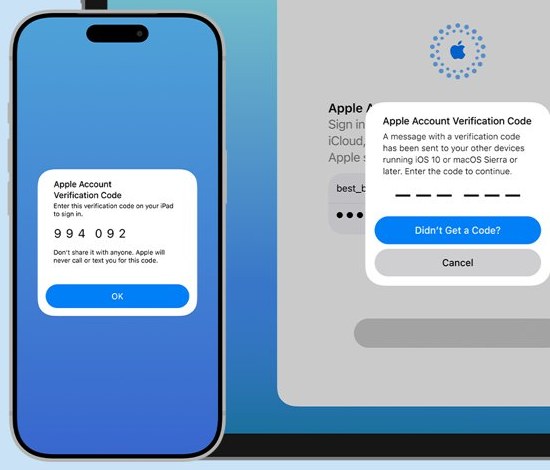
- Enter the six-digit verification code when it appears on your trusted device or phone.
- If you reach the dashboard, close the private window and clear apple.com data in your normal window.
- If the private window loops too, go back to the account requirements, since browser data is not the cause.
Chrome blocks third-party cookies in Incognito by default. If a sign-in page depends on them, Google lets you allow them temporarily for that site.
How to turn on two-factor authentication for Apple Podcasts Connect
Podcasts Connect needs an Apple Account with two-factor authentication. Most accounts already use it, but older ones may not.
- On an iPhone or iPad, open Settings; on a Mac, open System Settings.
- Choose your name, then Sign-In & Security.
- Turn on two-factor authentication and follow the onscreen instructions.
- On the web instead, go to account.apple.com and sign in.
- Select Upgrade Account Security and follow the onscreen instructions.
- Sign in to Apple Podcasts Connect and enter the verification code sent to your trusted device.
After the first sign-in on a browser, Apple asks for a code again only if you sign out completely, erase the device, or change your password for security reasons.
How to tell if your Apple Podcasts Connect account is activated
- Sign in to Apple Podcasts Connect in a normal browser window.
- Check that no message asks you to complete your account activation.
- Click Account and open the People tab.
- Find your name in the list and click it to see your roles.
- Close the browser, reopen it, and return to Podcasts Connect; a fixed login keeps you signed in or asks only for your password and code once.
The person who signed up holds the Admin and Legal roles and sees everything. Other roles, such as Analyst or Show Manager, see fewer sections by design.
How to sign up for Apple Podcasts Connect
If the loop started on your first visit, the Podcasts Connect account itself may not exist yet. Joining is a short form after the Apple Account is ready.
- Create an Apple Account, or use an existing one with two-factor authentication.
- Add a payment method and agree to the Apple Media Services terms.
- Go to Apple Podcasts Connect and sign in with that Apple Account.
- Give the account a name and choose Individual or Company.
- Agree to the Terms of Service and, if you want news from Apple Podcasts, opt in to emails.
- Submit your show by its RSS feed from your hosting provider.
How to report an Apple Podcasts Connect login problem with a HAR file
Apple's Partner Support team asks for a HAR file for Podcasts Connect faults. It records the network requests made while the loop happens.
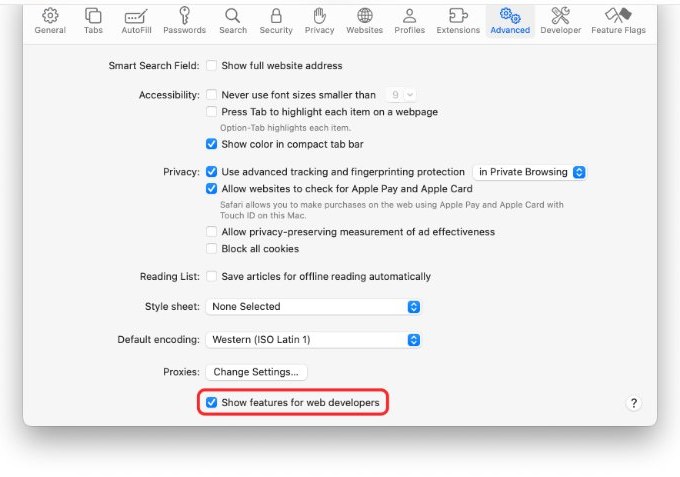
- Open Safari and open the Develop menu; if it is missing, turn it on in Safari's settings first.
- Select Show Web Inspector.
- Click the Network tab and keep it open.
- Sign in to Apple Podcasts Connect until the loop repeats.
- Click the Export icon and save the HAR file.
- Contact Partner Support from the Apple Podcasts for Creators support page and attach the HAR file.
A HAR file can contain details of your session, so send it only to Apple through the support case.
Apple Podcasts Connect sign in not working
Apple Podcasts Connect login loops back to the sign-in page
The browser does not keep the apple.com session, or the account is not fully activated.
- Delete apple.com cookies and site data.
- Turn off Block all cookies in Safari if it is on.
- Sign in from a private window to rule out stored data.
Apple Podcasts Connect asks you to complete your account activation
The Apple Account lacks a payment method or has not accepted the Media Services terms.
- Add a valid payment method to the Apple Account.
- Sign in at podcasts.apple.com and accept the terms.
- Sign in to Podcasts Connect again.
A school or work Apple Account will not sign in to Apple Podcasts Connect
It is a Managed Apple Account, which Podcasts Connect does not accept.
- Sign in with a personal or company Apple Account instead.
- Ask the account's Admin to invite that Apple Account as a user.
An Apple Podcasts Connect invitation link does not sign you in
The invited email address is not yet an active Apple Account with two-factor authentication.
- Open the activation link from the invitation email.
- Create an Apple Account with two-factor authentication if prompted, or sign in with the existing one.
- If you were invited as an Admin, add a valid payment method to your Apple Account.
Signed in to Apple Podcasts Connect but shows or Analytics are missing
Your user role or show access limits what you can see.
- Ask an Admin to open Account > People and click your name.
- Have them add the role you need, such as Analyst for analytics, or the missing shows.
- Sign out and sign in again after they click Save.
Forgot the Apple Account password for Apple Podcasts Connect
The Apple Account password, not a separate Podcasts Connect password, controls sign-in.
- Choose Forgot password? on the sign-in screen.
- Follow the onscreen instructions, which may send you to a trusted device or ask for a code sent to your trusted phone number.
- Sign in to Podcasts Connect with the new password.
When the same loop also appears in iCloud on a Windows PC, the cause is the Apple Account session, and you can fix the iCloud login loop on Windows 11 with similar steps.
Apple Podcasts Connect login FAQ
How do I sign in to Apple Podcasts Connect?
Sign in to Apple Podcasts Connect with the Apple Account email and password linked to your podcast, then enter the six-digit verification code from your trusted device. The account must have two-factor authentication, a payment method and accepted Apple Media Services terms.
How do I sign up for Apple Podcasts Connect?
Sign in to Apple Podcasts Connect with an active Apple Account that has two-factor authentication. Give the account a name, choose Individual or Company, and agree to the Terms of Service. You can then submit a show by its RSS feed from your hosting provider.
Why does Apple Podcasts Connect say to complete my account activation?
The message means the Apple Account is missing a valid payment method or has not accepted the Apple Media Services Terms and Conditions. Add a payment method, sign in at podcasts.apple.com or in Media & Purchases on an iPhone, accept the terms, then sign in again.
Do I need a credit card for Apple Podcasts Connect?
Apple asks for a valid payment method on the Apple Account to fully activate it. You are not charged until you make a purchase. Admin users who are invited later also need a valid payment method on their own Apple Account.
Can I use a Managed Apple Account for Apple Podcasts Connect?
No. Apple does not allow Managed Apple Accounts, the type issued by schools and businesses, in Apple Podcasts Connect. Sign in with a personal or company Apple Account, and have the account's Admin invite it as a user if needed.
Is the Apple Podcasts log in the same as Apple Podcasts Connect?
Both use your Apple Account, but they are different sites. podcasts.apple.com is the listener site where you accept the Media Services terms. Apple Podcasts Connect is the creator dashboard for submitting and managing shows, and it needs the extra activation steps.
How do I connect a podcast to Apple Podcasts?
Sign in to Apple Podcasts Connect, then submit your show by the RSS feed your hosting provider gives you. If you join the paid Apple Podcasters Program, you can also create shows in Podcasts Connect itself instead of using a third-party feed.
How do I contact Apple about an Apple Podcasts Connect login problem?
Use the contact us link on the Apple Podcasts for Creators support pages to reach the Partner Support team. Include a HAR file recorded in Safari's Web Inspector while the login loop happens, so Apple can see the failing requests.