To fix a Kernel32.dll not found error, update or reinstall the app that shows it, check that the app supports your Windows version, and repair Windows system files with DISM and SFC.
This guide matches each Kernel32.dll message to its cause, covers the entry point not found error, and explains why a downloaded copy of the DLL makes things worse.
Fix Kernel32.dll errors in Windows 11/10
Kernel32.dll is part of Windows itself, so the message tells you more about the app than about the file. Match the wording of your error to a row and start with that fix.
| Error you see | Most likely cause | Fix to try first |
|---|---|---|
| The procedure entry point … could not be located in the dynamic link library KERNEL32.dll | The app calls a Windows function your version of Windows does not have | Install a version of the app that supports your Windows, or update Windows |
| Fatal error: kernel32.dll not found, or could not load kernel32.dll | A damaged app install, or damaged Windows system files | Reinstall the app, then run DISM and SFC |
| Kernel32.dll errors in many different apps | Corrupted system files or malware | Run DISM and SFC, then a Windows Security full scan |
| The error started after installing another program | A software conflict or a replaced DLL in the app folder | Clean boot, then remove or update the conflicting program |
| The error appears only on Windows 7 or another old version | The app no longer supports that Windows version | Use an older release of the app or move to a supported Windows |
Kernel32.dll: what is it?
Kernel32.dll is one of the core Windows API libraries. Microsoft's reference pages list it as the DLL behind basic functions such as GetTickCount64 and SetThreadDescription, and it is always loaded in a process before any DLL's own entry point runs.
| Fact | Why it matters for the error |
|---|---|
| It ships with Windows | It is not installed by apps, so an app's installer cannot fix a damaged system copy |
| Almost every desktop program uses it | When it is truly damaged, many programs fail, not just one |
| Each function has a minimum Windows version | GetTickCount64 needs Windows Vista or later; SetThreadDescription needs Windows 10, version 1607 or later |
| Windows protects system DLLs | Windows checks for a valid digital signature before a system DLL is updated, which is why a downloaded copy is the wrong fix |
How do I fix kernel32 entry point not found?
An entry point error names a function, for example "The procedure entry point GetTickCount64 could not be located in the dynamic link library KERNEL32.dll". That function name tells you which Windows version the app expects.
- Write down the function name shown in the error, exactly as written.
- Search for that function name on learn.microsoft.com and open its reference page.
- Scroll to Requirements and note the Minimum supported client value.
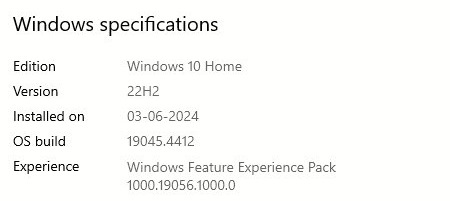
- Right-click Start, choose Settings, select System and pick About, then check the version under Windows specifications.
- If your Windows is older than the requirement, install Windows updates or use a release of the app built for your version.
- If your Windows meets the requirement, reinstall the app, because its own files are likely damaged or mixed with an older copy.
Update or reinstall the app that shows the Kernel32.dll error
- For a Microsoft Store app, open Microsoft Store and install any update for it.
- For other apps, check the publisher's website for a newer version that lists Windows 11 or Windows 10 support.
- If no update fixes it, open Settings > Apps > Installed apps, select the three dots next to the app and choose Uninstall.
- Restart the PC.
- Install a fresh copy from the publisher's official site or Microsoft Store, then open the app again.
Repair Kernel32.dll with SFC and DISM
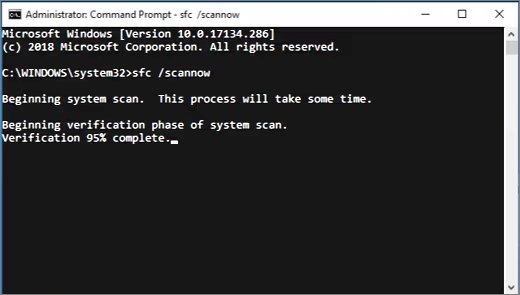
Run DISM first, because it supplies the files SFC uses for the repair. To open Command Prompt as administrator, type cmd in Search, right-click Command Prompt and select Run as administrator, then run DISM.exe /Online /Cleanup-image /Restorehealth. When it completes, run the command below in the same window.
sfc /scannowScans all protected system files, including Kernel32.dll, and replaces damaged files with a cached copy. Do not close the window until verification reaches 100%.
You should see: "Windows Resource Protection did not find any integrity violations" or "Windows Resource Protection found corrupt files and successfully repaired them." Restart and test the app.
If SFC says it "could not perform the requested operation", run it again in Safe Mode. If it found corrupt files it could not fix, run DISM once more with an internet connection, because DISM uses Windows Update as its source.
Run the Program Compatibility Troubleshooter for Kernel32.dll errors
Older programs written for an earlier Windows can fail on Windows 11 or Windows 10 because the system has changed underneath them. The troubleshooter sits with the other Windows troubleshooters in Settings and tests compatibility settings for you.
- Select Start > Settings > System > Troubleshoot > Other troubleshooters.
- Find Program Compatibility Troubleshooter and select Run.
- Pick the app that shows the Kernel32.dll error from the list.
- Follow the on-screen instructions and test the app with the suggested settings.
Find the program behind Kernel32.dll errors with a clean boot
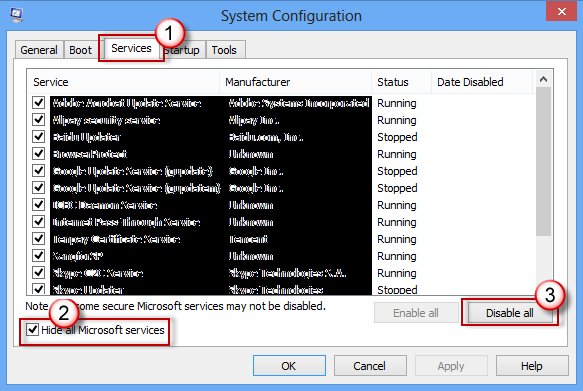
- Sign in as an administrator, select Search, type
msconfigand select System Configuration. - On the Services tab, select Hide all Microsoft services, then Disable all, then Apply.
- On the Startup tab, select Open Task Manager, disable each enabled startup app, and close Task Manager.
- Select OK in System Configuration and restart.
- Open the app that showed the error; if it works now, another program was interfering.
- Turn services and startup apps back on a few at a time until the error returns, then update or remove that program.
Should you download Kernel32.dll?
No. Never download Kernel32.dll from a DLL website or copy one into an app or system folder; repair Windows with DISM and SFC instead. Kernel32.dll is a signed Windows system file that Windows protects, a copy from another build can carry the wrong functions or malware, and an entry point error is a version mismatch that a downloaded file cannot fix.
The same rule applies to other missing DLL and runtime errors, such as the vcruntime140.dll missing error, which is fixed from the official installer rather than a loose file.
Kernel32.dll errors on Windows 7
Windows 7 support ended on January 14, 2020, and Windows 10 support ended on October 14, 2025. Apps built since then often call Kernel32.dll functions that older Windows versions do not have, which produces entry point errors.
| Your situation | What to do |
|---|---|
| Entry point error on Windows 7 after an app update | Install the last release of the app that listed Windows 7 support, from the publisher |
| The app needs a function marked Windows 10 or later | Move to a supported Windows version; there is no Windows 7 copy of that function |
| Your PC can run Windows 11 | Upgrade, because Windows 11 is 64-bit only and still receives updates |
| You want to stay on Windows 7 | Expect more apps to stop running, and no security fixes from Microsoft |
Kernel32.dll error still appears after SFC
Kernel32.dll errors in several apps and SFC finds nothing
Malware or a security tool interfering with programs.
- Open Windows Security and select Virus & threat protection.
- Select Scan options, choose Full scan and select Scan now.
- If the scan is clean but the errors continue, run Microsoft Defender Antivirus (offline scan) from Scan options; it restarts the PC and scans before Windows loads.
Kernel32.dll errors keep coming back after every fix
Windows system files are damaged beyond what SFC can repair.
- Back up your personal files.
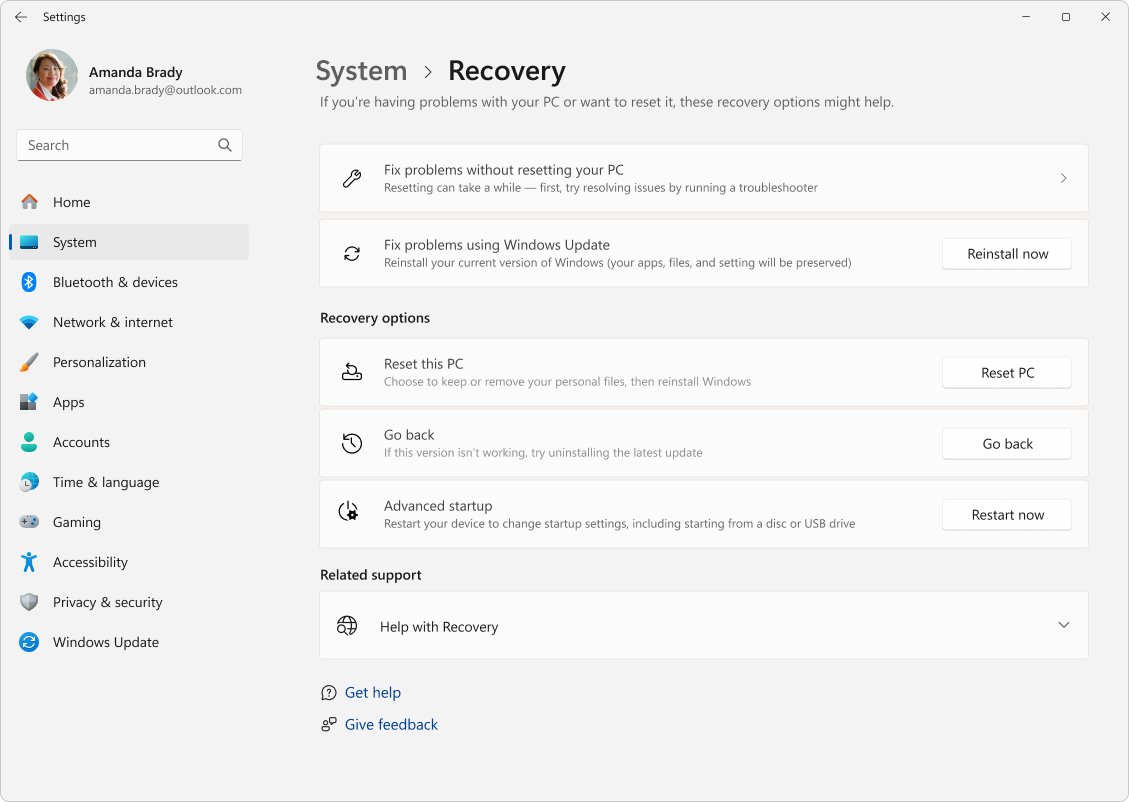
- Open Settings > System > Recovery.
- Under Recovery options, select Reset PC.
- Choose Keep my files to reinstall Windows while keeping documents and photos; apps and settings are removed.
- Pick Cloud download for a fresh copy of Windows, or Local reinstall if your internet connection is slow.
- Have your BitLocker recovery key ready if the drive is encrypted.
How to tell if Kernel32.dll is fixed
- Restart the PC after the last fix you applied.
- Open the app that showed the error and use the feature that triggered it.
- Run
sfc /scannowagain; "Windows Resource Protection did not find any integrity violations" confirms the system files are intact. - Open two or three other desktop apps; if they all start normally, the Kernel32.dll problem was limited to the one app and is now gone.
Kernel32.dll error FAQ
What is kernel32.dll?
Kernel32.dll is a core Windows system library that provides basic Windows API functions to desktop programs. It ships with Windows 11 and Windows 10 and is loaded in almost every running program.
What causes a kernel32.dll error?
Most kernel32.dll errors come from an app that needs a newer Windows than you have, a damaged app installation, or damaged Windows system files. Malware and conflicting programs cause the rest.
How do I fix fatal error kernel32.dll not found?
Reinstall the app that shows the message, then run DISM.exe /Online /Cleanup-image /Restorehealth followed by sfc /scannow from an administrator Command Prompt. Restart the PC and test the app again.
Is kernel32.dll download safe?
No. Downloading kernel32.dll from a DLL site is unsafe and does not fix the error. The file is a signed part of Windows, and DISM and SFC restore a genuine copy from Microsoft's own sources.
Does kernel32.dll exist on Windows 11?
Yes. Kernel32.dll is part of Windows 11 and Windows 10, and Microsoft's API reference pages still list it as the DLL for core functions such as GetTickCount64 and SetThreadDescription.
Why do I get kernel32.dll errors on Windows 7?
Newer apps often use Kernel32.dll functions that only exist in Windows 10 or later. Windows 7 lost support on January 14, 2020, so the fix is an older app release that supports Windows 7 or a move to a supported Windows.
Can a virus cause kernel32.dll errors?
Yes. Malware can damage system files or inject code into programs, which shows up as DLL errors. Run a Windows Security full scan, then a Microsoft Defender offline scan if the errors persist.