Press Ctrl + Z to undo on a Windows or Chromebook keyboard, or Command + Z on a Mac.
This guide puts the undo and redo keys for every platform in one table, then covers undoing file deletes, the limits in Word and Excel, iPhone gestures, laptop Fn keys and fixes when undo stops working.
The fastest way to undo something on a keyboard
Undo reverses your most recent action, whether that was typing, a Backspace, a paste or a file delete.
- Stay in the window where the mistake happened. Undo only affects the active app.
- Hold Ctrl (Windows, Chromebook, Linux) or Command (Mac).
- Press Z once to undo the last action.
- Press Z again, still holding the modifier, to step back through earlier actions.
- If you went one step too far, redo it with Ctrl + Y on Windows or Shift + Command + Z on a Mac.
Undo and redo shortcuts on Windows, Mac, Chromebook and Linux
Undo keeps a list of recent actions in the app you are using. Each press of the undo key takes one item off that list, and redo puts it back.
The undo key is the same in almost every app on a platform. Redo is the one that varies, so check the last column before assuming it failed.
| Platform | Undo | Redo (undo an undo) | Notes |
|---|---|---|---|
| Windows 11 and Windows 10 | Ctrl + Z | Ctrl + Y | Works for typing and for desktop and File Explorer actions. Some apps, such as Google Docs, use Ctrl + Shift + Z for redo. |
| macOS | Command + Z | Shift + Command + Z | In some apps you can undo and redo several commands in a row. Word and Excel for Mac use Command + Y to redo. |
| ChromeOS (Chromebook) | Ctrl + Z | Ctrl + Shift + Z | Same keys in Google Docs on a Chromebook. |
| Linux (GNOME desktop) | Ctrl + Z | Varies by app | Undo is listed among the common GNOME editing shortcuts. |
| Microsoft Office on Windows | Ctrl + Z | Ctrl + Y or F4 | F4 also repeats simple actions such as a paste. |
How to undo a deleted or moved file
In File Explorer, Ctrl + Z undoes the previous action, so a delete or move you just made can be reversed straight away. Press it before you do anything else in the window.
| What happened | What to do | Why |
|---|---|---|
| You just deleted or moved a file in File Explorer | Click the File Explorer window and press Ctrl + Z | Windows reverses the last file action |
| You deleted a file earlier with Delete or Ctrl + D | Open the Recycle Bin and restore the file from there | Ctrl + D and Delete move items to the Recycle Bin rather than erasing them |
| You used Shift + Delete | Check your backup, or a OneDrive or File History copy | Shift + Delete skips the Recycle Bin and deletes permanently |
| The file is gone from the Recycle Bin and you have no backup | Stop using the drive and try Microsoft's Windows File Recovery app from the Microsoft Store | New files can overwrite the space the deleted file still occupies |
| You moved a file to the Trash on a Mac | Click Trash in the Dock, select the item, then choose File > Put Back | The item returns to its original folder |
Undo features in popular applications: Word, Excel, Google Docs and Photoshop
Office apps keep the last 100 undoable actions by default. For Excel, Microsoft documents a registry change that raises the limit.
| App | Undo and redo keys | What to know |
|---|---|---|
| Microsoft Word | Ctrl + Z to undo, Ctrl + Y to redo, F4 to repeat the last action | Select the arrow next to Undo to pick several actions from the list and undo them together |
| Microsoft Excel | Ctrl + Z to undo, Ctrl + Y or F4 to redo; Command + Z and Command + Y on a Mac | Running a macro clears the undo list. Repeat is not on the Quick Access Toolbar until you add it |
| Excel with more than 100 undo steps | Close Office, open Registry Editor, go to HKEY_CURRENT_USER\Software\Microsoft\Office\16.0\Excel\Options, create a DWORD named UndoHistory, set a decimal value, then restart Excel |
Microsoft advises moderation: more undo levels use more RAM |
| Google Docs | Ctrl + Z and Ctrl + Shift + Z on Windows and Chromebook; Command + Z and Command + Shift + Z on a Mac | To go back further than undo reaches, click Last edit at the top right and choose Restore this version |
| Adobe Photoshop | Check Adobe's own shortcut list for your version | Adobe documents its undo, redo and history options on its undo and redo help page |
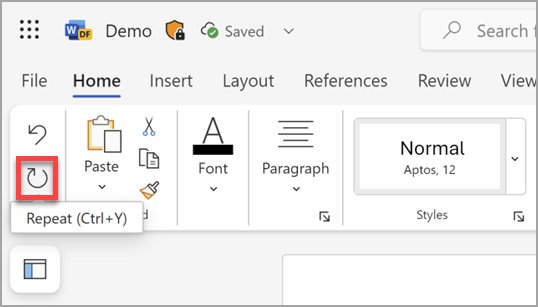
How to undo without Ctrl + Z: menus, toolbars and phone gestures
Use these when a key is broken, you are on a touchscreen, or you need to undo more than one step at once. Application-specific tools, such as the Office undo list, reach further than a single key press.
| Your situation | Use this | Result |
|---|---|---|
| Working in Word, Excel or PowerPoint with the mouse | Select Undo on the Quick Access Toolbar in the upper-left corner | Same as Ctrl + Z |
| Undoing many Office steps at once | Select the arrow next to Undo and choose how far back to go | Every action down to your selection is undone |
| Using a right-click menu in a text box | Look for Undo in the menu; not every app includes it | Undoes the last typing in that field |
| Typing on an iPhone | Swipe left with three fingers, or shake the iPhone to use Shake to Undo | Undoes the last text edit |
| A Microsoft keyboard with an F Lock key | Turn the F Lock light off, then press the key labelled Undo | The alternate command cancels the previous action |
| A reopened page, not text, is what you need | Press Ctrl + Shift + T (Command + Shift + T in Chrome on a Mac) | The browser reopens the last closed tab; Ctrl + Z does not do this |
Laptop keyboards: when Fn or F Lock changes what the keys do
Ctrl + Z and Command + Z never need Fn. Only the redo and repeat key F4 sits on the shared top row, where laptops often assign media or brightness controls.
| Your keyboard | What to do | Why |
|---|---|---|
| Windows laptop where F4 changes volume or brightness instead of repeating | Hold Fn and press F4, or use Ctrl + Y instead | Fn switches the top row to standard function keys |
| Keyboard with an F Lock key | Turn F Lock on for F1 to F12, off for alternate commands such as Undo | F Lock toggles between the two command sets |
| Surface keyboard or Type Cover | Press Fn once to lock the function keys; press it again so the light turns off to unlock | The LED shows the current state |
| MacBook or Apple keyboard | Hold Fn or the Globe key with a top-row key to use it as F1, F2 and so on | Top-row keys default to special functions |
| Chromebook | Use Ctrl + Z and Ctrl + Shift + Z | Neither shortcut uses the top row |
How to check that undo and redo work
A 30-second test in any text box shows whether the keys, not the app, are the problem.
- Open a blank document or any text field and type a short word.
- Press Backspace twice to delete two letters.
- Press Ctrl + Z (Command + Z on a Mac). The letters should come back.
- Press your platform's redo key from the table above. The letters should disappear again.
- If the letters return in one app but not another, the keyboard is fine and the app is limiting undo.
Fix undo when the shortcut does nothing
Ctrl + Z does nothing in any app
The Ctrl or Z key is not registering, or a driver or background program is interfering.
- Check the shortcut: press the right-hand Ctrl key with Z in case the left one has failed.
- Test the keyboard: go to Start > Settings > Accessibility > Keyboard and turn on On-Screen Keyboard (Ease of Access > Keyboard on Windows 10). Click Ctrl, then Z.
- If the on-screen keys work, right-click Start, select Device Manager, expand the keyboard category, right-click your keyboard and select Update driver.
- If that fails, select Uninstall device, confirm with Uninstall, and restart. Windows reinstalls the driver.
- To rule out a software conflict, type
msconfigin Search, open System Configuration, select Hide all Microsoft services and Disable all on the Services tab, then restart and test again. - Return to normal afterwards: select Normal Startup on the General tab and Enable all on the Services tab.
Undo works elsewhere but not in Word or Excel
The action cannot be undone, the undo list was cleared, or an add-in or customization is interfering.
- Look at the Undo button. If it reads Can't Undo, the last action, such as saving or a File tab command, is not undoable.
- In Excel, remember that running a macro clears the undo list.
- Close the app, hold Ctrl and double-click its shortcut, then select Yes to start in Safe Mode without customizations and add-ins.
- If undo works in Safe Mode, an add-in or customized preference is the cause. Remove that add-in or reset the customization instead of reinstalling.
- If it still fails, right-click Start, select Installed apps, open the menu next to Office, select Modify, then Quick Repair or Online Repair.
Ctrl + Y does not undo an undo
The app uses a different redo key.
- Press Ctrl + Shift + Z instead; Google Docs and Chromebooks use it.
- On a Mac, try Shift + Command + Z, or Command + Y in Word and Excel.
Pressing F4 or another top-row key changes volume instead of repeating
The function keys are set to their alternate commands.
- Hold Fn and press the key.
- On a keyboard with F Lock, turn the F Lock light on.
- On a Surface keyboard, press Fn once so the light comes on.
Limits of undo, best practices and tips for using it effectively
The general advice: treat undo as a short-term safety net for the current session, not a backup. The additional tips below cover where it stops.
| Limit or habit | Why it matters |
|---|---|
| Undo only works in the active app | Pressing Ctrl + Z in the wrong window undoes something else |
| Office stops at 100 undoable actions by default | Long editing sessions lose their oldest steps |
| Saving and File tab commands cannot be undone in Office | Save a copy with a new name before big changes |
| An Excel macro clears the undo list | Save before running one so you can reopen the old file |
| Shift + Delete bypasses the Recycle Bin | Use Delete or Ctrl + D unless you are sure |
| Closing a browser tab is not undone by Ctrl + Z | Use Ctrl + Shift + T instead |
Frequently asked questions
How do you undo on a keyboard?
Press Ctrl + Z on Windows, Linux or a Chromebook, and Command + Z on a Mac. Each press undoes one more recent action in the active app, including typing, pastes and file operations in File Explorer.
How do you undo a Backspace on a keyboard?
Press Ctrl + Z, or Command + Z on a Mac, straight after deleting. Deleted characters count as typing, so undo restores them. Press it again to bring back earlier deletions, one step at a time.
How do you undo a delete on a keyboard?
For deleted text, press Ctrl + Z. For a file deleted in File Explorer, press Ctrl + Z right away, or restore it from the Recycle Bin later. Files removed with Shift + Delete skip the Recycle Bin and need a backup.
How do you undo an undo on a keyboard?
Use redo. Press Ctrl + Y on Windows, Shift + Command + Z on a Mac, and Ctrl + Shift + Z on a Chromebook or in Google Docs.
How do you undo something on a keyboard without a Ctrl key working?
Use the other Ctrl key, or open the On-Screen Keyboard from Settings > Accessibility > Keyboard and click Ctrl, then Z. In Office apps, the Undo button on the Quick Access Toolbar does the same job with the mouse.
How many times can you undo in Word or Excel?
Office saves the last 100 undoable actions by default. Excel can keep more through an UndoHistory DWORD value in the registry, though Microsoft warns that extra undo levels consume RAM.
Can you undo after saving a file?
Not in Microsoft Office. Saving a file and commands on the File tab cannot be undone. In Google Docs, click Last edit at the top right and restore an earlier version instead.
How do you undo on an iPhone?
Swipe left with three fingers to undo a text edit, or shake the iPhone to use Shake to Undo. If shaking triggers undo by accident, go to Settings > Accessibility > Touch and turn off Shake to Undo.
Does Ctrl + Z reopen a closed tab?
No. Reopen the last closed tab with Ctrl + Shift + T in Chrome and Microsoft Edge on Windows, or Command + Shift + T in Chrome on a Mac.






How Type Forward Slash On Keyboard PC & Laptop – Full Guide - Techdows
[…] the wrong one? Press Ctrl + Z to take it back; the undo shortcuts guide covers every […]
How to add dvorak keyboard Windows 11 - Techdows
[…] the ones you use most, such as undo, in Notepad after […]
How to refresh laptop with keyboard Windows 11: a step-by-step guide - Techdows
[…] F2 instead of F5 in File Explorer starts a rename. Press Esc to cancel, or undo the rename with Ctrl + Z if you already pressed […]
How to do the opposite of Ctrl + Z - Techdows
[…] Undo on a keyboard steps backward through a list of recent actions. Redo walks forward through the same list, so it can only restore what Undo removed. […]