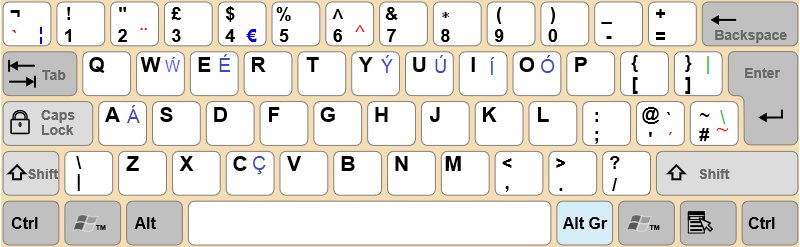
On a US or UK English keyboard, press the / key to the left of the right Shift key to type a forward slash; the same key gives ? when you hold Shift.
This guide covers desktop and laptop keyboards, the numeric keypad, the Alt + 47 code, other keyboard layouts, Mac, Chromebook and Linux, and what to do when the key types the wrong character.
The Quick Answer: How to Type Forward Slash on Most Keyboards
These steps work on most US and UK English keyboards, whether the keyboard is built into a laptop or plugged into a desktop PC.
- Click where you want the slash to appear, such as the address bar or a document.
- Find the bottom row of letter keys and look to the right of the M, comma and period keys.
- Locate the key printed with / and ?, directly to the left of the right Shift key.
- Press that key on its own, without Shift, to type /.
- If you see ? instead, release Shift and press the key again with no modifier held.
- On a full-size keyboard, you can also press the / key at the top of the numeric keypad.
What Is the Forward Slash?
The forward slash is the line that leans right: its bottom sits on the left and its top on the right. Its mirror image, the backslash, leans the other way.
Windows treats both characters as reserved, so neither can appear in a file or folder name.
| Property | Forward slash |
|---|---|
| Character | / |
| Direction | Leans right, from bottom-left to top-right |
| Key on US and UK English keyboards | Left of the right Shift, shared with ? |
| Numeric keypad key | The divide key at the top of the keypad |
| Windows Alt code | Alt + 47, typed on the numeric keypad |
| Unicode code point | U+002F (hex 2F is decimal 47, the same value as the Alt code) |
| Allowed in Windows file names | No, it is a reserved character |
Which method should you use?
| Your situation | Use this | Why |
|---|---|---|
| US or UK English keyboard, key works | The / key next to the right Shift | One key press, no modifiers |
| Full-size keyboard or laptop with a number pad | The / key on the numeric keypad | It sits in the same spot whatever the letter layout |
| German, French, Swedish or another non-English layout | Hold Shift or AltGr on the On-Screen Keyboard to find it | The slash moves to a different key on these layouts |
| The key types é, # or another wrong character | Check the layout with Windows logo key + Spacebar | Windows is using a layout that does not match the keys |
| No working slash key, numeric keypad present | Alt + 47 | Alt codes type the character by its number |
| No working key and no numeric keypad | Windows logo key + . then the Symbols tab | Needs no keypad and no layout change |
How to Type Forward Slash on a Windows PC Keyboard
A desktop keyboard gives you three ways to type the slash. Use them in this order: the main key, the keypad key, then the Alt code.
- Method 1: Use the main keyboard slash key. Press the / key to the left of the right Shift key, without Shift held.
- Method 2: Use the numeric keypad slash key. Press the / key in the top row of the numeric keypad, between Num Lock and the asterisk (\*) key.
- Method 3: Use the Windows Alt code. Turn on Num Lock if your keyboard needs it to type numbers on the keypad.
- Press and hold Alt.
- While holding Alt, type 4 then 7 on the numeric keypad, not on the number row above the letters.
- Release Alt. The / appears at the cursor.
In Word, you can also type 002F and then press Alt + X to turn the code into a slash. Microsoft notes that some Office apps, such as PowerPoint, cannot convert Unicode codes this way.
How to Type Forward Slash on a Laptop Keyboard
Laptop keyboards come in several sizes, so pick the row that matches the keys in front of you. The brand, whether HP, Lenovo, Dell or another, matters less than the layout printed on the keys.
| Your laptop keyboard | How to type / | Notes |
|---|---|---|
| Standard laptop keyboard (US or UK English) | Press the / key left of the right Shift | Same position as a desktop keyboard |
| Compact laptop keyboard with a short right Shift | Look for the key printed / and ? at the right end of the bottom letter row | Trust the printed legend over position on small keyboards |
| Laptop with a built-in numeric keypad | Press the / key at the top of the keypad, or use Alt + 47 on the keypad | Turn on Num Lock first if the keypad types nothing |
| Laptop without a numeric keypad | Use the main / key, or Windows logo key + . and the Symbols tab | Alt codes need a numeric keypad; the top number row does not work for them |
| Key has a second symbol printed in a different color | Hold Fn and press the key | Fn reaches the alternate command printed on a key |
How to Type Forward Slash on Different Keyboard Layouts
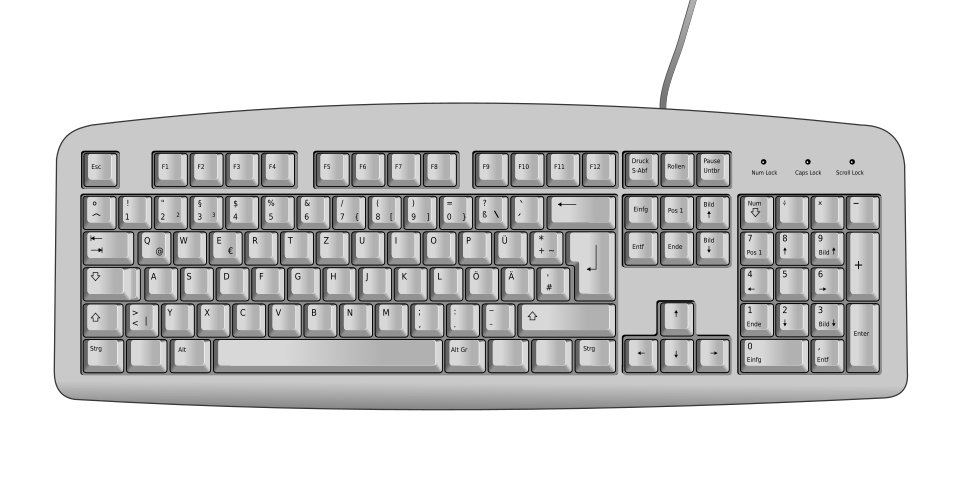
The slash is only beside the right Shift on English layouts. On many European layouts it moves to a number-row key and needs Shift, so the key printed / on a US keyboard types something else.
Windows shows the active layout on the On-Screen Keyboard. Hold Shift or AltGr there and the keys change to show which one types /.
| Layout | How to find the slash | Fallback that always works |
|---|---|---|
| US English keyboard | The / key left of the right Shift, no modifier | Numeric keypad / |
| UK English keyboard | The / key left of the right Shift, no modifier | Numeric keypad / |
| European and international keyboards (Spanish, Swedish, Italian and others) | Open the On-Screen Keyboard, click Shift, and read which key now shows / | Alt + 47 on the keypad |
| French AZERTY keyboard | Open the On-Screen Keyboard, click Shift, and read which key now shows / | Alt + 47 or the keypad / |
| German QWERTZ keyboard | Open the On-Screen Keyboard, click Shift, and read which key now shows / | Alt + 47 or the keypad / |
| United States-International | Same key as US English | Numeric keypad / |
Microsoft also publishes an interactive picture of every Windows layout, including German, French (Standard, AZERTY), Swedish and United Kingdom. Point to Shift or AltGr on that page to see where / sits.
How to Check or Change Your Keyboard Layout in Windows 11
If the keys on your keyboard do not match what appears on screen, Windows is using a different layout from the one printed on the keys. Match them and the slash key works again.
- Check the current keyboard layout: look at the input language icon in the system tray at the right end of the taskbar, such as ENG US or ENG UK.
- Switch layouts with a keyboard shortcut: hold the Windows logo key and press Spacebar to cycle through installed layouts. You can also select the input icon in the system tray and pick a layout.
- Change keyboard layout in Settings: select Start > Settings > Time & language > Language & region.
- Select the three dots next to your language, then select Language options.
- Under Keyboards, select Add a keyboard and choose the layout printed on your keys, such as US or United Kingdom.
- To remove the wrong layout, select the three dots next to it under Keyboards, then select Remove.
On Windows 10, the path is Start > Settings > Time & language > Language. Select your language under Preferred languages, select Options, then use Add a keyboard under Keyboards.
How to Type Forward Slash Using the Windows On-Screen Keyboard
The On-Screen Keyboard works with a mouse and needs no touchscreen. It also shows the active layout, which makes it the quickest way to find a moved slash key.
- Use the On-Screen Keyboard: press Windows logo key + Ctrl + O to open it.
- Or select Start > Settings > Accessibility > Keyboard and turn on On-Screen Keyboard. On Windows 10, the path is Settings > Ease of Access > Keyboard.
- Click in the app where you want the slash.
- Click the / key. If it is not visible, click Shift and look again, because some layouts put the slash on a shifted key.
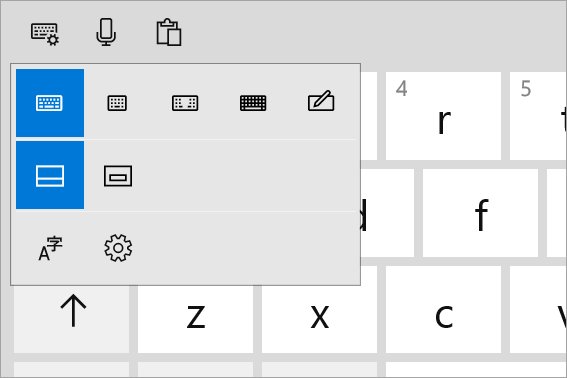
- Use the Windows touch keyboard on a touchscreen instead: tap a text box, or tap the Touch keyboard icon in the system tray.
- Tap the / key on the touch keyboard, switching to its symbol keys if the slash is not on the letter view.
The On-Screen Keyboard can also show a numeric keypad. Open Options on it and turn on the numeric keypad to get its / key.
How to type a forward slash on a Mac keyboard
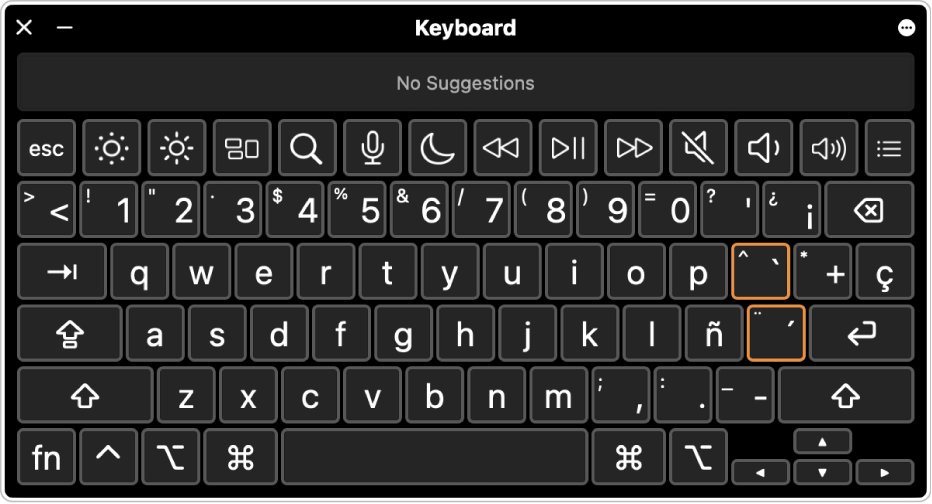
On a US English Mac keyboard, / shares a key with ? to the left of the right Shift, just like a PC. On other layouts, the Keyboard Viewer shows which key to press.
- Press the / key without Shift to type the slash.
- If it types something else, click the Input menu in the menu bar and choose Show Keyboard Viewer.
- If the Input menu is missing, choose Apple menu > System Settings > Keyboard, then under Text Input click Edit and turn on Show Input menu in menu bar.
- Hold Shift or Option and watch the Keyboard Viewer to see which key shows /.
- Press that key on your keyboard, or click it in the Keyboard Viewer.
How to Type Forward Slash on a Chromebook
Chromebooks with a US English keyboard have the / key in the same place as a PC: left of the right Shift. If it types the wrong character, the keyboard language is set wrong.
- Press the / key left of the right Shift to type the slash.
- If a different character appears, select the time at the bottom right, then select Settings.
- Under Device, select Keyboard > Change input settings.
- Under Input methods, add the keyboard language printed on your keys, then select it.
- To switch between installed keyboard languages later, press Ctrl + Shift + Space. Press Ctrl + Space to go back.
- To see every Chromebook shortcut, press Ctrl + Search + s.
How to Type Forward Slash on Linux
On Ubuntu and other GNOME desktops, the slash key follows the keyboard layout set in Settings. If the key is wrong or missing, enter the character by its code point instead.
- Press the / key left of the right Shift on a US or UK English keyboard.
- If the wrong character appears, open Settings > Keyboard and check the Input Sources list.
- Select + Add Input Source…, choose the language and layout printed on your keys, then select Add.
- Switch to the next input source with Super + Space.
- To type the slash by code, press Ctrl + Shift + U, type 2f, then press Space or Enter.
Common Uses for the Forward Slash
| Use | Example | Tip |
|---|---|---|
| Typing website addresses | https://techdows.com/ | Web addresses always use forward slashes, never backslashes |
| Writing dates | 9/19/2026 | US order is month/day/year; UK order is day/month/year |
| Using spreadsheet formulas | =A1/B1 | In Excel, / is the division operator, as in =3/3 |
| Typing file paths and commands | C:\Users\Name on Windows; /home/name on Linux and Mac | Windows paths use the backslash; Linux and macOS paths use the forward slash |
| Writing alternatives or ratios | and/or, km/h, 50/50 | No spaces around the slash in short pairs |
Forward Slash vs Backslash: Do Not Mix Them Up
The two keys look alike but do different jobs. A backslash in a web address or a forward slash in a Windows path can break the link or the command.
| Forward slash | Backslash | |
|---|---|---|
| Character | / | \ |
| Leans | Right | Left |
| US English key | Left of the right Shift, shared with ? | Near Enter, shared with | |
| Alt code | Alt + 47 | Alt + 92 |
| Main job | Web addresses, dates, division, Linux and Mac paths | Separating folders in Windows paths, such as C:\path\file |
| In a Windows file name | Not allowed | Not allowed |
Typed the wrong one? Press Ctrl + Z to take it back; the undo shortcuts guide covers every platform.
How to check you typed a forward slash
- Open Notepad or any plain text box.
- Press the key you think is the slash, then press the backslash key next to it.
- Check the first character leans right (/) and the second leans left (\).
- Type a short web address such as techdows.com/ and confirm the slash matches the one in your browser's address bar.
- If you used Alt + 47, confirm one / appeared and not the digits 47.
What to Do If the Forward Slash Key Does Not Work
The key types ? instead of /
Shift is held down, stuck, or pressed by habit.
- Check whether Shift is being held: release both Shift keys and press the slash key on its own.
- Open the On-Screen Keyboard with Windows logo key + Ctrl + O and check whether Shift shows as pressed.
- Click Shift on the On-Screen Keyboard to release it if it is locked.
- Tap each physical Shift key a few times to free a stuck key.
The key types é, -, #, or another wrong character
Windows is using a keyboard layout that does not match the keys.
- Check your keyboard layout: look at the input icon in the system tray.
- Press Windows logo key + Spacebar to cycle to the layout printed on your keys.
- If the right layout is not installed, add it under Settings > Time & language > Language & region > Language options > Add a keyboard.
- Remove the layout you do not use so a shortcut cannot switch back to it.
The forward slash is not working on the keyboard at all
The app is capturing the key, or the key itself has failed.
- Test the key in a simple app: open Notepad and press the key.
- If it works in Notepad, the other app uses / as a shortcut. Click inside a text field in that app and try again.
- If it fails in Notepad too, open the On-Screen Keyboard and click its / key. If that works, the physical key is the fault.
- Try the numeric keypad / key or Alt + 47 while you arrange a keyboard repair or replacement.
Alt + 47 types nothing or types 47
The digits were typed on the number row, or the keypad is off.
- Type the digits on the numeric keypad, not the number row above the letters.
- Turn on Num Lock if your keyboard requires it for keypad numbers.
- Keep Alt held until both digits are typed, then release it.
- On a laptop with no keypad, use Windows logo key + . and the Symbols tab instead.
Easy Alternatives If You Need a Slash Right Now
These routes work even when the slash key is broken or hidden on an unfamiliar layout.
- Press Windows logo key + . (period) in any text box to open the emoji panel.
- Select the Symbols tab and open the punctuation set.
- Click / to insert it.
- Or copy a / from this page with Ctrl + C and paste it with Ctrl + V.
- On a keyboard with a numeric keypad, hold Alt and type 47 on the keypad.
- On a Chromebook, Mac or Linux PC, use the keyboard language settings above to match the printed keys.
Frequently Asked Questions
Where is the forward slash on a keyboard?
On US and UK English keyboards, the forward slash is on the key to the left of the right Shift key, shared with the question mark. Full-size keyboards have a second slash key at the top of the numeric keypad, used for division.
What is the forward slash on a keyboard?
The forward slash is the / character, a line that leans to the right. It appears in web addresses, dates, fractions and spreadsheet division. It is different from the backslash (\), which leans left and separates folders in Windows file paths.
How do I type a forward slash without the slash key?
Hold Alt and type 47 on the numeric keypad, then release Alt. With no keypad, press Windows logo key + period to open the emoji panel, choose the Symbols tab and click the slash. The On-Screen Keyboard also has a clickable slash key.
How to type forward slash on a German keyboard?
On a German QWERTZ keyboard the slash is not beside the right Shift key. Open the On-Screen Keyboard, click Shift and find the key that shows /, or use the numeric keypad slash. Alt + 47 on the keypad also works.
How to type forward slash on a French keyboard?
The French AZERTY layout moves the slash to a shifted key. Open the On-Screen Keyboard with Windows logo key + Ctrl + O, click Shift and look for /. The numeric keypad slash key and Alt + 47 work on AZERTY too.
How to type forward slash on a Swedish keyboard?
The Swedish layout puts the slash on a shifted key rather than beside the right Shift. Hold Shift on the On-Screen Keyboard to see which key types it. Otherwise use the keypad slash key or hold Alt and type 47 on the keypad.
How to type forward slash on an HP keyboard?
HP keyboards use the standard position: on a US or UK English model, press the key left of the right Shift. If it types a different character, press Windows logo key + Spacebar to switch to the layout printed on the keys.
How to type forward slash on a Lenovo keyboard?
On a US or UK English Lenovo laptop, press the / key left of the right Shift without holding Shift. Models with a numeric keypad also have a / key at the top of the keypad. A wrong character means Windows is using another layout.
Why does my forward slash key type a question mark?
The slash and question mark share one key, and Shift selects the question mark. Release both Shift keys and press the key again. If Shift appears stuck, check it on the On-Screen Keyboard and click it to release it.
Can I type a forward slash with Alt codes on a laptop?
Only if the laptop has a numeric keypad. Microsoft states Alt codes must be typed on the numeric keypad, not the number row. Laptops without a keypad should use the main slash key or the Symbols tab in the Windows logo key + period panel.
Is the forward slash the same as the division key?
Yes. The / key on the numeric keypad types the same forward slash as the main key. In Excel and most calculators, that slash is the division operator, so =10/2 returns 5.

How to add dvorak keyboard Windows 11 - Techdows
[…] the symbol keys on the map, then see how to type a forward slash on a standard […]
How to Add Arabic Keyboard in Windows 11 - Techdows
[…] back to English first; the forward slash guide shows where / sits on US and UK […]
How to Type a Degree Symbol on a Keyboard: Full Guide - Techdows
[…] Characters that do have a key of their own follow different rules — see how to type a forward slash on a keyboard. […]
How to Type E with an Accent Mark (é, è, ê, ë) on Your Computer or Mobile Phone - Techdows
[…] If your laptop has no keypad, use the symbols panel in the next section instead. The same keypad rule applies to other Alt codes, such as those in the forward slash guide. […]
How to Type Does Not Equal ((≠)) Sign on Keyboard in Windows 11/10 [Step-by-step Guide] - Techdows
[…] How to type a forward slash on a keyboard covers the same ground for the / key. […]