The complete list of Microsoft Edge browser extensions is the Microsoft Edge Add-ons store at microsoftedge.microsoft.com, which sorts thousands of extensions into 12 categories.
This guide maps those categories, lists the extensions Microsoft publishes itself, and names notable extensions by type exactly as the store lists them, with the publisher wherever the store search showed it.
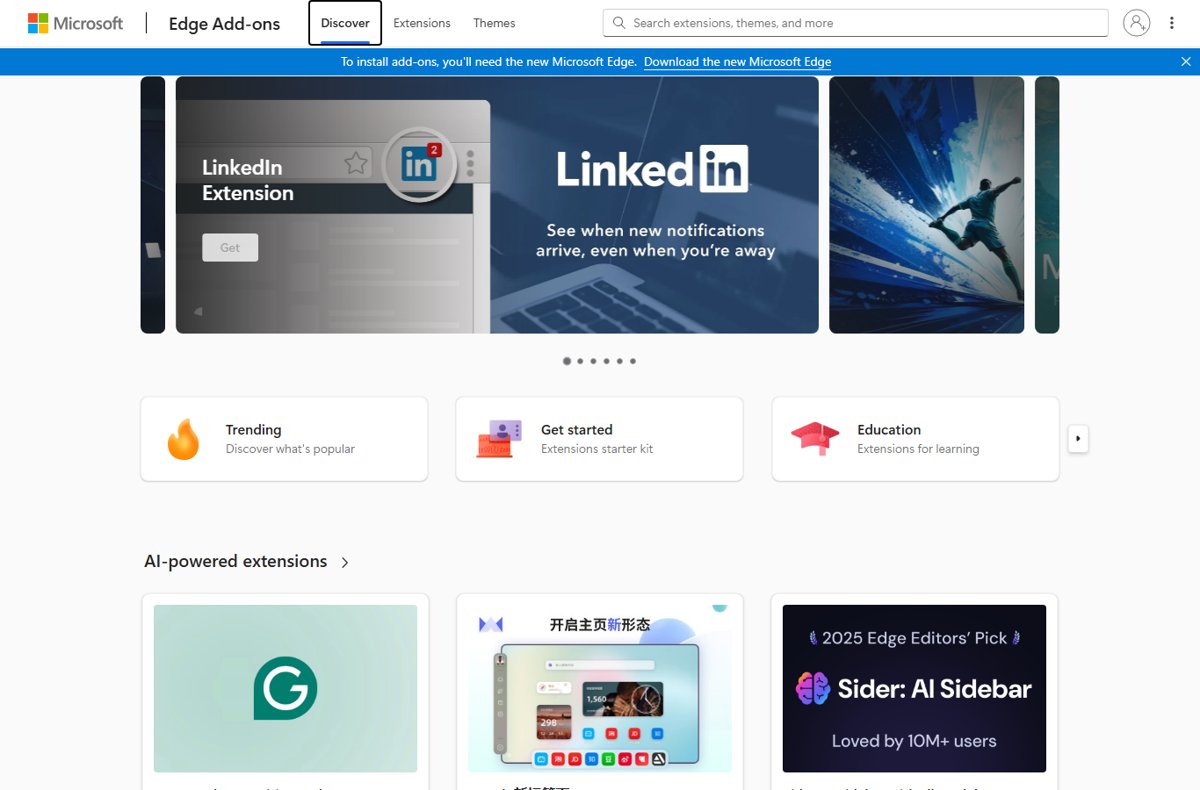
Where to Find the Complete Microsoft Edge Extension Catalog
Microsoft's developer documentation names one official source: users browse and install Edge extensions and themes from the Microsoft Edge Add-ons website. No other page holds the full list.
- In Microsoft Edge, select Extensions (the puzzle piece icon) to the right of the address bar.
- Select Get Extensions for Microsoft Edge to open the Edge Add-ons store.
- Select Extensions at the top of the store to see the category list on the left.
- Pick a category, or type a name into the Search extensions, themes, and more box.
- Open a listing, select Get, review the permissions, then select Add extension.
Option 2 is the Chrome Web Store. Edge runs Chrome extensions too, because both browsers are built on Chromium. When Edge asks, select Allow extensions from other stores, then Allow, before selecting Add extension.
How Microsoft Edge Extensions Are Organized
The store splits extensions into 12 categories. The counts below are the totals each category page showed in September 2026; they change daily as developers publish and remove listings.
| Store category | Extensions listed (Sept 2026) | Examples from the category page |
|---|---|---|
| Accessibility | 1,771 | Read Aloud, Read&Write for Microsoft Edge, Turn Off the Lights |
| Blogging | 116 | Image Downloader, The Passle Button, Writecream |
| Communication | 436 | Cisco Webex Extension, Zoom Edge Extension, Mailvelope, KeePassXC-Browser |
| Developer tools | Count did not load | React Developer Tools, Web Developer (found through store search) |
| Entertainment | 4,197 | Teleparty, SponsorBlock for YouTube, Ruffle, Xbox New Tab |
| News & weather | Count did not load | Browse the category page directly |
| Photos | 2,923 | Hover Zoom+, OCR – Image Reader, Tabliss |
| Productivity | 4,946 | Grammarly, Zotero Connector, 1Password, uBlock Origin Lite |
| Search tools | Count did not load | Browse the category page directly |
| Shopping | 926 | Capital One Shopping, PayPal Honey, Rakuten, Keepa |
| Social | 722 | Save to Pinterest, LinkedIn Extension, TubeBuddy for YouTube |
| Sports | 92 | Sauce for Strava, FPL Tools, Chess Analyzer |
Categories overlap in practice. Password managers and ad blockers sit under Productivity, not a security category, which is why search finds them faster than browsing.
Extensions Microsoft publishes itself
Searching the store for the publisher name "Microsoft Corporation" returned 23 extensions in September 2026, plus themes. These are the main ones; Xbox New Tab is included because its listing calls itself an official Microsoft extension.
| Extension | What the listing says it does |
|---|---|
| Microsoft Bing Homepage | Adds the daily Bing image and trending searches to your homepage |
| Microsoft Bing Homepage and Search Engine | Sets Bing as your default homepage and search engine |
| Microsoft Bing AI Search Choice | Sets Bing as default search and controls AI summaries in Bing results |
| MSN Homepage | Sets MSN as your homepage |
| MSN Homepage & Bing Search Engine | Sets MSN as homepage and Bing as search engine |
| OneNote Web Clipper | Saves pages, text and images from the web to OneNote |
| LinkedIn Extension | Shows a notification count for new LinkedIn activity |
| Microsoft WowTab | A customizable new tab page built by Microsoft |
| Xbox New Tab | Keeps Xbox content in your new tab; the listing calls it an official Microsoft extension |
| Microsoft Solitaire Collection with Search | Solitaire Collection games paired with Microsoft Search |
| Accessibility Insights for Web | Helps developers find and fix accessibility issues |
| Test & Feedback | Captures findings and files issues from the browser for software teams |
| Microsoft Dragon Copilot Web Extension | An AI assistant for clinical workflows |
Many listings with "Microsoft" in the name are not from Microsoft. Add to Microsoft To Do, for example, is published by an independent developer. Check the publisher line under the title before installing.
Productivity and Workflow Extensions
| Extension (publisher, where the store search showed it) | What it does |
|---|---|
| Grammarly: AI Writing and Grammar Checker App | Grammar, clarity and tone suggestions as you type |
| Zotero Connector | Saves references from web pages to your Zotero library |
| OneTab (OneTab Ltd) | Collapses open tabs into a single list to cut memory use |
| Tampermonkey | Runs user scripts that change how specific sites behave |
| SAP GUI connector for Microsoft Edge | Opens SAP HTML applications in Edge through SAP GUI for Windows |
| Okta Browser Plugin | Signs you in to work apps managed by Okta |
| WPS PDF Reader & Editor | Views, edits, converts and signs PDF files |
Category pages show names but not publishers, so open each listing and read the publisher line under the title before you select Get.
Password Managers and Security Extensions
Every major password manager has an Edge listing. Most need the vendor's account or desktop app; the extension only fills and saves logins.
| Extension (publisher, where the store search showed it) | Type |
|---|---|
| Bitwarden Password Manager (Bitwarden Inc) | Password manager |
| 1Password – Password Manager (AgileBits Inc.) | Password manager |
| LastPass: Free Password Manager (LastPass) | Password manager |
| Keeper® Password Manager & Digital Vault (Keeper Security Inc) | Password manager |
| Proton Pass: Free Password Manager (Proton AG) | Password manager |
| RoboForm Password Manager (Siber Systems Inc) | Password manager |
| Enpass Password Manager (Enpass Technologies Private Limited) | Fills logins from the Enpass desktop app |
| KeePassXC-Browser | Connects to the KeePassXC desktop app |
| Avira Password Manager (Avira) | Password manager |
| Norton Safe Web | Warns about dangerous sites while you browse |
| Malwarebytes Browser Guard | Blocks malware, scams, phishing and trackers |
| Avast Online Security & Privacy | Site reputation ratings and phishing warnings |
Edge already includes a password manager with a password generator, and Microsoft Defender SmartScreen checks sites against phishing and malware lists. Add a third-party manager only if you use it on other browsers or devices.
Privacy, Tracking Protection, and Ad Blockers
A search for "ad blocker" returned 234 results in September 2026. Many share near-identical names, so pick by publisher, not by title.
| Extension (publisher, where the store search showed it) | What it blocks |
|---|---|
| uBlock Origin Lite (Raymond Hill (gorhill)) | Ads, trackers and miners, working from install |
| Adblock Plus – free ad blocker (eyeo GmbH) | Ads on YouTube and other sites |
| AdBlocker Ultimate (AdAvoid Ltd) | Ads on YouTube, Facebook and other sites |
| Ghostery AdBlocker for Privacy (Ghostery GmbH) | Ads and trackers |
| Privacy Badger (Electronic Frontier Foundation) | Learns and blocks hidden trackers |
| DuckDuckGo Search & Tracker Protection (Duck Duck Go Inc) | Trackers, plus private search |
| Norton VPN with Ad Blocker (NortonLifeLock Inc.) | Controls Norton VPN and its ad blocker |
Note that uBlock, published by uBlock, LLC, is a different product from Raymond Hill's uBlock Origin Lite. Edge's own tracking prevention also blocks known trackers at three levels: Basic, Balanced and Strict.
Shopping, Coupons, and Price Tracking
| Extension | What it does |
|---|---|
| PayPal Honey: Automated Coupons & Rewards | Applies coupons and earns rewards at checkout |
| Capital One Shopping: Save Now | Looks for lower prices and savings while you shop |
| Rakuten: Get Cash Back For Shopping | Earns cash back on partner store sites |
| Coupert – Automatic Coupon Finder & Cash Back | Tests coupon codes and adds cash back |
| Keepa – Amazon Price Tracker | Adds price history charts and price drop alerts to Amazon |
Shopping extensions need permission to read the store pages you visit. That is expected for coupon tools, but it is a reason to install only one of them.
AI, Writing, and Research Extensions
A search for "ai" returned 698 results, the busiest part of the store. Many are small tools wrapping the same models, so these are listings with a clear, stated job.
| Extension (publisher, where the store search showed it) | What it does |
|---|---|
| Grammarly: AI Writing and Grammar Checker App | AI writing support from draft to final edit |
| Sider: AI sidebar with all models | A sidebar for several chat models, for search, reading and writing |
| MaxAI: Ask AI anything as you browse (MaxAI) | Helps you read, write and search on any page |
| DeepL: translate and write with AI (DeepL SE) | Translation plus writing suggestions |
| AIPRM for ChatGPT (AIPRM) | Adds curated prompt templates to ChatGPT |
| NoteGPT: YouTube Summary, Chat with AI Assistant (AI Helper) | Summarizes YouTube videos into notes |
Edge has Copilot built in, with page summarization and Compare across tabs. Try those before adding a sidebar extension that reads every page you open.
Translation and Language Learning Extensions
| Extension (publisher, where the store search showed it) | What it does |
|---|---|
| DeepL: translate and write with AI (DeepL SE) | Translates while you read and write |
| Immersive Translate: AI Web, PDF & Video Translator (Immersive Translate) | Bilingual translation of pages, PDFs, eBooks and subtitles |
| Simple Translate (Sienori) | Translates selected or typed text with Google Translate or the DeepL API |
| 10ten Japanese Reader (Rikaichamp) (Birchill) | Translates Japanese words when you hover over them |
| Dual Subtitles & AI Translation – InterSub (InterSub Inc.) | Shows two subtitle languages for language learning |
| Speech Translator | Translates video, audio and livestreams in real time |
Whole-page translation is built into Edge. Microsoft says it did not carry Microsoft Translator over as an extension for that reason; use the translate icon in the address bar or the right-click menu.
Tab Management and Browser Customization
| Extension (publisher, where the store search showed it) | What it does |
|---|---|
| OneTab (OneTab Ltd) | Turns open tabs into a saved list |
| tabExtend – Easy Tab manager (Aconiti Interfaces AB) | Saves tabs and tab groups to a new tab dashboard |
| Microsoft WowTab (Microsoft Corporation) | Customizable new tab page |
| Custom New Tab URL (Zach Adams) | Opens a URL you choose in every new tab |
| Tabliss – A Beautiful New Tab | New tab backgrounds and widgets with no permissions |
| Dark Reader | Dark mode for every website |
| Dark Mode – Night Eye (Promotino Ltd.) | Dark mode with brightness, contrast and scheduling controls |
Edge turns off an extension that changes your search engine, new tab page or site preferences without permission. If a new tab extension vanishes after install, turn it back on in Manage extensions.
Developer and Web Design Extensions
The Developer tools category page did not load during checking, so these come from store search results.
| Extension (publisher, where the store search showed it) | What it does |
|---|---|
| React Developer Tools (Meta Platforms, Inc.) | Adds React debugging panels to Edge DevTools |
| Web Developer (Chris Pederick) | Toolbar button with web developer tools |
| Accessibility Insights for Web (Microsoft Corporation) | Finds and fixes accessibility issues |
| Test & Feedback (Microsoft Corporation) | Captures findings and creates issues for a team |
| Tampermonkey | User script manager |
| Amazon Q Developer | GitHub issue helper (Amazon Q Developer) | Assigns GitHub issues to Amazon Q Developer |
| daily.dev (Daily Dev Ltd.) | Developer news in every new tab |
Accessibility Extensions
| Extension (publisher, where the store search showed it) | What it does |
|---|---|
| Read Aloud: A Text to Speech Voice Reader (LSD Software) | Reads the current article aloud in 40+ languages |
| Read&Write for Microsoft Edge | Reading and writing support for school and work |
| Dark Reader | Dark theme for every site |
| Turn Off the Lights | Dims the page around a video |
| Reader View (Bermet) | Removes clutter and adjusts text size, contrast and layout |
| Accessibility Insights for Web (Microsoft Corporation) | Accessibility testing for developers |
Edge's own Reading mode (Immersive Reader, F9) includes Read Aloud, text spacing and page translation, so many readers need no extension here.
Video, Music, and Media Extensions
| Extension (publisher, where the store search showed it) | What it does |
|---|---|
| Global Speed – Video Speed Control (polywock) | Speed control for video and audio on any site |
| SponsorBlock for YouTube – Skip Sponsorships | Skips sponsor segments in YouTube videos |
| Netflix Party is now Teleparty | Synced watch parties |
| Video Popout (Leonardo Compson) | Pops any video into a floating window |
| Open in VLC media player | Sends streams to the VLC desktop player |
| Ruffle – Flash Emulator | Plays old Flash content |
| Keyboard & Mouse for Xbox Cloud Gaming (xCloud) | Keyboard and mouse input for Xbox Cloud Gaming |
The store also lists many video downloaders. Downloading from streaming services can break their terms of service, so check the site's rules first.
Social Media and Communication Extensions
| Extension (publisher, where the store search showed it) | What it does |
|---|---|
| Cisco Webex Extension | Joins Webex meetings from the browser |
| Zoom Edge Extension | Schedules Zoom meetings from Google Calendar |
| LinkedIn Extension (Microsoft Corporation) | Badge count for new LinkedIn activity |
| Save to Pinterest | Saves images from any page to Pinterest boards |
| TubeBuddy for YouTube | Channel tools and insights for YouTube creators |
| Mailvelope – Secure your email with PGP | PGP encryption for Gmail, Outlook and other webmail |
| 3CX Click2Call | Click-to-call from websites for 3CX phone users |
The LinkedIn listing dates back to Microsoft's 2020 release; the original LinkedIn extension launch covers what it first offered.
SEO, Marketing, and Analytics Extensions
| Extension (publisher, where the store search showed it) | What it does |
|---|---|
| Similarweb – Website Traffic, AI Traffic & SEO Checker (Similarweb) | Traffic estimates and SEO metrics for any site |
| SEOquake (SEOquake) | SEO metrics, SERP overlays and page audits |
| SEO Manager by Seobility (Seobility GmbH) | Shows title, description, canonical, robots and headings |
| Sprout SEO Extension (User Growth) | One-click on-page SEO insights |
Education, Reading, and Note-Taking Extensions
| Extension (publisher, where the store search showed it) | What it does |
|---|---|
| OneNote Web Clipper (Microsoft Corporation) | Clips pages and images into OneNote |
| Zotero Connector | Saves citations for research papers |
| Read&Write for Microsoft Edge | Literacy support for students |
| Note Sidebar for Microsoft Edge (Stefan vd) | A sidebar notepad for quick notes and to-do lists |
| EPUBReader (epubreader) | Opens EPUB books in the browser |
| Voice In – Voice Typing & Speech-to-Text Dictation (Dictanote) | Dictation in 50+ languages on most sites |
The store's home page also runs an Education collection titled "Extensions for learning".
How to Manage Extensions in Microsoft Edge
Every control lives in one place: Settings and more (…) > Extensions > Manage extensions.
| Task | Where to do it |
|---|---|
| Disable an extension | Manage extensions, then turn off its toggle |
| Remove an extension | Right-click its icon > Remove from Microsoft Edge > Remove |
| Change site access | Extensions > More actions next to it > This can read and change site data > When you click the extension, On [current site] or On all sites |
| Allow it in InPrivate | Manage extensions > Details > Site access section |
| Show its icon in the toolbar | The Extensions menu lets you keep an extension's icon visible next to the address bar |
| Report a bad extension | Sign in to the Edge Add-ons site, open its listing, select Report abuse |
To test Edge with every extension off at once, launch Microsoft Edge without extensions.
How to Choose Safe Microsoft Edge Extensions
An extension can read the pages you visit, so the store listing is your only chance to check it before it runs.
- Install from the Edge Add-ons store, or the Chrome Web Store for extensions missing from Edge. Avoid files from other sites.
- Read the publisher line under the extension name. Match it to the real company, such as Bitwarden Inc or AgileBits Inc.
- Look for the Featured badge. Microsoft gives it to extensions verified against its best practices, though it is not a safety guarantee.
- Read the permission prompt before selecting Add extension. Cancel if a simple tool wants to read all your sites.
- After install, limit site access to When you click the extension for tools you use occasionally.
- Remove extensions you no longer use from Manage extensions.
Treat a "managed by your organization" extension on a personal PC as a warning sign. Microsoft advises running a full Microsoft Defender scan.
Best Built-In Edge Features That Replace Some Extensions
Microsoft lists these as built-in Edge features. Each one does a job people often install an extension for.
| If you want | Extension type it can replace | Built-in Edge feature |
|---|---|---|
| Fewer trackers | Tracker blockers | Tracking prevention: Basic, Balanced or Strict in Settings > Privacy, search, and services |
| Strong passwords | Password generators | Password generator and passkey support |
| Phishing and scam warnings | Site safety checkers | Microsoft Defender SmartScreen and scareware blocker |
| Pages in your language | Translators | Built-in page translation from the address bar |
| Clutter-free reading or listening | Reader view and text-to-speech | Reading mode (Immersive Reader) with Read Aloud |
| Summaries and AI help | AI sidebars | Copilot in Edge and summarization |
| Two pages side by side | Split view tools | Split screen |
| Organized tab sets | Tab managers | Workspaces and tab search |
| Safer public Wi-Fi | Browser VPNs | Edge Secure Network |
| A custom look | Theme extensions | AI theme generator and Edge themes |
How to see every extension installed in your Edge
- Select Settings and more (…) in the top-right corner of Edge.
- Select Extensions, then Manage extensions.
- Check each extension's toggle: on means it is running, off means it is installed but disabled.
- Look for a briefcase logo next to a toggle. That marks an extension your organization's policy installed.
- Select Details on any entry to see its site access and permissions.
Fix extension problems in Microsoft Edge
Edge turned off an extension you installed
Edge disables extensions that change your search engine, new tab page or site preferences without permission.
- Select Settings and more > Extensions > Manage extensions.
- Find the disabled extension and turn its toggle on.
- Recheck Settings > Privacy, search, and services > Search engine and Start, home, and new tab page.
An extension is not working
It is disabled, outdated, or missing a site permission.
- Confirm it is turned on in Manage extensions.
- Turn it off and on again.
- Open Details and check that Site access covers the site you are on.
- If it still fails, repair the extension or remove and add it again from the store.
An extension says "managed by your organization" on a personal PC
A policy installed it, which can be a sign of malware.
- Run a full scan with Microsoft Defender.
- Open
edge://policyand look for extension entries such as ExtensionSettings. - If the problem remains, reset Microsoft Edge.
An extension you used before is missing from the Edge store
Its developer never published it on Edge Add-ons.
- Search the Chrome Web Store for the same extension.
- Select Get, then Allow extensions from other stores > Allow.
- Review the permissions and select Add extension.
What Is the Actual Complete List?
Use the Edge Add-ons store as the complete list, and browse it by category or search by publisher name. No static article can list every Edge extension. The store adds and removes listings daily, and its Productivity and Entertainment categories alone held more than 9,000 extensions in September 2026. The Chrome Web Store adds thousands more that Edge can also run.
Frequently Asked Questions
The first six questions come from Bing autocomplete; the last two are the extension questions this list raises most directly.
Which version of Microsoft Edge do I have?
Select Settings and more > Help and feedback > About Microsoft Edge. The page at edge://settings/help shows your version number and whether Edge is up to date.
How do I get the latest Microsoft Edge?
Open About Microsoft Edge from Help and feedback. If it says An update is available, select Download and install, then Restart when asked.
Do I have the latest Microsoft Edge?
Yes, if About Microsoft Edge shows Microsoft Edge is up to date. If it shows To finish updating, restart Microsoft Edge, select Restart to apply the downloaded version.
Is Edge part of Microsoft?
Yes. Microsoft Edge is Microsoft's own web browser, and Microsoft runs its extension store, the Edge Add-ons website at microsoftedge.microsoft.com. Microsoft also publishes its own Edge extensions, such as OneNote Web Clipper.
What is included in Microsoft Edge?
Edge includes Copilot, tracking prevention, a password generator, Reading mode with Read Aloud, page translation, split screen, workspaces, Edge Secure Network and Microsoft Defender SmartScreen. Extensions add anything else.
Does Microsoft Edge include Microsoft Office?
No. Edge is a web browser and does not include Word, Excel or PowerPoint. You can open the web versions of those apps in Edge like any other site.
Can I install Chrome extensions in Microsoft Edge?
Yes. Open the extension in the Chrome Web Store, select Get, then Allow extensions from other stores and Allow. Review the permissions and select Add extension.
What does the Featured badge on an Edge extension mean?
It marks an extension that follows Microsoft's recommended practices and has been verified by an automated review. Microsoft says the badge is not a safety judgment and can be removed later.







Start Coding in Your Browser With Microsoft Visual Studio Online - Techdows
[…] The vscode.dev extension for Chrome and Edge adds an address-bar shortcut: type code, then a repository name. It sits alongside the others in the complete list of Microsoft Edge browser extensions. […]
Microsoft Edge Add-ons Store gets a redesign, offers Trending and Get Started sections - Techdows
[…] the new Microsoft Edge browser, you need to visit the new ‘Get started’ page to try out some of the extensions Microsoft recommends that were chosen from Editors […]