To delete a WhatsApp contact, search for the person in the Chats tab, open their name at the top of the chat, and choose Delete (Android sends you to the phone's address book to finish).
This guide covers Android, iPhone and WhatsApp Web, contacts saved only to your WhatsApp account, and when blocking or deleting the chat is the better move.
The fastest way to delete a WhatsApp contact
Every route starts the same way: search for the person in Chats, then open their name at the top of the chat. The last taps differ by device.
| Your device | Path after opening the contact's name | What gets deleted |
|---|---|---|
| Android phone | Three-dot menu > View in address book > Delete > Delete | The entry in your phone's address book |
| iPhone | Edit > Delete Contact > Delete | The WhatsApp contact, plus the phone entry if it was synced to your address book |
| WhatsApp Web in a browser | Contact info panel > Delete | The contact saved to your WhatsApp account |
Deleting a contact never deletes your chat history with that person. Remove the conversation separately if you want it gone too.
How WhatsApp Contacts Work
WhatsApp now keeps contacts in two places, and knowing which one holds a person decides where you delete them.
Contact upload is optional. It syncs your phone's address book to find people who use WhatsApp, and it can save contacts to your WhatsApp account so they come back on a new phone or a linked device.
| Where the contact lives | How it got there | Where to delete it |
|---|---|---|
| Phone address book only | You saved the number in your phone's Contacts app | The phone's Contacts app, or through WhatsApp's View in address book on Android |
| WhatsApp account only | You added it in WhatsApp with Sync contact to phone turned off | Inside WhatsApp, or Settings > Privacy > Contacts |
| Both places | Synced from your address book, or saved with Sync contact to phone on | Delete it in WhatsApp and check the phone's address book afterwards |
| Not saved anywhere | Someone messaged you and you never saved them | Nothing to delete; you see a number instead of a name, so delete the chat or block them |
New contacts added in WhatsApp have the sync option off by default, so they stay WhatsApp-only unless you switch it on. Contacts that came from your address book stay saved to your account even if you later turn address book syncing off.
Delete, block, or clear the chat: which one you need
| What you want | Do this | What it does not do |
|---|---|---|
| Remove the name from your contact list | Delete the contact | It does not stop their messages or delete your chat history |
| Stop someone messaging or calling you | Block them | It does not remove them from your contacts or remove you from theirs |
| Get the conversation off your Chats tab for good | Delete the chat | It cannot be undone, and WhatsApp cannot recover it for you |
| Hide the conversation but keep it | Archive the chat | It does not delete anything or block the person |
| Flag spam or abusive content | Report them, with or without blocking | The person is not notified that you reported them |
How To Delete a WhatsApp Contact on Android
On Android, WhatsApp hands the final step to your phone's own address book, so the contact disappears from both.
- Open WhatsApp and go to the Chats tab.
- Tap the search bar, enter the person's name, then tap the contact.
- Tap the contact's name at the top of the chat.
- Tap the three-dot menu, then tap View in address book.
- Tap Delete, then tap Delete again to confirm.
You can also delete the entry directly in the Android Contacts app. WhatsApp reads the same address book, so the result is the same.
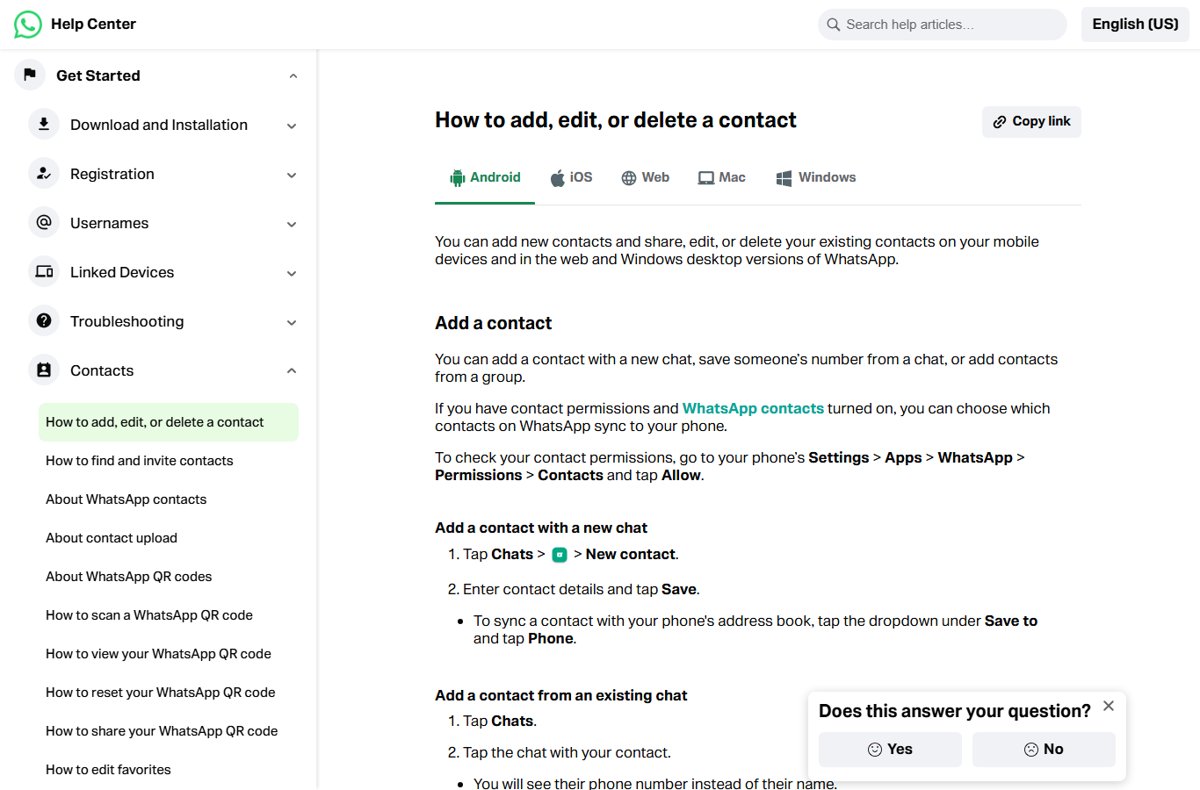
How To Delete a WhatsApp Contact on iPhone
The iPhone app deletes the contact from inside WhatsApp, with no detour to the Contacts app.
- Open WhatsApp and tap the search bar in Chats.
- Enter the person's name and tap the contact.
- Tap their name at the top of the chat.
- Tap Edit.
- Tap Delete Contact, then tap Delete to confirm.
If you synced this contact to your phone by turning WhatsApp contacts on, the entry is deleted from your iPhone's address book as well.
How to delete a WhatsApp contact on a laptop with WhatsApp Web
WhatsApp Web and the Windows desktop app both let you add, edit and delete contacts. The steps below are the browser version at web.whatsapp.com. If you use the Windows app, this hands-on look at WhatsApp for Windows 11 and Windows 10 covers it.
- Open WhatsApp Web and go to the Chats tab.
- Click the search bar, enter the person's name, then click the contact's name.
- Click the contact's name at the top of the chat to open the contact info panel.
- Use the icons in that panel to reach Delete, then click Delete to confirm.
Like on a phone, this removes the contact but leaves the chat history in place.
How to delete contacts saved only to your WhatsApp account
Contacts saved to your WhatsApp account come back after a reinstall or on a new phone. To remove them from the account itself, use the privacy settings.
- Open WhatsApp Settings.
- Tap Privacy, then tap Contacts.
- Delete individual contacts there, or turn off saving contacts to your WhatsApp account.
- Confirm the change when WhatsApp asks.
Turning off saving deletes every contact stored in your WhatsApp account, including ones synced from your address book. Save any WhatsApp-only contact you want to keep to your phone's address book first.
How To Remove a Contact From WhatsApp Without Deleting Their Number
If you want the person off your Chats tab but still want their number saved, delete or archive the chat and leave the contact alone.
| Goal | Android | iPhone |
|---|---|---|
| Delete the chat, keep the number | In Chats, tap and hold the chat, tap the three-dot menu > Delete chat | In Chats, swipe left on the chat, tap More > Delete chat > Delete chat |
| Hide the chat, keep everything | In Chats, tap and hold the chat, then tap the archive icon at the top | In Chats, swipe left on the chat and tap Archive |
| Find an archived chat again | Scroll to the top of Chats and tap Archived | Tap Archived at the top of the Chats screen |
Archived chats stay archived when a new message arrives, because Keep chats archived is on by default. You also get no notifications for archived chats unless you are mentioned or replied to.
How To Block or Report a WhatsApp Contact
Blocking stops messages, calls and status updates from that person. It hides your last seen, online status, status updates and profile photo changes from them, but it does not delete the contact.
| Device | Block from the chat | Delete a blocked contact |
|---|---|---|
| Android | Open the chat, tap the three-dot menu > More > Block > Block; clear Report to WhatsApp if you only want to block | Open the chat, tap the name, tap the three-dot menu > View in address book, then Delete > Delete |
| iPhone | Tap the contact's name, then Block {contact name} > Block, or Block and report | Settings > Privacy > Contacts > Blocked, tap the name > Edit > Delete contact |
| WhatsApp Web | Open the chat's menu or contact info, click Block > Block; tick Report to WhatsApp to report as well | Delete the contact from the phone's address book |
When you report someone, WhatsApp receives up to the last five messages they sent you, and the person is not notified. Report when the content is spam, a scam or abuse; block alone when you simply want quiet.
Blocking does not stop you seeing each other's messages in a group you both belong to. If you set up a new WhatsApp account, block those people again.
How to check the contact is really gone
- In WhatsApp, tap the search bar in Chats and enter the person's name; no contact result should appear.
- If an old chat still shows, open it; it should show their phone number instead of their name.
- Open your phone's Contacts app and search for the same name to confirm the address book entry is gone.
- If you use linked devices, check the contact list on WhatsApp Web as well.
Why Deleted Contacts Still Appear in WhatsApp
The chat thread still exists
Deleting a contact never deletes the chat history with that person.
- Go to the Chats tab and find the conversation.
- On Android, tap and hold it, then tap the three-dot menu > Delete chat.
- On iPhone, swipe left on it and tap More > Delete chat > Delete chat.
The number is still saved somewhere else
The contact is also saved to your WhatsApp account, or to an address book account your phone syncs.
- Open WhatsApp Settings > Privacy > Contacts and delete the contact from your WhatsApp account.
- Open your phone's Contacts app, search for the name, and delete any remaining entry.
- If your phone syncs contacts from Outlook.com, remove leftover copies there too; this guide to cleaning up duplicate Outlook.com contacts covers it.
WhatsApp has not refreshed its contact list
WhatsApp reads your address book on its own schedule, typically daily.
- Close WhatsApp fully and open it again.
- Check that WhatsApp still has permission to read your contacts (see the next section).
- Search for the name in Chats again.
The contact appears on WhatsApp Web or Desktop
Contacts saved to your WhatsApp account are restored to linked devices.
- Delete the contact from your WhatsApp account under Settings > Privacy > Contacts.
- Reopen WhatsApp Web or the desktop app and search for the name.
The person contacted you again
Deleting a contact does not stop someone who has your number from messaging you.
- Open the new chat from that number.
- Block the number using the steps for your device above.
- Tick Report to WhatsApp if the messages are spam or abusive.
How To Refresh or Sync WhatsApp Contacts
WhatsApp only shows names from your address book when it has permission to read it. Checking that permission is the fix when names vanish or old ones stick around.
- On Android, open the phone's Settings > Apps > WhatsApp > Permissions > Contacts and tap Allow.
- On iPhone, open Settings > Apps > WhatsApp > Contacts and select Full Access.
- Reopen WhatsApp so it reads the address book again.
- To copy a WhatsApp-only contact into your phone, open the contact, tap Edit and turn on Sync contact to phone.
- To add someone back after deleting them, open their chat, tap their number and tap Add (Android) or Create new contact (iPhone).
Frequently Asked Questions
How do I delete WhatsApp contacts permanently?
Delete the contact in WhatsApp, then remove any leftover copy under Settings > Privacy > Contacts and in your phone's Contacts app. Contacts saved to your WhatsApp account otherwise come back after a reinstall or on a linked device.
How do I delete WhatsApp contacts on Android?
Search for the person in Chats, open the chat, tap their name, then tap the three-dot menu > View in address book > Delete > Delete. This removes the entry from your phone's address book, which WhatsApp reads.
How do I delete a WhatsApp contact on a laptop?
In WhatsApp Web, search for the person in Chats, click their name at the top of the chat, and choose Delete in the contact info panel. The contact is removed, but your chat history with them stays until you delete the chat.
How do I delete a WhatsApp contact number that is not saved?
An unsaved number is not a contact, so there is nothing to delete; WhatsApp just shows the number instead of a name. Delete the chat to remove it from your Chats tab, or block the number to stop further messages and calls.
Can I delete all contacts on WhatsApp at once?
Yes, for contacts saved to your WhatsApp account: turn off saving contacts under Settings > Privacy > Contacts, which deletes them all. Contacts in your phone's address book must be deleted in the phone's Contacts app instead.
How do I delete a blocked contact on WhatsApp?
On iPhone, go to Settings > Privacy > Contacts > Blocked, tap the name, then Edit > Delete contact. On Android, open their chat, tap the name, tap the three-dot menu > View in address book, then Delete. The person stays blocked.
Does deleting a contact on WhatsApp delete it from my phone?
Usually yes. On Android the deletion happens in the phone's address book. On iPhone, a contact synced to your address book is deleted there too, while a WhatsApp-only contact exists only in WhatsApp.
Does deleting a WhatsApp contact delete our chat?
No. Deleting a contact leaves the chat history in place, and the chat then shows the phone number instead of a name. Delete the chat separately if you want the conversation gone.
Bottom Line
Delete the contact from inside WhatsApp, then check Settings > Privacy > Contacts so no copy survives in your WhatsApp account. WhatsApp stores contacts in your address book and in your account, and a copy left in either one brings the name back. If the goal is to stop contact rather than tidy your list, block the person instead, because deleting a contact does not stop their messages.




![Unable to accept invite in Discord [Fix]](https://techdows.com/wp-content/uploads/2026/10/Unable-to-accept-invite-in-Discord-Fix-1-600x338.jpg)

How Does WhatsApp Work? (A Beginner’s Guide) - Techdows
[…] come from your phone's address book, so tidy that first. How To Delete WhatsApp Contacts covers clearing old […]