You can post anonymously on Facebook only inside a group whose admins allow it: open the group, select Write something, and turn on the Post anonymously toggle before you post.
This guide covers the steps on a computer and in the app, anonymous comments, the admin setting that controls the feature, other ways to limit who sees your name, and fixes when the option is missing.
How to post anonymously on Facebook: Step-by-step
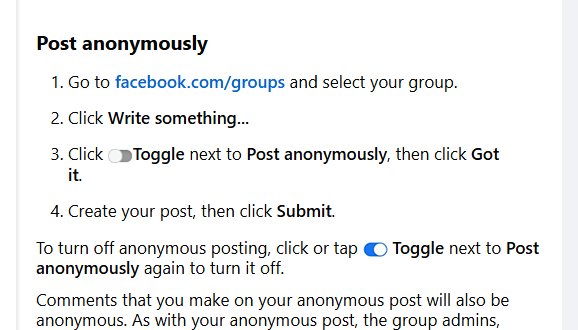
These steps work in a web browser on a PC or Mac. The toggle only appears in groups where anonymous participation is turned on.
- Sign in to facebook.com and select Groups in the left menu.
- Open the group you want to post in.
- Select Write something to start a new post.
- Turn on the Post anonymously toggle.
- Read the notice about anonymous posts if Facebook shows one, then continue.
- Write your post and select Post or Submit.
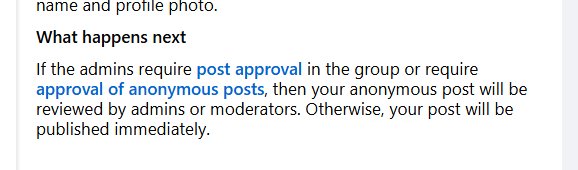
- Wait for an admin to approve the post if the group reviews anonymous posts first.
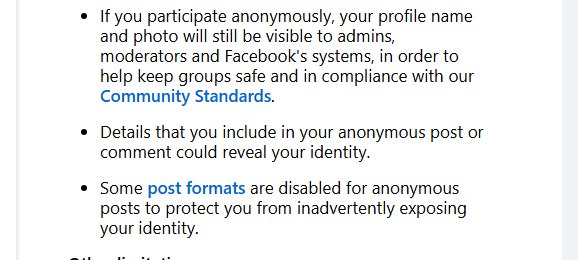
Other members see the post from an anonymous member. Group admins, moderators and Facebook systems can still see your real name and profile photo.
How to post anonymously on the Facebook app for iPhone and Android
- Open the Facebook app and tap the menu, then Groups.
- Open the group you want to post in.
- Tap Write something at the top of the group feed.
- Turn on the Post anonymously toggle.
- Write your post and tap Post or Submit.
- Check the group's pending posts later if the post needs admin approval.
Ways to stay anonymous on Facebook: Quick comparison
Only one of these routes truly hides your name from other members. The others change who sees the post or whose name appears on it.
| Your goal | Use this | What other people see |
|---|---|---|
| Ask a sensitive question in a group | Post anonymously in the group | An anonymous member label instead of your name |
| Reply without your name in a group | Comment as an anonymous member in the app | An anonymous label on the comment |
| Share something under a brand or project name | Post as a Facebook Page you manage | The Page name, not your profile name |
| The group has no anonymous option | Ask a group admin to post for you | The admin's name on the post |
| Limit a post on your own profile | Restrict the audience with the audience selector | Your name, but only to the people you choose |
Why is posting anonymously on Facebook difficult?
Facebook ties every account to a real profile, so anonymity exists in one place only: groups whose admins switch it on.
| Where you post | Anonymous option | Reason |
|---|---|---|
| A Facebook group | Yes, if admins allow it | Admins turn on anonymous participation in group settings |
| Your own profile or timeline | No | Facebook offers only the audience selector there |
| A Facebook Page | No anonymous mode | You can post as a Page you manage, which shows the Page name |
| Comments in a group | Yes in the Android and iOS apps, if allowed | You pick the anonymous identity next to the comment box |
| Group admins and Facebook | Never anonymous to them | They can still see your name and profile photo |
How to comment anonymously on a Facebook group post
Anonymous comments follow the same admin setting as anonymous posts. Facebook describes this option in its Android, iPhone and iPad apps.
- Open the Facebook app and go to the group post.
- Tap Comment.
- Tap your profile picture next to the comment box.
- Select anonymous member or anonymous participant.
- Type your comment and send it.
How to allow anonymous posts in a Facebook group you admin
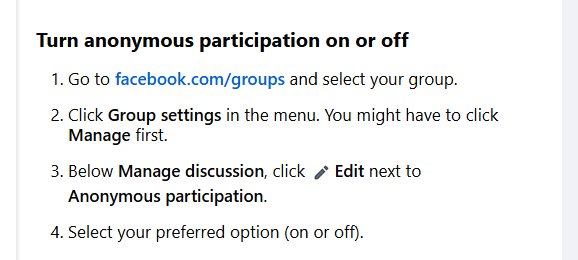
If you run the group, you decide whether members can post anonymously. You can also require admin review before anonymous posts go live.
- On a computer, open your group and select Group settings.
- Find the Manage discussion section.
- Select Edit next to Anonymous participation and choose On.
- In the app, tap Manage group, then Group settings.
- Tap Anonymous participation under Manage discussion and select On.
- Review anonymous posts in Pending posts if you set them to need approval.
If Anonymous participation does not appear, the feature may not be available for that group yet.
Alternative solutions
When the group has no anonymous toggle, these options keep your name off the post or limit who reads it.
| Alternative | How to do it | Limit |
|---|---|---|
| Post from a Facebook Page | Switch to a Page you have Facebook access to and post as that Page | A Page can only post or comment on other Pages, not on personal profiles |
| Ask an admin to post on your behalf | Message a group admin with the text you want shared | The admin knows who sent it |
| Restrict your post's audience instead | Pick Friends, specific friends or Only me with the audience selector | Your name stays on the post |
| Limit who posts on your timeline | Change who can post on your profile in Profile and tagging settings | Controls others' posts, not your own name |
Confirm your anonymous Facebook post was published
- Open the group and look for your post in the feed.
- Confirm the author shows as an anonymous member instead of your name and photo.
- If the post is missing, check the group's Pending posts for your submission.
- Wait for admin approval if it is still pending, as admins set that review step.
How to delete an anonymous post on Facebook
- Go to your profile and open Activity Log.
- Select Your Facebook activity, then Groups.
- Select Group posts and comments.
- Find the anonymous post and choose Delete.
Deleting a post removes only that post. If you want your name off Facebook altogether, you can deactivate your Facebook account instead.
Tips for posting anonymously
| Tip | Why it matters |
|---|---|
| Assume admins know it is you | Admins, moderators and Facebook systems can see your name and photo |
| Leave out names, places and details that identify you | Other members can still guess the author from the content |
| Read the group rules first | Admins can decline or remove anonymous posts that break them |
| Follow the Community Standards | Anonymous posts are still reviewed and can be reported |
| Check the toggle before you select Post | A post sent without it shows your real name |
Still not working? Troubleshooting anonymous posts on Facebook
Can't post anonymously in a Facebook group
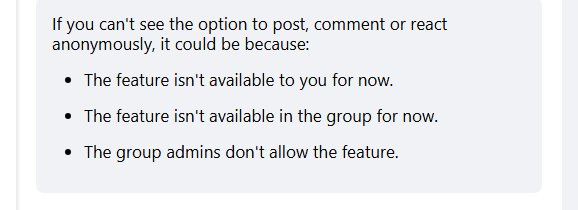
The admins have not turned on anonymous participation, or the feature is not available to you.
- Open the group and select Write something to look for the Post anonymously toggle.
- Ask a group admin to turn on Anonymous participation in Group settings.
- Use one of the alternative solutions if the admin declines.
Why can't I post anonymously on Facebook on my profile or Page?
Anonymous posting exists only inside groups.
- Post the message in a group that allows anonymous posts.
- Or restrict the audience of your profile post with the audience selector.
The anonymous post is stuck in pending
The group requires admin review of anonymous posts.
- Leave the post in the Pending posts queue.
- Message an admin if it stays unapproved for a long time.
No anonymous option when commenting
Anonymous comments need the admin setting and are described for the mobile app.
- Open the post in the Facebook app on Android, iPhone or iPad.
- Tap your profile picture next to the comment box and pick the anonymous identity.
- Update the Facebook app if the option still does not show.
You can't post or comment in the group at all
Facebook or a group admin has temporarily turned off your ability to participate.
- Read any notice in the group about your posting restriction.
- Wait for the restriction to end, or contact a group admin.
Post anonymously on Facebook: Frequently asked questions
Can you post anonymously on Facebook?
Yes, but only in Facebook groups whose admins allow anonymous participation. Select Write something in the group and turn on the Post anonymously toggle. There is no anonymous option for your own profile.
Is an anonymous Facebook post completely invisible to everyone?
No. Other group members cannot see who wrote it, but group admins, moderators and Facebook systems can still see your real name and profile photo.
Why don't I see the anonymous post option in my group?
The group admins have not turned on anonymous participation, or the feature is not available to you or that group yet. Ask an admin to enable it in Group settings under Manage discussion.
Can I comment anonymously on Facebook too?
Yes, in groups that allow it. In the Facebook app on Android, iPhone or iPad, tap your profile picture next to the comment box and select anonymous member or anonymous participant before you send.
Can I post anonymously on my own timeline or a Facebook Page?
No. Anonymous posting works only inside groups. On your profile you can limit the audience with the audience selector, and a Page you manage posts under the Page name.
How do I post anonymously on a Facebook group on PC?
Open the group on facebook.com, select Write something, turn on the Post anonymously toggle, write your post and submit it. The steps match the app.
How long does approval of an anonymous post take?
Facebook sets no fixed time. A post that needs review stays in the group's Pending posts until an admin or moderator approves it, so the wait depends on how active the admins are.
Can I delete an anonymous post later?
Yes. Open Activity Log from your profile, go to Your Facebook activity, then Groups and Group posts and comments, find the post and choose Delete.
Why do people post anonymously on Facebook?
People use anonymous group posts to ask about health, money, relationships or work without their name showing to other members. Admins still see who posted.
Quick summary of anonymous posting on Facebook
Use the Post anonymously toggle in a group that allows it, and treat the post as anonymous to members only. It is the only Facebook feature that removes your name from a post, and admins, moderators and Facebook can still see who you are.