Microsoft Word costs nothing in a browser or on a phone with a free Microsoft account, $9.99 a month or $99.99 a year inside Microsoft 365 Personal, or $179.99 as a one-time Office Home 2024 licence.
Those are Microsoft's United States list prices, checked on 22 September 2026, and this guide covers the free routes, every paid plan, the extra costs and the price differences between countries.
What Microsoft Word costs today
Every figure below comes from Microsoft's own store pages on 22 September 2026.
Microsoft sets prices per country, so a local storefront shows a different number in local currency.
| What you want | Route | US price on 22 September 2026 |
|---|---|---|
| Write and edit documents at no cost | Word for the web with a free Microsoft account | $0 |
| Word on a phone or tablet | The Word mobile app with a free Microsoft account | $0 |
| Desktop Word for one person | Microsoft 365 Personal | $9.99 a month or $99.99 a year |
| Desktop Word for up to six people | Microsoft 365 Family | $12.99 a month or $129.99 a year |
| Desktop Word with the highest Copilot limits | Microsoft 365 Premium | $19.99 a month or $199.99 a year |
| Own the apps outright on one machine | Office Home 2024 | $179.99, paid once |
| Own the apps outright and get Outlook for work | Office Home & Business 2024 | $249.99, paid once |
| Word for a business team | Microsoft 365 Business Basic | $7.00 per user a month, paid yearly |
A reader who only needs to open, edit and share a document can stop here and pay nothing.
Understanding Microsoft Word’s Pricing Structure
Microsoft sells Word three ways, and the price gap between them comes from what each one licenses.
| Licence model | How you pay | Devices covered | What happens next |
|---|---|---|---|
| Free Microsoft account | Nothing at all | Any browser, plus the iOS and Android apps | Stays free, with 5 GB of OneDrive storage |
| Microsoft 365 subscription | Monthly or yearly, renews automatically | Signed in on five devices at once, across PC, Mac, iPhone, iPad and Android | Renews at the regular price until recurring billing is turned off |
| One-time Office 2024 purchase | A single payment | 1 PC or Mac | The classic 2024 apps stay installed, and a second machine needs a second licence |
Copilot in Word is part of the subscription, not the one-time purchase.
The Word apps for Windows and macOS require a Microsoft 365 subscription, which is why the free route runs through the browser.
Pricing Overview
This is every plan Microsoft lists with Word in it, at US prices on 22 September 2026.
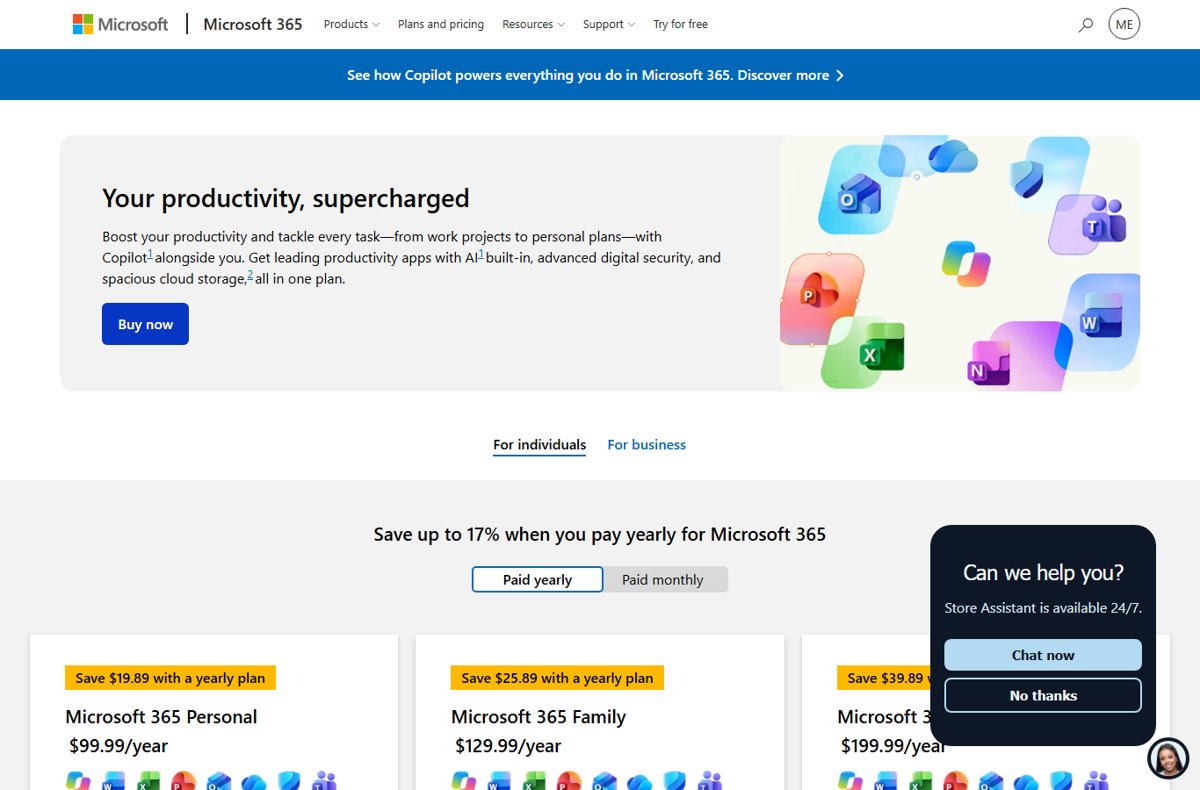
Paying yearly instead of monthly saves $19.89 on Personal, $25.89 on Family and $39.89 on Premium.
| Plan | US price on 22 September 2026 | How Word is included |
|---|---|---|
| Word for the web | Free | Browser only, with basic spelling, grammar and templates |
| Microsoft 365 Personal | $99.99 a year, or $9.99 a month | Desktop, web and mobile Word with Copilot, for 1 person |
| Microsoft 365 Family | $129.99 a year, or $12.99 a month | The same apps for 1 to 6 people, 1 TB of storage each |
| Microsoft 365 Premium | $199.99 a year, or $19.99 a month | The same apps with extensive Copilot usage and agentic AI features |
| Office Home 2024 | $179.99, paid once | Classic 2024 desktop Word, Excel, PowerPoint and OneNote on 1 PC or Mac |
| Office Home & Business 2024 | $249.99, paid once | The Office Home apps plus classic Outlook on 1 PC or Mac |
| Microsoft 365 Business Basic | $7.00 per user a month, paid yearly | Web and mobile Word only, up to 300 users |
| Microsoft 365 Business Standard with Copilot | $23.50 per user a month, paid yearly | Desktop, web and mobile Word with work-grounded Copilot |
| Microsoft 365 Business Premium with Copilot | $32.00 per user a month, paid yearly | The Business Standard apps plus device security and a Windows 11 Pro upgrade |
| Office 365 A1 | Free, donated by Microsoft to eligible institutions | Web Word for students and staff |
| Office 365 A3 | $3.25 per user a month | Desktop Word on up to five PCs or Macs per user |
| Office 365 A5 | $8.00 per user a month | Everything in A3 plus advanced security and analytics |
Microsoft 365 Family covers Word and Excel for six people for $129.99 a year, which is the cheapest way to license a household.
Already sure which one you want? Download Microsoft Word for PC, Windows 11/10 & Mac walks through the install.
Free Alternatives and Trials
Four of these routes are permanent and one is a trial that starts charging unless it is cancelled.
| Free route | Cost | What you get | The catch |
|---|---|---|---|
| Word for the web | $0 | Writing, editing, real-time collaboration and 5 GB of OneDrive storage | Files must be saved in and shared from OneDrive |
| Word for iOS and Android | $0 | Create, review and edit documents on a phone or tablet | Advanced formatting, track changes and Copilot need a subscription |
| Microsoft 365 one-month free trial | $0 for the first month | A full Personal, Family or Premium subscription, desktop apps included | A credit card is required and the trial converts to a paid plan automatically |
| Office 365 A1 through a school | $0 | Web Word, Excel, PowerPoint, OneNote and Outlook for staff and students | The institution has to be eligible and sign up |
| College student offer | $0 for 12 months of Microsoft 365 Premium | The full desktop apps with Copilot | A college email address is needed, and Microsoft calls it a limited-time offer |
Cancel during the trial month to stop the first charge.
How to start using Word free in a browser
This takes about a minute and needs no payment details.
- Open microsoft.com/en-us/microsoft-365/free-office-online-for-the-web in any browser.
- Select Sign up for free, or Sign in if a Microsoft account already exists.
- Select Go to Word under Word for the web.
- Select Blank document to start writing, or open an existing file from OneDrive.
- Select Share to invite someone else into the same document.
New to the interface? Microsoft Word Ribbon Basics (Word for Beginners) explains where the commands sit.
Which Pricing Model is Right for You?
| Your situation | Buy this | Why |
|---|---|---|
| Occasional letters, CVs and school work | Nothing | Word for the web handles them at $0 |
| One person who needs Word offline | Microsoft 365 Personal | $99.99 a year covers desktop Word on five devices |
| A household of three or more | Microsoft 365 Family | $129.99 a year splits across up to six people |
| Heavy Copilot and AI image use | Microsoft 365 Premium | $199.99 a year lifts the usage limits the cheaper plans cap |
| You keep a PC for a long time and dislike renewals | Office Home 2024 | $179.99 once beats $99.99 a year after two years |
| A sole trader who needs desktop Outlook | Office Home & Business 2024 | $249.99 once adds classic Outlook to the same bundle |
| A team that works entirely in the browser | Microsoft 365 Business Basic | $7.00 per user a month includes business email |
| A team that needs installed Word | Microsoft 365 Business Standard with Copilot | $23.50 per user a month adds the desktop apps |
The one-time licence stops making sense the moment a second computer joins the household.
Additional Costs to Consider
The headline price is not always the final price. These are the charges that surprise people.
| Extra cost | When it applies | What it adds |
|---|---|---|
| A second computer | Office Home 2024 and Office Home & Business 2024 each cover 1 PC or Mac | Another $179.99 or $249.99 |
| Monthly billing on Personal | Paying $9.99 a month instead of $99.99 a year | $19.89 more a year |
| Monthly billing on Family | Paying $12.99 a month instead of $129.99 a year | $25.89 more a year |
| Monthly billing on Premium | Paying $19.99 a month instead of $199.99 a year | $39.89 more a year |
| Copilot in Word | Not included with either one-time Office 2024 purchase | A Microsoft 365 subscription on top |
| AI features for other household members | On Family and Premium, AI is for the subscription owner only | A separate subscription per person who needs it |
| Automatic renewal after the trial | The one-month free trial converts unless it is cancelled | The plan's regular price on the renewal date |
How to check what you are actually being charged
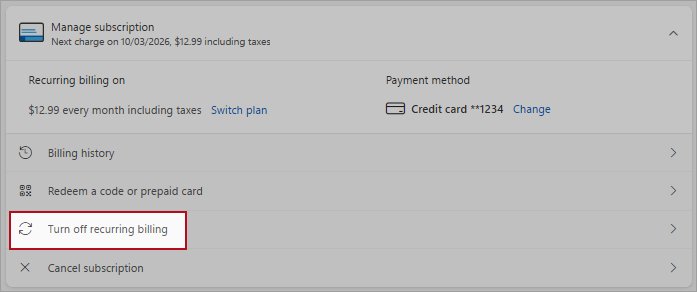
The subscription page shows the live price and the renewal date for the account that pays.
- Go to account.microsoft.com/services and sign in with the account that owns the subscription.
- Find the Microsoft 365 entry and select Manage.
- Read the price, the billing period and the date under Expires on.
- Select Turn off recurring billing if the next charge is unwanted, then select I don't want my subscription.
- Check that the page now offers Turn on recurring billing, which confirms the renewal is off.
A subscription bought through the Apple App Store, Google Play or a retail partner is billed by that partner, and the Manage link points there instead.
Fix the most common Microsoft Word pricing problems
The price you see does not match the figures above
Microsoft prices per country and shows the local storefront in local currency.
- Scroll to the bottom of the Microsoft page and check the country shown in the language selector.
- Switch to your own country's storefront, for example microsoft.com/en-gb for the United Kingdom.
- Read the price again on that page. On 22 September 2026 the UK price was £84.99 a year for Microsoft 365 Personal and £119.99 for Office Home 2024.
- Treat the local page as the correct figure, since tax and currency differ by market.
Word shows Unlicensed Product and documents open read-only
The subscription has lapsed, so the apps drop into reduced functionality mode.
- Sign in at account.microsoft.com/services with the account that bought the subscription.
- Check the date under Expires on for the Microsoft 365 entry.
- Select Manage, then renew or turn recurring billing back on.
- Open Word, select File then Account, and confirm the subscription is listed there.
- Use Word for the web in the meantime, since the free tier still opens and edits the same files.
You were charged after the free trial
The one-month trial converts to a paid subscription automatically, which is why a card is required to start it.
- Go to account.microsoft.com/services and select Manage on the Microsoft 365 entry.
- Select Turn off recurring billing so no further charge is taken.
- Select I don't want my subscription to confirm.
- Note the Expires on date, because the apps keep working until then.
Word on a Mac keeps asking for a subscription
The Word app for macOS requires a Microsoft 365 subscription, exactly as the Windows app does.
- Sign in to the Mac app with the account that holds the subscription.
- Buy Microsoft 365 Personal at $99.99 a year if no subscription exists.
- Buy Office Home 2024 at $179.99 instead if a one-time licence suits better, since it covers 1 PC or Mac.
- Use Word for the web at no cost if neither purchase is wanted.
Frequently Asked Questions
Does Microsoft Word cost money?
Not always. Word for the web and the Word mobile apps are free with a Microsoft account, which includes 5 GB of OneDrive storage. Payment starts when you want the installed Windows or Mac app, which needs a Microsoft 365 subscription or an Office 2024 licence.
How much does Microsoft Word cost per year?
Microsoft 365 Personal costs $99.99 a year in the United States and includes Word for one person on five devices. Family costs $129.99 a year for up to six people, and Premium costs $199.99 a year. Prices checked on 22 September 2026.
How much does Microsoft Word cost a month?
Microsoft 365 Personal costs $9.99 a month, Family $12.99 a month and Premium $19.99 a month at US prices on 22 September 2026. Monthly billing costs $19.89 more a year than paying for Personal annually.
How much does Microsoft Word cost to buy outright?
Office Home 2024 costs $179.99 as a one-time purchase and includes Word, Excel, PowerPoint and OneNote on 1 PC or Mac. Office Home & Business 2024 costs $249.99 and adds classic Outlook. Neither includes Copilot in Word.
How much does Microsoft Word cost in the UK?
On Microsoft's UK store on 22 September 2026, Microsoft 365 Personal cost £84.99 a year or £8.49 a month, Family £104.99 a year, Premium £189.99 a year and Office Home 2024 £119.99 once. Always read your own country's storefront.
How much does Microsoft Word cost for Mac?
The same as on Windows. The Mac app needs Microsoft 365 Personal at $99.99 a year, or Office Home 2024 at $179.99 once, since that licence covers 1 PC or Mac. Word for the web works free on macOS in any browser.
How much does Microsoft Word and Excel cost together?
They are sold together, never separately. Microsoft 365 Personal at $99.99 a year includes both, as does Office Home 2024 at $179.99 once. Both apps are also free in a browser through a Microsoft account.
How much does Microsoft Word cost to download?
The Word mobile apps for iOS and Android download at no cost, though advanced formatting and Copilot need a subscription. The Windows and Mac apps download free but require a Microsoft 365 subscription or an Office 2024 licence to run.
How much does Microsoft Word 365 cost for a business?
Microsoft 365 Business Basic costs $7.00 per user a month paid yearly and gives web and mobile Word. Business Standard with Copilot costs $23.50 and adds desktop Word. Business Premium with Copilot costs $32.00 per user a month.
Why does Microsoft Word cost so much?
The paid price covers more than the editor: 1 TB of OneDrive storage, Copilot in the apps, Microsoft Defender, Teams and ongoing support, across five devices. The editor on its own, in a browser, still costs nothing.
Is there a free trial of Microsoft Word?
Yes. Microsoft offers a one-month free trial of Microsoft 365 Personal, Family and Premium, which includes desktop Word. A credit card is required, and the trial converts to a paid subscription unless it is cancelled first.
Can students get Microsoft Word free?
Often, yes. Eligible institutions get Office 365 A1 free from Microsoft, which covers web Word for students and staff. Microsoft also runs a limited-time offer giving college students 12 months of Microsoft 365 Premium with a college email.
The Value of Microsoft Word
Start on the free web version, and pay $99.99 a year for Microsoft 365 Personal only when you need Word installed on a device. The free tier already covers writing, editing and sharing, so the subscription is really buying offline apps, 1 TB of storage, Copilot and Defender. Office Home 2024 at $179.99 repays itself after two years, but only on the single PC or Mac it licenses.