No, the full Microsoft 365 Copilot is not included in Microsoft 365 Business Standard at $14 per user per month; the plan only includes Copilot Chat with web grounding.
Copilot inside Word, Excel, PowerPoint, Outlook and Teams needs the Microsoft 365 Copilot Business add-on or the Business Standard with Copilot plan, and this guide covers prices, seat rules, how to add it and how to confirm it works.
Does Microsoft 365 Business Standard have Copilot? The three-second version
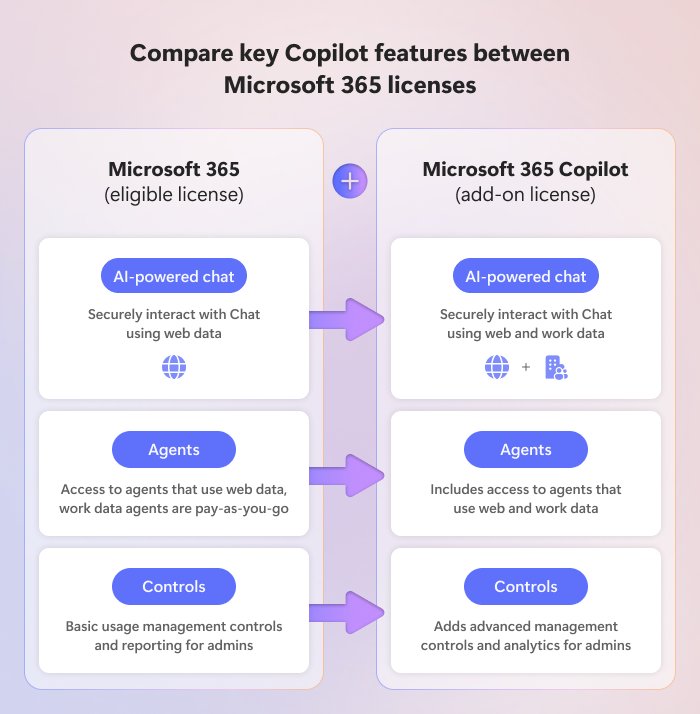
Business Standard includes Copilot Chat at no extra cost, but not Copilot in the Office apps. To get that, add Microsoft 365 Copilot Business for $21 per user per month ($18 promotional price through December 31, 2026), or buy Business Standard with Copilot for $23.50 per user per month, both on annual billing. Microsoft sells the work-grounded Copilot as a separate per-user license. Business Standard on its own lists only secure AI chat, while the with-Copilot plan and the add-on list Copilot in Word, Excel, PowerPoint, Outlook and Teams.
Microsoft 365 Business Standard Copilot Chat vs Microsoft 365 Copilot
The word Copilot covers two different things in a Business Standard tenant. One is already in your plan; the other is the paid license.
| Feature | Business Standard ($14) | With Copilot Business license |
|---|---|---|
| Copilot Chat with web results | Included at no extra cost | Included |
| Copilot Chat grounded in work email, files and meetings | Not included | Included |
| Copilot in Word, Excel, PowerPoint and OneNote | Not included | Included |
| Copilot in Outlook and Teams | Not included | Included (Teams features need a Teams license) |
| Researcher, Analyst and Facilitator agents | Not included | Included |
| Choice of large language model | Not included | Included |
| Copilot Dashboard usage analytics for admins | Not included | Included |
| Copilot in OneDrive, which compares files without opening them | Not included | Included |
| Agents in Copilot Chat, including ones built with Copilot Studio | Metered pay-as-you-go use that needs an Azure subscription | Included |
| Enterprise data protection for work accounts | Included | Included |
Microsoft describes web-based chat as automatically included with an eligible Microsoft 365 subscription, while work-based chat that sees what your account can access needs a Copilot license.
Get Copilot apps for Microsoft 365 Business Standard
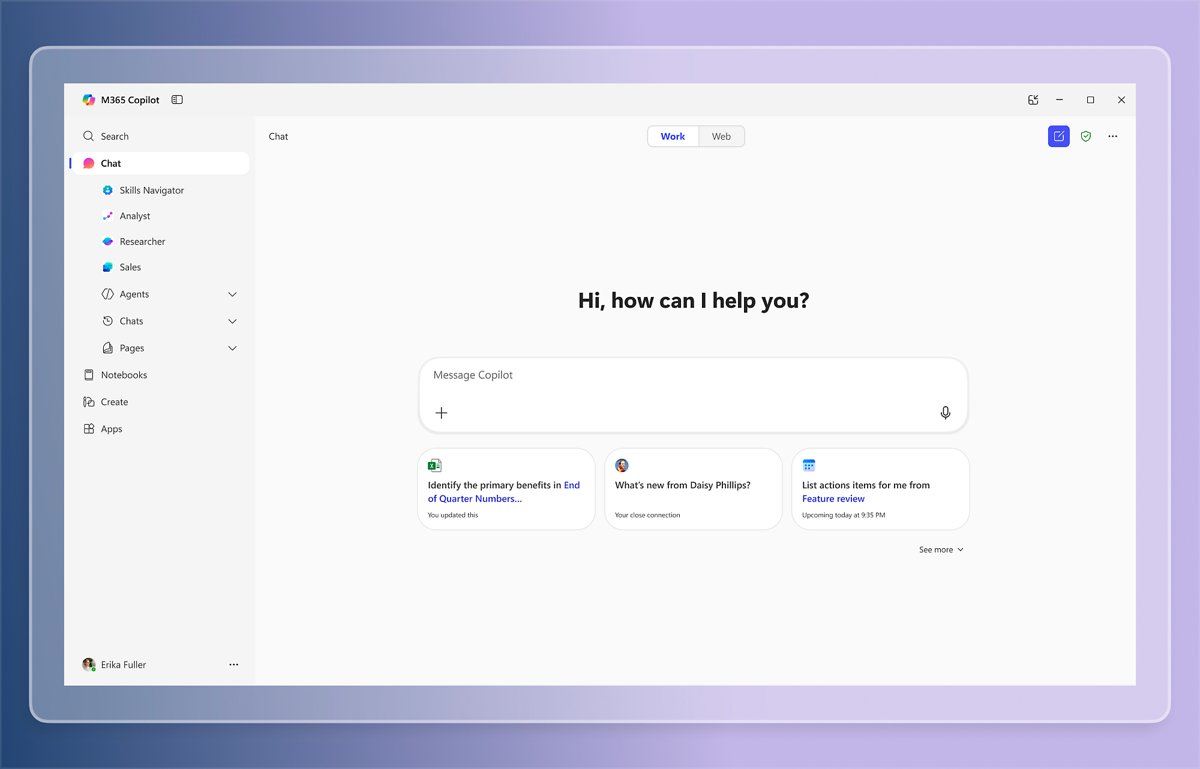
Business Standard users open Copilot Chat in the Microsoft Copilot app, which Microsoft renamed from the Microsoft 365 Copilot app. It is the main place to use Copilot's AI tools outside Word, Excel and Outlook, and it runs on the web, desktop and mobile.
| Where | How to open it | Account to use |
|---|---|---|
| Browser | Go to copilot.cloud.microsoft, the new primary address, or copilot.microsoft.com |
Sign into the work account that holds Business Standard |
| Windows | Microsoft Copilot desktop app | Work account; a personal account can sit alongside it |
| macOS | Microsoft Copilot desktop app | Work account |
| Android and iOS | Microsoft Copilot mobile app | Work account |
Users see a Work label under their profile in the navigation pane when signed in with a work account, and they can jump between personal and work accounts with the account switcher. Data entered in one account does not flow into the other.
Good to know: the features shown for a work account depend on the licenses assigned to the user. With Business Standard alone, the app offers web-grounded chat; to go further and search work email and files, assign a Copilot license, which unlocks the full app experience.
Microsoft 365 Business Standard with Copilot price compared
These are Microsoft's US list prices per user per month on an annual subscription, as shown on its business pricing pages.
| Plan | Price | Copilot in Office apps | User cap |
|---|---|---|---|
| Microsoft 365 Business Basic | $7.00 | No (Copilot Chat only) | 300 |
| Microsoft 365 Business Standard | $14.00 ($16.80 monthly billing) | No (Copilot Chat only) | 300 |
| Microsoft 365 Copilot Business add-on | $21.00, or $18.00 promotional through December 31, 2026 | Yes, on top of an eligible plan | 300 |
| Microsoft 365 Business Standard with Copilot | $23.50 | Yes | 300 |
| Microsoft 365 Business Premium | $22.00 | No (Copilot Chat only) | 300 |
| Microsoft 365 Business Premium with Copilot | $32.00 | Yes | 300 |
The promotional add-on price applies only to existing customers with an eligible Business plan, requires an annual commitment, and covers the first year only. It is not available on trial subscriptions.
Three ways to get Copilot onto a Business Standard tenant
| Your situation | Use this | Why |
|---|---|---|
| Only some staff need Copilot | Add Microsoft 365 Copilot Business licenses to your existing Business Standard plan | You pay only for the users you assign it to and keep everyone else on Business Standard |
| Everyone should have Copilot | Change the subscription to Business Standard with Copilot | One plan at $23.50 covers both the apps and Copilot for every user |
| You also need device management and advanced threat protection | Upgrade to Business Premium with Copilot | Adds advanced device management, threat protection and information protection on top of Copilot for $32 |
Microsoft 365 Copilot Business is sold to existing Business Basic, Business Standard, Business Premium, Apps for Business and Teams Essentials customers, for organizations of up to 300 users.
Way 1: Add Microsoft 365 Copilot Business to Business Standard
This route keeps your current subscription and adds Copilot only where you assign it. You need a billing admin role to buy and a license admin role to assign.
- Sign in to the Microsoft 365 admin center at
admin.microsoft.com. - Open the admin center marketplace and find Microsoft 365 Copilot Business.
- Buy one license for each user who should get Copilot, then complete checkout.
- Go to Billing > Licenses and select Microsoft Copilot.
- On the product details page, assign the licenses to individual users or to a group.
- Go to Users > Active users to confirm the license now shows against each user.
Copilot then appears in apps such as Word and Excel, though Microsoft says some apps can take up to 24 hours and may need a restart. Once it shows up, you can turn on Copilot in Excel for your spreadsheets.
Way 2: Switch to Microsoft 365 Business Standard with Copilot
An automatic plan change moves every user on the subscription to the new plan, keeps all mailbox and SharePoint data, and turns off billing for the old plan the day the change completes.
- In the Microsoft 365 admin center, go to Billing > Your products, or select Subscriptions in the Simplified view.
- Select your Microsoft 365 Business Standard subscription.
- On a Microsoft Online Services Agreement account, select View upgrades recommended for your org under Product details and upgrades.
- On a Microsoft Customer Agreement account, select Change to a different subscription option under Other subscription options instead.
- Pick Microsoft 365 Business Standard with Copilot and select Upgrade or Change plan.
- Choose a payment method and select Place order.
Users keep working during the change, which Microsoft says can take up to an hour. Any prorated credit for the old plan arrives on a later invoice.
Do you have to buy Copilot for every Business Standard seat?
No. The Copilot Business add-on is a per-user license, and admins assign it to individual users or groups. Only a full plan change moves every user at once.
| How you add Copilot | Who gets it | Cost impact |
|---|---|---|
| Copilot Business add-on | Only users you assign a license to | $21 (or $18 promotional) per assigned user on top of $14 |
| Automatic change to Business Standard with Copilot | Every user on that subscription | $23.50 per user for the whole subscription |
| Buy a separate Business Standard with Copilot subscription | Only users you move to it | Some users stay on $14, others pay $23.50 |
To move only some people to a new plan, Microsoft's guidance is to buy the new plan with the number of licenses you need and assign those licenses to the users you want to move.
How to check Copilot is working in Business Standard
- In the Microsoft 365 admin center, go to Users > Active users and confirm the user lists a Copilot license.
- Have the user sign in to Word, Excel or PowerPoint with their work account, not a personal Microsoft account, from File > Account > Sign In; if both are on one PC, switch between Microsoft 365 accounts first.
- Open an editable document. In Word, a Copilot prompt appears when you create a new document; in other apps, Copilot sits on the ribbon.
- Open Copilot Chat and confirm it can answer questions about the user's own email or files, which shows work-grounded chat is active.
- If Copilot is still missing, run Microsoft's Copilot License Details diagnostic from
aka.ms/CopilotLicenseDetailsagainst the user account.
When to upgrade from Business Standard to Business Premium with Copilot
| If your business needs | Stay on | Why |
|---|---|---|
| Office apps, email, Teams and Copilot only | Business Standard with Copilot ($23.50) | Cheapest route to Copilot in every app |
| Company laptops and phones managed and wiped remotely | Business Premium with Copilot ($32) | Premium adds advanced device management |
| Protection against phishing, malware and cyberattacks beyond spam filtering | Business Premium with Copilot | Premium adds email and threat protection; Standard has automatic spam and malware filtering |
| Sensitive data discovered, labeled and protected | Business Premium with Copilot | Premium includes information protection |
| A Windows 11 Pro upgrade for existing company PCs | Business Premium with Copilot | Premium lists a Windows 11 Pro upgrade; Standard includes no Windows edition |
| A larger archive mailbox | Business Premium with Copilot | Premium lists 1.5 TB archive storage against 50 GB on Standard |
| More than 300 users | An enterprise plan with the Microsoft Copilot add-on | All Business plans and the Copilot Business add-on stop at 300 users |
Microsoft 365 Business Standard no Copilot: fixes
Copilot does not appear in Word or Excel after assigning a license
License propagation can take up to 24 hours, and Copilot needs a supported update channel and an editable file.
- Wait up to 24 hours after assigning the license, then restart the app.
- Confirm the user is signed in with the work account that holds the license.
- Check the Microsoft 365 Apps update channel; Copilot is available in every channel except Semi-Annual Enterprise Channel.
- Open a file that is editable, not read-only.
Copilot Chat only shows web results, not work email or files
Business Standard includes web-based Copilot Chat only; work-based chat requires a Copilot license.
- Assign a Microsoft 365 Copilot Business license to the user.
- Sign out of Copilot Chat and sign back in with the work account.
- Ask a question about a recent email or file to confirm work grounding.
View upgrades recommended for your org is grayed out
The plan cannot change automatically, often because users outnumber licenses, an add-on blocks the change, or a credit check is pending.
- Unassign licenses until users no longer outnumber licenses.
- Remove any add-on that blocks the change; you can add it back later.
- Wait for a pending credit check to finish, which can take up to two working days.
- If it stays gray, buy Business Standard with Copilot separately and move users to it manually.
Can't sign in to Microsoft 365 or Office with the work account
The account details, password or account status block sign-in, so the Copilot license never reaches the apps.
- Open Microsoft's Sign in to Microsoft 365 support page and select Sign-in helper.
- Enter the work email address the user signs in with and follow the fix the tool suggests.
- Once signed in, reopen Word or Excel and check for Copilot again.
Copilot cannot be assigned to a guest user
Microsoft does not support assigning Copilot licenses to cross-tenant users, including guests.
- Create a member account for the person in your own tenant.
- Assign Business Standard and the Copilot license to that account.
Copilot questions from Microsoft 365 Business Standard users
Does Microsoft 365 Business include Copilot?
Every Microsoft 365 Business plan includes Copilot Chat with web results at no extra cost. Copilot inside Word, Excel, PowerPoint, Outlook and Teams is included only in the Business Standard with Copilot and Business Premium with Copilot plans, or through the Copilot Business add-on.
Is Copilot Chat free with Microsoft 365 Business Standard?
Yes. Copilot Chat with web grounding is automatically included with Business Standard at no extra cost. It answers from internet sources, while chat grounded in your work email, files and meetings needs a paid Copilot license.
Does Business Standard include Copilot in Excel?
No. Copilot in Excel needs a Microsoft 365 Copilot Business license or the Business Standard with Copilot plan. Once a user has the license, Copilot appears on the Excel ribbon, sometimes after up to 24 hours.
How much does Microsoft 365 Business Standard with Copilot cost?
Microsoft lists Business Standard with Copilot at $23.50 per user per month on an annual subscription. That compares with $14 for Business Standard alone plus $21 for the separate Copilot Business add-on, or $18 during the 2026 promotion.
Does Office 365 Business Standard get Copilot?
Microsoft sells this plan as Microsoft 365 Business Standard, and it includes Copilot Chat but not Copilot in the Office apps. It is an eligible base plan for the Microsoft 365 Copilot Business add-on, so the same pricing and steps apply.
Can I add Copilot to Microsoft 365 Business Basic?
Yes. Business Basic is an eligible base plan for Microsoft 365 Copilot Business. Business Basic users only get the web and mobile Office apps, so Copilot works there rather than in the Microsoft 365 desktop apps.
Is there a Microsoft 365 Copilot plan for small businesses?
Yes. Microsoft 365 Copilot Business is the small business edition, sold to organizations of up to 300 users that already have an eligible Business plan. Larger organizations use the enterprise Microsoft Copilot add-on instead.
Do Microsoft 365 Personal and Family include Copilot?
Microsoft offers Copilot in Microsoft 365 apps for individuals with a Microsoft 365 Personal or Family subscription. Those are consumer plans, so they cannot add Copilot to a Business Standard tenant or its work accounts.
Bottom line: is Copilot worth adding to Business Standard?
Start with the free Copilot Chat, then buy Copilot Business add-on licenses for the few people who write, analyze or summarize the most. Switch the whole tenant to Business Standard with Copilot only when most users need it. Per-user add-on licenses avoid paying $9.50 more for every seat, while the bundle becomes the cheaper option once Copilot is in everyone's daily work.


![[Solved] Lenovo laptop plugged in but not charging](https://techdows.com/wp-content/uploads/2026/10/Solved-Lenovo-laptop-plugged-in-but-not-charging-533x338.jpg)