Microsoft's generic product keys for Windows 11, formally Generic Volume License Keys (GVLKs), install Pro, Education or Enterprise, but they activate only against a KMS host on an organisation's network.
This guide lists the official keys for Windows 11, Windows 10 and Windows Server, shows how to install one with slmgr, and explains how to activate a home PC with a real product key or digital license instead.
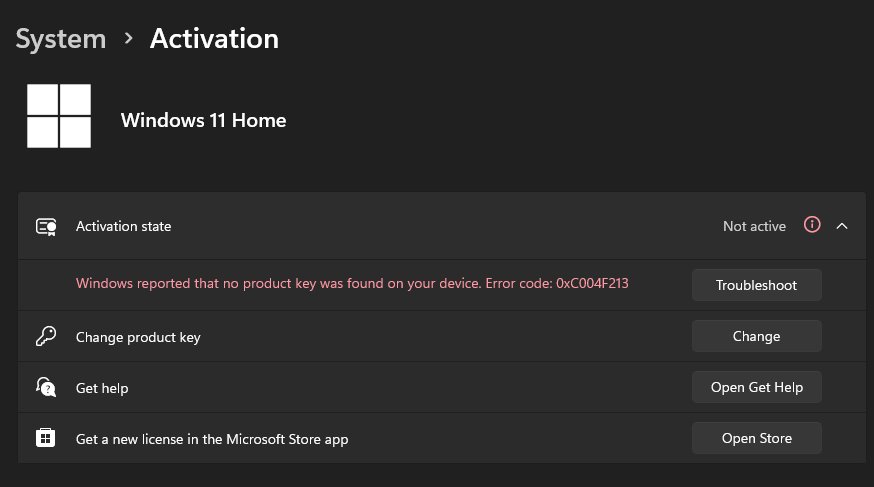
Install a generic product key on Windows 11 with slmgr
Use this when a PC in a volume licensing environment needs to become a KMS client, for example after it used a MAK or a retail key. Windows 11 Pro is the example; take the key for your edition from the tables below.
- Select Start, type
cmd, right-click Command Prompt and select Run as administrator. - Type
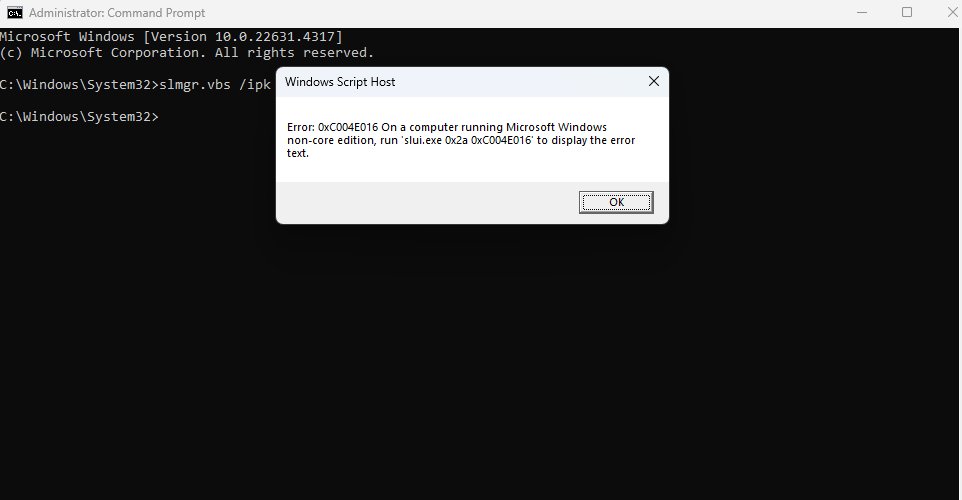
slmgr /ipk W269N-WFGWX-YVC9B-4J6C9-T83GXand press Enter. - Type
slmgr /atoand press Enter to make Windows try KMS activation. - Open Settings > System > Activation and read the Activation status line.
Without a KMS host on your local network, the key installs but Windows stays unactivated. Microsoft states that KMS client keys won't activate or serve as a retail license key.
What is a generic product key?
A generic product key is a published 25-character key that tells Windows which edition to install or which activation route to use. It is not a license on its own.
| Key or license type | What it does | Activates a home PC? |
|---|---|---|
| Generic Volume License Key (GVLK, KMS client key) | Makes the PC a KMS client that activates against an organisation's KMS host | No |
| KMS host key | Activates the KMS host itself with Microsoft; issued through volume licensing agreements | Not applicable |
| Multiple Activation Key (MAK) | A volume licensing key that activates online | Only with a volume licensing agreement |
| Retail or OEM product key | Bought from Microsoft, a retailer or supplied with the PC on its packaging or COA | Yes |
| Digital license (digital entitlement) | Tied to the hardware and your Microsoft account, no key needed | Yes |
Which Windows 11 key should you use?
| Your situation | Use this | Why |
|---|---|---|
| Work PC on a network with a KMS host | The GVLK for the installed edition | KMS activation needs the matching client key |
| Volume licensing PCs were moved off a MAK | The GVLK, then slmgr /ato |
Converting from MAK is a listed GVLK scenario |
| Home PC that upgraded from genuine Windows 10 | Nothing; the digital license activates it | Reinstalls of the same edition activate online |
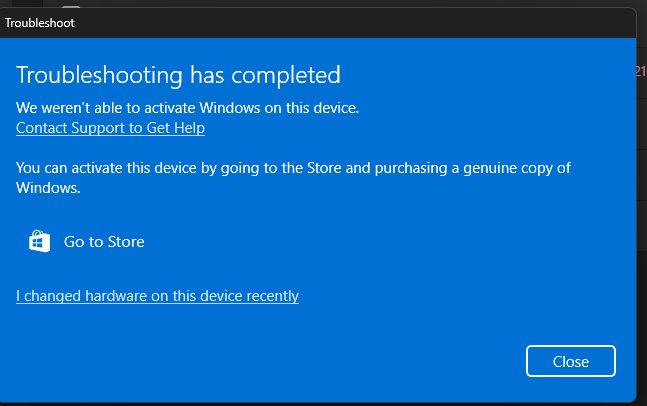
| New PC or motherboard with no license | I don't have a product key during setup, then buy a license | Settings opens the Microsoft Store to buy a digital license |
| You bought a retail or OEM key | Change product key in Settings | Retail keys activate online without a KMS host |
| Windows 11 Home | A retail key or digital license | Microsoft's KMS client key list has no Home edition |
Generic product keys for Windows 11 and Windows 10
These are the KMS client keys Microsoft publishes for all supported Semi-Annual Channel versions. Windows 11 and Windows 10 share the same key for each edition.
| Windows 11 / Windows 10 edition | KMS client product key |
|---|---|
| Pro | W269N-WFGWX-YVC9B-4J6C9-T83GX |
| Pro N | MH37W-N47XK-V7XM9-C7227-GCQG9 |
| Pro for Workstations | NRG8B-VKK3Q-CXVCJ-9G2XF-6Q84J |
| Pro for Workstations N | 9FNHH-K3HBT-3W4TD-6383H-6XYWF |
| Pro Education | 6TP4R-GNPTD-KYYHQ-7B7DP-J447Y |
| Pro Education N | YVWGF-BXNMC-HTQYQ-CPQ99-66QFC |
| Education | NW6C2-QMPVW-D7KKK-3GKT6-VCFB2 |
| Education N | 2WH4N-8QGBV-H22JP-CT43Q-MDWWJ |
| Enterprise | NPPR9-FWDCX-D2C8J-H872K-2YT43 |
| Enterprise N | DPH2V-TTNVB-4X9Q3-TJR4H-KHJW4 |
| Enterprise G | YYVX9-NTFWV-6MDM3-9PT4T-4M68B |
| Enterprise G N | 44RPN-FTY23-9VTTB-MP9BX-T84FV |
Windows 10 all supported Semi-Annual Channel versions
Older Windows 10 releases such as v1909, v1903 and v1809 use the same Semi-Annual Channel keys as the table above. Older client versions have their own keys.
| Version and edition | KMS client product key |
|---|---|
| Windows 10 Pro, all Semi-Annual Channel versions | W269N-WFGWX-YVC9B-4J6C9-T83GX |
| Windows 10 Enterprise, all Semi-Annual Channel versions | NPPR9-FWDCX-D2C8J-H872K-2YT43 |
| Windows 10 Education, all Semi-Annual Channel versions | NW6C2-QMPVW-D7KKK-3GKT6-VCFB2 |
| Windows 8.1 Pro | GCRJD-8NW9H-F2CDX-CCM8D-9D6T9 |
| Windows 8.1 Enterprise | MHF9N-XY6XB-WVXMC-BTDCT-MKKG7 |
| Windows 7 Professional | FJ82H-XT6CR-J8D7P-XQJJ2-GPDD4 |
| Windows 7 Enterprise | 33PXH-7Y6KF-2VJC9-XBBR8-HVTHH |
Windows 7 Ultimate has no KMS key because it was sold only as a retail or OEM product.
Windows 10 LTSC/LTSB versions
Long-Term Servicing Channel (LTSC) and the older Long-Term Servicing Branch (LTSB) editions use separate keys from the Semi-Annual Channel.
| LTSC or LTSB edition | KMS client product key |
|---|---|
| Windows 11 Enterprise LTSC 2024, Windows 10 Enterprise LTSC 2021 and LTSC 2019 | M7XTQ-FN8P6-TTKYV-9D4CC-J462D |
| Windows 11 Enterprise N LTSC 2024, Windows 10 Enterprise N LTSC 2021 and LTSC 2019 | 92NFX-8DJQP-P6BBQ-THF9C-7CG2H |
| Windows IoT Enterprise LTSC 2024 and LTSC 2021 | KBN8V-HFGQ4-MGXVD-347P6-PDQGT |
| Windows 10 Enterprise LTSB 2016 | DCPHK-NFMTC-H88MJ-PFHPY-QJ4BJ |
| Windows 10 Enterprise N LTSB 2016 | QFFDN-GRT3P-VKWWX-X7T3R-8B639 |
| Windows 10 Enterprise LTSB 2015 | WNMTR-4C88C-JK8YV-HQ7T2-76DF9 |
| Windows 10 Enterprise N LTSB 2015 | 2F77B-TNFGY-69QQF-B8YKP-D69TJ |
Product keys for Windows Server LTSC/LTSB versions
Windows Server uses its own KMS client keys. The Semi-Annual Channel versions of Windows Server have reached end of service, but their keys remain listed.
| Windows Server edition | KMS client product key |
|---|---|
| Windows Server 2025 Standard | TVRH6-WHNXV-R9WG3-9XRFY-MY832 |
| Windows Server 2025 Datacenter | D764K-2NDRG-47T6Q-P8T8W-YP6DF |
| Windows Server 2022 Standard | VDYBN-27WPP-V4HQT-9VMD4-VMK7H |
| Windows Server 2022 Datacenter | WX4NM-KYWYW-QJJR4-XV3QB-6VM33 |
| Windows Server 2019 Standard | N69G4-B89J2-4G8F4-WWYCC-J464C |
| Windows Server 2019 Datacenter | WMDGN-G9PQG-XVVXX-R3X43-63DFG |
| Windows Server 2019 Essentials | WVDHN-86M7X-466P6-VHXV7-YY726 |
| Windows Server 2016 Standard | WC2BQ-8NRM3-FDDYY-2BFGV-KHKQY |
| Windows Server 2016 Datacenter | CB7KF-BWN84-R7R2Y-793K2-8XDDG |
| Windows Server 2016 Essentials | JCKRF-N37P4-C2D82-9YXRT-4M63B |
| Windows Server v1809 (and 20H2, 2004, 1909, 1903) Standard | N2KJX-J94YW-TQVFB-DG9YT-724CC |
| Windows Server v1809 (and 20H2, 2004, 1909, 1903) Datacenter | 6NMRW-2C8FM-D24W7-TQWMY-CWH2D |
| Windows Server v1803 Standard | PTXN8-JFHJM-4WC78-MPCBR-9W4KR |
| Windows Server v1803 Datacenter | 2HXDN-KRXHB-GPYC7-YCKFJ-7FVDG |
| Windows Server v1709 Standard | DPCNP-XQFKJ-BJF7R-FRC8D-GF6G4 |
| Windows Server v1709 Datacenter | 6Y6KB-N82V8-D8CQV-23MJW-BWTG6 |
Activate Windows 11 against a KMS host with slmgr
KMS clients normally find the host on their own. If yours does not, point it at the host by name and start activation.
slmgr /skms kms.example.local:1688Replace kms.example.local with your organisation's KMS host name, and the port if it differs. /skms sets the host and disables auto-detection. Then run slmgr /ato, which prompts a KMS activation attempt on a PC with a GVLK installed. Both commands need an elevated Command Prompt.
You should see: Settings > System > Activation shows Windows as activated, and slmgr /dlv shows the detailed license information.
How to install a product key in Windows 11 Settings
A retail, OEM or MAK key goes in through Settings. The same 25-character format applies: XXXXX-XXXXX-XXXXX-XXXXX-XXXXX.
- Select Start, then Settings.
- Select System, then Activation.
- Select Change product key.
- Type the 25-character product key.
- Follow the onscreen prompts, then check the Activation status line.
On a Windows 10 PC, activating a product key also runs through Change product key on the Activation page.
Install Windows 11 without a product key
Setup asks for a product key, but you can skip it. A PC with a digital license activates by itself once it is online.
- Start Windows 11 setup from your installation media and choose the edition that matches the one on the PC.
- Select I don't have a product key when setup asks for one.
- Finish setup and sign in with the Microsoft account linked to your digital license.
- Open Settings > System > Activation to confirm activation.
- If there is no license, select Go to Store on the same page to buy one.
Check that a generic key activated Windows 11
- Open Settings > System > Activation and read Activation status.
- Open an elevated Command Prompt and run
slmgr /dlvfor detailed license information. - Run
slmgr /xprto see the activation expiration date, which matters for KMS clients. - Confirm the edition shown matches the GVLK you installed.
The expiration date is mainly useful for KMS clients. MAK and retail activation is perpetual.
Can a generic product key activate Windows 11 for free?
No. Use a GVLK only on PCs covered by a volume licensing agreement with a KMS host; activate everything else with a retail key or digital license. Microsoft states that KMS client keys can't be used with retail editions and won't activate or serve as a retail license key, so a home PC stays unactivated.
Windows 11 generic product key FAQ
What is a generic product key?
A generic product key is a published key that installs a specific Windows edition or sets its activation route. Microsoft's official generic keys are KMS client keys, formally Generic Volume License Keys, used by PCs that activate against an organisation's KMS host.
What is a generic key in Windows?
It is the same thing as a generic product key: a key that is not tied to a purchase. It identifies the edition, such as Windows 11 Pro, but grants no license. Activation still needs a KMS host, a MAK, a retail key or a digital license.
How do I install a product key on Windows 11?
Open Settings > System > Activation and select Change product key, then type the 25-character key. For a KMS client key, run slmgr /ipk followed by the key in an administrator Command Prompt, then run slmgr /ato.
What is the Windows 11 Pro generic key?
Microsoft lists W269N-WFGWX-YVC9B-4J6C9-T83GX as the KMS client key for Windows 11 Pro and Windows 10 Pro. It activates only against a KMS host on a volume licensing network, not as a retail license.
Is there a generic key for Windows 11 Home?
Not in Microsoft's KMS client key list, which covers Pro, Pro for Workstations, Education, Enterprise and LTSC editions. Windows 11 Home activates with a retail or OEM product key or a digital license.
Do generic product keys for Windows 10 work on Windows 11?
Yes. Microsoft publishes one KMS client key per edition for both versions, so Windows 10 Pro and Windows 11 Pro share W269N-WFGWX-YVC9B-4J6C9-T83GX. LTSC and LTSB editions have their own keys.
Bottom line: generic product keys for Windows 11
Use the GVLK tables for work PCs that activate through KMS; on a personal PC, skip the key during setup and activate with your digital license or a purchased key. Generic keys only identify the edition for KMS, and Microsoft's own guidance says they never act as a retail license.