To activate Windows 10 with a product key, open Start > Settings > Update & Security > Activation, select Change product key, and enter your 25-character key.
This guide covers that route, the Command Prompt and phone alternatives, where your key is, how to reactivate after a hardware change, and fixes for the activation errors Microsoft lists.
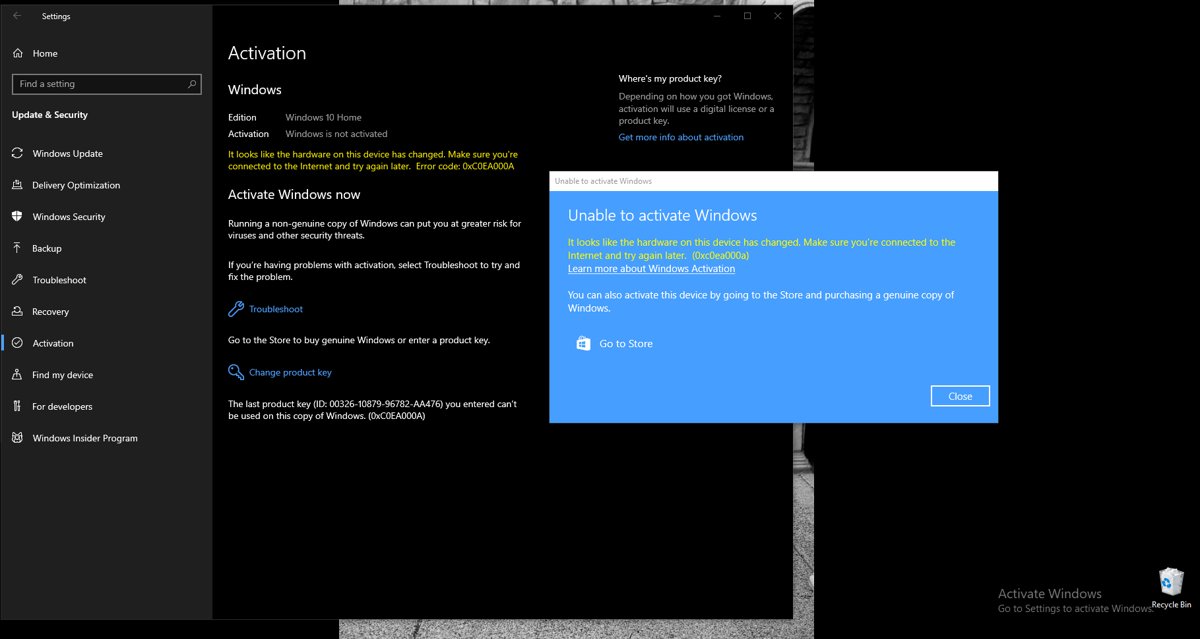
How to Activate Windows 10 Using Settings
This is the route Microsoft documents for a retail or OEM key. You need an internet connection and an administrator account.
- Select Start, then select Settings.
- Select Update & Security, then select Activation in the left pane.
- Select Change product key.
- If the User Account Control window appears, select Yes or enter an administrator's user name and password.
- Type the 25-character product key in the format XXXXX-XXXXX-XXXXX-XXXXX-XXXXX and select Next.
- Follow the on-screen instructions to finish. Windows contacts Microsoft's activation servers online.
Shortcut: right-click Start, select Run, type ms-settings:activation and select OK. Microsoft Learn documents this command, and it opens the same Activation page on Windows 10 and Windows 11.
Which activation route fits your situation
| Your situation | Use this | Why |
|---|---|---|
| Windows 10 is installed and you have a 25-character key | Settings > Change product key | Fewest steps, documented by Microsoft |
| You are reinstalling Windows 10 | Enter the key during setup, or skip it if you have a digital license | Windows activates online once setup finishes |
| You manage the PC from a script or the Settings page will not accept the key | slmgr.vbs /ipk then /ato in an elevated Command Prompt |
Microsoft Learn documents both switches |
| The PC has no internet access | Phone activation with SLUI 04 | Microsoft's route for offline activation |
| You replaced the motherboard | Activation troubleshooter > I changed hardware on this device recently | Works only if your digital license was linked to a Microsoft account first |
| You have no key and no digital license | Go to the Store on the Activation page | Buys a genuine digital license from Microsoft |
What You Need Before Activating Windows 10
| Requirement | Details |
|---|---|
| A valid Windows 10 product key or digital license | Microsoft states that without one of these you cannot activate. A key is 25 characters: XXXXX-XXXXX-XXXXX-XXXXX-XXXXX. |
| The correct Windows 10 edition | A Home key activates only Home, and a Pro key activates only Pro. A mismatch produces errors such as 0xC004F210 or 0xC004E016. |
| An internet connection | Online activation needs one. Without it, use phone activation or error 0xC004FC03 appears. |
| An administrator account | Change product key and slmgr /ipk both need administrator rights. |
| Correct date and time | A wrong clock can cause error 0x80072F8F, because Windows cannot verify the key with the activation service. |
How to Activate Windows 10 During Installation
Windows Setup asks for a product key before it copies files. After installation finishes, Windows activates online automatically.
- Start Windows Setup from your installation media.
- When setup asks for a product key, type your 25-character key.
- If this PC already has a digital license for the same edition, select I don't have a product key instead.
- Choose the edition your key or license covers, such as Windows 10 Home or Windows 10 Pro.
- Finish setup and connect to the internet.
- Sign in with the Microsoft account linked to your digital license, if you linked one.
If you finished setup without a key, you can still enter it later with Change product key in Settings. Microsoft notes that you need a valid product key on a device that never had an activated copy of this edition. Once the PC is online, confirm the fresh install is activated before you enter anything.
How to Activate Windows 10 Using Command Prompt
Microsoft Learn documents slmgr.vbs as the command-line tool for installing product keys and activating Windows. Open Command Prompt as administrator first: type cmd in Start search, right-click Command Prompt, and select Run as administrator.
slmgr.vbs /ipk XXXXX-XXXXX-XXXXX-XXXXX-XXXXX
slmgr.vbs /ato
/ipk installs the 25-character key and silently replaces any key already installed; it needs an elevated window. /ato then asks Windows to try online activation for a retail key or MAK. Replace the X characters with your own key.
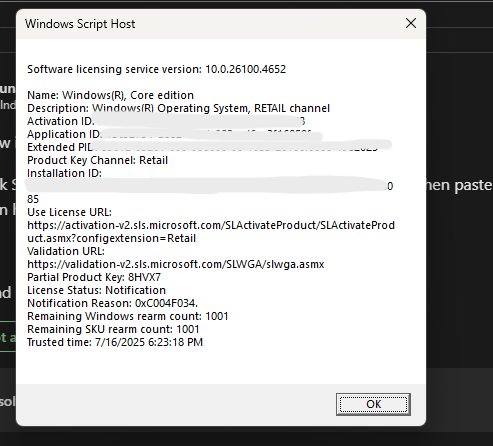
You should see: A Windows Script Host dialog confirms each step. Run slmgr.vbs /dli afterwards to display the license information and activation status.
Microsoft advises restarting the PC, or the Software Protection service, after installing a key with /ipk to keep the license service stable.
Two read-only checks need no elevation: slmgr.vbs /dlv shows detailed license information, and slmgr.vbs /xpr shows the expiration date. Microsoft notes that retail and MAK activation is perpetual.
How to Activate Windows 10 by Phone
Microsoft's activation errors page gives phone activation for PCs that cannot reach the activation servers, such as with error 0xC004FC03.
- Enter your product key first with Change product key or
slmgr.vbs /ipk. - Select the search box on the taskbar and type SLUI 04.
- Select SLUI 04 from the list of results.
- Follow the instructions on the screen to complete activation by phone.
Windows 10 Pro Education and Windows 10 Pro for Workstations must activate over the internet. Microsoft states that phone activation and SLUI 04 cannot be used for those editions.
How to Check If Windows 10 Is Already Activated
Check this before you type a key; many PCs activate on their own from a digital license. Open Start > Settings > Update & Security > Activation and read the status message.
- Windows is activated with a digital license linked to your Microsoft account: you are done, and you can reactivate after hardware changes.
- Windows is activated with a digital license: you are activated, but link a Microsoft account now.
- Windows is activated: you are activated with a key, and no Microsoft account is linked.
- Windows is not activated: read the error code shown under the status and use the error table below.
- Check the edition shown on the same page matches the key or license you own.
From Command Prompt, slmgr.vbs /dli shows the same license status without administrator rights.
How to Link Your Windows 10 License to a Microsoft Account
Linking is what lets the Activation troubleshooter reactivate Windows after a motherboard swap. Linking a Microsoft account to your digital license has the full walkthrough; the short version follows.
- Sign in with an administrator account. Settings > Accounts > Your info shows Administrator under your name.
- Check an email address appears above Administrator. If it does not, you are on a local account.
- Open Settings > Update & Security > Activation.
- Select Add an account, enter your Microsoft account and password, and select Sign in.
- Confirm the status now reads Windows is activated with a digital license linked to your Microsoft account.
How to Reactivate Windows 10 After a Hardware Change
A significant change, such as a new motherboard, stops Windows from finding a license that matches the device. Connect to the internet, then use the route that matches your license.
- Sign in as an administrator and open Settings > Update & Security > Activation.
- Select Troubleshoot. This option appears only while Windows is not activated.
- Select I changed hardware on this device recently, then select Next.
- Enter the Microsoft account and password linked to your digital license, then select Sign in.
- In the list of devices, tick This is the device I'm using right now.
- Select Activate.
- No linked account but you have the original product key? Select Change product key on the same page and enter it instead.
Microsoft notes that if Windows came preinstalled and you replaced the motherboard yourself, you may need to buy a new license. If the manufacturer replaced the board under repair, the PC should reactivate automatically, or it may come with a COA card whose key sits under a gray scratch-off coating.
Where to Find Your Windows 10 Product Key
Where the key lives depends on how you got Windows 10. Microsoft keeps a record of product keys only for purchases from the Microsoft online store; check your Microsoft account Order history for those. For a key already installed on the PC, you can find your product key with Command Prompt, which shows its last five characters.
| If you got Windows 10 by | Where the key is |
|---|---|
| Buying it online from an authorized retailer | The confirmation email, or the retailer's digital locker on its website |
| Buying a physical copy | A label or card inside the box Windows came in |
| Buying a PC that came with Windows 10 | Preinstalled on the PC, in the packaging, or on the Certificate of Authenticity (COA) attached to the PC |
| Buying a digital copy from Microsoft's website | The confirmation email from Microsoft, and your Microsoft account order history |
| Upgrading free from Windows 7 or Windows 8.1 | No key; the PC has a digital license instead |
| Buying Windows 10 or a Pro upgrade in the Microsoft Store app | No key; a digital license tied to the purchase email's Microsoft account |
| A Volume Licensing agreement or MSDN subscription | The web portal for your program |
| A PC managed by work or school | Your organization's IT department; activation is handled centrally |
| A refurbished PC | The refurbisher, not Microsoft, must provide the key |
History note: in 2015, Windows 10 build 10565 began accepting Windows 7, 8 or 8.1 keys for activation. Microsoft's current pages describe that path only as the free-upgrade digital license.
Common Windows 10 Activation Errors and Fixes
Start with the Activation troubleshooter: Settings > Update & Security > Activation > Troubleshoot. If the error code changes after running it, look up the new code.
Error 0xC004F050: the product key didn't work
The key you entered cannot activate this copy of Windows, or the activation servers were busy after an upgrade.
- Check the key for typing errors and that it is for Windows 10, not another product.
- Wait a while and select Activate again if you just upgraded from an activated Windows 7 or 8.1.
- Enter a different valid key, or buy one through Go to the Store.
Error 0xC004C003: the activation server determined the key is blocked
Product keys are unique to one device; a key used, or tried, on several devices is marked not valid.
- Contact the reseller if you bought the key and expected it to work.
- Contact the PC maker if the error appears the first time you turn on a new PC.
- Look for a paper copy of your original 25-character key and enter it with Change product key.
- Ask the repair shop if the PC was repaired recently, because the repair may need a new license.
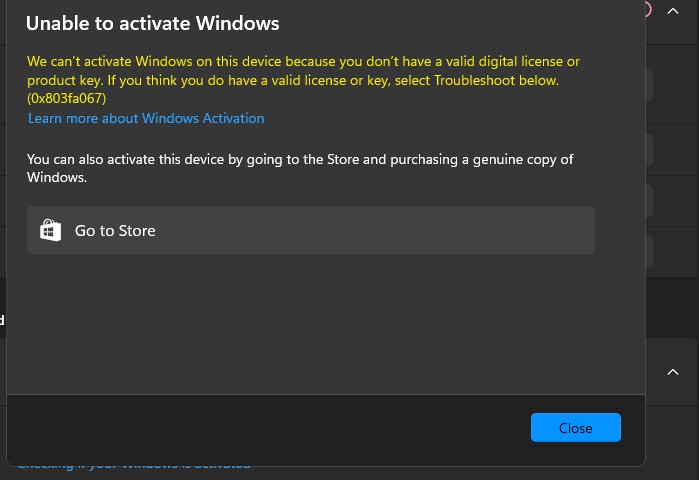
Error 0x803F7001: Windows cannot find a valid license
No valid Windows license was found for this device, often after a reinstall or hardware change.
- Open Settings > Update & Security > Activation.
- If you have a valid key, select Change product key and enter it.
- If you do not, select Go to the Store to buy a digital license.
Error 0xC004F074: could not contact the Key Management Service
The PC is set up for a work network's KMS server, or an Enterprise key was entered on Home or Pro.
- Connect to your workplace network and try again if this is a work device.
- Contact your organization's support person if it still fails.
- On a personal PC, enter a key that matches your edition with Change product key.
Error 0x80072F8F: security or connection problem
The date and time are wrong, or Windows cannot reach the online activation service.
- Open Settings > Time & Language > Date & time and correct the clock.
- Type network troubleshooter in taskbar search and select Identify and repair network problems.
- Restart the PC and try activation again.
Error 0xC004F210 or 0xC004E016: the key is for a different edition
The key's edition does not match the installed edition, such as a Pro or Enterprise key on Home.
- Check the edition on the Activation page.
- Enter a key that matches that edition.
- Or reinstall the edition your digital license covers.
Error 0xC004C008, 0xC004C770 or 0x803FA071: key already used
The key is in use on another device, or on more devices than the license terms allow.
- Buy a separate key for each PC through Go to the Store.
- After a motherboard replacement with a valid key, activate by phone with SLUI 04.
Error 0xC004FC03 or 0x8007267C: no connection to activation
The PC is offline, a firewall blocks activation, or the server is briefly unavailable.
- Confirm the PC is online and your firewall is not blocking Windows activation.
- Wait and retry; Microsoft says Windows activates automatically once the service is back.
- Use phone activation with SLUI 04 if the PC must stay offline.
For any code not listed here, Microsoft's Get help with Windows activation errors page carries the full table.
How to Change from Windows 10 Home to Windows 10 Pro
Activate Windows 10 Home first, then enter a Pro key or buy the upgrade. Pro adds BitLocker Drive Encryption, Remote Desktop and the ability to join a domain.
- Open Settings > Update & Security > Activation and confirm Windows 10 Home is activated.
- If you have a Windows 10 Pro key, select Change product key.
- Select Yes at the User Account Control prompt.
- Enter the 25-character Pro key and select Next to start the upgrade.
- No Pro key? Select Go to the Store on the Activation page to buy the Pro upgrade as a digital license.
- Restart when prompted; Microsoft Learn lists Home to Pro as supported with a reboot.
Microsoft Learn also documents changepk.exe /ProductKey <product_key> for edition upgrades, but its table marks the command-line route as not supported for Home to Pro. Use Settings for that path.
Can You Activate Windows 10 for Free?
Only where you already hold a license. Microsoft does not document any free activation for a PC that never had one, and it says a key used on several devices is blocked.
| Situation | Free activation? |
|---|---|
| Upgraded free from a genuine Windows 7 or Windows 8.1 | Yes; the PC holds a digital license |
| Reinstalling the same edition on a PC with a digital license | Yes; skip the key and Windows activates online |
| Motherboard replaced by the manufacturer under repair | Usually; Microsoft says the PC should reactivate automatically |
| You replaced the motherboard on a preinstalled OEM copy | Only with a linked Microsoft account; otherwise you may need a new license |
| New PC or new drive with no license history | No; you need a valid key or a digital license bought from the Store |
| A key bought outside Microsoft and authorized retailers | No guarantee; keys used on multiple devices are blocked with 0xC004C003 |
What Happens If You Do Not Activate Windows 10?
Activation pairs your key or digital license with the device's hardware. It is separate from validation, which Microsoft says checks licensing files and is needed to receive certain updates and downloads.
| Area | What Microsoft documents |
|---|---|
| Activation page | Shows Windows is not activated with an error message explaining the failure |
| License terms | Activation verifies the copy has not been used on more devices than the Microsoft Software License Terms allow |
| Buying a license later | Go to the Store on the Activation page buys a digital license without reinstalling |
| Troubleshooter | The Troubleshoot option stays on the Activation page while Windows is not activated |
| Security updates | Windows 10 reached end of support on October 14, 2025, activated or not; Extended Security Updates run until October 12, 2027 |
Microsoft's support pages checked for this guide do not list which personalization options are locked on an unactivated copy, so no list is given here.
Windows 10 Activation and Windows 11 Upgrades
An activated Windows 10 PC is the cleanest route to Windows 11. Microsoft ended Windows 10 support on October 14, 2025, and version 22H2 is the final release.
| Scenario | What happens to activation |
|---|---|
| Free upgrade to Windows 11 on an eligible, genuine Windows 10 PC | Windows 11 gets a digital license; no key needed |
| The Microsoft account you used on Windows 10 was linked | That account holds the Windows 11 digital license |
| Windows 10 Home upgraded to Windows 11 | Stays Home; changing to Pro still needs a Pro key or Store upgrade |
| PC cannot take the free upgrade through Windows Update | Microsoft says its retail Windows 11 Pro license will not install on that PC either |
| Staying on Windows 10 | Extended Security Updates keep security fixes coming until October 12, 2027 |
Activate Windows 10 and link your Microsoft account before upgrading. Then Settings > System > Activation in Windows 11 should show the linked digital license.
How to deactivate or remove a Windows 10 product key
Remove the key before you sell or give away a PC whose retail key you plan to reuse. Microsoft Learn documents both switches below; each needs an elevated Command Prompt.
slmgr.vbs /upk
slmgr.vbs /cpky
/upk uninstalls the product key of the current Windows edition. /cpky clears the key from the registry so malicious code cannot read it there.
You should see: After a restart, the Activation page shows Windows as not activated, which Microsoft describes as an Unlicensed state, until a new key is installed.
Tips for Avoiding Activation Problems
| Tip | Why it matters |
|---|---|
| Link a Microsoft account to your digital license now | It is the only way the troubleshooter can reactivate after a motherboard swap |
| Keep the purchase email, box card or COA photo | Microsoft stores keys only for purchases from its own online store |
| Install the edition your license covers | A Home license will not activate Pro, and the reverse also fails |
| Buy keys from Microsoft or authorized retailers | Keys already used on other devices are blocked and cannot be recovered |
| Check the clock and internet before activating | Wrong date and time or a blocked connection cause 0x80072F8F and 0xC004FC03 |
| Leave work PCs to IT | Volume and KMS activation are managed by the organization, not the user |
| Confirm activation before reinstalling | A digital license reactivates a reinstall of the same edition automatically |
Frequently Asked Questions
How do I activate my Windows 10 product key?
Open Start > Settings > Update & Security > Activation and select Change product key. Enter the 25-character key, select Next and follow the prompts. You need an administrator account and an internet connection; without internet, use SLUI 04 for phone activation.
How do I activate a Windows 10 Home product key?
Use the same Change product key option on the Activation page, with Windows 10 Home installed. A Home key activates only Home, so a Pro installation reports an edition mismatch error such as 0xC004F210. Reinstall Home or buy a Pro key.
How do I deactivate a Windows 10 product key?
Open Command Prompt as administrator and run slmgr.vbs /upk to uninstall the key, then slmgr.vbs /cpky to clear it from the registry. After a restart Windows is unlicensed until a new key is installed. Both switches are documented on Microsoft Learn.
How do I reactivate a Windows 10 product key?
Enter the same key again with Change product key on the Activation page. After a motherboard change with a linked digital license, run Troubleshoot and select I changed hardware on this device recently. With a valid key, phone activation through SLUI 04 also works.
Does Windows 10 activate automatically?
Yes, in most cases. A PC with a digital license activates online after you reinstall the same edition, and a key typed during setup activates online once installation completes. You need an internet connection; if servers are busy, Windows activates when the service returns.
What does activate Windows mean in Windows 10?
Activation pairs your product key or digital license with the PC's hardware. Microsoft says it confirms the key is valid for that hardware and has not been used on more devices than the license terms allow. It does not by itself prove the copy is genuine.
How do I get help with Windows 10 activation?
Run the Activation troubleshooter from Settings > Update & Security > Activation > Troubleshoot; it appears only while Windows is not activated. If an error code remains, look it up on Microsoft's activation errors page or contact Microsoft customer support.
How do I activate a Windows 11 product key?
In Windows 11 the path is Start > Settings > System > Activation > Change product key. Enter the 25-character key and follow the prompts. A PC upgraded free from activated Windows 10 already has a digital license and needs no key.




How To Find Microsoft Office Product Key Already Installed - Techdows
[…] The Windows licence on that PC is separate from the Office licence. For the Windows side, see How to Activate Windows 10 Product Key. […]
How to get Windows 10 free: a comprehensive guide to legal methods - Techdows
[…] 10 activates with either a digital license or a 25-character product key. Whether it costs you anything depends on how that license reached the […]
How to Update to Windows 10: A Step-by-Step Upgrade Guide - Techdows
[…] Settings, Update & Security, Activation. Select Change product key and enter a 25-character Windows 10 Pro key, or select Go to the Store to buy the upgrade. Your […]