To enable iMessage on iPhone, open Settings, tap Apps, tap Messages, and turn on iMessage; on iOS 17 and earlier, Messages sits directly in Settings.
This guide covers the steps for each iOS version, what the iPhone needs before activation succeeds, how to confirm it worked, and what to do when activation stalls or fails.
Step-by-Step Guide to Enable iMessage on iPhone
These steps match the current iPhone User Guide and work the same on every iPhone model running iOS 18 or later.
- Connect the iPhone to Wi-Fi or cellular data.
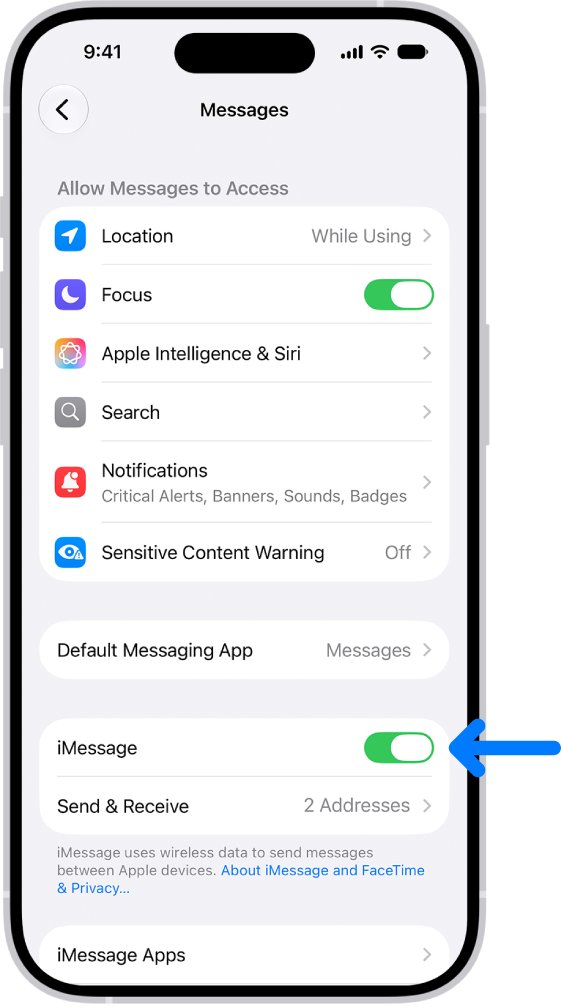
- Open the Settings app.
- Tap Apps, then tap Messages.
- Turn on the iMessage switch.
- If a prompt says your network provider may charge for SMS messages used to activate iMessage and FaceTime, tap Turn On.
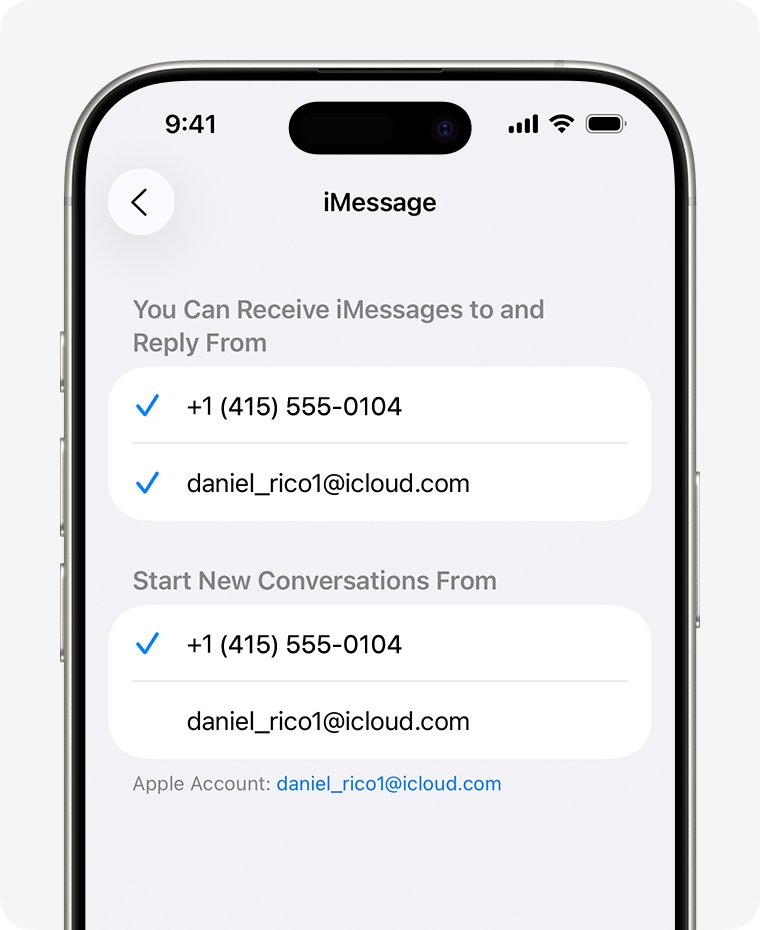
- Tap Send & Receive and check the phone number and email addresses listed under You can receive iMessages to and reply from.
Activation runs in the background. Your phone number is verified by a silent SMS, so the switch can show Waiting for activation for a few minutes.
iMessage Activation Methods Compared
Most people only need the Settings switch. The other routes exist for new phones, eSIM changes and accounts that refuse to activate.
| Your situation | Use this | Why |
|---|---|---|
| iPhone with a working SIM or eSIM and a text plan | Settings > Apps > Messages > iMessage on | Activates your phone number and Apple Account together |
| New iPhone on iOS 26 where you skipped iMessage or added the eSIM later | Turn iMessage off and back on in Settings > Apps > Messages | iMessage does not activate automatically after an eSIM is set up later |
| Phone number never gets verified | Activate online at apple.co/IMFT-mac | Apple emails you when the account is ready for iMessage and FaceTime |
| No text plan, or the number is stuck | Use your Apple Account email address in Send & Receive | iMessage works with an email address instead of a phone number |
| Account shows a spam block | Keep using SMS, MMS or RCS with iMessage off, and contact Apple Support | A blocked account cannot be activated from the phone |
Prerequisites for Enabling iMessage
Apple lists these conditions before activation can succeed. Check them first, because most activation errors trace back to one of them.
| Requirement | How to check it | Why it matters |
|---|---|---|
| Wi-Fi or cellular data connection | Load any web page in Safari | iMessage signs in to Apple's servers over the internet |
| Latest iOS version | Install any pending iOS update before you start | Apple asks for the latest iOS before troubleshooting activation |
| Correct time zone | Settings > General > Date & Time | Apple lists a correct time zone as an activation requirement |
| SMS messaging on the line | Send a normal text to another number | Your phone number is activated through an SMS, which your carrier may charge for |
| An Apple Account | Your name appears at the top of Settings | iMessage is tied to your Apple Account as well as your number |
| Active phone line (Dual SIM users) | Settings > Cellular, check the line is turned on | iMessage can only register a number whose line is on |
Where the iMessage switch is in each iOS version
Apple moved app settings under a new Apps entry in iOS 18. If you do not see Apps in Settings, your iPhone runs an older iOS and the path is one level shorter.
| iOS version | Path to the iMessage switch | Path to Send & Receive |
|---|---|---|
| iOS 18 and later (including iOS 26) | Settings > Apps > Messages > iMessage | Settings > Apps > Messages > Send & Receive |
| iOS 17 | Settings > Messages > iMessage | Settings > Messages > Send & Receive |
Alternative Solutions if iMessage Won’t Activate
When the switch on the phone keeps failing, Apple offers an online activation request. It checks the account on Apple's side and emails you the result.
- On any browser, go to apple.co/IMFT-mac.
- Under Enable Apple Account, tap Get Started.
- Sign in with the same Apple Account used on the iPhone.
- If you use a phone number with iMessage, enter that phone number when asked.
- Follow the onscreen instructions and wait for Apple's email confirming the account is ready.
- Return to Settings > Apps > Messages and turn on iMessage again.
No email after the request usually means the account is blocked from iMessage and FaceTime, and the request to lift the block was not approved.
Use an email address with iMessage instead of a phone number
An email address lets iMessage work while the phone number is still unverified, or on a line with no text plan.
- Sign in to your Apple Account on the web and review the email addresses on file.
- Correct any wrong address, then click Resend next to the address you want to verify.
- Open the verification email and confirm the address.
- On the iPhone, open Settings, tap Apps, then tap Messages.
- Tap Send & Receive, then choose your email address.
Using both a phone number and an email address can split one contact into two threads. Pick one of them as the primary way to start new conversations.
How to check iMessage is turned on and working
- Open Settings > Apps > Messages and confirm the iMessage switch is green.
- Tap Send & Receive and look for a check mark next to your phone number or email address.
- If a spinning gear shows next to the number, leave it alone; the iPhone keeps retrying verification on its own.
- Open Messages and start a conversation with a contact who uses an iPhone, iPad or Mac.
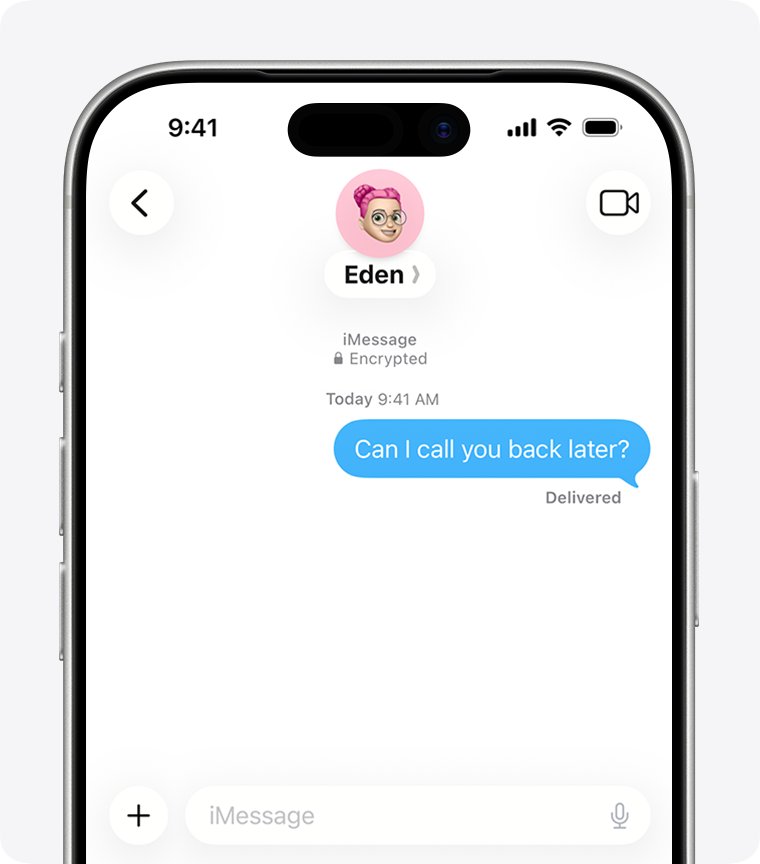
- Confirm your sent message appears in a blue bubble, not a green one.
- Look for the lock icon at the top of the conversation, which shows it is end-to-end encrypted.
Understanding iMessage
The Messages app sends each text as iMessage, RCS or SMS/MMS. Which one it uses decides the bubble colour, the features and the cost.
| iMessage | RCS | SMS/MMS | |
|---|---|---|---|
| Who you can message | iPhone and other Apple devices | Any phone, including Android | Any phone |
| Network used | Wi-Fi or cellular data | Carrier service over data | Carrier text plan |
| Bubble colour | Blue | Green | Green |
| End-to-end encrypted | Yes, shown by a lock icon | Only with iOS 26.5 and supported carriers on both ends | No |
| Read receipts and typing indicators | Yes | Yes | No |
| What you need | An Apple Account and activation | iOS 18 and a carrier that supports RCS | A text-messaging plan |
| Cost | No per-message fee; cellular data rates can apply | Carrier plan | Carrier plan |
Why Activating iMessage Sometimes Feels Tricky
Activation depends on your carrier, Apple's servers and your Apple Account all agreeing. Each one can stall it for a different reason.
| What gets in the way | What you see | What it means |
|---|---|---|
| Carrier SMS verification | Waiting for activation for a long time | The carrier can take up to 24 hours to verify your number with Apple |
| International SMS blocked on the plan | Activation never completes | The verification SMS cannot leave your carrier's network |
| Wrong date or time zone | Activation unsuccessful or a sign-in error | Activation fails until the time zone is corrected |
| No connection at the time | Could not sign in, please check your network connection | The iPhone cannot reach the iMessage server |
| eSIM added after setup on iOS 26 | Green bubbles, Not Delivered, or messages from your email address | iMessage was never activated for the new line |
| Account blocked for reported spam | This account is blocked due to reported spam | Apple has limited the account; the phone cannot clear it |
Enhancing Your iMessage Experience
Once iMessage is on, these settings in the same Messages screen decide where your messages appear and how they fall back when iMessage is unavailable.
| Setting | Where to find it | What it does |
|---|---|---|
| Messages in iCloud | Settings > your name > iCloud > Messages (tap See All if hidden), then Use on this iPhone | Keeps your full message history in sync across Apple devices on the same Apple Account |
| Text Message Forwarding | Settings > Apps > Messages > Text Message Forwarding | Shows SMS, MMS and RCS texts from your iPhone on your iPad or Mac |
| Send as Text Message | Settings > Apps > Messages > Send as Text Message | Sends as a text message when iMessage is unavailable; carrier rates may apply |
| Share Name and Photo | In Messages, tap Edit > Set Up Name & Photo | Chooses the name and picture new contacts see, with Contacts Only or Always Ask sharing |
| Send & Receive | Settings > Apps > Messages > Send & Receive | Sets which phone numbers and email addresses receive and send iMessages |
Messages in iCloud uses your iCloud storage, and deleting a message on the iPhone deletes it on your other synced devices too.
To reach your conversations from a Windows PC, see how to get Apple's iMessage on Windows.
Pro Tips for a Smooth iMessage Setup
These tips for enabling iMessage on iPhone come straight from Apple's activation guidance. The additional tips for a smooth activation matter most on a new phone or a new SIM.
| Tip | Why it helps |
|---|---|
| Update iOS before turning on iMessage | Apple's fixes for activation assume the latest iOS |
| Turn on iMessage over Wi-Fi with cellular service active | The SMS check needs the phone line, the sign-in needs data |
| Tap Turn On at the SMS charge prompt | Your phone number is activated through that SMS |
| Do not keep toggling iMessage off and on while the gear spins | The iPhone retries verification automatically, and restarting it adds delay |
| Pick one primary number or email in Send & Receive | Stops the same contact from splitting into two threads |
| On a Dual SIM iPhone, turn on the line you want in Settings > Cellular | iMessage registers only a line that is turned on |
| Give the carrier 24 hours before escalating | Number verification can take that long |
Troubleshooting iMessage Activation Issues
Find the message or behaviour you see, then work through its fix in order.
iPhone says iMessage needs to be enabled
The iMessage switch is off, or activation has not finished on this iPhone.
- Open Settings, tap Apps, then tap Messages.
- Turn on iMessage and tap Turn On at any SMS charge prompt.
- Wait for the phone number to show a check mark in Send & Receive, then send the message again.
"Waiting for activation", "Activation unsuccessful" or "An error occurred during activation"
The number verification or Apple Account sign-in did not complete.
- Check the iPhone is on Wi-Fi or cellular data.
- Set the correct time zone in Settings > General > Date & Time.
- Go to Settings > Apps > Messages and turn off iMessage.
- Go to Settings > Apps > FaceTime and turn off FaceTime.
- Restart the iPhone.
- Turn iMessage and FaceTime back on.
"Could not sign in" or "Unable to contact the iMessage server. Try again."
The iPhone cannot reach Apple's servers.
- Switch between Wi-Fi and cellular data to rule out one network.
- Install any pending iOS update.
- Turn iMessage off and back on in Settings > Apps > Messages.
Messages turn green or come from your email after setting up a new iPhone
iMessage did not activate for the new line, which happens when an eSIM is added after setup on iOS 26.
- Open Settings > Cellular and make sure the phone line is turned on.
- Go to Settings > Apps > Messages and turn iMessage off, then back on.
- Tap Send & Receive and tap the phone number you want to use.
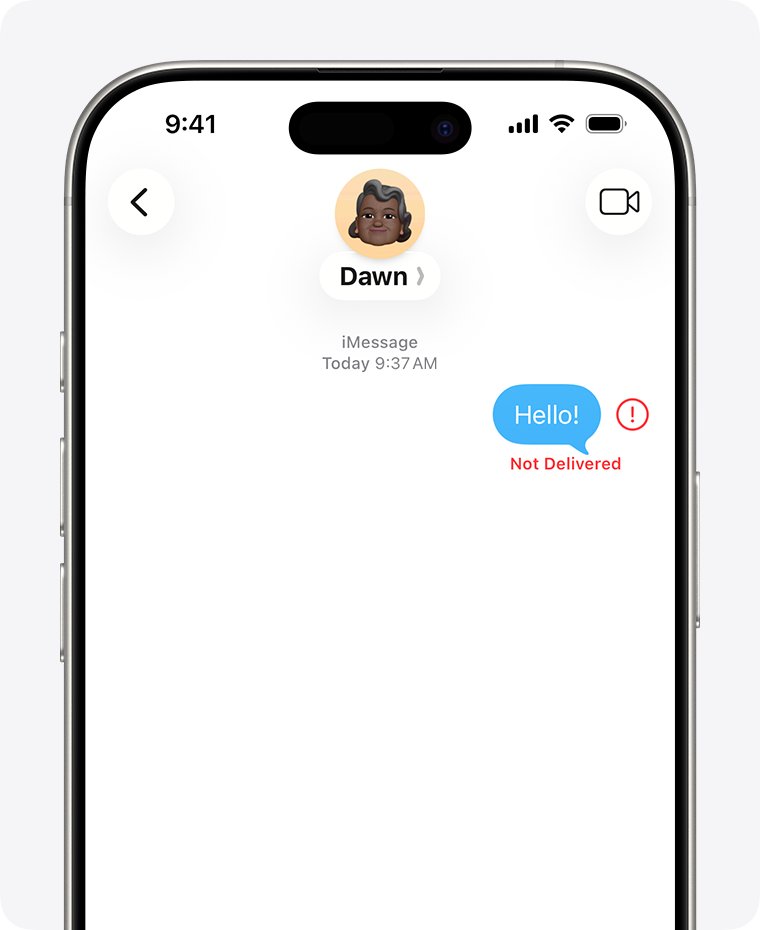
Red exclamation point with **Not Delivered**
The message could not go out as iMessage at that moment.
- Check your network connection.
- Tap the red exclamation point, then tap Try Again.
- If it still fails, tap the red exclamation point and choose Send as Text Message.
Still Not Working? Try This
Phone number still has no check mark after 24 hours
The carrier has not completed verification with Apple.
- Contact your carrier and confirm the plan can send and receive international SMS messages.
- Repeat the turn-off, restart and turn-on steps above.
- Wait up to 24 hours before trying again.
"iMessage or FaceTime Activation Failed. This account is blocked due to reported spam."
Apple has limited the account for misuse reports, and the phone cannot remove the block.
- Tap Get Help if the alert offers it.
- Submit the online activation request at apple.co/IMFT-mac and watch for Apple's email.
- Turn off iMessage so texts still go out as SMS, MMS or RCS.
- Contact Apple Support about the block.
iMessages arrive on your iPad or Mac but not on the iPhone
Send & Receive is set to your Apple Account email instead of your phone number.
- Open Settings > Apps > Messages > Send & Receive.
- Select your phone number.
- If the number is missing, link it to your Apple Account, then check the list again.
Frequently Asked Questions
How do I enable iMessage on iPhone 15, 16 or 17?
Open Settings, tap Apps, tap Messages and turn on iMessage. The steps depend on the iOS version, not the model, so the iPhone 15, iPhone 16, iPhone 16 Pro Max and iPhone 17 all use this same path.
How do I enable iMessage on iPhone 11, 12, 13 or 14?
Go to Settings > Apps > Messages and turn on iMessage. If your Settings app has no Apps entry, the iPhone runs iOS 17 or earlier, so tap Messages directly in Settings instead.
How do I enable iMessage on iPhone SE, XR, iPhone 8 or iPhone X?
Open Settings and look for Apps. If it is there, tap Apps > Messages; if not, tap Messages straight from Settings. Turn on iMessage, then check your number under Send & Receive.
How do I allow iMessage on iPhone?
Turn on iMessage in Settings > Apps > Messages, and tap Turn On when the iPhone warns that your carrier may charge for the activation SMS. Your phone number needs that SMS to activate.
How do I use iMessage on iPhone once it is on?
Open Messages, tap the compose button, enter a contact who uses an Apple device and send. The message goes as iMessage when the bubble is blue; green means it went as RCS or SMS/MMS.
Can I enable iMessage on an Android or other cell phone?
No. iMessage works between iPhone, iPad, Mac, Apple Watch and Apple Vision Pro. Texts to non-Apple phones go as RCS or SMS/MMS instead. On a Windows PC, see Download iMessage for PC, Windows 11/10, Mac and iPhone for what exists.
How long does iMessage activation take?
Apple says carrier verification of your phone number can take up to 24 hours. While a spinning gear shows next to your number, the iPhone keeps retrying on its own.
Does turning on iMessage cost anything?
iMessage has no per-message fee, but your carrier may charge for the SMS used to activate your number. Messages sent over cellular instead of Wi-Fi use your data allowance.
Can I use iMessage without a SIM card or phone number?
Yes. Verify an email address on your Apple Account, then select it under Settings > Apps > Messages > Send & Receive. People can then reach you on iMessage at that address.
Quick Summary
Turn on iMessage in Settings > Apps > Messages while connected to Wi-Fi with a working phone line, accept the SMS prompt, and confirm a check mark in Send & Receive. Nearly every activation failure comes from a missing prerequisite or slow carrier verification, so check those first and give it 24 hours before using the online request or an email address.