To see what an apple.com/bill charge is for, sign in to reportaproblem.apple.com with your Apple Account and search your purchase history for the exact amount on your statement.
This guide covers every place Apple records that charge, how grouped and pending charges work, and how to cancel, get a refund or report a charge you still cannot match.
Start with Apple’s purchase lookup website
Apple's own purchase history site lists every App Store, subscription and media purchase on your Apple Account. It works from any browser, including on a Windows PC or an Android phone.
- Open a browser and go to reportaproblem.apple.com.
- Sign in with the Apple Account you use for purchases.
- Type the amount from your bank statement into the search field to find the matching charge.
- Tap or click the purchase date to open the full receipt, including tax.
- Read the receipt: it lists every app, subscription or item that makes up that one charge.
If the amount matches a receipt, you have your answer. If nothing matches, work through the device, email and Family Sharing checks below before you assume fraud.
What “apple.com/bill” usually means
Apple.com/bill is the label Apple puts on card and bank statements for digital purchases and subscriptions billed through your Apple Account. It is not the name of an app, and it does not by itself tell you which item was bought.
| What triggered the charge | Who made it | Where it shows up |
|---|---|---|
| An app, in-app purchase, song, movie, book or other content bought from Apple | You, on any device signed in to your Apple Account | Purchase history and an emailed receipt |
| A subscription renewing, such as iCloud+, Apple Music or an app subscription | Nobody on the day; it renews on its own | Purchase history and the Subscriptions list |
| A purchase by a family member | A Family Sharing member whose purchases the family organizer pays for | The organizer's purchase history, under that member's name |
| A small temporary hold | Apple, after you update billing details or add someone to Family Sharing | Your bank's pending list, not your purchase history |
Apple can group several purchases into one charge, so the amount on your statement may not match any single item price.
Check purchase history on your iPhone or iPad
Use this when you cannot find an item at reportaproblem.apple.com. The steps are the same on iPhone and iPad.
- Open the App Store.
- Tap your photo or initials at the top. If you are signed out, tap the My Account button and sign in.
- Tap Apps & Purchase History, and sign in to your Apple Account if asked.
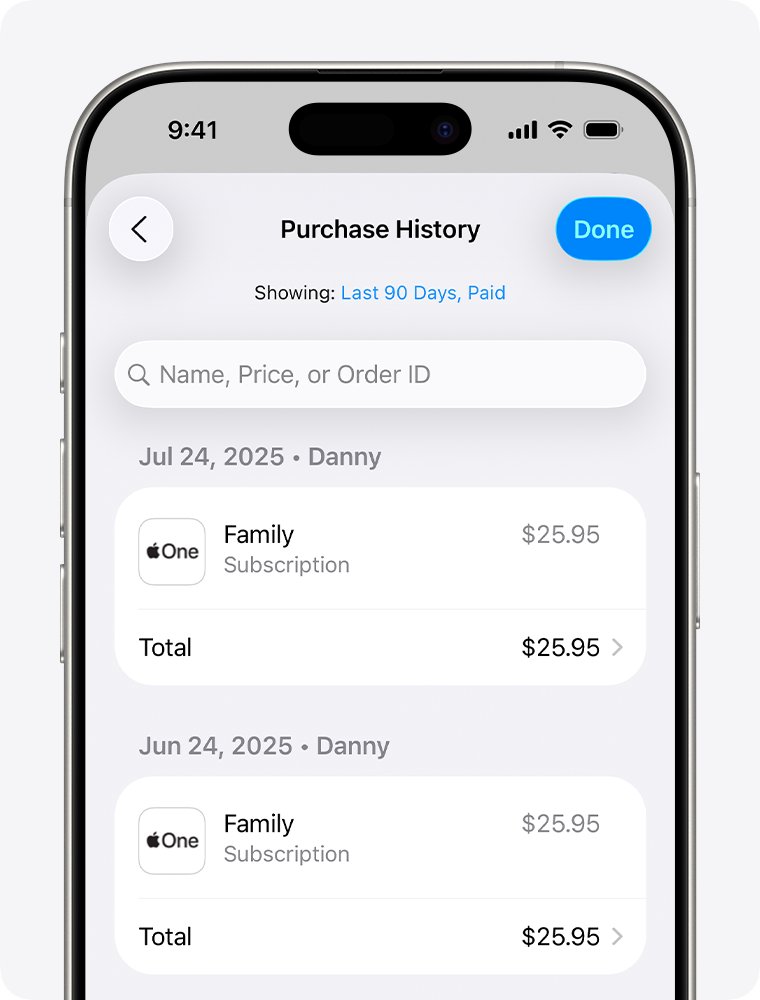
- Tap Purchase History.
- Search for the amount from your statement.
- To see older purchases, tap Last 90 days at the top and choose another filter.
Check purchase history on a Mac
- Open the App Store on your Mac.
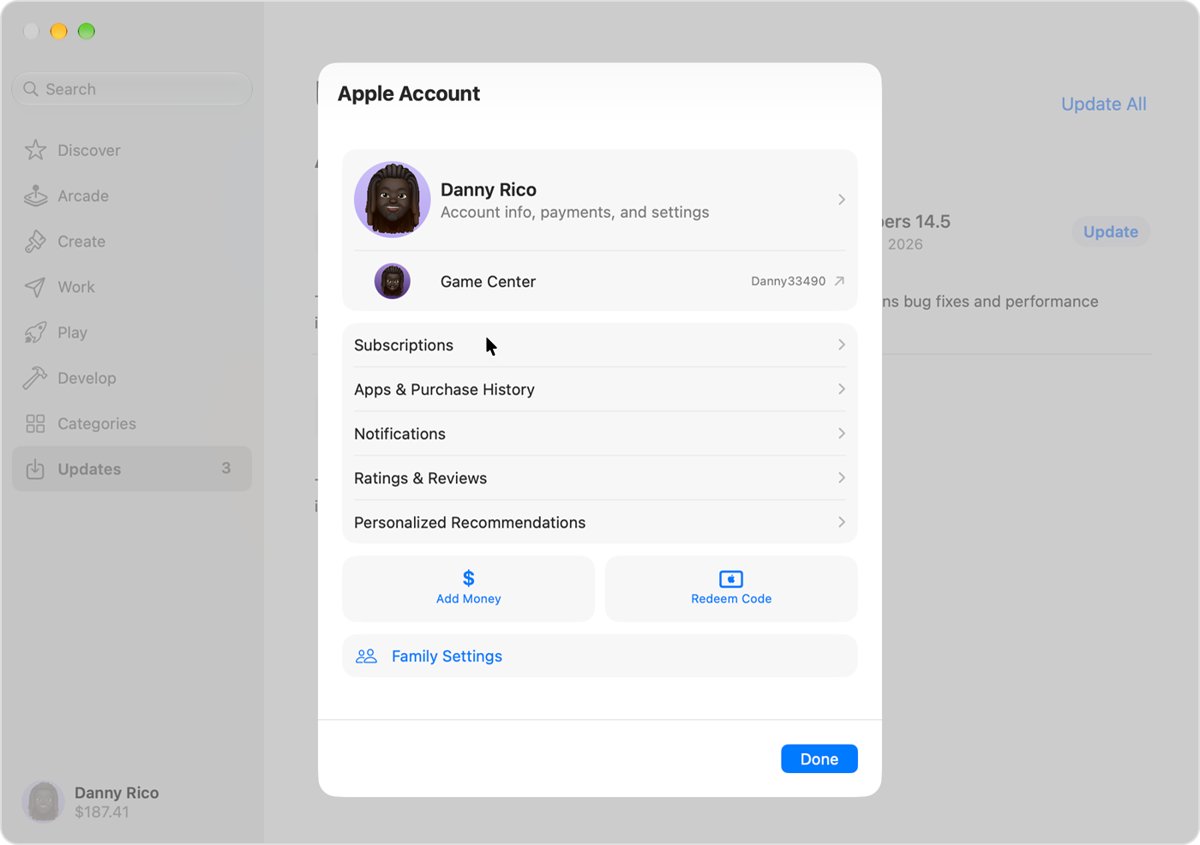
- Click your name at the bottom of the sidebar. If you are signed out, click Sign In and sign in to your Apple Account.
- Click Apps & Purchase History, and sign in again if asked.
- Click Purchase History to see your purchases.
- Click Last 90 Days at the top and choose another filter to go further back.
Check your email receipts from Apple
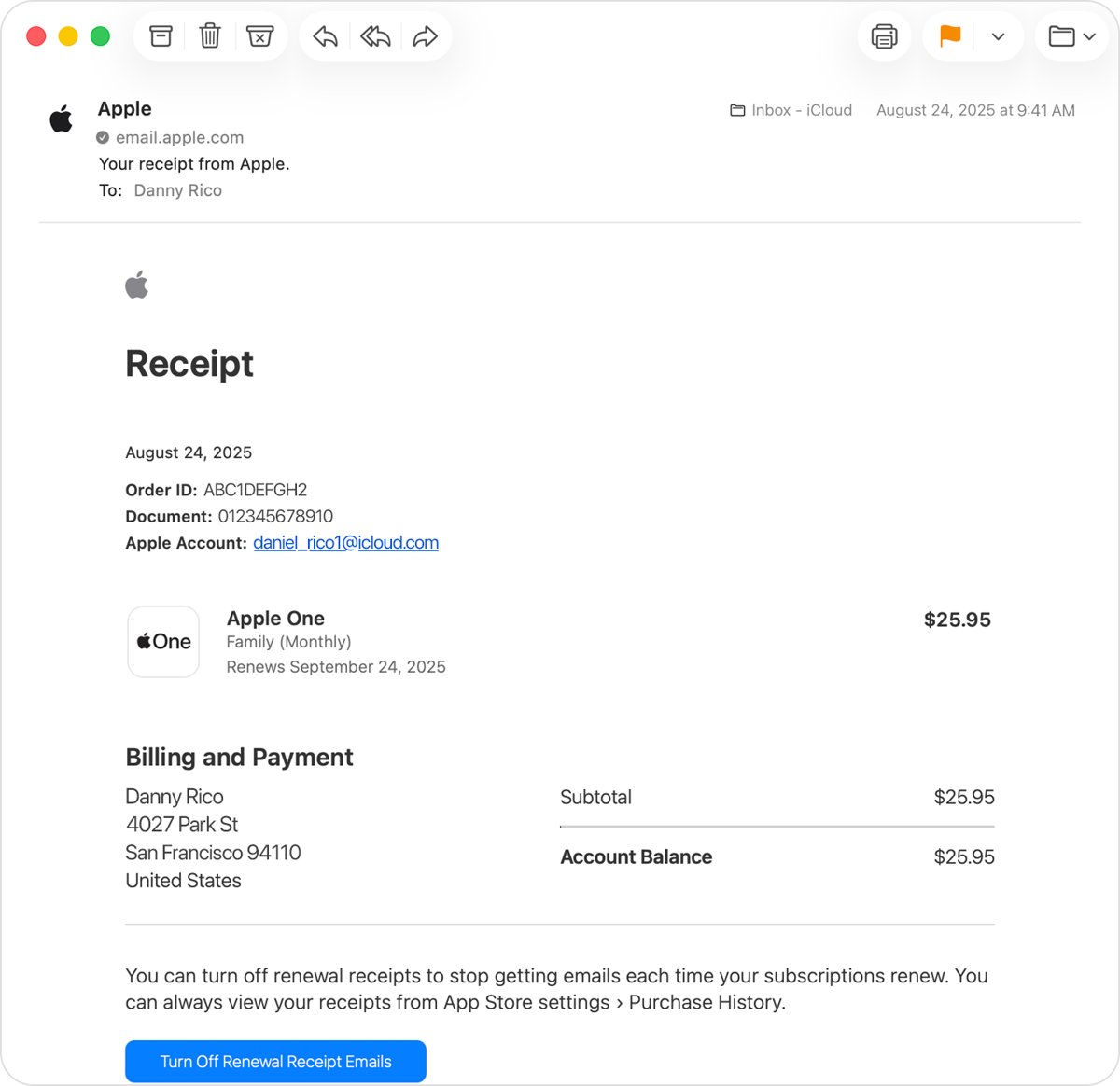
Apple emails a receipt for each charge. The receipt also names the Apple Account that paid, which is the fastest way to catch a purchase made on a second account.
- Open every email account you have ever used with Apple.
- Search for receipt from Apple or invoice from Apple.
- Open the receipt whose total matches the amount on your statement.
- Read what was purchased and which Apple Account was used.
- Check that the receipt shows your current billing address; genuine Apple purchase receipts include it.
If you use Family Sharing, both the person who bought the item and the family organizer receive the email receipt.
View the receipt from your bank's app or website
Some banks and card issuers show a View Receipt option next to App Store, Apple Music or iCloud transactions. Apple then shows the items behind the charge. Not every financial institution offers it.
- Sign in to your bank's website or mobile app.
- Open the apple.com/bill transaction.
- Select View Receipt or the similar option, if your bank shows one.
- Read the item list Apple displays. Apple also emails you to say the details were viewed.
Details can take time to appear after the transaction posts. If you get an email saying purchase details were viewed and nobody authorised to see them did it, contact your financial institution immediately.
Check active Apple subscriptions
A charge that repeats every month or every year at the same amount is almost always a subscription. The Subscriptions list shows each one, its price and its renewal date.
| Your device | Where to open Subscriptions | What to look for |
|---|---|---|
| iPhone or iPad | Settings > tap your name > Subscriptions | Items under Active and their renewal dates |
| Mac | App Store > your name at the bottom of the sidebar > your name > Subscriptions | A price that matches your statement |
| No Apple device to hand | Search the purchase history at reportaproblem.apple.com for the amount | Receipts that repeat on the same date each period |
If the subscription is not in your list, check your email receipts for the Apple Account it was bought with. A subscription with no Apple receipt at all was probably bought from another company, which bills under its own name.
Check iCloud+ storage charges
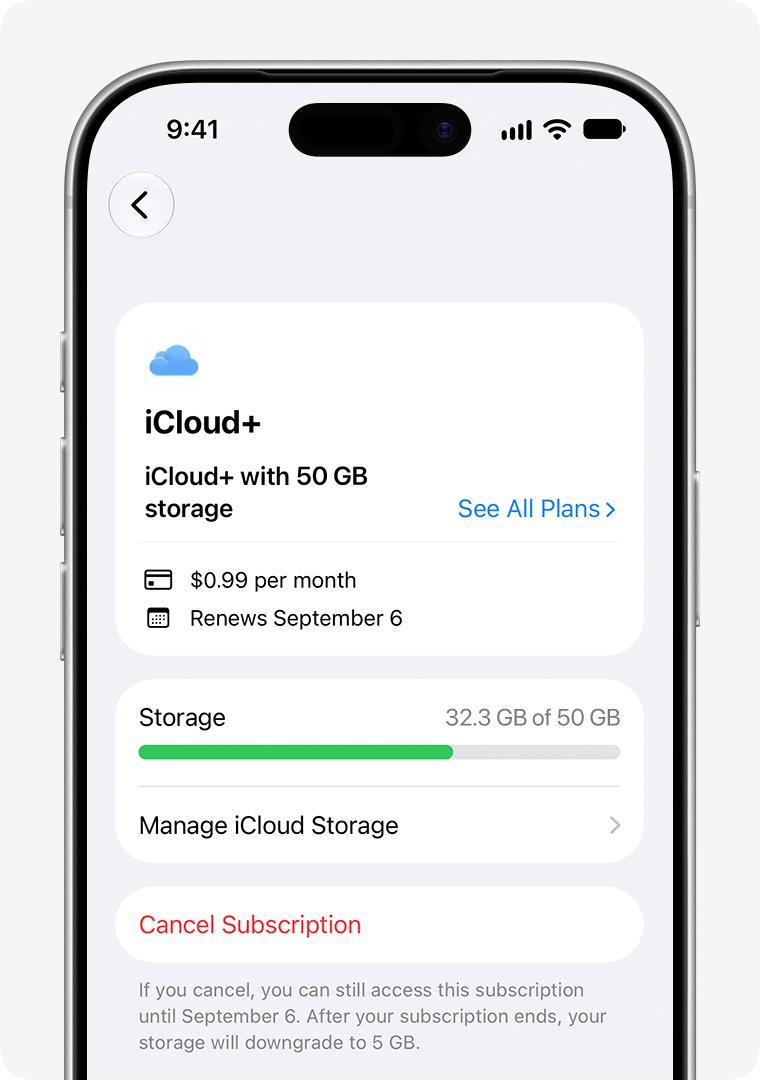
iCloud+ is a paid storage subscription, and it is one of the most common small recurring apple.com/bill charges. These steps are for iOS 18.4 and later.
- Open the Settings app, then tap your name.
- Tap Subscriptions.
- Tap iCloud+ under Active to see the plan you pay for.
- To move to a smaller plan, tap See All Plans, choose a plan and follow the onscreen instructions.
- To stop paying, tap Cancel Subscription.
A downgrade or cancellation takes effect when the current billing period ends. Download or remove anything that will not fit in the smaller plan first.
Check Family Sharing purchases
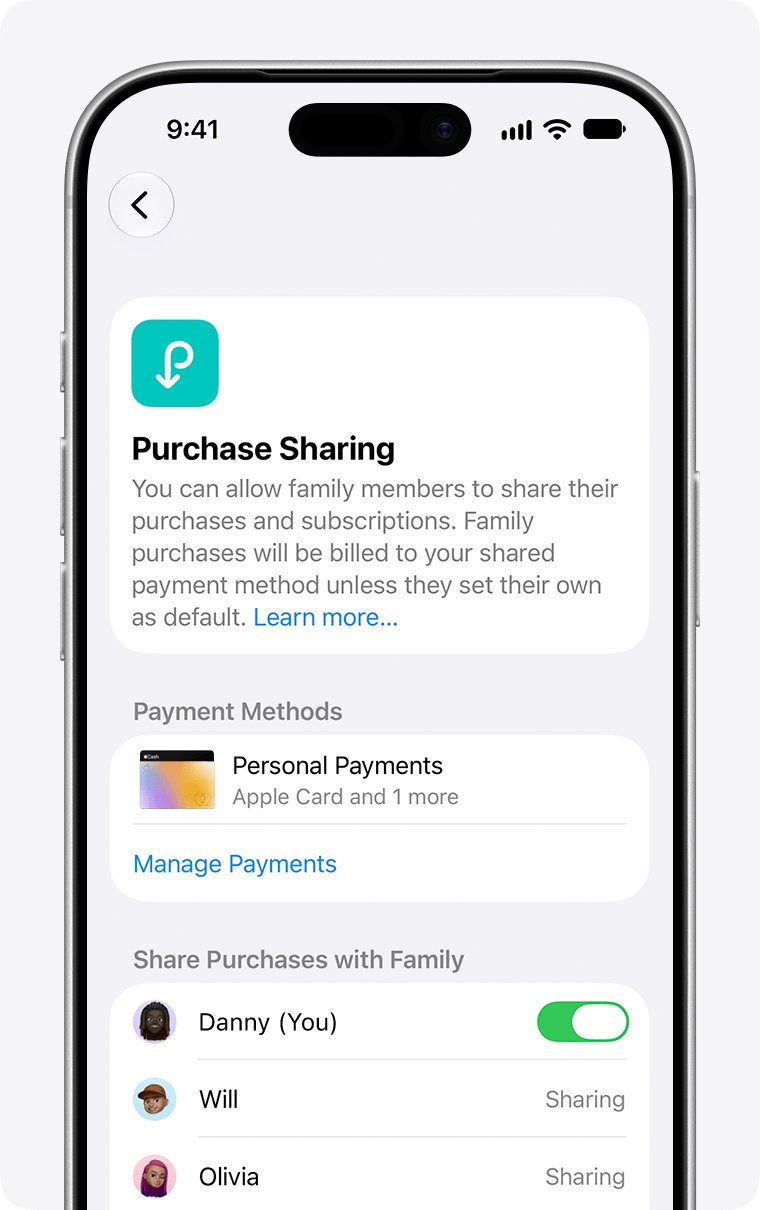
When Purchase Sharing is on, the family organizer pays for every member's purchases unless an adult member uses their own payment method. That makes a child's in-app purchase appear on the organizer's card as apple.com/bill.
- Sign in to reportaproblem.apple.com with the family organizer's Apple Account.
- Select the Apple Account menu.
- Choose a family member to see their purchases, or choose All to see everything charged to the shared payment method.
- Search for the amount from your statement.
- Ask the family member named on the matching receipt whether they made the purchase.
To see which card family purchases go to, the organizer opens Settings > Family > Purchase Sharing and checks the entry under Payment Methods.
Understand pending charges and grouped billing
The amount and the timing on your statement often differ from what you remember paying. These are the documented reasons.
| What you see | Why it happens | What to do |
|---|---|---|
| One charge larger than any item you bought | Apple groups several purchases and subscriptions into one bill | Open the receipt for that date; it lists each item |
| A small pending charge you did not make | A temporary authorization hold after you update billing details or add someone to Family Sharing | Wait; your card issuer removes the hold after a short time |
| A charge a few days after the purchase | Apple charges at the time of purchase or within a few days | Search purchase history for the days before the charge |
| A total slightly higher than the price in the store | Tax is added to the receipt | Tap or click the purchase date at reportaproblem.apple.com to see the tax line |
| Separate charges for each item | Purchases in Europe and India might not be grouped | Match each charge to its own receipt |
| A pending charge you cannot request a refund for | Refunds open only after the charge completes | Wait for the email receipt, then request the refund |
Apple takes the money from your Apple Account balance first, then your primary payment method, then your other payment methods from top to bottom.
Look for purchases made with another Apple Account
Many people have an old Apple Account from an earlier email address, and it may still have your card attached.
- Search your email for receipt from Apple to find the Apple Account named on the matching receipt.
- Go to reportaproblem.apple.com and sign out of your usual account.
- Sign in with the other Apple Account.
- Search the purchase history for the amount.
- Repeat for every Apple Account you have used, including ones on a family member's or an old device.
If you share your card details with a family member who is not in your Family Sharing group, ask them too; their own Apple Account may use your card.
How to request a refund from Apple
Some App Store, iTunes Store, Apple Books and other Apple service purchases are eligible for a refund. Eligibility varies by country or region.
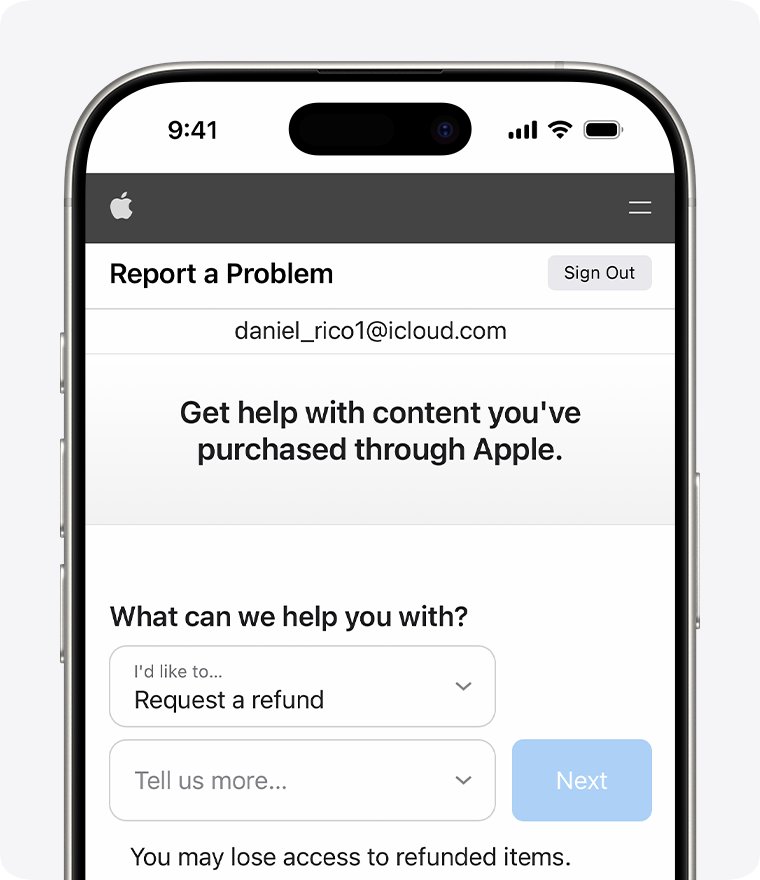
- Sign in to reportaproblem.apple.com.
- Tap or click I'd like to, then choose Request a refund.
- Choose the reason you want a refund, then choose Next.
- Choose the app, subscription or other item, then choose Submit.
- Wait 24 to 48 hours for an update on your request.
If Apple approves the refund, the money can take extra time to reach your payment method. A family organizer can request a refund for a member's purchase by choosing All in the Apple Account menu. Refunds that cannot be requested on the site go through Apple Support.
How to cancel an Apple-billed subscription
- On your iPhone or iPad, open Settings and tap your name.
- Tap Subscriptions.
- Tap the subscription you want to stop.
- Scroll down and tap Cancel Subscription.
- If there is no cancel button, or you see an expiration message in red text, the subscription is already cancelled.
On a Mac, open the Subscriptions page from the table above, click the subscription and click Cancel Subscription. Cancel a free trial at least 24 hours before it ends to avoid the first charge. You cannot cancel a family member's subscription; they must cancel it from their own Apple Account.
What to do if you still do not recognize the charge
Why am I being billed by Apple when nothing is in my purchase history?
The purchase was made on a different Apple Account, or the charge is still pending.
- Search every email account for receipt from Apple and note the Apple Account on the receipt.
- Sign in to reportaproblem.apple.com with each Apple Account you own.
- If the charge is still pending at your bank, wait for it to post and for the receipt to arrive.
- If there is still no match, contact Apple Support and give the date and amount from your statement.
Why is apple.com billing me for something I did not buy?
A family member bought it with your payment method, or someone else has access to your Apple Account.
- Ask the members of your Family Sharing group, and anyone who uses your devices, whether they bought the item.
- If nobody did, change your Apple Account password straight away.
- Go to account.apple.com, select Devices and remove any device you do not recognise.
- Turn on two-factor authentication if it is not already on.
- Request a refund for the purchases you did not make at reportaproblem.apple.com.
Why do I have an apple.com bill that Apple cannot find at all?
The charge may not come from your Apple Account, for example a card used by someone else's account or a charge made outside Apple.
- Contact Apple Support with the statement date and amount so they can check the charge.
- Check which payment methods are on your Apple Account and remove any card you no longer use.
- Contact your bank or card issuer, tell them the charge is not on any of your Apple Accounts, and ask about a dispute.
The subscription behind the charge is not in my Subscriptions list
It is billed to another Apple Account, to a family member, or through your wireless carrier or another provider.
- Find the receipt and check which Apple Account appears on it.
- If it is a family member's account, ask them to cancel it.
- If it is another account of yours, sign in to that account and cancel it there.
- If there is no Apple receipt, contact the company named on your statement or your carrier.
How to tell a real Apple charge from a scam
Scammers send fake receipts and calls about purchases you never made, hoping you will click a link or read out a code. Check the charge in your own purchase history, never through a link in a message.
| Check | A genuine Apple charge | A likely scam |
|---|---|---|
| Where the purchase appears | In your purchase history at reportaproblem.apple.com or on your device | Only in an email, text or phone call |
| Billing address on the receipt | Your current billing address is shown | No address, or one that is not yours |
| What the message asks for | Nothing; it is just a receipt | Your full card number, CVV code, Social Security number or mother's maiden name |
| Sender and links | Match Apple's name and website | Sender or link address does not match Apple |
| Tone | Plain receipt | Urgency, threats or an attachment you did not expect |
| Security requests | Never asks you to turn off security features or share a code | Asks for your password, a two-factor code or to disable two-factor authentication |
Forward a suspicious email that claims to be from Apple to [email protected]. For a suspicious text, email a screenshot of it to the same address. Update payment or password details only in Settings on your device or at account.apple.com.
Common examples of apple.com/bill charges
| Pattern on your statement | Usual cause | Where to confirm it |
|---|---|---|
| A small charge every month on the same date | A monthly subscription such as iCloud+ or an app subscription | The Subscriptions list |
| A larger charge once a year | An annual subscription that renewed automatically, often after a free trial | The Subscriptions list and the receipt for that date |
| A charge you never made, on the organizer's card | A family member's app or in-app purchase paid through Purchase Sharing | reportaproblem.apple.com, Apple Account menu, the member's name |
| One charge that matches no single price | Several purchases grouped into one bill | The full receipt for that purchase date |
| A small pending amount that disappears | An authorization hold after a billing change | Your bank's pending transactions |
How to prevent surprise Apple charges in the future
- On your iPhone or iPad, open Settings, tap your name, tap Media & Purchases, then tap Password Settings and choose Always Require.
- On a Mac, open Apple menu > System Settings, click your name, click Media & Purchases and choose the password setting for purchases.
- If you are the family organizer, open Settings > Family, tap your child's name, tap Apps & Websites > Restrictions > Ask to Buy, and turn on Require Purchase Approval.
- Cancel a free trial at least 24 hours before it ends if you do not want to keep it.
- Open your Subscriptions list each month and cancel anything you no longer use.
If you do not see Password Settings, Face ID or Touch ID is already turned on for purchases, which also asks for approval before each purchase.
Quick checklist for identifying an apple.com/bill charge
Work down the list. The charge is identified the moment one step produces a receipt with a matching amount.
- Search the amount at reportaproblem.apple.com and open the receipt for that date.
- Check the Subscriptions list for a matching recurring price.
- Search your email for receipt from Apple and read which Apple Account paid.
- Sign in with every other Apple Account you have used.
- As family organizer, choose All in the Apple Account menu to include family purchases.
- Rule out a pending authorization hold or a grouped bill.
- Contact Apple Support, then your bank, only if all of the above find nothing.
Bottom line
Search the exact statement amount at reportaproblem.apple.com first, then check subscriptions, other Apple Accounts and Family Sharing before you treat an apple.com/bill charge as fraud. Most unrecognised apple.com/bill charges turn out to be a renewed subscription, a grouped bill or a family member's purchase, and reportaproblem.apple.com is also where you request the refund if you did not want it.
Frequently Asked Questions
How do I see an apple.com bill?
Go to reportaproblem.apple.com and sign in with your Apple Account. Search for the amount on your statement, then tap or click the purchase date to open the full receipt. It lists every item and subscription included in that charge, plus tax.
How do I see the bill from Apple for a specific charge?
Search your email for "receipt from Apple" or "invoice from Apple" and open the receipt that matches the amount. The receipt shows what was bought and which Apple Account paid. Some banks also show a View Receipt option next to the transaction.
How do I view my Apple bill on iPhone?
Open the App Store, tap your photo or initials, then tap Apps & Purchase History and Purchase History. Search for the amount, and tap Last 90 days to choose a longer range. The same steps work on iPad.
How do I see my Apple app bills and subscriptions?
App purchases appear in Purchase History in the App Store and at reportaproblem.apple.com. Recurring charges appear in Settings, under your name, in Subscriptions. Check both, because a recurring app charge is listed in each place.
How do I check an apple.com bill on a Mac?
Open the App Store, click your name at the bottom of the sidebar, then click Apps & Purchase History and Purchase History. Click Last 90 Days to filter a longer period. A browser on any computer can also use reportaproblem.apple.com.
How do I find an Apple bill I cannot see in my purchase history?
Search your email for "receipt from Apple" to see which Apple Account was used, then sign in with that account at reportaproblem.apple.com. If you are the family organizer, choose All in the Apple Account menu to include family members' purchases.
Why do I have an apple.com bill on my statement?
Apple.com/bill appears when you buy an app, music, a movie or other content from Apple, when a subscription renews, or when a family member buys something paid for through Family Sharing. Several purchases can be grouped into one charge.
Why is apple.com billing me every month?
A charge that repeats monthly is almost always an active subscription, such as iCloud+ storage or an app subscription. Open Settings, tap your name and tap Subscriptions to see it, then tap Cancel Subscription if you no longer want it.
Why am I being billed by Apple for something I did not buy?
A family member may have bought it with your payment method, or someone else may be using your Apple Account. Ask your family first. If nobody made the purchase, change your Apple Account password, remove unknown devices and request a refund.
Is an email about an apple.com/bill charge real?
Check the purchase in your own purchase history rather than through the email's links. Genuine Apple receipts include your current billing address and never ask for your full card number, CVV code or Social Security number. Forward suspicious ones to [email protected].