The Microsoft Office suite is Microsoft's bundle of productivity apps, led by Word, Excel, PowerPoint, Outlook and OneNote, sold today as a Microsoft 365 subscription or as Office 2024, a one-time purchase.
This guide lists what each app does, what Office is called now, how the editions differ, how to use it free in a browser, and how to check which version you have.
What Is Microsoft Office Suite?
A suite is a set of programs sold together that share a look, a file format family and an account. Office is that set for documents, spreadsheets, presentations, email and notes.
Microsoft now sells the same core apps in three ways: a subscription, a one-time purchase, and a free browser version with fewer features.
Microsoft Office is a suite of desktop, web and mobile apps (Word, Excel, PowerPoint, Outlook and OneNote, plus Access on Windows) that you get through Microsoft 365, Office 2024, or free at office.com. Microsoft's own support pages describe Microsoft 365 as the subscription that delivers these apps, Office 2024 as the one-time purchase, and Microsoft 365 for the web as the free version that needs only a Microsoft account.
What apps does the Microsoft Office suite include?
| App | What it does | Microsoft 365 (Personal, Family) | Office Home 2024 | Office Home & Business 2024 |
|---|---|---|---|---|
| Word | Word processing: letters, reports, resumes | Yes | Yes | Yes |
| Excel | Spreadsheets, formulas, charts, data analysis | Yes | Yes | Yes |
| PowerPoint | Slide presentations | Yes | Yes | Yes |
| OneNote | Digital notebooks | Yes | Yes | Yes |
| Outlook | Email, calendar and contacts | Yes | No | Yes |
| Access | Desktop databases (Windows only) | Yes, on PC | No | No |
| Publisher | Desktop publishing | Removed after October 1, 2026 | No | No |
| OneDrive storage | Cloud file storage | 1 TB per person | Not included | Not included |
| Copilot features | AI help inside Word, Excel, PowerPoint, Outlook and OneNote | Included for the subscription owner | No | No |
Visio and Project are separate products for PCs, sold on their own as a subscription or one-time purchase. Business plans add services such as Teams, Exchange Online and SharePoint. If you work with databases, the guide on opening Access in Office 365 shows where it sits in a subscription.
What is the Microsoft Office suite called now?
Microsoft has renamed most of the Office branding, which is why searches for "Office" now land on Microsoft 365 pages. The apps themselves are still called Word, Excel and PowerPoint.
| Old name | Current name | What it is |
|---|---|---|
| Office 365 (home plans) | Microsoft 365 Personal, Family, Premium, Pro or Basic | The subscription |
| Office 365 / Microsoft 365 for business | Microsoft 365 Business and Enterprise plans; Microsoft 365 Apps | Subscriptions for organizations |
| Office Home & Student | Office Home 2024 | One-time purchase for one PC or Mac |
| Office (one-time, business) | Office Home & Business 2024 | One-time purchase that adds Outlook |
| Office Professional Plus (volume license) | Office LTSC Professional Plus 2024 | For regulated organizations that cannot take feature updates |
| Office app, then Microsoft 365 app | Microsoft Copilot app (rename began January 15, 2025) | The hub app that opens your files and the Office apps |
| Office Online / Office on the web | Microsoft 365 for the web | Free browser versions of Word, Excel, PowerPoint and more |
office.com and microsoft365.com now redirect to the unified cloud.microsoft address, so old bookmarks still work.
Which version of Office should you get?
| Your situation | Get this | Why |
|---|---|---|
| You only need occasional documents and have internet access | Microsoft 365 for the web (free) | Word, Excel and PowerPoint in a browser with only a Microsoft account |
| You use Office on several devices or share with family | Microsoft 365 Personal or Family | Install on all your devices, sign in on five at once, 1 TB storage each; Family shares with up to five more people |
| You want to pay once for one computer and need no email app | Office Home 2024 | Word, Excel, PowerPoint and OneNote on one PC or Mac |
| You want to pay once and need Outlook for a small business | Office Home & Business 2024 | Adds Outlook and allows business use |
| Your organization cannot take feature updates | Office LTSC 2024 through volume licensing | Fixed features, five years of mainstream support |
| You need Access for databases | A Microsoft 365 subscription on a PC | Office Home 2024 and Home & Business 2024 do not include Access |
Microsoft 365 vs Office 2024: the real differences
| Item | Office 2024 (one-time purchase) | Microsoft 365 (subscription) |
|---|---|---|
| Cost | One payment; Office Home 2024 lists at $179.99 in the US Microsoft Store | Monthly or yearly fee; Personal starts at $9.99 a month in the US |
| Feature updates | Security updates only; no new features | New features, security updates and bug fixes |
| Installs | Once, on one PC or Mac | All your devices, five signed in at the same time |
| Cloud storage | None | 1 TB of OneDrive per person |
| Phones and tablets | Free mobile apps with basic editing on screens under 10.1 inches | Extra features in the mobile apps when signed in |
| Upgrades | Next major release costs full price | Included |
| Support | Support resources and chat; call back for activation only | Ongoing chat and call back support |
| Internet needed | To install, activate, update and reactivate periodically | To install, activate and update; connect at least once a month or apps go into reduced functionality mode |
Both versions work offline once installed and activated, and neither forces you to save files in the cloud. Moving a one-time license to another PC has its own rules, covered in transferring Office to a new computer.
How to use the Office suite free in a browser
Microsoft 365 for the web is the free version of the suite. It needs a Microsoft account, which you can create with any new or existing email address.
- Open Edge, Chrome, Firefox or Safari and go to office.com.
- Select Sign in and enter your Microsoft account, or create one with your email address.
- Choose Word, Excel or PowerPoint from the app list on the left.
- Start a blank file or pick a template.
- Work on the file; web files are stored in your OneDrive.
The web apps have fewer features than the desktop apps. Email works the same way through Outlook on the web.
How to check which Office version you have
- Open any Office app, such as Word or Excel.
- Select File, then Account.
- Read the name under Product Information: a Microsoft 365 plan name means a subscription, while "Office Home 2024" or "Office LTSC" means a one-time license.
- On a Mac, open the app, select the app name in the menu bar, then choose About.
What changed in October 2026: Publisher is gone
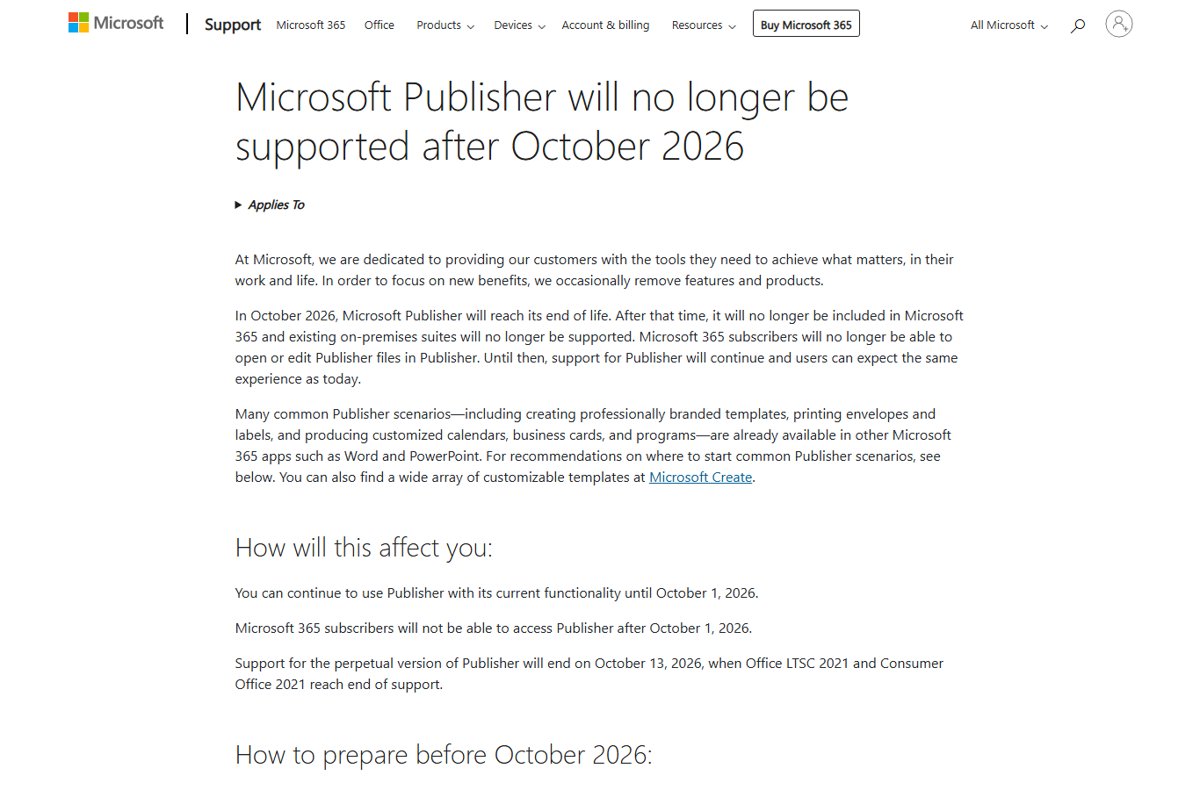
Microsoft Publisher reached end of life in October 2026. Microsoft 365 subscribers lose access after October 1, 2026, and support for perpetual Publisher ends on October 13, 2026, with Office 2021.
- If you still have Publisher, open each publication.
- Select File, then Save as, and choose a location.
- Pick PDF as the file type and select Save.
- To edit the content later, open Word, select File, then Open, and open the PDF.
- Select OK when Word offers to convert it.
Word and PowerPoint now handle the common Publisher jobs, such as flyers, calendars, business cards and labels.
Frequently asked questions
What does the Microsoft Office suite consist of?
The core suite is Word, Excel, PowerPoint, Outlook and OneNote. Microsoft 365 subscriptions add Access on Windows PCs and 1 TB of OneDrive storage, while Office Home 2024 includes only Word, Excel, PowerPoint and OneNote.
What is the Microsoft Office suite called now?
Microsoft sells it mainly as Microsoft 365, the subscription that replaced the Office 365 name for home users. One-time versions still carry the Office name, such as Office Home 2024, and the hub app is now the Microsoft Copilot app.
What programs are in Microsoft Office?
Word for documents, Excel for spreadsheets, PowerPoint for presentations, Outlook for email and calendar, and OneNote for notes. Access is included with Microsoft 365 on PCs. Publisher was removed from Microsoft 365 after October 1, 2026.
Is Microsoft 365 the same as Microsoft Office?
Microsoft 365 is the subscription that includes the Office apps plus cloud storage, Copilot features and ongoing updates. Office 2024 is the same core apps as a one-time purchase for one computer, without new features or storage.
What is Microsoft Office 2024?
Office 2024 is the current one-time purchase version of Office. Office Home 2024 includes Word, Excel, PowerPoint and OneNote for one PC or Mac, and Office Home & Business 2024 adds Outlook. It gets security updates but no new features.
What kind of software is Microsoft Office considered?
Microsoft Office is application software, specifically a productivity suite: a bundle of programs for creating documents, spreadsheets, presentations, email and notes that share one account, interface and file format family.
Is it Microsoft Office or Microsoft suite?
The product has always been Microsoft Office, and "Office suite" describes it as a bundle of apps. There is no product named Microsoft Suite. Today Microsoft markets the subscription as Microsoft 365 and the one-time version as Office 2024.
Can I use Microsoft Office for free?
Yes. Microsoft 365 for the web gives you Word, Excel, PowerPoint and more in a browser at office.com, free with a Microsoft account. The desktop apps need a Microsoft 365 subscription or an Office 2024 license.



![How to turn on/off ad blocker in Microsoft Edge? [step-by-step]](https://techdows.com/wp-content/uploads/2026/10/How-to-turn-onoff-ad-blocker-in-Microsoft-Edge-step-by-step-1-600x338.jpg)



How to enable the Developer tab on the Microsoft Office ribbon - Techdows
[…] tab exists only in the desktop apps of the Microsoft Office suite, so the same toolset is not available in a […]