Microsoft Visio is Microsoft's diagramming software: you use it to turn processes, systems and data into flowcharts, org charts, network diagrams, floor plans and other visuals built from ready-made templates and shapes.
This explainer covers what Visio does, the Visio plans and their prices, the free Visio in Microsoft 365 web app, who uses it and where it falls short.
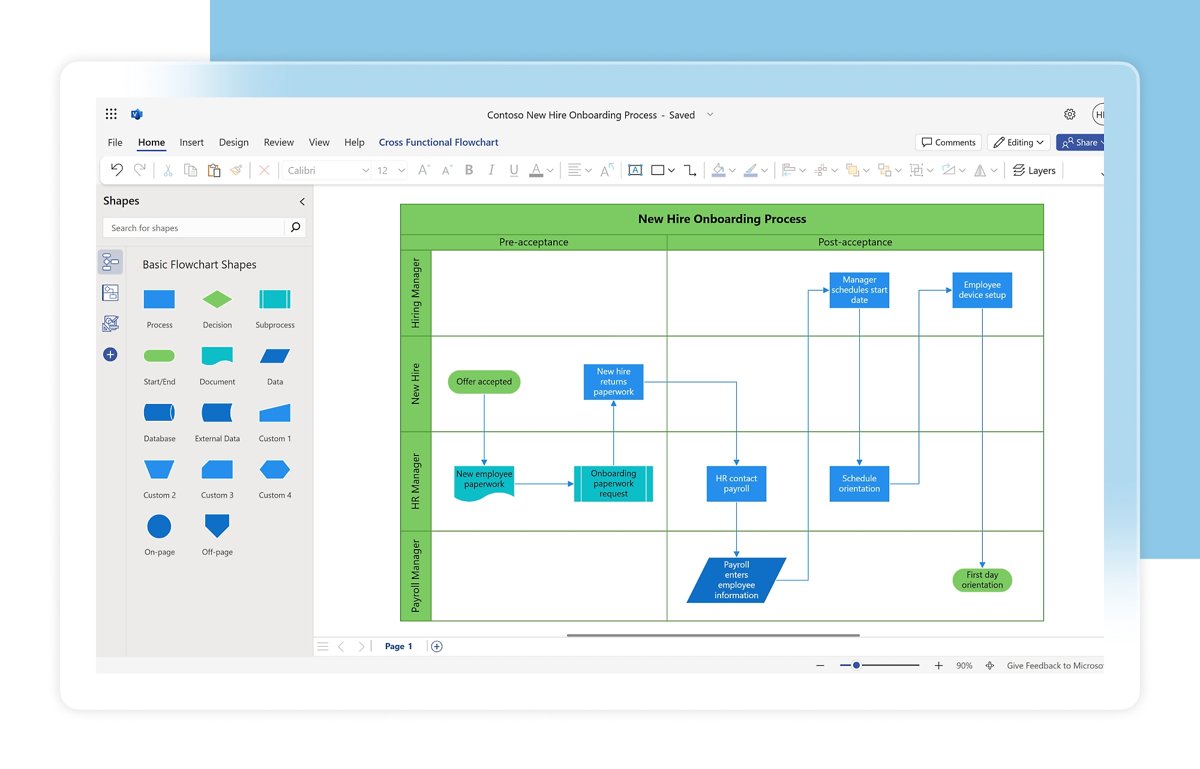
What does Microsoft Visio do?
Visio software lets you build diagrams by dragging shapes from a stencil onto a canvas, connecting them and adding text.
It runs as a desktop app for Windows and as a web app in the browser, and it is sold separately from the main Microsoft 365 apps.
Use Visio when you need a diagram that explains something at a glance: a process flow, a reporting structure, a network layout, a cloud architecture or an office floor plan. Visio ships with templates, stencils and grid settings for each diagram type, so a flowchart or org chart starts from the right shapes instead of a blank page. Shapes can also hold data, which plain drawing tools cannot.
What is Microsoft Visio?
Visio is part of the Microsoft 365 family but is not one of the core apps like Word or Excel. It comes in three forms, and the form you get depends on your plan.
| Fact | Detail |
|---|---|
| Publisher | Microsoft |
| Category | Diagramming and flowchart software |
| Desktop app | Windows only; included with Visio Plan 2 and the one-time Visio Standard 2024 and Professional 2024 licences |
| Web app | Visio for the web at visio.cloud.microsoft, works on Windows and macOS in a browser |
| Inside Teams | Create, view, edit and comment on Visio diagrams from a Teams channel's Files tab |
| Main file format | .vsdx; the desktop app and paid plans also open legacy .vsd files from Visio 2000 and later |
| Free viewing | Visio Viewer and Visio for the web (read-only) open drawings without a licence |
The history of Microsoft Visio
Visio has shipped as boxed versions for decades and is now mainly sold as a subscription. These are the milestones Microsoft documents for current users.
| Milestone | What changed |
|---|---|
| Visio 2000 | Oldest version whose .vsd files current Visio Plan 1 and Plan 2 can still view and edit |
| Visio 2016 and Visio 2019 | Standard and Professional editions sold as one-time purchases |
| Visio Plan 1 and Plan 2 | Subscription plans: Plan 1 is web only, Plan 2 adds the always up-to-date desktop app |
| August 2021 | Microsoft began rolling out Visio in Microsoft 365, a lightweight web app included with commercial Microsoft 365 plans |
| Visio LTSC 2021 | Standard and Professional editions for volume licensing |
| September 30, 2024 | Visio 2024 Standard and Professional released; support ends October 9, 2029 |
Key features of Microsoft Visio
| Feature | What it does | Available in |
|---|---|---|
| Templates and stencils | Start a diagram with the right shapes, scale and grid already set | All versions |
| AutoConnect arrows | Hover over a shape and click an arrow to add and connect the next shape | All versions |
| Real-time co-authoring | Several people edit and comment on one diagram at the same time | Web app in all plans |
| Shape data | Store text or numbers on each shape and show them with data graphics | Plan 1, Plan 2, desktop |
| Data linking | Link shapes to Excel, Access, SharePoint lists, SQL Server, Exchange or Azure Active Directory | Plan 2 desktop app |
| Diagram validation | Check structured diagrams such as flowcharts against built-in rules | Plan 2 |
| ShapeSheet and macros | Control shape behaviour and automate drawing with macros or VSTO add-ins | Plan 2 desktop app |
| DWG import | Bring AutoCAD drawings into a diagram | Plan 2 |
| Export | Save as PNG, JPEG or SVG; export process diagrams to Word and Power Automate | Varies by plan |
| Accessibility and security | Narrator, Accessibility Checker, high contrast, Information Rights Management | All versions; IRM is set in the desktop app |
What can you create with Microsoft Visio?
The diagram types you can create depend on your plan. Visio in Microsoft 365 covers everyday business diagrams, while the technical ones need a paid plan.
| Diagram type | Examples | Lowest plan that creates it |
|---|---|---|
| General diagrams | Block, Venn, cycle, pyramid and matrix diagrams | Visio in Microsoft 365 |
| Flowcharts | Basic flowcharts and process diagrams | Visio in Microsoft 365 |
| Org charts | Basic organization charts; pictures and employee fields need a paid plan | Visio in Microsoft 365 |
| Timelines | Infographic timelines | Visio in Microsoft 365 |
| Swim-lane diagrams | Cross-functional flowcharts | Visio Plan 1 |
| Network and cloud diagrams | Detailed network, Azure and AWS architecture diagrams | Visio Plan 1 |
| Software and database diagrams | UML 2.5 and entity relationship diagrams (Crow's Foot, Chen's notation) | Visio Plan 1 |
| Mind maps | Brainstorming maps | Visio Plan 1 |
| Process models | BPMN 2.0 diagrams | Visio Plan 2 |
| Floor plans | Office layouts, HVAC plans, plant layouts | Visio Plan 2 |
| Engineering diagrams | Electrical and P&ID diagrams | Visio Plan 2 |
| Project schedules | Gantt charts, PERT charts, timeline diagrams | Visio Plan 2 |
| Web mockups | Web and mobile wireframes | Visio Plan 2 |
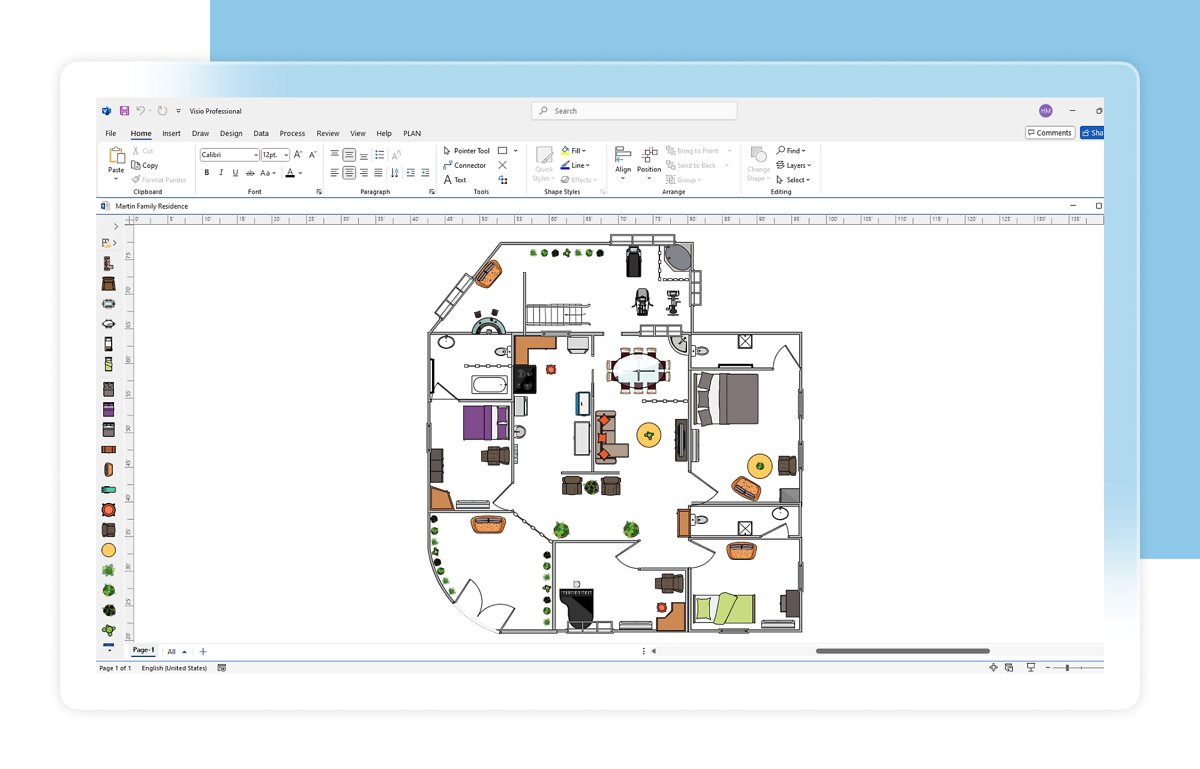
Visio Plan 1 vs Plan 2 vs Visio in Microsoft 365: which plan to choose
Prices below are Microsoft's US list prices per user, paid yearly. Plan 1 and Plan 2 each include 2 GB of OneDrive storage and a one-month free trial.
| Your situation | Choose | Price | Why |
|---|---|---|---|
| Your work or school already has a Microsoft 365 commercial plan and you draw basic flowcharts | Visio in Microsoft 365 | Included | Lightweight web app with basic templates and co-authoring at no extra cost |
| You make network, cloud, UML or swim-lane diagrams in a browser | Visio Plan 1 | $5 per user/month | Web app with thousands of shapes, layers, containers and shape data |
| You need the desktop app, offline work, data linking or engineering and floor plan templates | Visio Plan 2 | $15 per user/month | Web plus desktop app, more than 250,000 shapes, install on up to 5 PCs |
| You want a desktop app without a subscription | Visio Standard 2024 or Professional 2024 | One-time purchase | Perpetual licence supported until October 9, 2029, with no web or cloud features of the plans |
| You only need to open a diagram someone sent you | Visio Viewer or Visio for the web | Free | Both open Visio files read-only without a licence |
What is Visio in Microsoft 365?
Visio in Microsoft 365 is a lightweight, web-based version of Visio included at no extra cost with Microsoft 365 business, enterprise and education plans.
It is not available in Microsoft 365 Personal or Family, and Microsoft has said it has no plans to include the Visio desktop app in Microsoft 365.
| Question | Answer |
|---|---|
| Which plans include it? | Business Basic, Business Standard, Business Premium, Apps for business, Office 365 E1/E3/E5/F3, Microsoft 365 E3/E5/F3, Apps for enterprise, and A1/A3/A5 education plans |
| Which plans do not? | Microsoft 365 Personal, Family and F1; Business plans signed up with a Microsoft account (outlook.com, hotmail.com) do not qualify |
| Where do you open it? | visio.cloud.microsoft, or the Visio tile on office.com, signed in with a work or school account |
| What can you edit? | Basic flowcharts, block, Venn, pyramid, cycle and matrix diagrams, basic org charts and basic network diagrams |
| What about advanced diagrams? | You can view and comment on them but not edit them |
| File support | .vsdx only; legacy .vsd files need Visio Plan 1 or Plan 2 |
| Does it need turning on? | No; it is enabled by default and admins have no switch to turn it off, though a hidden app tile hides it from office.com |
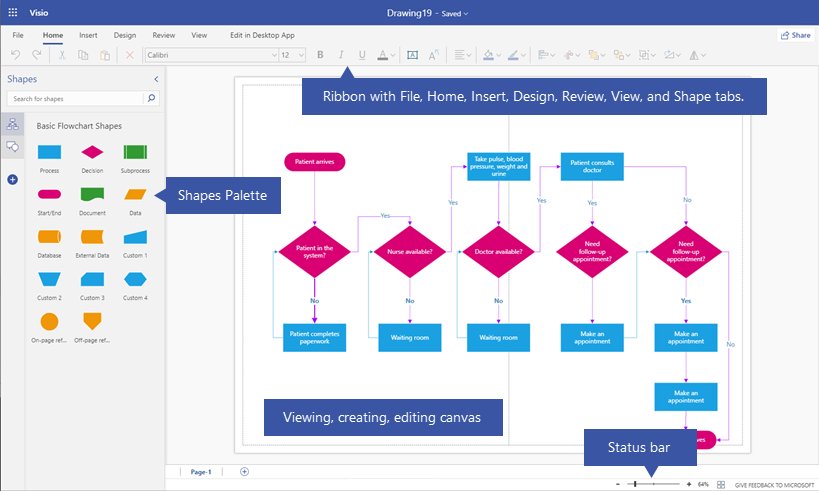
Who uses Microsoft Visio?
| User | Typical Visio diagrams | Plan that fits |
|---|---|---|
| Business analysts and managers | Process flowcharts, swim-lane diagrams, BPMN models | Plan 1 or Plan 2 |
| IT and network administrators | Network, rack and Active Directory diagrams | Plan 1 or Plan 2 |
| Cloud and software architects | Azure and AWS architecture, UML and ERD diagrams | Plan 1 |
| HR teams | Organization charts generated from Excel or Azure Active Directory data | Plan 2 for data-generated charts |
| Facilities and engineering staff | Floor plans, office layouts, HVAC, electrical and P&ID diagrams | Plan 2 |
| Project managers | Timelines, Gantt and PERT charts | Plan 2 |
| Teachers and students | Education templates for algebra, chemistry, physics, music and sports | Plan 2; basic diagrams in education Microsoft 365 plans |
| Casual diagrammers | Simple flowcharts and block diagrams | Visio in Microsoft 365 |
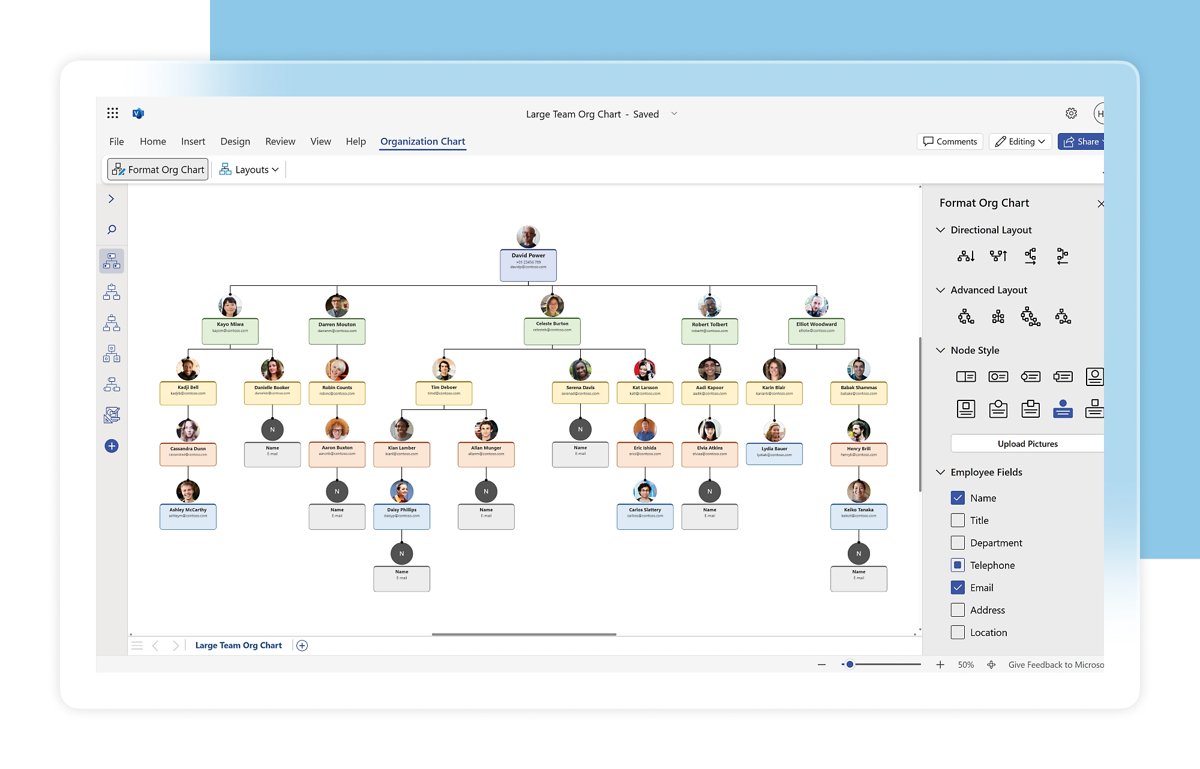
How to use Visio to create your first diagram
Every Visio diagram follows the same three stages: pick a template, arrange and connect shapes, then add text. These steps work in both the desktop and web app.
- Open the Visio desktop app, or go to visio.cloud.microsoft and sign in with your work or school account.
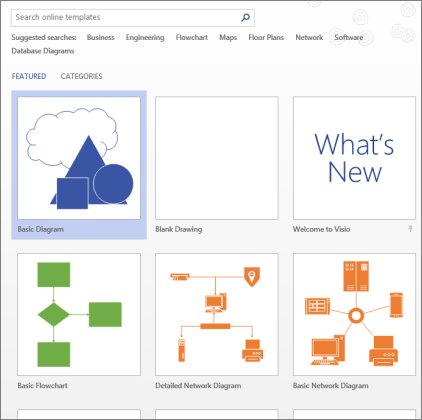
- Select a template, or select Basic Diagram to start from scratch. In the desktop app, select File > New if Visio is already open.
- In the desktop app, pick a template variant if prompted and select Create.
- Drag a shape from the Shapes window onto the canvas.
- Hover over the shape until the AutoConnect arrows appear, then click an arrow and choose the next shape from the mini toolbar.
- Select a shape and start typing to add a label. Press Esc when you finish.
- On the Design tab, pick a theme to restyle the whole diagram.
If the AutoConnect arrows do not appear, click Connector in the Tools group on the Home tab. Visio Plan 2 subscribers can install the Visio desktop app from their Microsoft 365 account.
How to check which version of Visio you have
- Open Visio.
- Select File > Account, or File > Help in older versions.
- Read the product name shown on that page, such as Visio Plan 2 or Visio Professional 2024.
- For a subscription, you can also sign in to office.com, open My account and search that page for Visio.
Advantages of using Microsoft Visio
| Advantage | Why it matters |
|---|---|
| Industry-standard notation | Built-in support for UML 2.5, BPMN 2.0 and IEEE standards keeps technical diagrams readable by other professionals |
| Large shape library | Thousands of shapes in Plan 1 and more than 250,000 in Plan 2, including official Azure and AWS icons |
| Data-connected diagrams | Plan 2 diagrams refresh from Excel, SharePoint or SQL Server instead of being redrawn |
| Microsoft 365 integration | Work in Teams, embed diagrams in Power BI, build diagrams from Excel with Data Visualizer, export to Word and PowerPoint |
| Co-authoring | Teams edit and comment on one diagram in real time in the web app |
| Security and compliance | Information Rights Management and GDPR support, the same protections as other Microsoft 365 apps |
| Long file compatibility | Paid plans still edit .vsd drawings made in Visio 2000 |
Limitations of Microsoft Visio
| Limitation | Detail |
|---|---|
| No Mac desktop app | The desktop app is Windows only; Mac users work in Visio for the web in Safari or Chrome |
| Sold separately | Plan 1 and Plan 2 are extra subscriptions on top of Microsoft 365, and Microsoft 365 Personal and Family get no Visio at all |
| Web app gaps | Visio for the web cannot import shapes, set IRM, link data or add clickable image overlays |
| Plan 1 is web only | Offline work and local files need Plan 2 or a one-time licence |
| Limited free tier | Visio in Microsoft 365 edits only basic diagram types and cannot open legacy .vsd files |
| Mobile editing | Editing in a browser works only on devices with a screen of 9 inches or larger |
| Plan 2 diagram types | Some Plan 2 diagram types, such as floor plans and BPMN, are only available in the desktop app |
Where can I find Visio? Fixes when Visio is missing
You bought Visio Plan 1 or Plan 2 and cannot find it
Both plans are web products, so nothing appears in the Start menu until a Plan 2 user installs the desktop app.
- Open your browser and go to www.office.com/launch/visio.
- Sign in with the work or school account that holds the licence.
- For the Plan 2 desktop app, sign in at m365.cloud.microsoft/apps, then select Install apps and install Visio.
The Visio tile does not appear on office.com
Your tenant has the Visio app tile hidden, or your plan does not include Visio in Microsoft 365.
- Go to visio.cloud.microsoft directly and sign in with your work or school account.
- If it still fails, ask your Microsoft 365 admin to show the Visio app tile for your organization.
- Confirm your plan is a commercial or education plan; Personal, Family and F1 do not include Visio.
A diagram opens but you cannot edit it in Visio for the web
The diagram uses a type outside your plan, or it is a legacy .vsd file.
- Check the diagram type against the plan table in this article.
- Ask the sender to save a copy as .vsdx if it is a .vsd file.
- Use Visio Plan 1 or Plan 2 to edit network, UML or other advanced diagrams.
Microsoft Visio FAQ
What is Visio software used for?
Visio software is used to create diagrams such as flowcharts, organization charts, network diagrams, floor plans, cloud architecture diagrams and timelines. You build them from templates and shapes, connect the shapes and add text or data.
What is Visio Plan 2?
Visio Plan 2 is Microsoft's top Visio subscription at $15 per user per month, paid yearly. It includes Visio for the web and the Windows desktop app, offline work, more than 250,000 shapes, data linking and engineering and floor plan templates.
Is Visio part of Microsoft Office?
Visio is a Microsoft 365 app, but it is not part of the standard Office apps. Microsoft 365 commercial and education plans include the lightweight Visio in Microsoft 365 web app, while the full desktop app needs Visio Plan 2 or a one-time Visio 2024 licence.
Is Microsoft Visio free?
Visio is not free in full, but you can view Visio files for free with Visio Viewer or in Visio for the web through OneDrive. Microsoft 365 work and school users also get Visio in Microsoft 365 for basic diagrams at no extra cost.
How do I use Visio online?
Go to visio.cloud.microsoft and sign in with a work or school account that has Visio in Microsoft 365, Plan 1 or Plan 2. Pick a template, drag shapes onto the canvas, connect them with the AutoConnect arrows and type labels.
Can I use Visio on a Mac?
Yes, but only in a browser. Visio for the web runs in Safari or Chrome on a Mac with nothing to install. There is no Visio desktop app for macOS.
What can I use if I don't have Visio?
To open a Visio file without a licence, use Visio Viewer or upload the file to OneDrive and open it in Visio for the web in read-only view. To create diagrams, check whether your work or school Microsoft 365 plan includes Visio in Microsoft 365.
Where is Visio installed?
Visio Plan 1 and Visio in Microsoft 365 are web apps, so nothing is installed; open them at visio.cloud.microsoft. Visio Plan 2 and Visio 2024 install a desktop app on Windows, which you launch from the Start menu.
Bottom line: is Microsoft Visio worth it?
Start with Visio in Microsoft 365 if your work or school plan includes it, move to Plan 1 for technical diagrams in the browser, and pay for Plan 2 only when you need the desktop app, offline work or data-linked diagrams. Most users who only draw flowcharts and org charts never need more than the free web app. In the Microsoft Office suite, Visio is the dedicated diagramming tool, and its paid plans earn their cost through industry-standard templates and data connections.