To view or download your invoice, open the Microsoft 365 admin center, go to Billing > Bills & payments, select the invoice, then select Download > Download invoice to save the PDF.
This applies to Microsoft business subscriptions, and the guide also covers the permissions you need, printing, invoice fields, tax receipts, Fapiao requests, invoice emails and recurring billing.
View or download your invoice
- Sign in to the Microsoft 365 admin center at admin.microsoft.com with a billing admin account.
- In the Simplified view, select Products, then View invoices. In the Dashboard view, go to Billing > Bills & payments.
- If your organization has more than one billing account, select Change billing account and pick the right one.
- Select an invoice in the list to open its details page.
- Select Download, then Download invoice to save the PDF copy.
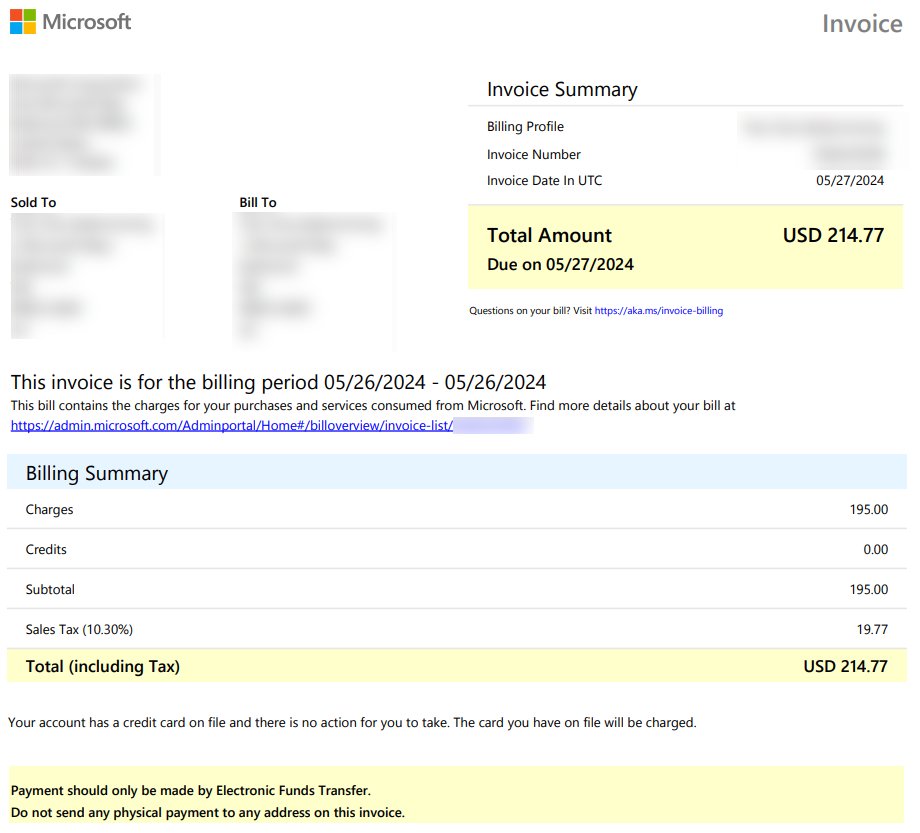
The details page shows the amount due, the paid date, the invoice date, billing period, billing profile and account, a billing summary with charges, credits and taxes, and the transactions for that account. The online view looks different from the PDF.
If the list is empty, widen the date range or choose another account from the Billing account view selector. If you need to open the Microsoft 365 admin center for the first time, sign in with the account that bought the subscription.
Before you begin: Microsoft 365 admin roles needed to view invoices
The role you need depends on your billing account type. Check it on Billing > Billing accounts, where the Billing account type column shows the agreement for each account.
| Billing account type | What it means | Role needed to see invoices |
|---|---|---|
| Microsoft Online Subscription Agreement (MOSA) | Created when you signed up for Microsoft 365 directly; one invoice per order on the account anniversary | At least Billing Administrator |
| Microsoft Customer Agreement (MCA) | Created when you buy through a Microsoft representative, a partner or on your own; subscriptions sit in billing profiles | Billing Administrator, plus a billing account or billing profile role for profile settings |
| Person who signed up | The original purchaser | Automatically a Billing account owner |
This article does not apply to apps, games or personal subscriptions. Those orders appear in your Microsoft Store order history instead.
How to check where your Microsoft 365 subscription is managed
If no invoice shows up in the admin center, the subscription may be billed somewhere else. For a home plan, sign in at account.microsoft.com/services with the Microsoft account that bought it: options such as Manage, Cancel or Change payment mean Microsoft bills it, while missing options point to a third party.
| Where you bought it | Where billing is managed |
|---|---|
| Microsoft 365 for business, bought from Microsoft | Microsoft 365 admin center, Billing > Bills & payments |
| Microsoft 365 Personal or Family, bought from Microsoft | Your Microsoft account subscriptions page at account.microsoft.com/services |
| Mobile apps on iPhone or iPad | Subscriptions in your Apple ID settings |
| Mobile apps on Android | Subscriptions in Google Play |
| Amazon or another app store or retailer | That provider's account settings; Microsoft cannot cancel, refund or change billing for these |
Print your Microsoft 365 bill or invoice
To print an invoice, print the downloaded PDF, which is the official layout with the invoice number and payment instructions.
- Download the invoice PDF from Billing > Bills & payments as shown above.
- Open the PDF in Microsoft Edge or your PDF reader.
- Press Ctrl + P to open the print dialog.
- Choose your printer, or Microsoft Print to PDF to keep a copy, and select Print.
Microsoft 365 services do not issue payment receipts. For card payments, keep the invoice together with your card statement as proof of payment.
Transaction type details on a Microsoft 365 invoice
| Transaction type | What it means |
|---|---|
| Purchase | A new purchase; your first invoice for a product shows this type |
| Monthly payment | Recurring cycle charges |
| Renew | The subscription renewed to a new term |
| Re-enable | The subscription was disabled and then re-enabled |
| Add quantity | Licenses added to an existing subscription |
| Remove quantity | Licenses removed from an existing subscription |
| Usage charges | Consumption-based services such as Azure |
| Cancel | A cancellation that qualified for a prorated refund |
| Convert | A switch from one subscription to another |
| Credit | A credit applied to your account |
Understand your Microsoft 365 invoice PDF
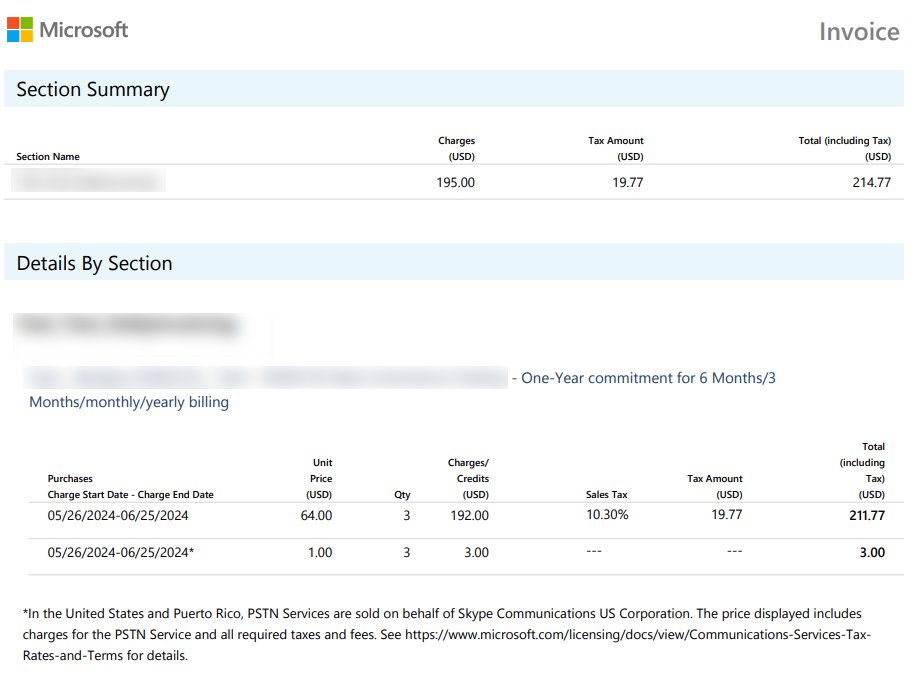
An MCA invoice PDF has at least three pages. Page one holds the summary and payment instructions, and page two onward lists charges grouped by product order.
| Field or behavior | What to know |
|---|---|
| Bill to and Billing Profile | Set on the billing profile details page, along with PO number and payment terms |
| Invoice date | The date the invoice was generated |
| Billing period | A single day for new purchases and renewals; the prior month for changes to existing subscriptions |
| Billing Summary | Charges, credits, tax and the total due |
| Card payments | Charged automatically within 10 days of the invoice date |
| Two invoices in one month | Happens only at renewal: one closes the old term, one opens the new term |
| One invoice per billing profile | Each billing profile gets its own invoice and invoice-ready email |
Some invoices are generated within 24 hours of a purchase, while others arrive at the end of the billing period with every item from that period.
Get your Microsoft 365 invoice by email as a PDF
You can have each invoice attached to the invoice-ready email. The steps differ by billing account type.
| Account type | Where to turn it on | Setting |
|---|---|---|
| MOSA | Billing > Billing notifications > Edit notification settings | Under Invoice PDF, check Attach a PDF to your invoice emails and select Save |
| MCA | Billing > Billing accounts > select the account > Billing profiles tab > select the profile > Manage settings under Invoice and payment contact settings | Switch Get invoices in email attachments to On, add recipients if needed, then select Save Changes |
On MOSA accounts, a Global admin can make every change on that page and a Billing admin can turn on the PDF attachment. On MCA accounts, invoice emails go to billing profile owners, contributors and invoice managers.
Download your tax receipt
Tax receipts exist only in certain jurisdictions. When one is available, the option appears next to the invoice ID.
- In the admin center, go to Billing > Bills & payments.
- Find the invoice in the list.
- Open the context menu next to the invoice ID.
- Select Download tax receipt.
If Download tax receipt is missing, no tax receipt is issued for that invoice in your region.
Request a Fapiao for Microsoft 365 operated by 21Vianet
Microsoft 365 operated by 21Vianet in China does not accept international credit cards. Proof of payment comes as a Fapiao instead of a receipt.
- Pay the invoice by invoice payment, Alipay or China UnionPay.
- Wait about three days after the payment.
- Open the Fapiao system linked from the 21Vianet admin center documentation.
- Submit your Fapiao request with the invoice details.
How to stop recurring billing in Microsoft 365
Recurring billing is on by default for card and billing profile payments. Turning it off does not cancel the subscription; it stays active until it expires.
- In the admin center, select Billing in the Simplified view, or go to Billing > Your products in the Dashboard view.
- Select the subscription.
- On the subscription details page, select Edit recurring billing.
- In the Edit recurring billing pane, select Off, then Save.
Turning off recurring billing also cancels any scheduled changes on that subscription. You can change the setting only on an active subscription, so an expired one must be reactivated first.
Can't sign in to Microsoft 365 to view or download your invoice
Invoices sit behind the Microsoft 365 admin center sign-in, so a sign-in problem blocks the whole task. Sign in with the work or school account email and password you use for Microsoft 365 or Office, not a personal Microsoft account, unless that personal account bought the subscription.
The sign-in page rejects your Microsoft account
A problem with the account details, such as a wrong email address, phone number or password.
- Open the Sign in to Microsoft 365 page on Microsoft Support and select Sign-in helper.
- Enter the email address or mobile phone number you are trying to sign in with.
- Follow the fix the tool gives you, or its self-help steps if it finds no problem with the account.
You can sign in, but billing pages or invoices are missing
Your account does not have at least the Billing Administrator role.
- Ask an admin in your organization to assign you the Billing Administrator role or a higher one.
- Sign out, sign back in to admin.microsoft.com and open Billing > Bills & payments again.
You still can't get into the account
The account needs help from Microsoft Support.
- Go to Contact Microsoft Support, describe the problem and select Get Help.
- If that does not solve it, select Contact Support to reach an agent.
Microsoft support agents are not allowed to send password reset links or change account details, so expect to verify the account yourself.
Microsoft 365 billing and invoice FAQ
How do you stop recurring billing for Microsoft 365?
Go to Billing > Your products in the Microsoft 365 admin center, select the subscription, select Edit recurring billing, choose Off and save. The subscription stays active until its expiration date and is not renewed.
Where is the Microsoft 365 billing portal?
Billing lives inside the Microsoft 365 admin center at admin.microsoft.com. Invoices are under Billing > Bills & payments, subscriptions under Billing > Your products, and account details under Billing > Billing accounts.
What is a billing account in Microsoft 365?
A billing account holds your agreement with Microsoft and is used to manage account settings, invoices, payment methods and purchases. It is either a Microsoft Online Subscription Agreement (MOSA) or a Microsoft Customer Agreement (MCA) account.
How do you change the billing account for Microsoft 365 invoices?
On the Bills & payments page, select Change billing account to switch between the accounts your organization has. Each billing account shows only its own invoices, so check every account if an invoice seems missing.
Does Microsoft 365 give payment receipts?
No. Microsoft 365 services do not provide payment receipts. For card payments, use the invoice together with your card statement. Some jurisdictions offer a tax receipt, and customers of 21Vianet in China receive a Fapiao.
When is my card charged for a Microsoft 365 invoice?
If you pay by credit or debit card, Microsoft charges the card automatically within 10 days of the invoice date. For wire transfer or other electronic payments, follow the payment instructions at the bottom of the invoice PDF.
Why do I have two Microsoft 365 invoices in the same month?
This happens only when a subscription renews. One invoice closes the previous term and covers the prior month, and the other opens the new term with a single-day billing period. The charges are for different service periods.
Who can see Microsoft 365 billing information?
At least a Billing Administrator can view and download invoices. On MCA accounts, billing account and billing profile roles control profile settings, and the person who signed up is automatically a Billing account owner.