Google makes no Windows or Mac installer for Google Translate; the free, official way to get it on a PC is to open translate.google.com in Chrome or Edge and install the page as an app, which takes about a minute on Windows 11 and Windows 10. On a Mac, Safari's File > Add to Dock or Chrome's Install page as app does the same, and the result opens in its own window with its own taskbar or Dock icon.
The same free Google Translate download is on Google Play for Android and on the App Store for iPhone and iPad, where it also translates with no internet connection.
This guide covers which version to install on each device, the official Google links, desktop install steps, document translation, offline use, and fixes for Google Translate not working.
Which Google Translate download do you need?
Match your device to a row and follow the link.
| Your device | What to install | Size |
|---|---|---|
| Windows 11 or Windows 10 PC | translate.google.com, installed as an app in Chrome or Edge | No setup file |
| Mac | translate.google.com, added to the Dock from Safari or Chrome | No setup file |
| Chrome on any computer, for selected text | Google Translate extension | Small browser extension |
| Android phone, tablet or Chromebook | Google Translate on Google Play | Play states no size |
| iPhone or iPad | Google Translate on the App Store | Shown on the App Store |
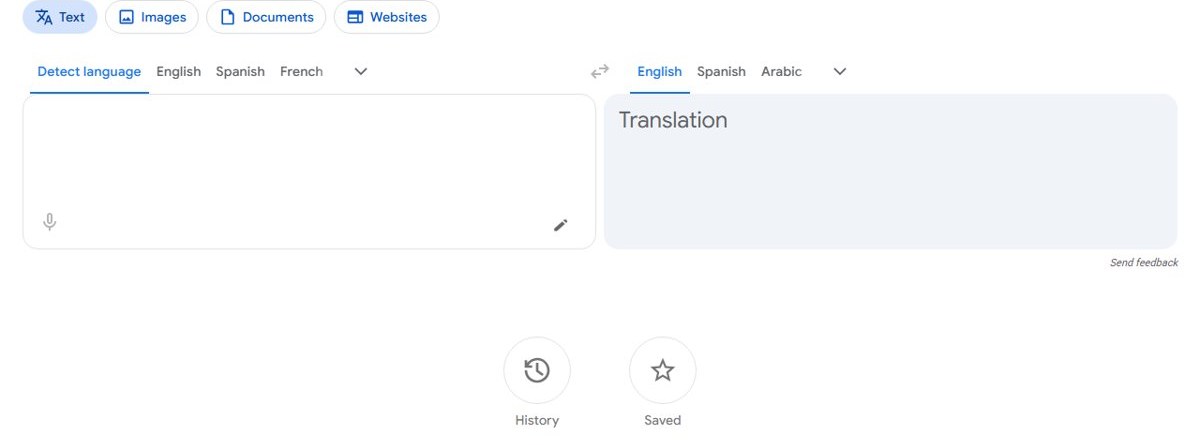
Pick the desktop app for typing, documents and websites. Add the extension when you mostly translate words on pages you are already reading.
Download Google Translate from Google’s official sources
Google links its phone apps and the website from its own Translate page. These are the addresses to use.
- Google Translate on the web — no sign-in needed
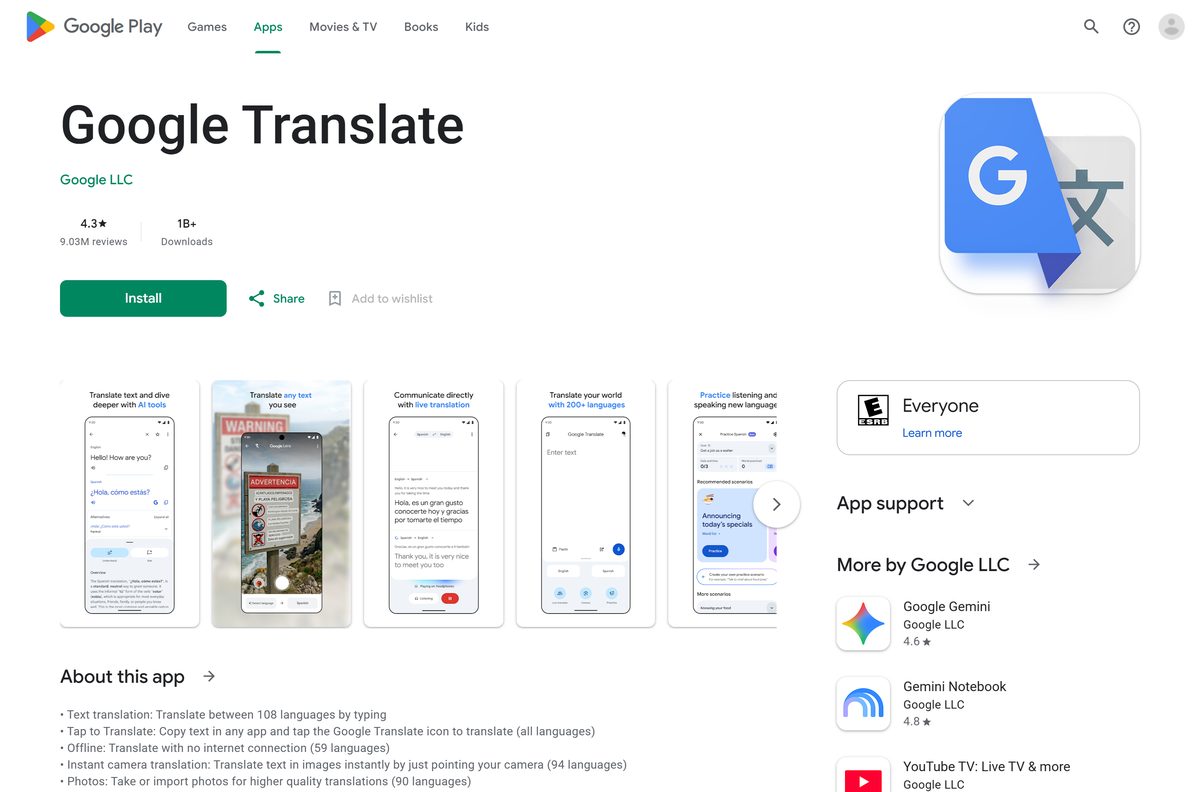
- Google Translate on Google Play — published by Google LLC
- Google Translate on the App Store — published by Google LLC
- Google Translate extension for Chrome — offered by Google, for highlighted text
- Google Chrome — needed to install the web app from Chrome
How to install Google Translate on Windows 11 and 10 as a desktop app
Chrome turns translate.google.com into an app with its own window, taskbar icon and Alt + Tab entry. The same steps work in Chrome on a Mac.
- Open Chrome and go to translate.google.com.
- Select More, the three-dot button at the top right.
- Select Cast, save, and share, then Install page as app.
- Keep the name Google Translate or type a shorter one.
- Select Install. The app opens in its own window.
- Right-click the app’s taskbar icon and select Pin to taskbar.
- Open it later from the Start menu, or from chrome://apps in a Chrome tab.
The app keeps the Documents and Websites tabs of the site, so files translate from the same window.
Install Google Translate with Microsoft Edge
Edge is already on every Windows 11 and Windows 10 PC, so this route needs no extra browser. Edge lists the result with your other Windows apps.
- Open Microsoft Edge and go to translate.google.com.
- Select Settings and more, the three-dot button at the top right.
- Select More tools, then Apps, then Install this site as an app.
- Name the app and select Install.
- Tick Pin to Start during the install to add it to the Start menu.
- In the dialog that opens after installing, tick Auto-start on device login to launch it with Windows.
Manage it later from edge://apps, where each app card has a Details page. Microsoft documents the whole flow in its Edge app guide.
Google Translate for Mac
Safari builds a Dock app from any page on macOS Sonoma 14 or later. Chrome does the same on macOS 13 Ventura and up.
| Your Mac | What to do | Where it comes from |
|---|---|---|
| macOS Sonoma 14 or later, using Safari | Open translate.google.com, then File > Add to Dock | Apple |
| macOS 13 Ventura or later, using Chrome | More > Cast, save, and share > Install page as app | |
| Older macOS | Bookmark translate.google.com in your browser | |
| You also carry an iPhone | Google Translate on the App Store | Apple App Store |
In Safari, type a name in the dialog and select Add. The app then appears in the Dock and in your home folder’s Applications folder.
Is Google Translate free on PC and Mac?
Yes. Google Translate is free on the web, on Android, on iPhone and iPad, and as a Chrome extension. The App Store lists the price as Free, and Google Play offers the app with no in-app purchase needed to translate. No account is needed to translate text on translate.google.com, and installing the site as a desktop app from Chrome, Edge or Safari costs nothing. Saved translations need a Google Account, which is also free.
Google Translate system requirements for PC
Google Translate sets no hardware floor of its own on a computer. The browser sets it.
| Field | Value |
|---|---|
| Software | Google Translate |
| Developer | Google LLC |
| Latest version | Web-based, auto-updating |
| License / Price | Free |
| Supported OS | Windows 11, Windows 10, macOS, ChromeOS, Linux, Android, iOS and iPadOS 18.0 or later |
| Chrome requirement | Windows 10 or later on Intel, Windows 11 on ARM, macOS 13 Ventura or later |
| Safari web app requirement | macOS Sonoma 14 or later |
| Architecture | None of its own, the browser’s build applies |
| File size | No desktop setup file; the phone apps download from their stores |
| Offline installer | None; offline languages download inside the phone apps |
| Official download source | translate.google.com |
| Last verified | 2026-10-27 |
To check your own PC, open Settings > System > About and read System type and the Windows edition.
Translate text
The Text tab is what opens by default in the desktop app. Google's help gives these steps:
- Open Google Translate.
- At the top, pick the languages. For From, choose a language or select Detect language; for To, pick the language you want.
- Type the text in the box on the left.
- Use the buttons under the result to Listen, Copy translation, rate it with thumbs up or down, or Look up details for definitions and examples (selected languages only).
Translate longer text: you can paste up to 5,000 characters at a time. Use the Back and Forward buttons in the bottom bar to step through sections of the result. Google also notes that a single word can have several meanings, so a full phrase or sentence translates more accurately.
Translate documents
Select Documents at the top of the page to translate a whole file. Google supports .docx, .pdf, .pptx and .xlsx files up to 10 MB, and PDFs must be 300 pages or less; for bigger jobs it points to the Cloud Translation API.
- Go to Google Translate and select Documents.
- Choose the languages, or select Detect language for the original.
- Select Browse your files, or drag the file onto the page.
- Select Translate, then Download translation.
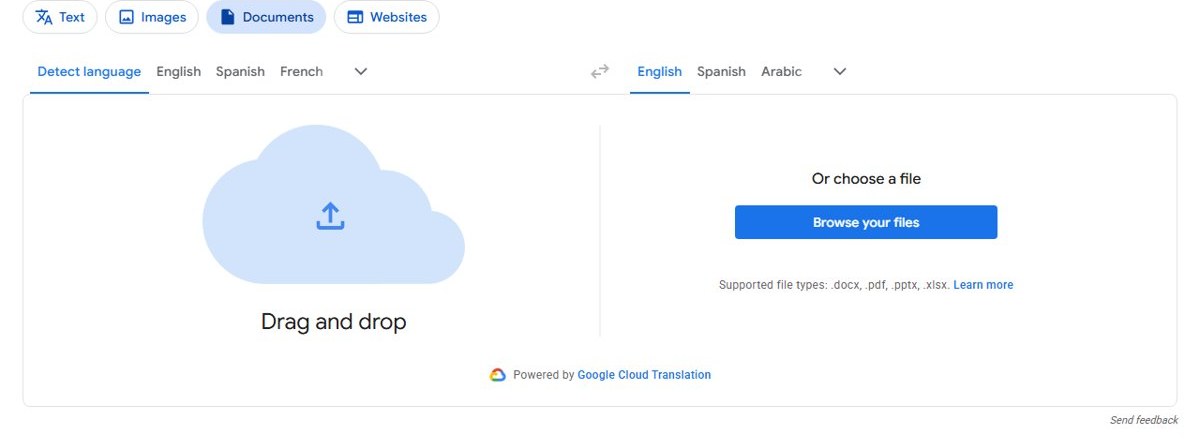
Document translation is not available on small screens or mobile, so widen the window if the Documents tab disappears. Text inside images and scanned PDF pages stays in the output untranslated.
Translate websites
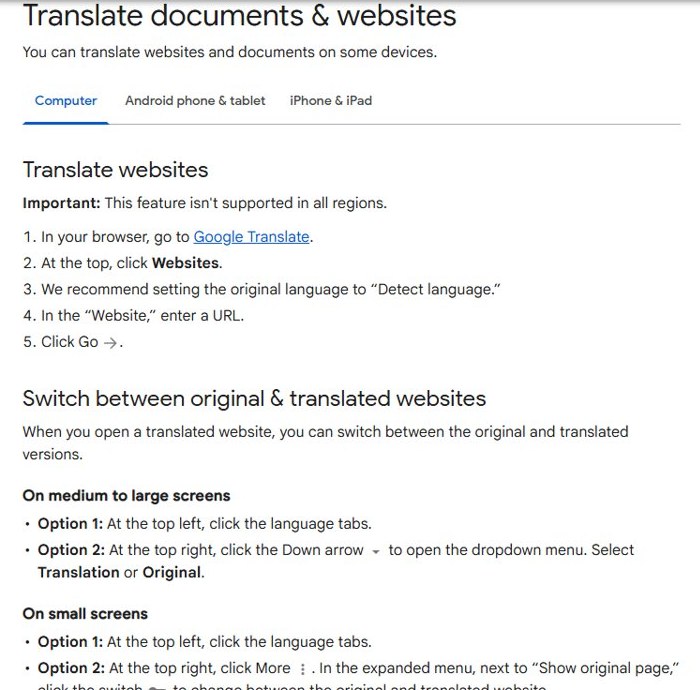
Google warns that website translation is not available in every region. Where it is:
- Go to Google Translate and select Websites.
- Leave the original language on Detect language, as Google recommends.
- Enter the address in the Website box and select Go.
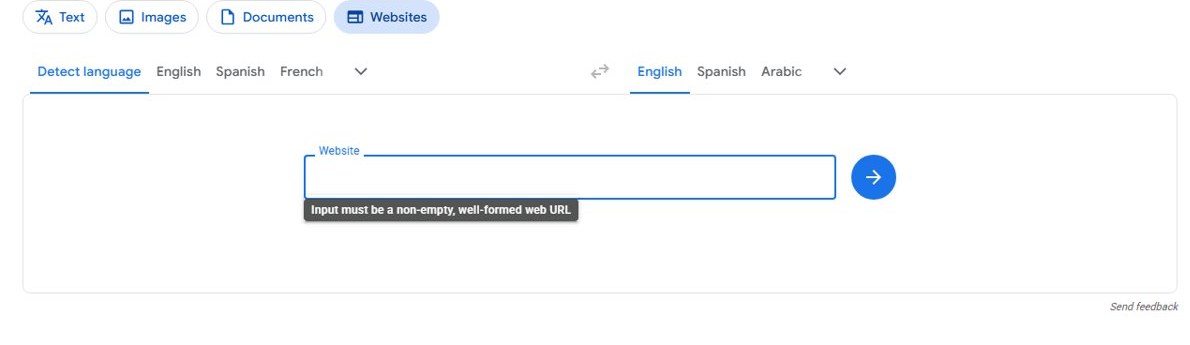
- To switch between original and translated websites, select the language tabs at the top left, or use the Down arrow at the top right and pick Translation or Original.
For pages you are already reading, Chrome now translates whole pages on its own, and it can also translate selected text without the extension. Edge has the same option through Microsoft's translator, which also powers Translator in Bing.
Choose & download languages
Offline translation lives in the Android and iPhone apps, not on a PC. Download a language once and it translates with no internet connection; on supported languages, the camera also works offline.
- Install Google Translate from Google Play or the App Store.
- Connect to Wi-Fi.
- Open the Translate app.
- At the bottom, select the language you want to download.
- Next to the language, tap Download. If no Download button appears, that language cannot be used offline.
- Turn on airplane mode and translate a phrase to confirm it works.
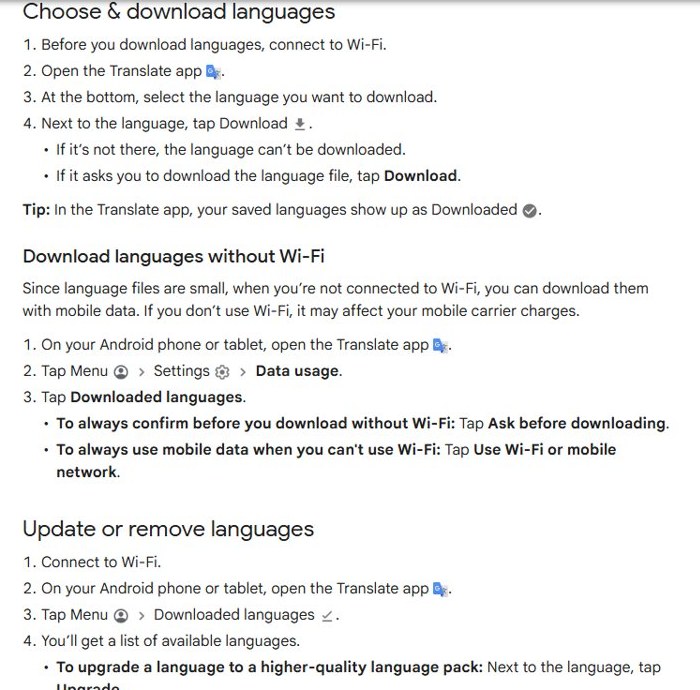
Download languages without Wi-Fi: language files are small, so mobile data works too. On Android, tap Menu > Settings > Data usage > Downloaded languages and choose Ask before downloading or Use Wi-Fi or mobile network.
Update or remove languages: tap Menu > Downloaded languages, then Upgrade for a higher-quality pack, Update to refresh one, or Remove to delete it. Google’s offline translation help lists the steps for both phones.
Is Google Translate for PC safe to download from other sites?
Pages offering a Google Translate .exe or offline installer for PC are distributing someone else’s program. Google’s Windows and Mac version is the website itself.
- Read the address bar before installing. The app must come from translate.google.com.
- On Google Play, confirm the name under the title reads Google LLC.
- On the App Store, confirm the seller reads Google LLC.
- In the Chrome Web Store, confirm the extension is offered by Google.
- Right-click any .exe or .msi claiming to be Google Translate, open Properties, then Digital Signatures, and delete it if the signer is not Google.
How to check your Google Translate version and update it
The desktop app has no version number. It loads the current site each time it opens.
- On a PC or Mac, update the browser through Help > About Google Chrome or Settings > About Microsoft Edge.
- On Android, open Google Play, select your profile picture, then Manage apps & device.
- Select Updates available, find Google Translate and select Update.
- On iPhone or iPad, open the App Store, select your profile picture and pull down to refresh the update list.
- Open chrome://extensions and turn on Developer mode to see the extension’s version number.
The phone apps update through their stores, and each listing shows the current version number.
Fix Google Translate not working on Windows or Mac
The install option does not appear in Chrome or Edge
The page is open in a private window, or the browser is out of date.
- Close the Incognito or InPrivate window and open translate.google.com in a normal one.
- Update the browser and restart it.
- Check Cast, save, and share in Chrome, or More tools > Apps in Edge, again.
A document will not translate
The file breaks one of Google’s document limits.
- Confirm the file is .docx, .pdf, .pptx or .xlsx.
- Keep the file under 10 MB, and a PDF at 300 pages or less.
- Split a large PDF into parts and translate each one.
- Run a scanned PDF through OCR first, because text in images is not translated.
Translation fails with no internet on the phone
The language pack was never downloaded, or the language has no offline pack.
- Reconnect to Wi-Fi and open the language list at the bottom of the app.
- Tap Download next to both languages in the pair.
- If the language has no Download button, it has no offline pack.
Google Translate is not working in Chrome
An extension or cached data is interfering with the page.
- Open translate.google.com in an Incognito window.
- If it works there, turn extensions off at chrome://extensions one at a time.
- Clear cached images and files, then reload the page.
How to uninstall Google Translate from a PC or Mac
Removing the desktop app deletes no translations saved to your Google Account.
- In Chrome, open the Google Translate app window.
- Select More at the top right, then Uninstall Google Translate, then Remove.
- In Edge, open edge://apps, select Details on the Google Translate card, then Uninstall.
- On Windows, the Edge app also appears under Add or remove programs, where it can be removed.
- On a Mac, open the Applications folder in your home folder and drag the Safari web app to the Trash.
- Remove the extension from chrome://extensions with Remove.
Google Translate alternatives for Windows
Browsers now translate whole pages without any add-on.
| Option | Publisher | Cost | Best for |
|---|---|---|---|
| Google Translate web app | Free | Text, documents and whole websites | |
| Google Translate extension | Free | Highlighted text while you browse | |
| Translation built into Chrome | Free | Whole pages, with no extension | |
| Google Translate for iPhone and iPad | Free | Camera, conversation and offline use |
Firefox also translates pages on the device with its native translation feature. Install the web app for everyday use. The extension’s own listing notes that full page translation now lives inside Chrome.
Other office and productivity apps for PC include BarTender and Jira.
Google Translate for PC FAQ
Is Google Translate free?
Yes. Google Translate is free on translate.google.com, on Android, on iPhone and iPad, and as a Chrome extension. No account is needed to translate text on the website, and offline languages cost nothing.
What is the official Google Translate download page?
Google’s Translate page at translate.google.com/about links the Google Play and App Store apps and the website. On a PC or Mac, install translate.google.com as an app from Chrome, Edge or Safari.
Does Google Translate work on Windows 11?
Yes. Open translate.google.com in Chrome or Edge on Windows 11 and install it as an app. It gets its own window, a Start menu entry and a taskbar icon you can pin.
What is the Google Translate download size?
Installing it from a browser on Windows or Mac downloads no setup file. The phone apps download from Google Play and the App Store, which show their current size, and the Chrome extension is a small add-on.
Is there a Google Translate offline installer for PC?
No. Google publishes no offline installer for Windows or Mac, and the website needs an internet connection. Offline translation works in the Android and iPhone apps after you download a language.
Is there a Google Translate app for Mac?
Google makes no macOS app. On macOS Sonoma 14 or later, open translate.google.com in Safari and choose File > Add to Dock. Chrome installs it as an app on macOS 13 Ventura and up.
Is Google Translate 64-bit or 32-bit?
Neither on a computer. It runs inside the browser, so the browser’s build applies. Chrome needs Windows 10 or later on Intel processors and Windows 11 on ARM64 processors.
Can I get a Google Translate .exe for Windows?
No. Google publishes no .exe for Windows, so any Google Translate installer on a download site came from another publisher. Install translate.google.com from Chrome or Edge instead.
What is the latest version of Google Translate?
The website and desktop app are web-based and update automatically. The Android and iPhone apps update through their stores.
Why won’t Google Translate install on my PC?
The install option is hidden in Incognito and InPrivate windows. Open translate.google.com in a normal Chrome or Edge window, update the browser, then select Install page as app or Install this site as an app.
How do I use Google Translate offline?
Install the Android or iPhone app, connect to Wi-Fi, select a language at the bottom of the app and tap Download. Languages with no Download button cannot be used offline.
Can Google Translate translate a PDF or Word file?
Yes. Select Documents on translate.google.com, choose Browse your files and upload a .docx, .pdf, .pptx or .xlsx file up to 10 MB. PDFs must be 300 pages or less.






