No, Windows 11 26H2 does not need a new product key: it arrives free through Windows Update as a small enablement package on Windows 11 24H2 and 25H2, and your PC keeps the same edition, digital license or key it already has.
This guide shows the few cases where a key does come up (a clean install, a hardware change, a Home to Pro switch, volume-licensed work PCs), how to check activation after updating, and how to reactivate without buying anything new.
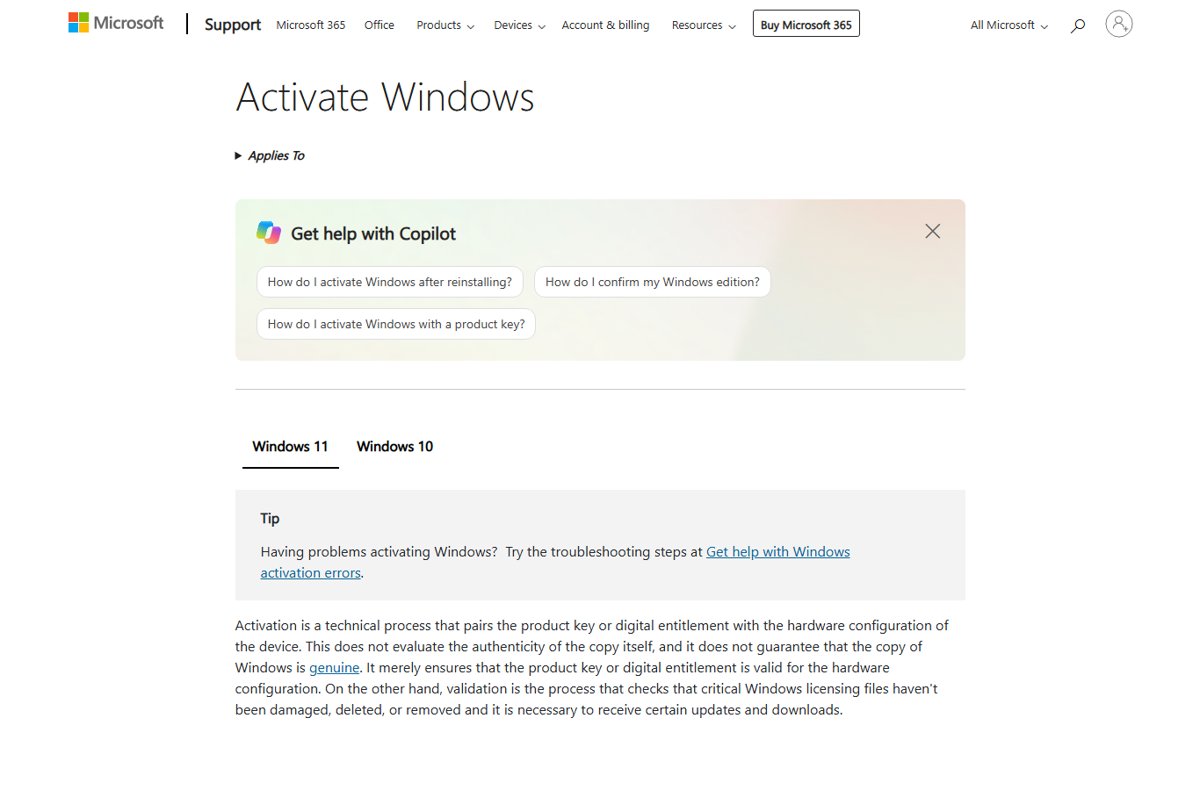
When 26H2 needs a product key and when it does not
| Your situation | Key needed? | What to do |
|---|---|---|
| Updating from Windows 11 24H2 or 25H2 through Windows Update | No | Install 26H2 when offered; activation carries on as before |
| Clean install of the same edition on a PC with a digital license | No | Select I don't have a product key in Setup, then sign in with your Microsoft account |
| Clean install on a PC that was activated with a product key | Only the same key you already have | Enter it in Setup or later under Change product key |
| Upgrading an eligible Windows 10 PC to Windows 11 | No, for a PC that qualifies for the upgrade | Use Windows Update, Installation Assistant or the Media Creation Tool |
| Replacing the motherboard | No new key | Reactivate with the Activation troubleshooter, or re-enter your existing key |
| Switching from Home to Pro | Yes, a Pro licence | Get a Pro licence; a Home licence will not activate the Pro edition |
| Volume-licensed work PC using KMS | No new key | The Windows 11 KMS client key is per edition, not per version |
Microsoft's own instructions for getting 26H2 go through Settings > Windows Update and never ask for a key.
Why 26H2 keeps your current activation
| Fact | What it means for your key |
|---|---|
| 26H2 is an enablement package for 24H2 and 25H2 | It switches on features already on the PC, like a monthly update; Windows is not reinstalled |
| 24H2, 25H2 and 26H2 share one servicing branch | Same codebase, same edition, same activation |
| A digital license is tied to your hardware and Microsoft account | It does not name a Windows 11 version, so a new version needs no new licence |
| Activation depends on the edition | A Home licence activates Home and a Pro licence activates Pro; the version number does not matter |
| The multi-edition 26H2 ISO uses your product key to pick the edition | Your existing key unlocks the matching 26H2 edition |
If Windows was activated before the update, it should still be activated after it.
How to check activation after installing 26H2
- Select Start, then Settings > System > Activation.
- Read the Activation status message, and note the edition shown on the same page.
- Windows is activated with a digital license linked to your Microsoft account means you are fully set, including for future hardware changes.
- Windows is activated with a digital license means you are activated, but your Microsoft account is not linked yet; link it with the steps below.
- Go to Settings > System > About and confirm Version reads 26H2.
Link your digital license to your Microsoft account
Do this before a clean install or a hardware change. A linked license is what lets Windows reactivate without any key.
- Open Settings > Accounts > Your info and check that Administrator appears under your name.
- Check that an email address shows above Administrator; that confirms you are signed in with a Microsoft account, not a local account.
- Go to Settings > System > Activation and select Add an account.
- Enter your Microsoft account and password, then select Sign in.
- Confirm the page now reads Windows is activated with a digital license linked to your Microsoft account.
Clean install 26H2 without a product key
- Link your digital license to your Microsoft account first, and note your edition (Home or Pro).
- Create 26H2 installation media and boot the PC from it.
- When Setup asks for a product key, select I don't have a product key.
- In Select Image, choose the same edition the PC was licensed for, then select Next.
- Finish Setup and sign in with the Microsoft account linked to the digital license; Windows activates automatically.
The full media and partition steps apply to a clean install of 26H2. Pick a different edition and Windows will not activate, because a license activates only its own edition.
Enter your existing product key when Windows asks for one
If Windows 11 was not preinstalled and you activated it with a product key, 26H2 uses that same 25-character key. Find it on the box label, the purchase confirmation email, or the Certificate of Authenticity on a preinstalled PC.
- Select Start, then Settings > System > Activation.
- Select Change product key.
- Type the 25-character key in the format XXXXX-XXXXX-XXXXX-XXXXX-XXXXX.
- Follow the prompts, then check that the activation status reads activated.
A Home key activates only Home and a Pro key only Pro. That is one of the differences between Home and Pro in 26H2.
Reactivate 26H2 after a hardware change
Replacing a motherboard can make Windows stop recognising its digital license. The Activation troubleshooter appears only when Windows is not activated, and it needs the Microsoft account you linked earlier.
- Connect to the internet and sign in with an administrator account.
- Select Start, then Settings > System > Activation > Troubleshoot.
- Select I changed hardware on this device recently, then Next.
- Enter your linked Microsoft account and password, then select Sign in.
- Tick This is the device I'm using right now and select Activate.
If you never linked an account but used a product key, enter that key under Change product key instead. The edition must be the same before and after the hardware change.
Work and school PCs: KMS, MAK and 26H2
| Activation type | What 26H2 changes |
|---|---|
| KMS client (Generic Volume License Key) | Nothing. Microsoft publishes one KMS client key per Windows 11 edition, not per version, and volume editions already contain it |
| MAK | Nothing for an in-place update; a reinstall uses the same MAK from your volume licensing portal |
| Retail copy on a work PC | KMS client keys cannot activate retail editions; use the retail key or a MAK |
| Enterprise LTSC | No 26H2 LTSC exists, so LTSC keys are unaffected |
Deployment through WSUS, Intune and Autopatch is part of 26H2 for enterprise.
Do not buy a "26H2 key"
There is no such thing as a Windows 11 26H2 product key, so any site selling one is selling an ordinary Windows 11 key or something worse. Keys are per edition, not per version. If you genuinely need a licence, buy it through Settings > System > Activation > Go to Store or from an authorised retailer, and avoid activation tools that modify system files.
Frequently asked questions
Do I need a new product key for Windows 11 26H2?
No. Windows 11 26H2 is a free feature update delivered through Windows Update as an enablement package for 24H2 and 25H2. Your existing digital license or product key keeps working, and the edition stays the same.
Is Windows 11 26H2 free?
Yes, for any PC already running a licensed copy of Windows 11 24H2 or 25H2. Microsoft offers it through Windows Update at no cost. Eligible Windows 10 devices that qualify for the Windows 11 upgrade can also move to it without buying a new licence.
Will my Windows 11 key work with 26H2?
Yes. Windows 11 product keys are tied to an edition, such as Home or Pro, not to a version like 25H2 or 26H2. Enter the same key under Settings > System > Activation > Change product key if Windows ever asks for it.
Will Windows deactivate after the 26H2 update?
It should not. The update does not reinstall Windows or change the edition, so activation stays in place. Check Settings > System > Activation afterwards; if it shows a problem, run the Activation troubleshooter from the same page.
Do I need a product key for a 26H2 clean install?
Not if the PC has a digital license. Select I don't have a product key during Setup, pick the same edition, and sign in with the Microsoft account linked to the license. Windows then activates automatically after setup.
Where do I find my Windows 11 product key?
It depends on how you bought Windows: preinstalled PCs carry it in the packaging or on a Certificate of Authenticity, boxed copies have it on a card inside, and digital purchases list it in the confirmation email. Microsoft Store upgrades and free upgrades use a digital license instead.
Does 26H2 change the KMS key for Windows 11 Pro or Enterprise?
No. Microsoft lists one Generic Volume License Key per Windows 11 edition, and volume-licensed editions already include it. Updating to 26H2 needs no change on the client or the KMS host.
Bottom line
Install 26H2 without thinking about keys, but link your digital license to your Microsoft account today. The update itself never asks for a key. The link is what saves you when you later clean install or replace hardware from Settings > System > Activation.

How to install Windows 11 26H2 using Media Creation Tool - Techdows
[…] with the Microsoft account that holds your digital license lets Windows activate without a key; the 26H2 product key guide explains when you need […]