To check if Windows is activated, open Settings > System > Activation on Windows 11, or Settings > Update & Security > Activation on Windows 10, and read the status line.
This guide covers both versions, the Command Prompt check with slmgr, what each status message means, how to tell genuine Windows apart, and how to fix activation errors.
How to check if Windows 11 is activated
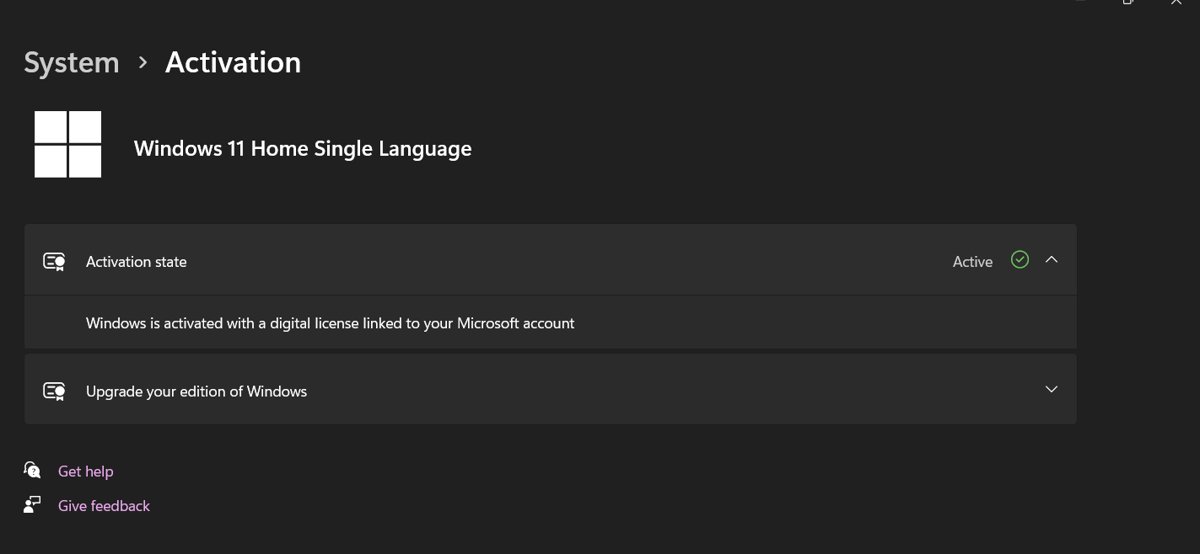
The Activation page in Settings is the official place to read your license status on Windows 11.
- Select Start and open Settings.
- Select System in the left pane.
- Select Activation.
- Read the text next to Activation status. It says either that Windows is activated or that Windows is not activated.
If the status says Windows is not activated, the same page shows an error message that explains why.
Which way to check Windows activation fits your situation
| Your situation | Use this | Why |
|---|---|---|
| You want a quick yes or no | Settings > Activation page | Shows the status line and whether a Microsoft account is linked |
| You need the expiration date | slmgr /xpr in Command Prompt |
Shows whether activation is perpetual or has an end date |
| You need license details | slmgr /dli or slmgr /dlv |
Displays license information, including the partial product key |
| You plan to change hardware | Settings > Activation, then check for a linked account | A linked digital license is what lets the Activation troubleshooter reactivate Windows |
| Your PC is managed by work or school | Ask your IT administrator | Volume licenses are activated and renewed by the organization |
How to check if Windows 10 is activated
Windows 10 keeps the Activation page under Update & Security instead of System.
- Select Start and open Settings.
- Select Update & Security.
- Select Activation in the left pane.
- Read the status shown next to Activation.
On Windows 10 Version 1511, Microsoft called a digital license a digital entitlement, so older screenshots may use that term.
Check Windows activation status using Command Prompt
Windows includes slmgr.vbs, a licensing script that reports activation status from Command Prompt or PowerShell.
The read-only options do not need an elevated window, so a normal Command Prompt window works.
slmgr /xprDisplays the activation expiration date for the installed Windows edition. Retail and MAK activation is perpetual, so the date matters mainly for KMS clients on work networks.
You should see: A window opens with the activation expiration. Retail and MAK activations have no end date, while a KMS-activated PC shows the date when activation must renew.
Open Command Prompt by pressing Win + R, typing cmd and pressing Enter, then type the command.
Show Windows license details with slmgr /dli and /dlv
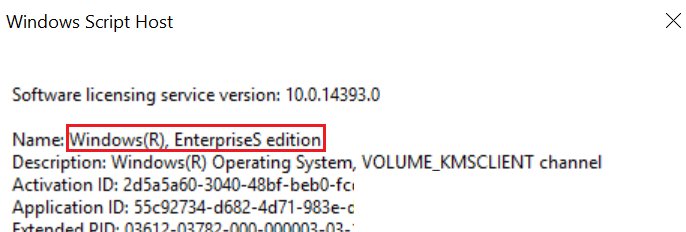
Use these two options when you need more than a yes or no, for example the edition name and the last characters of the installed key.
slmgr /dlv/dlv displays detailed license information for the installed operating system. /dli shows a shorter summary. Add all to either option to list every installed product.
You should see: A window lists the edition name, the partial product key and the license status for your copy of Windows.
On many OEM PCs the partial key shown is a default key, not the key stored in the firmware. Microsoft says this is by design and does not affect activation.
Check if your Windows digital license is linked to a Microsoft account
A digital license linked to your Microsoft account is the proof that activation will survive a reinstall or a hardware change.
- Open Settings > Accounts > Your info and confirm that Administrator appears under your name.
- Check that an email address appears above Administrator. No email means you use a local account.
- Go back to the Activation page.
- Select Add an account if it appears, then sign in with your Microsoft account.
- Confirm the status now reads Windows is activated with a digital license linked to your Microsoft account.
What do Windows activation status messages mean?
| Status message | What it means | What to do |
|---|---|---|
| Windows is activated | Windows is activated, but no Microsoft account is linked | Link your Microsoft account on the Activation page |
| Windows is activated with a digital license | Activated with a digital license that is not linked to a Microsoft account | Link your Microsoft account so you can reactivate later |
| Windows is activated with a digital license linked to your Microsoft account | Activated and linked | Nothing; this is the best state |
| Windows is not activated | No valid license was found; an error message explains why | Read the error code and follow the fixes below |
Understanding your activation status: digital license vs. product key
How Windows activates depends on how you got it. Both routes end in the same activated state.
| Digital license | Product key | |
|---|---|---|
| What it is | Activation with no key to type, tied to your hardware | A 25-character code in the form XXXXX-XXXXX-XXXXX-XXXXX-XXXXX |
| Where it comes from | Free upgrades, Microsoft Store purchases, or a previously activated PC | Device packaging, a Certificate of Authenticity, a retail box or a purchase confirmation email |
| Microsoft account | Can be linked to your account for later reactivation | Not linked by default; activation stays with the key |
| After a hardware change | Reactivate with the Activation troubleshooter if the account is linked | Enter the key again with Change product key |
On a refurbished PC, the key on the Certificate of Authenticity may sit under a gray scratch-off coating.
How to tell if Windows is genuine
Genuine Windows is published by Microsoft, properly licensed and supported. Windows validates your product key or digital license online and shows a results page when the check fails.
| Check | Genuine sign | Warning sign |
|---|---|---|
| Activation page | Status says Windows is activated | Status says not activated, or a notice says Windows is not genuine |
| Packaging | Certificate of Authenticity, proof of license label and an edge-to-edge hologram | No COA, or a key printed on plain paper |
| Where you bought it | Microsoft, a trusted retailer or a PC with Windows preinstalled | Online auction sites or a used PC without the original COA |
| Key history | One key on one PC | One key installed on several PCs, which fails activation |
If you bought a used PC that fails validation, ask the seller for the COA and the original installation media.
How to fix Windows if it is not activated
Work through these in order. Each one solves a different cause, and the first two are free.
- Connect your PC to the internet. Activation needs a connection, and a firewall that blocks it causes error 0xC004FC03.
- Run the Activation troubleshooter. Open Settings > System > Activation (Windows 10: Update & Security > Activation) and select Troubleshoot. The option appears only while Windows is not activated and you are signed in as an administrator.
- Enter a valid product key. On the same page, select Change product key and type the 25-character key for your edition.
- Reactivate after a hardware change. In the troubleshooter, select I changed hardware on this device recently, select Next, sign in with your linked Microsoft account, tick This is the device I'm using right now and select Activate.
- Buy a license if none of these apply. The Activation page links to Microsoft Store when no valid license exists.
Hardware reactivation requires the same edition (Home or Pro) before and after the change, and Windows 10 Version 1607 or later.
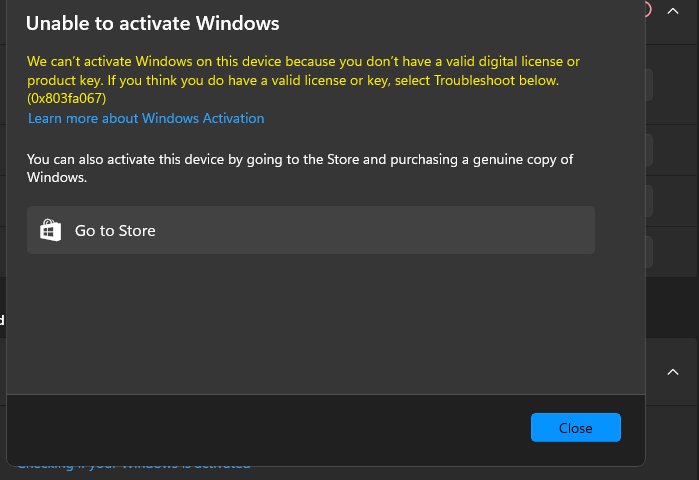
Common activation errors and their solutions
Error 0xC004F211 or 0xC004F213 after a hardware change
Windows detected new hardware, often a motherboard, and no longer matches the license.
- Open the Activation page and select Troubleshoot.
- Select I changed hardware on this device recently and sign in with the Microsoft account linked before the change.
- If you never linked an account, select Change product key and enter your original key.
Error 0x803F7001 or 0x800704cF: no valid license found
The PC has no digital license and no product key for this edition.
- Select Change product key and enter a valid 25-character key.
- If you have no key, buy a digital license from Microsoft Store through the Activation page.
Error 0xC004F212, 0xC004E016 or 0xC004F210: wrong edition
The key is for a different edition than the one installed, such as a Home key on Pro.
- Enter a key that matches your installed edition.
- For 0xC004F210, run Troubleshoot, which can switch to the edition your license covers.
Error 0xC004C003, 0xC004C008 or 0xC004C770: key already used
The key was used on more PCs than its license allows.
- Contact the seller or the PC manufacturer about the key.
- Buy a separate key for each PC that needs one.
Error 0xC004FC03, 0x8007267C or 0x80072F8F: cannot reach the activation server
No internet connection, a blocking firewall, or a wrong date and time.
- Check your internet connection and firewall.
- Confirm the date and time are correct in Settings > Time & language.
- Restart the PC and select Activate again.
"Your Windows license will expire soon" message
The PC uses a volume license from an organization, usually a work or school PC.
- Connect to the work network so the PC can renew its activation.
- Contact your system administrator if the message stays.
Error 0xC004C012, 0xC004C013 or 0xC004C014: server unavailable
The activation service is temporarily down.
- Wait. Windows activates automatically when the service is back.
The risks of using non-activated Windows
| Area | What Microsoft says |
|---|---|
| Security updates | Critical security updates still install, even on a copy that is not genuine |
| Other updates and benefits | Some optional updates and downloads are available only to genuine Windows |
| Notifications | Non-genuine copies can show repeated notices that Windows is not genuine |
| Counterfeit copies | Microsoft recommends replacing counterfeit software with genuine software to keep the PC safer |
Activating with a legitimate license removes these limits. Avoid tools that claim to activate Windows for free, because Microsoft only activates genuine, licensed copies.
Windows activation check FAQ
How do I know if my Windows is activated?
Open Settings > System > Activation on Windows 11, or Settings > Update & Security > Activation on Windows 10. The status line says whether Windows is activated and whether the license is linked to your Microsoft account.
How do I check if Windows 11 is activated?
Select Start > Settings > System > Activation and read the text next to Activation status. If it says Windows is not activated, the page also shows the error that explains why.
Can I check Windows activation using CMD?
Yes. Open Command Prompt and run slmgr /xpr to see whether activation is permanent or has an expiration date. Run slmgr /dli or slmgr /dlv for license details. None of these options need administrator rights.
How do I check if Windows is genuine?
Check that the Activation page says Windows is activated, then confirm your purchase came with a Certificate of Authenticity or from Microsoft or a trusted retailer. Windows validates your key online and shows a results page if the check fails.
How do I check if Windows is licensed?
An activated status on the Activation page means Windows has a valid license, either a digital license or a product key. For the license details, run slmgr /dlv in Command Prompt, which shows the edition and the license status.
Does Windows activation expire?
Retail and MAK activation is perpetual and does not expire. Only volume-licensed PCs activated through a KMS server renew on a schedule, which is why slmgr /xpr shows an end date on those work or school machines.
Can I use Windows without activation?
Windows runs before activation and still receives critical security updates. Some optional updates and benefits are reserved for genuine Windows, and the Activation page keeps reporting that Windows is not activated until you add a valid license.
How do I check if Windows is in S mode?
Windows 11 in S mode exists only on the Home edition, and leaving it is a free, one-way switch through Microsoft Store. You can check whether Windows 11 is in S mode from the same Settings app used for the activation check.
How do I check what Windows I'm using?
Open Settings > System > About to see the Edition, Version and OS Build. You can also type winver in the search box and press Enter, which helps if you want to confirm Windows 11 26H2 is installed.