No, you should not disable the Remote Procedure Call (RPC) service on Windows 11 or Windows 10, because Microsoft states that programs using COM or DCOM stop working properly without it.
This guide explains what the RPC service does, which related services you can and cannot touch, how to confirm RPC is running, and how to fix "The remote procedure call failed" errors.
Can I disable Remote Procedure Call Service on Windows 11/10?
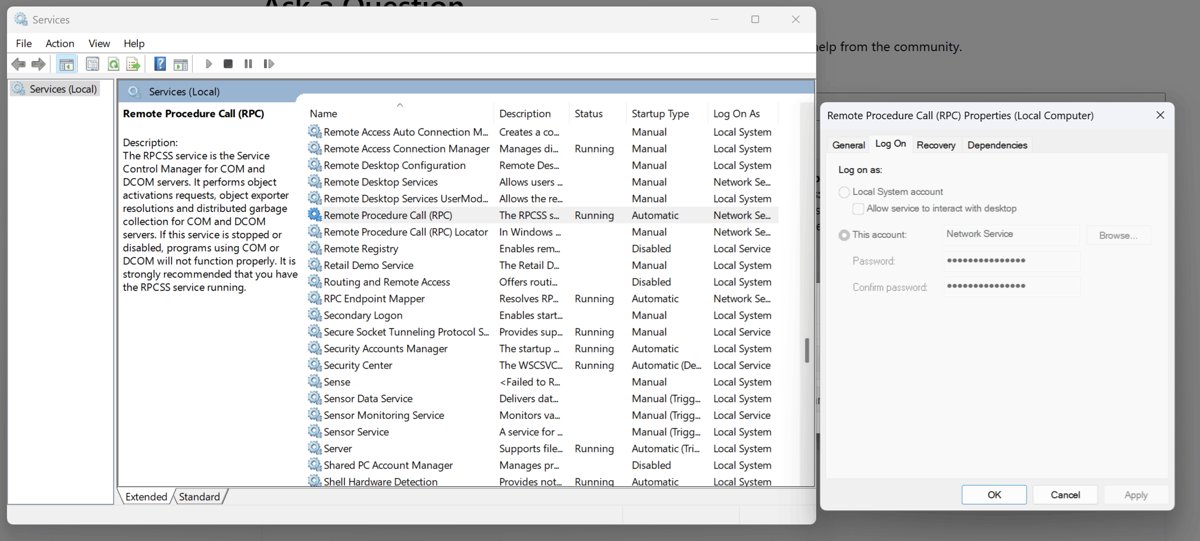
The Remote Procedure Call (RPC) service, service name RpcSs, is the Service Control Manager for COM and DCOM servers. It is always installed and set to start automatically.
Microsoft highly recommends leaving it running. Stopping or disabling it breaks programs that rely on COM or DCOM, which includes large parts of Windows itself, such as the COM Surrogate process.
Leave the Remote Procedure Call (RPC) service running with its Automatic startup type, on every Windows 11 and Windows 10 PC. RpcSs handles object activation, object exporter resolution and distributed garbage collection for COM and DCOM servers; disabling it gains nothing and stops those programs from working.
What is Microsoft Remote Procedure Call Service?
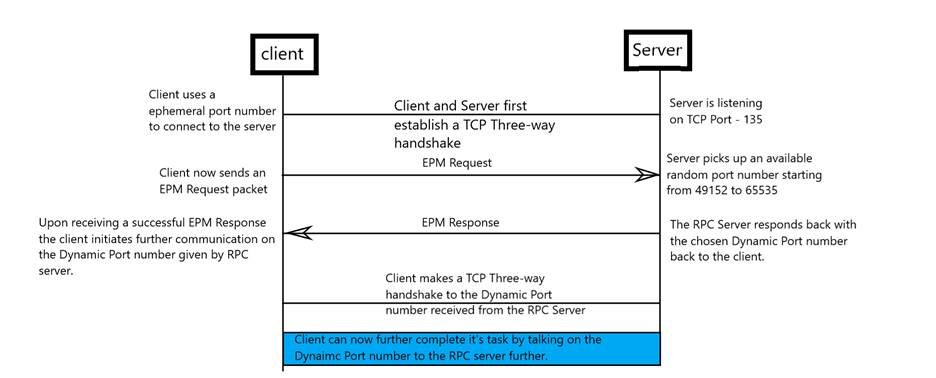
Remote Procedure Call is the Windows technology that lets one program call a function in another program, on the same PC or across a network, as if it were local. The calling program talks to a local stub, and the RPC run-time libraries carry the request to the server program and return the result.
Windows splits that work across several services. Their names are easy to confuse, so check the service name before changing anything.
| Display name | Service name | What it does | Default startup |
|---|---|---|---|
| Remote Procedure Call (RPC) | RpcSs | Service Control Manager for COM and DCOM servers | Automatic |
| RPC Endpoint Mapper | RpcEptMapper | Resolves RPC interface identifiers to transport endpoints | Automatic |
| DCOM Server Process Launcher | DcomLaunch | Launches COM and DCOM servers in response to activation requests | Automatic |
| Remote Procedure Call (RPC) Locator | RpcLocator | Kept only for compatibility with older apps; provides no functionality since Windows Vista | Manual |
Is it safe to disable the Remote Procedure Call?
Disabling RpcSs, RpcEptMapper or DcomLaunch is not safe. Microsoft's service guidance says programs using COM, DCOM or RPC stop functioning properly when any of them is stopped or disabled.
The Remote Procedure Call (RPC) Locator is the one exception: it no longer does anything on Windows Vista and later, so leaving it on Manual costs nothing.
| Service | Safe to disable? | What happens if you do |
|---|---|---|
| Remote Procedure Call (RPC) – RpcSs | No | Programs using COM or DCOM stop working properly |
| RPC Endpoint Mapper – RpcEptMapper | No | Programs using RPC services stop working properly |
| DCOM Server Process Launcher – DcomLaunch | No | Programs using COM or DCOM cannot function properly |
| Remote Procedure Call (RPC) Locator – RpcLocator | No need to | Nothing changes; it is already idle on Manual |
| Microsoft iSCSI Initiator Service – MSiSCSI | No | The Microsoft iSCSI service is not running, so the PC cannot sign in to or access iSCSI targets |
Disabling a service rarely speeds up Windows in a way you can measure. For services you genuinely do not need, such as a vendor add-on like Nahimic, it is cleaner to disable the Nahimic service or uninstall the app that installed it.
How to check the Remote Procedure Call service is running
- Press Win + R, type
services.mscand press Enter. - Scroll to Remote Procedure Call (RPC) in the list.
- Confirm the Status column shows Running and Startup Type shows Automatic.
- Check RPC Endpoint Mapper and DCOM Server Process Launcher the same way.
- For a command-line check, open Terminal and run
sc.exe query RpcSs; the STATE line should read RUNNING.
The Services console is also where you manage other Windows services and their startup types.
Do I need RPC service?
Yes. RPC is not an optional networking extra; Windows components talk to each other through it even on a PC that never joins a network. Microsoft lists RpcSs, RpcEptMapper and DcomLaunch as always installed with an Automatic startup type.
| Common belief | What is actually true |
|---|---|
| RPC is only for remote computers | RPC also connects programs running on the same PC |
| Turning RPC off closes a security hole | Microsoft recommends leaving RpcSs running; protection comes from updates and the firewall, not from disabling it |
| RPC wastes resources | It is a core service that COM, DCOM and RPC programs depend on |
| RPC Locator and RPC are the same thing | RPC Locator is a separate, idle compatibility service |
Fix remote procedure call failed errors on Windows 11
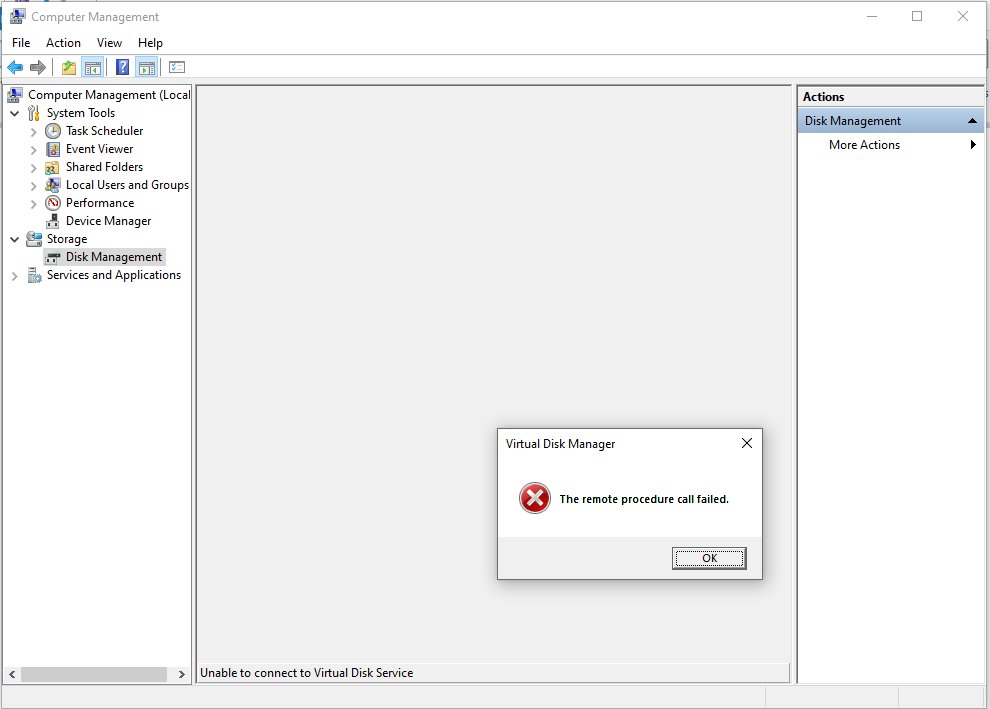
"The remote procedure call failed" (error 1726, 0x6BE)
The program on the other end of the call stopped, or a service it needs is not running.
- Restart the app that showed the error, then restart the PC if it repeats.
- Open
services.mscand confirm Remote Procedure Call (RPC), RPC Endpoint Mapper and DCOM Server Process Launcher are Running. - Install pending updates from Settings > Windows Update.
- Open Terminal as administrator and run
sfc /scannowto repair damaged system files.
"The remote procedure call failed and did not execute" (error 1727, 0x6BF)
The request never reached the program that should have handled it.
- Close and reopen the app, then try the action again.
- Restart the PC so every RPC and COM service starts cleanly.
- Run
sfc /scannowfrom an administrator Terminal if the error returns.
"The remote procedure call was cancelled" (error 1818, 0x71A)
The call was stopped before it finished, often because the app or a remote machine timed out.
- Retry the action once the app or connection is idle.
- Restart the PC if the app keeps cancelling calls.
- Check the remote PC or server is online if the action targets another machine.
"The RPC server is unavailable" (error 1722, 0x6BA)
The target program or computer cannot be reached.
- Confirm the remote computer is switched on and connected to the network.
- Confirm the RPC services are running on both computers.
- Restart both computers and retry.
System File Checker needs an administrator account, and its SFC scan results tell you whether any files were repaired.
Remote Procedure Call service FAQ
Should I disable Remote Procedure Call?
No. Microsoft highly recommends leaving the Remote Procedure Call (RPC) service running. Programs using COM or DCOM stop working properly without it, and disabling it brings no performance or security benefit on Windows 11 or Windows 10.
How do I disable Remote Procedure Call (RPC)?
You should not disable it. RpcSs is a core Windows service that is always installed and starts automatically. If you only want to stop a specific app from using the network, block that app in Windows Firewall instead of disabling RPC.
What is Remote Procedure Call?
Remote Procedure Call is a Windows technology that lets one program run a function inside another program, locally or over a network, as if the code were its own. The RPC run-time libraries ship with Windows and handle the communication.
Is Remote Procedure Call safe?
Yes. The Remote Procedure Call service is a genuine Microsoft component that runs on every Windows PC. Keeping Windows updated and the firewall on is how you protect it; Microsoft's guidance is to leave the service running rather than disable it.
What does Remote Procedure Call failed mean?
"The remote procedure call failed" is Windows error 1726. It means a program asked another program to do something and the call did not complete, usually because the other program stopped or a required service is not running.
What is the Remote Procedure Call (RPC) Locator service?
RPC Locator managed the RPC name service database in Windows Server 2003 and earlier. On Windows Vista and later it provides no functionality and stays only for compatibility with certain apps, so it normally sits idle on Manual.
Is the Microsoft iSCSI Initiator service related to RPC?
It is a separate service, MSiSCSI, that manages connections to iSCSI storage targets. Microsoft recommends not disabling it either. If it is stopped, the PC cannot sign in to iSCSI targets until the service runs again.


![How to install or update a printer driver in Windows 11? [Full guide]](https://techdows.com/wp-content/uploads/2026/10/How-to-Install-or-Update-a-Printer-Driver-in-Windows-11-600x338.jpg)