Add them as two accounts: sign in with your Hotmail or Outlook.com address for the Microsoft mailbox, then add your @icloud.com address for the Apple mailbox.
This guide covers new Outlook, classic Outlook and Outlook for Mac, the app-specific password iCloud may need, and the fix for the "email address has already been added" error.
How to add Apple ID email and Microsoft email to Outlook
Your Apple ID (Apple's pages now say Apple Account) can use a Hotmail address as its sign-in name without creating a second mailbox at that address. Outlook needs a different address for the Apple mailbox, and that address ends in @icloud.com.
- Confirm your Hotmail or Outlook.com address is already listed in Outlook. If it is missing, add it with your Microsoft password.
- Go to icloud.com/mail in a browser and sign in with your Apple Account, using the Hotmail address and your Apple password.
- If you see an inbox, you already have an iCloud mailbox. If you see Create Email Address, select it and follow the onscreen instructions.
- In Outlook, start adding a new account and enter your @icloud.com address, not the Hotmail address.
- Approve the Apple sign-in in your browser, or paste an app-specific password if Outlook asks for a password.
- Select Done, then check that both mailboxes appear in the Outlook folder pane.
Is Apple ID an email address?
An Apple ID looks like an email address because it usually is one, but signing in to Apple with an address does not move that mailbox to Apple. Your Hotmail messages stay at Microsoft, whichever company you sign in to with that address.
| Address | What it does | How Outlook uses it |
|---|---|---|
| [email protected] as your Apple ID | Signs you in to Apple services and receives Apple Account messages | Not a separate Apple mailbox, so there is nothing extra to add |
| [email protected] as your Microsoft mailbox | Holds your Microsoft mail, sent and received through Outlook.com | Add it once, with your Microsoft password |
| [email protected] | Holds your iCloud Mail, and can also sign you in to Apple devices and iCloud.com | Add it as a second account, with an Apple sign-in or an app-specific password |
| Rescue email address | Receives account and security information when you do not use two-factor authentication | Not relevant to Outlook |
The two are easy to confuse because you reach iCloud with your Apple ID, but iCloud and Apple ID are different things, and Outlook only cares about the mailbox address.
How to find Apple ID email on iPhone, Mac, Windows and the web
Check which addresses are tied to your account before you add anything to Outlook. Your @icloud.com address can also sign you in, so it belongs on the same list once you have created one.
| Device | Where to look | What you will see |
|---|---|---|
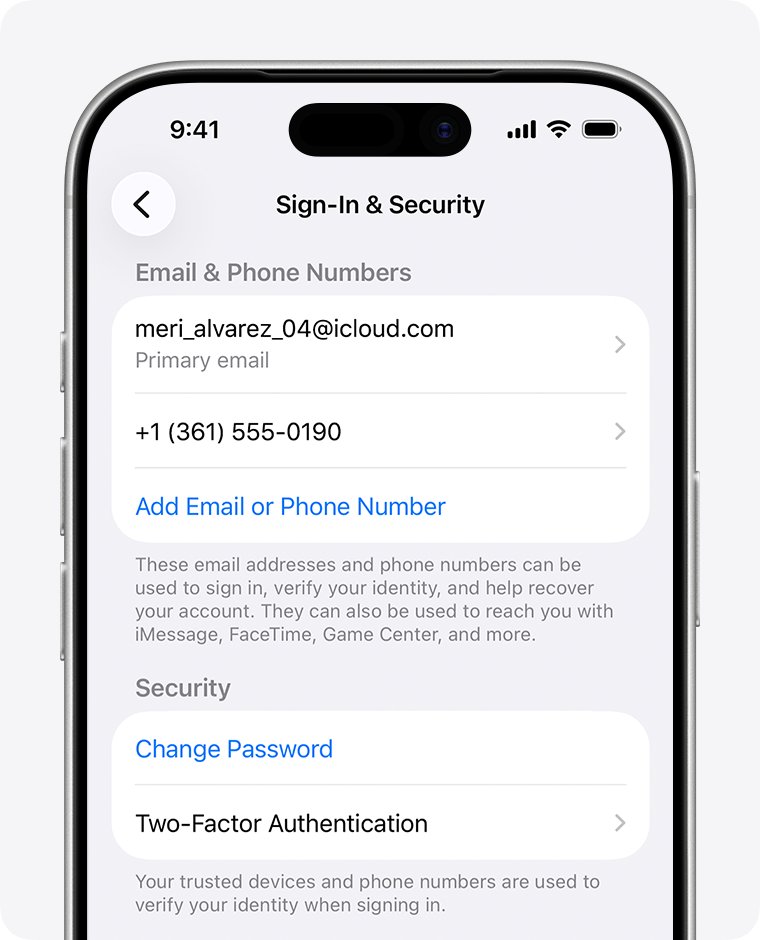
| iPhone or iPad | Settings > your name > Sign-In & Security | The email addresses you can use to sign in |
| Mac | Apple menu > System Settings > your name > Sign-In & Security | The email addresses you can use to sign in |
| Windows PC | Open iCloud for Windows and look under your name | Your primary Apple Account email address |
| Web browser | Go to account.apple.com | Your email address or phone number, if the sign-in screen shows it |
How to get an @icloud.com email for your Apple ID
An older Apple ID built on a Hotmail address may never have had an iCloud mailbox. Apple requires a primary iCloud address before you can use iCloud Mail on any device.
- Go to icloud.com/mail and sign in with your Apple Account.
- Select Create Email Address. If an inbox opens instead, you already have a primary iCloud Mail address.
- Edit the suggested name if you want. It must be more than three characters and currently available.
- Follow the onscreen instructions to finish.
- Write the new address down, because this is the one you will enter in Outlook.
Choose carefully, since Apple does not let you rename the primary address later. If you want a different address afterwards, Apple suggests adding an email alias instead.
How to add iCloud email to new Outlook for Windows
New Outlook signs you in to Apple through your browser, so Microsoft's steps for this version do not mention an app-specific password.
- On the View tab, select View settings, or on the File tab, select Account info.
- Select Accounts > Your accounts.
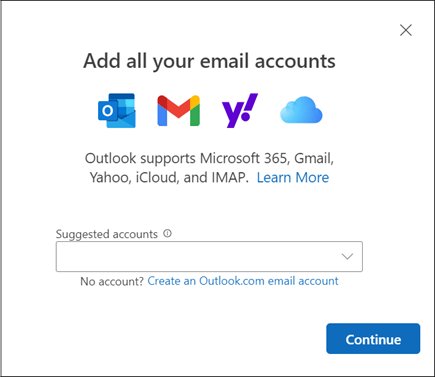
- Select Add Account, enter your @icloud.com address in the Suggested account box, and select Continue.
- On Sync your iCloud account, select Continue.
- Select Continue or Sign in with iPhone to sign in to your Apple Account in the browser, and enter your password if prompted.
- Enter the two-factor code from your trusted device if Apple asks for one.
- On the Apple Account permissions window, select Allow.
- On the Success! window, select Done.
How to add iCloud email to classic Outlook with an app-specific password
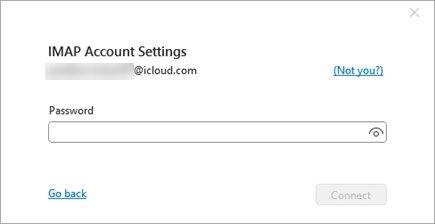
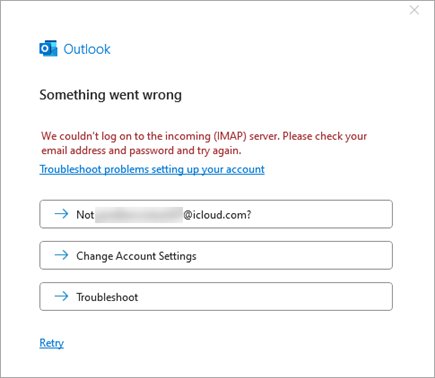
Classic Outlook asks for a password directly. Your normal Apple password usually fails here when two-factor authentication is on, and Outlook shows a Something went wrong error.
- Go to account.apple.com and sign in with your Apple Account, using the Hotmail address if that is your sign-in.
- Under Sign-In and Security, select App-Specific Passwords, then Generate an app-specific password.
- Type a name such as Outlook, select Create, and enter your Apple password if prompted.
- Copy the password and select Done. It is case-sensitive and usually has 16 characters with dashes.
- In classic Outlook, select File > Add Account.
- Enter your @icloud.com address and select Connect.
- Paste the app-specific password into the password box.
- On the Account successfully added window, select Done.
Your Apple Account must use two-factor authentication before you can generate one of these passwords. You can keep up to 25 active app-specific passwords at once.
How to add iCloud email to Outlook for Mac
Outlook for Mac uses the same address rule: enter the @icloud.com address for the Apple mailbox and keep Hotmail as its own account.
- Open the Outlook menu and select Settings.
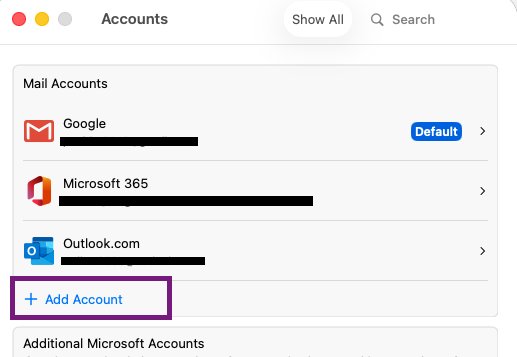
- In the side panel, select Accounts, then + Add Account.
- Enter your @icloud.com address and select Continue.
- Follow the prompts, and allow Outlook access if you are sent to Apple's site.
- If Outlook asks for a password, use an app-specific password rather than your Apple password.
- Select Done.
How to add Hotmail to Outlook when it is also your Apple ID
Treat this as a normal Microsoft account. Your Apple password has no role here, even though both companies accept the same address at sign-in.
- In classic Outlook, select File > Add Account. In new Outlook, go to Accounts > Your accounts and select Add Account.
- Enter your Hotmail, Live or Outlook.com address and continue.
- Enter your Microsoft account password, not your Apple password.
- Finish the prompts and select Done.
- Open the account's inbox and check that it shows your Microsoft mail.
Microsoft says a Hotmail.com or Live.com address should be set up as an Outlook.com account. Picking Exchange or Microsoft 365 for it can stop folders and messages from syncing.
iCloud Mail and Outlook.com IMAP settings for Outlook
Automatic setup normally finds these values. Use the table when you have to enter them yourself, or when you want to check an existing account.
| Setting | iCloud Mail | Hotmail or Outlook.com |
|---|---|---|
| Incoming server | imap.mail.me.com | outlook.office365.com |
| Incoming port | 993, with SSL | 993, with SSL/TLS |
| Outgoing server | smtp.mail.me.com | smtp-mail.outlook.com |
| Outgoing port | 587, with SSL (try TLS or STARTTLS if SSL gives an error) | 587, with STARTTLS |
| Incoming username | Your iCloud Mail name without the domain, or the full address if that fails | Your full email address |
| Outgoing username | Your full iCloud Mail address | Your full email address |
| Password | An app-specific password for both servers | OAuth2 (Modern Auth) sign-in with your Microsoft account |
| POP support | Not available | Port 995, off by default |
How to set up iCloud Mail manually in classic Outlook
Use this route only when automatic setup cannot find the settings or keeps showing an error.
- Select File, then Add Account under Account Information.
- Enter your @icloud.com address, then select Advanced options > Let me set up my account manually.
- Select POP or IMAP, and use IMAP because iCloud Mail does not support POP.
- Enter your app-specific password and select Connect.
- If setup fails, select Change Account Settings, enter the iCloud values from the table above, and select Connect.
- Select Done.
How to sync iCloud calendar and contacts to Outlook
The mailbox and the calendar are set up separately. Apple syncs calendars and contacts through iCloud for Windows, and its guide names only the classic version of Outlook for this.
- Set up your @icloud.com address first, because Apple's guide requires one for this sync.
- Open iCloud for Windows.
- Next to Calendars and Contacts, select the arrow button.
- Turn on Automatically sync your iCloud calendars and contacts to Microsoft Outlook.
- Select Done, then follow the onscreen instructions to set up Outlook.
Apple lists Outlook 2021 or later for this feature. If you only want the calendar, you can also add iCloud Calendar to Outlook on its own.
How to tell if iCloud email is working in Outlook
A short test from each mailbox proves that both accounts send and receive on their own.
- Look for two separate accounts in the Outlook folder pane, one with your Hotmail address and one with your @icloud.com address.
- Send a test message from the @icloud.com account to your Hotmail address.
- Open the Hotmail inbox in Outlook and check that the message arrives.
- Reply from the Hotmail account and check that the reply reaches the iCloud inbox.
- Open icloud.com/mail and check that the same messages appear there.
How to change Apple ID email from Hotmail to another address
This step is optional, and Outlook does not need it. Change the address only if you want your Apple sign-in to stop depending on your Microsoft mailbox.
- On a trusted iPhone, iPad or Mac, open Settings or System Settings and choose your name.
- Select Sign-In & Security, then select your primary email address.
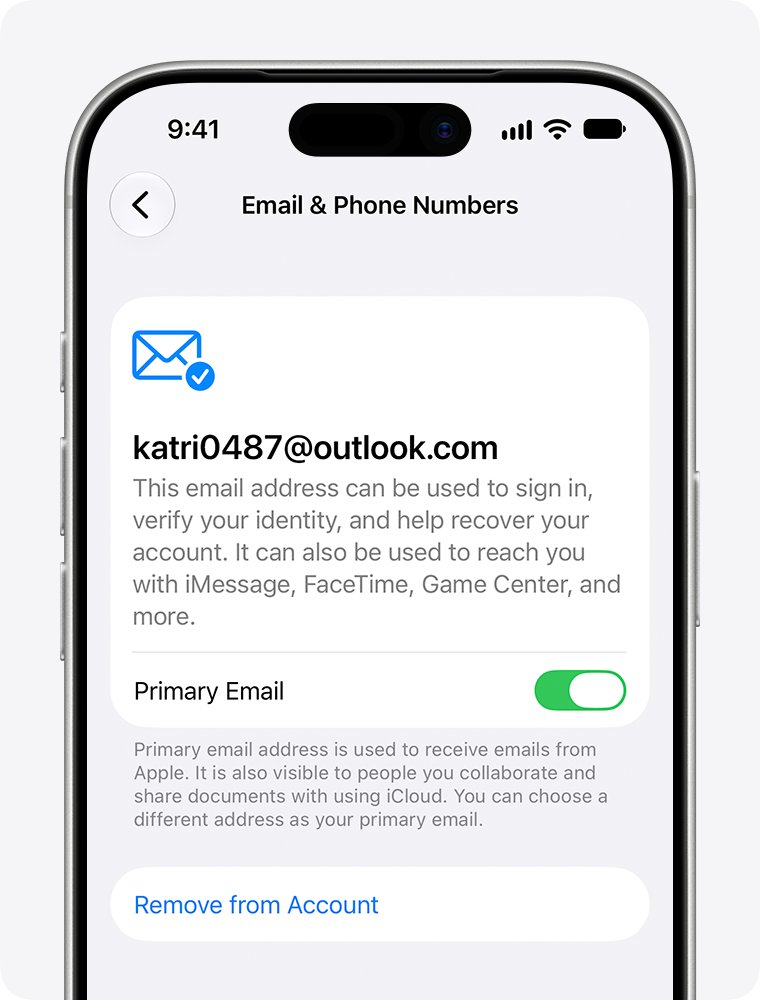
- Select Remove from Account to drop the Hotmail address, or turn off Primary Email to keep it as an extra address.
- Choose another address already on your account, or add a new one.
- Enter the verification code Apple sends, and finish the onscreen steps.
You keep your contacts, purchases and other account information. A removed address cannot be linked to another Apple Account for 30 days, and you cannot use an address that another Apple Account already holds.
Apple ID for Outlook: email address already added and password errors
Outlook says the email address has already been added
The Hotmail address you typed is already an account in Outlook, so it cannot be added a second time for Apple.
- Stop entering the Hotmail address for the Apple mailbox.
- Add your @icloud.com address as the new account.
- If you have no such address yet, create one at icloud.com/mail.
The Hotmail account itself is broken in Outlook
An old account entry may no longer sync. Removing it clears only the copies stored on this PC.
- In classic Outlook, select File > Account Settings > Account Settings.
- Select the Hotmail account, then select Remove.
- Read the warning about offline cached content, then select Yes.
- Add the account again with File > Add Account and your Microsoft password.
Outlook stopped recognizing your Apple ID after it worked for years
Changing or resetting your Apple Account password automatically revokes every app-specific password.
- If you no longer know the password, reset your iCloud email password first.
- Go to account.apple.com and sign in.
- Under Sign-In and Security, select App-Specific Passwords and generate a new one.
- In classic Outlook, select File, choose the iCloud account under Account Information, then select Account Settings > Server Settings.
- Enter the new password, select Next, then select Done.
Please create an app password for Outlook on your email provider's site
Outlook needs a generated password here, and your regular Apple password will not be accepted.
- Generate an app-specific password at account.apple.com.
- Paste it in place of your regular password, because it must match exactly.
- Turn on two-factor authentication first if Apple does not offer the option.
Classic Outlook keeps asking for a password
The username or stored password does not match what the server expects.
- Check that Caps Lock is off, since passwords are case-sensitive.
- Use your full email address as the username.
- Update the saved password if you changed it with your provider.
iCloud account cannot send or receive mail in Outlook
The fault may sit with iCloud, the iCloud for Windows sign-in, or Outlook's own connection.
- Confirm you can send and receive at iCloud.com.
- Check Apple's System Status page for iCloud Mail issues.
- Make sure your PC's date and time are correct.
- Close Outlook, sign out of iCloud for Windows, and sign back in.
- Restart Outlook and try again.
Apple ID email and Outlook FAQ
Is Apple ID an email?
An Apple ID is an account, and its sign-in name is usually an email address. Using a Hotmail address for it does not create an Apple mailbox at that address. Your messages stay with whichever provider runs that address.
Is my Apple ID my email?
Your Apple ID can share the same address as your email, but the two remain separate. You use your Apple password to reach Apple services and your Microsoft password to read Hotmail. Changing one password does not change the other.
What email does Apple ID use?
Apple uses your primary email address for sign-in and account messages. That can be a Hotmail, Gmail or iCloud address. On an iPhone, open Settings, tap your name and select Sign-In & Security to see every address tied to the account.
What email to use on Apple ID?
Use an address you can reliably open, because Apple sends a verification email to confirm it and sends account messages there later. The address cannot already belong to another Apple Account. Hotmail and Outlook.com addresses can be used if they meet those conditions.
How to access Apple ID email?
Open the address with its own provider. A Hotmail address opens at Outlook.com or in Outlook with your Microsoft password. An @icloud.com address opens at icloud.com/mail, in the Mail app on Apple devices, or in Outlook once you add it.
Does Apple send emails from Apple ID?
Apple sends account messages to your primary email address, and verification codes when you add or change one. Those messages reach your Hotmail inbox if that is your primary address. You can check an Apple security alert email before you click anything inside it.
Is there an Apple email?
Yes. iCloud Mail is Apple's email service, and it uses an @icloud.com address, with older accounts sometimes on @me.com or @mac.com. You must create a primary iCloud address before you can use it. It does not support POP, only IMAP.
What is Microsoft email ID?
It is the address you use to sign in to your Microsoft account, often ending in @outlook.com, @hotmail.com or @live.com. Microsoft describes a Microsoft account as the personal account required for services such as Outlook.com, OneDrive and Office.
How to get Apple ID email?
Find the address you already use under Sign-In & Security on your iPhone, iPad or Mac, or in iCloud for Windows under your name. To get a new Apple mailbox, go to icloud.com/mail, sign in and select Create Email Address.